

ВОПРОСЫ
Общие вопросы
MoonBot - это торговый терминал, который связывается с биржами Binance, HTX, Bybit, Gate и Bitget по API и позволяет торговать быстрее, чем это делают остальные трейдеры, которые используют веб-интерфейсы этих бирж.
Ваши преимущества перед другими трейдерами, не имеющими этот терминал:
- Тиковый (секундный график, на котором видна каждая сделка).
- Мониторинг всех монет биржи по всем парам и быстрое обнаружение хорошего движения.
- Неограниченный размер ордера (в Free версия размер ордера ограничен 40$).
- Неограниченное число активных ордеров (в Free версии ограничено 20 ордерами).
- Быстрое выставление как одиночных, так и сетки ордеров с отступом за один клик.
- Возможность принимать сигналы из приватных каналов и групп Телеграм и автоматически выставлять ордера и покупать монеты, с одновременным выставлением тейков, стоп-лоссов и трейлинга.
- Возможность торговать ко всем существующим парам на бирже.
- Возможность использования уникальных ручных и автоматических стратегий.
- Большое количество фильтров и расширенная настройка стопов.
- Динамические вертикальные и горизонтальные объемы.
- Функционал рисования на графике в режиме онлайн (линии поддержки, наклонки, фибо и прочее).
- Возможность выставление ордеров на продажу монет хранящихся на балансе и купленных на бирже в ручную.
- Сохранение графиков всех монет после перезагрузки/выхода и повторного запуска (если между запусками бота прошло не более 8 часов).
- Спотовая и фьючерсная торговля с возможностью подключения дополнительных модулей, расширяющих возможности терминала (“Moon Scalper” , “Binance Futures”).
- Бесплатное подключение других API ключей от того же аккаунта биржи со статусом PRO.
- Возможность запускать неограниченное количество копий бота (в Free версии ограничено 1 активным ботом).
- Возможность использовать Доверительное Управление по протоколу UDP (в Free версии ДУ возможно только в режиме эмуляции).
- Моментальное получение команд из TradingView по средствам веб-хук.
Официальный сайт терминала MoonBot:
1) на русском языке: https://moon-bot.com/ru/home/
2) на английском языке: https://moon-bot.com/en/home/
1) на русском языке: https://moon-bot.com/ru/home/
2) на английском языке: https://moon-bot.com/en/home/
Скачать бесплатную FREE версию MoonBot можно с нашего сайта https://moon-bot.com/ru/download/ (кнопка "СКАЧАТЬ MOONBOT").
После нажатия на эту кнопку на Ваш компьютер будет скачан архив, который следует распаковать в отдельную папку на компьютере, например на C:/Moonbot.
Терминал MoonBot - это портативное х64 приложение для Windows, предназначенное для автоматизации торговли на бирже криптовалют. В текущей версии поддерживаются биржи Binance, HTX, Bybit, Gate и Bitget.
Ознакомиться со всеми преимуществами ПРО версии можно на странице нашего сайта "PRO версия" https://moon-bot.com/ru/pro-version/
Системные требования для компьютера, на котором будет запускаться MoonBot следующие:
Операционная система: Windows 7 64bit/ Windows server 2012 (64 bit) или старше, но обязательно с 64 битной архитектурой.
При установке терминала MoonBot на выделенный сервер (VDS) следует выбирать конфигурацию с CPU 2 vCores и RAM 2GB или выше.
Операционная система: Windows 7 64bit/ Windows server 2012 (64 bit) или старше, но обязательно с 64 битной архитектурой.
При установке терминала MoonBot на выделенный сервер (VDS) следует выбирать конфигурацию с CPU 2 vCores и RAM 2GB или выше.
Краткая инструкция по установке терминала MoonBot:
1) Скачайте архив с терминалом MoonBot с нашего сайта https://moon-bot.com/files/MoonBot.zip
2) Распакуйте его в отдельную папку (не в системный раздел).
Внимание, рекомендации по установке и расположению папки с MoonBot:
а) не запускайте терминал MoonBot из архива;
б) не распаковывайте MoonBot на рабочий стол, во временные и системные папки операционной системы, такие как windows, temp, users и так далее;
в) не используйте в названиях папок в пути к терминалу MoonBot русские буквы;
г) если на компьютере есть другие диски кроме системного С, например, такие как D, E и так далее, то размещайте папку с терминалом MoonBot на них. Если на компьютере есть только системный диск С, то размещайте папку с ботом на этом диске в отдельную папку корневого каталога, например, в такую C:\MoonBot.
3) Для того чтобы запустить терминал MoonBot Вам нужно нажать правой кнопкой мыши на файл MoonBot.exe и выбрать опцию "Запуск от имени Администратора", такой режим повысит приоритет работы приложения на вашем ПК, будет нормализована точность часов и улучшится соединение с биржей.
4) На вкладке Настройки-Логин Вам нужно выбрать нужную биржу и ввести ниже в соответствующие поля API ключи от аккаунта этой биржи и нажать на кнопку "Зарегистрировать API ключи". При последующих запусках терминала MoonBot API ключи повторно вводить не нужно.
Важно! Обязательно делайте бэкапы папки с терминалом MoonBot после регистрации API ключей! Бэкап - единственный способ восстановить ключи в случае форматирования диска и переустановки системы.
5) При использовании терминала MoonBot на VDS (удаленном сервере) следует выбрать в боте Меню - System Settings и в открывшемся окне выставить галочку "Режим VDS (оптимизация)" и далее перегрузить бота в режиме администратора.
6) Убедитесь, что нажата кнопка "Старт", которая находится в левом верхнем углу основного окна терминала MoonBot.
7) Настройте основные параметры и стратегии под Ваш стиль торговли.
Более подробную инструкцию по установке и запуску приложения читайте в разделе "Установка и API Ключи" https://moon-bot.com/ru/manual/api-keys/
1) Скачайте архив с терминалом MoonBot с нашего сайта https://moon-bot.com/files/MoonBot.zip
2) Распакуйте его в отдельную папку (не в системный раздел).
Внимание, рекомендации по установке и расположению папки с MoonBot:
а) не запускайте терминал MoonBot из архива;
б) не распаковывайте MoonBot на рабочий стол, во временные и системные папки операционной системы, такие как windows, temp, users и так далее;
в) не используйте в названиях папок в пути к терминалу MoonBot русские буквы;
г) если на компьютере есть другие диски кроме системного С, например, такие как D, E и так далее, то размещайте папку с терминалом MoonBot на них. Если на компьютере есть только системный диск С, то размещайте папку с ботом на этом диске в отдельную папку корневого каталога, например, в такую C:\MoonBot.
3) Для того чтобы запустить терминал MoonBot Вам нужно нажать правой кнопкой мыши на файл MoonBot.exe и выбрать опцию "Запуск от имени Администратора", такой режим повысит приоритет работы приложения на вашем ПК, будет нормализована точность часов и улучшится соединение с биржей.
4) На вкладке Настройки-Логин Вам нужно выбрать нужную биржу и ввести ниже в соответствующие поля API ключи от аккаунта этой биржи и нажать на кнопку "Зарегистрировать API ключи". При последующих запусках терминала MoonBot API ключи повторно вводить не нужно.
Важно! Обязательно делайте бэкапы папки с терминалом MoonBot после регистрации API ключей! Бэкап - единственный способ восстановить ключи в случае форматирования диска и переустановки системы.
5) При использовании терминала MoonBot на VDS (удаленном сервере) следует выбрать в боте Меню - System Settings и в открывшемся окне выставить галочку "Режим VDS (оптимизация)" и далее перегрузить бота в режиме администратора.
6) Убедитесь, что нажата кнопка "Старт", которая находится в левом верхнем углу основного окна терминала MoonBot.
7) Настройте основные параметры и стратегии под Ваш стиль торговли.
Более подробную инструкцию по установке и запуску приложения читайте в разделе "Установка и API Ключи" https://moon-bot.com/ru/manual/api-keys/
Основные отличия FREE версии терминала MoonBot от полной PRO версии:
- Объем каждого ордера на покупку на FREE версии ограничен 40 USDT в эквиваленте BTC.
- Можно запускать только один экземпляр FREE бота на компьютере.
- Торговля на FREE версии возможна только на парах к BTC, остальные пары можно смотреть в боте, но выставлять ордера нельзя (торговля на всех парах доступна только на PRO версии)
- Торговля на FREE версии возможна только на спотовом рынке (фьючерсная торговля возможна только на PRO версии с активацией дополнительного модуля фьючерсной торговли Binance Futures).
- Объем каждого ордера на покупку на FREE версии ограничен 40 USDT в эквиваленте BTC.
- Можно запускать только один экземпляр FREE бота на компьютере.
- Торговля на FREE версии возможна только на парах к BTC, остальные пары можно смотреть в боте, но выставлять ордера нельзя (торговля на всех парах доступна только на PRO версии)
- Торговля на FREE версии возможна только на спотовом рынке (фьючерсная торговля возможна только на PRO версии с активацией дополнительного модуля фьючерсной торговли Binance Futures).
Посмотреть статистику сделок пользователей MoonBot (в реальном времени / за 24 часа / за неделю), а также виды популярных стратегий можно на странице: https://stat.moon-bot.com/
Вам следует сначала зайти на официальный сайт MoonBot и ознакомится с инструкцией и функционалом: https://moon-bot.com/ru/home/
Преимущества PRO Версии описаны тут: https://moon-bot.com/ru/pro-version/
Страница для скачивания терминала MoonBot: https://moon-bot.com/ru/download/
Установка и запуск терминала MoonBot: https://moon-bot.com/ru/manual/api-keys/
Статистика сделок пользователей терминала MoonBot (в реальном времени / за 24 часа / за неделю): https://stat.moon-bot.com/
После ознакомления информации на сайте, нужно пройти следующие шаги:
1) Зарегистрировать аккаунт на бирже Binance, используя одну из четырех корпоративных реферальных ссылок для активации бонусной программы по частичному возврату торговой комиссии биржи и активации дополнительного функционала в MоonBot. Список представителей бонусной программы можно посмотреть, если нажать на кнопку MoonBonus в верхней части основного окна терминала MoonBot.
2) Зарегистрировать торговые API ключи на бирже Binance (включить разрешение на торговлю и при необходимости прописать в них белые списки IP, с которых будет производиться торговля).
3) Зачислить торговый депозит, но не меньше минимально лота на монетах (от 15$ в эквиваленте BTC для FREE версии).
4) Скачать терминал MoonBot с официального сайта https://moon-bot.com/ru/download/
5) Запустить терминал MoonBot на своём компьютере в режиме администратора.
6) Зарегистрировать ранее полученные API ключи в терминале MoonBot https://moon-bot.com/ru/manual/api-keys/
7) Настроить стратегии (ручные и автоматические) https://moon-bot.com/ru/manual/strategies/
8) Начать тестовую торговлю и освоение функционала Moonbot.
Преимущества PRO Версии описаны тут: https://moon-bot.com/ru/pro-version/
Страница для скачивания терминала MoonBot: https://moon-bot.com/ru/download/
Установка и запуск терминала MoonBot: https://moon-bot.com/ru/manual/api-keys/
Статистика сделок пользователей терминала MoonBot (в реальном времени / за 24 часа / за неделю): https://stat.moon-bot.com/
После ознакомления информации на сайте, нужно пройти следующие шаги:
1) Зарегистрировать аккаунт на бирже Binance, используя одну из четырех корпоративных реферальных ссылок для активации бонусной программы по частичному возврату торговой комиссии биржи и активации дополнительного функционала в MоonBot. Список представителей бонусной программы можно посмотреть, если нажать на кнопку MoonBonus в верхней части основного окна терминала MoonBot.
2) Зарегистрировать торговые API ключи на бирже Binance (включить разрешение на торговлю и при необходимости прописать в них белые списки IP, с которых будет производиться торговля).
3) Зачислить торговый депозит, но не меньше минимально лота на монетах (от 15$ в эквиваленте BTC для FREE версии).
4) Скачать терминал MoonBot с официального сайта https://moon-bot.com/ru/download/
5) Запустить терминал MoonBot на своём компьютере в режиме администратора.
6) Зарегистрировать ранее полученные API ключи в терминале MoonBot https://moon-bot.com/ru/manual/api-keys/
7) Настроить стратегии (ручные и автоматические) https://moon-bot.com/ru/manual/strategies/
8) Начать тестовую торговлю и освоение функционала Moonbot.
Вы можете зарегистрироваться на бирже Binance по этой ссылке: https://accounts.binance.com/register?ref=joinmoonbot и затем получить бесплатный пробный период в течении 14 дней на полный функционал PRO-версии терминала MoonBot, включая модули Moon Scalper и Binance Futures. Активация осуществляется на странице "Настройки - PRO" после регистрации ключей в терминале.
Кроме этого Вы можете зарегистрироваться как участник турнира MOON BATLE и получить бесплатный пробный период в течении 30 дней на полный функционал PRO-версии терминала MoonBot, включая модули Moon Scalper и Binance Futures. Подробнее можно прочесть тут: https://moon-bot.com/ru/moonbattle/
При каждом запуске терминала MoonBot нужно запускать файл MoonBot.exe в режиме администратора, для этого нужно нажать на этот файл правой кнопкой мыши и выбрать пункт "Запуск от имени Администратора".
Или можно установить постоянный атрибут на файл MoonBot.exe для запуска его в режиме администратора. Для этого нужно выбрать файл MoonBot.exe кликнуть на него правой кнопкой мыши, выбрать Свойства - Совместимость - установить галочку "Запускать эту программу от имени Администратора" - Применить - ОК. В этом случае запускать бот можно теперь простым двойным нажатием на файл MoonBot.exe и он будет запускаться в режиме администратора автоматически.
Запуск терминала MoonBot в режиме администратора позволяет ему получить приоритет над основными процессами на компьютере, а также улучшить синхронизацию и точность часов в MoonBot, чтобы предотвратить эффект расслоения основной линии цены и тиковых трейдов на графике. Точность часов считается нормой, если она находится в диапазоне плюс минус 50 ms. Если Вы увидите в левом нижнем углу основного окна терминала MoonBot красную надпись "ПЛОХАЯ точность часов", то нужно предпринять необходимые меры для исправления этой ситуации (перезапустить компьютер, роутер, проверить интернет соединение, проверить синхронизацию времени и часовой пояс, а затем снова запустить MoonBot в режиме Администратора).
Или можно установить постоянный атрибут на файл MoonBot.exe для запуска его в режиме администратора. Для этого нужно выбрать файл MoonBot.exe кликнуть на него правой кнопкой мыши, выбрать Свойства - Совместимость - установить галочку "Запускать эту программу от имени Администратора" - Применить - ОК. В этом случае запускать бот можно теперь простым двойным нажатием на файл MoonBot.exe и он будет запускаться в режиме администратора автоматически.
Запуск терминала MoonBot в режиме администратора позволяет ему получить приоритет над основными процессами на компьютере, а также улучшить синхронизацию и точность часов в MoonBot, чтобы предотвратить эффект расслоения основной линии цены и тиковых трейдов на графике. Точность часов считается нормой, если она находится в диапазоне плюс минус 50 ms. Если Вы увидите в левом нижнем углу основного окна терминала MoonBot красную надпись "ПЛОХАЯ точность часов", то нужно предпринять необходимые меры для исправления этой ситуации (перезапустить компьютер, роутер, проверить интернет соединение, проверить синхронизацию времени и часовой пояс, а затем снова запустить MoonBot в режиме Администратора).
Да можно, для этого необходимо купить PRO версию терминала MoonBot с дополнительным модулем Binance Futures.
Биржа Binance в течении 3 дней после активации фьючерсного аккаунта не дает пользователям торговать на плечах больших чем х20. Вам придётся подождать пока выйдет срок этого ограничения и тогда можно будет менять плечи выше, чем х20, как на самой бирже, так и соответственно в терминале MoonBot.
Если у Вас нет галочки "Short", то это означает, что у Вас в терминале MoonBot не активирован модуль Binance Futures, который расширяет возможности терминала и позволяет торговать как на фьючерсном рынке, так и на спотовом в режиме "шорт на споте".
Так как терминал MoonBot не инсталлируется в систему Windows, а запускается из своей папки, в которой расположен файл MoonBot.exe и сопутствующие файлы, то для переноса MoonBot на другой компьютер Вам нужно закрыть терминал MoonBot, затем скопировать на флешку всю папку с терминалом MoonBot и перенести её на другой компьютер. Кроме этого, можно даже не копировать папку с MoonBot на другой компьютер, а запускать его непосредственно с флешки.
Внимание, рекомендации по установке и расположению папки с MoonBot:
а) не запускайте терминал MoonBot из архива;
б) не распаковывайте MoonBot на рабочий стол, во временные и системные папки операционной системы, такие как windows, temp, users и так далее;
в) не используйте в названиях папок в пути к терминалу MoonBot русские буквы;
г) если на компьютере есть другие диски кроме системного С, например, такие как D, E и так далее, то размещайте папку с терминалом MoonBot на них. Если на компьютере есть только системный диск С, то размещайте папку с ботом на этом диске в отдельную папку корневого каталога, например, в такую C:\MoonBot.
Внимание, рекомендации по установке и расположению папки с MoonBot:
а) не запускайте терминал MoonBot из архива;
б) не распаковывайте MoonBot на рабочий стол, во временные и системные папки операционной системы, такие как windows, temp, users и так далее;
в) не используйте в названиях папок в пути к терминалу MoonBot русские буквы;
г) если на компьютере есть другие диски кроме системного С, например, такие как D, E и так далее, то размещайте папку с терминалом MoonBot на них. Если на компьютере есть только системный диск С, то размещайте папку с ботом на этом диске в отдельную папку корневого каталога, например, в такую C:\MoonBot.
Модуль MoonScalper - это платное дополнение к MoonBot, которое расширяет его функционал. После активации этого модуля станут доступными такие функции как:
- Вертикальные объемы
- Горизонтальные объемы
- Функционал рисования на графике
- Возможность включения режима плавного графика
- Выставление мульти ордеров
- Алерты на элементах рисования
Подробнее про функционал модуля MoonScalper можно прочесть тут: https://moon-bot.com/ru/pro-version/moon-scalper-addon/
- Вертикальные объемы
- Горизонтальные объемы
- Функционал рисования на графике
- Возможность включения режима плавного графика
- Выставление мульти ордеров
- Алерты на элементах рисования
Подробнее про функционал модуля MoonScalper можно прочесть тут: https://moon-bot.com/ru/pro-version/moon-scalper-addon/
Да, такая возможность есть для владельцев PRO версии MoonBot, у которых активирован модуль MoonScalper.
Функционал рисования на графике можно настраивать, если кликнуть правой кнопкой мышки на кнопку с изображением "Карандаша".
В данном меню необходимо выбрать и нажать на один из элементов:
- ручка (свободное рисование)
- горизонтальная линия (уровень с указанием цены)
- наклонная линия (линии тренда)
- треугольник (треугольные зоны)
- линии Фибоначчи (уровень 0,618 является пользовательским, Вы можете перетянуть эту линию удерживая Ctrl и ЛКМ)
- прямоугольная область (уровень с указанием цены или в растянутом положении область с указанием процентов)
Так же в этом меню можно выбрать цвет, толщину, тип линии и её прозрачность.
Для того, чтобы начать рисование, необходимо на графике удерживать Ctrl и нажав ЛКМ нарисовать необходимый элемент.
Для того, чтобы удалить элемент, необходимо нажать Ctrl+Z или подвести курсор мышки к выбранному элементу, нажать на ПКМ и в меню выбрать "Remove". Если Вы хотите изменить положение нарисованного элемента, то удерживайте Ctrl, наведите курсор на крайнюю точку или линию элемента и отредактируйте его положение.
Если необходимо срочно отключить все рисунки на графике, то отожмите кнопку со значком «Карандаш» (кнопка станет не активной) для отключения слоя рисования.
Функционал рисования на графике можно настраивать, если кликнуть правой кнопкой мышки на кнопку с изображением "Карандаша".
В данном меню необходимо выбрать и нажать на один из элементов:
- ручка (свободное рисование)
- горизонтальная линия (уровень с указанием цены)
- наклонная линия (линии тренда)
- треугольник (треугольные зоны)
- линии Фибоначчи (уровень 0,618 является пользовательским, Вы можете перетянуть эту линию удерживая Ctrl и ЛКМ)
- прямоугольная область (уровень с указанием цены или в растянутом положении область с указанием процентов)
Так же в этом меню можно выбрать цвет, толщину, тип линии и её прозрачность.
Для того, чтобы начать рисование, необходимо на графике удерживать Ctrl и нажав ЛКМ нарисовать необходимый элемент.
Для того, чтобы удалить элемент, необходимо нажать Ctrl+Z или подвести курсор мышки к выбранному элементу, нажать на ПКМ и в меню выбрать "Remove". Если Вы хотите изменить положение нарисованного элемента, то удерживайте Ctrl, наведите курсор на крайнюю точку или линию элемента и отредактируйте его положение.
Если необходимо срочно отключить все рисунки на графике, то отожмите кнопку со значком «Карандаш» (кнопка станет не активной) для отключения слоя рисования.
Дополнительный платный модуль “Binance Futures” в терминале MoonBot позволяет торговать бессрочными фьючерсами на Binance с плечом от х1 до х125, то есть при депозите в $1000 Вы можете работать с ордером в $125000. И зарабатывать не только на росте монет входя в LONG позиции, но и на их падении открывая SHORT позиции. Более подробно о торговле фьючерсами можете прочитать на сайте Binance, либо поискать информацию в интернете.
К тому же наличие данного модуля даст возможность также торговать Квартальными фьючерсными контрактами. Подключение к фьючерсной торговле осуществляется на вкладке Настройки-Логин.
Покупку дополнительного модуля Binance Futures можно сделать на вкладке Настройки-PRO терминала MoonBot.
Там же для владельцев PRO версии доступна возможность бесплатного тестирования работы данного модуля в течении 7 дней с ограничением размера ордера реальными 30$ без учета плеча, то есть размер ордера с учетом выбранного плеча в тестовом периоде может быть от 30$ до 3750$.
К тому же наличие данного модуля даст возможность также торговать Квартальными фьючерсными контрактами. Подключение к фьючерсной торговле осуществляется на вкладке Настройки-Логин.
Покупку дополнительного модуля Binance Futures можно сделать на вкладке Настройки-PRO терминала MoonBot.
Там же для владельцев PRO версии доступна возможность бесплатного тестирования работы данного модуля в течении 7 дней с ограничением размера ордера реальными 30$ без учета плеча, то есть размер ордера с учетом выбранного плеча в тестовом периоде может быть от 30$ до 3750$.
После того как Вы приобрели модуль Binance Futures для терминала MoonBot нужно проделать следующие действия:
- Необходимо активировать фьючерсный счет на сайте Binance.
- Перевести немного средств на фьючерсный счет.
- Получить новые API ключи на бирже Binance с разрешением торговли фьючерсами (при создании ключей нужно отредактировать разрешения и поставить галочку разрешающую торговать на фьючерсном рынке) и при необходимости прописать в них белый IP адреса.
- Скопировать текущую папку с терминалом MoonBot для спотовой торговли, чтобы создать отдельный терминал MoonBot для фьючерсной торговли.
- Далее, в копии терминала MoonBot нужно открыть вкладку Настройки-Логин и из выпадающего меню "Биржа:" выбрать пункт "Binance Futures" и нажать кнопку "Применить".
- Затем нужно нажать кнопку "Зарегистрировать другие ключи" и ввести новые API ключи, в которых есть разрешение для фьючерсной торговли.
- Потом нажать на кнопку "Зарегистрировать ключи" и дождаться загрузки фьючерсного режима в MoonBot.
Если у Вас возникают сложности с подключением терминала MoonBot к фьючерсной торговле, то Вам будет полезна следующая информация на нашем сайте:
https://moon-bot.com/ru/manual/api-keys/
https://moon-bot.com/ru/pro-version/binance-futures-addon/
Также можно обратиться за помощью в телеграмм группу MoonBot Настройки: https://t.me/MoonBotSettings
- Необходимо активировать фьючерсный счет на сайте Binance.
- Перевести немного средств на фьючерсный счет.
- Получить новые API ключи на бирже Binance с разрешением торговли фьючерсами (при создании ключей нужно отредактировать разрешения и поставить галочку разрешающую торговать на фьючерсном рынке) и при необходимости прописать в них белый IP адреса.
- Скопировать текущую папку с терминалом MoonBot для спотовой торговли, чтобы создать отдельный терминал MoonBot для фьючерсной торговли.
- Далее, в копии терминала MoonBot нужно открыть вкладку Настройки-Логин и из выпадающего меню "Биржа:" выбрать пункт "Binance Futures" и нажать кнопку "Применить".
- Затем нужно нажать кнопку "Зарегистрировать другие ключи" и ввести новые API ключи, в которых есть разрешение для фьючерсной торговли.
- Потом нажать на кнопку "Зарегистрировать ключи" и дождаться загрузки фьючерсного режима в MoonBot.
Если у Вас возникают сложности с подключением терминала MoonBot к фьючерсной торговле, то Вам будет полезна следующая информация на нашем сайте:
https://moon-bot.com/ru/manual/api-keys/
https://moon-bot.com/ru/pro-version/binance-futures-addon/
Также можно обратиться за помощью в телеграмм группу MoonBot Настройки: https://t.me/MoonBotSettings
Пакет расширений для Автоторговли в терминале MoonBot состоит из следующих дополнений:
- стратегия Spread
- EMA фильтр
- EMA стратегия
- Дополнительные параметры в стратегии MoonShot для настройки повторных сработок
- Набор параметров для управления триггерами
- Набор параметров для управления сессиями
Пакет расширений для Автоторговли активируется в окне "MoonCredits" за внутренние кредиты терминала MoonBot.
Без активации функции из этого пакета работают только в режиме Эмулятора, включенного через Меню на главном окне терминала MoonBot.
Чтобы открыть окно "MoonCredits", нажмите надпись PRO Version в нижнем правом углу главного окна Moonbot или на надпись "MoonCredits" на вкладке "Настройки-PRO".
Доступное количество Moon Credits на Вашем балансе можно посмотреть в этом же окне в нижней левой части.
Пополнить баланс Moon Credits можно через наших администраторов, для этого обратитесь к ним с запросом в официальные телеграм каналы терминала MoonBot.
- стратегия Spread
- EMA фильтр
- EMA стратегия
- Дополнительные параметры в стратегии MoonShot для настройки повторных сработок
- Набор параметров для управления триггерами
- Набор параметров для управления сессиями
Пакет расширений для Автоторговли активируется в окне "MoonCredits" за внутренние кредиты терминала MoonBot.
Без активации функции из этого пакета работают только в режиме Эмулятора, включенного через Меню на главном окне терминала MoonBot.
Чтобы открыть окно "MoonCredits", нажмите надпись PRO Version в нижнем правом углу главного окна Moonbot или на надпись "MoonCredits" на вкладке "Настройки-PRO".
Доступное количество Moon Credits на Вашем балансе можно посмотреть в этом же окне в нижней левой части.
Пополнить баланс Moon Credits можно через наших администраторов, для этого обратитесь к ним с запросом в официальные телеграм каналы терминала MoonBot.
На данный момент к терминалу MoonBot можно подключить пять бирж: Binance, HTX, Bybit, Gate и Bitget. Новые биржи периодически подключаются к терминалу MoonBot.
При покупке PRO версии MoonBot Вы получаете пожизненную лицензию на пользование этой программой, а также на бесплатные обновления, которые выходят регулярно. Список обновлений MoonBot публикуется в нашем телеграм канале MoonBotNews: https://t.me/MoonBotNews
При скачивании с сайта базовая версия терминала MoonBot содержит папке data пустой файл со стратегиями. Пользователь создает стратегии самостоятельно, исходя из своих потребностей в ручной или в автоматической торговле. Информацию по стратегиям можно получить на нашем сайте https://moon-bot.com/ru/manual/strategies/
Готовый файл с тестовыми стратегиями для спотового рынка биржи Binance для ознакомления можно скачать на нашем сайте:
https://moon-bot.com/ru/manual/strategies/ (архивный файл data.zip: https://api.moon-bot.com/files/data.zip)
Папку data из этого архива нужно скопировать в папку с терминалом MoonBot с заменой.
Внимание! Эту операцию нужно производить при выключенном терминале и она полностью заменит все стратегии, которые ранее были в нем!
Если у Вас уже были свои заполненные стратегии, сделайте бэкап папки data перед копированием.
https://moon-bot.com/ru/manual/strategies/ (архивный файл data.zip: https://api.moon-bot.com/files/data.zip)
Папку data из этого архива нужно скопировать в папку с терминалом MoonBot с заменой.
Внимание! Эту операцию нужно производить при выключенном терминале и она полностью заменит все стратегии, которые ранее были в нем!
Если у Вас уже были свои заполненные стратегии, сделайте бэкап папки data перед копированием.
Сейчас в терминале MoonBot есть 21 базовая стратегия и они предназначены для работы с различными детектами, сигналами и алгоритмами.
Вы можете выбрать нужные типы стратегий и настроить их под Ваши торговые идеи, в этом Вам помогут многочисленные параметры в стратегиях, которые могут быть изменены с различной точностью и в различных диапазонах.
Сам терминал MoonBot не проверяет "адекватность" задания параметров и будет исполнять стратегию, согласно тем настройкам, которые Вы указали, поэтому внимательно прочтите описание стратегий и их параметров и включайте стратегии, только если Вы уверены, что делаете.
Вы всегда можете предварительно протестировать стратегии в режиме "Эмулятор", чтобы проверить основные настройки (срабатывание детектов, настройки фильтров, место выставления Buy и Sell ордеров, работу параметров EMA и триггеров, стопы, трейлинг и прочие настройки), но они не дадут такой точности, как использование стратегий на реальном счете, так как эмулятор не учитывает пинг и лаги биржи, а также наполняемость стакана и реальный выкуп ордеров. Поэтому стратегия, которая работала длительное время в режиме эмулятора и показывала плюсы на реальном депозиты с рабочим ордером может работать как с нулевой прибылью, так и в минус.
Для тестирования стратегий на длинной дистанции с фактическими сделками мы рекомендуем использовать реальный режим торговли с минимальным ордером.
Если работа стратегии при этом будет Вас устраивать, то затем можно плавно повышать размер ордера и далее наблюдать за отчетами.
Информацию по стратегиям и их параметрам можно получить на нашем сайте: https://moon-bot.com/ru/manual/strategies/
Вы можете выбрать нужные типы стратегий и настроить их под Ваши торговые идеи, в этом Вам помогут многочисленные параметры в стратегиях, которые могут быть изменены с различной точностью и в различных диапазонах.
Сам терминал MoonBot не проверяет "адекватность" задания параметров и будет исполнять стратегию, согласно тем настройкам, которые Вы указали, поэтому внимательно прочтите описание стратегий и их параметров и включайте стратегии, только если Вы уверены, что делаете.
Вы всегда можете предварительно протестировать стратегии в режиме "Эмулятор", чтобы проверить основные настройки (срабатывание детектов, настройки фильтров, место выставления Buy и Sell ордеров, работу параметров EMA и триггеров, стопы, трейлинг и прочие настройки), но они не дадут такой точности, как использование стратегий на реальном счете, так как эмулятор не учитывает пинг и лаги биржи, а также наполняемость стакана и реальный выкуп ордеров. Поэтому стратегия, которая работала длительное время в режиме эмулятора и показывала плюсы на реальном депозиты с рабочим ордером может работать как с нулевой прибылью, так и в минус.
Для тестирования стратегий на длинной дистанции с фактическими сделками мы рекомендуем использовать реальный режим торговли с минимальным ордером.
Если работа стратегии при этом будет Вас устраивать, то затем можно плавно повышать размер ордера и далее наблюдать за отчетами.
Информацию по стратегиям и их параметрам можно получить на нашем сайте: https://moon-bot.com/ru/manual/strategies/
Мы не осуществляем поддержку по настройке и работе стратегий. Если Вы считаете, что Ваша стратегия не работает так, как Вы думаете, она должна быть проверена Вами, сделайте небольшое исследование самостоятельно.
Зайдите в Настройки-Специальные, включите расширенный режим отладки (галочка Extended Debug Mode), затем откройте любой график и на неё слева вверху появятся несколько строчек со всеми данными по этой монете и посмотрите фактические значения стратегии - это единственный способ увидеть, что происходит на самом деле. Никто не может сказать Вам больше, просто взглянув на скриншот - это вопрос математики и фактических значений.
Если Вы затрудняетесь в настройке стратегий, то Вы можете пройти обучающие курсы МунАкадемии или получить платную консультацию специалиста.
Зайдите в Настройки-Специальные, включите расширенный режим отладки (галочка Extended Debug Mode), затем откройте любой график и на неё слева вверху появятся несколько строчек со всеми данными по этой монете и посмотрите фактические значения стратегии - это единственный способ увидеть, что происходит на самом деле. Никто не может сказать Вам больше, просто взглянув на скриншот - это вопрос математики и фактических значений.
Если Вы затрудняетесь в настройке стратегий, то Вы можете пройти обучающие курсы МунАкадемии или получить платную консультацию специалиста.
Причин, по которым стратегии могут не срабатывать может быть несколько. Убедитесь, что в Ваших API ключах установлены галочки, разрешающие торговлю и верно указаны IP адреса в белом списке ключей, нажата ли кнопка Старт в терминале MoonBot, у Вас должно быть достаточно депозита для выставления ордера, должны быть включены кнопки Автодетект и Стратегии, а также должны быть активированы сами стратегии и правильно настроены. Затем, чтобы проверить, почему стратегия не срабатывает по фильтрам, включите кнопку "Воронка" (Фильтры на графиках) на главном окне терминала MoonBot. Откройте график любой монеты и Вы увидите список стратегий с указанием причины, почему данная стратегия не работает на данной монете в данный момент времени и какие фильтры не позволяют ей запуститься. Кроме этого откройте лог и посмотрите записи в нём, в которых Вы найдете причину проблемы.
Если у Вас всё еще будут вопросы, то обратитесь за помощью в телеграм группу MoonBot Настройка https://t.me/MoonBotSettings или пройдите платное обучение в МунАкадемии.
Если у Вас всё еще будут вопросы, то обратитесь за помощью в телеграм группу MoonBot Настройка https://t.me/MoonBotSettings или пройдите платное обучение в МунАкадемии.
На данный момент в терминале MoonBоt можно создать следующие базовые стратегии: Telegram, DropsDetection, WallsDetection, PumpsDetection, MoonShot, Liquidations, MoonStrike, Volumes, VolumesLite, Waves, Delta, UDP, Manual, Combo, NewListing, TopMarket, EMA, Spread, MoonHook, Activity, Alerts.
Подробнее об этих стратегиях Вы можете прочесть на нашем сайте: https://moon-bot.com/ru/manual/strategies/
Все свои действия (информационные сообщения, действия, ошибки и прочее) терминал записывает в свои логи, которые хранятся в папке logs. При любых непонятных ситуациях или ошибках Вы можете открыть лог и проверить его записи.
Если Вы владелец PRO версии, то можно запускать много копий терминала MoonBot на одном компьютере. Например, удобно держать несколько копий терминалов, которые настроены каждый под свою торговую пару: MoonBot1 для торговли на паре USDT, MoonBot2 для торговли на паре BTC и так далее. Владельцы FREE версии могут запускать только один терминал MoonBot на одном компьютере.
Чтобы сделать копию терминала MoonBot сначала следует его закрыть, затем скопировать папку целиком и переименовать её, например в MoonBot2. Затем запустить оба терминала, первый оставить для торговли на паре USDT, а второй переключить на пару BTC. При необходимости добавить в MoonBot2 торговые стратегии (их можно скачать из MoonBot1). MoonBot2 может использовать как одни и те же API, как и на MoonBot1 или можно создать новые API ключи от своего аккаунта биржи и зарегистрировать их в MoonBot2, при этом MoonBot2 активируется с функционалом PRO абсолютно бесплатно.
Терминал MoonBot взаимодействует с биржей посредством API биржи, для получения доступа при этом требуются API ключи, которые состоят из пары: API Key и API Secret и создаются Вами самостоятельно в аккаунте биржи.
API Key - это публичный ключ, он используется для регистрации Вашего терминала MoonBot.
API Secret - это приватный ключ, который используется для подписи ордеров.
При первом запуске терминала MoonBot требуется ввести ключи API Key и API Secret в соответствующие поля на вкладке Настройки-Логин.
API ключи хранятся на Вашем компьютере локально в корневой папке терминала MoonBot в зашифрованном виде в файле BotConfig.bcfg, который создается терминалом автоматически.
В Интернет приватный ключ API Secret не передается!
Для дополнительной защиты Ваших API ключей можно установить пароль в терминале MoonBot и этот пароль будет запрашиваться при каждом запуске программы.
Пароль так же используется только локально на Вашем компьютере.
API Key - это публичный ключ, он используется для регистрации Вашего терминала MoonBot.
API Secret - это приватный ключ, который используется для подписи ордеров.
При первом запуске терминала MoonBot требуется ввести ключи API Key и API Secret в соответствующие поля на вкладке Настройки-Логин.
API ключи хранятся на Вашем компьютере локально в корневой папке терминала MoonBot в зашифрованном виде в файле BotConfig.bcfg, который создается терминалом автоматически.
В Интернет приватный ключ API Secret не передается!
Для дополнительной защиты Ваших API ключей можно установить пароль в терминале MoonBot и этот пароль будет запрашиваться при каждом запуске программы.
Пароль так же используется только локально на Вашем компьютере.
На Binance есть ограничение нагрузки на API ключи и IP адреса. В боте есть внизу экрана индикатор с отображением нагрузки при превышении определенного уровня Вы услышите звуковой сигнал и индикатор загрузки покраснеет. Если Вы одновременно запустите несколько ботов с одного компьютера (одного IP адреса или Wi-Fi сети), то нагрузка будет суммироваться со всех ботов, даже если на них будут разные API ключи, так как Binance учитывает нагрузку с одного IP адреса. Поэтому, если Вы хотите запустить несколько копий терминала MoonBot на одном компьютере, то не запускайте их все одновременно, а запускайте их последовательно друг за другом и только после полной загрузки предыдущего терминала.
На бирже есть ограничения на выставление ордеров, если все Ваши боты одновременно выставят много ордеров и больше, чем предусмотрено лимитами биржи, то биржа выдаст Вам бан и временно заблокирует ваши API ключи. Учитывайте это при настройке стратегий на нескольких работающих ботах и особенно не забывайте об этом при включении мульти ордеров, так как они могут одномоментно выставить очень много ордеров и превысить лимиты биржи. Лимиты на разных биржах свои, поэтому их можно посмотреть на сайте той биржи, на которой у Вас происходит торговля.
При возможных лагах и работе нескольких терминалов Moonbot они могут перехватывать ордера друг у друга, это может приводить к непредсказуемым последствиям, это конечно происходит очень редко, но при стечении обстоятельств это возможно, а при использовании мульти ордеров вероятность таких случаев увеличивается в разы. В этом случае пользуйтесь "ботами слежунами", которые могут искать зависшие позиции и своевременно их продавать. Более подробно можно прочесть тут: https://moon-bot.com/ru/control-hanged-position/
При торговле фьючерсами есть еще одно важное обстоятельство: 2 терминала MoonBot, работающие независимо по одной и той же монете, могут суммарно превысить лимит позиции, что приведет к невозможности выставить ордер на закрытие.
Если Вы все же запускаете несколько ботов на 1 аккаунте (на свой страх и риск), то обязательно используйте на них ордера разного размера. При работе с одинаковыми ордерами вероятность сбоя и потери ордера гораздо выше!
При торговле фьючерсами есть еще одно важное обстоятельство: 2 терминала MoonBot, работающие независимо по одной и той же монете, могут суммарно превысить лимит позиции, что приведет к невозможности выставить ордер на закрытие.
Если Вы все же запускаете несколько ботов на 1 аккаунте (на свой страх и риск), то обязательно используйте на них ордера разного размера. При работе с одинаковыми ордерами вероятность сбоя и потери ордера гораздо выше!
Если Вы планируете использовать один терминал MoonBot для разных бирж, то можно регистрировать ключи от другой биржи в том же боте и переключаться между биржами с помощью выпадающего списка выбора биржи. Однако рекомендуем сделать копии терминала MoonBot и в каждой из них зарегистрировать API ключи только для выбранной биржи (MoonBot1=Binance, MoonBot2=HTX, MoonBot3=Bybit, MoonBot4=Gate, MoonBot5=Bitget).
Владельцы PRO версии могут делать неограниченное число API ключей от того же аккаунта одной биржи с поддержкой PRO бесплатно.
Для этого необходимо:
1) Скопировать PRO версию терминала MoonBot в отдельную папку .
2) Запустить терминал MoonBot из этой папки.
3) Убедиться что у Вас запустилась рабочая ПРО версия MoonBot и на вкладке Логин в левом верхнем углу есть зеленая надпись Вашего ID.
4) Там же во вкладке Логин нажать Зарегистрировать другие ключи, вместо текущих ввести новые API ключи и нажать Зарегистрировать API ключи. Будьте внимательны, чтобы не осталось в полях символов от предыдущих ключей и при копировании новых не захватывался пробел в конце.
5) После этого MoonBot с новыми ключами тоже станет PRO.
Терминал MoonBot можно хранить на флешке и запускать с других ПК.
FREE версию терминала MoonBot можно запускать только в 1 экземпляре.
Терминал MoonBot работает только на 64-и битной операционной системе Windows, для запуска на Mac OS Вы можете создать удаленный рабочий стол, например на сервере Vultr или Amazon, со средой Windows и пользоваться терминалом MoonBot через удаленное управление, так же можно на Mac установить Parallels.
64-битная архитектура имеет важное преимущество при работе с биржевыми данными за счет того, что биржевые цены кодируются 64-битным вещественным типом double. За счет этого достигается оптимизация ядра терминала MoonBot: кроме незначительной оптимизации расчетов есть существенный выигрыш от использования неблокирующей синхронизации. Так как MoonBot работает с финансами, то оптимальная работа ядра важна вдвойне в сравнении с обычной программой. Это преимущество потеряли бы пользователи 32-битной версии, поэтому нам ее делать не целесообразно и это было бы шагом назад, а не вперед.
Разрыв графика и пропадание крестиков обычно сигнализирует о том, что происходят потери связи между ботом и биржей.
Это в основном происходит из-за:
1) Проблем с Вашим оборудованием (компьютер, роутер).
2) В это время Ваш компьютер мог находиться в спящем режиме и не получать данные по трейдам.
3) Проблем с провайдером и интернетом.
4) Проблем и лагами на бирже.
Это в основном происходит из-за:
1) Проблем с Вашим оборудованием (компьютер, роутер).
2) В это время Ваш компьютер мог находиться в спящем режиме и не получать данные по трейдам.
3) Проблем с провайдером и интернетом.
4) Проблем и лагами на бирже.
Подгрузка графиков - это дополнительный платный сервис, который позволяет с наших выделенных серверов загрузить в Ваш терминал MoonBot недостающие части графиков, если у Вас был выключен компьютер или не грузились данные трейдов некоторое время по разным причинам.
МунСтример (Moon Streamer) - это дополнительный платный сервис, который с выделенного сервера, который находится в локации Токио (Япония), по UDP соединению присылает текущие трейды от себя на Ваш терминал MoonBot. Если Ваше соединение с биржей лагает, то подключение к МунCтримеру может помочь Вам снова видеть крестики (трейды) и график в реальном времени.
Если Ваша торговля происходит на выделенном сервере (VDS), то выигрыша от использования МунСтримера особого нет, МунСтример полезен в основном, если Вы торгуете на своем локальном компьютере.
Общие рекомендации по исправлению, когда у Вас начали пропадать крестики. Вам следует:
1) Перезагрузить компьютер и MoonBot в режиме администратора
2) Перезагрузить роутер и проверить устойчивость интернет соединения. По возможности не использовать Wi-Fi, а пользоваться проводным интернетом.
3) Отключить в компьютере режим сна, когда графики не получают данные от биржи
4) Использовать модули Подгрузка графиков (установить галочку автозагрузки графиков или обновлять их периодически вручную по мере появления разрывов) и МунСтример (MoonStreamer)
5) Если это временные лаги биржи или провайдера, то обратиться в их техническую поддержку или дождаться стабилизации ситуации.
Если это, что-то совсем аномальное, то следует скачать новый MoonBot с сайта и проверить ситуацию на нем при тех же равных условиях.
Если проблема исчезнет, то затем можно перенести в нового бота все старые файлы с настройками и данными из старого, а затем ещё раз проверить пропадание крестиков.
1) Перезагрузить компьютер и MoonBot в режиме администратора
2) Перезагрузить роутер и проверить устойчивость интернет соединения. По возможности не использовать Wi-Fi, а пользоваться проводным интернетом.
3) Отключить в компьютере режим сна, когда графики не получают данные от биржи
4) Использовать модули Подгрузка графиков (установить галочку автозагрузки графиков или обновлять их периодически вручную по мере появления разрывов) и МунСтример (MoonStreamer)
5) Если это временные лаги биржи или провайдера, то обратиться в их техническую поддержку или дождаться стабилизации ситуации.
Если это, что-то совсем аномальное, то следует скачать новый MoonBot с сайта и проверить ситуацию на нем при тех же равных условиях.
Если проблема исчезнет, то затем можно перенести в нового бота все старые файлы с настройками и данными из старого, а затем ещё раз проверить пропадание крестиков.
Рекомендуем вступить в следующие телеграм группы и каналы сообщества MoonBot:
https://t.me/MoonBotSettings
Телеграм группа MoonBot Настройка (техническая поддержка)
https://t.me/moon_bot_kurilka
Телеграм группа MOON BOT ® крипто Kypuлка (курилка, любые вопросы не вошедшие в другие группы)
https://t.me/moon_bot_crypto
Телеграм группа MOON BOT обсуждения (общие вопросы)
https://t.me/MoonBotNews
Телеграм канал MoonBotNews (важные новости и версии обновлений MoonBot)
https://t.me/MoonBot_Profit
Телеграм канал MoonBot Profit (примеры профита от пользователей MoonBot)
https://t.me/+47Iqm-_TeMdkZDk6
Телеграм группа MoonAcademy: Вебинары
https://t.me/MoonBotSettings
Телеграм группа MoonBot Настройка (техническая поддержка)
https://t.me/moon_bot_kurilka
Телеграм группа MOON BOT ® крипто Kypuлка (курилка, любые вопросы не вошедшие в другие группы)
https://t.me/moon_bot_crypto
Телеграм группа MOON BOT обсуждения (общие вопросы)
https://t.me/MoonBotNews
Телеграм канал MoonBotNews (важные новости и версии обновлений MoonBot)
https://t.me/MoonBot_Profit
Телеграм канал MoonBot Profit (примеры профита от пользователей MoonBot)
https://t.me/+47Iqm-_TeMdkZDk6
Телеграм группа MoonAcademy: Вебинары
На FREE версии терминала MoonBot возможна торговля только на парах к BTC. Вам следует снова переключиться на BTC пару и тогда сможете выставлять ордера.
Нет, на FREE версии терминала MoonBot возможна торговля только спотовая торговля на парах к BTC.
Вам нужно проверить, на каком кошельке биржи находятся Ваши средства, скорей всего они лежат в "Кошельке пополнения" и MoonBot в этом случае их не будет видеть на торговом балансе. Сделайте внутренее перемещения средств на спотовой или фьючерсный кошелек и баланс появится в MoonBot.Кроме этого Вам нужно проверить валюту депозита и торговой пары, которая у Вас открыта в терминале MoonBot. Если у Вас, например, депозит только в BTC, то на парах USDT в терминале MoonBot будет значение "Всего USDT: 0$".
Да, это можно сделать, если у Вас есть PRO версия MoonBot с активированным модулем BinanceFutures.
Трейлинг в терминале MoonBot обычно используют, когда монета растет долго и плавно без резких провалов. Обычно трейлинг включают после 2% роста монеты. Настраивать трейлинг менее 2% нецелесообразно, так как в этом случае сделки будут часто закрываться по трейлинг стопу. После того как цена дойдет до уровня продажи, сделка закроется и линия Трейлинга пропадет.
Обычно входить в шортовую позицию можно на фьючерсном рынке, но не смотря на это и на спотовом рынке есть такая возможность, если у Вас PRO версия терминала MoonBot с активированным модулем Binance Futures, куплено необходимое количество монет, которые Вы собираетесь шортить и есть достаточный депозит в базовой валюте.
Binance ping - это пинг/задержка между Вашим компьютером, где запущен MoonBot и сервером биржи. Значение ping не должно превышать 500ms для комфортной торговли на локальном компьютере, в случае высокого пинга попробуйте изменить методы соединения (Настройки-Специальные-Binance connection Method), перезагрузить роутер, изменить скорость Вашего интернета, не пользоваться Wi-Fi, а только проводным интернетом или попробовать подключение к другому провайдеру.
У нас есть отдельная страница с мониторингом задержки трейдов, то есть промежутка времени между моментом совершения сделки на бирже (параметр "T" в потоке websocket Trade Stream) и моментом получения данных об этой сделке по сети от биржи Binance на спотовом и фьючерсном маркете (за час и за сутки) https://api.moon-bot.com/latency/, где в реальном времени можно наблюдать за этими параметрами.
У нас есть отдельная страница с мониторингом задержки исполнения ордеров: времени, которое требуется на исполнения команд работы с ордерами (время от момента отправки на биржу команды до получения ответа от биржи Binance) на спотовом и фьючерсном маркете (за час и за сутки) https://api.moon-bot.com/latency/, где в реальном времени можно наблюдать за этими параметрами.
У нас есть отдельная страница с мониторингом задержки REST запросов к API биржи - Время, требуемое на исполнения всех остальных API запросов, кроме команд работы с ордерами на спотовом и фьючерсном маркете (за час и за сутки) https://api.moon-bot.com/latency/, где в реальном времени можно наблюдать за этими параметрами.
Вам следует закрыть рабочий терминал MoonBot.
Затем создать копию папки с терминалом MoonBot и удалить из него всю папку с логами, она может весить очень много и перемещение копии на другой сервер может затянуться.
Чтобы еще более облегчить папку с MoonBot можно удалить из папки data файлы с графиками вида: "BTC-MarketData.zip", затем сжать папку с ботом: кликнуть ПКМ на папке в меню выбрать "Отправить" -> "Сжатая ZIP папка", далее эту ZIP папку переместить на новый сервер и разжать её в обычную папку.
После этого можно запускать на новом сервере файл MoonBot.exe в режиме администратора.
Затем создать копию папки с терминалом MoonBot и удалить из него всю папку с логами, она может весить очень много и перемещение копии на другой сервер может затянуться.
Чтобы еще более облегчить папку с MoonBot можно удалить из папки data файлы с графиками вида: "BTC-MarketData.zip", затем сжать папку с ботом: кликнуть ПКМ на папке в меню выбрать "Отправить" -> "Сжатая ZIP папка", далее эту ZIP папку переместить на новый сервер и разжать её в обычную папку.
После этого можно запускать на новом сервере файл MoonBot.exe в режиме администратора.
Это можно сделать несколькими способами:
Первый способ:
- Закройте оба терминала.
- Откройте папки data обоих терминалов.
- Скопируйте с фьючерсного USDT терминала файл со стратегиями data / Binance Futures-USDT-strat.txt, вставьте его в папку спотового USDT терминала и переименуйте его в Binance-USDT-strat.txt.
- Запустите спотовый USDT терминал MoonBot в режиме администратора, нажмите на кнопку Стратегии и убедитесь, что в окне стратегий присутствуют скопированные стратегии.
Второй способ:
- Не закрывая оба терминала MoonBot, выделите нужные Вам стратегии или папки со стратегиями во-фьючерсном USDT терминале, удерживая CTRL и кликая на них по одной или удерживая SHIFT и кликая с первой до последней.
- Затем нажмите CTRL+С и скопируйте всё выделенное в буфер.
- После этого, в спотовом USDT терминале кликните мышкой на папку Root, нажмите CTRL+V и вставьте содержимое из буфера.
- Убедитесь, что все стратегии появились в спотовом USDT терминале MoonBot.
Первый способ:
- Закройте оба терминала.
- Откройте папки data обоих терминалов.
- Скопируйте с фьючерсного USDT терминала файл со стратегиями data / Binance Futures-USDT-strat.txt, вставьте его в папку спотового USDT терминала и переименуйте его в Binance-USDT-strat.txt.
- Запустите спотовый USDT терминал MoonBot в режиме администратора, нажмите на кнопку Стратегии и убедитесь, что в окне стратегий присутствуют скопированные стратегии.
Второй способ:
- Не закрывая оба терминала MoonBot, выделите нужные Вам стратегии или папки со стратегиями во-фьючерсном USDT терминале, удерживая CTRL и кликая на них по одной или удерживая SHIFT и кликая с первой до последней.
- Затем нажмите CTRL+С и скопируйте всё выделенное в буфер.
- После этого, в спотовом USDT терминале кликните мышкой на папку Root, нажмите CTRL+V и вставьте содержимое из буфера.
- Убедитесь, что все стратегии появились в спотовом USDT терминале MoonBot.
На данный момент в терминале MoonBоt можно создать следующие стратегии: Telegram, DropsDetection, WallsDetection, PumpsDetection, MoonShot, Liquidations, MoonStrike, Volumes, VolumesLite, Waves, Delta, UDP, Manual, Combo, NewListing, TopMarket, EMA, Spread, MoonHook, Activity, Alerts.
Каждый трейдер для себя выбирает нужные ему стратегии под свой стиль торговли и свой риск менеджмент.
Каждая из этих стратегий при правильной её настройке (фильтры, детекты и прочие параметры) позволяет улучшить торговлю и получать профит.
Одной из наиболее старой и считающейся наиболее безопасной стратегией является MoonShot - она выставляет лимитные ордера в зеленом стакане, следует за ценой на определенном расстоянии и срабатывает при резком простреле цены, так же популярны стратегии: Drops, Pump, Spread.
Статистику популярных стратегий можно посмотреть на нашем сайте: https://stat.moon-bot.com/ (вкладка Strategy Ratings).
Каждый трейдер для себя выбирает нужные ему стратегии под свой стиль торговли и свой риск менеджмент.
Каждая из этих стратегий при правильной её настройке (фильтры, детекты и прочие параметры) позволяет улучшить торговлю и получать профит.
Одной из наиболее старой и считающейся наиболее безопасной стратегией является MoonShot - она выставляет лимитные ордера в зеленом стакане, следует за ценой на определенном расстоянии и срабатывает при резком простреле цены, так же популярны стратегии: Drops, Pump, Spread.
Статистику популярных стратегий можно посмотреть на нашем сайте: https://stat.moon-bot.com/ (вкладка Strategy Ratings).
Например, для спотовой торговли можно сделать четыре разных терминала MoonBot для различных пар и настроить в них нужные Вам стратегии-детекты (TopMarket, Delta, Drops, Pump, Spread и другие):
MoonBot1 для пары BTC
MoonBot2 для пары USDT
MoonBot3 для пары BNB
MoonBot4 для пары BUSD
Это делается для того, чтобы каждый из ботов мониторил свой рынок и открывал графики самых волатильных монет или определял резкие прострелы или сильные проливы. Как только начнутся такие движения, то дальше можно действовать по ситуации, подключать авто стратегии или торговать руками.
Для удобства можно детекты с каждого бота перенаправить от отдельные окна (чарты), в которых они будут находиться заданное время и можно будет контролировать их в более удобном формате.
Подробнее о функционале окна мониторинга можно прочесть на этой странице: https://moon-bot.com/ru/charts-in-separate-windows/
MoonBot1 для пары BTC
MoonBot2 для пары USDT
MoonBot3 для пары BNB
MoonBot4 для пары BUSD
Это делается для того, чтобы каждый из ботов мониторил свой рынок и открывал графики самых волатильных монет или определял резкие прострелы или сильные проливы. Как только начнутся такие движения, то дальше можно действовать по ситуации, подключать авто стратегии или торговать руками.
Для удобства можно детекты с каждого бота перенаправить от отдельные окна (чарты), в которых они будут находиться заданное время и можно будет контролировать их в более удобном формате.
Подробнее о функционале окна мониторинга можно прочесть на этой странице: https://moon-bot.com/ru/charts-in-separate-windows/
Да, в терминале MoonBot есть инструменты для доверительного управления счетами других пользователей.
В MoonBot это можно сделать посредством управления сигналов через телеграм (с небольшими задержками 1-2 сек) или по протоколу UPD (более быстрая передача команд).
Как это работает: терминал MoonBot может автоматически формировать команды, соответствующие основным торговым действиям: выставление, перестановка ордеров, продажа, отмена ордера. Команды подаются или в Ваш личный канал в особом виде или через протокол UPD и эти сигналы могут прочитать другие терминалы. Таким образом, Ваш терминал может является ведущим, а терминалы других пользователей, которых Вы пригласили к доверительному управлению - ведомыми и они будут повторять Ваши действия.
Функция приема команд доступна только в PRO версии!
Обратите внимание, что точного повторения действий добиться невозможно из-за скорости передачи команд и очереди в торговом стакане!
Более подробно про настройку доверительного управления через телеграм можно посмотреть на этой странице: https://moon-bot.com/ru/74-trust-management/
Более подробно про настройку доверительного управления по протоколу UPD можно посмотреть на этой странице: https://moon-bot.com/ru/86-udp-trust-management/
В MoonBot это можно сделать посредством управления сигналов через телеграм (с небольшими задержками 1-2 сек) или по протоколу UPD (более быстрая передача команд).
Как это работает: терминал MoonBot может автоматически формировать команды, соответствующие основным торговым действиям: выставление, перестановка ордеров, продажа, отмена ордера. Команды подаются или в Ваш личный канал в особом виде или через протокол UPD и эти сигналы могут прочитать другие терминалы. Таким образом, Ваш терминал может является ведущим, а терминалы других пользователей, которых Вы пригласили к доверительному управлению - ведомыми и они будут повторять Ваши действия.
Функция приема команд доступна только в PRO версии!
Обратите внимание, что точного повторения действий добиться невозможно из-за скорости передачи команд и очереди в торговом стакане!
Более подробно про настройку доверительного управления через телеграм можно посмотреть на этой странице: https://moon-bot.com/ru/74-trust-management/
Более подробно про настройку доверительного управления по протоколу UPD можно посмотреть на этой странице: https://moon-bot.com/ru/86-udp-trust-management/
Обновления терминала MoonBot выходят регулярно, иногда несколько раз в месяц. Терминал MoonBot совершенствуется с добавлением нового функционала, параметров, стратегий. Список обновлений MoonBot публикуется в нашем телеграм канале MoonBotNews: https://t.me/MoonBotNews
Информация об очередном обновлении появляется на главном окне терминала MoonBot в виде вкладки в верхнем правом углу. Вы можете нажать на эту вкладку и обновить версию терминала MoonBot до последней. Кроме этого сообщения о выходе новой версии и история версий публикуется в новостном канале MoonBotNews https://t.me/MoonBotNews, а также на нашем сайте в разделе: Инструкция-История версий https://moon-bot.com/ru/manual/versions-history/
Да, действительно, раньше на спотовом терминале MoonBot для биржи Binance перестановка ордеров занимала две операции: отменить ордер и выставить ордер на новое место. А начиная с версии 6.95 (11.04.2023г.) ордера на споте переставляются в 2 раза быстрее - это стало возможным за счет использования одной биржевой операции "cancelReplace" в API Binance.
Да, терминал MoonBot корректно обрабатывает бан торгов по новым правилам контроля риска на Binance futures https://www.binance.com/en/support/faq/binance-futures-trading-risk-control-f1afe9cbcd7a438492a0676e024f1897
Да, в терминале MoonBot можно торговать всеми монетами, которые доступны для торговли, включая монеты у которых точность цены менее 1 сатоши.
Если Вы отмените биржевой стоп на графике терминала MoonBot, то в этом случае выставленная позиция с монетами будет отменена и не проданные монеты окажутся у Вас на балансе.
Обратите внимание, что для возможности использования биржевого стопа следует на вкладке Настройки-Специальные-System установить полозок в крайнее правое положение на “Уровень логирования: 5”.
В настоящее время в терминале MoonBot для биржи HTX присутствуют следующие пары: BTC, ETH, USDT, HT, USDD.
Обратите внимание, что расчет MAvg изменен и это приведет к изменению в работе стратегий! Теперь цены монет считаются приведенными к 1.nПринцип расчета MAvg сейчас следующий: для каждой монеты считается средняя цена за 48 часов. Далее, по всем рынкам считается сумма: (текущая цена / среднюю цену) * (если стоит галочка на объемы, то умножить на объем).nMAvg = это сумма цен выше / количество рынков.
Да, в терминале MoonBot при регистрации субакаунтов можно использовать символ "+" в названии почтового ящика.
Нет, функционал контроля ордеров и позиции доступен только для владельцев PRO версии терминала MoonBot.
Есть ряд ситуаций, когда могут появиться нежелательные ордера и позиции на бирже:n- При проведении технических работ у провайдера VDS, а также при различных видах сетевых сбоев.n- Программные ошибки в работе терминала MoonBot или биржи.n- При ручной торговле - вмешательство в работу терминала MoonBot, попытка закрыть позицию через балансы или через приложение биржи.
В автоторговле, если, к примеру, рабочий терминал MoonBot установлен на VDS, и на этом VDS происходит сетевой сбой, то этот терминал ничего не сможет сделать. Для решения этого вопроса разработан функционал контроля за потерянными ордерами и позициями с помощью специальных следящих терминалов MoonBot, которых нужно обязательно размещать отдельно от рабочих терминалов и на разных серверах VDS, а лучше в разных регионах и\или у разных провайдеров.
Функция слежения за зависшими позициями для биржи Bittrex не работает, так как в API бирже Bittrex нет такого функционала и поэтому для этой биржи следящего бота поставить нельзя. Внимание! Биржа Bittrex с 04.12.2023г. прекратила торговую деятельность по причине её банкротства, поэтому её поддержка в терминале MoonBot прекращена.
При ручной торговле в терминале MoonBot достаточно и необходимо на вкладке Настройки - Специальные установить галочку Ignore Replacing Bug. При ручной торговле Вы самостоятельно контролируете ордера / позиции и можете сами принять меры к их закрытию.
Да, такой алгоритм реализовать можно и он может пригодится, например, если вы знаете, что какие-то монеты ходят одинаково и при пампе одной монеты, через некоторое время начинается памп другой. Тогда можно настроить детект на одну монету "поводырь" купить её или просто дать от неё детект и одновременно купить другую / другие монеты, цены которых, как вы предполагаете, пойдут вслед за ценой "поводырём".
Например, нам нужно, чтобы при покупке монеты Coin1 (BTC) сразу по триггеру покупалась монета Coin2 (ETH).
Тогда в Master стратегии используйте триггер детекта (TriggerKey) с установленной галочкой TriggerAllMarkets=YES и с параметром AutoBuy=NO (без автопокупки) - это позволит по триггеру активирвать Slave стратегию на всех маркетах, но покупка по Slave стратегии будет ограничена её белым списком.
Далее можно развить алгоритм, чтобы при продаже монеты BTC по стратегии Master сразу по триггеру стратегией Slave будет продана и монета ETH.
Для этого в Master стратегию ещё добавляете нужные триггеры на продажу по убытку или профиту и по ним закрываете позицию, используя настройку TriggerBL на Slave стратегии.
То есть, если нужно закрыть Slave позицию одновременно с позицией Master без разницы убыток это был или профит у Master, то указываются одинаковые триггеры в настройках Master стратегии:
TriggerKeyProfit=40
TriggerKeyLoss=40
А в Slave стратегии используются такие настройки параметров:
TriggerKeyBL=40
TriggerSecondsBL=2
SellByTriggerBL=40
За какой монетой должна следить Master стратегия указывается в её белом списке (Master: CoinWhiteList=BTC), а какую монету покупать с помощь Slave стратегии от триггера Master стратегии указывается в её белом списке (Slave: CoinWhiteList=ETH).
Можно менять комбинации и, например, Master стратегия будет мониторить 3 монеты из одного белого списка (Master: CoinWhiteList=COIN1 COIN2 COIN3), а Slave стратегия будет покупать монеты из другого белого списка (Master: CoinWhiteList=COIN4 COIN5 COIN6 ...), например, если начал расти один из трех фантокенов, то можно купить другие фантокены, которые пока не пампили, но могут это сделать.
* Варианты использования данного алгоритма могут быть разными, больше полезных алгоритмов можно найти в МунАкадемии.
Голосование за внедрение биржи Bybit в терминал MoonBot (на кнопке "MoonBonus", вкладка "Votes") происходило только для пользователей PRO версии. Чтобы проголосовать нужно было на вкладке "Настройки - Интерфейс" снять галочку "Скрывать кнопку MoonBonus", чтобы на главном окне появилась кнопка "MoonBonus", после её нажатия, нужно было зайти на вкладку "Votes", прочесть условия голосования и проголосовать, используя кредиты в любом количестве от 500, но выгоднее проголосовать сразу на 800 кредитов, чтобы потом получить 25% бонус (800+200=1000 кредитов), чтобы хватило на 2 активации, например, основного аккаунта и субаккаунта. Результаты голосования публиковались в реальном времени на этой странице: https://api.moon-bot.com/files/ByBitVotesV2.php. В настоящее время голосование уже успешно завершено и биржа Bybit добавлена в терминал MoonBot.
Голосование за внедрение биржи Gate в терминал MoonBot (на кнопке "MoonBonus", вкладка "Votes") происходило только для пользователей PRO версии. Чтобы проголосовать нужно было на вкладке "Настройки - Интерфейс" снять галочку "Скрывать кнопку MoonBonus", чтобы на главном окне появилась кнопка "MoonBonus", после её нажатия, нужно было зайти на вкладку "Votes", прочесть условия голосования и проголосовать, используя кредиты в любом количестве от 500, но выгоднее проголосовать сразу на 800 кредитов, чтобы потом получить 25% бонус (800+200=1000 кредитов), чтобы хватило на 2 активации, например, основного аккаунта и субаккаунта. Результаты голосования публиковались в реальном времени на этой странице: https://api.moon-bot.com/files/GateVotes.php. В настоящее время голосование уже успешно завершено и биржа Gate добавлена в терминал MoonBot.
В настоящее время терминал MoonBot для биржи Bybit поддерживает работу со спотовым рынком (на вкладке Настройки-Логин выбрать: Bybit) и linear-фьючерсами (на вкладке Настройки-Логин выбрать: Bybit Futures). Inverse Contracts в терминале не поддерживается. На linear-фьючерсах (Bybit Futures) доступны режимы Cross и Isolated Margin в one way mode. Hedge mode в настоящий момент в терминале MoonBot для биржи Bybit не поддерживается.
Подробная инструкция по подключению биржи Bybit опубликована на этой странице: https://moon-bot.com/ru/connect-bybit/.
Условия активации модуля для торговли на бирже Bybit в терминале MoonBot:
1) Для торговли на фьючерсах у вас должен быть активирован в модуль “Binance Futures” (смотрите на вкладке Настройки - PRO).
2) Активация возможна только для аккаунтов, зарегистрированных по реферальной ссылке https://partner.bybit.com/b/JOINMOONBOT. Если у Вас уже есть Bybit аккаунт, который был зарегистрирован по другой реферальной ссылке, то Вы можете сделать новый аккаунт Bybit по нашей реферальной ссылке и затем перенести KYC на новый аккаунт (это официально разрешено биржей Bybit).
3) Активация производится через окно Moon Credits (на вкладке Настройки - PRO нажать на надпись Moon Credits и далее в окне Moon Credits под надписью "Activate API Key" нажать на кнопку "Activate for 500 Credits") и стоит 500 Moon Credits, как для основного аккаунта, так и для каждого субаккаунта.
4) Мункредиты доступны только пользователям PRO-версии MoonBot (до активации Bybit у вас предварительно должна быть активирована PRO-версия терминала от любой другой биржи).
Подробная инструкция по подключению биржи Bybit опубликована на этой странице: https://moon-bot.com/ru/connect-bybit/.
Инструкция для регистрации API ключей от биржи Bybit в терминале MoonBot.
Сделайте копию рабочей папки с терминалом MoonBot в новую папку.
Зайдите на вкладку Настройки-Логин, в списке бирж выберите Bybit (спотовая торговля) или Bybit Futures (фьючерсная торговля) и нажмите кнопку Применить.
Зарегистрируйте API-ключи от биржи Bybit в терминале MoonBot (версия станет Free).
Убедитесь, что ID терминала MoonBot не поменялся. Если ID поменялся, то это значит, что Вы не следовали инструкции, в этом случае создайте на бирже новые API ключи и повторите процесс с первого пункта заново.
Нажмите на надпись Free version в правом нижнем углу терминала MoonBot, найдите раздел "Activate API Key" и нажмите в нем кнопку "Activate for 500 Credits".
Если вы видите надпись “Wrong account”, то это означает, что Ваш аккаунт не зарегистрирован по реферальной ссылке: https://partner.bybit.com/b/JOINMOONBOT.
После успешной активации API ключей рекомендуется перезапустить терминал MoonBot.
Подробная инструкция по подключению биржи Bybit опубликована на этой странице: https://moon-bot.com/ru/connect-bybit/.
Обратите внимание на особенности при работе с биржей Bybit.n 1) При внесении депозита средства появляются на счёте Funding, для торгов их надо перевести на счёт Unified Trading, в этом случае баланс появится в терминале MoonBot.n 2) Также в настройках аккаунта биржи Bybit можно самостоятельно указать, чтобы депозиты сразу попадали на торговый счет (Setting: Auto Transfer Deposits To Unified Trading Account). n 3) При торговле на споте биржи Bybit из-за того, что комиссия списывается в монетах, а не в USDT или BNB, как на бирже Binance, на аккаунте биржи образуется “монетная пыль” - мелкие остатки монет меньше минимального торгового лота, которые невозможно продать. Их можно только конвертировать в токен MNT через интерфейс биржи Bybit.n Подробная инструкция по подключению биржи Bybit опубликована на этой странице: https://moon-bot.com/ru/connect-bybit/.
Инструкция для регистрации API ключей от биржи Gate в терминале MoonBot:
1) Зарегистрируйте аккаунт на бирже Gate по нашей реферальной ссылке https://www.gate.io/signup/MOONLOVE?ref_type=103. Переходить на универсальный аккаунт (UTA), как на бирже Bybit - НЕ НУЖНО (это и невозможно без статуса VIP2).
2) Активируйте фьючерсный аккаунт биржи Gate. Для этого в личном кабинете на сайте биржи Gate зайдите на фьючерсные торги и переведите любую сумму USDT на фьючерсный аккаунт. Если Вы не активируете фьючерсный аккаунт и попытаетесь ввести API ключи во фьючерсный терминал MoonBot, то логе возникнет ошибка "label":"USER_NOT_FOUND","message":"please transfer funds first to create futures account".
3) Затем создайте API ключи для биржи Gate с разрешениями для спотовой и фьючерсной торговли.
Ниже отмечены необходимые для работы разрешения на API ключах. Галочки нужно ставить заранее при создании API ключей!
Account Type: Trading Account
Permissions:
Включить Spot Trade и выбрать Read And Write.
Включить Perpetual Futures и выбрать Read And Write.
Включить Delivery Futures и выбрать Read And Write.
Включить Wallet и выбрать Read And Write.
Включить Subaccount и выбрать Read And Write.
Включить Commission Details и выбрать Read And Write.
Включить Account и выбрать Read And Write.
Если забыли поставить нужные галочки, и API ключи в терминале MoonBot не зарегистрировались, то необходимо сделать новые API ключи, а не редактировать старые.
4) Купите на бирже Gate небольшое количество токенов GT, которые будут использоваться для вычитания торговых комиссий. Затем перейдите в аккаунте биржи Gate в Мои Комиссии (My Fees) и в разделе "Мой тариф для спотовой торговли" раскройте меню и активируйте пункт "Оплатить GT-токенами (Включено)".
5) Сделайте копию рабочей папки с терминалом MoonBot в новую папку.
6) Зайдите на вкладку Настройки-Логин, в списке бирж выберите Gate Spot (спотовая торговля) или Gate Futures (фьючерсная торговля) и нажмите кнопку Применить.
7) Зарегистрируйте API-ключи биржи Gate в терминале MoonBot (версия станет Free). Не пытайтесь регистрировать ключ в свеже-скачанном терминале, так как он получит новый ID, на котором не будет кредитов для активации! Убедитесь, что ID терминала MoonBot не поменялся. Если ID поменялся, то это значит, что Вы не следовали инструкции, в этом случае создайте на бирже Gate новые API ключи и повторите процесс с первого пункта заново. Если уже зарегистрировали API ключи с новым ID, то удалите их, сделайте копию папки с терминалом MoonBot и вставьте новые API ключи.
8) Нажмите на надпись Free version в правом нижнем углу терминала MoonBot, откроется окно Moon Credits и под надписью "Activate API Key" и нажмите ниже на кнопку "Activate for 500 Credits". Если вы видите надпись “Wrong account”, то это означает, что Ваш аккаунт не зарегистрирован по реферальной ссылке: https://www.gate.io/signup/MOONLOVE?ref_type=103. Регистрация по этой ссылке также даёт Вам возможность получать 30% возврата на уплаченную комиссию бирже (выплачивается биржей автоматически согласно правилам биржи Gate).
9) После успешной активации API ключей рекомендуется перезапустить терминал MoonBot.
10) Важно! Поскольку на Gate большое количество торговых пар, MoonBot занимает много памяти! Это нормально, но необходимо строго соблюдать рекомендацию "1 MoonBot на 1 VPS".
Подробная инструкция по подключению биржи Gate опубликована на этой странице: https://moon-bot.com/ru/connect-gate/.
Активация субаккаунтов в терминале MoonBot для биржи Gate.
1) Создайте на сайте биржи Gate API ключи для субаккаунта.
2) Скопируйте папку с вашим основным PRO терминалом от основного аккаунта биржи Gate в новую папку и запустите его.
3) На вкладке Настройки - Логин в меню "Биржа" выберите Gate Spot или Gate Futures и нажмите кнопку "Применить".
4) На вкладке Настройки - Логин зарегистрируйте API ключи от вашего субаккаунта.
5) Кликните на надпись PRO version в правом нижнем углу главного окна терминала MoonBot или на вкладке Настройки - PRO, кликните на надпись Moon Credits, чтобы открыть окно Moon Credits с активациями платных модулей.
6) В окне Moon Credits внизу указан баланс Ваших Moon Credits. Для активации одного субаккаунта нужно иметь 500 Moon Credits. Если баланс достаточен, то под надписью "Activate API Key" нажмите на кнопку "Activate for 500 Credits" и API ключи субаккаунта будут активированы в этом терминале.
7) Если вы видите надпись “Wrong account”, то это означает, что ваш аккаунт не зарегистрирован по указанной выше реферальной ссылке.
8) Если нужно активировать другие субаккаунты от этой же биржи, то проделайте эту процедуру нужное количество раз.
Подробная инструкция по подключению биржи Gate опубликована на этой странице: https://moon-bot.com/ru/connect-gate/.
Обратите внимание на особенности при работе с биржей Gate.
1) На фьючерсах доступный баланс обновляется с задержкой.
2) Торговля на фьючерсах на бирже Gate (на сайте) ведется в контрактах и у каждой монеты есть размер контракта. Например, на ETH размер контракта равен 0.01 ETH. В терминале MoonBot эта логика скрыта от пользователя, так что визуально торги считаются в единицах валют. Иначе говоря, при торгах в терминале MoonBot вы открываете позицию на 0.01 ETH, а на сайте эта позиция равна 1 контракту ETH.
3) На споте “большой” стакан в 1000 уровней загружается с сильной задержкой (до 1 минуты), в это время доступен только “узкий” стакан в несколько десятков уровней.
4) После первого запуска терминала MoonBot на фьючерсах некоторое время (примерно 2-3 минуты) производится “инициализация” позиций. В это время не получится поменять плечи и максимальные ордера и соответственно не сработает авто управление плечами.
5) При повторном запуске авто управление плечами тоже не будет работать первые минуты, но плечи вручную менять можно.
6) Публичных ликвидаций, похоже, нет в API. Поэтому стратегия Liquidations в терминале MoonBot работать не будет.
7) Айсберги работают на фьючерсах и споте; видимая часть айсберга ставится в размере минимального лота.
8) Из-за крайне низкого лимита API на маркет-запросы начальная загрузка рыночных данных идет долго. Для ручной торговли есть смысл на вкладке “Настройки - Основные" снимать галочку "Анализ монет при запуске”.
9) Для автоматической торговли - строго соблюдать правило “1 терминал MoonBot = 1 VPS”, регион размещения выделенного сервера (VDS) для биржи Gate рекомендуется: Токио (Япония).
10) На фьючерсах в API нет значений комиссии, поэтому в отчете будет расхождение с фактическим профитом на величину комиссии мейкера.
Подробная инструкция по подключению биржи Gate опубликована на этой странице: https://moon-bot.com/ru/connect-gate/.
Да, функционал "Подгрузка графиков" работает для спотового терминала MoonBot для биржи Bybit.
Self Trade Prevention (STP) - предотвращение самостоятельной торговли это механизм, используемый биржами для предотвращения случайной торговли пользователей против самих себя. Такая ситуация, известная как самоторговля, возникает, когда собственные ордера пользователя совпадают друг с другом в книге ордеров. STP особенно важна для поддержания справедливой и прозрачной торговой среды, поскольку она помогает предотвратить манипулирование рыночными ценами и гарантирует, что торговая активность точно отражает подлинный интерес рынка.
На Binance система Self Trade Prevention (STP) предотвращает совпадение ордеров пользователей или их "tradeGroupId" с их собственными.
При спотовой торговле на бирже Binance алгоритм SPT в терминале MoonBot в настоящий момент следующий: отменяется Buy ордер при попытке выкупить у себя и отменяется Buy ордер при попытке продать себе.
Вы можете зарегистрироваться на бирже Binance по этой реферальной ссылке: https://accounts.binance.com/register?ref=joinmoonbot и получить бесплатный пробный период на 14 дней на функционал PRO-версии терминала MoonBot (включая функционал модулей Moon Scalper и Binance Futures).
Также, после регистрации по ссылке https://accounts.binance.com/register?ref=joinmoonbot и активации PRO версии можно получить следующие бонусы:
- Автовозврат комиссии при торговле на Binance: 10% от всех сделок на фьючерсах (в первый месяц торговли) и 20% от всех сделок на споте (пожизненно)!
- 500 Мункредитов в подарок.
- Купон MoonAcademy: на обучающие видео-курсы с безлимитными просмотрами и доступ в закрытый Телеграм чат с преподавателями на 1 месяц
- Опцию автопокупки BNB при торговле USDT-M фьючерсами.
- Стратегию MoonHook.
- Инструмент эмуляция цены на графике с помощью "Карандаша".
- Модуль мониторинга графиков в отдельных окнах.
Активация осуществляется на странице "Настройки - PRO" после регистрации API ключей в терминале MoonBot. В этом случае терминал будет привязан к Вашему аккаунту на бирже Binance и Вы сможете тестировать терминал как на реальных, так и на эмуляторных ордерах.
Кроме этого Вы можете на странице нашего сайта https://moon-bot.com/ru/download/ скачать полностью настроенный терминал MoonBot PRO (ID 500) c модулями Binance Futures и MoonScalper (демо-версия), который привязан к нашему аккаунту и работающий в режиме эмулятора. Такой режим позволит Вам протестировать все функции, но без выставления реальных ордеров и он не требует от Вас подключения к Вашему аккаунту биржи.
Если работа терминала и его функционал Вас устроит, то в дальнейшем Вы можете купить терминал и активировать свои API ключи для совершения реальных торговых операций на биржевом депозите.
Если Вы установили терминал MoonBot на выделенный сервер (VDS) и при этом у Вас пинг значительно больше 10ms, то это будет сказываться на скорости взаимодействия терминала с биржей (выставление, переставление, закрытие ордеров и т.д.). Чтобы уменьшить пинг попробуйте менять DNS в настройках сетевого подключения с перезагрузкой сервера и проверяйте, какая настройка даст лучший эффект:
1.1.1.1
1.0.0.1
8.8.8.8
8.8.4.4
8.8.8.8
1.1.1.1
Также попробуйте менять методы подключения на вкладке Настройки - Специальные - Настройка движка.
В терминале MoonBot сейчас поддерживаются 5 бирж: Binance, HTX, Bybit, Gate и Bitget.
Если Вы планируете размещать терминалы MoonBot на выделенных серверах (VDS) для уменьшения пинга и увеличения скорости общения с биржей, то Вам следует размещать сервера в следующих локациях:
Для биржи Binance: Токио (Япония).
Для биржи HTX: Токио (Япония).
Для биржи Bybit: Сингапур.
Для биржи Gate: Токио (Япония).
Для биржи Bitget: Токио (Япония).
Если при торговле на спотовом терминале MoonBot для биржи HTX Sell ордер будет превышать лимит на максимальный ордер биржи, то произойдет его автоматическое дробление.
API биржи Bitget поддерживает конвертацию мелких остатков монет, поэтому в терминале MoonBot для биржи Bitget Spot можно конвертировать мелкие остатки монет в токены BGB (Bitget Token). Для этого зайдите в Меню - Assets и нажмите на кнопку Convert to BGB после этого терминал отправит запрос на биржу и все мелкие остатки монет будут конвертированы.
Вы можете конвертировать в токены BGB небольшие балансы поддерживаемой криптовалюты cтоимостью менее 10 USDT один раз в 6 часов. Активы, исключенные из листинга или неподдерживаемые, не могут быть конвертированы. Список поддерживаемых монет можно найти на сайте биржи Bitget в Центре объявлений.
В терминале MoonBot на вкладке Filters / Base параметр BinanceTokenTags используется для фильтрации монет с различными тегами. Проверка актуального списка тегов монет производится терминалом MoonBot в :00мин:00сек и в :00мин:02сек каждого часа.
У комьюнити терминала MoonBot есть группа для обсуждения бонусной системы и прочих организационных вопросов по взаимодействию с биржами Bybit и Binance: https://t.me/MoonBotCandy
В терминале MoonBot часовые и дневные объемы, идущие с биржи Gate в контрактах, пересчитываются в USDT.
В терминале MoonBot вы можете использовать функционал MoonStreamer для биржи Gate, в том числе, если используете свой сервер для этого.
Терминал MoonBot будет считать монету новым листингом, если в торгах на ней произошел разрыв в свечном графике более 12 часов.
Биржа Binance ввела у себя обязательную функцию предотвращения самоторговли STP (Self-Trade Prevention) для всех пользователей спотовой и маржинальной торговли Binance, то есть нельзя покупать и продавать монеты самому себе. Функция STP предотвращает непреднамеренное совершение сделок с участием одного пользователя API, обеспечивает соответствие требованиям и сохранность данных, а также избавляет пользователей API от оплаты лишних торговых комиссий. В терминале MoonBot для биржи Binance предусмотрена защита от самоторговли STP при попытке продать (или купить) в свою же лимитку отменится Buy ордер;
- если стоит Ваш Sell ордер, то при попытке выкупить его по маркету у себя же - покупка не пройдет, а Sell ордер останется.
- если стоит Ваш Buy ордер, а в него кидается Ваш Sell ордер, то Sell ордер переместится, а Ваш Buy ордер отменится.
Регулярные турниры MOON BATTLE проводятся каждый месяц, с 10-го по 25-е число включительно (отчет по UTC+0). В декабре проводится финальный турнир MOON BATTLE с супер призом от MoonBot.
Для участия в турнире MOON BATTLE Вы можете зарегистрировать новые аккаунты на биржах Binance или Bybit по нашим реферальным ссылкам:
- Регистрация на бирже Binance https://accounts.binance.com/register?ref=joinmoonbot
- Регистрация на бирже Bybit https://partner.bybit.com/b/JOINMOONBOT
Наш реферальный код: joinmoonbot.
К турниру MOON BATTLE допускаются также новые участники, которые ещё не использовали терминал MoonBot и имеют биржевые аккаунты, зарегистрированные вообще без использования каких-либо реферальных ссылок.
Для начала скачайте на странице загрузки https://moon-bot.com/ru/download/ FREE версию терминала MoonBot и затем активируйте бесплатную триальную PRO-версию в терминале на вкладке Настройки - PRO. Триальная PRO-версия активируется сроком на 1 месяц и только для основного аккаунта биржи (субаккаунты в турнире не участвуют).
В период участия в турнире MOON BATTLE можно торговать на спотовых или фьючерсных биржах Binance или Bybit и использовать для этого любые торговые пары доступные в терминале MoonBot для этих бирж.
Триальная PRO версия терминала MoonBot с модулем Moon Scalper и Moon Futures для участия в турнире MOON BATTLE выдается сроком на 1 месяц, так чтобы у Вас было время подготовиться к турниру. Целесообразно активировать PRO-версию с 26 числа текущего месяца, чтобы с 26 по 9 число подготовиться к турниру и с 10 по 25 число принять участие в турнире.
В терминале MoonBot зайдите на вкладку Настройки-Интерфейс и снимите галочку "Скрыть кнопку MoonBonus". После этого на главном экране терминала в верхней части появится кнопка MoonBonus, кликните на неё, далее в окне MoonBonus на вкладке Bonus внизу укажите Ваш NickName, который будет отражаться на странице статистики турнира https://stat.moon-bot.com/ (вкладка Moon Battle), установите галочку "Принять участие в Турнире" и затем нажмите кнопку OK. На вкладке "Настройки - Логин" установите галочку "Я согласен отправлять результаты сделок на сервер" без галочки "Анонимно". Если Вы сделали всё правильно, то Вы найдете себя на странице статистики турнира MOON BATTLE.
Да, Вы можете при регистрации для участия в турнире MOON BATTLE использовать произвольный ник, но при его выборе соблюдайте корректность и этические нормы, не создавайте оскорбительные ники, а также ники с политическим и религиозным уклоном. Организаторы турнира могут дисквалифицировать тех участников, которые не будут соблюдать эти условия.
Размер депозита для участия в турнире MOON BATTLE на основном аккаунте биржи должен составлять от 300$ до 1500$ (в любой валюте в пересчете на $ по текущему курсу). Из-за возможного изменения курса рекомендуем делать депозит чуть больше 300$, например 310$ для минимального депозита и чуть меньше 1500$, например 1490$ для максимального депозита. Депозит для турнира считается не по свободному балансу, а по той цифре, которую пишет биржа на кнопке Asset в личном кабинете биржи, то есть суммарно на торговом аккаунте.
Для того, чтобы данные о депозите корректно отобразились на странице статистики нужно до 10 числа запустить терминал, который зарегистрирован для турнира MOON BATTLE и убедиться, что на вкладке Настройки - PRO установлена галочка "Принять участие в Турнире". Затем зайти на страницу статистики турнира https://stat.moon-bot.com/ (вкладка Moon Battle) и проверить, что данные о Вашем депозите отображаются верно.
В период турнира MOON BATTLE не разрешается пополнять депозит основного аккаунта: участник оперирует только имеющимися на момент старта средствами. За нарушение этого условия наступает дисквалификация. Проверка суммы депозита проводится автоматически в период участия, и дополнительно в ручном режиме в отношении победителей - после окончания турнира. Депозит участника может выходить за эти границы (уменьшаться или увеличиваться) только в результате торговых действий в период проведения турнира.
На бирже Bybit также не разрешается делать внутренние переводы между Funding и Trade аккаунтами это тоже приведёт к автоматической дисквалификации участника турнира MOON BATTLE. Функция трансфера средств в терминале MoonBot, которое производится через Меню - Assets в нижнем окне Transfer, у участников турнира заблокирована.
Турниры MOON BATTLE - это регулярные грандиозные соревнования между трейдерами, которые используют терминал MoonBot!
Турниры MOON BATTLE проводятся каждый месяц с 10 по 25 число. Каждый может принять участие в ежемесячных поединках, сможет показать свои навыки и побороться за крутые призы!
Зарегистрированным участникам турнира бесплатно предоставляется PRO версия терминала MoonBot с подключенными модулями Moon Scalper и Binance Futures на целый месяц!
Финальная битва MOON BATTLE состоится в декабре 2025 года - великое сражение за супер-приз от MoonBot!
MoonBot ждет именно тебя - смелого, амбициозного и готового к Победе! Регистрируйся, торгуй, побеждай!
Если Вам на биржу Bybit приходит кэшбек, то это не будет считаться пополнением депозита в момент участия в турнире MOON BATTLE и не приведёт к дисквалификации.
Каждый основной аккаунт участвует в регулярном месячном турнире MOON BATTLE только 1 раз, и еще 1 раз в финальном турнире (в декабре). Однако основные аккаунты Binance и Bybit считаются разными аккаунтами, так что 1 пользователь может участвовать 2 раза на этих двух биржах: по очереди в разные месяцы, или одновременно в одном месяце, тем самым удвоив свои шансы на победу.
Условия отбора победителей турнира MOON BATTLE следующие: отбор победителей турнира MOON BATTLE будет производится среди участников, которые набрали не менее 30 баллов и сделали не менее 10000$ торгового объема (покупка и продажа считается как одна сделка).
Cоответственно, при депозите 300$ для получения минимальных 30 баллов нужно набрать +90$ профита, а при депозите 1500$ для получения минимальных 30 баллов нужно набрать +201$ профита.
Рейтинг победителей турнира MOON BATTLE формируется по набранным баллам, чем больше вы набрали профита, тем больше получаете баллов и следовательно выше шансы на победу. Турнир MOON BATTLE проводится каждый месяц и по его завершению распределяется 5 призовых мест.
В турнире MOONBATTLE предусмотрено 5 призовых мест со следующими призами:
1 место: 1000 USDT + 500 MoonCredits + PRO-версия MoonBot с модулями Moon Scalper и Binance Futures (бессрочно)
2 место: 500 USDT + 500 MoonCredits + PRO-версия MoonBot с модулями Moon Scalper и Binance Futures (на 2 месяца)
3 место: 300 USDT + 300 MoonCredits + PRO-версия MoonBot с модулями Moon Scalper и Binance Futures (на 2 месяца)
4 место: PRO-версия MoonBot с модулями Moon Scalper и Binance Futures (на 2 месяца)
5 место: PRO-версия MoonBot с модулями Moon Scalper и Binance Futures (на 2 месяца)
Кроме этого, все призовые места (с 1 по 5) получают в подарок памятную футболку “Moonbot 2025”.
Внимание! PRO версия терминала MoonBot активируется на том же Account ID, с которым пользователь участвовал в турнире.
На странице статистики MoonBot https://stat.moon-bot.com/ (вкладка Moon Battle) в дни проведения турнира MOON BATTLE отображаются данные участников в реальном времени и их текущий прогресс:
Rank - занимаемое место на текущий момент
UserId - ID терминала с вкладки Настройки-Логин
Market - название биржи, на которой происходит торговля
Nick - ник, указанный в окне кнопки MoonBonus в поле NickName
Volume, K - торговый объем в K$
Orders - количество сделок
Deposit - начальный депозит
Profit, % - профит в процентах
Score - количество набранных баллов
Status - статус участника
Расшифровка статусов участника турнира (колонка Status):
participation - участник
make deposit - увеличьте депозит до диапазона 300$...1500$
reduce deposit - уменьшите депозит до диапазона 300$...1500$
disqualified - дисквалифицирован
Баллы (Score) в турнире MOON BATTLE расчитываются по следующей формуле:
Профит в % * [Корень из отношения (Начальный депозит / 300)]
Таким образом, участник с начальным депозитом 1500$ получает в 2.24 раза больше баллов при таком же профите, нежели чем участник с депозитом 300$.
Обратите внимание, что Score считается по приросту депозита в USDT-эквиваленте, таким образом, даже если совсем не торговать на турнире, то Score может меняться как в меньшую, так и большую сторону из-за курсовой разницы валют.
Этапы участия в турнире MOON BATTLE:
C 1 по 9 числа каждого месяца принимаются заявки на участие в турнире: участники, которые активировали триал-версию PRO MoonBot регистрируются, ставят в терминале галочку на участие в турнире и проверяют, что их данные появились на странице статистики https://stat.moon-bot.com (на вкладке Moon Battle).
С 10 по 25 число включительно проходит турнир. Присоединиться к нему можно и после его начала в любой день с 10 по 25 число. Если Вы один раз пополнили депозит в пределах от 300$ до 1500$ и стали участником (в статистике появился статус participation), то дополнительно пополнять депозит в этот период запрещено, а нарушение приведёт к дисквалификации.
С 26 по 1 число на странице статистики отображаются итоги турнира, производится вручение призов и включается счетчик времени до начала следующего турнира.
Посмотреть сколько осталось времени до начала следующего турнира MOON BATTLE можно:
1) На странице турнира https://moon-bot.com/ru/moonbattle/
Если турнир ещё не начался, то счетчик будет показывать обратный отчет до старта турнира:
До старта турнира осталось (по UTC)
03 days 12 hours 27 minutes
Если турнир уже начался, то счетчик будет показывать нули:
До старта турнира осталось (по UTC)
00 days 00 hours 00 minutes
2) На странице статистики https://stat.moon-bot.com/ (вкладка Moon Battle)
Если турнир ещё не начался, то счетчик будет показывать обратный отчет до старта турнира:
Competition starts in 07d 13h 05m
Если турнир уже начался, то счетчик будет показывать обратный отчет до окончания турнира:
Competition ends in 14d 09h 27m
Вы можете посмотреть краткое видео как пройти все этапы для регистрации в турнире MOON BATTLE в нашей Телеграм группе MOON BOT обсуждения: https://t.me/moon_bot_crypto/110775
При торговле в терминале MoonBot на бирже Bybit Spot во время турнира MOON BATTLE для более точного подсчета баланса учитывается totalEquity, в том числе открытых позиций. Для участия в турнире MOON BATTLE используйте всегда актуальную версию терминала MoonBot.
В терминале MoonBot для биржи Gate Futures перепроверка максимального ордера производится один раз в 10 минут.
Если Вы хотите использовать терминал MoonBot для торговли на бирже Bitget, то при регистрации нового аккаунта на бирже Bitget используйте нашу реферальную ссылку: https://www.bitget.com/expressly?vipCode=2MOON
Если Вы при регистрации нового акканута использовали нашу реферальную ссылку: https://www.bitget.com/expressly?vipCode=2MOON, то для Вас будет действовать автоматический кэшбэк в размере 20% на споте и фьючерсах.
При создании API ключей в аккаунте на бирже Bitget предлагается использовать пароль, так как в терминале MoonBot для биржи Bitget мы его не используем при запросах API, то указывайте в этом поле 00000000 (восемь нулей).
В терминале MoonBot для биржи Bitget лимита на размер одного ордера нету. Есть лимиты на максимальные позиции, которые грузятся не сразу, вместе с плечами.
При торговле в терминале MoonBot для биржи Bitget существуют лимиты API: 6000 запросов в минуту всего, то есть достаточно много, а также есть ещё отдельный лимит 10 ордеров в секунду, от которого защита невозможна по причине короткого времени сброса, просто старайтесь не сильно выходить за этот лимит.
В терминале MoonBot для биржи Bitget использован ряд недокументированных функций API: больше уровней в книге ордеров, подписка сразу на все трейды. То есть ещё больше уровней в книге ордеров уже не станет, но может стать меньше, если эту функцию отключат.
Время Funding Time через API отдает за 1 запрос по 1 паре, поэтому, чтобы не запрашивать разом все 700+ маркетов для оптимизации сейчас время берётся по паре BTC-USDT. Соответственно, если на другом маркете время Funding Time другое, то терминал MoonBot сейчас этого не увидит.
Подгрузка графиков в терминале MoonBot для биржи Bitget работает сейчас только для фьчерсного маркета.
Сервера биржи Binget установлены в этой локации:
AWS Tokyo ap-northeast-1a (apne1-az4)
AWS Tokyo ap-northeast-1c (apne1-az1)
Поэтому для выделенных серверов (VDS) при торговле через терминал MoonBot для биржи Bitget нужно выбирать: Токио (Япония).
BGB (Bitget Token) - это нативный токен биржи Bitget. Если Вы включили в аккаунте биржи возможность использовать эти токены для комиссии https://www.bitget.com/fee, то можно будет получать скидку 20% от комиссии за все спотовые транзакции. Также в терминале MoonBot следует настроить автопокупку BGB на вкладке Настройки - Специальные - Настройки движка.
В терминале MoonBot для биржи Bybit минимальный лот увеличен с 2$ до 5$, так как в API биржи Bybit в данный момент прописано такое ограничение на размер минимального лота.
В терминале MoonBot можно использовать алерты (сигнальные фигуры рисования: горизонтальные линии, трендовые линии, треугольники и прочие).
Преимущества алертов в терминале MoonBot:
а) не занимают при выставлении депозит, а при связывании из со стратегией Alerts реальный ордер выставляется этой стратегии только после пересечения ценой алерта. Это удобно, можно раскидать алерты по рынку, не трогать депозит раньше времени, не попадать в лимит API биржи, можно набирать позицию постепенно, выставляя алерты в красной книге ордеров на падении с отработкой далее стратегией Alerts только после отката вверх.
б) позволяют реализовывать некоторые алгоритмы без лишних стратегий прокладок и триггеров.
в) реагируют как на пересечение средней линии цены (AlertByTrades=NO), так и трейдов (AlertByTrades=YES), то есть во-втором варианте они более чувствительные к пересечениям и можно использовать их для ловли глубоких прострелов.
г) не занимают квоту на количество ордеров в терминале (1000 ордеров максимум, включая: отложенные, реальные и эмуляторные ордера). То есть, например их можно вручную раскидать на 2600 монет на бирже Gate Spot и не трогать лимит ордеров.
Недостатки алертов: не возможность их установки через ручные или автостратегии, то есть только ручная установка алертов на график.
В терминале MoonBot можно использовать отложенные (Pending) ордера.
Преимущества отложенных ордеров в терминале MoonBot:
а) не занимают при выставлении депозит, а реальный ордер выставляют только после пересечения ценой. Это удобно, можно раскидать их по рынку, не трогать депозит раньше времени, не попадать в лимит API биржи, можно набирать позицию постепенно, выставляя отложенные ордера в красной книге ордеров на падении с отработкой только после отката вверх.
б) возможность их установки как вручную по основным настройкам и через ручную стратегию Manual, так и через автостратегии (BuyLimit и BuyStop).
Недостатоки отложенных ордеров:
а) не реагируют на пересечения трейдов, а только на среднюю линии цены, которая запаздывает. То есть не подходят для прострелов. В качестве альтернативной меры можно использовать выставление эмуляторных Buy ордеров, которые реагируют на пересечение трейдами.
б) занимают квоту на количество ордеров в терминале (1000 ордеров максимум, включая: отложенные, реальные и эмуляторные ордера).
В последних версиях терминала Moonbot для биржи Bybit учет загрузки API изменен в соответствии с повышенными лимитами на бирже (200 ордеров в секунду для фьючерсов, 400 ордеров в секунду для спота и 600 ордеров в секунду общий).
Терминал MoonBot регулярно обновляется, в него дополняются новые биржи, новые функции, настало время и для обновления логотипа терминала MoonBot, поэтому в новой релизной версии вместо иконки "Зеленая стрелка", теперь пользователи будут видеть и наш новый логотип.
Да, Вы можете зарегистрировать по нашей реферальной ссылке https://partner.bybit.com/b/JOINMOONBOT новый аккаунт на бирже Bybit, а затем перенести на него данные KYC со старого аккаунта - это официально разрешенная процедура на бирже Bybit. Подробнее с ней можно ознакомиться на сате биржи Bybit: https://www.bybit.com/ru-RU/help-center/article/How-to-Transfer-Your-Identity-to-Another-Account.
Наши актуальные реферальные ссылки для других бирж можно взять на нашем сайте: https://moon-bot.com/ru/promotion/
При использовании в торговле терминала MoonBot графические данные по сделкам можно получать следующими способами:
1) Отправлять скриншоты графиков со сделками в свой Телеграм канал с помощью функционала на вкладке Настройки - Специальные - Remote и далее нужные из них сохранять в отдельную папку на компьютере.
2) Открыть папку ScreenShots в корневой папке с терминалом MoonBot и выбирать оттуда скриншоты со сделками. Туда они автоматически складываются терминалом после создания скриншота сделки согласно настройкам на вкладке Настройки - Специальные - Remote. Скриншоты будут в формате .jpg и в названии каждого автоматически будут указываться Монета-Пара_Месяц_Число_Часы_Минуты.
3) Открывать миниграфики сделок с возможность масштабирования по времени и цене (раздвигать график по горизонтали и вертикали), используя Таблицу Отчетов и кликая на название монеты по закрытой сделке.
Согласно объявлению от биржи Binance https://www.binance.com/ru/support/faq/detail/360033162192 "Кредитное плечо и маржа фьючерсов USDⓈ-M" с 12 августа 2025 г. кредитное плечо свыше х5 стало недоступно для фьючерсных аккаунтов USDⓈ-M, созданных субаккаунтами обычных пользователей, которые имеют статус VIP0. Поэтому и в терминале MoonBot будет такое же ограничение согласно ограничению биржи Binance. Чтобы иметь возможность выставлять плечи свыше х5 на фьючерсном субаккаунте USDⓈ-M и соответственно в терминале MoonBot Вам нужно при создании субаккаунта на бирже Binance иметь уровень пользователя VIP1. На торговлю на фьючерсных квартальных субаккаунтах данное ограничение не распространяется.
В терминале MoonBot можно активировать API ключи для субаккаунтов биржи Bitget, которые помогают распределить нагрузку на API или торговать на разных спотовых и фьючерсных субаккаунтах с раздельными балансами.
Для регистрации API ключей для субаккаунтов биржи Bitget проделайте следующие действия:
1) Создайте на сайте биржи Bitget API ключи для субаккаунта.
2) Скопируйте папку с вашим основным PRO терминалом от основного аккаунта биржи Bitget в новую папку и запустите его.
3) На вкладке Настройки - Логин в меню "Биржа" выберите Bitget Spot или Bitget Futures и нажмите кнопку "Применить".
4) На вкладке Настройки - Логин зарегистрируйте API ключи от Вашего субаккаунта.
5) Кликните на надпись PRO version в правом нижнем углу главного окна терминала MoonBot или на вкладке Настройки - PRO, кликните на надпись Moon Credits, чтобы открыть окно Moon Credits с активациями платных модулей.
6) В окне Moon Credits внизу указан баланс Ваших Moon Credits. Для активации одного субаккаунта Bitget нужно иметь 500 Moon Credits. Если баланс достаточен, то под надписью "Activate API Key" нажмите на кнопку "Activate for 500 Credits" и API ключи субаккаунта будут активированы в этом терминале.
7) Если вы видите надпись “Wrong account”, то это означает, что ваш аккаунт не зарегистрирован по указанной выше реферальной ссылке.
8) Если нужно активировать другие субаккаунты от этой же биржи, то проделайте эту процедуру нужное количество раз.
Подробная инструкция по подключению биржи Bitget опубликована на этой странице: https://moon-bot.com/ru/connect-to-bitget/.
Биржа Bybit увеличила лимиты API и в соответствии в этим книга ордеров в терминале MoonBot расширена до 1000 уровней (недостающие уровни по прежнему берутся из парсинга сайта биржи Bybit).
Обучение
:
Обучение
МунАкадемия - это официальный платный образовательный проект, состоящий из:
- онлайн-курсов для быстрого освоения терминала MoonBot
- закрытой платной телеграм группы MoonBot Academy для поддержки и консультаций.
Преподаватели-консультанты:
Дмитрий https://t.me/Diman_YK и Константин https://t.me/kostmain
Причины, по которым Вам нужно вступить в МунАкадемию:
- в МунАкадемии есть как платные так и БЕСПЛАТНЫЕ курсы (всего 58 уроков).
- курсы постоянно обновляются и актуализируются, то есть все что новое появится в боте будет подробно раскрыто на курсах бесплатно.
- курсы остаются у Вас навсегда в личном кабинете и Вы сможете их изучить позже, если прямо сейчас нет времени.
- есть уникальное предложение для FREE пользователей обучающихся в МунАкадемии по тестированию всего функционала PRO версии.
- такого подробного разбора каждого параметра и галочек в терминале MoonBot Вы не найдете нигде. По этому даже если Вы уже давно PRO пользователь, то Вы сможете в МунАкадемии подтянуть свои знания всего функционала терминала MoonBot.
- в телеграм группе МунАкадемии Константин https://t.me/kostmain собрал много интересного и полезного материала и алгоритмов для работы с терминалом MoonBot.
- в МунАкадемии уже зарегистрировалось более 700 учеников.
- отзывы можете почитать в наших официальных телеграм группах по хэштегу #ОтзывМунАкадемия
- онлайн-курсов для быстрого освоения терминала MoonBot
- закрытой платной телеграм группы MoonBot Academy для поддержки и консультаций.
Преподаватели-консультанты:
Дмитрий https://t.me/Diman_YK и Константин https://t.me/kostmain
Причины, по которым Вам нужно вступить в МунАкадемию:
- в МунАкадемии есть как платные так и БЕСПЛАТНЫЕ курсы (всего 58 уроков).
- курсы постоянно обновляются и актуализируются, то есть все что новое появится в боте будет подробно раскрыто на курсах бесплатно.
- курсы остаются у Вас навсегда в личном кабинете и Вы сможете их изучить позже, если прямо сейчас нет времени.
- есть уникальное предложение для FREE пользователей обучающихся в МунАкадемии по тестированию всего функционала PRO версии.
- такого подробного разбора каждого параметра и галочек в терминале MoonBot Вы не найдете нигде. По этому даже если Вы уже давно PRO пользователь, то Вы сможете в МунАкадемии подтянуть свои знания всего функционала терминала MoonBot.
- в телеграм группе МунАкадемии Константин https://t.me/kostmain собрал много интересного и полезного материала и алгоритмов для работы с терминалом MoonBot.
- в МунАкадемии уже зарегистрировалось более 700 учеников.
- отзывы можете почитать в наших официальных телеграм группах по хэштегу #ОтзывМунАкадемия
:
Обучение
Вы можете пройти бесплатную регистрацию и получить доступ с 11 бесплатным вводным видео о терминале MoonBot на сайте МунАкадемии.
После регистрации Вам станут доступны следующие бесплатные вводные уроки:
- Пополнение баланса (способы пополнения аккаунта)
- Создание API ключей (API ключи и особенности их использования)
- Установка терминала (скачивание и правильная установка терминала MoonBot)
- Регистрация API ключей (первый запуск терминала MoonBot и регистрация ключей)
- Быстрая настройка бота (основные настройки терминала MoonBot)
- Ручная торговля в терминале MoonBot (как выставить ордер вручную)
- Автоторговля в терминале MoonBot (запуск первых/стартовых стратегий)
- Отчеты и логи (работа с отчетом и логами)
- PRO версия терминала (преимущества и правильная активация ПРО версии)
- Копирование терминала (как сделать для ПРО версии другие API ключи)
- Обучение в MoonAcademy (быстрое и углубленное освоение терминала MoonBot)
Для более углубленного изучения терминала MoonBot в МунАкадемии есть расширенный платный пакет с видео-уроками и доступом в закрытую платную телеграм группу, в которой оказывается быстрая и квалифицированная поддержка пользователям терминала MoonBot.
После регистрации Вам станут доступны следующие бесплатные вводные уроки:
- Пополнение баланса (способы пополнения аккаунта)
- Создание API ключей (API ключи и особенности их использования)
- Установка терминала (скачивание и правильная установка терминала MoonBot)
- Регистрация API ключей (первый запуск терминала MoonBot и регистрация ключей)
- Быстрая настройка бота (основные настройки терминала MoonBot)
- Ручная торговля в терминале MoonBot (как выставить ордер вручную)
- Автоторговля в терминале MoonBot (запуск первых/стартовых стратегий)
- Отчеты и логи (работа с отчетом и логами)
- PRO версия терминала (преимущества и правильная активация ПРО версии)
- Копирование терминала (как сделать для ПРО версии другие API ключи)
- Обучение в MoonAcademy (быстрое и углубленное освоение терминала MoonBot)
Для более углубленного изучения терминала MoonBot в МунАкадемии есть расширенный платный пакет с видео-уроками и доступом в закрытую платную телеграм группу, в которой оказывается быстрая и квалифицированная поддержка пользователям терминала MoonBot.
:
Обучение
Полезные обучающие видео (настройка, интерфейс, стратегии и прочее) можно посмотреть на официальном YouTube канале MoonBot:
https://www.youtube.com/@moonbot_ru/videos
Кроме этого Вы сможете найти и другие видео от наших пользователей в YouTube по запросу "MoonBot".
https://www.youtube.com/@moonbot_ru/videos
Кроме этого Вы сможете найти и другие видео от наших пользователей в YouTube по запросу "MoonBot".
Бонусная программа
Подключение к нашей бонусной программе MoonBonus дает несколько преимуществ, во-первых Вы получаете возврат части торговой комиссии при торговли на бирже, а это 20% со спотовой торговли. А также дополнительные бесплатные опции к существующему функционалу MoonBot: уникальную торговую стратегию MoonHook, активацию режимов "Мониторинг графиков в отдельных окнах" и "Эмуляцию цены с помощью Карандаша", а также опцию автопокупки BNB для комиссии при торговле на фьючерсном рынке.
На главном окне терминала MoonBot в верхней его части Вы можете видеть кнопку MoonBonus. Если Вы нажмете на неё, то Вам откроется отдельное окно с информацией о подключении к нашей бонусной программе, которая позволит получать скидку на комиссию с Ваших сделок на бирже Binance на спотовом и фьючерсном рынке. Если Вы ещё не подключены к бонусной программе MoonBonus, то в этом окне будет приведен список наших представителей, к которым можно обратиться для его подключения. Если Вы уже подключены к одному из них, то Вы увидите только его в списке и он будет ответственным лицом бонус программы.
Если кнопка MoonBonus не видна на главном окне терминала MoonBot, то зайдите на вкладку Настройки-Интерфейс и снимите галочку с параметра "Скрыть кнопку MoonBonus".
Для регистрации нового аккаунта на бирже Binance используйте нашу реферальную ссылку https://accounts.binance.com/register?ref=joinmoonbot и примите участие в акции, условия которой опубликованы на сайте https://moon-bot.com/ru/promotion/ или обратитесь в личку к одному из наших корпоративных представителей бонусной программы MoonBonus:
1) https://t.me/ButchWhite
2) https://t.me/krypto_pride
3) https://t.me/mnbtuser
4) https://t.me/CryptoTonyESBC
Файловая система
Такие данные записываются в корневой папке терминала MoonBot в файл BotConfig.bcfg - это основной файл с настройками бота, тут ещё хранятся в зашифрованном виде API key и API secret, параметры профиля, расположение ползунков и галочек, тип цветовой темы бота (светлая или темная) и прочее.
Обеспечьте должную безопасность хранения файлам BotConfig.bcfg.
Сделайте копию этого файла на флешку и уберите в надежное место.
Лицо, владеющее данным файлом и паролем от него, получит доступ к Вашим ключам!
Обеспечьте должную безопасность хранения файлам BotConfig.bcfg.
Сделайте копию этого файла на флешку и уберите в надежное место.
Лицо, владеющее данным файлом и паролем от него, получит доступ к Вашим ключам!
Такие данные записываются в корневой папке терминала MoonBot в файл MoonBot.ini в нём файле хранятся конкретные цветовые настройки тем бота: фон графика, цвет сетки и отображение трейдов, цвета книги ордеров, а также дополнительные системные параметры для более быстрой работы стратегий, параметры записи стратегий (короткий или длинный вид), количество открываемых графиков и прочие дополнительные параметры.
В файле MoonBot.ini терминала MoonBot в разделе настроек [Charts] параметр MouseClickDelay=230 задает задержку в миллисекундах между повторным кликом на Buy ордер (по умолчанию 230мс).
В папке updates терминала MoonBot хранится текстовый файл с номером текущей версии и архивы версий MoonBot, которые были скачаны с наших серверов для обновления MoonBot на более свежую версию.
В папке logs хранятся все логи, в которые терминал MoonBot записывает все свои действия.
Есть текстовые файлы без приставки ADD с датой (год-месяц-день) с расширением .log - это лог всех действий бота за эти даты, в которых бот построчно с указанием времени записывает все события: старт и стоп бота, старт стратегий, покупки, продажи, переставления ордеров, ошибки API, записи о стоп лоссах, трейлингах, а также прочие рабочие и системные события.
Есть текстовые файлы с приставкой ADD с датой (год-месяц-день) с расширением .log - это логи всех записей из Телеграм за эти даты, который получал MoonBot, по ним можно определить правильно ли читает терминал сообщения из Телеграм.
Так же в папке logs есть файлы Pump с указанием торговой пары и с расширением .bin это графические записи сделок в терминале MoonBot. Их можно открыть через таблицу с отчетами, если кликнуть по названию монеты в строке с отчетом и посмотреть, какой был вход в сделку и как она закрылась.
На вкладке Настройки-Специальные-System полозком "Удалять старые логи через N дней. Если 0, не писать графики в отчёт!" можно выставлять сроки удаления логов и графиков с отчетами с расширением .bin из папки с логами. Если полозок установлен в крайнее левое положение на 0, то графики с отчетами сделок не будут записываться в папку с логами. Полозком "Графики в отчете за N минут, после закрытия" можно регулировать длительность интервала времени на графике после закрытия сделки.
В папке, где установлен терминал MoonBot, в подпапке data, в файлах Binance.db (для спотового рынка) или файл Binance Futures.db (для фьючерсного рынка) содержатся отчеты по всем сделкам (открытым, закрытым, удаленным). То есть вся информация, которую Вы видите, когда нажимаете кнопку "Отчеты".
Для того, чтобы удалить из терминала MoonBot весь отчет со сделками целиком, Вам нужно сначала закрыть MoonBot. Затем зайти в папку data и удалить из папки data файлы Binance.db (для спотового рынка) или файл Binance Futures.db (для фьючерсного рынка). При очередном запуске терминала MoonBot он сам автоматически создаст новый файл с таким же именем и он будет пустым. Таким образом старых сделок в терминале MoonBot уже не будет.
В папке data терминала MoonBot содержатся файлы вида: BinanceBTCOrders.backup - это, например, основной файл, в котором хранятся все ордера (BUY, SELL, PENDING) выставленные на графике для BTC пары.
В файлах BinanceBTCOrders.backup2 и BinanceBTCOrders.backup3 являются копиями основного файла BinanceBTCOrders.backup и если он случайно повреждается, то бот данные берет из этих файлов с индексом 2 и 3.
Если Вы при закрытом боте удалите эти три файла, то при очередном запуске бота, эти файлы ботом будут созданы заново пустыми и все ордера на графике будут отсутствовать.
Указание в файле название торговой пары соответствует ордерам на этой паре, если Вы торговали на паре USDT, то MoonBot создает файлы BinanceUSDTOrders.backup, BinanceUSDTOrders.backup2 и BinanceUSDTOrders.backup3.
В файлах BinanceBTCOrders.backup2 и BinanceBTCOrders.backup3 являются копиями основного файла BinanceBTCOrders.backup и если он случайно повреждается, то бот данные берет из этих файлов с индексом 2 и 3.
Если Вы при закрытом боте удалите эти три файла, то при очередном запуске бота, эти файлы ботом будут созданы заново пустыми и все ордера на графике будут отсутствовать.
Указание в файле название торговой пары соответствует ордерам на этой паре, если Вы торговали на паре USDT, то MoonBot создает файлы BinanceUSDTOrders.backup, BinanceUSDTOrders.backup2 и BinanceUSDTOrders.backup3.
Стратегии в терминале MoonBot хранятся в папке data в файлах вида: Binance-BTC-strat.txt - это, например, файл со стратегиями для пары BTC для спотового рынка. Если Вы переключаетесь на другую пару, например USDT, то бот создаст новый пустой файл Binance-USDT-strat.txt и стратегии созданные в боте на паре USDT будут записываться и читаться из этого файла.
Стратегии можно перенести на другую пару, для этого нужно при закрытом боте скопировать файл со стратегиями и изменить ему наименование торговой пары, а после запуска бота проверить стратегии на соответствие параметров к этой паре (объемы в фильтрах, размер ордера и прочее), так как в стратегии BTC размер ордера может быть выставлен 1 BTC, а в стратегии USDT это окажется уже 1 USDT, тогда нужно будет изменить размер ордера на нужную Вам величину в USDT.
Стратегии можно перенести на другую пару, для этого нужно при закрытом боте скопировать файл со стратегиями и изменить ему наименование торговой пары, а после запуска бота проверить стратегии на соответствие параметров к этой паре (объемы в фильтрах, размер ордера и прочее), так как в стратегии BTC размер ордера может быть выставлен 1 BTC, а в стратегии USDT это окажется уже 1 USDT, тогда нужно будет изменить размер ордера на нужную Вам величину в USDT.
В папке data терминала MoonBot содержатся файлы вида: BTC-MarketData.zip - это, например, архив графиков для пары BTC с трейдами и записи линий рисования на графике по соответствующей торговой паре. Если удалить этот файл, то при запуске MoonBot предыдущая история трейдов на парах будет отсутствовать, а новые трейды будут заноситься в новый файл BTC-MarketData.zip, который снова создаст бот с нуля.
В папке data терминала MoonBot содержится архивный файл sounds.zip, в нем находятся звуковые файлы с расширением .wav, которыми можно пользоваться в MoonBot. В этот архив можно добавлять свои звуки с расширением .wav и после перезапуска бота они также будут доступны для выбора в качестве системных звуков, алертов и звуков стратегий.
В папке data терминала MoonBot есть текстовый файл CoinsTwitters.txt, в нем содержатся ссылки на Twitter создателей монет, которые торгуются на бирже. Можно нажимать на специальный значок "Твиттер" в MoonBot и автоматически открывать твиттер той монеты, торговая пара которой была открыта в момент нажатия этого значка.
В папке data терминала MoonBot в архивном файле CoinsLogos.zip хранятся мини логотипы монет, используемые в окне "Transfer", которое вызывается через "Меню-Assets".
В файле data \ CoinsComments.txt сохраняются комментарии по монетам, которые Вы можете делать на правой панели управления главного окна терминала MoonBot в поле ниже записей "Multi:, B:, S:". Для редактирования комментария нужно кликнуть на надпись Comment (double-click to edit) или на пустое поле, когда курсор изменит своё состояние на "стрелка с листом".
В папке bak хранятся архивы отчетов по сделкам стратегий, а также копии системных профилей бота перед обновлением на новые версии программы. Если случайно удалили основные файлы из папки data или произошли их повреждения, то можно зайти в папку bak и восстановить нужные файлы от туда.
Если Вы не устанавливали пароль на терминал MoonBot, то Вам нужно его закрыть и заменить файл с конфигом BotConfig.bcfg сохраненный перед последним обновлением. Для этого Вам надо сначала закрыть терминал MoonBot и удалить файл BotConfig.bcfg из корневой папки, затем скопировать из папки bak последний файл "BotConfig- v5хх (DD_MM_YYYY).bcfg" в корневой каталог бота и переименовать "BotConfig.bcfg". Затем запустить файл MoonBot.exe в режиме администратора и терминал MoonBot запустится без пароля.
Если Вы используете API ключи с поддержкой белых адресов IP, то рекомендуем использовать постоянные IP адреса. В этом случае Вы будете защищены от такого рода ошибок. В Вашем же случае при спотовой торговле, если в боте не сохранились ордера можно воспользоваться бэкапом из папки bak файлов вида:
bak\BinanceUSDTOrders.backup-1
bak\BinanceUSDTOrders.backup-2
bak\BinanceUSDTOrders.backup-3
Файлы с ордерами с цифрами на конце 1, 2, 3 записываются в папку bak один раз в 8 часов с покрытием записи 24 часа.
Чтобы восстановить файл с ордерами Вам нужно закрыть терминал MoonBot, удалить из папки data "пустые" файлы с ордерами (например для спотовой торговли на паре USDT вида BinanceUSDTOrders.backup, BinanceUSDTOrders.backup2, BinanceUSDTOrders.backup3) скопировать подходящий файл (либо самый свежий по дате, либо, если в самом свежем уже нет ордеров то предыдущий, оценить бэкап можно по размеру файла, размер пустого - 32 байта) из папки bak в папку data и переименовать их согласно формату аналогичных файлов в папке data, например:
bak\BinanceUSDTOrders.backup-1 -> data\BinanceUSDTOrders.backup
После замены и переименования файла с ордерами запустите терминал MoonBot в режиме администратора.
Кроме этого мы рекомендуем Вам периодически сохранять папку с терминалом MoonBot в отдельную архивную папку с определенным интервалом времени, чтобы можно было восстановить данные (файлы отчетов, открытые сделки, стратегии и прочее) из этого архива.
Отчёты по всем сделкам (открытым, закрытым, удаленным) в терминале MoonBot хранятся в папке data, в файлах вида: Binance.db (для спотового рынка) или Binance Futures.db (для фьючерсного рынка). В редких случаях, при внештатном закрытии терминала MoonBot файл с отчётами может оказаться пустым. Чтобы его восстановить, Вам нужно закрыть терминал MoonBot, затем скопировать бэкап файла с отчётами из папки bak и папку data и запустить MoonBot в режиме администратора. Кроме этого мы рекомендуем Вам периодически сохранять папку с терминалом MoonBot в отдельную архивную папку с определенным интервалом времени, чтобы можно было восстановить данные (файлы отчетов, открытые сделки, стратегии и прочее) из этого архива.
Файл с отчетами в терминале MoonBot сохраняется в папке data в файлах с расширением .db, например, для биржи Binance это файлы вида: Binance.db (Binance спот), Binance Futures.db (Binance фьючерсы). Для того, что бы его сохранить для архива можно закрыть терминал и сохранить копию этого файла в нужное Вам место. Кроме этого можно не закрывая терминал нажать на кнопку "Отчеты", нажать на кнопку "Manage Data" и далее нажать на кнопку "Backup", выбрать место сохранения и нажать на кнопку "Сохранить".
Да, это можно сделать. Для этого закройте терминал MoonBot, в корневой папке откройте файл MoonBot.ini, допишите в конец текста строчку ExpertMode=1 и сохраните файл. После запуска терминала в режиме администратора InternalError penalty будет уменьшено с 30 до 5 секунд.
В файле MoonBot.ini терминала MoonBot в разделе настроек [Special] параметр MoonShotDebug=1 используется для отладки причин не выставления ордеров по стратегии MoonShot. В стратегии MoonShot при этом должен быть заполнен белый список в параметре CoinsWhiteList.
При выключенном терминале MoonBot в файл MoonBot.ini можно добавить строчку с новым параметром HookRecalcInterval, значение которого может быть от 200 до 500 (измеряется в миллисекундах) - это интервал пересчета детекта. По умолчанию HookRecalcInterval=500 миллисекунд). Данное значение влияет на скорость пересчета детекта у следующих стратегий: MoonHook, Spread, EMA, Activity.
Да, с недавних пор в базу данных терминала MoonBot добавлено поле TaskID - идентификатор задачи (в отчете не показываетсяи доступно только для анализа сторонними средствами).
Если у Вас терминал MoonBot расположен на удаленном сервере без проводника (core windows), то в этом случае при экспорте отчетов в формате .csv и .xls, они сохраняются в папку Export терминала без окна выбора файла.
В терминале MoonBot есть функционал, который автоматически сохраняет все элементы рисования на графиках монет в zip файлы вида: USDT-ChartFigures.zip, USDT-ChartFigures-1.zip, USDT-ChartFigures-2.zip (пример для USDT пары), которые сохраняются в папку bak. Кроме этого Вы можете вручную производить такое сохранение для этого на главном окне нажмите ПКМ на иконке "Карандаш" и в меню элементов рисования используйте иконку "Дискета". Если Вам нужно загрузить файл с ранее сохранёнными элементами рисования, то нажмите на иконку, которая расположена правее иконки "Дискета", далее в проводнике выберете ранее сохранённый файл и нажмите кнопку Открыть. После этого все сохранённые элементы подгрузятся в терминал MoonBot. Если до загрузки Вы успели нарисовать новые элементы, то при подгрузке старых они добавятся на графиках к новым.
В терминале MoonBot ключи триггеров сохраняются в папке data в архивном файле с рыночными данными, например, для маркета: data\USDT-MarketData.zip.
[ColorsLight]
graphFont=FF000000 цвет шрифта надписей на графике, цвет значений объемов за 3h, 1h и 15m, а также цвет гистограммы горизонтальных объемов, при выборе TimeFrame: в кнопке HVol.
BuyOrder=FF000000 цвет выставляемых лонговых Buy ордеров.
BuyPendingOrder=FFB00000 цвет отложенных (Pending) ордеров.
SellOrder=FF0000FF цвет Sell ордеров лонговых позиций.
LastPrice=FF800000 средняя цена между ценами ASK и BID (рисуется в середине спреда).
graphBK=FFFFFFFF цвет фона графика.
graphNet=FFC0C0C0 цвет сетки на графике.
graphCursor=FFA0A0A0 цвет цвет курсора на графике и цвет контура зоны горизонтальных объемов.
GraphRed=FFFF0000 цвет красных крестиков (трейдов) на графике и цвет индикатора объема на продажу (Sv - Sell volume).
GraphGreen=FF008000 цвет зеленых крестиков (трейдов) на графике и цвет индикатора объема на покупку (Bv - Buy volume).
VolRed=FFFF7F50 цвет фона красной книги ордеров и цвет объемов на продажу (красных) на вертикальных и горизонтальных гистограммах.
VolGreen=FF008000 цвет фона зеленой книги ордеров и цвет объемов на покупку (зеленых) на вертикальных и горизонтальных гистограммах.
OrderBookRed=B2FF0000 цвет красной книги ордеров (продавцов).
OrderBookGreen=FF008000 цвет зеленой книги ордеров (покупателей).
BookLevelRed=FFFF0000 цвет горизонтальных черточек-ордеров продавцов в красной книге ордеров.
BookLevelGreen=FF008000 цвет горизонтальных черточек-ордеров покупателей в зеленой книге ордеров.
BuyOrderDone=FFFF8C00 цвет ордеров, которые были исполнены и сделки по ним были закрыты.
Trailing=FF00008B цвет цвет линии трейлинг-стопа (трейлинга).
BuyShort=FF8B008B цвет выставляемых шортовых Buy ордеров.
SellShort=FF800000 цвет Sell ордеров шортовых позиций.
SpotRed=208B008B цвет красных крестиков (трейдов) на спотовом рынке.
SpotGreen=2000FF00 цвет зеленых крестиков (трейдов) на спотовом рынке.
SpotBookRed=208B008B цвет красной книги ордеров (продавцов) на спотовом рынке.
SpotBookGreen=2000FF00 цвет зеленой книги ордеров (покупателей) на спотовом рынке.
MarkPrice=FFB8860B цвет линии цены маркировки.
LiqPrice=FFFF0000 цвет линии цены ликвидации.
LiqOrdersLong=FFFFFF00 цвет крестиков ликвидаций лонговых позиций.
LiqOrdersShort=FFFFFF00 цвет крестиков ликвидаций шортовых позиций.
Данные параметры в файле MoonBot.ini повторяют параметры, которые настраиваются визуально на вкладке Настройки - Интерфейс в меню кнопки Colors Setup.
Значения индекса цветов после знака равно могут отличаться, так как это пользовательская настройка, которая может разной в зависимости от выбора своих цветов.
Все изменения в файле MoonBot.ini следует производить только при выключенном терминале MoonBot.
[ColorsDark]
graphFont=FFC0C0C0 цвет шрифта надписей на графике, цвет значений объемов за 3h, 1h и 15m, а также цвет гистограммы горизонтальных объемов, при выборе TimeFrame: в кнопке HVol.
BuyOrder=DF45FED9 цвет выставляемых лонговых Buy ордеров.
BuyPendingOrder=FFA9910A цвет отложенных (Pending) ордеров.
SellOrder=FF689DFF цвет Sell ордеров лонговых позиций.
LastPrice=FFC0C0C0 средняя цена между ценами ASK и BID (рисуется в середине спреда).
graphBK=FF1E1E1E цвет фона графика.
graphNet=FF463D3D цвет сетки на графике.
graphCursor=FF808080 цвет цвет курсора на графике и цвет контура зоны горизонтальных объемов.
GraphRed=FFFF7F50 цвет красных крестиков (трейдов) на графике и цвет индикатора объема на продажу (Sv - Sell volume).
GraphGreen=FF83FD83 цвет зеленых крестиков (трейдов) на графике и цвет индикатора объема на покупку (Bv - Buy volume).
VolRed=FFEB4D5C цвет фона красной книги ордеров и цвет объемов на продажу (красных) на вертикальных и горизонтальных гистограммах.
VolGreen=FF53B987 цвет фона зеленой книги ордеров и цвет объемов на покупку (зеленых) на вертикальных и горизонтальных гистограммах.
OrderBookRed=FFB53D13 цвет красной книги ордеров (продавцов).
OrderBookGreen=FF567609 цвет зеленой книги ордров (покупателей).
BookLevelRed=FFC76B4A цвет горизонтальных черточек-ордеров продавцов в красной книге ордеров.
BookLevelGreen=FF7AA314 цвет горизонтальных черточек-ордеров покупателей в зеленой книге ордеров.
BuyOrderDone=81FF00C1 цвет ордеров, которые были исполнены и сделки по ним были закрыты.
Trailing=6F5BFC53 цвет цвет линии трейлинг-стопа (трейлинга).
BuyShort=FFE0B0D9 цвет выставляемых шортовых Buy ордеров.
SellShort=FF106AF1 цвет Sell ордеров шортовых позиций.
SpotRed=378B008B цвет красных крестиков (трейдов) на спотовом рынке.
SpotGreen=20006400 цвет зеленых крестиков (трейдов) на спотовом рынке.
SpotBookRed=898B008B цвет красной книги ордеров (продавцов) на спотовом рынке.
SpotBookGreen=E5006400 цвет зеленой книги ордеров (покупателей) на спотовом рынке.
MarkPrice=FFF4B15F цвет линии цены маркировки.
LiqPrice=FFFF4500 цвет линии цены ликвидации.
LiqOrdersLong=FF0033FF цвет крестиков ликвидаций лонговых позиций.
LiqOrdersShort=FFFFFF00 цвет крестиков ликвидаций шортовых позиций.
Данные параметры в файле MoonBot.ini повторяют параметры, которые настраиваются визуально на вкладке Настройки - Интерфейс в меню кнопки Colors Setup.
Значения индекса цветов после знака равно могут отличаться, так как это пользовательская настройка, которая может разной в зависимости от выбора своих цветов.
Все изменения в файле MoonBot.ini следует производить только при выключенном терминале MoonBot.
[Global]
AppVersion=746
UseGPU=0
UseClearType=0
UseDirect2D=1
UseAntiAliasing=0
DefaultFont=Segoe UI
DefaultFontSize=12
DefaultFPS=10
IgnoreScale=0
DefaultScale=100
ForceIgnoreScale=0
VDSMode=0
FirstRunApplication=0
Некоторые параметры в файле MoonBot.ini прописываются согласно визуальным настройкам в терминале MoonBot на разных вкладках и окнах, некоторые параметры прописываются вручную как временные для тестирования.
Строчки с параметрами и их значения в файле MoonBot.ini могут отличаться у разных пользователей, в зависимости персональных настроек терминала и их ручного ввода в файл.
Подробную расшифровку нужного параметра в файле MoonBot.ini можно получить через поиск по его названию в Справке терминала или на сайте в разделе "Вопросы" по ссылке: https://moon-bot.com/ru/faq/.
Все изменения в файле MoonBot.ini следует производить только при выключенном терминале MoonBot.
[Charts]
RepaintOnMouseOver=0
SmoothCharts=1
OrderBookFastUpdate=1
PixelAlign=1
HugePixels=0
ChartPixelSize=1
DrawTradesOverPrice=1
MouseClickDelay=230
ReportChartLength=15
MaxOpenedCharts=20
HighMouseDPI=0
Некоторые параметры в файле MoonBot.ini прописываются согласно визуальным настройкам в терминале MoonBot на разных вкладках и окнах, некоторые параметры прописываются вручную как временные для тестирования.
Строчки с параметрами и их значения в файле MoonBot.ini могут отличаться у разных пользователей, в зависимости персональных настроек терминала и их ручного ввода в файл.
Подробную расшифровку нужного параметра в файле MoonBot.ini можно получить через поиск по его названию в Справке терминала или на сайте в разделе "Вопросы" по ссылке: https://moon-bot.com/ru/faq/.
Все изменения в файле MoonBot.ini следует производить только при выключенном терминале MoonBot.
[Special]
MoonStrikePriority=1
LocalTradesTime=0
ForceReconnectDelay=20
ForceReloadStrats=0
ForcePingOrders=0
MoonStrikePriceSmooth=1
ShareMyTMCommands=0
DontCheckRestBook=0
SpecialBinanceEndPoint=0
UseBinanceTrailing=0
UseShortBinanceWS=0
UseMemForCharts=100
CopyFullStrategyText=1
FastMoonShotOrders=1
FastMoonShotRestart=1
IgnoreReplacingBug=1
CashBackRatioSpot=30
CashBackRatioFutures=15
ExpertMode=1
MMOrdersCountMax=25000
UseLeverageForTake=0
Некоторые параметры в файле MoonBot.ini прописываются согласно визуальным настройкам в терминале MoonBot на разных вкладках и окнах, некоторые параметры прописываются вручную как временные для тестирования.
Строчки с параметрами и их значения в файле MoonBot.ini могут отличаться у разных пользователей, в зависимости персональных настроек терминала и их ручного ввода в файл.
Подробную расшифровку нужного параметра в файле MoonBot.ini можно получить через поиск по его названию в Справке терминала или на сайте в разделе "Вопросы" по ссылке: https://moon-bot.com/ru/faq/.
Все изменения в файле MoonBot.ini следует производить только при выключенном терминале MoonBot.
В терминале MoonВot файл MoonBot.ini читается только при его запуске и в основном параметры в этом файле нужны для того, чтобы обкатать в тесте внутренние настройки различного функционала и настроек стратегий. Часть параметров, которые были протестированы могут уже входить в код терминала MoonBot и не обязательны для их указания отдельной строкой в файле MoonBot.ini.
Все изменения в файле MoonBot.ini следует производить только при выключенном терминале MoonBot.
В терминале MoonВot в файле MoonBot.ini выделено 5 групп настроек со своими параметрами в каждом:
[ColorsLight] параметры для настройки светлых тем на вкладке Настройки - Интерфейс кнопка Colors Setup.
[ColorsDark] параметры для настройки темных тем на вкладке Настройки - Интерфейс кнопка Colors Setup.
[Global] параметры для настройки на вкладке Меню - System Settigs.
[Charts] параметры для настроки элементов на графике монет.
[Special] специальные параметры для настроек работы стратегий и терминала.
Некоторые параметры в файле MoonBot.ini прописываются согласно визуальным настройкам в терминале MoonBot на разных вкладках и окнах, некоторые параметры прописываются вручную как временные для тестирования.
Строчки с параметрами и их значения в файле MoonBot.ini могут отличаться у разных пользователей, в зависимости персональных настроек терминала и их ручного ввода в файл.
Подробную расшифровку нужного параметра в файле MoonBot.ini можно получить через поиск по его названию в Справке терминала или на сайте в разделе "Вопросы" по ссылке: https://moon-bot.com/ru/faq/.
Все изменения в файле MoonBot.ini следует производить только при выключенном терминале MoonBot.
Если Вы скачали с сайта новый терминал MoonBot, то у него все цветовые настройки интерфейса будут "по умолчанию". Если Вы настраивали цветовые настройки в старом терминале, а теперь Вам их нужно скопировать в новый, то нужно закрыть оба терминала, скопировать файл MoonBot.ini из старого терминала в новый и запустить новый терминал в режиме администратора. В файле MoonBot.ini хранятся все настройки цветов элементов интерфейса (цвета фона, сетки, индикаторов объема, гистограммы объемов, цвета книги ордеров, цвета Buy и Sell ордеров и прочие настройки).
Все изменения в файле MoonBot.ini следует производить только при выключенном терминале MoonBot.
В терминале MoonBot на вкладке Настройки - Интерфейс можно нажать на кнопку Colors Setup, то откроется окно Colors Setup, в котором можно менять цвет и его прозрачность для разных элементов интерфейса, в том числе и цвета для лонговых и шортовых Buy ордеров с помощью параметров BuyOrder и BuyShort соответственно. Чтобы скопировать цвета этих ордеров для переноса настроек в другой терминал откройте в текущем терминале файл MoonBot.ini и в разделе [ColorsLight] для светлой темы или в разделе [ColorsDark] для темной темы скопируйте соответствующие строчки для лонговых (например, BuyOrder=FF000000) и шортовых (например, BuyShort=FF8B008B) Buy ордеров. Затем при выключенном втором терминале откройте его файл MoonBot.ini и замените аналогичные стройки на ранее скопированные и затем запустите второй терминал в режиме администратора.
Все изменения в файле MoonBot.ini следует производить только при выключенном терминале MoonBot.
В файле MoonBot.ini терминала MoonBot в разделе настроек [Global] параметр AppVersion=747 обозначает номер текущей версии 7.47.
c
За что отвечает параметр UseGPU в разделе настроек [Global] файла MoonBot.ini в терминале MoonBot?
В файле MoonBot.ini терминала MoonBot в разделе настроек [Global] параметр UseGPU=0 определяет установку галочки у параметра Use GPU Canvas в окне System Settings, которое открывается через Меню - System Settings. 0 - галочка не установлена, 1 - галочка установлена.
В файле MoonBot.ini терминала MoonBot в разделе настроек [Global] параметр UseClearType=0 определяет установку галочки у параметра Use ClearType в окне System Settings, которое открывается через Меню - System Settings. 0 - галочка не установлена, 1 - галочка установлена.nВсе изменения в файле MoonBot.ini следует производить только при выключенном терминале MoonBot.
В файле MoonBot.ini терминала MoonBot в разделе настроек [Global] параметр UseDirect2D=1 определяет установку галочки у параметра Use Direct2D в окне System Settings, которое открывается через Меню - System Settings. 0 - галочка не установлена, 1 - галочка установлена.nВсе изменения в файле MoonBot.ini следует производить только при выключенном терминале MoonBot.
В файле MoonBot.ini терминала MoonBot в разделе настроек [Global] параметр UseAntiAliasing=0 определяет установку галочки у параметра Antialiasing в окне System Settings, которое открывается через Меню - System Settings. 0 - галочка не установлена, 1 - галочка установлена.nВсе изменения в файле MoonBot.ini следует производить только при выключенном терминале MoonBot.
В файле MoonBot.ini терминала MoonBot в разделе настроек [Global] параметр DefaultFont=Segoe UI задаёт тип шрифта.
Все изменения в файле MoonBot.ini следует производить только при выключенном терминале MoonBot.
В файле MoonBot.ini терминала MoonBot в разделе настроек [Global] параметр DefaultFontSize=12 задаёт размер шрифта.
Все изменения в файле MoonBot.ini следует производить только при выключенном терминале MoonBot.
В файле MoonBot.ini терминала MoonBot в разделе настроек [Global] параметр DefaultFPS=30 определяет число, которое задается в поле FPS в окне System Settings, которое открывается через Меню - System Settings.
Все изменения в файле MoonBot.ini следует производить только при выключенном терминале MoonBot.
В файле MoonBot.ini терминала MoonBot в разделе настроек [Global] параметр IgnoreScale=0 определяет установку галочки у параметра Ignore Scale в окне System Settings, которое открывается через Меню - System Settings. 0 - галочка не установлена, 1 - галочка установлена.
Все изменения в файле MoonBot.ini следует производить только при выключенном терминале MoonBot.
В файле MoonBot.ini терминала MoonBot в разделе настроек [Global] параметр DefaultScale=100 более не используется. Терминал сейчас сам определяет масштаб экрана и дополнительно записывает его в этот параметр автоматически на всякий случай.
Все изменения в файле MoonBot.ini следует производить только при выключенном терминале MoonBot.
В файле MoonBot.ini терминала MoonBot в разделе настроек [Global] параметр ForceIgnoreScale=0 игнорирование масштаба, если 1. Сейчас параметр не нужен, так как с помощью него проводится тест редких случаев древних мониторов без автоопределения масштаба.
Все изменения в файле MoonBot.ini следует производить только при выключенном терминале MoonBot.
В файле MoonBot.ini терминала MoonBot в разделе настроек [Global] параметр VDSMode=0 определяет установку галочки у параметра "Режим VDS (оптимизация)" в окне System Settings, которое открывается через Меню - System Settings. 0 - галочка не установлена, 1 - галочка установлена.
Все изменения в файле MoonBot.ini следует производить только при выключенном терминале MoonBot.
В файле MoonBot.ini терминала MoonBot в разделе настроек [Global] параметр FirstRunApplication=0 это флаг первичной инициализации настроек при первом запуске. Этот параметр терминал записывает сам и менять его не нужно.
Все изменения в файле MoonBot.ini следует производить только при выключенном терминале MoonBot.
В файле MoonBot.ini терминала MoonBot в разделе настроек [Charts] параметр RepaintOnMouseOver=1 определяет установку галочки у параметра RepaintOnMouseOver в окне System Settings, которое открывается через Меню - System Settings. 0 - галочка не установлена, 1 - галочка установлена.
Все изменения в файле MoonBot.ini следует производить только при выключенном терминале MoonBot.
В файле MoonBot.ini терминала MoonBot в разделе настроек [Charts] параметр SmoothCharts=1 определяет установку галочки у параметра Smooth Charts scrolling в окне System Settings, которое открывается через Меню - System Settings. 0 - галочка не установлена, 1 - галочка установлена.
Все изменения в файле MoonBot.ini следует производить только при выключенном терминале MoonBot.
В файле MoonBot.ini терминала MoonBot в разделе настроек [Charts] параметр OrderBookFastUpdate=0 определяет установку галочки у параметра Fast OrderBook updates в окне System Settings, которое открывается через Меню - System Settings. 0 - галочка не установлена, 1 - галочка установлена.
Все изменения в файле MoonBot.ini следует производить только при выключенном терминале MoonBot.
В файле MoonBot.ini терминала MoonBot в разделе настроек [Charts] параметр PixelAlign=1 более не используется. Всегда 1 и означает выравнивание пикселей графика для избегания эффекта "дергания" трейдов из-за округления цен.
Все изменения в файле MoonBot.ini следует производить только при выключенном терминале MoonBot.
В файле MoonBot.ini терминала MoonBot в разделе настроек [Charts] параметр HugePixels=0 определяет установку галочки у параметра Huge в окне, которое открывается по клику на кнопку "Показывать графики стаканы\спотовых торгов" (правее от кнопки "М"). 0 - галочка не установлена, 1 - галочка установлена.
Все изменения в файле MoonBot.ini следует производить только при выключенном терминале MoonBot.
В файле MoonBot.ini терминала MoonBot в разделе настроек [Charts] параметр ChartPixelSize=1 определяет установку одного из четырех положений полозка Pixel Size (рисовать трейды-крестики на графиках крупнее) на вкладке Настройки - Интерфейс.
Если полозок Pixel Size находится крайнем левом положении (в первом), то ChartPixelSize=1 (минимальный размер трейдов-крестиков).
Если полозок Pixel Size находится крайнем правом положении (в четвертом), то ChartPixelSize=4 (максимальный размер трейдов-крестиков).
Все изменения в файле MoonBot.ini следует производить только при выключенном терминале MoonBot.
В файле MoonBot.ini терминала MoonBot в разделе настроек [Charts] параметр DrawTradesOverPrice=0 определяет будут ли спотовые трейды и спотовые "мини-свечи" перекрывать фьючерсные трейды и фьючерсные "мини-свечи" на фьючерсном графике. 0 - не перекрывают, 1 - перекрывают.
Все изменения в файле MoonBot.ini следует производить только при выключенном терминале MoonBot.
В файле MoonBot.ini терминала MoonBot в разделе настроек [Charts] параметр MouseClickDelay=230 задержка в миллисекундах между повторным кликом на Buy ордер (по умолчанию 230мс).
Все изменения в файле MoonBot.ini следует производить только при выключенном терминале MoonBot.
В файле MoonBot.ini терминала MoonBot в разделе настроек [Charts] параметр ReportChartLength=30 определяет за сколько минут сохранить график в отчете до покупки монеты (по умолчанию 30 минут, максимум 60 минут).
Все изменения в файле MoonBot.ini следует производить только при выключенном терминале MoonBot.
В файле MoonBot.ini терминала MoonBot в разделе настроек [Charts] параметр MaxOpenedCharts=20 определяет максимальное количество графиков монет, которое может быть открыто по автостратегиям, а остальные терминал сбрасывает и в логе появляется запись вида: Skip chart due to too many charts (ХХ) per second! При этом вручную можно открыть больше графиков, чем этот лимит, так как он влияет только на автоматическое открывание графиков.
Раньше, при большом количестве авто-детектов, терминал MoonBot открывал очень много графиков и это могло приводить к зависанию терминала в самый важный момент большой волатильности на бирже, а все эти открытые окна пользователь и так физически не успевал просмотреть.
Поэтому, чтобы уменьшить зависания и ограничить количество открываемых окон на главном экране терминала было введено ограничение с помощью этого параметра в файле MoonBot.ini.
Все изменения в файле MoonBot.ini следует производить только при выключенном терминале MoonBot.
В файле MoonBot.ini терминала MoonBot в разделе настроек [Charts] параметр HighMouseDPI=0 определяет установку галочки у параметра High DPI Mouse в окне System Settings, которое открывается через Меню - System Settings. 0 - галочка не установлена, 1 - галочка установлена.
Все изменения в файле MoonBot.ini следует производить только при выключенном терминале MoonBot.
В файле MoonBot.ini терминала MoonBot в разделе настроек [Special] параметр MoonStrikePriority=1 определяет приоритет выставления первого Buy ордера в сетке ордеров MoonStrike, если 0, тогда приоритет не будет выписываться первому ордеру.
Все изменения в файле MoonBot.ini следует производить только при выключенном терминале MoonBot.
В файле MoonBot.ini терминала MoonBot в разделе настроек [Special] параметр MoonStrikePriceSmooth=1 (по умолчанию 1). При = 0 могли быть ложные детекты страйка, а с 1 он подтягивает "цену до прострела" к текущей и исключает такие долгие тянущиеся "прострелы", то есть с этой настройкой страйки отрабатывают чище.
Все изменения в файле MoonBot.ini следует производить только при выключенном терминале MoonBot.
В файле MoonBot.ini терминала MoonBot в разделе настроек [Special] параметр LocalTradesTime=0 определяет установку галочки у параметра Local Trades Time в окне System Settings, которое открывается через Меню - System Settings. 0 - галочка не установлена, 1 - галочка установлена.
Все изменения в файле MoonBot.ini следует производить только при выключенном терминале MoonBot.
В файле MoonBot.ini терминала MoonBot в разделе настроек [Special] параметр ForceReconnectDelay=2 задаёт время в минутах между переподключениями.
Все изменения в файле MoonBot.ini следует производить только при выключенном терминале MoonBot.
В файле MoonBot.ini терминала MoonBot в разделе настроек [Special] параметр ForcePingOrders=1, если поставить 1, то терминал будет раз в минуту выставлять мелкий тестовый ордер.
Все изменения в файле MoonBot.ini следует производить только при выключенном терминале MoonBot.
В файле MoonBot.ini терминала MoonBot в разделе настроек [Special] параметр ForceReloadStrats=0 (или значение в минутах) файл стратегий будет перечитываться раз в этот промежуток времени. Если 0, то не перечитывать файл стратегий.
Все изменения в файле MoonBot.ini следует производить только при выключенном терминале MoonBot.
В файле MoonBot.ini терминала MoonBot в разделе настроек [Special] параметр FastMoonShotRestart=1 включает быстрый перезапуск муншотов. Спреды без ЕМА и с нулевым TradesDensityPrev тоже будут быстро включаться. Сейчас уже можно не прописывать данную строчку в файле MoonBot.ini, так как в последних версиях терминала эта настройка всегда включена в коде программы.
Все изменения в файле MoonBot.ini следует производить только при выключенном терминале MoonBot.
В файле MoonBot.ini терминала MoonBot в разделе настроек [Special] параметр FastMoonShotOrders=1 включает выставление ордеров муншота без задержки. Сейчас уже можно не прописывать данную строчку в файле MoonBot.ini, так как в последних версиях терминала эта настройка всегда включена в коде программы.
В лог в строку "Starting new MoonShot market..." для анализа причин слишком медленного выставления шотов добавлен вывод задержки.
Все изменения в файле MoonBot.ini следует производить только при выключенном терминале MoonBot.
В файле MoonBot.ini терминала MoonBot в разделе настроек [Special] параметр ExpertMode = 1 отвечает за включение экспертного режима, если 0, то экспертный режим выключен.
Если экспертный режим влючен ExpertMode = 1, то:
- InternalError penalty уменьшается с 30 секунд (без экспертного режима) до 5 секунд (с экспертным режимом).
- на вкладке Sell order настроек стратегий в экспертном режиме появляется параметр AutoSell = YES/NO: выставлять Sell ордер после покупки (YES) или нет (NO). По умолчанию AutoSell = YES и этот параметр доступен только на споте.
- количество строк, которое можно выводить в Таблице отчетов в режиме VDS увеличивается с 50-500 (без экспертного режима) до 50-1000 (с экспертным режимом).
- минимальные значения в стратегии MoonShot для параметров, которые без экспертного режима были MShotPriceMin = 0.05 и для MShotPrice = 0.10 с экспертным режимом стали ещё меньше, то есть MShotPriceMin = 0.01 и MShotPrice = 0.02 соответственно.
- минимальное значение в стратегии MoonShot для параметра без экспертного режима было AutoCancelBuy = 90 секунд с экспертным режимом стало ещё меньше, то есть AutoCancelBuy=15 секунд.
Все изменения в файле MoonBot.ini следует производить только при выключенном терминале MoonBot.
В файле MoonBot.ini терминала MoonBot в разделе настроек [Special] параметр DontCheckRestBook=1 исправлял ситуацию со скачущими книгами ордеров при высокой волатильности на маркетах.
Все изменения в файле MoonBot.ini следует производить только при выключенном терминале MoonBot.
В файле MoonBot.ini терминала MoonBot в разделе настроек [Special] параметр SpecialBinanceEndPoint=0 сейчас не используется. При SpecialBinanceEndPoint=1 использовался дополнительный сервер биржи Binance, но выяснилось, что разницы нет вообще и сложилось мнение, что этот дополнительный сервер просто дубль DNS fapi2.binance.com.
Все изменения в файле MoonBot.ini следует производить только при выключенном терминале MoonBot.
В файле MoonBot.ini терминала MoonBot в разделе настроек [Special] параметр UseNewBinanceURL=1 работает только на серверах Японии и только для фьючерсных маркетов. При этом вебсокет будет переведен на новый недокументированный адрес fstream3, что должно приводить к меньшим лагам.
Все изменения в файле MoonBot.ini следует производить только при выключенном терминале MoonBot.
В файле MoonBot.ini терминала MoonBot в разделе настроек [Special] параметр UseShortBinanceWS=0 сейчас не используется. Он был нужен для внутреннего теста в терминале MoonBot и такую строчку можно удалить из файла MoonBot.ini.
Все изменения в файле MoonBot.ini следует производить только при выключенном терминале MoonBot.
В файле MoonBot.ini терминала MoonBot в разделе настроек [Special] параметр UseBUSDFutures=0 сейчас не используется. Он был нужен для внутреннего теста в терминале MoonBot, когда новые пары добавлялись только через файл MoonBot.ini, в данном случае при UseBUSDFutures=1, после перезапуска терминала добавлялась пара BUSD для биржи Binance Futures.
Все изменения в файле MoonBot.ini следует производить только при выключенном терминале MoonBot.
В файле MoonBot.ini терминала MoonBot в разделе настроек [Special] параметр MMOrdersCountMax=25000 определяет максимальный размер памяти (по 16 байт на ордер на каждый маркет), отведенной на ордера в HeatMap, по умолчанию 25000.
Все изменения в файле MoonBot.ini следует производить только при выключенном терминале MoonBot.
В файле MoonBot.ini терминала MoonBot в разделе настроек [Special] параметр UseMemForCharts=200 задает значение памяти, используемое терминалом, которое управляется ползунком в Меню - System Settings, а в файле MoonBot.ini продублировано это значение на ползунке.
Все изменения в файле MoonBot.ini следует производить только при выключенном терминале MoonBot.
В файле MoonBot.ini терминала MoonBot в разделе настроек [Special] параметр ShareMyTMCommands=0 вводился как экспериментальный, влияющий на дальнейшую копию команд "по цепочке" от ведомых ботов к следующим ведомым (функция так и осталась в тестах и в релиз не вышла).
Все изменения в файле MoonBot.ini следует производить только при выключенном терминале MoonBot.
В файле MoonBot.ini терминала MoonBot в разделе настроек [Special] параметр CopyFullStrategyText=0.
1) Если CopyFullStrategyText=0, то копирование стратегий будет производиться в сокращённом виде, только тех параметров, которые были изменены пользователем в стратегии. При этом параметры, которые устанавливаются по умолчанию при создании новой стратегии не копируются в сокращенной форме, а потом восстанавливаются при вставке в другой терминал.
2) Если CopyFullStrategyText=1, то копирование стратегий будет производиться в полном виде всех без исключения параметров, как измененных пользователем, так и всех параметров по умолчанию.
Стратегии в сокращенном виде удобнее хранить, копировать, передавать и они занимают гораздо меньше строк в своей записи по сравнении с полным вариантом, которые содержат все без исключения параметры стратегии.
Все изменения в файле MoonBot.ini следует производить только при выключенном терминале MoonBot.
В файле MoonBot.ini терминала MoonBot в разделе настроек [Special] параметр UseBinanceTrailing=0 вводился как экспериментальный для работы с биржевым трейлинг-ордером на Binance Futures (функция так и осталась в тестах и в релиз не вышла).
Все изменения в файле MoonBot.ini следует производить только при выключенном терминале MoonBot.
В файле MoonBot.ini терминала MoonBot в разделе настроек [Special] параметр KeepOrdersAfterCrash=0 отвечает за механизм отмены Buy ордеров после нештатного перезапуска терминала MoonBot или Windows.
Отмена Buy ордеров при нештатных ситуациях на компьютере - это необходимая защитная мера в терминале, так как, к примеру, если Вы торговали на домашнем компьютере, вдруг отключился свет, состояние Buy ордеров при этом не успело сохраниться на диск и, если их не отменить этим механизмом после перезапуска терминала, то эти ордера останутся на бирже без управления, что может привести к их исполнению и возможной ликвидации позиции, так как Вы не будете контролировать эту позицию.
Если Вам не нужна такая защита с отменой Buy ордеров, то Вы можете в Moonbot.ini добавить самостоятельно строчку:
KeepOrdersAfterCrash=1 "не снимать Buy ордера после нештатного перезапуска MoonBot или Windows", но такая настройка это крайняя мера, в общем случае приведет скорее к ликвидациям из-за висящих ордеров, чем к положительным результатам.
Чтобы восстановить защитный механизм, просто установите KeepOrdersAfterCrash=0 "снимать Buy ордера после нештатного перезапуска MoonBot или Windows" или удалите совсем эту строчку из Moonbot.ini, то есть при этом не обязательно менять статус записи на KeepOrdersAfterCrash с 1 на 0, так как эта строка по умолчанию зашита в код и можно её не указывать в MoonBot.ini специально.
Все изменения в файле MoonBot.ini следует производить только при выключенном терминале MoonBot.
В файле MoonBot.ini терминала MoonBot в разделе настроек [Special] параметр GlobalDefOrdersLimit=5000 используется для выставления личных повышенных лимитов при выставлении ордеров. Этот параметр сам не появляется в файле MoonBot.ini, нужно открыть файл и добавить строчку с этим параметров в конец раздела [Special].
Внимание! Использование этого параметра с вашими значениями лишает технической поддержки, поскольку вы можете вписать в него любые цифры, никак не связанные с фактическими лимитами биржи.
Все изменения в файле MoonBot.ini следует производить только при выключенном терминале MoonBot.
В файле MoonBot.ini терминала MoonBot в разделе настроек [Special] параметр GlobalDefRateLimit=120 используется для выставления повышенных лимитов ордеров за несколько секунд. Например, если на бирже лимит выставления ордеров 120 за 5 секунд, а у вас в аккаунте лимиты выше, например 300 ордеров за 5 секунд, то можно поменять на GlobalDefRateLimit=300. Этот параметр сам не появляется в файле MoonBot.ini, нужно открыть файл и добавить строчку с этим параметров в конец раздела [Special].
Внимание! Использование этого параметра с вашими значениями лишает технической поддержки, поскольку вы можете вписать в него любые цифры, никак не связанные с фактическими лимитами биржи.
Все изменения в файле MoonBot.ini следует производить только при выключенном терминале MoonBot.
В файле MoonBot.ini терминала MoonBot в разделе настроек [Special] параметр GlobalDefOrdersDayLimit=200000 задаёт максимальное число выставленных ордеров в сутки для всего аккаунта на бирже. Этот параметр сам не появляется в файле MoonBot.ini, нужно открыть файл и добавить строчку с этим параметров в конец раздела [Special].
Внимание! Использование этого параметра с вашими значениями лишает технической поддержки, поскольку вы можете вписать в него любые цифры, никак не связанные с фактическими лимитами биржи.
Все изменения в файле MoonBot.ini следует производить только при выключенном терминале MoonBot.
В файле MoonBot.ini терминала MoonBot в разделе настроек [Special] параметр CashBackRatioSpot=30 задаёт значение в процентах кэшбека для спота, которое используется для расчета в таблице Candy, которую можно открыть, если в терминале MoonBot для биржи Binance на вкладке Настройки - Интерфейс снять галочку Скрыть табличку Candy, а после того как на главном окне появится информация для приблизительного расчета Candy (Кэшбека), нужно затем нажать на "Candy, $". Если для расчета кэшбека на фьючерсах используется другой процент, то нужно в этой строке поменять процент на нужный, сохранить файл MoonBot.ini и потом запустить терминал MoonBot в режиме администратора.
Все изменения в файле MoonBot.ini следует производить только при выключенном терминале MoonBot.
В файле MoonBot.ini терминала MoonBot в разделе настроек [Special] параметр CashBackRatioFutures=15 задаёт значение в процентах кэшбека для фьючерсов, которое используется для расчета в таблице Candy, которую можно открыть, если в терминале MoonBot для биржи Binance на вкладке Настройки - Интерфейс снять галочку Скрыть табличку Candy, а после того как на главном окне появится информация для приблизительного расчета Candy (Кэшбека), нужно затем нажать на "Candy, $". Если для расчета кэшбека на фьючерсах используется другой процент, то нужно в этой строке поменять процент на нужный, сохранить файл MoonBot.ini и потом запустить терминал MoonBot в режиме администратора.
Все изменения в файле MoonBot.ini следует производить только при выключенном терминале MoonBot.
В файле MoonBot.ini терминала MoonBot в разделе настроек [Special] параметр IgnoreReplacingBug=1 отвечает за игнорирование лага "реплейсинга" при ошибках 12030 или 10054.
Если терминала MoonBot вы видите в логе или в окошке при нажатии на индикатор API ошибки 12030 или 10054, то рекомендуем перенести терминалы в локацию Seul и выставить в файле MoonBot.ini параметр IgnoreReplacingBug=1.
При такой настроке, если Sell ордер "зависает" в реплейсинге, то он просто выставляется заново. В редких случаях есть вероятность, что таким образом Sell ордер задублируется.
То есть сейчас, если Sell ордер потерян из-за такой ошибки, то терминал его ищет в истории ордеров, какое-то время. Это и есть лаг "реплейсинга", когда не известно, выставился Sell ордер или нет.
При IgnoreReplacingBug=1, если Sell ордер потерян из-за ошибки, то терминал ничего не ищет, а просто ставит новый. Sell ордер не зависает в реплейсинге, потому что сразу же ставится заново, но есть вероятность, что таким образом поставится два Sell ордера вместо одного.
Этот параметр сам не появляется в файле MoonBot.ini, нужно открыть файл и добавить строчку с этим параметров в конец раздела [Special].
Все изменения в файле MoonBot.ini следует производить только при выключенном терминале MoonBot.
В файле MoonBot.ini терминала MoonBot в разделе настроек [Special] параметр BitGetBetaStage=1 использовался для запуска биржи Bitget в тестовом режиме. Сейчас данный параметр не используется, так как биржа Bitget добавлена в терминал MoonBot и доступна для выбора на вкладке Настройки - Логин.
Все изменения в файле MoonBot.ini следует производить только при выключенном терминале MoonBot.
В файле MoonBot.ini терминала MoonBot в разделе настроек [Special] параметр UseLeverageForTake=1 определяет учитывать или нет плечо на ползунке Sell ордера и в отчёте. UseLeverageForTake=1, то ползунок Sell ордера, а так же отчет не учитывают плечо. Если UseLeverageForTake=1, то учитывают (как было до версии 7.09).
Аналогом является установка или снятие галочки на вкладке Настройки - Интерфейс у параметра "Use Leverage for TP".
Все изменения в файле MoonBot.ini следует производить только при выключенном терминале MoonBot.
В файле MoonBot.ini терминала MoonBot в разделе настроек [Special] параметр NoTradesCompression=1 используется для отключения сжатия потока трейдов (только для биржи Binance, на других биржах его нет).
Основная нагрузка на ЦПУ идёт от потока трейдов и немного снизить нагрузку на него можно, если установить NoTradesCompression=1 и отключить сжатие трейдов. В этом случае будет чуть больше расход трафика и чуть меньше станет нагрузка на ЦПУ.
Этот параметр сам не появляется в файле MoonBot.ini, нужно открыть файл и добавить строчку с этим параметров в конец раздела [Special].
Все изменения в файле MoonBot.ini следует производить только при выключенном терминале MoonBot.
В файле MoonBot.ini терминала MoonBot в разделе настроек [Special] параметр UseBinanceVipAPI=1 активирует новый тип подключения к Binance Futures "fstream-j" на вкладке Настройки - Специальные - Настройки движка для тех, кто получил доступ к API с меньшим лагом, данная настройка работает только на оригинальном методе подключения.
Все изменения в файле MoonBot.ini следует производить только при выключенном терминале MoonBot.
В файле MoonBot.ini терминала MoonBot в разделе настроек [Special] параметр ILoveBinance=1 использовался для тестовой активации биржи Commex. В настоящий момент даннная биржа закрыта, она удалена из списка бирж, доступных к подключению в терминале MoonBot, а параметр ILoveBinance не актуален и его можно удалить из файла MoonBot.ini.
Все изменения в файле MoonBot.ini следует производить только при выключенном терминале MoonBot.
Файл Demo_LAYER 10-08-2025 05-39.bin в папке BackTest терминала MoonBot - это один из демонстрационных файлов с записанными историческими данными трейдов для тестирования стратегий с помощью функционала BackTest. Данный файл и другие демонстрационный файлы скачиваются в папку BackTest терминала MoonBot, если нажать Меню - BackTest на главном окне терминала MoonBot и далее в окне BackTest нажать на кнопку "Скачать примеры".
Расшифровка обозначений в названии этого файла:
Demo - приставка, указывающая, что это демонстрационный файл.
LAYER - имя монеты, на которой были записаны исторические данные трейдов.
10-08-2025 - дата записи файла (10 августа 2025г.).
05-39 - часы и минуты начала записи файла (5 часов 39 минут).
В терминале MoonBot при нажатии на галку "Важно" в Таблице отчетов файл .bin с записанной сделкой одновременно сохраняется сразу в две папки Logs/Important и BackTest/Important, так сделано специально, так как один файл .bin сохраняется для отчёта в папке Logs/Important, а его копия с тем же названием одновременно сохраняется в папке BackTest/Important и может использоваться для BackTest (тестирования стратегий на исторических данных трейдов).
В терминале MoonBot после совершения сделки в папку Logs записываются файлы с графиком сделки с расширением .bin. Такие графики можно открыть в окне Pump Chart в виде статичного графика и отображении следов от сделки, а также можно прогнать бекстест по этой записи графика через Меню - BackTest в окне BackTest. При этом файлы от разных бирж будут записаны с разными префиксами в начале файла (несколько букв из названия биржи и приставка fu для фьючерсов или sp для спота).
Пример для биржи Binance:
BinanceS_USDT-BTC_01-09-2025 20-55-34_2.bin
BinanceF_USDT-BTC_01-09-2025 20-55-34_2.bin
Пример для биржи HTX:
HTX_USDT-BTC_01-09-2025 20-55-34_2.bin
(фьючей нет)
Пример для биржи Bybit:
BybitS_USDT-BTC_01-09-2025 20-55-34_2.bin
BybitF_USDT-BTC_01-09-2025 20-55-34_2.bin
Пример для биржи Gate:
GateS_USDT-BTC_01-09-2025 20-55-34_2.bin
GateF_USDT-BTC_01-09-2025 20-55-34_2.bin
Пример для биржи Bitget:
BitgetS_USDT-BTC_01-09-2025 20-55-34_2.bin
BitgetF_USDT-BTC_01-09-2025 20-55-34_2.bin
Настройка интерфейса
Условно главный экран MoonBot можно разделить на несколько секторов. Вкладки с настройками, Шапка с ключевыми органами управления: размер ордеров, уровень покупки, уровень продажи, масштаб графика, кнопки объема, управления ордерами, рисование на графике и другие кнопки. Кнопки управления стратегиями, отчеты и таблицы монет. Главное окно бота с графиком и служебной информацией. Вспомогательные кнопки для управления ордерами, выставления ордеров в режиме айсберга и прочее. Окно с активными ордерами. Окно с логами. Поле с дополнительной технической информацией.
Терминал MoonBot взаимодействует с биржей посредством API биржи, для получения доступа к API требуются ключи (API Keys).
При первом запуске терминала MoonBot требуется ввести API ключи, которые состоят из пары API Key и API Secret.
API Key - это публичный ключ, он используется для регистрации терминала MoonBot.
API Secret - приватный ключ, используется для подписи ордеров. Приватный ключ хранится на вашем компьютере локально в зашифрованном виде в файле BotConfig.bcfg, который MoonBot создает автоматически. В Интернет приватный ключ не передается!
Чтобы зарегистрировать API ключи в терминале MoonBot Вам нужно зайти на вкладку Настройки-Логин и из меню "Биржа:" следует выбрать нужную биржу для торговли, например, если это "Binance (спотовый рынок)", то следует выбрать пункт "Binance" и нажать кнопку Применить.
В поле "API Key" ввести ключи API Key.
В поле "API Secret" ввести приватный ключ API Secret.
И затем нажать кнопку "Зарегистрировать API ключи".
Если ключи введены верно, то MoonBot установит соединение с сервером биржи, в окне с настройками отобразится Ваш регистрационный номер MoonBot ID и в главном окне в нижнем левом углу появится статус «Соединение ОК». При последующих запусках бота ключи повторно вводить не нужно.
Пошаговая инструкция для создания и регистрации API ключей опубликована на нашем сайте тут: https://moon-bot.com/ru/manual/api-keys/
При первом запуске терминала MoonBot требуется ввести API ключи, которые состоят из пары API Key и API Secret.
API Key - это публичный ключ, он используется для регистрации терминала MoonBot.
API Secret - приватный ключ, используется для подписи ордеров. Приватный ключ хранится на вашем компьютере локально в зашифрованном виде в файле BotConfig.bcfg, который MoonBot создает автоматически. В Интернет приватный ключ не передается!
Чтобы зарегистрировать API ключи в терминале MoonBot Вам нужно зайти на вкладку Настройки-Логин и из меню "Биржа:" следует выбрать нужную биржу для торговли, например, если это "Binance (спотовый рынок)", то следует выбрать пункт "Binance" и нажать кнопку Применить.
В поле "API Key" ввести ключи API Key.
В поле "API Secret" ввести приватный ключ API Secret.
И затем нажать кнопку "Зарегистрировать API ключи".
Если ключи введены верно, то MoonBot установит соединение с сервером биржи, в окне с настройками отобразится Ваш регистрационный номер MoonBot ID и в главном окне в нижнем левом углу появится статус «Соединение ОК». При последующих запусках бота ключи повторно вводить не нужно.
Пошаговая инструкция для создания и регистрации API ключей опубликована на нашем сайте тут: https://moon-bot.com/ru/manual/api-keys/
Получение API ключей на Binance: для регистрации ключей необходимо на сайте биржи зайти в раздел Центр пользователя - API Settings. Ввести любое имя для новых ключей, нажать API создан. Ввести код двухфакторной авторизации. После получения API KEY и API SECRET рекомендуется сохранить их в отдельный файл (в целях безопасности биржа Binance не даст возможности просмотреть API Secret в случае их утраты и они будут скрыты за звёздочками).
ВНИМАНИЕ! После создания ключей, необходимо отредактировать разрешения для API, в частности, обязательно поставить галочки разрешающие спотовую и фьючерсную торговлю и потом сохранить изменения, иначе выставление ордеров будет не возможным.
ВАЖНО! Так же необходимо выбрать "Разрешить доступ только к доверенным IP-адресам" и указать адреса, где будут работать боты с этими ключами. Если этого не сделать, то разрешение на спотовую и маржинальную торговлю будет действовать только 90 дней, после этого нужно будет заново редактировать ограничения ключей и ставить галочку "Включить спотовую и маржинальную торговлю".
Если Вы планируете запускать терминалы MoonBot для разных бирж одновременно; можно регистрировать ключи в том же терминале MoonBot, не копируя его, и переключаться между биржами с помощью выпадающего списка выбора биржи. Однако лучше сделать копию терминала MoonBot, выбрать там другую биржу и зарегистрировать АПИ ключи от другой биржи.
Владельцы PRO версии могут создавать в аккаунте биржи несколько API ключей и регистрировать их в PRO версии бесплатно.
Для этого необходимо:
1) Скопировать PRO версию терминала MoonBot в отдельную папку.
2) Запустить MoonBot из этой папки в режиме администратора.
3) Убедиться, что у Вас запустилась рабочая PRO версия MoonBot и на вкладке Настройки-Логин в левом верхнем углу присутствует зеленая надпись Вашего MoonBot ID.
4) Там же, на вкладке Настройки-Логин нажать "Зарегистрировать другие ключи", вместо текущих ввести новые API ключи и нажать кнопку "Зарегистрировать API ключи". Будьте внимательны, чтобы не осталось в полях символов от предыдущих ключей и при копировании новых не захватывался пробел в конце.
5) После этого MoonBot с новыми ключами тоже станет PRO версией.
ВНИМАНИЕ! После создания ключей, необходимо отредактировать разрешения для API, в частности, обязательно поставить галочки разрешающие спотовую и фьючерсную торговлю и потом сохранить изменения, иначе выставление ордеров будет не возможным.
ВАЖНО! Так же необходимо выбрать "Разрешить доступ только к доверенным IP-адресам" и указать адреса, где будут работать боты с этими ключами. Если этого не сделать, то разрешение на спотовую и маржинальную торговлю будет действовать только 90 дней, после этого нужно будет заново редактировать ограничения ключей и ставить галочку "Включить спотовую и маржинальную торговлю".
Если Вы планируете запускать терминалы MoonBot для разных бирж одновременно; можно регистрировать ключи в том же терминале MoonBot, не копируя его, и переключаться между биржами с помощью выпадающего списка выбора биржи. Однако лучше сделать копию терминала MoonBot, выбрать там другую биржу и зарегистрировать АПИ ключи от другой биржи.
Владельцы PRO версии могут создавать в аккаунте биржи несколько API ключей и регистрировать их в PRO версии бесплатно.
Для этого необходимо:
1) Скопировать PRO версию терминала MoonBot в отдельную папку.
2) Запустить MoonBot из этой папки в режиме администратора.
3) Убедиться, что у Вас запустилась рабочая PRO версия MoonBot и на вкладке Настройки-Логин в левом верхнем углу присутствует зеленая надпись Вашего MoonBot ID.
4) Там же, на вкладке Настройки-Логин нажать "Зарегистрировать другие ключи", вместо текущих ввести новые API ключи и нажать кнопку "Зарегистрировать API ключи". Будьте внимательны, чтобы не осталось в полях символов от предыдущих ключей и при копировании новых не захватывался пробел в конце.
5) После этого MoonBot с новыми ключами тоже станет PRO версией.
В самом верхнем левом углу главного окна терминала MoonBot можно увидеть название "Moon Bot Binance" и номер текущей версии. Слово "Binance" взято из меню подключения к бирже с вкладки Настройки - Логин и в данном случае это говорит нам, что этот терминал используется для торговли на спотовом рынке биржи Binance.
Аналогично, если будет указано "Moon Bot Binance Futures" - это будет означать, что терминал подключен к торговле на фьючерсном рынке биржи Binance.
Номер версии в терминале MoonBot позволяет Вам всегда свериться с историей обновлений на сайте https://moon-bot.com/ru/manual/versions-history/ и проверить актуальность Вашей версии.
Обязательно используйте самую актуальную версию терминала MoonBot, в этом случае Вы получите не только обновления, но исправление недочетов прошлых версий.
Аналогично, если будет указано "Moon Bot Binance Futures" - это будет означать, что терминал подключен к торговле на фьючерсном рынке биржи Binance.
Номер версии в терминале MoonBot позволяет Вам всегда свериться с историей обновлений на сайте https://moon-bot.com/ru/manual/versions-history/ и проверить актуальность Вашей версии.
Обязательно используйте самую актуальную версию терминала MoonBot, в этом случае Вы получите не только обновления, но исправление недочетов прошлых версий.
Да, это можно сделать и имя будет показываться в верхней строке главного окна после номера версии MoonBot. Это имя задается пользователем и полезно для того, чтобы знать, какой именно терминал открыт в данном случае, а также для идентификации сделок через Телеграм. Установить или поменять имя терминалу MoonBot можно в разделе Настройки - Специальные - Remote - This Bot name. Имя терминала появится после его перезагрузки.
В левом верхнем углу терминала MoonBot располагается главная кнопка - это кнопка Старт / Стоп, она позволяет или запрещает выставлять ордера, покупать и продавать монеты в боте, как в ручном, так и в автоматическом режиме. Чтобы разрешить работу в терминале MoonBot нужно нажать на зеленую кнопку Старт, после этого терминал перейдет в рабочий режим, а кнопка переключится и станет гореть красным с надписью Стоп, приглашая остановить терминал, когда это будет нужно. То есть нормальное рабочее состояние терминала MoonBot, когда Вы видите на этой кнопке красную надпись Стоп.
Основные настройки терминала MoonBot производятся на вкладке Настройки, в Меню и на главном окне терминала.
Это можно сделать, если нажать на кнопку Пары в верхней части главного окна терминала MoonBot, с указанием текущей рабочей пары в данном боте. При её нажатии Вы увидите список пар доступных к выбору и торговле в этом терминале при данном подключении к конкретной бирже. Галочкой будет отмечена текущая пара, которую можно переключить на другую, если кликнуть на неё. При переключении на другую пару, терминал перезагрузится и загрузит уже новые пары соответствующие выбранной позиции.
После нажатия на кнопку MoonBonus откроется отдельное окно с информацией о подключении к нашей бонусной программе, чтобы получать скидку на комиссию с Ваших сделок на бирже Binance на спотовом и фьючерсном рынке. Если Вы не подключены к бонусной программе, то в этой кнопке будет приведен список наших представителей, к которым можно обратиться для его подключения. Если Вы уже подключены к одному из них, то Вы увидите только его в списке и он будет ответственным лицом бонус программы. Подключение к нашей бонусной программе дает Вам несколько преимуществ, во-первых Вы получаете возврат части торговой комиссии при торговли на бирже, а это 20% со спотовой торговли. А также уникальные дополнительные бесплатные опции к существующему функционалу MoonBot: уникальную торговую стратегию MoonHook, активацию режимов "Мониторинг графиков в отдельных окнах" и "Эмуляцию цены с помощью Карандаша", а также опцию автопокупки BNB для комиссии при торговле на фьючерсном рынке.
Данную кнопку можно скрыть, если на вкладке Настройки - Интерфейс установить галочку Скрыть кнопку MoonBonus.
Да, это можно сделать для этого кликните на надпись Профиль: Default и сохраните текущий профиль или загрузите ранее сохраненный другой свой профиль с настройками терминала MoonBot. Вы можете настраивать разные цветовые схемы, настраивать различные основные параметры и с помощью этого функционала быстро подгружать нужный Вам профиль. Все файлы профиля имею расширение .bcfg и сохраняются в корневой директории папки MoonBot.
При активации режима Эмуляции через Меню - Режим Эмуляции в терминале MoonBot в верхней зоне управления терминалом правее надписи "Профиль Default" появится красная надпись "ЭМУЛЯТОР" и Вы начинаете вести торговлю "виртуальным счетом". Весь профит или потери от сделок будут не реальными, при этом баланс Вашего реального счета не используется и данные по выставляемым ордерах и их исполнении на биржу не поступают. Данный режим используется для тренировочной торговли и тестирования Ваших стратегий без риска для депозита.
Это можно проверить, если в верхней части главного окна терминала MoonBot нажать на вкладку Меню и проверить установлена ли галочка напротив пункта "Режим эмуляции", если галочка стоит, то MoonBot находится в режиме Эмуляции и при этом на главном окне Вы можете наблюдать красную надпись ЭМУЛЯТОР, в этом случае все ордера, которые выставляются в MoonBot являются не настоящими, а эмуляторными и информация по сделкам, совершенном в этом режиме не поступает на биржу. Если Вам нужно вернуться в реальный режим торговли, то следует снова зайти в Меню и снять галочку с пункта "Режим эмуляции", при этом красная надпись ЭМУЛЯТОР исчезнет с главного окна.
В правом верхнем углу главного окна терминала MoonBot, когда появится новая версия будет информирование об этом отдельной вкладкой.
Можно будет нажать на эту вкладку вручную, после этого бот начнет обновляться и спустя короткое время установит последнюю актуальную версию.
После обновления бота, откроется браузер со страницей историй версий https://moon-bot.com/ru/manual/versions-history/, на которой можно будет прочесть, какие обновления и исправления вошли в новую версию терминала MoonBot.
Обновление терминала MoonBot можно настроить и в автоматическом режиме, если на вкладке Настройки - Автостарт установить галочку "Автообновление версии бота", но имейте ввиду, что может такое случится, что бот начнет обновляться в самый неподходящий момент, например, при сильном падении BTC и вместо того, чтобы срочно закрывать позиции, Вам придется тратить драгоценные мгновения и ждать обновления терминала.
Поэтому с установкой галочки "Автообновление версии бота" рекомендуется ставить и галочку "Ждать, если есть открытые sell", в этом случае MoonBot не будет обновляться пока есть открытые позиции.
Кроме этого, можно снять эти галочки и при появлении новой версии обновиться вручную и в удобное для Вас время.
Можно будет нажать на эту вкладку вручную, после этого бот начнет обновляться и спустя короткое время установит последнюю актуальную версию.
После обновления бота, откроется браузер со страницей историй версий https://moon-bot.com/ru/manual/versions-history/, на которой можно будет прочесть, какие обновления и исправления вошли в новую версию терминала MoonBot.
Обновление терминала MoonBot можно настроить и в автоматическом режиме, если на вкладке Настройки - Автостарт установить галочку "Автообновление версии бота", но имейте ввиду, что может такое случится, что бот начнет обновляться в самый неподходящий момент, например, при сильном падении BTC и вместо того, чтобы срочно закрывать позиции, Вам придется тратить драгоценные мгновения и ждать обновления терминала.
Поэтому с установкой галочки "Автообновление версии бота" рекомендуется ставить и галочку "Ждать, если есть открытые sell", в этом случае MoonBot не будет обновляться пока есть открытые позиции.
Кроме этого, можно снять эти галочки и при появлении новой версии обновиться вручную и в удобное для Вас время.
Информация о торговом балансе, который получает терминал MoonBot по API с Вашего аккаунта на бирже, отображается в левом верхнем углу основного окна терминала. Это весь свободный баланс в этой валюте, который находится не в ордерах, и который Вы можете использовать для торговли в терминале.
Если Вы используете для торговли BTC, то баланс нужно пополнять в BTC, если в USDT, то и баланс нужно пополнять или конвертировать в USDT и так далее. Если Вы перевели деньги на биржу, а в боте баланс не появился, то внимательно проверяйте, где в данный момент находятся деньги, возможно они остались лежать в кошельке пополнения (p2p) и поэтому не отображаются на счете торгового баланса. В этом случае, чтобы депозит появился в терминале нужно средства перевести с кошелька пополнения на спотовый или фьючерсный торговый баланс и в той валюте, которой собираетесь торговать.
Если Вы используете для торговли BTC, то баланс нужно пополнять в BTC, если в USDT, то и баланс нужно пополнять или конвертировать в USDT и так далее. Если Вы перевели деньги на биржу, а в боте баланс не появился, то внимательно проверяйте, где в данный момент находятся деньги, возможно они остались лежать в кошельке пополнения (p2p) и поэтому не отображаются на счете торгового баланса. В этом случае, чтобы депозит появился в терминале нужно средства перевести с кошелька пополнения на спотовый или фьючерсный торговый баланс и в той валюте, которой собираетесь торговать.
В этом месте в терминале MoonBot можно быстро просмотреть информацию о текущей цене биткоина в USDT, а также, чуть правее, приведены цифры изменения цены BTC по отношению к ее средней цене за 1 час и за 24 часа, а также в скобках можно видеть среднее изменение всех цен на альткоинах по всему маркету по сравнению с ценами за 1 час и за 24 часа. А если кликнуть мышкой на эту запись, то сразу откроется график BTC (только на тех парах, где есть график BTC).
Кроме этого, если подвести указатель мышки на эти цифры можно увидеть расширенную информацию, которая будет включать в себя еще изменение цены BTC за 5 минут и за 1 минуту.
Данная информация помогает быстро сориентироваться, какая текущая цена курса BTC падает она или растет, какие сейчас дельты BTC и маркета в целом. И можно оперативно оценить, какой сейчас рынок: падающий (отрицательные значения), флэтовый (около нулевые значения) или растущий (положительные значения).
Кроме этого, можно дополнительно настроить, чтобы эти цифры подсвечивались красным цветом и бот сигнализировал об изменении курса биткоина на определенную величину - это будет дополнительной сигнализацией об изменении курса BTC. Порог сигнализации можно настроить внизу вкладки Настройки - Автостарт, где можно установить галочки "Подсвечивать курс BTC при изменении" и "Звук при изменении курса BTC", а также выбрать необходимый порог срабатывания сигнализации.
Да, это можно сделать. Чуть правее от информации о балансе BNB есть небольшая кнопка "Hide", которая позволяет скрыть часть верхнего информационного поля главного окна терминала MoonBot и увеличить тем самым основную зону графика. Данная опция актуальна для тех, кто торгует с ноутбука и ему более важно окно с графиком, чем дополнительные органы управления.
Да, это можно сделать, если нажать на кнопку S9 она увеличивает размерность шкалы Sell кнопок в 10 раз. Данная кнопка полезна, если на графике наблюдается быстрый большой рост цены, когда резкие движения вверх позволяют выставлять ордер не на 1-2-3%, а на 10-20-30% соответственно.
Масштаб графика в терминале MoonBot можно менять используя фиксированные кнопки масштаба.
Например, для спотовой торговли кнопки масштаба в базовом варианте имеют следующую градацию: 100%, 50%, 20%, 10%, 5%, Авто.
Если нажать на кнопку х9, то градация в кнопках масштаба увеличится и станет соответственно: 2k%, 1k%, 500%, 200%, 100% Авто.
Если движение не очень волатильное, то можно работать на небольших масштабах 5-10-20%, а если Вы видите сильный рост и масштаба графика уже не хватает на главном экране, то Вы можете нажать на кнопку х9 и переключиться на более крупный масштаб.
Так же можно нажать на кнопку Авто, тогда масштаб будет автоматически подстраивается на каждой монете по отдельности в зависимости от её 3-х часовой дельты цены.
Быструю подстройку масштабах в рамках выбранной кнопки можно сделать, если нажать на графике правую кнопку мыши и удерживая её проводить курсором выше или ниже.
Кроме этого можно воспользоваться хоткеями для увеличения или уменьшения масштаба графика, которые можно задать на вкладке Настройки - Hotkeys.
Кнопка Авто на главном окне терминала MoonBot автоматически подстраивается на каждой монете в зависимости от её 3-х часовой дельты цены.
Этот режим используют, когда нужно быстро подстроить масштаб в зависимости от волатильности.
Иногда бывает, что монету резко начинают пампить и тогда в режиме автомасштаба график подстраивается под размах 3-х часовой дельты цены и Вы видите всё движение, а не малую его часть.
Кто-то пользуется стандартным масштабом и начинает скальпить на масштабе 5-10%, а потом постепенно переходит на больший масштаб, что позволяет высиживать большие по профиту сделки и не торговать мелкие движения.
На основном графике терминала MoonBot Вы видите сетку, которая разбита на 10 вертикальных клеточек, одна клеточка это одна десятая от цифры на кнопке масштаба.
Если у Вас нажата кнопка 10%, то одна клеточка это будет 1% и можно визуально оценить размер роста или падения монеты.
Кроме этого, справа под горизонтальной линией-курсора, отображаются проценты масштаба, с помощью этого измерительного инструмента можно оперативно проверить расстояние в процентах от линии цены вверх или вниз.
Отключить или включить отображение масштаба на линейке-курсоре можно на вкладке Настройки - Интерфейс - Scale Tool.
Также процент роста или падения можно измерить с помощью элемента рисования "Прямоугольник". Для этого можно выбрать его в кнопке Карандаш (Рисование на графике) это крайний справа элемент. Далее удерживая CTRL кликнуть левой кнопкой мыши на график и продолжая удерживать CTRL потянуть линию вверх или вниз, при этом линия станет прямоугольной областью, с левой стороны которой Вы увидите проценты: сверху для измерения роста, снизу для измерения падения цены.
Инструмент достаточно удобный и дополняет предыдущие методы работы с масштабом и измерение процентов изменения цены монет.
Если у Вас нажата кнопка 10%, то одна клеточка это будет 1% и можно визуально оценить размер роста или падения монеты.
Кроме этого, справа под горизонтальной линией-курсора, отображаются проценты масштаба, с помощью этого измерительного инструмента можно оперативно проверить расстояние в процентах от линии цены вверх или вниз.
Отключить или включить отображение масштаба на линейке-курсоре можно на вкладке Настройки - Интерфейс - Scale Tool.
Также процент роста или падения можно измерить с помощью элемента рисования "Прямоугольник". Для этого можно выбрать его в кнопке Карандаш (Рисование на графике) это крайний справа элемент. Далее удерживая CTRL кликнуть левой кнопкой мыши на график и продолжая удерживать CTRL потянуть линию вверх или вниз, при этом линия станет прямоугольной областью, с левой стороны которой Вы увидите проценты: сверху для измерения роста, снизу для измерения падения цены.
Инструмент достаточно удобный и дополняет предыдущие методы работы с масштабом и измерение процентов изменения цены монет.
На каждой фиксированной кнопке масштаба терминала MoonBot можно дополнительно скорректировать масштаб в два раза вручную (в меньшую или в большую сторону).
То есть на кнопке 10% можно растянуть вручную график до 20% или сузить до 5% с произвольным масштабом в этом диапазоне.
Для этого нужно курсором мышки встать на любое место графика, зажать правую кнопку мышки и не отпуская её, провести вверх для увеличения масштаба до 20%, при этом график будет визуально уменьшаться или провести вниз для изменения масштаба до 5%, при этом график будет визуально увеличиваться.
Этим способом можно быстро скорректировать масштаб графика, не прибегая к перекликиванию фиксированных кнопок масштаба.
Масштаб растянутый вручную будет действовать только на текущую монету, а новые монеты, которые будут открываться в боте, при нажатой кнопке 10%, будут открываться с 10% масштабом, без учета растяжения.
Если Вы хотите снова восстановить исходный масштаб графика 10% согласно кнопке, то кликните на неё еще раз и масштаб графика снова придет в исходное положение равное 10%.
То есть на кнопке 10% можно растянуть вручную график до 20% или сузить до 5% с произвольным масштабом в этом диапазоне.
Для этого нужно курсором мышки встать на любое место графика, зажать правую кнопку мышки и не отпуская её, провести вверх для увеличения масштаба до 20%, при этом график будет визуально уменьшаться или провести вниз для изменения масштаба до 5%, при этом график будет визуально увеличиваться.
Этим способом можно быстро скорректировать масштаб графика, не прибегая к перекликиванию фиксированных кнопок масштаба.
Масштаб растянутый вручную будет действовать только на текущую монету, а новые монеты, которые будут открываться в боте, при нажатой кнопке 10%, будут открываться с 10% масштабом, без учета растяжения.
Если Вы хотите снова восстановить исходный масштаб графика 10% согласно кнопке, то кликните на неё еще раз и масштаб графика снова придет в исходное положение равное 10%.
Да, в терминале MoonBot можно быстро переключаться между кнопками масштаба с помощью горячих комбинаций клавиш, которые можно настроить на вкладке Настройки-Hotkeys, используя поля "Scale +" для увеличения масштаба и "Scale -" для уменьшения масштаба.
В терминале MoonBot предусмотрены фиксированные кнопки изменения масштаба, которые пользователю изменить нельзя, но их шаг достаточен для выбора комфортного масштаба для торговли в зависимости от волатильности монет. Если нужен больший масштаб, то нажмите на кнопку х9 и цифры масштаба на кнопках увеличатся в 10 раз. Также можно вручную корректировать масштаб в некоторых границах, растягивая или сжимая график при выбранной кнопки масштаба. Для этого нужно поместить курсор на график, зажать правую кнопку мышки и не отпуская её, провести вверх или вниз.
Для того чтобы быстро отцентровать графики в режиме прокрутки при смене масштаба нажмите два раза на кнопку с синей стрелкой (Автосдвиг графиков) на главном окне терминала MoonBot.
На главном окне терминала MoonBot, правее за кнопками s9 и x9, Вы можете увидеть широкое пустое поле, если на него дважды кликнуть мышкой, то откроется "Поле для комментария", в которое можно написать любую текстовую информацию: свои заметки, правила торговли, имя бота и торговую пару. Такое поле удобно для тех, кому нужна важная информация о терминале на виду или у кого много терминалов и при модерировании их можно было бы легко отличить один от другого.
На главном окне терминала MoonBot на правой панели управления, ниже записей "Multi:, B:, S:" Вы можете увидеть надпись Comment (double-click to edit), если Вы ещё не делали комментарии на какой либо монете. Если такой записи нет, то подведите курсор мышки к этому месту, пока значок курсора не изменится на "стрелка с листом". Дважды кликните на эту запись мышкой или на пустое поле в этом месте, при этом откроется окно, в которое можно записать небольшой комментарий по данной монете. По окончании написания комментария кликните в любом месте на правой панели управления или просто на график - окно для редактирования закроется, а надпись комментария станет синей для светлых тем и жёлтой для темных тем.
Для ручной торговли можно включить "Режим: Ручной" или "Режим: Сигналы" в обоих случаях можно будет выставлять ордера руками, покупать и продавать монеты.
Для автоматических стратегий нужно обязательно переключать кнопку в "Режим: Сигналы", так как только в этом режиме, авто стратегиям разрешено делать покупки, но конечно же, если стратегия активирована, в ней установлено разрешение на покупку AutoBuy=YES и включен автодетект.
В "Режиме: Ручной" автопокупка по стратегиям будет запрещена в любом случае, покупать монеты можно только вручную.
Если Вам при ручной стратегии не нужно будет, чтобы стратегии покупали, пока Вы торгуете руками, то чтобы не отключать детекты или менять параметры авто покупки в стратегиях с AutoBuy=YES на AutoBuy=NO можете просто нажать на кнопку "Режим: Ручной" и использовать только детекты от стратегий, но без авто покупки.
Если же Вам нужен универсальный режим работы "покупка как вручную, так и по стратегиям", то рекомендуется перевести эту кнопку в "Режим: Сигналы", так как этот режим является более универсальным, как для ручной торговли, так и для автоторговли по стратегиям.
Для автоматических стратегий нужно обязательно переключать кнопку в "Режим: Сигналы", так как только в этом режиме, авто стратегиям разрешено делать покупки, но конечно же, если стратегия активирована, в ней установлено разрешение на покупку AutoBuy=YES и включен автодетект.
В "Режиме: Ручной" автопокупка по стратегиям будет запрещена в любом случае, покупать монеты можно только вручную.
Если Вам при ручной стратегии не нужно будет, чтобы стратегии покупали, пока Вы торгуете руками, то чтобы не отключать детекты или менять параметры авто покупки в стратегиях с AutoBuy=YES на AutoBuy=NO можете просто нажать на кнопку "Режим: Ручной" и использовать только детекты от стратегий, но без авто покупки.
Если же Вам нужен универсальный режим работы "покупка как вручную, так и по стратегиям", то рекомендуется перевести эту кнопку в "Режим: Сигналы", так как этот режим является более универсальным, как для ручной торговли, так и для автоторговли по стратегиям.
На главном окне терминала MoonBot в верхнем правом углу расположена кнопка "Справка", при нажатии на которую, открывается отдельное окно MoonBot FAQ: каталог справочной информации по терминалу MoonBot. В поисковой строке этого окна Вы можете написать ключевые слова и затем для поиска нажать на Enter или кнопку Найти. Все вопросы и ответы, где встречаются данные ключевые слова будут выведены в виде списка. Каталог MoonBot FAQ имеет меню с группировкой вопросов и ответов по нескольким темам:
- Общие вопросы
- Стоимость
- Обучение
- Бонусная программа
- Файловая система
- Настройка интерфейса
- Настройка стратегий
- MoonBot и Телеграм
- Управление через телеграм
- Общие ошибки
- Ошибки в логе
- Записи в логе
- Статистика
- Развитие и тестирование
- Помощь
Так же, Вы можете прочесть целиком все вопросы и ответы по каждой теме для этого после выбора темы нажмите кнопку "Показать всё".
Каталог вопросов и ответов MoonBot FAQ регулярно пополняется новой информацией.
- Общие вопросы
- Стоимость
- Обучение
- Бонусная программа
- Файловая система
- Настройка интерфейса
- Настройка стратегий
- MoonBot и Телеграм
- Управление через телеграм
- Общие ошибки
- Ошибки в логе
- Записи в логе
- Статистика
- Развитие и тестирование
- Помощь
Так же, Вы можете прочесть целиком все вопросы и ответы по каждой теме для этого после выбора темы нажмите кнопку "Показать всё".
Каталог вопросов и ответов MoonBot FAQ регулярно пополняется новой информацией.
На главном окне терминала MoonBot расположена кнопка, которая может принимать два положения: "Автодетект: ON" или "Автодетект: OFF" это кнопка отвечает за включение (ON-лампочка горит) или отключение (OFF-лампочка не горит) детектов по авто стратегиям. Если автодетекты разрешены (ON), то детекты по стратегиям будут происходить, если выключены (OFF) - то не будут.
В правой части главного окна терминала MoonBot можно видеть красный (продавцы) и зеленый (покупатели) торговые стаканы с горизонтальными черточками лимитных ордеров других трейдеров. Чем длинее черточка, тем больший ордер находится в торговом стакане. Еще правее можно увидеть служебную информации с названием пары и чуть правее крестик для закрытия данного графика.
Чуть ниже информация с дельтами за 3 часа, 1 час и 15 минут, а так же часовыми и дневными объемами на текущей паре.
Ниже расположены кнопки Buy (купить), Cancel Buy (отмена покупки), Panic Sale (срочная продажа) и Order (задать параметры ордера).
Кнопка Замок - добавление этой монеты в глобальный черный список бота,
Кнопка Звездочка - добавление монеты в избранный список,
Кнопка Глаз - позволяет открыть график этой монеты в активном чарт-окне,
Кнопка ТрейдингВью, при нажатии на который откроется обзор по этой паре на сайте ТрейдингВью,
Кнопка с графиком откроет свечной график на сайте ТрейдингВью
Кнопка Twitter откроет страницу с твиттером этой монеты.
Ниже кнопка Поделиться для социального трейдинга, о котором можно подробнее прочесть тут: https://moon-bot.com/ru/73-social-trading/
Еще ниже располагаются две кнопки, которые включают режим айсберг на Buy или Sell ордера соответственно.
Eще ниже можно видеть размер минимального лота на этой монете и максимально возможный размер ордера.
Индикация включения или отключения режима мульти ордеров, количество Buy и Sell ордеров на этой монете и её текущую цену.
При двойном клике на надпись Comment (double-click to edit), откроется поле, в которое можно записать небольшой комментарий по конкретной монете.
Значение минимального лота для конкретной монеты можно посмотреть на правой панели основного окна MoonBot ниже кнопок Buy и Sell. Это запись следующего вида: "Lot: 10$", что в данном примере означает, что минимальный лот на этой монете составляет 10$. Это важно знать, чтобы выставлять ордера больше этого значения, в противном случае ордера выставляться не будут.
После того как Вы сделаете комментарий на монете, а потом удалите его, то надпись Comment (double-click to edit) с неё будет удалена автоматически.
Кроме этого, после перезапуска бота надписей Comment (double-click to edit) не будет на всех монетах, даже тех, в которых не было редактирования комментария, так как в этом случае подразумевается, что Вы нашли и воспользовались этим полем и Вам больше не нужны эти подсказки.
Комментарии по монетам сохраняются в файле data \ CoinsComments.txt, если Вы очистите содержимое этого файла и перезапустите терминал MoonBot, то подсказки Comment (double-click to edit) появятся снова на всех монетах, но это делать не обязательно, так как при отсутствии надписи Comment (double-click to edit) у Вас сохраняется возможность писать комментарий на монете, для этого подведите к этому месту курсор, чтобы он изменил свой значок на "стрелка с листом" и дважды кликните мышкой.
Кроме этого, после перезапуска бота надписей Comment (double-click to edit) не будет на всех монетах, даже тех, в которых не было редактирования комментария, так как в этом случае подразумевается, что Вы нашли и воспользовались этим полем и Вам больше не нужны эти подсказки.
Комментарии по монетам сохраняются в файле data \ CoinsComments.txt, если Вы очистите содержимое этого файла и перезапустите терминал MoonBot, то подсказки Comment (double-click to edit) появятся снова на всех монетах, но это делать не обязательно, так как при отсутствии надписи Comment (double-click to edit) у Вас сохраняется возможность писать комментарий на монете, для этого подведите к этому месту курсор, чтобы он изменил свой значок на "стрелка с листом" и дважды кликните мышкой.
Если Вы хотите сделать комментарии не вручную по одному, а сразу для некоторой выборке монет, например, отметить все футбольные токены, или все фьючерсные монеты, или для каждой монеты сделать свою запись из своих архивов, то это можно сделать списком.
Для этого запишите в файл data \ CoinsComments.txt данные в столбик в формате:
BTC=Комментарий1
ETH=комментарий2
BNB=комментарий3
LTC=комментарий4
Сохраните файл, перезагрузите MoonBot и на всех этих монетах отобразятся все записанные комментарии из файла data \ CoinsComments.txt.
Для этого запишите в файл data \ CoinsComments.txt данные в столбик в формате:
BTC=Комментарий1
ETH=комментарий2
BNB=комментарий3
LTC=комментарий4
Сохраните файл, перезагрузите MoonBot и на всех этих монетах отобразятся все записанные комментарии из файла data \ CoinsComments.txt.
При смене темы оформления в боте, сначала цвет комментария остается от старой темы, чтобы обновить цвет комментария нужно пере открыть график этой монеты уже в новой теме. Правильные цвета комментария: для темных тем - желтый цвет, для светлых тем - темно-синий цвет.
Нет, цвет комментария на монете изменить нельзя. Стандартные цвета комментария: для темных тем - это желтый цвет, для светлых тем - это темно-синий цвет.
Да, это можно сделать, если нажать на кружок в нижней части терминала MoonBot. При этом откроется небольшое окно "Info" с краткими техническими характеристиками: режим VDS включен (ON) или выключен (OFF), если Вы работаете на локальном компьютере, то этот режим следует выключить, если на удаленном сервере (VDS), то - включить через Меню-System settings - Режим VDS (оптимизация) с перезагрузкой терминала MoonBot.
Ниже указаны API лимиты для текущего подключения к бирже (для спотовой торговли тут будут одни лимиты, для фьючерсной другие). Подключения к Веб Сокету - ОК
Трейды и Латенси, который показывает задержку трейдов от биржи, а также значение параметра PriceBug, загрузка процессора, загрузка системы, использование памяти.
В самом низу информация о включении (ON) или отключении (OFF) отдельного сервиса MoonStreamer, параметры которого можно настраивать, если кликнуть на надпись Settings. MoonStreamer - это отдельный сервер, который находится в локации Токио, он по UDP соединению присылает текущие трейды от себя. Если Ваше прямое соединение с биржей не стабильно, то подключение к MoonStreamer может помочь Вам снова видеть график в реальном времени. Это фактически дополнительный резервный канал передачи графиков в Ваш терминал MoonBot. Если Вы торгуете на VDS (удаленном сервере), то выигрыша от использования MoonStreamer особой нет, он полезен в основном, если Вы торгуете на своем локальном компьютере. MoonStreamer - это дополнительный платный модуль, который можно активировать за MoonCredits в отдельном окне.
Ниже указаны API лимиты для текущего подключения к бирже (для спотовой торговли тут будут одни лимиты, для фьючерсной другие). Подключения к Веб Сокету - ОК
Трейды и Латенси, который показывает задержку трейдов от биржи, а также значение параметра PriceBug, загрузка процессора, загрузка системы, использование памяти.
В самом низу информация о включении (ON) или отключении (OFF) отдельного сервиса MoonStreamer, параметры которого можно настраивать, если кликнуть на надпись Settings. MoonStreamer - это отдельный сервер, который находится в локации Токио, он по UDP соединению присылает текущие трейды от себя. Если Ваше прямое соединение с биржей не стабильно, то подключение к MoonStreamer может помочь Вам снова видеть график в реальном времени. Это фактически дополнительный резервный канал передачи графиков в Ваш терминал MoonBot. Если Вы торгуете на VDS (удаленном сервере), то выигрыша от использования MoonStreamer особой нет, он полезен в основном, если Вы торгуете на своем локальном компьютере. MoonStreamer - это дополнительный платный модуль, который можно активировать за MoonCredits в отдельном окне.
Ping (пинг) - это отклик от Вашего компьютера до биржи, чем меньше будет это значение тем лучше, терминал MoonBot быстрее сможет выставить ордера, купить и продать монеты. Для локального компьютера допустимы значения до 500 ms, для удаленных серверов ping обычно составляет от 10 до 30ms, поэтому для автоторговли обычно MoonBot размещают именно на удаленных серверах, а при ручной торговле используют локальный компьютер. Второй параметр после слэша - это задержка выставления ордеров в миллисекундах, тоже как и с пингом, чем меньше это значение тем лучше. В боте есть дополнительная настройка методов подключения к бирже (Original, Method 2, Method 3, Method 4) можно пробовать переключать эти методы и смотреть, в каком случае пинг и значение задержки ордеров будут минимальными.
O: - это общее количество всех активных Buy и Sell ордеров в боте
E: - это текущее и через слэш максимальное количество ошибок в боте
O: - это общее количество всех активных Buy и Sell ордеров в боте
E: - это текущее и через слэш максимальное количество ошибок в боте
API load - это индикатор загрузки API. Когда Вы открываете новые графики, выставляете новые ордера, то шкала постепенно заполняется. Если она зеленая, то все в порядке загрузка небольшая и находится в допустимом диапазоне, но если она горит красным цветом и раздается звуковой сигнал, то это сигнализирует о том, что текущая загрузка API высокая или критическая. Если индикатор долго находится в красном режиме, то через некоторое время биржа может выписать бан и запретить принимать данные по API от этого IP адреса. В период бана Вы не сможете торговать. В этом случае нужно проанализировать, что привело к повышенной нагрузке и снизить её, например закрыть часть графиков или возможно Вы открыли сразу много стратегий, каждая из которых стала выставлять очень много ордеров. Тогда нужно отключить часть стратегий или пересмотреть их работу, чтобы количество ордеров не приводило к загрузке API. Если биржа видит, что от Вашего IP идет повышенное количество запросов сверх разрешенных лимитов по API, то она выписывает бан и блокирует прием от Вашего бота данных по API. Бан сначала выписывается кратковременный на несколько минут, потом биржа его автоматически снимает, но если спам от Вас продолжается, то биржа еще раз выписывает бан, но уже на более продолжительное время. Поэтому обязательно следите за этим индикатором и не допускайте перегрузки API.
В самом правом нижнем углу можете увидеть информацию о типе версии терминала MoonBot: FREE version (горит красным) или PRO version (горит зеленым) - это информация, какая именно версия бота у Вас в данный момент активирована.
Можно нажать на эту надпись и при этом откроется окно Moon Credits, в котором представлен список дополнительных платных модулей, которые активируются за Moon Credits и позволяют расширить возможности бота. Также в это окно можно попасть, если на вкладке Настройки-PRO нажать на надпись Moon Credits.
Можно нажать на эту надпись и при этом откроется окно Moon Credits, в котором представлен список дополнительных платных модулей, которые активируются за Moon Credits и позволяют расширить возможности бота. Также в это окно можно попасть, если на вкладке Настройки-PRO нажать на надпись Moon Credits.
Терминал MoonBot может принимать текстовые сообщения из телеграм каналов и анализировать их автоматически. Для этого требуется скачать и запустить альтернативный телеграм клиент.
Важное замечание! Если у Вас много ботов (более 3-х) подключенных к одному аккаунту телеграмма (при условии разные боты\серверы\клиенты), то это может приводить к серьёзным задержкам сообщений или вообще их потере, то есть не все сообщения могут доходить до бота.
Для получения ботом сигналов из телеграм каналов Вам необходимо:
1) Нажать галочку "Use built-in client" (использовать встроенный клиент) и выполнить вход в учетную запись Телеграма прямо в боте.
2) Или можно скачать альтернативный Телеграм по кнопке на экране (стандартное приложение с ботом работать не будет) и войти в свою учетную запись. Регистрировать новый аккаунт в телеграмме нужно только в официальном телеграмме, а в альтернативный вводить уже данные существующего аккаунта (при регистрации нового аккаунта в альтернативном телеграмме возможен бан). После этого вместо кнопки скачать появится кнопка Запустить альтернативный телеграм, нажмите её.
3) Список каналов, с которыми Вы планируете работать, Вы формируете вручную, добавляя нужные каналы кнопкой "Добавить канал" (при этом нужный канал должен быть так же добавлен в вашем аккаунте Телеграма). Название канала следует писать без значка "@" и без приставки "https://t.me", например канал https://t.me/HighestPump называется «HighestPump».
4) После того как добавленный Вами канал появится в списке, нажмите на него ЛКМ, тогда в строке Каналы с сигналами:@(тут появится имя Вашего канала)
Все полученные сообщения терминал MoonBot хранит в файле bot\logs\LOG_ADD_ХХХХ-ХХ-ХХ (в зависимости от даты).
В терминале MoonBot так же есть встроенный клиент Телеграма. Для его включения нужно:
1) Установить галочку "Use built-in client".
2) Ввести свой телефон, смс-код, пароль.
3) При необходимости можно указать прокси-сервер (socks5 или MTProxy). При невозможности подключиться к Телеграму без прокси бот автоматически включит встроенный MTProxy, в дальнейшем Вы можете поменять прокси-сервер на свой.
4) Встроенный клиент можно запускать одновременно с альтернативным, таким образом получая сигналы с 2х аккаунтов Телеграма.
5) Включить\Выключить встроенный Телеграм клиент можно галочкой в настройках.
Важное замечание! Если у Вас много ботов (более 3-х) подключенных к одному аккаунту телеграмма (при условии разные боты\серверы\клиенты), то это может приводить к серьёзным задержкам сообщений или вообще их потере, то есть не все сообщения могут доходить до бота.
Для получения ботом сигналов из телеграм каналов Вам необходимо:
1) Нажать галочку "Use built-in client" (использовать встроенный клиент) и выполнить вход в учетную запись Телеграма прямо в боте.
2) Или можно скачать альтернативный Телеграм по кнопке на экране (стандартное приложение с ботом работать не будет) и войти в свою учетную запись. Регистрировать новый аккаунт в телеграмме нужно только в официальном телеграмме, а в альтернативный вводить уже данные существующего аккаунта (при регистрации нового аккаунта в альтернативном телеграмме возможен бан). После этого вместо кнопки скачать появится кнопка Запустить альтернативный телеграм, нажмите её.
3) Список каналов, с которыми Вы планируете работать, Вы формируете вручную, добавляя нужные каналы кнопкой "Добавить канал" (при этом нужный канал должен быть так же добавлен в вашем аккаунте Телеграма). Название канала следует писать без значка "@" и без приставки "https://t.me", например канал https://t.me/HighestPump называется «HighestPump».
4) После того как добавленный Вами канал появится в списке, нажмите на него ЛКМ, тогда в строке Каналы с сигналами:@(тут появится имя Вашего канала)
Все полученные сообщения терминал MoonBot хранит в файле bot\logs\LOG_ADD_ХХХХ-ХХ-ХХ (в зависимости от даты).
В терминале MoonBot так же есть встроенный клиент Телеграма. Для его включения нужно:
1) Установить галочку "Use built-in client".
2) Ввести свой телефон, смс-код, пароль.
3) При необходимости можно указать прокси-сервер (socks5 или MTProxy). При невозможности подключиться к Телеграму без прокси бот автоматически включит встроенный MTProxy, в дальнейшем Вы можете поменять прокси-сервер на свой.
4) Встроенный клиент можно запускать одновременно с альтернативным, таким образом получая сигналы с 2х аккаунтов Телеграма.
5) Включить\Выключить встроенный Телеграм клиент можно галочкой в настройках.
Да, терминал MoonBot может мониторить несколько Телеграм каналов - это дает возможность отслеживать несколько Телеграм каналов и покупать монеты из любого канала из списка. Кроме этого можно покупать только те монеты, которые будет предложено купить сразу в 2 каналах одновременно. Чтобы отметить несколько каналов для мониторинга, после их добавления в список, нажмите на них ЛКМ, удерживая клавишу CTRL.
Если Вы настроили связь терминала MoonBot с Телеграмом, то MoonBot может автоматически читать сигналы на добавление определенных монет во временный черный список. Эти сигналы дают другие пользователи в общем канале @MoonInt. Чтобы Ваш терминал начал читать данный канал, Вам нужно присоединиться в этому каналу.
Как это работает: опытные пользователи (с рейтингом от 4 или числом голосов от 4) при обнаружении монеты, торги на которой в данный момент слишком рискованны, на главном окне терминала MoonBot нажимают правой кнопкой мышки на кнопку "Поделиться" и открывают окно "Share market", через которое отправляют сигнал на добавление данной монеты во временный черный список (ЧС).
В сигнале указана длительность в минутах и уровень риска от 1 до 3:
1) Pips - риски при торговле до 2%;
2) Deep - риски даже на глубоких байпрайсах 5% - 10%;
3) Deadly - крайней опасно (делистинг, скам, угроза потери депозита).
Ваш MoonBot, если Вы включили галочку "Использовать сетевой ЧС в канале @MoonInt" на вкладке Настройки-Телеграм читает эти сигналы и применяет их ко всем Вашим стратегиям. В каждой стратегии Вы указываете уровень риска, начиная с которого стратегия не должна работать (вкладка Filters / Base в стратегиях, параметр MoonIntRiskLevel, по умолчанию он равен 2, то есть стратегия не будет работать, если был дан сигнал ЧС уровня риска Deep). Если поставить значение 4 или больше, то стратегия будет игнорировать все ЧС сигналы, поскольку самый большой уровень на данный момент равен 3 (Deadly).
Да, терминал MoonBot может читать сообщения из Телеграм и определять сигналы на покупку криптомонет автоматически.
Чтобы настроить обнаружение телеграм сигналов Вы должны использовать настройки на вкладке Настройки-АвтоПокупка в зоне "Искать монеты в Телеграме", там установите настройку «Спец. фильтр» и ниже пропишите нужные Вам фильтры. Бот также может обнаруживать сигналы в тексте буфера обмена, это может помочь в тестировании Ваших фильтров - для этого используйте настройки в зоне "Искать монеты в буфере обмена".
При нажатой кнопке "Режим: Сигналы", MoonBot будет покупать монеты по найденным сигналам автоматически.
При нажатой кнопке "Режим: Ручной", MoonBot отобразит рыночные графики по найденным сигналам, но авто-покупка производится не будет.
Чтобы настроить обнаружение телеграм сигналов Вы должны использовать настройки на вкладке Настройки-АвтоПокупка в зоне "Искать монеты в Телеграме", там установите настройку «Спец. фильтр» и ниже пропишите нужные Вам фильтры. Бот также может обнаруживать сигналы в тексте буфера обмена, это может помочь в тестировании Ваших фильтров - для этого используйте настройки в зоне "Искать монеты в буфере обмена".
При нажатой кнопке "Режим: Сигналы", MoonBot будет покупать монеты по найденным сигналам автоматически.
При нажатой кнопке "Режим: Ручной", MoonBot отобразит рыночные графики по найденным сигналам, но авто-покупка производится не будет.
Да, в терминале MoonBot для этого есть специальные настройки на вкладке Настройки-АвтоПокупка в зоне "Искать монеты в буфере обмена".
Пункт "Авто-покупка по буферу обмена": в нём настраивается будет ли MoonBot автоматически выставлять ордер на покупку при обнаружении названия монеты в буфере обмена или нет. Если снять галочку с пункта "Авто-покупка по буферу обмена", но оставить галочку «Захватывать буфер», то при обнаружении монеты MoonBot откроет ее график и начнет мониторить цены и ордера, но покупку сам осуществлять не будет.
Для настройки параметров покупки необходимо включить параметр "Спец фильтр".
"Захватывать буфер": При установленной галочке захватывает буфер обмена, другие программы не смогут его использовать. Если снять эту галочку, то MoonBot не будет захватывать буфер обмена вообще, чтобы не мешать работе с буфером обмена в других программах.
Пункты "Искать по токену" и "Искать по полной ссылке": Определение монеты по названию токена в сообщении или по полной ссылке на биржу - в этом случае MoonBot купит её только, если в сообщении будет содержаться ссылка на данную монету.
Если же задать обнаружение по токену, то MoonBot купит при обнаружении слова VTR, выделенного пробелами, кавычками, символом тире и т.п. Например, "BTC-VTR" или "VTR". Определение по токену следует использовать с осторожностью!
Да, в терминале MoonBot для этого есть специальные настройки на вкладке Настройки-АвтоПокупка в зоне "Искать монеты в Телеграме".
Галочка "Авто-покупка по Телеграму" отвечает за автоматическую покупку при обнаружении монеты в сообщениях в выбранных Вами каналах Телеграма. Требуется настроить соединение бота с Телеграм каналом. Если снять галочку с пункта "Авто-покупка по Телеграму", то выставление ордера будет производиться по основным параметрам настроек терминала MoonBot, если установить галочку, то выставление ордеров будет производиться по Телеграм стратегии.
Для настройки параметров покупки необходимо включить параметр "Спец фильтр".
Пункты "Искать по токену" и "Искать по полной ссылке": Определение монеты по названию токена в сообщении или по полной ссылке на биржу. Если задать обнаружение по полной ссылке, то MoonBot купит её только, если в сообщении будет содержаться ссылка на данную монету. Если же задать обнаружение по токену, то MoonBot купит при обнаружении слова VTR, выделенного пробелами, кавычками, символом тире и т.п. Например, "BTC-VTR" или "VTR". Определение по токену следует использовать с осторожностью!
Галочки "Не покупать пересланное" и "Не покупать ответное" определяют покупать или нет монеты по пересланному или ответному телеграм сигналу.
В терминале MoonBot зона настроек "Фильтрация сообщений с сигналами" на вкладке Настройки-АвтоПокупка нужна для тонкой фильтрации параметров, по которым будет произведена автопокупка. Во-всех Телеграм каналах название монеты подается по-разному, где-то могут стоять символы #,$,! перед названием монеты, а где-то пишут слово buy, так как все каналы индивидуальны и отправляют сигналы с разным синтаксисом, то Вам придется настраивать фильтр самостоятельно на нужные ключевые слова и параметры.
Ключевые слова (через запятую) в Long сигнале: список ключевых слов (разделенных запятыми), которые MoonBot ищет в сообщении. MoonBot выставит ордер на покупку в лонг, если он найдет, какое-либо из слов из Вашего списка в сообщении.
Между ключевым словом и токеном не больше N слов: Обычно в сигнальном сообщении рядом с токеном написано ключевое слово (например, "Buy some #NEO", расстояние между ними составляет 1 слово "some"). В других сообщениях как еженедельные отчеты или общие обсуждения, ключевые слова и токены находятся дальше друг от друга, что помогает фильтровать такие сообщения.
Покупать монеты с тегами: список тегов, предшествующих токену. Этот параметр помогает боту отличать реальные сигналы на покупку от пустой информации в сигнал канале. Например, если Вы оставляете теги по умолчанию "#, $", тогда "Buy #START" или "Buy $ START" будут рассматриваться как сигналы, тогда как "START buy coins" не будет сигналом.
Слова в сообщении при которых НЕ покупать: черный список слов (разделенных запятыми) в сообщении при обнаружении которого, MoonBot не будет совершать покупку. Обычно это слова, используемых в отчетах о старых сигналах ("we gave #NEO signal last week", "we called #TRIG", "#NEO raised 68k" и так далее).
Слов в сообщении не больше, чем: Общее количество слов в сообщении (включая ссылки и цифры \ даты \ цены). Помогает терминалу MoonBot отличать реальные сигналы от длинных общих дискуссионных сообщений.
Слова, при которых покупать по меньшей цене: в некоторых случаях каналы не указывают цену покупки, а предлагают ловить ее на уровне ниже, тогда Вам стоит задать список таких слов, и задать на сколько % ниже от текущей цены нужно выставлять ордер на покупку.
Если включена галочка на пункте "Слова, при которых покупать по меньшей цене", то разблокируются два дополнительных полозка: "Покупать по рыночной цене N%" и "Автоотмена дешевой покупки через M минут".
Ключевые слова (через запятую) в Short сигнале: список ключевых слов (разделенных запятыми), которые MoonBot ищет в сообщении. MoonBot выставит ордер на покупку в шорт, если он найдет, какое-либо из слов из Вашего списка в сообщении.
Покупать монеты с тегами: если галочка установлена, то можно в поле ниже ввести через запятую теги, по которым будет производится автопокупка
Токены без тэгов: если галочка стоит, то автопокупка будет возможной и по названию монеты без тэгов, например "ВТС"
Ссылки: автопокупка будет возможной при указании в сигнале ссылки на бирже, где торгуется монета, которая должна быть куплена.
Special: использовать особые написания токенов, например, С O I N, (С) (O) (I) (N) и пр.
Покупать, если только 1 токен в сообщении: обычно реальное сигнальное сообщение содержит ровно 1 токен, поэтому в большинстве случаев Вы должны включить этот параметр. Возможны редкие исключения. Если Вы снимите этот флажок, бот выберет токен, который повторяется большую часть времени, например, будет выбрана монета ETH в сообщении вида: "BUY #ETH, #ETH will go to the moon like #BTC".
Покупать только если в сообщении есть цена: MoonBot проверяет есть ли в сигнальном сообщении цена покупки. Если в сообщении больше 1 цены, бот возьмет максимальную цену от всех цен сообщений, которые меньше, чем текущие рыночные ASK, но не менее 15%.
Использовать цену покупки из сообщения: MoonBot использует для покупки цену из сообщения и выставит buy ордер именно на эту цену. Если цена в сообщении будет указана выше текущей, то покупка будет произведена по рынку.
Если включена галочка на пункте "Использовать цену покупки из сообщения", то разблокируется дополнительный полозок "Покупать по цене из сообщения минус/плюс N%", с помощью которого можно в процентах уменьшать или увеличивать цену из сообщения.
Брать Стопы, ТейкПрофит из сообщения: если галочка установлена, то так как минимальной ценой в сообщении обычно указывается стоп-лосс, то на этот уровень и будет выставлен стоп-лосс после покупки монеты. Второй ценой после цены покупки обычно указывается цена монеты, на которой нужно фиксировать прибыль в этом случае при достижении этого тейк профита MoonBot выставит трейлинг и тем самым будет фиксировать прибыль, если цена пойдет выше, то трейлинг будет сопровождать ее выше, если цена пойдет ниже, то тейк профит будет зафиксирована на последней позиции трейлинга. Sell ордер в стратегии при этом следует поднимать выше, чем цена указанная в сообщении (например, на +30%).
Ключевые слова (через запятую) в Long сигнале: список ключевых слов (разделенных запятыми), которые MoonBot ищет в сообщении. MoonBot выставит ордер на покупку в лонг, если он найдет, какое-либо из слов из Вашего списка в сообщении.
Между ключевым словом и токеном не больше N слов: Обычно в сигнальном сообщении рядом с токеном написано ключевое слово (например, "Buy some #NEO", расстояние между ними составляет 1 слово "some"). В других сообщениях как еженедельные отчеты или общие обсуждения, ключевые слова и токены находятся дальше друг от друга, что помогает фильтровать такие сообщения.
Покупать монеты с тегами: список тегов, предшествующих токену. Этот параметр помогает боту отличать реальные сигналы на покупку от пустой информации в сигнал канале. Например, если Вы оставляете теги по умолчанию "#, $", тогда "Buy #START" или "Buy $ START" будут рассматриваться как сигналы, тогда как "START buy coins" не будет сигналом.
Слова в сообщении при которых НЕ покупать: черный список слов (разделенных запятыми) в сообщении при обнаружении которого, MoonBot не будет совершать покупку. Обычно это слова, используемых в отчетах о старых сигналах ("we gave #NEO signal last week", "we called #TRIG", "#NEO raised 68k" и так далее).
Слов в сообщении не больше, чем: Общее количество слов в сообщении (включая ссылки и цифры \ даты \ цены). Помогает терминалу MoonBot отличать реальные сигналы от длинных общих дискуссионных сообщений.
Слова, при которых покупать по меньшей цене: в некоторых случаях каналы не указывают цену покупки, а предлагают ловить ее на уровне ниже, тогда Вам стоит задать список таких слов, и задать на сколько % ниже от текущей цены нужно выставлять ордер на покупку.
Если включена галочка на пункте "Слова, при которых покупать по меньшей цене", то разблокируются два дополнительных полозка: "Покупать по рыночной цене N%" и "Автоотмена дешевой покупки через M минут".
Ключевые слова (через запятую) в Short сигнале: список ключевых слов (разделенных запятыми), которые MoonBot ищет в сообщении. MoonBot выставит ордер на покупку в шорт, если он найдет, какое-либо из слов из Вашего списка в сообщении.
Покупать монеты с тегами: если галочка установлена, то можно в поле ниже ввести через запятую теги, по которым будет производится автопокупка
Токены без тэгов: если галочка стоит, то автопокупка будет возможной и по названию монеты без тэгов, например "ВТС"
Ссылки: автопокупка будет возможной при указании в сигнале ссылки на бирже, где торгуется монета, которая должна быть куплена.
Special: использовать особые написания токенов, например, С O I N, (С) (O) (I) (N) и пр.
Покупать, если только 1 токен в сообщении: обычно реальное сигнальное сообщение содержит ровно 1 токен, поэтому в большинстве случаев Вы должны включить этот параметр. Возможны редкие исключения. Если Вы снимите этот флажок, бот выберет токен, который повторяется большую часть времени, например, будет выбрана монета ETH в сообщении вида: "BUY #ETH, #ETH will go to the moon like #BTC".
Покупать только если в сообщении есть цена: MoonBot проверяет есть ли в сигнальном сообщении цена покупки. Если в сообщении больше 1 цены, бот возьмет максимальную цену от всех цен сообщений, которые меньше, чем текущие рыночные ASK, но не менее 15%.
Использовать цену покупки из сообщения: MoonBot использует для покупки цену из сообщения и выставит buy ордер именно на эту цену. Если цена в сообщении будет указана выше текущей, то покупка будет произведена по рынку.
Если включена галочка на пункте "Использовать цену покупки из сообщения", то разблокируется дополнительный полозок "Покупать по цене из сообщения минус/плюс N%", с помощью которого можно в процентах уменьшать или увеличивать цену из сообщения.
Брать Стопы, ТейкПрофит из сообщения: если галочка установлена, то так как минимальной ценой в сообщении обычно указывается стоп-лосс, то на этот уровень и будет выставлен стоп-лосс после покупки монеты. Второй ценой после цены покупки обычно указывается цена монеты, на которой нужно фиксировать прибыль в этом случае при достижении этого тейк профита MoonBot выставит трейлинг и тем самым будет фиксировать прибыль, если цена пойдет выше, то трейлинг будет сопровождать ее выше, если цена пойдет ниже, то тейк профит будет зафиксирована на последней позиции трейлинга. Sell ордер в стратегии при этом следует поднимать выше, чем цена указанная в сообщении (например, на +30%).
Веб хуки позволяют отправлять POST-запрос на определенный URL-адрес каждый раз, когда срабатывает оповещение, установленное Вами в TradingView. Эта функция может быть включена при создании или редактировании оповещения в TradingView. Добавьте правильный URL-адрес взятый в настройках терминала MoonBot и при срабатывании оповещения будет моментально отправлена Ваша команда для исполнения в MoonBot.
Настройка MoonBot для приема команд WebHook.
Нужно поставить галочку Detect by WebHook во вкладке АвтоПокупка.
Рядом с этой галочкой есть URL адрес который нужно использовать при настройки оповещений в TradingView.
Так же необходимо сделать несколько настроек для чтения ботом токенов в сообщениях:
1) Поставьте галочку Спец. фильтр.
2) Галочка Ключевые слова не обязательна, но при желании можете ее использовать как фильтр.
3) Галочка Покупать монеты с тегами нужна для покупки по сообщениям, где токен указан в виде ***BTC. Для этого надо перед токеном поставить #, чтоб получилось например: #ALGOBTC. Без этой галочки бот может покупать, если в сообщении будет просто указан токен, например: ALGO.
4) Остальные параметры описаны на сайте в разделе Инструкции их можете настроить по желанию.
Вариантов сообщений и настроек может быть очень много, Вы сами можете настроить как Вам будет удобно.
Напомним, что сообщения с токеном такого вида ALGOBTC бот не купит, нужно либо удалить ВТС либо поставить тэг #, о чем выше было написано.
Далее надо настроить стратегию Telegram как для работы с обычными сигналами в телеграмме с помощью обычных сообщений либо поставить галочку в стратегии AcceptCommands для приема команд ДУ в сообщениях.
Более подробный материал на эту тему можно прочесть тут: https://moon-bot.com/ru/immediate-reciept-of-commands-from-tradingview-using-webhooks/
Для того чтобы осуществлять покупку монет по телеграм стратегии в терминале MoonBot нужно проделать следующие шаги:
1) На вкладке Настройки - Телеграм подключить Телеграм к MoonBot и добавить канал, из которого будут поступать сигналы на покупку монет.
2) На вкладке Настройки - АвтоПокупка: в зоне "Искать монеты в Телеграме" снять галочку "Авто-покупка по Телеграму" и отметить пункт "Спец. фильтр".
3) На вкладке Настройки - АвтоПокупка: в зоне "Фильтрация сообщений с сигналами" установить галочки и настройки, согласно Вашим потребностям к сортировке чтения сигналов. Подробнее о настройках тут: https://moon-bot.com/ru/manual/signals-trading/
4) Нажать на кнопку Стратегии и в окне стратегий создать телеграм стратегию:
а) В параметре SignalType выбрать пункт "Telegram".
б) В параметре ChannelName выбрать название канала из списка, который Вы создали на вкладке Настройки - Телеграм.
в) В параметре ChannelKey указать ключевое слово, совпадающее с ключевым словом из настройки на вкладке Настройки - АвтоПокупка в поле "Ключевые слова (через запятую) в Long/Short сигнале".
5) Выставить остальные параметры телеграм стратегии (условия покупки, условия продажи, стопы, трейлинг и прочее).
6) Сохранить телеграм стратегию.
7) Установить рядом с телеграм стратегией галочку и нажать на кнопку "Старт отмеч.", чтобы активировать её, при этом рядом с активированной стратегией загорится лампочка.
8) Дождаться сигнала на покупку в телеграм канале и проверить работу покупки монеты по телеграм стратегии.
Для детальной консультации обратитесь за помощью в телеграм группу MoonBot Настройка https://t.me/MoonBotSettings или пройдите платное обучение в МунАкадемии.
В более новых версиях терминала MoonBot вкладка Настройки - АвтоДетект с настройками была удалена, так как так как по мере развития терминала MoonBot функционал этих настроек был перемещен и дополнен в параметрах настроек стратегий. Если у Вас старая версия терминала MoonBot, то не используйте параметры на вкладке Настройки - АвтоДетект и обязательно обновитесь на последнюю актуальную версию терминала.
Нажмите на кнопку Меню и установите галочку на первом пункте "Режим Эмуляции", который предназначен для включения режима Эмуляции.
Если этот режим включить, то бот сразу предупредит, что Вы будете переключены в эмуляторный режим, в котором реальные ордера на бирже выставляться не будут и реальный баланс не будет затронут, все сделки плюсовые или минусовые будут отражаться только в самом боте и на биржу не попадут. Если Вы соглашаетесь с предупреждением, то бот перейдет в Эмуляторный режим и загорится красная надпись "ЭМУЛЯТОР". При этом в Меню напротив надписи Эмуляторный режим будет установлена галочка, которая тоже говорит об активации эмуляторного режима. Если снова зайти в Меню и снять галочку с режима Эмулятор, то бот сразу без дополнительных предупреждений снова вернется в режим реальной торговли и надпись Эмулятор исчезнет.
Если этот режим включить, то бот сразу предупредит, что Вы будете переключены в эмуляторный режим, в котором реальные ордера на бирже выставляться не будут и реальный баланс не будет затронут, все сделки плюсовые или минусовые будут отражаться только в самом боте и на биржу не попадут. Если Вы соглашаетесь с предупреждением, то бот перейдет в Эмуляторный режим и загорится красная надпись "ЭМУЛЯТОР". При этом в Меню напротив надписи Эмуляторный режим будет установлена галочка, которая тоже говорит об активации эмуляторного режима. Если снова зайти в Меню и снять галочку с режима Эмулятор, то бот сразу без дополнительных предупреждений снова вернется в режим реальной торговли и надпись Эмулятор исчезнет.
В режиме эмулятора боту будет не важен реальный баланс, так как в эмуляторном режиме можно устанавливать ордера на графике, покупать и продавать монеты, но это будет не настоящая торговля, а учебная, при которой ордера не уходят на биржу и не расходуется баланс с Вашего аккаунта.
Если на реальном балансе будут средства, то ордера в режиме эмулятора можно ставить больше, в пределах этого баланса.
В режиме эмулятора можно даже выставлять ордера на графиках с нулевым реальным балансом, но тогда ордера будут выставляться с минимальным ордером примерно эквивалентному 15$.
В режиме эмулятора можно даже выставлять ордера на графиках с нулевым реальным балансом, но тогда ордера будут выставляться с минимальным ордером примерно эквивалентному 15$.
Режим эмуляции в боте предназначен для тестирования стратегий и их параметров, тестирование триггеров, параметров сессий, EMA формул, тренировки ручной и автоматической торговли. Кроме этого эмуляторные ордера могут выступать в качестве детектов движений в виде маячков, которые могут затем запускать уже реальные стратегии с реальным депозитом.
Режим эмулятора можно включить как глобально на всего бота через Меню - Эмулятор, так и локально, если бот находится в реальном режиме работы, а в стратегиях стоит галочка Эмулятор, которая будет означать, что ордера по данной стратегии будут выставляться в эмуляторном режиме.
Учитывайте, что эмуляторные ордера выставляются быстрее реальных, быстрее покупаются и продаются, так как на эти действия не тратится время на пересылку данных на биржу и возврат данных обратно в бота, не учитывает наполняемость стаканов и другие моменты и отчеты при эмуляторной торговле могут быть более положительными, чем при реальной торговле.
Поэтому, на первых порах Вы можете тестировать стратегии и торговать руками в режиме Эмулятора, но чтобы точнее получать результаты по торговле с учетом пинга, пересылки данных, проскальзываний по цене, мы всё же рекомендуем использовать для тестов реальную торговлю с минимальным ордером, которая Вам даст результаты близкие к реальным.
Поэтому, на первых порах Вы можете тестировать стратегии и торговать руками в режиме Эмулятора, но чтобы точнее получать результаты по торговле с учетом пинга, пересылки данных, проскальзываний по цене, мы всё же рекомендуем использовать для тестов реальную торговлю с минимальным ордером, которая Вам даст результаты близкие к реальным.
При нажатии на Меню - Assets в терминале MoonBot откроется отдельное окно "Assets", в верхнем окне "Assets" могут присутствовать монеты, которые есть на Вашем балансе, но не находятся в ордерах, не выставлены в качестве лимитных Buy ордеров или Sell ордеров.
Через окно Assets можно продать монеты, которые там есть по маркету через кнопку Market Sell или через кнопку Order купить монету по текущей цене ASK с выставлением Sell ордера.
Имейте ввиду, что на балансе могут быть монеты купленные в разное время и по разной цене, но при продаже они будут проданы по маркету, а при выставлении ордера линия покупки будет согласно текущей цене монеты.
Если купить монету и отменить Sell ордер, то в этом случае монета окажется не в ордере и будет находиться на балансе аккаунта.
Если затем в окне Assets нажать на кнопку Market Sell, после этого монеты будут куплены по текущей рыночной цене с выставлением Sell ордера, который Вы уже можете контролировать через терминал.
Внимание! Продажа монет через окно Assets доступна только владельцам PRO версии.
При нажатии на Меню - Assets в терминале MoonBot откроется отдельное окно "Assets", в нижнем окне "Transfers" можно переводить средства со спотового баланса на фьючерсный или квартальные балансы и обратно.
Кроме этого в нём можно конвертировать мелкие остатки монет в токены соответствующей биржи, например для биржи Binance можно конвертировать мелкие остатки стоимостью менее 10 USDT (в эквиваленте) в токены BNB (1 раз в час).
Функция перевода между балансами доступна только для API ключей, в которых установлены галочки, разрешающие торговать через эти API ключи, как на споте, так и на фьючерсах.
Данный параметр позволяет выбрать два варианта указания размера ордера: или Фиксированный или Плавающий.
Плавающий режим устанавливается по умолчанию при начальной запуске бота и позволяет задавать размер ордера ползунком в процентном соотношении от свободного депозита.
При выборе фиксированного размера ордера, вместо ползунка появляются 6 фиксированных кнопок, в которые можно установить нужные Вам значения с удобным шагом. Так же можно быстро переключать эти режимы, если нажимать курсором мышки на слова "Ставить buy ордер на:...".
Плавающий режим устанавливается по умолчанию при начальной запуске бота и позволяет задавать размер ордера ползунком в процентном соотношении от свободного депозита.
При выборе фиксированного размера ордера, вместо ползунка появляются 6 фиксированных кнопок, в которые можно установить нужные Вам значения с удобным шагом. Так же можно быстро переключать эти режимы, если нажимать курсором мышки на слова "Ставить buy ордер на:...".
Менять размер ордера в кнопке можно, если кликнуть на неё два раза, в этом случае откроется поле с редактируемым значением, в котором Вы можете поменять размер ордера и затем нажать на Enter, чтобы зафиксировать его в кнопке. Такую процедуру можно повторить на других кнопках и подобрать комфортный для себя размер и шаг ордеров. Переключить размер ордера можно нажатием на нужную кнопку.
В MoonBot есть два варианта указания размера ордера: Меню-Размер ордера - Фиксированный или Плавающий. Плавающий позволяет задавать размер ордера ползунком в процентном соотношении от свободного депозита, фиксированным можно задать размер ордера на шести кнопках Например, для пары USDT можно в кнопках установить фиксированные размеры ордера: 50, 100, 500, 1000, 5000, 10000 USDT и быстро переключаться между ними, кликая на эти кнопки мышкой.
Да, размер ордеров можно изменить на вкладке Настройки-Hotkeys - "Fixed Order Sizes" и сопоставить каждой кнопке свои горячие клавиши. Например: F1 для первой кнопки, F2 для второй и так далее. Переключить размер ордера можно нажатием на соответствующую горячую клавишу.
Обратите внимание, что размер ордера на фиксированных кнопках выставления ордеров до значения 999 отображается полностью, свыше 1000 до 10000 - в сокращенном виде "1k" без математического округления, например, значение 1300 будет отображено как 1.3k, а свыше 10000 - в сокращенном виде "10k" без математического округления, то есть, например, значение 10400 будет отображено как 10k, а значение 10600 уже как 11k. Еще учитывайте, что для FREE версии размер ордера ограничен суммой в 40$ в эквиваленте к BTC, на PRO версии размер максимального ордера практически не органичен. Минимальный (Lot) и максимальный (Max) размер ордера можно посмотреть справа главного экрана под кнопками Sell и Buy.
В этом разделе можно выбрать или пункт Fixed, тогда появятся шесть кнопок для фиксированных размеров Sell ордеров или Float, тогда появится полозок для плавного задания размера отступа от цены покупки для Sell ордеров. Переключаться с одного режима на другой можно также путем нажатия на фразу "Продать за [Цена покупки]". Рекомендуем Вам выбрать именно режим Fixed и настроить его кнопки на нужный Вам шаг, в этом случае можно, быстро нажимая на нужную кнопку подбирать подходящий уровень продажи под текущую ситуацию на монете, например, когда идет серия одинаковых прострелов на 5%, нажмите на кнопку 5% и покупаемые ордера будут сразу закрываться на нужном уровне в 5% и Вы не будете терять время на ручное перемещение Sell ордера. Например, если бы в стратегии был выставлен уровень 1% (не добор, пришлось бы каждый раз ордера перемещать выше до уровня 5%) или 6% (ордера не закроются и их нужно было бы перемещать каждый раз ниже на уровень 5%).
Да, так сделать можно, для этого нажмите на кнопку s9 правее этих кнопок, которая увеличивает значения в фиксированных кнопках Sell Price в 10 раз, этот режим необходим, когда на какой-либо монете происходят аномальные прострелы 30, 50, 100%, а значения на кнопках стоят 3, 5, 10%, тогда удается быстро изменить значения всех кнопок Sell Price в 10 раз и не менять их вручную.
Изменение значения в фиксированной кнопке Sell Price производится с помощью двойного нажатия на эту кнопку, далее значение меняется на нужное и нажимается Enter.
Очень хорошо зарекомендовала опция с фиксированными кнопками для ручной торговли совместно со стратегиями Manual, которые можно настроить по Вашему желанию с разным количеством ордеров в сетке и разным расстоянием между ними, а вот уже значение Sell Price выставляемых ордеров в ручной стратегии можно быстро менять, нажатием на фиксированные кнопки.
При нажатии на фиксированную кнопку Sell Price, на графике можно кратковременно наблюдать две пунктирные линии с уровнями, куда будут выставляться Sell ордера (для лонга линия будет показывать с отступом в плюс и для шорта - в минус от средней линии спреда).
Да, размер Sell Price можно изменить на вкладке Настройки-Hotkeys - "Fixed Sell Prices" и сопоставить каждой кнопке свои горячие клавиши. Например: Shift+F1 для первой кнопки, Shift+F2 для второй и так далее. Переключить размер ордера можно нажатием на соответствующую горячую клавишу.
В терминале MoonBot можно разделить sell ордер вручную на 3 части или на произвольное количество частей (до 20). В базовом варианте sell ордер делится на 3 части для этого на графике нажмите на sell ордер правой кнопкой мышки и в меню выберете "Split order", в этом случае ордер разделится на 3 равные части. Аналогичное разделение на 3 части можно сделать через комбинацию горячих кнопок в поле "Split Order" на вкладке Настройки-Hotkeys. Если нужно разделить sell ордер на произвольное количество частей (до 20), то за это отвечает комбинация горячих кнопок в поле "Split to ХХ (click to set)". Установить нужное значение частей можно, если нажать мышкой надпись на надпись "Split to ХХ (click to set)", затем в дополнительном поле набрать нужное значение (до 20) и нажать Enter.
В этом разделе можно выбрать два пункта:
- Использовать цену ASK 30 секундной давности
- Использовать текущую рыночную цену ASK
Эти параметры нужны для ползунка "Купить по [цене перед пампом] ХХ%"
Бот всегда анализирует цены и Вы можете выставить ордер на покупку от текущей рыночной цене (+/- X% в зависимости от заданных вами условий покупки) или же выставить ордер на покупку от минимальной цены за последние 30 секунд (+/- X% в зависимости от заданных вами условий покупки). Обычно этот параметр выставляется на значение "Использовать цену ASK 30 секундной давности", в этом случае при участии в пампах это убережет Вас от покупки на пике цены.
- Использовать цену ASK 30 секундной давности
- Использовать текущую рыночную цену ASK
Эти параметры нужны для ползунка "Купить по [цене перед пампом] ХХ%"
Бот всегда анализирует цены и Вы можете выставить ордер на покупку от текущей рыночной цене (+/- X% в зависимости от заданных вами условий покупки) или же выставить ордер на покупку от минимальной цены за последние 30 секунд (+/- X% в зависимости от заданных вами условий покупки). Обычно этот параметр выставляется на значение "Использовать цену ASK 30 секундной давности", в этом случае при участии в пампах это убережет Вас от покупки на пике цены.
При нажатии на этот пункт откроется отдельное окно "Настройки", в котором можно более точечно настраивать различные параметры терминала MoonBot.
В разделе Меню-Ручная торговля можно выбрать два пункта:
- использовать основные настройки
- использовать ручную стратегию
Если Вы выбираете верхний пункт, то можно будет торговать вручную, задав нужные условия: покупки, продажи, стоп-лосс, трейлинг, черные списки и т.д., и на вкладке Настройки-Основные, и на главном экране бота.
Второй пункт предназначен для работы со стратегиями Manual. Обратите внимание, что если в списке стратегий будут отсутствовать ручные стратегии, то пункт "Использовать ручную стратегию" будет не активным.
- использовать основные настройки
- использовать ручную стратегию
Если Вы выбираете верхний пункт, то можно будет торговать вручную, задав нужные условия: покупки, продажи, стоп-лосс, трейлинг, черные списки и т.д., и на вкладке Настройки-Основные, и на главном экране бота.
Второй пункт предназначен для работы со стратегиями Manual. Обратите внимание, что если в списке стратегий будут отсутствовать ручные стратегии, то пункт "Использовать ручную стратегию" будет не активным.
Ручные стратегии Manual в терминале MoonBot нужны для более тонких настроек основных и дополнительных параметров, например, выставление в один клик сетки мульти ордеров с заданными шагом и размером ордера, с разными уровнями выставления sell ордера, второй и третий стопы, трейлинги, стопы по BV_SV и так далее. Их использование гораздо упрощает ручную торговлю в терминале.
Вам нужно создать ручную стратегию Manual и включить режим ручной торговли: Меню-Ручная торговля-Использовать ручную стратегию. Затем выбрать нужную ручную стратегию в меню, которое располагается ниже информации о количестве BNB. Можно создать несколько ручных стратегий, например с разным количеством мульти ордеров и шагом между ними, а также другими параметрами и быстро выбирать нужную ручную стратегию в зависимости от ситуации на графике.
Да, Вы можете создать в терминале MoonBot несколько стратегий Manual, для разного вида волатильности на монетах, с зависимостью, чем более волатильна монета, тем шире шаг у мульти ордеров и выше уровень sell ордера.
После создания стратегий Manual в терминале MoonBot в Меню нужно выбрать на вкладке "Ручная торговля" пункт "Использовать ручную стратегию", затем на главном окне терминала при первом выборе ручных стратегий нажать на надпись "Нажмите для выбора ручной стратегии" и далее выбрать нужную в данный момент ручную стратегию из своего списка, чтобы затем выставлять ордера уже с помощью неё. В этом случае все основные параметры buy и sell ордеров, стопы, трейлинги и прочие параметры будут задаваться именно в выбранной ручной стратегии.
Обычно при ручной торговле трейдеры визуально оценивает обстановку и редко используют настройки стопов, так как обычно закрывают позу исходя из текущей обстановки (движения графика, поведения других трейдеров, наполненности стаканов, стенок в них и прочее), но Вы можете тоже использовать стопы, настроив в самой стратегии Manual. Но если бывает большая волатильность, а Вы выбрали стратегию с короткими стопами, то возможны случаи, когда после входа в сделку, Вы можете сразу закрываться по стопу в минус.
Стратегии Manual в отличие от других стратегий работают сразу и их можно специально не активировать, то есть они работают и, когда у них горит лампочка и, когда не горит.
Для этого нужно включить кнопку "Фильтры на графиках" (Воронка), которая отобразит в верхнем левом углу на графике условие, по которому стратегия не может запустится на данной монете. Часто это не выполнение условий параметров фильтров на вкладке Filters в параметрах стратегии.
Для этого нужно нажать или отжать кнопку с параллельными линиями "Рисовать только последний buy ордер" на главном окне терминала MoonBot, которая находится левее кнопки Vol.
При активации данного пункта неиспользуемые графики будут закрываться через заданное время, которое можно выбрать с помощью полозка в разделе "Настройки-Специальные-System".
Если в этой настройке мы выставим полозок в положение «закрывать через 1 минуту», то графики будут закрываться автоматически через 1 минуту. Большое количество открытых графиков в фоновом режиме повышает нагрузку на API, поэтому я рекомендую правильно настроить автозакрытие графиков и не держать их долго в открытом состоянии.
Если в этой настройке мы выставим полозок в положение «закрывать через 1 минуту», то графики будут закрываться автоматически через 1 минуту. Большое количество открытых графиков в фоновом режиме повышает нагрузку на API, поэтому я рекомендую правильно настроить автозакрытие графиков и не держать их долго в открытом состоянии.
При нажатии на этот пункт откроется папка с логами, где хранятся файлы с расширением .bin. Это снимки завершенных сделок с графиками, которые дают Вам возможность обратиться к этому архиву сделок и проанализировать их дополнительно. Но удобнее делать тоже самое из таблицы отчетов, если выбрать нужную сделку и нажать на название монеты.
При активации параметра у Вас откроется дополнительное окно, где будут отображаться кнопки с монетами, которые пампят в настоящий момент, согласно настроенной вашей стратегии Pump. При нажатии на эту кнопку у Вас будет возможность сразу купить эту монету.
Это функция пере подключения бота к бирже и нужна, если у вас, например, пропали крестики трейдов на графике или случились какие-то кратковременные проблемы со связью.
В терминале MoonBot выберете нужную монету и нарисуйте на её графике выбранный графический элемент, например "Price Line" (горизонтальный уровень с указанием цены). Нажмите на него правой кнопкой мышки и в меню кликните на пункт "Alert".
После этого в меню рядом с надписью Alert установится галочка, а сам графический элемент поменяет свой цвет, тем самым визуально подтверждая, что он теперь установлен с алертом.
Снять Alert можно, если снова по правой кнопкой мышки на графическом элементе открыть меню и снять галочку с пункта Alert.
Если нужно совсем удалить графический элемент и соответственно алерт на нём, то нужно выбрать в меню пункт "Remove". Кроме этого, управлять ранее установленными алертами на разных монетах можно в отдельном окне Alerts, которое можно вызвать через Меню - Alerts.
Это звуковые сигналы, которые активируются на линиях рисования на графике и позволяют сигнализировать Вам, о пересечении ценой линии алерта.
То есть Вы можете на графике с нажатой кнопкой CTRL нарисовать горизонтальные или наклонные уровни или другие графические элементы, затем правой кнопкой мыши кликнуть на этот элемент и выбрать пункт Alert, после этого линия поменяет свой цвет и станет сигнальной.
Если цена пересекает такую сигнальную линию, то раздается звуковой сигнал, который будет проигрываться с заданной длительностью и заданное количество раз.
Справа и выше от названия торговой пары возникает кнопка с названием монеты, на которой сработал Alert и если нажать на неё, то откроется график этой монеты и далее по ситуации можно будет принять нужное торговое решение.
Алерты позволяют заранее их расставить на нужных Вам монетах и не просматривать ситуации каждую минуту, подошла цена к важным уровням или нет, а обратиться к графику только тогда, когда MoonBot сам просигналит, если эти события произойдут.
То есть Вы можете на графике с нажатой кнопкой CTRL нарисовать горизонтальные или наклонные уровни или другие графические элементы, затем правой кнопкой мыши кликнуть на этот элемент и выбрать пункт Alert, после этого линия поменяет свой цвет и станет сигнальной.
Если цена пересекает такую сигнальную линию, то раздается звуковой сигнал, который будет проигрываться с заданной длительностью и заданное количество раз.
Справа и выше от названия торговой пары возникает кнопка с названием монеты, на которой сработал Alert и если нажать на неё, то откроется график этой монеты и далее по ситуации можно будет принять нужное торговое решение.
Алерты позволяют заранее их расставить на нужных Вам монетах и не просматривать ситуации каждую минуту, подошла цена к важным уровням или нет, а обратиться к графику только тогда, когда MoonBot сам просигналит, если эти события произойдут.
Таблицу с текущими Алертами можно вызвать из Меню - Alerts, или из меню "Рисование на графике" - Alerts.
В этой таблице можно увидеть список алертов, на какой монете и на какой вид рисованного элемента он установлен, с указанием даты и времени установки алерта, а также можно выбрать длительность алерта в секундах, выбрать его звук и количество повторов звукового сигнала.
В этой же таблице можно очистить некоторое количество или все алерты, чтобы долго их не искать по всем монетам. При этом после нажатия кнопки Clear графический элемент останется на графике, но с него снимется Alert.
В этой таблице можно увидеть список алертов, на какой монете и на какой вид рисованного элемента он установлен, с указанием даты и времени установки алерта, а также можно выбрать длительность алерта в секундах, выбрать его звук и количество повторов звукового сигнала.
В этой же таблице можно очистить некоторое количество или все алерты, чтобы долго их не искать по всем монетам. При этом после нажатия кнопки Clear графический элемент останется на графике, но с него снимется Alert.
В самом терминале MoonBot это можно сделать, если выбрать Меню-Reset Session или с помощью телеграм команд:
1) ResetSession coin | ALL
сбросить сессии на монете (coin) или на всех рынках (all)
2) ResetSession ALL
эта команда сбросит в ноль все старые сессии на ВСЕХ монетах и все новые сессии, а также все счетчики cPlus и сMinus на ВСЕХ монетах по всем стратегиям
1) ResetSession coin | ALL
сбросить сессии на монете (coin) или на всех рынках (all)
2) ResetSession ALL
эта команда сбросит в ноль все старые сессии на ВСЕХ монетах и все новые сессии, а также все счетчики cPlus и сMinus на ВСЕХ монетах по всем стратегиям
Выбор этого параметра позволяет обнулить все сессии на всех монетах. Сессия это итоговый результат Ваших торгов на конкретной монете с момента первого запуска бота или с момента последнего обнуления сессии. Сессия может быть нулевой, положительной или отрицательной по сумме всех совершенных сделок любыми стратегиями на этой монете. В стратегиях есть параметры, которые используют этот параметр в своей работе и могут, например, останавливать работу конкретной стратегии, если она получила определённый убыток, который фиксируется сессией. Трейдер может не обнулять сессии совсем или может по желанию, например, обнулять сессии в начале каждого торгового периода (дня, недели, месяца), чтобы в конце периода посмотреть итоги торгов по монетам.
Очень полезная опция, но она работает только в том случае, если у Вас активирован дополнительный платный модуль "Подгрузка графиков", который позволяет подгружать графики из истории торгов с наших серверов. Погдрузка графиков, позволяет Вам восстановить линию графика, если на Вашей стороне произошел сбой связи или Вы выключали компьютер на некоторое время, в этом случае без подгрузки графиков у Вас будут разрывы в трейдах и Вы не сможете увидеть, чтобы было на монетах в момент отключения, а при подгрузке графиков все пробелы трейдов будут восстановлены. В настоящий момент подгрузка графиков работает на спотовом рынке только для торговых пар BTC, USDT и BUSD, а на фьючерсном только для USDT пар.
При выборе этого параметра откроется отдельное окно с набором дополнительных функций: задание FPS, использование аппаратного ускорения, плавная прокрутка графиков и т.д. Можно отключать некоторые параметры или уменьшать значение FPS, если Вы имеете слабый ПК. Кроме этого, если Вы торгуете на выделенном сервере, то обязательно нужно установить галочку "Режим VDS (оптимизация)", который позволяет снизить нагрузку на выделенный сервер. В этом же меню можно настроить автовход в Windows при перезагрузке сервера.
Чтобы график в MoonBot был плавным, у Вас должен быть активирован модуль MoonScalper, а также в меню
Menu -> System Settings -> установлена галочка на параметре "Smooth Charts scrolling".
Menu -> System Settings -> установлена галочка на параметре "Smooth Charts scrolling".
Это нужно делать для автоторговли по стратегиям, которым нужно быстрое выставление ордеров и их закрытие. Чем меньше пинг, тем есть большая вероятность быстрой сделки, когда именно Ваш MoonBot покупает и продает монеты быстрее других. Оптимальный пинг на выделенных серверах составляет 10ms, при этом, например, для биржи Binance следует выбирать сервера с локацией в Японии (Токио), так как именно в этой локации расположены сервера биржи и в этом случае будут наименьшие задержки.
c
Какие настройки нужно сделать в терминале MoonBot, если он установлен на выделенном сервере (VDS)?
После установки терминала MoonBot на выделенный сервер (VDS), следует зайти через Меню-System Settings в окно с системными настройками и установить галочку у параметра "Режим VDS (оптимизация)" и перезапустить MoonBot в режиме администратора. Включение данного режима экономит ресурсы при работе терминала MoonBot на выделенном сервере (меньше памяти и ЦПУ расходуется на хранение и отрисовку графиков, больше ресурсов отводится работе алгоритмов).
Вы можете воспользоваться следующими нашими рекомендациями по настройке выделенных серверов (VDS) для автоторговли с помощью терминала MoonBot.
1) В Меню-System Settings - следует установить галочку "режим VDS". Установить её крайне желательно, так как эта опция экономит ресурсы сервера, меньше памяти и ЦПУ расходуется на хранение и отрисовку графиков, больше ресурсов отводится работе алгоритмов.
2) В Меню-System Settings - настройте автологин в windows: введите свой логин и пароль от аккаунта Windows и нажмите кнопку "AutoLogin". Также можно добавить терминал MoonBot в автозапуск. Для этого нажмите в этом же меню настроек кнопку «Запускать при старте Windows" и для проверки перезапустите свой сервер (горячий рестарт через панель управления VDS), при этом терминал MoonBot после загрузки операционной системы должен автоматически запуститься и продолжить свою работу.
3) Обязательно отключите обновление Windows и Defender! Иначе в процессе обновления система может закрыть бота, и ордера останутся висеть на бирже.
4) Обязательно отключайте "Автоматический переход на летнее время и обратно" на VPS, а лучше ставьте часовой пояс "(UTC) Время в формате UTC".
5) При работе МунШотов с коротким интервалом цен (до 0.5% разницы между MshotPriceMin и MshotPrice) рекомендуется использовать новый параметр MShotAddDistance=50, а также MShotUsePrice=Trade. В этом случае цены для перестановки ордера будут браться по цене последней сделки, и бот будет переставлять ордера быстрее. Это особенно актуально при торговле фьючерсами.
6) В стратегиях, ориентированных на быструю торговлю (МунШоты с коротким интервалом, страйки, дропсы с маленькой просадкой) рекомендуется использовать ненулевое значение параметра HFT (целое число).
7) На вкладке "Настройки - Автостарт" рекомендуем включить опцию "Автостоп по ошибкам АПИ", число ошибок оставьте на уровне 3 или 4. Рестарт не ранее, чем через 20 минут.
8) Так же можно использовать На вкладке "Настройки - Автостарт" стоп по пингу, с порогом пинга от 100ms и выше.
1) В Меню-System Settings - следует установить галочку "режим VDS". Установить её крайне желательно, так как эта опция экономит ресурсы сервера, меньше памяти и ЦПУ расходуется на хранение и отрисовку графиков, больше ресурсов отводится работе алгоритмов.
2) В Меню-System Settings - настройте автологин в windows: введите свой логин и пароль от аккаунта Windows и нажмите кнопку "AutoLogin". Также можно добавить терминал MoonBot в автозапуск. Для этого нажмите в этом же меню настроек кнопку «Запускать при старте Windows" и для проверки перезапустите свой сервер (горячий рестарт через панель управления VDS), при этом терминал MoonBot после загрузки операционной системы должен автоматически запуститься и продолжить свою работу.
3) Обязательно отключите обновление Windows и Defender! Иначе в процессе обновления система может закрыть бота, и ордера останутся висеть на бирже.
4) Обязательно отключайте "Автоматический переход на летнее время и обратно" на VPS, а лучше ставьте часовой пояс "(UTC) Время в формате UTC".
5) При работе МунШотов с коротким интервалом цен (до 0.5% разницы между MshotPriceMin и MshotPrice) рекомендуется использовать новый параметр MShotAddDistance=50, а также MShotUsePrice=Trade. В этом случае цены для перестановки ордера будут браться по цене последней сделки, и бот будет переставлять ордера быстрее. Это особенно актуально при торговле фьючерсами.
6) В стратегиях, ориентированных на быструю торговлю (МунШоты с коротким интервалом, страйки, дропсы с маленькой просадкой) рекомендуется использовать ненулевое значение параметра HFT (целое число).
7) На вкладке "Настройки - Автостарт" рекомендуем включить опцию "Автостоп по ошибкам АПИ", число ошибок оставьте на уровне 3 или 4. Рестарт не ранее, чем через 20 минут.
8) Так же можно использовать На вкладке "Настройки - Автостарт" стоп по пингу, с порогом пинга от 100ms и выше.
При нажатии на этот пункт в лог бота будет выведена информация о всех покупках и продажах монеты из Вашего аккаунта биржи. Для этого нужно выбрать монету и открыть её график на полный экран и выбрать в Меню - Orders History. После этого в логе будут отражены все данные: id ордеров, даты покупки и продажи, количество монет и прочие данные. Но имейте ввиду, что биржа отдает не все данные за историю торгов, а только последние тысячу записей по всем монетам. И если в составе последних 1000 трейдов были сделки по этой монете, то Вы увидите их в логе бота.
Тоже очень полезная функция, но она работает только в том случае, если у Вас активирован дополнительный платный модуль MoonStreamer.
При нажатии на этот пункт откроется отдельное окно, в котором можно включить и настроить сервис MoonStreamer - это отдельный сервер, который находится в локации Токио, он по UDP соединению присылает текущие трейды от себя на Ваш компьютер. Если у Вас соединение с биржей происходит с ошибками и в моменте пропадают трейды, то подключение к MoonStreamer может помочь Вам снова видеть график в реальном времени.
Если торговать на VDS (удаленном сервере), то выигрыша от использования MoonStreamer не будет, он полезен в основном, если торговля происходит на локальном компьютере.
При нажатии на этот пункт откроется отдельное окно, в котором можно включить и настроить сервис MoonStreamer - это отдельный сервер, который находится в локации Токио, он по UDP соединению присылает текущие трейды от себя на Ваш компьютер. Если у Вас соединение с биржей происходит с ошибками и в моменте пропадают трейды, то подключение к MoonStreamer может помочь Вам снова видеть график в реальном времени.
Если торговать на VDS (удаленном сервере), то выигрыша от использования MoonStreamer не будет, он полезен в основном, если торговля происходит на локальном компьютере.
При нажатии на пункт Меню - News откроется отдельное окно "Important News", в котором размещены важные новости и рекомендации по терминалу MoonBot.
Если Вам нужно совсем закрыть бота, то это можно сделать с помощью этого пункта или крестиком в правом верхнем углу главного окна бота.
На главном экране терминала MoonBot нажмите кнопку Отчеты, при этом откроется отдельная таблица, в которой представлены построчно все Ваши сделки.
Под надписью Статус ордера расположено меню, в котором можно выбрать ордера с разными статусами:
All показать все ордера активные и закрытые
Active only - показать только активные ордера
Closed only - показать только закрытые ордера
All incl. deleted - показать все ордера активные и закрытые, включая удаленные
Под надписью Статус ордера расположено меню, в котором можно выбрать ордера с разными статусами:
All показать все ордера активные и закрытые
Active only - показать только активные ордера
Closed only - показать только закрытые ордера
All incl. deleted - показать все ордера активные и закрытые, включая удаленные
На главном экране терминала MoonBot нажмите кнопку Отчеты, при этом откроется отдельная таблица, в которой представлены построчно все Ваши сделки.
Чтобы посмотреть отчет Ваших сделок совершенных в режиме Эмулятора нужно поставить галочку рядом со словом Эмулятор и таблица, которая появится будет содержать в себе только эмуляторные сделки. Если галочку снять, то увидим таблицу с другими данными уже со сделками при реальной торговле с учетом нашего реального депозита.
Чтобы посмотреть отчет Ваших сделок совершенных в режиме Эмулятора нужно поставить галочку рядом со словом Эмулятор и таблица, которая появится будет содержать в себе только эмуляторные сделки. Если галочку снять, то увидим таблицу с другими данными уже со сделками при реальной торговле с учетом нашего реального депозита.
На главном экране терминала MoonBot нажмите кнопку Отчеты, при этом откроется отдельная таблица, в которой представлены построчно все Ваши сделки.
Если Вам нужно посмотреть сделки за определенный период, то для этого установите галочку ОТ и ДО и под ними установите нужные даты и время. Если Вам нужно посмотреть отчет с определенной даты до текущего дня, то можно или снять галочку ДО или под галочкой ДО установить будущую дату, например конец текущего года.
Если Вам нужно посмотреть сделки за определенный период, то для этого установите галочку ОТ и ДО и под ними установите нужные даты и время. Если Вам нужно посмотреть отчет с определенной даты до текущего дня, то можно или снять галочку ДО или под галочкой ДО установить будущую дату, например конец текущего года.
На главном экране терминала MoonBot нажмите кнопку Отчеты, при этом откроется отдельная таблица, в которой представлены построчно все Ваши сделки.
Для быстрого отчета за сегодня можно установить галочку рядом со словом Сегодня и установить время.
В этом случае можно увидеть все сегодняшние сделки, начиная с того времени, которое было установлено, если это 00:00, то в отчете будут указаны все сделки за весь день начиная с 00:00, если указать, например 12:00, то мы увидим сделки за сегодня, но начиная с 12:00 и по текущее время.
Для быстрого отчета за сегодня можно установить галочку рядом со словом Сегодня и установить время.
В этом случае можно увидеть все сегодняшние сделки, начиная с того времени, которое было установлено, если это 00:00, то в отчете будут указаны все сделки за весь день начиная с 00:00, если указать, например 12:00, то мы увидим сделки за сегодня, но начиная с 12:00 и по текущее время.
На главном экране терминала MoonBot нажмите кнопку Отчеты, при этом откроется отдельная таблица, в которой представлены построчно все Ваши сделки.
В верхней части этого окна можно увидеть два поля для фильтров "Фильтр" и "Filter2", которые нужны для того, чтобы быстро сортировать информацию в таблице по монетам, стратегиям, профиту, убытку и так далее.
Например, Вы можете указать в поле любого фильтра название монеты и получить список с сортировкой только по этой монете.
Или указать в поле любого фильтра название стратегии и получить данные только по этой стратегии.
Второй фильтр Вам поможет в предварительно отсортированном отчете по первому фильтру получить более детальную информацию, например, можно во-втором поле написать знак минуса и увидеть в отчете только все минусовые сделки или написать знак плюса и увидеть только все плюсовые сделки.
На главном экране терминала MoonBot нажмите кнопку Отчеты, при этом откроется отдельная таблица, в которой представлены построчно все Ваши сделки.
В правой верхнем углу нажмите на иконку с гаечным ключом при этом справа откроется дополнительное меню настроек.
В поле "Lines" можно задать сколько видимых строк нужно выводить в таблице с отчетами (от 50 до 1000).
Значения менее 50 и более 1000 можно вписывать в это поле, но визуально отображаться в таблице с отчетами будут всё равно только сделки в диапазоне от 50 и до 1000.
Итоговые результаты по сделкам, которые отображаются в нижнем правом углу таблицы с отчетами считаются по всем сделкам за выбранный временной период, включая визуально не отображаемые в таблице с отчетом. Обратите внимание, что чем меньше число в поле "Lines" тем быстрее работают отчеты.
Чтобы посмотреть полный отчет по сделкам, следует нажать на кнопку "Экспорт в Excel", выгрузить отчет и дальнейший просмотр и анализ этого отчета производить в Excel.
В правой верхнем углу нажмите на иконку с гаечным ключом при этом справа откроется дополнительное меню настроек.
В поле "Lines" можно задать сколько видимых строк нужно выводить в таблице с отчетами (от 50 до 1000).
Значения менее 50 и более 1000 можно вписывать в это поле, но визуально отображаться в таблице с отчетами будут всё равно только сделки в диапазоне от 50 и до 1000.
Итоговые результаты по сделкам, которые отображаются в нижнем правом углу таблицы с отчетами считаются по всем сделкам за выбранный временной период, включая визуально не отображаемые в таблице с отчетом. Обратите внимание, что чем меньше число в поле "Lines" тем быстрее работают отчеты.
Чтобы посмотреть полный отчет по сделкам, следует нажать на кнопку "Экспорт в Excel", выгрузить отчет и дальнейший просмотр и анализ этого отчета производить в Excel.
На главном экране терминала MoonBot нажмите кнопку Отчеты, при этом откроется отдельная таблица, в которой представлены построчно все Ваши сделки.
Отображение колонок в отчете можно менять и оставлять только нужные для Вас в настоящий момент.
Какие колонки показать, а какие скрыть можно настроить, если нажать на иконку с ключом в верхнем левом углу окна с отчетами.
При этом справа откроется список с наименованием колонок, если установить галочку, то колонка будет отображаться в таблице, если снять, то колонка будет скрыта.
Можно установить опцию сжимать колонки или нет и так же отображать в отчете средний ордер с плечом или без него.
Отображение колонок в отчете можно менять и оставлять только нужные для Вас в настоящий момент.
Какие колонки показать, а какие скрыть можно настроить, если нажать на иконку с ключом в верхнем левом углу окна с отчетами.
При этом справа откроется список с наименованием колонок, если установить галочку, то колонка будет отображаться в таблице, если снять, то колонка будет скрыта.
Можно установить опцию сжимать колонки или нет и так же отображать в отчете средний ордер с плечом или без него.
На главном экране терминала MoonBot нажмите кнопку Отчеты, при этом откроется отдельная таблица, в которой представлены построчно все Ваши сделки.
В верхнем правом углу окна с отчетами есть две кнопки - это экспорт отчета в формат .csv или в формат .xls для дальнейшего анализа и сортировки в Экселе или сторонних программах.
В верхнем правом углу окна с отчетами есть две кнопки - это экспорт отчета в формат .csv или в формат .xls для дальнейшего анализа и сортировки в Экселе или сторонних программах.
На главном экране терминала MoonBot нажмите кнопку Отчеты, при этом откроется отдельная таблица, в которой представлены построчно все Ваши сделки.
Ниже мы видим основное табличное поле каждая строчка это одна сделка, данные по которой сведены в колонки.
Coin - Название монеты
BuyDate - Дата покупки
CloseDate - Дата продажи
Quantity - Объем купленных и проданных монет, если эти две цифры совпадают, то все купленные монеты были проданы, если не совпадает, то часть осталась на балансе аккаунта или потрачена на комиссию, если для комиссии не использовались монеты BNB
BuyPrice - Цена покупки
SellPrice - Цена продажи
Spent BUSD - Затраченные с баланса средства в ордере в валюте торговой пары (в данном примере пара BUSD)
Gained BUSD - Возвращенные на баланс средства из ордера в валюте торговой пары (в данном примере пара BUSD)
Profit BUSD - Профит или убыток в валюте пары (в данном примере пара BUSD)
ProfitUSDT - Профит или убыток в USDT до второго знака после запятой и цветовой маркировкой (зеленым - положительные сделки, красным - отрицательные сделки)
Profit - Профит или убыток в процентах с учетом плеча
ProfitAbs - Профит или убыток в процентах без учета плеча
Lev - размер плеча
Source - тип ордера (ручной/автоматический/сигнал)
ChannelName - название стратегии, по которой была совершена сделка или запись Manual, значит сделка была совершена вручную или имя канала телеграмма, если покупка была по телеграмм стратегии
Comment - комментарий, в котором указаны тип стратегии и какие параметры были у монеты при её покупки (дельты, объемы, латенси, прайсбаги и прочее)
SignalType - Тип сигнала, если Emulator, то сделка была совершена в режиме эмулятора, если Auto, то сделка совершена в автоматическом режиме.
SellReason - Причина продажи - в этой колонке указывается, по какой причине был продан ордер: Sell Price - продажа произошла, когда цена дошла до выставленного Sell ордера, при чём положение Sell ордера могло быть изменено вручную, но без применения корректирующих параметров PriceDown и SellLevel. Manual PanicSell - продажа произошла принудительно, после того как мы нажали на кнопку Panic Sell на главном окне терминала и закрыли ордер сами. StopLoss AutoActivated - продажа произошла после активации стоп-лосса на монете. Trailing - продажа произошла по трейлингу по основным настройкам или настройкам стратегии на вкладке "Stops". Auto Price Down - продажа произошла при опускании Sell ордера согласно настройкам стратегии и значением в параметрах PriceDown на вкладке "Sell order". Sell Level - продажа произошла при корректировке Sell ордера согласно настройкам стратегии и значениям в параметрах SellLevel на вкладке "Sell order" и так далее.
Status - Статус ордера - done ордер завершен (монета куплена и продана), active - активный ордер (монета куплена, но еще не продана)
dBTC - часовая дельта BTC
d24BTC - дельта BTC за 24 часа
dMarket - часовая дельта маркета
dM24 - дельта маркета за 24 часа
bvsv - соотношение объема купленных к объему проданных ордеров на момент сигнала, интервал берется из стратегии параметры BV_SV_Kind и BV_SV_TradesN на вкладке Stops.
dBTC5m - дельта BTC за 5 минут
Pump1H - часовая дельта роста
Dump1H - часовая дельта падения
d24h - дельта по монете за 24 часа
d3h - дельта по монете за 3 часа
d1h - дельта по монете за 1 час
d15m - дельта по монете за 15 минут
d5m - дельта по монете за 5 минут
d1m - дельта по монете за 1 минуту
dBTC1m - дельта BTC за 1 минуту
PriceBug - ПрайБаг
Vd1m - минутный объем монеты
H. Vol - часовой объем монеты
D. Vol - дневной объем монеты
Данные по дельтам помогают нам в дальнейшем анализировать, в каком случае и при каких диапазонах дельт у нас получилось забрать больше профита или понести убытки. Если мы для себя выяснили, что в каком-то из диапазонов очень много отрицательных сделок, то мы можем скорректировать фильтры в стратегиях и запретить работу стратегий в этих диапазонах.
Все стратегии, кроме стратегии MoonShot, фиксируют эти дельты на момент срабатывания детекта и выставления buy ордера. Для стратегии MoonShot эти параметры фиксируются в отчете в момент покупки монеты, так как у стратегии MoonShot нет детекта, а её ордера размещаются в стакане и ждут прострела и покупки монеты.
Все стратегии, кроме стратегии MoonShot, фиксируют эти дельты на момент срабатывания детекта и выставления buy ордера. Для стратегии MoonShot эти параметры фиксируются в отчете в момент покупки монеты, так как у стратегии MoonShot нет детекта, а её ордера размещаются в стакане и ждут прострела и покупки монеты.
Да, если Вы нажмете кнопку Отчеты и откроете талицу с отчетами, то при нажати на шапку названия колонки можно сделать её сортировку в порядке убывания и возрастания значнией или алфавитном прорядке.
На главном экране терминала MoonBot нажмите кнопку Отчеты, при этом откроется отдельная таблица, в которой представлены построчно все Ваши сделки.
При клике на название монеты в самой таблице откроется окно Pump Helper просмотрщик сделок, в котором будут открываться снимки графиков и сделок на них, эти отчеты тоже интерактивны, их можно будет растянуть по горизонтали или вертикали, а также изменить масштаб, чтобы лучше рассмотреть точки входа и выхода из сделок. Кроме этого на таком мини графике запоминаются данные по дельтам за 3 часа, 1 час и 15 минут, а также часовой и дневной объемы монеты.
При клике на название монеты в самой таблице откроется окно Pump Helper просмотрщик сделок, в котором будут открываться снимки графиков и сделок на них, эти отчеты тоже интерактивны, их можно будет растянуть по горизонтали или вертикали, а также изменить масштаб, чтобы лучше рассмотреть точки входа и выхода из сделок. Кроме этого на таком мини графике запоминаются данные по дельтам за 3 часа, 1 час и 15 минут, а также часовой и дневной объемы монеты.
Да, если выбрать конкретную монету в отчете, то ниже слева в информационной зоне также подсвечивается синим название этой монеты и если нажать на неё, то можно сразу открыть текущий график этой монеты на главном окне бота.
На главном экране терминала MoonBot нажмите кнопку Отчеты, при этом откроется отдельная таблица, в которой представлены построчно все Ваши сделки.
Ниже табличных данных с правой стороны будет указываться общий отчет по выбранным данным согласно настройкам дат и фильтров.
В этом отчете отображаются следующие данные:
Количество ордеров в выбранном отчете
Размер среднего ордера в валюте пары без плеча и с плечом
Итоговая сумма профита или убытка
Итоговый процент профита или убытка от среднего ордера
Ниже табличных данных с правой стороны будет указываться общий отчет по выбранным данным согласно настройкам дат и фильтров.
В этом отчете отображаются следующие данные:
Количество ордеров в выбранном отчете
Размер среднего ордера в валюте пары без плеча и с плечом
Итоговая сумма профита или убытка
Итоговый процент профита или убытка от среднего ордера
На главном экране терминала MoonBot нажмите кнопку Отчеты, при этом откроется отдельная таблица, в которой представлены построчно все Ваши сделки. Слева внизу есть параметр "Важно", если кликнуть на важную для Вас сделку в отчете и установить галочку, то тем Вы запретите боту удалять график этой сделки через установленное время (по умолчанию через 7 дней, которое задается на вкладке Настройки-Специальные). Кроме этого, ордера отмеченные такой галочкой могут быть быстро отсортированы в отчете, если в поле для фильтров написать "impo", сокращение от слова "important".
На главном экране терминала MoonBot нажмите кнопку Отчеты, при этом откроется отдельная таблица, в которой представлены построчно все Ваши сделки.
Кликните на нужную Вам строчку и в нижней части этой таблицы в информационном окне, сможете посмотреть более подробные данные по сделке:
- Дату закрытия сделки
- Реальный режим торговли или эмулятор
- Наименование стратегии
А также системные параметры бота: загрузка CPU, загрузка системы, лимиты API, процент PriceLag, Латенси, Пинг и прочие данные.
Кликните на нужную Вам строчку и в нижней части этой таблицы в информационном окне, сможете посмотреть более подробные данные по сделке:
- Дату закрытия сделки
- Реальный режим торговли или эмулятор
- Наименование стратегии
А также системные параметры бота: загрузка CPU, загрузка системы, лимиты API, процент PriceLag, Латенси, Пинг и прочие данные.
На главном экране терминала MoonBot нажмите кнопку Отчеты, при этом откроется отдельная таблица, в которой представлены построчно все Ваши сделки.
Из этого отчета можно выборочно удалить некоторые или все строчки с торговыми сделками и для этого нужно нажать на кнопку "Удалить".
Если Вам потом потребудется посмотреть отчет с удаленными сделками, то это можно будет сделать через меню "All incl. deleted" (показать все активные и закрытые ордера, включая удаленные ордера).
Из этого отчета можно выборочно удалить некоторые или все строчки с торговыми сделками и для этого нужно нажать на кнопку "Удалить".
Если Вам потом потребудется посмотреть отчет с удаленными сделками, то это можно будет сделать через меню "All incl. deleted" (показать все активные и закрытые ордера, включая удаленные ордера).
На главном экране терминала MoonBot нажмите кнопку Смотреть маркеты, при этом откроется отдельное окно "Таблица монет", в которой Вы сможете найти список монет, который доступен для торговли на данной торговой паре. Кроме этого в этой же таблице можно сделать сортировку по различным параметрам монет: суточному или часовому объему торговли, дельтам за 24 часа, 1 час, 15 минут и прочим параметрам.
Колонка Market в таблице монет - это наименования монет на выбранной торговой паре
Колонка Vol. в таблице монет - это суточные объемы на монетах. Монеты с небольшим суточным объемом лучше подходят для пампа.
Колонка H.vol в таблице монет - это часовые объемы на монетах. Если часовой объем превышает (суточный объем)/24 в несколько раз, это означает, что монету уже начали скупать заранее, в этом случае вероятность успешного пампа невысока.
Колонка ASK в таблице монет - это текущие цены монет
Колонка H. High в таблице монет - это часовые максимумы цены монет
Колонки Buy x4 и Buy x2 в таблице монет - это объем предложений на покупку по ценам 1/4 и 1/2 от текущей цены, соотв. Иначе говоря, объемы поддержки и наполняемость стакана.
Колонки Sell x2, Sell x4 в таблице монет - содержат данные объемов на продажу по ценам 100% от текущей, 200% текущей и т.п. Чем меньше стенка Sell x2, тем больше может вырасти цена при пампе. Наличие поддержки Buy x2 также повышает вероятность успешного пампа.
Колонка 24h Delta в таблице монет - это суточные дельты монет
Колонка h.Delta в таблице монет - это часовые дельты монет
Колонка 15m Delta в таблице монет - это дельты на монетах за 15 минут
Колонка PumpsCount в таблице монет состоит из двух цифр: количество пампов данной монеты за неделю и средняя вероятность продать монету дороже при покупке в случайный момент времени. Данный параметр позволяет оценить риск остаться с купленной монетой и выйти из пампа в другой день без потерь.
Колонка 72h channel в таблице монет содержит две цифры: среднее-часовое изменение цены за последние 3 дня и соотношение минимального и максимального суточного объема за последние 10 дней без учета пампов. Данные параметры позволяют оценить влияние фундаментальных причин на тренд. То есть, к примеру, если монета падает в цене после появления неблагоприятной новости, вероятность перебить этот тренд пампом невысока; и наоборот, если монета недавно начала расти, то памп этой монеты может привлечь дополнительное внимание к ней, и рост продолжится еще больше.
Колонка Pump Q в таблице монет - это условная величина, характеризующая пригодность монеты для пампа.
Колонка PriceStep в таблице монет - это шаг цены (первое значение шаг цены на текущей паре, второе шаг цены на ВТС паре). То есть можно оценить насколько монета квадратная. На USDT паре квадратных монет нет, а вот на BTC паре много монет, у которых очень большой шаг цены и он визуально отображается в стакане ступеньками, поэтому такие монеты и называются "квадратными".
Колонка Orders в таблице монет - это количество ордеров на каждой монете.
Да, если в Таблице монет нажать на шапку с названием колонки, то в ней можно сделать сортировку в алфавитном порядке, а также в порядке возрастания или убывания данных.
Для этого нужно нажать на кнопку "Смотреть маркеты", открыть отдельное окно "Таблица монет", встать на нижнюю монету из списка, нажать на неё правой кнопкой мыши в дополнительном меню выбрать "Copy markets above selected". Все монеты с верхней до выбранной монеты будут скопированы в буфер обмена, после этого можно их скопировать в блокнот или Эксель и далее использовать для своих нужд.
На главном экране терминала MoonBot нажмите кнопку Смотреть маркеты, при этом откроется отдельная таблица Монет, в которой представлены данные по монетам, которые торгуются на текущей паре.
В нижнем правом углу таблицы есть кнопка "Экспорт в csv" - это экспорт данных в формат .csv для их дальнейшего анализа и сортировки в Экселе или других сторонних программах.
В нижнем правом углу таблицы есть кнопка "Экспорт в csv" - это экспорт данных в формат .csv для их дальнейшего анализа и сортировки в Экселе или других сторонних программах.
На главном окне терминала MoonBot нажмите на кнопку "Смотреть маркеты" и в открывшемся окне "Таблица монет" слева внизу располагается кнопка "Воронка" (Фильтры колонок), если нажать на неё, то в открывшемся окне можно установить или снять галочки напротив названий колонок Таблицы маркетов. Если галочки установлена, то колонка будет отображаться, если снята, то колонка будет скрыта. В этом же окне можно быстро установить или снять все галочки с помощью кнопок Check All и Uncheck All. Также ниже можно установить галочку "Скрыть ЧС" и скрыть монеты, которые находятся в черном списке, чтобы даже если на них будет большая волатильность не показывать их в таблице монет и не открывать вручную их графики поле с фильтром для быстрого поиска монет. Ещё ниже расположена кнопка "Экспорт в csv", которая позволет выгрузить данные из Таблицы монет в отдельный файл с расширением .csv для дальнейшей его обработки в сторонних программах.
Правее кнопки "Воронка" расположено поле, которое используется как фильтр для быстрого поиска монет.
Кнопка с зелеными стрелками позволяет обновить Таблицу монет и одновременно восстановить сортировку монет по дате их добавления на биржу.
Кнопка "Настройка плеча" (для фьючерного терминала MoonBot) имеет дополнительное меню работы с ордерами, типом маржи, плечами и максимальными позициями.
Кнопка "Close ALL" orders после предупреждения закроет все активные Sell ордера путем выставления V-STOP на уровень [buy +1%] и активирует Panic Sell на этих ордерах.
Кнопка "Cancel ALL orders" на спотовом рынке это отменит все buy ордера, которые у Вас есть на аккаунте на бирже, даже выставленные с помощью других терминалов, а фьючерсах эта кнопка отменит также все ордера на закрытие позиций, даже если они были выставлены не в терминале MoonBot.
Для этого нужно нажать на кнопку "Смотреть маркеты" и открыть "Таблицу монет" на USDT паре. Встать на последнюю в списке монету, нажать на её название правой кнопкой мышки, выбрать пункт "Copy markets above selected" и скопировать в буфер список всех монет на паре USDT. Затем открыть терминал MoonBot на BUSD паре и вставить этот список в глобальный черный список на вкладке Настройки-Основные. Затем нажать на кнопку "Смотреть маркеты", открыть "Таблицу монет" на BUSD паре и установить галочку в нижнем левом углу "Скрыть ЧС". Все монеты на паре USDT, которые совпадут со списком BUSD будут скрыты этим фильтром и в таблице останется только список монет, которые есть только на паре BUSD. Затем их также можно скопировать в буфер для дальнейшего использования этих данных для своих целей.
Кнопка "Show Bid/ASK line" показывает или скрывает текущие линии цены покупателей и продавцов, которые формируется лимитными ордерами в книге ордеров покупателей BID (зеленая линия) и продавцов ASK (красная линия). Расстояние между этими двумя линиями называется спред цены. Эти линии можно использовать для определения расхождения спроса и предложения, но он перегружает график и обычно эти линии отключают при повседневной торговле, чтобы лучше видеть крестики трейдов.
Кнопка Show Market History показывает или скрывает крестики трейдов. То есть все эти зеленые и красные крестики это трейды - сделки на покупку или продажу по маркету по определенной цене. Если скрыть эти крестики, то на графике останется только средняя линия цены - середина спреда, но в этом случае мы не увидим резкие прострелы вверх или резкие пробои вниз, которые важны для правильной настройки стратегий. Такие прострелы могут нам подсказать, на какое расстояние лучше выставлять buy и sell ордера на этой монете. Плотность крестиков свидетельствует об активности на данной монете, чем их больше и они находятся ближе друг к другу, тем более интересна данная монета трейдерам и увеличивается вероятность повышенной волатильности. Красные крестики означает, что кто-то продал лот по маркету, зеленые если кто-то купил лот по маркету, причем если видите почти вертикальную серию крестиков, то это означает, что продали большой лот и совершались последовательные сделки сначала по одной цене, затем по второй, по третьей и так далее, выкупая постепенно все лимитные ордера в книге ордеров, пока лот не был окончательно продан. Чаще всего такие прострелы упираются в большой лимитный ордер "стенку" - большую лимитную позицию в книге ордеров. Поэтому, если хотите быстрее продать свою позицию, то ставьте sell ордер чуть ниже большого лимитного ордера-стенки в красной книге ордеров, а стопы выставляйте ниже большого ордера-стенки в зеленой книге ордеров.
Кнопка "Рисовать только последний buy ордер", на иконке которой есть ряд горизонтальных линий, позволяет показать или все линии покупок закрытых сделок или только последнюю, а так же еще линии покупок еще активных сделок. Если нажать на кнопку и отобразить все линии покупки, то можно будет посмотреть, в каких местах были совершены покупки, но обычно кнопку оставляют в положении показать только последнюю линию покупки, чтобы не загружать график. Если нажать на эту кнопку правой кнопкой мышки, то можно выбрать два варианта действия: очистить входы на текущем графике или очистить входы на всех графиках.
Кнопка Vol Вертикальные объемы - это графическое отображение объемов внизу окна с графиком.
Данная кнопка и настройки в ней работают только у владельцев PRO версии MoonBot с активированным модулем MoonScalper.
Если кнопку нажать, то объемы будут отображаться, если отжать, то не будет отображаться. Эти объемы графически показывают нам, в каком месте графика проходили какие объемы. Если преобладали зеленые объемы, то давление на рынок оказывали покупатели, если преобладали красные объемы, то - продавцы. Изменение объемов может нам давать дополнительную подсказку, в какую сторону может двинуться цена в данный момент, а так же можно определить зоны накопления покупателей или зоны разгрузки продавцов, которые через некоторое время приводят к росту или падению цены.
Данная кнопка и настройки в ней работают только у владельцев PRO версии MoonBot с активированным модулем MoonScalper.
Если кнопку нажать, то объемы будут отображаться, если отжать, то не будет отображаться. Эти объемы графически показывают нам, в каком месте графика проходили какие объемы. Если преобладали зеленые объемы, то давление на рынок оказывали покупатели, если преобладали красные объемы, то - продавцы. Изменение объемов может нам давать дополнительную подсказку, в какую сторону может двинуться цена в данный момент, а так же можно определить зоны накопления покупателей или зоны разгрузки продавцов, которые через некоторое время приводят к росту или падению цены.
Если кликнуть по кнопке Vol правой кнопкой мыши, то откроется дополнительное меню для настройки отображения вертикальных объемов.
TimeFrame: задается интервал измерения объема. Объем в каждый момент времени считается как суммарный объем в заданном интервале Объемы сделок на продажу и на покупку, а также общий объем считаются раздельно.
Height: задается высота области отображения объемов (в процентах от высоты графика).
Kind: Smooth Graph - при данном варианте отображения продажи (красные) накладываются на покупки (зеленые), Общая высота столбика объема равна максимуму из объема продаж и объема покупок.
Kind: Stacked Graph - при данном варианте отображения продажи (красные) рисуются над покупками (зеленые). Общая высота столбика объема равна сумме из объема продаж и объема покупок.
Measure Tool: линейка позволяет измерять объемы на покупку и продажу на любом интервале графика. Если Вы поставите галочку, то в верхнем правом углу графика появится дополнительное окно измерения bv и sv. Направляя курсором мыши на необходимый участок графика, Вы будете видеть объемы на этом участке.
Time sec: Размер зоны для измерения (например при выборе 30 сек. измеряются объемы в зоне плюс-минус 15 сек. от центрального положения курсора)
Opacity: задается прозрачность отображения объемов.
Ind. Pos: настройка расположения индикатора-шкалы вертикальных объемов слева (Left) или справа (Right) на графике.
Кнопка HVol Горизонтальные объемы или Профиль рынка. Они отображаются слева от графика и помогают нам понять границы проторговок за выбранный интервал времени, а также ценовые уровни, на которых были максимальные проторговки. Данные пики так же помогают нам выстроить линии поддержки и сопротивления, которым может подходить цена отталкиваться от нее или пробивать и идти выше.
Если кликнуть по кнопке HVol правой кнопкой мыши, то откроется дополнительное меню для настройки отображения горизонтальных объемов.
PriceFrame: задается шаг цены: если 0%, то бот будет измерять объемы на покупку и продажу на каждом значении цены (пример на 1000,1001,1002 и тд) если 1%, то будет измерять объемы в 1% интервале цен (например около цены 1000 будет отображаться объем сделок по ценам от 995 до 1005).
TimeFrame: время измерения, максимальное значение 48 часов. При выборе TimeFrame до 24ч. объемы считаются по сделкам (trades), если больше 24ч., то по свечам.
Width: ширина гистограммы (в процентах от общей ширины графика).
Opacity: прозрачность объемов.
PriceFrame: задается шаг цены: если 0%, то бот будет измерять объемы на покупку и продажу на каждом значении цены (пример на 1000,1001,1002 и тд) если 1%, то будет измерять объемы в 1% интервале цен (например около цены 1000 будет отображаться объем сделок по ценам от 995 до 1005).
TimeFrame: время измерения, максимальное значение 48 часов. При выборе TimeFrame до 24ч. объемы считаются по сделкам (trades), если больше 24ч., то по свечам.
Width: ширина гистограммы (в процентах от общей ширины графика).
Opacity: прозрачность объемов.
Кнопка "Карандаш" - это функционал рисования на графике, который доступен пользователям PRO версии терминала MoonBot с активированным модулем MoonScalper.
Инструменты рисования позволяют трейдеру делать произвольные записи на графике, устанавливать линии поддержки и сопротивления, устанавливать уровни Фибоначчи, определять процент волатильности.
Если кнопка нажата, то можно рисовать и будут видны все нарисованные линии, если она отжата, то линии рисования с графика будут скрыты.
Если нажать на "Карандаш" правой кнопкой мыши, то откроется дополнительное меню с кнопками и настройками.
В данном меню необходимо выбрать и нажать на один из элементов, который Вы планируете использовать.
Для того, чтобы начать рисование, необходимо на графике удерживать Ctrl и нажав ЛКМ нарисовать необходимый элемент.
Для того, чтобы удалить элемент, необходимо нажать Ctrl+Z или кликнуть на элемент ПКМ в меню выбрать пункт "Remove".
Если Вы хотите изменить положение элемента, то удерживайте Ctrl, наведите курсом на редактируемую часть элемента (линию, крайнюю точку и пр.) и появится возможность его править и перемещать.
Инструменты рисования позволяют трейдеру делать произвольные записи на графике, устанавливать линии поддержки и сопротивления, устанавливать уровни Фибоначчи, определять процент волатильности.
Если кнопка нажата, то можно рисовать и будут видны все нарисованные линии, если она отжата, то линии рисования с графика будут скрыты.
Если нажать на "Карандаш" правой кнопкой мыши, то откроется дополнительное меню с кнопками и настройками.
В данном меню необходимо выбрать и нажать на один из элементов, который Вы планируете использовать.
Для того, чтобы начать рисование, необходимо на графике удерживать Ctrl и нажав ЛКМ нарисовать необходимый элемент.
Для того, чтобы удалить элемент, необходимо нажать Ctrl+Z или кликнуть на элемент ПКМ в меню выбрать пункт "Remove".
Если Вы хотите изменить положение элемента, то удерживайте Ctrl, наведите курсом на редактируемую часть элемента (линию, крайнюю точку и пр.) и появится возможность его править и перемещать.
- Ручка: свободное рисование, можно рисовать произвольные линии.
- Бесконечная горизонтальная линия.
- Произвольная наклонная линия(линии тренда).
- Треугольник.
- Уровни Фибоначчи (уровень 0,618 является пользовательским, Вы можете перетянуть эту линию удерживая Ctrl и ЛКМ)
- Прямоугольник (линия с указанием цены или при её растяжении прямоугольная область с указанием процента роста или падения цены)
В каждом элементе рисования можно дополнительно настраивать тип линии, её толщину, цвет и прозрачность.
Кнопка Remove All удаляет все элементы рисования на графике, который открыт на полный экран.
- Бесконечная горизонтальная линия.
- Произвольная наклонная линия(линии тренда).
- Треугольник.
- Уровни Фибоначчи (уровень 0,618 является пользовательским, Вы можете перетянуть эту линию удерживая Ctrl и ЛКМ)
- Прямоугольник (линия с указанием цены или при её растяжении прямоугольная область с указанием процента роста или падения цены)
В каждом элементе рисования можно дополнительно настраивать тип линии, её толщину, цвет и прозрачность.
Кнопка Remove All удаляет все элементы рисования на графике, который открыт на полный экран.
В терминале MoonBot на некоторых фигурах (линия, наклонка, треугольник, Фибо, прямоугольник) можно включить оповещение о пересечении ценой фигуры. Для этого нарисуйте фигуру, нажмите правой кнопкой мышки в ее узловой точке, если это линия, то в любом месте линии; если треугольник, то на одну из его вершин.
Появится выпадающее меню, отметьте в нем пункт "Alert".
Фигура изменит цвет, и бот будет наблюдать за ценой в заданной области.
Когда цена пересечет фигуру, будет выдан звуковой сигнал; в верхней панели появится кнопка маркета, на котором сработал алерт.
Список всех алертов можно посмотреть, нажав кнопку "Alerts" на панели рисования или через Меню - Alerts. После этого откроется окно Alerts со списком алертов и разными настройками.
Выборочно удалить Alert или элемент рисования можно если кликнуть правой кнопкой мыши на элемент и выбрать из меню пункт Remove.
В терминале MoonBot нет явной настройки цвета alert, так как этот цвет инвертируется относительно базового цвета элемента рисования без alert. Например, если Вы назначите элементу рисования базовый серый цвет, а потом установите на него alert, то цвет элемента рисования станет чёрным и в темной теме оформления он будет сливаться с фоном графика. В этом случае следует подобрать такой базовый цвет, инверсия которого будет также хорошо видна на фоне графика. Например, Вы можете установить базовый цвет для горизонтальной линии зелёным, тогда цвет этой линии с alert будет жёлтым и оба цвета хорошо будут видны на темном фоне графика.
В меню кнопки Карандаш, есть кнопка Ручка, которая имеет дополнительный функционал "Рисовать линией цены", данная опция доступна только пользователям, которые подключены к нашей бонусной программе. Рекомендуем при использовании этого режима временно перевести бота в режим Эмулятора с помощью Меню-Эмулятор.
Затем в кнопке Карандаш выбрать кнопку Ручка и установить галочку Emulator.
Чтобы рисование было более быстрым нужно максимально раздвинуть график, для этого нужно установить курсор на график и прокрутить колесо мышки от себя.
Для более удобного рисования нужно отжать кнопку "Автосдвиг графиков" (Синяя стрелка) и отодвинуть мышкой график влево.
Далее следует нажать кнопку CTRL и удерживая её нарисовать нужную траекторию правее цены ПЕРЕД текущими трейдами, как только линия графика подойдет к началу нарисованной линии, то "крестики" побегут по этой линии, позволяя эмулировать нужный Вам паттерн цены и проверить срабатывания buy, выставления sell, включение триггеров, включение трейлинга, отработку стопов и прочее.
Для рисования используйте монеты с "плотными и насыщенными" трейдами, например, на монете BTC, тогда линия нарисованной цены будет более адекватная и "красивая".
Если Вам нужно эмулировать прострел, то можно поставить точку или короткую черту ниже цены и тогда цена резко упадет к этой точке или черте.
Сбросить траекторию эмулированной цены можно с помощью Меню-Перекачать графики (для тех у кого подключен модуль подгрузки графиков).
Если у Вас не подключен модуль подгрузки графиков, то проводить эксперименты с рисованием линией цены я рекомендую на отдельном боте, чтобы дельты цены не влияли на стратегии при реальной торговле.
Затем в кнопке Карандаш выбрать кнопку Ручка и установить галочку Emulator.
Чтобы рисование было более быстрым нужно максимально раздвинуть график, для этого нужно установить курсор на график и прокрутить колесо мышки от себя.
Для более удобного рисования нужно отжать кнопку "Автосдвиг графиков" (Синяя стрелка) и отодвинуть мышкой график влево.
Далее следует нажать кнопку CTRL и удерживая её нарисовать нужную траекторию правее цены ПЕРЕД текущими трейдами, как только линия графика подойдет к началу нарисованной линии, то "крестики" побегут по этой линии, позволяя эмулировать нужный Вам паттерн цены и проверить срабатывания buy, выставления sell, включение триггеров, включение трейлинга, отработку стопов и прочее.
Для рисования используйте монеты с "плотными и насыщенными" трейдами, например, на монете BTC, тогда линия нарисованной цены будет более адекватная и "красивая".
Если Вам нужно эмулировать прострел, то можно поставить точку или короткую черту ниже цены и тогда цена резко упадет к этой точке или черте.
Сбросить траекторию эмулированной цены можно с помощью Меню-Перекачать графики (для тех у кого подключен модуль подгрузки графиков).
Если у Вас не подключен модуль подгрузки графиков, то проводить эксперименты с рисованием линией цены я рекомендую на отдельном боте, чтобы дельты цены не влияли на стратегии при реальной торговле.
Для того, чтобы у нас перед глазами была информация об ордерах и текущих событиях, которые происходят в терминале MoonBot и затем пишутся в логи, полезно в боте оставлять открытыми окна с ордерами и логами.
Вы их можете отобразить или скрыть на вкладке Настройка-Интерфейс, если установите или снимите галочки рядом с надписями:
Показать окно с логами
Показать окно с ордерами
Вы их можете отобразить или скрыть на вкладке Настройка-Интерфейс, если установите или снимите галочки рядом с надписями:
Показать окно с логами
Показать окно с ордерами
Окно с ордерами позволяет оперативно отображать какие Buy (на покупку), Sell (на продажу) и Pending (отложенные) ордера установлены на графике в терминале MoonBot. Если на графике не выставлено ни одного ордера, то окно с будет пустым.
В окне ордеров можно увидеть Ваши ордера и у каждого ордера есть информационные данные:
Тип ордера: SELL (на продажу), BUY (на покупку), BUY+ (отложенный ордер)
Номер ордера
Если стоит индекс i, то это айсберг ордер
Если стоит индекс E, то это эмуляторный ордер
Сумма купленных монет (количество купленных монет / максимальное количество монет согласно ордеру)
Стоп-лосс (включить ON или выключить OFF)
ТрейлингСтоп (включить ON или выключить OFF)
Vstop стоп по объему в стакане (включить ON или выключить OFF)
Цена покупки и цена продажи. Для Buy ордера будет только одно значение "Цена, по которой нужно купить монету". Для Sell ордера это два значения через слэш: первое это Buy (цена покупки монеты) и второе это Sell (цена продажи монеты).
Текущая цена монеты, на которой был выставлен ордер
Для Sell ордера: текущий профит (обозначен зеленым цветом со знаком плюс) или убыток (обозначен красным цветом со знаком минус) в базовой валюте и правее величина профита или убытка в процентах от цены покупки, так же обозначается с плюсом или минусом зеленого и ил красного цвета.
Заполненность ордера
Тип ордера: активный (одиночный), активный М (мульти ордер), отложенный ордер
Крестик нужен для отмены ордера, если на него нажать, то перед отменой ордера бот попросит подтвердить операцию. Это сделано для того, чтобы случайно не отменить ордер, который отменять не планировали. После этого ордера отменяются и для Buy ордеров их баланс в базовой валюте возвращается на обратно, а для Sell ордеров на баланс возвращаются купленные монеты, которые будут просто лежать на аккаунте биржи.
Отмена ордеров крестиком не является продажей и закрытием позиции, а это только отмена ордеров и возврат средств или монет на аккаунт биржи.
В окне ордеров можно увидеть Ваши ордера и у каждого ордера есть информационные данные:
Тип ордера: SELL (на продажу), BUY (на покупку), BUY+ (отложенный ордер)
Номер ордера
Если стоит индекс i, то это айсберг ордер
Если стоит индекс E, то это эмуляторный ордер
Сумма купленных монет (количество купленных монет / максимальное количество монет согласно ордеру)
Стоп-лосс (включить ON или выключить OFF)
ТрейлингСтоп (включить ON или выключить OFF)
Vstop стоп по объему в стакане (включить ON или выключить OFF)
Цена покупки и цена продажи. Для Buy ордера будет только одно значение "Цена, по которой нужно купить монету". Для Sell ордера это два значения через слэш: первое это Buy (цена покупки монеты) и второе это Sell (цена продажи монеты).
Текущая цена монеты, на которой был выставлен ордер
Для Sell ордера: текущий профит (обозначен зеленым цветом со знаком плюс) или убыток (обозначен красным цветом со знаком минус) в базовой валюте и правее величина профита или убытка в процентах от цены покупки, так же обозначается с плюсом или минусом зеленого и ил красного цвета.
Заполненность ордера
Тип ордера: активный (одиночный), активный М (мульти ордер), отложенный ордер
Крестик нужен для отмены ордера, если на него нажать, то перед отменой ордера бот попросит подтвердить операцию. Это сделано для того, чтобы случайно не отменить ордер, который отменять не планировали. После этого ордера отменяются и для Buy ордеров их баланс в базовой валюте возвращается на обратно, а для Sell ордеров на баланс возвращаются купленные монеты, которые будут просто лежать на аккаунте биржи.
Отмена ордеров крестиком не является продажей и закрытием позиции, а это только отмена ордеров и возврат средств или монет на аккаунт биржи.
В терминале MoonBot есть несколько решений для этой задачи:
1) Можно использовать для этих целей окно с ордерами на главном окне терминала MoonBot.
2) Можно держать окно с Отчетами открытым и проверять завершенные или активные сделки в нем.
3) Можно нажать на синюю надпись с названием монеты в верхнем правом углу основного окна терминала MoonBot и открыть график этой монеты.
4) Все активные сделки, на которых есть buy или sell ордера, можно открыть в отдельном окне, используя режим Модуль мониторинга графиков в отдельных окнах (“окна мониторинга”) и контролировать ситуацию в нем. Этот режим работает при активированном модуле MoonBonus. Подробнее о режиме "Окна мониторинга", можно прочесть тут: https://moon-bot.com/ru/charts-in-separate-windows/
1) Можно использовать для этих целей окно с ордерами на главном окне терминала MoonBot.
2) Можно держать окно с Отчетами открытым и проверять завершенные или активные сделки в нем.
3) Можно нажать на синюю надпись с названием монеты в верхнем правом углу основного окна терминала MoonBot и открыть график этой монеты.
4) Все активные сделки, на которых есть buy или sell ордера, можно открыть в отдельном окне, используя режим Модуль мониторинга графиков в отдельных окнах (“окна мониторинга”) и контролировать ситуацию в нем. Этот режим работает при активированном модуле MoonBonus. Подробнее о режиме "Окна мониторинга", можно прочесть тут: https://moon-bot.com/ru/charts-in-separate-windows/
При выборе пункта Show All orders в меню при нажатии правой кнопки мышки на окно с ордерами главного окна терминала MoonBot будут показаны все ордера.
То есть, в окне ордеров будут отображаться и исполненные ордера на покупку DONE и выставленыe на графики монет, но еще не исполненные ордера на продажу - активные и отложенные ордера.
Уже исполненные ордера DONE можно посмотреть в отдельной таблице закрытых сделок, поэтом лишние строчки в окне ордеров нам не нужны, для того, что бы убрать все исполненные ордера DONE обычно выбирают пункт ниже
То есть, в окне ордеров будут отображаться и исполненные ордера на покупку DONE и выставленыe на графики монет, но еще не исполненные ордера на продажу - активные и отложенные ордера.
Уже исполненные ордера DONE можно посмотреть в отдельной таблице закрытых сделок, поэтом лишние строчки в окне ордеров нам не нужны, для того, что бы убрать все исполненные ордера DONE обычно выбирают пункт ниже
При выборе пункта Show only active orders в меню при нажатии правой кнопки мышки на окно с ордерами главного окна терминала MoonBot будут показаны только активные ордера, которые существуют на графике.
Если Buy ордер переместить в красный стакан, то он исполнился и превратится в Sell ордер (ордер на продажу), при этом в окне ордеров ордер Buy поменяется на ордер Sell.
Таким образом при использовании этого параметра будут отображаться только активные ордера, которые имеют статус Active.
Если Buy ордер переместить в красный стакан, то он исполнился и превратится в Sell ордер (ордер на продажу), при этом в окне ордеров ордер Buy поменяется на ордер Sell.
Таким образом при использовании этого параметра будут отображаться только активные ордера, которые имеют статус Active.
При выборе пункта Show only active market в меню при нажатии правой кнопки мышки на окно с ордерами главного окна терминала MoonBot будут показаны только те ордера, которые относятся к этому маркету, то есть если включить этот параметр и открыть график монеты, то в окне можно будет увидеть только ордера на этой монете. Если закрыть график этой монеты и перейти в общий список монет, то в окне с ордерами снова будут показаны все ордера на всех монетах.
При выборе пункта "Скрыть ордера Эмулятора" в меню при нажатии правой кнопки мышки на окно с ордерами главного окна терминала MoonBot будут скрыты из этого окна все ордера, выставленные в режиме эмулятора. То есть режим эмулятора работать будет и эмуляторные ордера можно будет выставлять на график, но в окне ордеров они отображаться не будут.
При выборе пункта "Sort" (cортировка) в меню при нажатии правой кнопки мышки на окно с ордерами главного окна терминала MoonBot будет доступны несколько принципов сортировки ордеров в окне.
1) Sell First: в самом верху этого списка будут отображаться уже исполненные Sell ордера, а все Buy ордера будут отображаться ниже по списку. Обычно выбирают эту настройку, чтобы следить в первую очередь за Sell ордерами.
2) Buy first: в самом верху этого списка будут отображаться Buy ордера, а уже исполненные Sell ордера будут отображаться ниже по списку.
3) Creation order: это сортировка согласно очереди выставления ордеров на график. То есть, если Вы выставляете ордера один за другим, то в таком же порядке они будут отображены в окне ордеров при выборе этой настройки.
4) Newver first: при этой настройке вверху будут самые новые ордера.
5) Older first: при этой настройке вверху будут самые старые ордера, установленные позже всех.
6) By Market: сортировка ордеров по названию монет.
1) Sell First: в самом верху этого списка будут отображаться уже исполненные Sell ордера, а все Buy ордера будут отображаться ниже по списку. Обычно выбирают эту настройку, чтобы следить в первую очередь за Sell ордерами.
2) Buy first: в самом верху этого списка будут отображаться Buy ордера, а уже исполненные Sell ордера будут отображаться ниже по списку.
3) Creation order: это сортировка согласно очереди выставления ордеров на график. То есть, если Вы выставляете ордера один за другим, то в таком же порядке они будут отображены в окне ордеров при выборе этой настройки.
4) Newver first: при этой настройке вверху будут самые новые ордера.
5) Older first: при этой настройке вверху будут самые старые ордера, установленные позже всех.
6) By Market: сортировка ордеров по названию монет.
При выборе пункта Cancel all pending в меню при нажатии правой кнопки мышки на окно с ордерами главного окна терминала MoonBot будут отменены все отложенные ордера (Pendig), но при этом не исполненные Buy ордера останутся на графиках и отменены не будут.
При выборе пункта Cancel ALL BUYs в меню при нажатии правой кнопки мышки на окно с ордерами главного окна терминала MoonBot будут отменены все ордера на всех монетах, как Buy ордера, так и отложенные ордера (Pending).
При выборе пункта Panic Sell ALL в меню при нажатии правой кнопки мышки на окно с ордерами главного окна терминала MoonBot будет включена срочная продажа по маркету всех Sell ордеров.
Да, такое иногда случается, когда пользователь пытается продать позицию по нажатию на кнопку Panic Sell или при срабатывании режима Panic Sell при срабатывании стоп-лосса и не все Sell ордера быстро закрываются. Это может быть связано с неправильной настройкой параметров Panic Sell или остаточным малым ордером - меньшим, чем минимальный лот на монете.
В этом случае Вы на графике увидите не проданный Sell ордер и синюю прямоугольную область, в которой бот пытался продать Sell ордер.
В этом случае нужно будет нажать на кнопку Panic Sell, отменить продажу ордера, процесс будет прерван и синяя область исчезнет.
Далее следует или докупить небольшим ордером ниже еще немного монет и объединить в общий ордер, чтобы его величина стала достаточной для продажи или оставить его не проданным.
Так же Вы можете немного подождать пока цена сама не поднимется до его уровня и закроет его со временем.
Также можно отменить этот ордер и оставить как мелкий баланс на бирже и позже сконвертировать его в BNB для торговой комиссии бирже.
В этом случае Вы на графике увидите не проданный Sell ордер и синюю прямоугольную область, в которой бот пытался продать Sell ордер.
В этом случае нужно будет нажать на кнопку Panic Sell, отменить продажу ордера, процесс будет прерван и синяя область исчезнет.
Далее следует или докупить небольшим ордером ниже еще немного монет и объединить в общий ордер, чтобы его величина стала достаточной для продажи или оставить его не проданным.
Так же Вы можете немного подождать пока цена сама не поднимется до его уровня и закроет его со временем.
Также можно отменить этот ордер и оставить как мелкий баланс на бирже и позже сконвертировать его в BNB для торговой комиссии бирже.
Да, Stop-loss можно включать или отключать вручную. Для этого в окне с ордерами под окном с графиками, выберете нужный Вам ордер и нажмите на надпись "SL: OFF" после этого загорится надпись "SL: ON" и Stop-Loss от этого ордера появится на графике. Если нужно отключить Stop-Loss, то проделайте обратные действия.
Да, трейлинг можно включать или отключать вручную. Для этого в окне с ордерами под окном с графиками, выберете нужный Вам ордер и нажмите на надпись "TS: OFF" после этого загорится надпись "TS: ON" и активируется режим трейлинга. Если нужно отключить трейлинг, то проделайте обратные действия.
Да, горячие клавиши можно настроить на вкладке Настройки-Hotkeys. В этом разделе можно выбрать варианты установки фиксированных buy и sell ордеров, отмену ордеров, быструю продажу sell ордеров по Panic Sell, объединение и разделение ордеров, переключения режима рисования на графике, обновления торгового стакана, выставление новых ордеров в лонг и шорт позиции, создание скриншотов на изображение графика или всего бота целиком, обновление графика, перемещения buy или sell ордеров с шагом в 1%, скрыть баланс, отобразить служебное окно, если оно находится за главным окном бота или вне зоны монитора и прочее.
Да, Вы можете кликнуть на Sell ордере левой кнопкой мышки, не отпуская её переместить Sell ордер выше или ниже и затем отпустить. Sell ордер будет переставлен на выбранное место. Если переместить таким образом Sell ордер в зеленый стакан, но монета будет продана по маркету. Кроме этого для быстрого перемещения Sell ордеров можно настроить горячие клавиши на вкладке Настройки-Hotkeys, использовать специальные комбинации на вкладке Настройки-Интерфейс-Настройки кнопок мышки, а также вызвать правой кнопкой мышки дополнительное меню в кнопке М (мультиордера) , где также можно настраивать комбинации ручного перемещения Sell ордеров.
Да, Вы можете кликнуть на Buy ордере левой кнопкой мышки и не отпуская её переместить Buy ордер выше или ниже и затем отпустить. Buy ордер будет переставлен на выбранное место. Если переместить таким образом Buy ордер в красный стакан, то монета будет куплена по маркету. Кроме этого для быстрого перемещения Buy ордеров можно настроить горячие клавиши на вкладке Настройки-Hotkeys, использовать специальные комбинации на вкладке Настройки-Интерфейс-Настройки кнопок мышки, а также вызвать правой кнопкой мышки дополнительное меню в кнопке М (мультиордера), где также можно настраивать комбинации ручного перемещения Buy ордеров.
В MoonBot есть два варианта указания уровня sell ордера: Меню-Sell Price - Fixed (Фиксированный) или Float (Плавающий).
Плавающий позволяет задавать уровень sell ордера ползунком в процентном соотношении от линии покупки, фиксированным можно задать уровень sell ордера на шести кнопках Например, можно задать 1%, 3%, 5%, 10%, 30%, 100% и быстро переключаться между ними, кликая на эти кнопки мышкой.
Плавающий позволяет задавать уровень sell ордера ползунком в процентном соотношении от линии покупки, фиксированным можно задать уровень sell ордера на шести кнопках Например, можно задать 1%, 3%, 5%, 10%, 30%, 100% и быстро переключаться между ними, кликая на эти кнопки мышкой.
Такое случается, если MoonBot не работает (компьютер выключен или он находится в режиме сна) или на некоторое время потеряна связь с биржей из-за лагов самой биржи или потери связи с интернетом. Чтобы восстановить пропавший участок на графике воспользуйтесь горячей кнопкой, которую можно настроить на вкладке Настройки-Hotkeys-Reload Chart, также можно выбрать пункт Meню-Перекачать график или включите галочку "Подгрузка графиков с сервера" в Настройки-Интерфейс. Для того, чтобы иметь возможность восстанавливать график на более протяженном времени, лучше активировать дополнительный модуль Подгрузка графиков.
В окно с логами, которое расположено под окном графиков на основном окне терминала MoonBot отображается вся информация о действиях бота: указываются все детекты и срабатывание стратегий с их названиями, выставление, перемещение, объединение ордеров, данные о количестве купленных монет и затраченного баланса, причины активации стопов и трейлинга, всевозможные ошибки в боте и API и другую служебную информацию.
Лог большой и очень подробный, каждая строчка начинается с указанием времени записи и по данным из него всегда можно разобраться, что происходило в MoonBot и в чем причина того или иного события.
Часто в нашей службе технической поддержки спрашивают, а почему тут бот продал, а почему тут не сработал стоп-лосс, а почему у меня не выставляются ордера и прочее, тогда мы обязательно просим данные из этого лога и быстро поможем решить все вопросы. Если же пользователь сам научился читать логи, то он сам быстро понимает причину и исправляет её самостоятельно.
На основном графике можно открыть небольшое окно для того, чтобы оперативно смотреть последние действия бота, но если Вам нужно посмотреть больше информации за определенное время, то нужно открыть в папке logs файл с логом за нужный день с расширением log, тот который записывается без приставки ADD. Открыть его в блокноте, найти интересующий интервал времени и прочесть по порядку всю информацию о действиях бота. Например, какая стратегия сработала. Когда выставлен ордер, эмуляторный он или реальный, когда он исполнился или отменился. Объемы, цены, стоп-лос включен, трейлинг-стоп выключен. Бот остановлен, запущен, проверка API и другая подробная информация.
Лог большой и очень подробный, каждая строчка начинается с указанием времени записи и по данным из него всегда можно разобраться, что происходило в MoonBot и в чем причина того или иного события.
Часто в нашей службе технической поддержки спрашивают, а почему тут бот продал, а почему тут не сработал стоп-лосс, а почему у меня не выставляются ордера и прочее, тогда мы обязательно просим данные из этого лога и быстро поможем решить все вопросы. Если же пользователь сам научился читать логи, то он сам быстро понимает причину и исправляет её самостоятельно.
На основном графике можно открыть небольшое окно для того, чтобы оперативно смотреть последние действия бота, но если Вам нужно посмотреть больше информации за определенное время, то нужно открыть в папке logs файл с логом за нужный день с расширением log, тот который записывается без приставки ADD. Открыть его в блокноте, найти интересующий интервал времени и прочесть по порядку всю информацию о действиях бота. Например, какая стратегия сработала. Когда выставлен ордер, эмуляторный он или реальный, когда он исполнился или отменился. Объемы, цены, стоп-лос включен, трейлинг-стоп выключен. Бот остановлен, запущен, проверка API и другая подробная информация.
Да, если Вы хотите уменьшить окна с ордерами и логами, то левой кнопкой мышки нажмите на их верхнюю границу и потяните вниз. Уменьшить окна можно до 1 строки. Если Вам нужно совсем скрыть эти окна, то снимите галочки с пунктов "Показывать окно с логами", "Показывать окно с ордерами" на вкладке Настройки-Интерфейс.
Если переключиться со спотового на фьючерсный интерфейс терминала MoonBot, то Вы увидите, что фьючерсный интерфейс имеет некоторые отличия от спотового, а именно - это другой масштаб на кнопках, новый функционал с кругом, с помощью которого можно выбирать плечи для фьючерсной торговли, выбор типа маржи, выбор режима хеджирования, выбор направления торговли (только в шорт, только в лонг, в оба направления). А также, несколько иная техническая информация на графике и возможности отображения различных линий цены и точек и линий ликвидации позиции.
Так же немного изменен функционал Таблицы монет, в нижней части которой есть кнопка Настройка плеча. В меню этой кнопки присутствуют настройки для смена плеча, измерения типа маржи (Isolated или Cross), установки максимальных плеч, функционал для автоматической подстройки плеч в зависимости от максимальной позиции.
Плечи на конкретной монете во-фьючерсном терминале MoonBot можно поменять с помощью интерфейса на главном окне (в виде круга). Кроме этого плечи на монетах можно поменять через Таблицу монет. Для этого нужно нажать на кнопку Смотреть маркеты, в открывшейся Таблице монет в нижней части нажать на кнопку Настройка плеча, установить в специальном поле значение нужного плеча и нажать кнопку Set Leverage to.
Для этого в терминале MoonBot на главном экране нажмите на кнопку "Смотреть маркеты" и откройте окно "Таблица монет". В нижней части этой таблицы нажмите кнопку "Настройка плеча" и в открывшейся дополнительной настройке, в поле рядом с кнопкой Set Leverage to, введите число 10, а затем нажмите на кнопку Set Leverage to. После этого терминал MoonBot отправит на биржу запрос на выставление плеча х10. Контролировать значение "текущее плечо / максимальное плечо" можно в этой же "Таблице монет" в колонке Leverage. Процесс смены плеч будет виден как в окне логов, так и в самой "Таблице монет".
Во-фьючерсном интерфейсе главного окна терминала MoonBot есть функционал, который отсутствовал в спотовой торговли это "фьючерсный круг" для изменения плеча на монете. Для того, чтобы изменить плечо на монете нужно обязательно открыть ее на полный экран и нажать на значение плеча в круге. При этом откроется меню с полозком, который позволяет плавно менять плечо, кроме этого тут же есть еще выпадающее меню с указанием базовых плечей (кратными 5). Установите нужное Вам плечо и нажмите кнопку Apply (применить).
Если в центре круга горит х1 это означает, что на монете установлено первое плечо, если, например, горит х20, то установлено двадцатое плечо.
Обратите внимание, что если график монеты не открыт или открыто несколько графиков, то в круге будет гореть всегда х1 и менять плечо будет нельзя, так как MoonBot не будет понимать, на какой именно монете Вы хотите изменить плечо.
Если в центре круга горит х1 это означает, что на монете установлено первое плечо, если, например, горит х20, то установлено двадцатое плечо.
Обратите внимание, что если график монеты не открыт или открыто несколько графиков, то в круге будет гореть всегда х1 и менять плечо будет нельзя, так как MoonBot не будет понимать, на какой именно монете Вы хотите изменить плечо.
Во-фьючерсном интерфейсе главного окна терминала MoonBot нажмите на значение плеча во-фьючерсном круге и в верхней части открывшегося меню увидите запись вида: "х20/50 Cross". Она означает, что на данной монете установлено плечо х20 / максимально возможное плечо х50 и текущий тип маржи Cross. Для того, чтобы изменить тип маржи на Isolated (изолированную) нужно нажать на слово Cross и запись изменится на "х20/50 Isolated". Для переключения обратно на Cross маржу - проделайте обратные действия "х20/50 Isolated" => "х20/50 Cross".
Во-фьючерсном интерфейсе главного окна терминала MoonBot нажмите на значение плеча во-фьючерсном круге и в открывшемся меню для включения режима хеджирования нажмите на пункт "Hedge mode: OFF", который после этого переключится в позицию "Hedge mode: ON" и теперь MoonBot будет находиться в режиме хеджирования. Для отключения режима хеджирования - проделайте обратные действия "Hedge mode: ON" => "Hedge mode: OFF".
Режим хеджирования позволяет держать на бирже две противоположные позиции одновременно, как шорт, так и лонг позиции.
Если режим хеджирования выключен, то можно одновременно открыть позицию или в шорт или лонг. И именно не выставить ордер, а открыть позицию. Обратите внимание, что режим хеджирования заключается на весь аккаунт, а не только на текущей монете.
Режим хеджирования позволяет держать на бирже две противоположные позиции одновременно, как шорт, так и лонг позиции.
Если режим хеджирования выключен, то можно одновременно открыть позицию или в шорт или лонг. И именно не выставить ордер, а открыть позицию. Обратите внимание, что режим хеджирования заключается на весь аккаунт, а не только на текущей монете.
Во-фьючерсном интерфейсе главного окна терминала MoonBot в соответствии со значением плеча будет меняться и значение максимальной позиции на этой монете, которую можно набирать как одним ордером, так и несколькими.
При этом в строке с балансом Вы видите теперь две цифры: первая означает, какой у Вас реальный баланс собственных средств, а в скобках - с учетом текущего плеча.
При выставлении ордера его размер можно выбирать как с помощью полозка, так и с помощью фиксированных кнопок и его размер уже будет соответствовать размеру ордера с учетом плеча. Например, если в фиксированной кнопке стоит 100$, а плечо стоит х10, то это означает, что будет выставлен ордер на 100$, но при этом в нем будет только 10$ собственных средств, а 90$ заемных средств.
Потому после выставления ордера в строке баланса можно будет видеть, что баланс собственных средств уменьшился на 10$.
При этом в строке с балансом Вы видите теперь две цифры: первая означает, какой у Вас реальный баланс собственных средств, а в скобках - с учетом текущего плеча.
При выставлении ордера его размер можно выбирать как с помощью полозка, так и с помощью фиксированных кнопок и его размер уже будет соответствовать размеру ордера с учетом плеча. Например, если в фиксированной кнопке стоит 100$, а плечо стоит х10, то это означает, что будет выставлен ордер на 100$, но при этом в нем будет только 10$ собственных средств, а 90$ заемных средств.
Потому после выставления ордера в строке баланса можно будет видеть, что баланс собственных средств уменьшился на 10$.
На фьючерсном интерфейсе терминала MoonBot на графике можно наблюдать кроме зеленых или красных крестиков, также желтые крестики - это ликвидации шорт позиций и синие крестики - это ликвидации лонг позиций других трейдеров.
На фьючерсном интерфейсе терминала MoonBot на графике, после того как Вы купили монету, появляется дополнительная красную линию - это линия ликвидации, после пересечения ценой этой линии биржа ликвидирует Вашу позицию. При лонговой позиции - линия ликвидации появляется в зеленом стакане, а при шортовой - в красном стакане.
В терминале MoonBot Registration ID (Ваш персональный номер терминала) можно посмотреть на вкладке Настройки-Логин.
В терминале MoonBot между биржами можно переключаться используя выпадающее меню около надписи "Биржа" на вкладке Настройки-Логин.
В настоящее время доступны следующие виды подключений:
- Bittrex (спотовая торговля) в настоящее время биржа закрыта
- Binance (спотовая торговля)
- Binance Futures (фьючерсная торговля)
- HTX (спотовая торговля)
- Binance Quarterly (фьючерсная торговля на квартальных контрактах)
- Bybit (спотовая торговля)
- Bybit Futures (фьючерсная торговля)
- Gate Spot (спотовая торговля)
- Gate Futures (фьючерсная торговля)
- Bitget Spot (спотовая торговля)
- Bitget Futures (фьючерсная торговля)
После выбора нужной Вам биржи следует нажать на кнопку Применить и MoonBot перезагрузится на нужную биржу. Далее Вам нужно зарегистрировать в терминале MoonBot API от соответствующей биржи.
Чтобы подключить биржу HTX к терминалу MoonBot Вам нужно сделать следующее:
1) Проверить активацию модуля HTX в терминале MoonBot.
2) На бирже HTX создать новые ключи без привязки к IP и убедиться, что установлены галочки на торговлю.
3) На компьютере у пользователя:
а) cоздать новую папку C:/MoonBotHTX и скопировать туда спотовый MoonBot PRO от биржи Binance.
б) запустить MoonBot в режиме администратора.
в) на вкладке Настройки-Логин нужно поменять биржу с Binance на HTX и нажать кнопку "Применить".
г) зарегистрировать новые API ключи уже для биржи HTX.
д) проверить результат подключения.
Если у Вас не получится подключится к бирже HTX, то для дополнительной консультации обратитесь за помощью в Телеграм группу MoonBot Настройка https://t.me/MoonBotSettings
Чтобы поменять языковый интерфейс в терминале MoonBot Вам нужно зайти на вкладку Логин-Настройки и нажать на один из трех флажков (русский, английский или испанский)
Для дополнительной защиты Вашего терминала MoonBot можно установить пароль, который будет запрашиваться при каждом запуске терминала. Для установки пароля нужно зайти на вкладку Настройки-Логин, ввести пароль в поле "Пароль" и еще раз его повторить в поле "Пароль еще раз" и затем нажать на кнопку "Изменить пароль".
c
Для чего нужна галочка “Анализ монет при запуске” на вкладке Настройки-Основные терминала MoonBot?
На вкладке Настройки-Основные терминала MoonBot есть пункт "Анализ монет при запуске", рядом с этим пунктом следует установить галочку и активировать его и в этом случае MoonBot запускает при своем старте загрузку исторических данных с биржи. Загружаются последние 1000 трейдов по каждой монете, на основании этих данных рисуются графики монет за небольшой интервал времени до старта и дальше пока бот будет работать все трейды по всем монетам будут в отображаться в боте до перезагрузки. Так же эти данные заносятся в Таблицу маркетов и используются для оценки риска и оценки "памп-качества" монеты.
В терминале MoonBot на вкладке Настройки-Основные есть полозок "Panic Sell может снижать цена до [покупка]" и он может меняться в диапазоне значений от -40 до +5%.
Это уровень в процентах от линии покупки, до которого боту будет разрешено опускать Sell ордер при нажатии кнопки Panic Sell на главном окне бота. Обычно стараются этот полозок сразу выставлять в крайнее левое положение на -40%, чтобы дать максимальную возможность продать Sell ордер при сильном снижении цены. Если этот полозок, выставить например на -1%, а цена резко упала на -3% и далее идет вниз, то Sell ордер остановится на уровне -1% и ниже не будет переставляться. Таким образом, Вы не сможете быстро продать Sell ордер по кнопке Panic Sell и будете вынуждены тратить драгоценное время, чтобы закрывать его вручную, например, уже на уровне -5%.
Это уровень в процентах от линии покупки, до которого боту будет разрешено опускать Sell ордер при нажатии кнопки Panic Sell на главном окне бота. Обычно стараются этот полозок сразу выставлять в крайнее левое положение на -40%, чтобы дать максимальную возможность продать Sell ордер при сильном снижении цены. Если этот полозок, выставить например на -1%, а цена резко упала на -3% и далее идет вниз, то Sell ордер остановится на уровне -1% и ниже не будет переставляться. Таким образом, Вы не сможете быстро продать Sell ордер по кнопке Panic Sell и будете вынуждены тратить драгоценное время, чтобы закрывать его вручную, например, уже на уровне -5%.
В терминале MoonBot на вкладке Настройки-Основные есть полозок "Паник Селл Спред: ХХ%" и он может меняться в диапазоне от 0 до +5% - это шаг перестановки Sell ордера за каждые 2 секунды, то есть как быстро Panic Sell может опускать цену. Чем больше этот параметр, тем быстрее Sell ордер найдет зеленую книгу ордеров и продаст монету. Если Вы установите этот параметр, например, на значение 0.5%, то после нажатия кнопки Panic Sell бот переместит Sell ордер на 0.5% ниже текущей цены, если он попадет в спред и не найдет ликвидность (покупателей в зеленой книге ордеров), то через 2 секунды бот опустит Sell ордер еще раз вниз на 0,5% и так далее. В этом случае, может так случиться, что за эти две секунды цена начнет резко падать все ниже и ниже, а Sell ордер будет переставляться каждые 2 секунды на следующие 0.5%, но при этом не будет успевать за падающей ценой. В этом случае он может сделать несколько таких перестановок, пока не будет продан, но при этом Вы получите уже значительный минус по сделке. Поэтому для небольших и средних ордеров рекомендуется сразу ставить большой шаг, например 2-3-5%, чтобы сразу бросить Sell ордер глубоко в зеленую книгу ордеров и уже за первый шаг снижения цены продать ордер по текущей рыночной цене.
В терминале MoonBot на вкладке Настройки-Основные, если не выставить галочку у параметра "Авто Panic Sell, если цена упала < [покупка] - ХХ%", то при покупке монеты вручную, стоп-лосс выставлен не будет и Sell ордер откроется без стоп-лосса. Если Вам нужно торговать вручную со стопом, то следует установить галочку рядом с этим параметром и выставить полозок на нужный уровень, соответствующий расстоянию от цены покупки до стопа. Полозок позволяет устанавливать значения стопа от -10% до +5%. Если, например, Вы установите полозок на -2%, то после покупки монеты стоп выставится на расстояние -2% от цены покупки. Установка этого параметра зависит от того, с какими стопами Вы обычно торгуете, кто-то торгует с короткими стопами -1%, а кто-то специально выставляет стопы больше, в зависимости от волатильности монеты, чтобы при неожиданном кратковременном падении цены с дальнейшем отскоком вверх, Вас быстро не выбило из сделки. Имейте ввиду, что линия стоп-лосса видна только в боте, а на бирже стоп-лосс при этом не выставляется. Принцип закрытия позиции следующий, как только цена пересекла линию стопа в боте, внутренний алгоритм бота включает функцию Panic Sell и инициирует срочную продажу позиции по рыночной цене, для этого он резко опускает Sell ордер с заданным шагом стоп-спреда в зеленую книгу ордеров и пытается найти покупателей.
В терминале MoonBot на вкладке Настройки-Основные параметр "Тейк Профит [actual buy] +XX%" отвечает за плавающий трейлинг стоп. Если галочку не ставить, то линия трейлинга на графике появится сразу после покупки на выбранном нами уровне. Если Вы хотите использовать Тейк профит, то нужно установить галочку и полозком выбрать нужное Вам значение, при этом линия трейлинга появится позже и только после увеличения цены выше процента, выбранного полозком Тейк Профита.
Совместно с полозком Тейк профит работает полозок Авто Panic Sell если цена упала < [Пик] - XX%. Этот полозок отвечает за линию, где должна появиться линия Трейлинга, а если включена галочка Тейк профита и он выставлен на +2%, а полозок линия трейлинга появится на уровне Авто Panic Sell если цена упала < [Пик] стоит на -1%, то линия цены появится на линии +2% от линии покупки, но только после роста цены на 3% (тейк профит + трейлинг по модулю).
Если цена росла, а потом начала падать, то как только от пика она упадет на -1% и пересечет линию трейлинга, то сработает трейлинг-стоп и активируется Panic Sell.
Совместно с полозком Тейк профит работает полозок Авто Panic Sell если цена упала < [Пик] - XX%. Этот полозок отвечает за линию, где должна появиться линия Трейлинга, а если включена галочка Тейк профита и он выставлен на +2%, а полозок линия трейлинга появится на уровне Авто Panic Sell если цена упала < [Пик] стоит на -1%, то линия цены появится на линии +2% от линии покупки, но только после роста цены на 3% (тейк профит + трейлинг по модулю).
Если цена росла, а потом начала падать, то как только от пика она упадет на -1% и пересечет линию трейлинга, то сработает трейлинг-стоп и активируется Panic Sell.
В терминале MoonBot на вкладке Настройки-Основные параметр "Авто Panic Sell может снижать цену до [покупка] - ХХ%" определяет, на какой максимальный уровень будет разрешено опускать Sell ордер при Panic Sell. Максимальный нижний уровень в этой настройке составляет -40%. Если Вы устанавливаете этот параметр, например на -10%, то при Panic Sell ордер будет перемещаться все ниже и ниже, пока не найдет зеленую книгу ордеров, но не ниже -10%. Если цена очень быстро падала и Sell ордер не удалось продать, то он остановится на уровне -10% и ниже опускаться не будет. В этом случае Вам останется только дождаться, когда цена опять поднимется вверх до уровня -10% и закроет Ваш ордер или Вам нужно будет его закрыть руками.
В терминале MoonBot на вкладке Настройки-Основные параметр "Добавлять к трейлингу 0,00% за каждый процент цены" используется для монет с высокой волатильностью, когда пропорционально росту увеличиваются и размеры откатов.
Если этот полозок стоит на 0,00%, то параметр Авто Panic Sell если цена упала < [Пик] - XX% всегда будет таким как Вы его установили (в нашем примере -1%)
Если полозок поставить в минусовое положение, то расстояние от пика при росте цены будет уменьшаться, если установить в плюсовое положение, то расстояние от пика при росте цены будет увеличиваться. В качестве базовой настройки рекомендуется установить его на значении 0,00%, а потом уже экспериментировать по мере освоения терминала MoonBot согласно Вашим торговым алгоритмам. Имейте ввиду, что этот параметр в основных настройках, также влияет трейлинг в настройках стратегий.
Если этот полозок стоит на 0,00%, то параметр Авто Panic Sell если цена упала < [Пик] - XX% всегда будет таким как Вы его установили (в нашем примере -1%)
Если полозок поставить в минусовое положение, то расстояние от пика при росте цены будет уменьшаться, если установить в плюсовое положение, то расстояние от пика при росте цены будет увеличиваться. В качестве базовой настройки рекомендуется установить его на значении 0,00%, а потом уже экспериментировать по мере освоения терминала MoonBot согласно Вашим торговым алгоритмам. Имейте ввиду, что этот параметр в основных настройках, также влияет трейлинг в настройках стратегий.
В терминале MoonBot на вкладке Настройки-Основные параметр "Panic Sell по стакану на уровне [buy] -ХХ%" отвечает за настройку Panic Sell по объему в стакане, то есть он нужен для настройки V-Stop, который настраивается и активируется в окне Ордера. Чтобы открыть окно Ордера, нужно правой кнопкой мыши кликнуть на ордер и откроется окно, в котором можно выставлять разные параметры для текущего ордера. С помощью полозка "Panic Sell по стакану на уровне [buy] -ХХ%" Вы задаете только уровень, на котором проверять падение объемов в параметре V-Stop.
В терминале MoonBot на вкладке Настройки-Основные параметр "Ждать полной покупки ордера / Продавать, если куплена часть ордера более, чем ХХ%" определяет, после какого процента выкупа Buy ордера можно выставить Sell ордер:
а) если при полном его выкупе, тогда установите полозок в крайнее правое положение (Ждать полной покупки ордера)
б) если при частичном выкупе, тогда установите полозок на тот процент, когда уже можно будет выставить Sell (Продавать, если куплена часть ордера более, чем ХХ%)
Например, если у Вас выставлен Buy ордер на 1000$ и ордер стоит в зеленой книге ордеров на определённом расстоянии от текущей цены. В момент резкого прострела цены вниз, Ваш ордер куплен только на 500$, то тогда если будет выставлен полозок "Ждать полной покупки ордера", то тогда buy ордер будет оставаться на месте и ждать пока вторые 500$ будут выкуплены, а если поставить полозок на 50%, то тогда остаток buy ордера отменится, а на 500% будет выставлен сразу sell ордер на продажу. Рекомендую выставить этот полозок на 60-70% если у Вас средние ордера или на 30-40%, если у Вас крупные ордера. Ещё, если у Вас стоит настройка "Ждать полной покупки ордера", а ордер выкупили, например, только на 60-70%, то Вы можете вручную нажать на кнопку Cancel Buy на главном окне терминала MoonBot, не выкупленные остатки от Buy ордера отменятся, а то что было выкуплено сразу выставится на продажу с установкой Sell ордера.
а) если при полном его выкупе, тогда установите полозок в крайнее правое положение (Ждать полной покупки ордера)
б) если при частичном выкупе, тогда установите полозок на тот процент, когда уже можно будет выставить Sell (Продавать, если куплена часть ордера более, чем ХХ%)
Например, если у Вас выставлен Buy ордер на 1000$ и ордер стоит в зеленой книге ордеров на определённом расстоянии от текущей цены. В момент резкого прострела цены вниз, Ваш ордер куплен только на 500$, то тогда если будет выставлен полозок "Ждать полной покупки ордера", то тогда buy ордер будет оставаться на месте и ждать пока вторые 500$ будут выкуплены, а если поставить полозок на 50%, то тогда остаток buy ордера отменится, а на 500% будет выставлен сразу sell ордер на продажу. Рекомендую выставить этот полозок на 60-70% если у Вас средние ордера или на 30-40%, если у Вас крупные ордера. Ещё, если у Вас стоит настройка "Ждать полной покупки ордера", а ордер выкупили, например, только на 60-70%, то Вы можете вручную нажать на кнопку Cancel Buy на главном окне терминала MoonBot, не выкупленные остатки от Buy ордера отменятся, а то что было выкуплено сразу выставится на продажу с установкой Sell ордера.
В терминале MoonBot на вкладке Настройки-Основные параметр "Авто отмена покупки - НИКОГДА / через ХХ секунд" используется, когда Вы покупаете монету по кнопке Buy или кнопке Enter. Если Вы ставите ордер кликом по стакану, то эта настройка не работает. И нужна, для выставления авто отмены ордера, когда Вы выставили Buy ордер, а цена резко пошла вверх и не выкупила его, тогда бот может автоматически отменить этот ордер, через выбранный интервал в секундах согласно этой настройке. Если Вы установили полозок в положение НИКОГДА, то ордер не будет отменен ботом, а его отмена будет возможна только вручную.
В терминале MoonBot на вкладке Настройки-Основные параметр "Авто отмена покупки - НИКОГДА / через ХХ секунд" работает следующим образом:
а) галочка установлена: Если первый ордер из сетки Buy ордеров будет исполнен и выставлен Sell ордер, то остальные Buy ордера из этой сетки будут автоматически отменены.
б) галочка не установлена: Если первый ордер из сетки Buy ордеров будет исполнен и выставлен Sell ордер, то остальные Buy ордера из этой сетки отменяться не будут.
а) галочка установлена: Если первый ордер из сетки Buy ордеров будет исполнен и выставлен Sell ордер, то остальные Buy ордера из этой сетки будут автоматически отменены.
б) галочка не установлена: Если первый ордер из сетки Buy ордеров будет исполнен и выставлен Sell ордер, то остальные Buy ордера из этой сетки отменяться не будут.
В терминале MoonBot на вкладке Настройки-Основные в параметре "Ставить Sell ордера под стенку", если установить галочку, то тем самым Вы позволите боту немного, в пределах 20% от величины Sell уровня, корректировать выставляемый Sell ордер.
Например, после покупки без этой галочки Sell ордера будут выставляться строго на +1%, согласно настройке Sell ордера. А при установке этой галочки бот будет проверять есть ли в диапазоне +1%, чуть выше на +0,2%(+20% от 1%) или чуть ниже на -0,2%(+20% от 1%), какой-либо крупный ордер и тогда MoonBot постарается поставить ордер чуть ниже этого ордера, чтобы при очередном росте цены или простреле, сразу продать Bаш Sell ордер. То есть с этой галочкой, при выставлении Sell ордера на 1% он может выставляться на разный процент с разбросом в диапазоне от: +0,80% до +1,20%, а именно на тот уровень, где найдет стенку и установит Sell ордер чуть ниже его, потому что под стенкой ордер продать можно быстрее. Поэтому обычно в этом параметре галочку оставляют установленной для лучшей вероятности продажи Sell ордера.
Например, после покупки без этой галочки Sell ордера будут выставляться строго на +1%, согласно настройке Sell ордера. А при установке этой галочки бот будет проверять есть ли в диапазоне +1%, чуть выше на +0,2%(+20% от 1%) или чуть ниже на -0,2%(+20% от 1%), какой-либо крупный ордер и тогда MoonBot постарается поставить ордер чуть ниже этого ордера, чтобы при очередном росте цены или простреле, сразу продать Bаш Sell ордер. То есть с этой галочкой, при выставлении Sell ордера на 1% он может выставляться на разный процент с разбросом в диапазоне от: +0,80% до +1,20%, а именно на тот уровень, где найдет стенку и установит Sell ордер чуть ниже его, потому что под стенкой ордер продать можно быстрее. Поэтому обычно в этом параметре галочку оставляют установленной для лучшей вероятности продажи Sell ордера.
В терминале MoonBot на вкладке Настройки-Основные в разделе "Условия хорошего пампа", расположена группа условий, при наступлении которых бот использует вторую, большую цену продажи, которая указывается на главном экране. Для применения второй цены требуется выполнение всех условий, отмеченных галочками.
Если изменение цены < X%: Проверяется отклонение цены монеты за последний час. Большое отклонение может иметь место, если админы скупали монету сами до объявления пампа, или делают репост из другого канала телеграм, где памп начался раньше.
Если «памп-качество» монеты (pump Q) > N: Проверяется условие качества монеты, бот определяет его сам. Для монет с качеством выше заданного бот поставит большую цену продажи.
Если реальная цена покупки < X%: Проверяется, что реальная цена покупки отличается от цены до пампа меньше, чем на X%. Покупка может произойти по меньшей цене, чем Вы задали, в случае, если в стакане на продажу было достаточно ордеров с меньшей ценой. Обычно так бывает, если выбрана хорошо подходящая для пампа монета, и админы не скупали много заранее.
В этом разделе рекомендуется снять все галочки, так как эти параметры были актуальны в ранней версии терминала MoonBot, а сейчас можно настраивать все более гибко в самих стратегиях и их фильтрах. Часто бывает, что пользователи оставляют галочки, а потом бот останавливается, по причине того, что не проходят условия по этим настройкам.
Если изменение цены < X%: Проверяется отклонение цены монеты за последний час. Большое отклонение может иметь место, если админы скупали монету сами до объявления пампа, или делают репост из другого канала телеграм, где памп начался раньше.
Если «памп-качество» монеты (pump Q) > N: Проверяется условие качества монеты, бот определяет его сам. Для монет с качеством выше заданного бот поставит большую цену продажи.
Если реальная цена покупки < X%: Проверяется, что реальная цена покупки отличается от цены до пампа меньше, чем на X%. Покупка может произойти по меньшей цене, чем Вы задали, в случае, если в стакане на продажу было достаточно ордеров с меньшей ценой. Обычно так бывает, если выбрана хорошо подходящая для пампа монета, и админы не скупали много заранее.
В этом разделе рекомендуется снять все галочки, так как эти параметры были актуальны в ранней версии терминала MoonBot, а сейчас можно настраивать все более гибко в самих стратегиях и их фильтрах. Часто бывает, что пользователи оставляют галочки, а потом бот останавливается, по причине того, что не проходят условия по этим настройкам.
В терминале MoonBot на вкладке Настройки-Основные в разделе "Ограничение рисков", расположена дополнительная группа условий:
НЕ покупать, если цена изменилась более чем на > X%: Бот не купит, если отклонение цены за последний час больше, чем X%.
НЕ покупать, если "памп-качество" монеты (pump Q) < N: Проверяется качество монеты ботом. Монеты с качеством ниже заданного бот не купит.
НЕ покупать, если суточный объем < N BTC: Не покупать, если суммарный объем торгов по монете меньше N BTC за 24 часа.
НЕ покупать, если 3-час объем > X BTC: Не покупать, если суммарный объем торгов по монете, больше X BTC за 3 часа.
Не покупать то, что уже пампили: Бот не купит, если сигнал на памп этой монеты уже приходил с момента запуска Бота в текущей сессии. Полезно, если Вы используете несколько источников сигналов, которые могут дублировать друг друга.
В этом разделе также рекомендуется снять все галочки, так как эти параметры были актуальны в ранней версии терминала MoonBot, а сейчас их установка может запрещать выставлять новые ордера в боте, если условия не будут удовлетворять этим настройкам. А настройки по волатильности, дельтам и объемам лучше настраивать в самих стратегиях.
НЕ покупать, если цена изменилась более чем на > X%: Бот не купит, если отклонение цены за последний час больше, чем X%.
НЕ покупать, если "памп-качество" монеты (pump Q) < N: Проверяется качество монеты ботом. Монеты с качеством ниже заданного бот не купит.
НЕ покупать, если суточный объем < N BTC: Не покупать, если суммарный объем торгов по монете меньше N BTC за 24 часа.
НЕ покупать, если 3-час объем > X BTC: Не покупать, если суммарный объем торгов по монете, больше X BTC за 3 часа.
Не покупать то, что уже пампили: Бот не купит, если сигнал на памп этой монеты уже приходил с момента запуска Бота в текущей сессии. Полезно, если Вы используете несколько источников сигналов, которые могут дублировать друг друга.
В этом разделе также рекомендуется снять все галочки, так как эти параметры были актуальны в ранней версии терминала MoonBot, а сейчас их установка может запрещать выставлять новые ордера в боте, если условия не будут удовлетворять этим настройкам. А настройки по волатильности, дельтам и объемам лучше настраивать в самих стратегиях.
В терминале MoonBot на вкладке Настройки-Основные в параметре "Черный список", если установить галочку, то все монеты, которые записаны через запятую без пробела в поле ниже будут занесены в глобальный черный список и на этих монетах будет запрещено всем стратегиям срабатывать, то есть не будет детектов и соответственно не будет выставления ордеров.
В терминале MoonBot на вкладке Настройки-Основные в параметре "Исключить из дельт", если установить галочку, то монеты занесенные в черных список, будут исключены из подсчета дельт маркета, который показывается в верхней части основного окна бота.
В терминале MoonBot на вкладке Настройки-Основные в параметре "Не покупать только что добавленные монеты от 0 минут до 37 часов" определяется время, после которого разрешено покупать монеты после листинга на бирже.
В первые минуты, а иногда и часы после листинга, такие новые монеты имеют аномальную или повышенную волатильность на бирже и если Вы не умеете еще торговать на листингах или у Вас настроены стратегии без учета аномальной волатильности, то Вы можете без должного опыта получить убыток. Поэтому для новичков рекомендуется выставить это полозок в крайнее правое положение на 37 часов, чтобы не покупать новые монеты в течении этого времени. После того, как Вы научитесь торговать на листингах и создавать для них стратегии, тогда можете перевести этот полозок в крайнее левое положение, чтобы стратегии могли выставлять ордера сразу после появления монеты в боте. Этот полозок влияет только на стратегии для автоторговли, если Вы хотите торговать вручную на листингах, то он позволит Вам выставлять ручные ордера, даже если выставлен на 37 часов.
Обратите внимание, что если Вы перезагрузите бота в течении этих 37 часов, то бот "забудет" эту настройку и разрешит авто стратегиям выставлять ордера, даже если с момента листинга прошло меньшее количество времени, поэтому будьте осторожны и учитывайте эту особенность.
В первые минуты, а иногда и часы после листинга, такие новые монеты имеют аномальную или повышенную волатильность на бирже и если Вы не умеете еще торговать на листингах или у Вас настроены стратегии без учета аномальной волатильности, то Вы можете без должного опыта получить убыток. Поэтому для новичков рекомендуется выставить это полозок в крайнее правое положение на 37 часов, чтобы не покупать новые монеты в течении этого времени. После того, как Вы научитесь торговать на листингах и создавать для них стратегии, тогда можете перевести этот полозок в крайнее левое положение, чтобы стратегии могли выставлять ордера сразу после появления монеты в боте. Этот полозок влияет только на стратегии для автоторговли, если Вы хотите торговать вручную на листингах, то он позволит Вам выставлять ручные ордера, даже если выставлен на 37 часов.
Обратите внимание, что если Вы перезагрузите бота в течении этих 37 часов, то бот "забудет" эту настройку и разрешит авто стратегиям выставлять ордера, даже если с момента листинга прошло меньшее количество времени, поэтому будьте осторожны и учитывайте эту особенность.
В терминале MoonBot на вкладке Настройки-Основные в параметре "Не отменять малые BUY ордера" можно задавать:
а) галочка уставновлена: если у Вас выкуплена монета на малую часть, меньше минимального ордера, то Buy ордер не отменится, а будет ждать пока его весь выкупят.
б) галочка не установлена: если у Вас выкуплена монета на малую часть, меньше минимального ордера, то Buy ордер отменится, Sell ордер не выставится на график, а сумма малого количества монет останется на вашем балансе биржи. Если таких монет с малым количеством будет много, то они постепенно будут снижать Ваш оборотный торговый баланс и кроме этого могут объединяться с монетами купленными в другое время и по другой цене, а при объединении ордеров могут показывать не корректную цену покупки или аномальную цену продажи. Чтобы эти мелкие остатки монет не оставались у Вас на балансе рекомендуется регулярно заходить в Ваш аккаунт на бирже и переконвертировать их в монеты BNB для использования торговой комиссии.
а) галочка уставновлена: если у Вас выкуплена монета на малую часть, меньше минимального ордера, то Buy ордер не отменится, а будет ждать пока его весь выкупят.
б) галочка не установлена: если у Вас выкуплена монета на малую часть, меньше минимального ордера, то Buy ордер отменится, Sell ордер не выставится на график, а сумма малого количества монет останется на вашем балансе биржи. Если таких монет с малым количеством будет много, то они постепенно будут снижать Ваш оборотный торговый баланс и кроме этого могут объединяться с монетами купленными в другое время и по другой цене, а при объединении ордеров могут показывать не корректную цену покупки или аномальную цену продажи. Чтобы эти мелкие остатки монет не оставались у Вас на балансе рекомендуется регулярно заходить в Ваш аккаунт на бирже и переконвертировать их в монеты BNB для использования торговой комиссии.
В терминале MoonBot на вкладке Настройки-Основные параметр "Отменять малые SELL ордера" используется для следующего:
может возникнуть такая ситуация, что будет куплено небольшое количество монет или останется остаток от продажи более крупного ордера, но этот остаток будет чуть меньше минимального ордера, при этом если цена пойдет резко вниз, то этот малый SELL ордер уже будет невозможно продать, так как при перемещении вниз с учетом комиссии сумма в ордере меньше минимального ордера. В этом случае можно или оставить такой ордер на графике, чтобы он дождался повышения цены и продался самостоятельно или бот его может отменить и это малое количество монет попадет на Ваш баланс на бирже и будет там накапливаться до момента конвертации малых балансов в монету BNB. Поэтому если Вы хотите оставлять такие мелкие ордера на графике, то галочку нужно снять, если хотите, чтобы такие ордера MoonBot автоматически снимал с продажи, то галочку нужно установить. Для новичков, рекомендуется галочку снять, чтобы MoonBot не отменял малые Sell ордера и они могли был самостоятельно контролировать свои Sell ордера и не удивлялись, почему они отменяются и куда пропадают.
может возникнуть такая ситуация, что будет куплено небольшое количество монет или останется остаток от продажи более крупного ордера, но этот остаток будет чуть меньше минимального ордера, при этом если цена пойдет резко вниз, то этот малый SELL ордер уже будет невозможно продать, так как при перемещении вниз с учетом комиссии сумма в ордере меньше минимального ордера. В этом случае можно или оставить такой ордер на графике, чтобы он дождался повышения цены и продался самостоятельно или бот его может отменить и это малое количество монет попадет на Ваш баланс на бирже и будет там накапливаться до момента конвертации малых балансов в монету BNB. Поэтому если Вы хотите оставлять такие мелкие ордера на графике, то галочку нужно снять, если хотите, чтобы такие ордера MoonBot автоматически снимал с продажи, то галочку нужно установить. Для новичков, рекомендуется галочку снять, чтобы MoonBot не отменял малые Sell ордера и они могли был самостоятельно контролировать свои Sell ордера и не удивлялись, почему они отменяются и куда пропадают.
В терминале MoonBot есть включение специальных режимов айсберг ордеров. Они включаются на вкладке Настройки-Специальные-Настройки движка:
а) Iceberg Buys: специальный айсберг режим, при активации которого Ваш ордер на покупку будет в стакане виден не полностью, а лишь на 10%, при выкупе 10% будет автоматически выставляться ордер на покупку следующих 10%, это сделано, чтобы не пугать участников биржи большими "стенками" в стакане.
б) Iceberg Sells: специальный айсберг режим, при активации которого Ваш ордер на продажу будет в стакане виден не полностью, а лишь на 10%,при выкупе 10% будет автоматически выставляться ордер на продажу следующих 10%, это сделано, чтобы не пугать участников биржи большими "стенками" в стакане.
Кроме этого, для быстрого включения или отключения режима айсберг ордеров, на главном окне терминала MoonBot в правой части интерфейса есть две кнопки "Buy" и "Sell" со значками кубиками.
а) Iceberg Buys: специальный айсберг режим, при активации которого Ваш ордер на покупку будет в стакане виден не полностью, а лишь на 10%, при выкупе 10% будет автоматически выставляться ордер на покупку следующих 10%, это сделано, чтобы не пугать участников биржи большими "стенками" в стакане.
б) Iceberg Sells: специальный айсберг режим, при активации которого Ваш ордер на продажу будет в стакане виден не полностью, а лишь на 10%,при выкупе 10% будет автоматически выставляться ордер на продажу следующих 10%, это сделано, чтобы не пугать участников биржи большими "стенками" в стакане.
Кроме этого, для быстрого включения или отключения режима айсберг ордеров, на главном окне терминала MoonBot в правой части интерфейса есть две кнопки "Buy" и "Sell" со значками кубиками.
В терминале MoonBot на вкладке Настройки-Специальные-Настройки движка находится параметр "Ставить Iceberg если шаг цены < x%". Поясним на примере его работу: есть так называемые квадратные монеты с большим спредом, который является шагом цены, то есть, например у монеты HOT на данный момент цена ASK 0.000000017, а цена BID 0.000000016, то есть шаг цены составляет около 6% и Вы не можете, купив за 0.000000016 продать её за 0.000000165 с профитом 3%, Вам придется ставить ордер на продажу на уровне 0.000000017 и ждать своей очереди. При использовании Айсберг ордера, дойдя до вашей очереди, у Вас купят 10%, а потом, пока ваши 10% от ордера выставляются вновь, Вы успеете встать в конец очереди и Вам придется ждать выкупа еще 10% несколько дней. По-этому Вы можете указать шаг цены, при которой выставлять ордер будет по-обычному и будет выкупаться сразу.
В терминале MoonBot на вкладке Настройки-Специальные-Настройки движка можно найти параметр "Исп. BookTicker". Если он отключен, то отображение на графике BID\ASK в реальном времени. Если включен, то эти цены используются в стратегии MoonShot при выбранной перестановке ордеров от цен BID или ASK.
На данный момент опция "Исп. цены BookTicker" выключена на программном уровне, без возможности её включения пользователем, поскольку она могла приводить к лагам в терминале MoonBot.
В терминале MoonBot на вкладке Настройки-Специальные-Настройки движка находится параметр "Коррекция цены ордеров" - это опция Авто коррекции цены ордеров при попытке выставить ордер слишком высоко или слишком низко.
В терминале MoonBot на вкладке Настройки-Специальные-Настройки движка находится параметр "Не проверять лимиты позиции" (есть только у фьючерсного терминала MoonBot). Его не рекомендуется включать. При установке галочки позволяет обойти ограничение максимальной суммы всех ордеров на монете, например, при лимите 5000$ на монете позволяет поставить ордер в лонг на 5000$ и одновременно в шорт на 5000$.
В терминале MoonBot на вкладке Настройки-Специальные-Настройки движка находится параметр "Добавлять маленький случайный процент к Sell price". При установке галочки на этом параметре терминал MoonBot добавляет маленький случайный процент к параметру SellPrice в настройках стратегий на вкладке Sell order.
В терминале MoonBot на вкладке Настройки-Специальные-Настройки движка находится параметр "Liquidation Control" (есть только у фьючерсного терминала MoonBot). Это экспериментальный параметр. Закрывает все ордера и позиции в случаи ликвидации.
В терминале MoonBot на вкладке Настройки-Специальные-Настройки движка находится параметр "Ignore Replacing Bug" - игнорировать или нет баг зависших ордеров (ошибки со статусом 499, 12030, 10054 и тп.). Если Вы включаете слежение с автопродажей, то включайте во-всех ботах галку Ignore Replacing Bug. Если у Вас не включена автопродажа, то не ставьте галку нигде. Подробнее о функции слежения за зависшими позициями можно прочесть у нас на сайте: https://moon-bot.com/ru/control-hanged-position/
В терминале MoonBot на вкладке Настройки-Специальные-Настройки движка находится параметр "Quantitative Rules". Данный параметр был введен в терминал MoonBot в качестве дополнительной защиты при торговле на фьючерсном рынке и позволяет ограничить выставление ордеров, которые могут привести к бану биржи Binance на основе их новых "Количественных правил".
Дополнительно приводим рекомендации по настройке ботов на Binance-фьючерс:
1) Настоятельно рекомендуем использовать на всех ботах, которые работают на одном аккаунте, одинаковый белый список (БС) (субаккаунты считаются раздельно)
2) Если в вашем БС не более 9 монет, то новые правила биржи Binance Вас не коснутся и дальше можно не читать
3) Если в вашем БС больше 9 монет, настоятельно рекомендуем не снимать галку защиты от новых правил биржи Binance Quantitative Rules на вкладке Настройки-Специальные (она включена по умолчанию).
Команда для включения/отключения через Телеграм: SetQRules ON/OFF.
а) При работе с БС до 15-20 монет защита скорее всего срабатывать не будет, или будет, то очень редко.
б) Если в БС больше 20 монет, или БС вообще не задан, то галка будет срабатывать тем чаще, чем больше у Вас ордеров в минуту (включая перестановки муншотов, выставление и отмена сеток дропсов и других стратегий).
в) Защита работает по принципу внесения монеты, где было слишком много ордеров, в ЧС на 10 минут. Таким образом, работа защиты полностью автоматизирована и не даёт терминалу MoonBot размещать ордеров больше лимита на конкретной монете, чтобы не получить бан от биржи.
В логе при срабатывании защиты Вы сможете видеть записи следующего вида:
FilterCheck: market no longer meets the conditions. According to new Futures Trading Quantitative Rules you can place only 2 orders per 46 markets. You placed 4 orders. Market BTC will be blackListed for 10 minutes.
FilterCheck: рынок больше не соответствует условиям. Согласно новым количественным правилам торговли фьючерсами, Вы можете разместить только 2 ордера на 46 рынках. Вы разместили 4 ордера. Рынок BTC будет внесен в черный список на 10 минут.
Дополнительно приводим рекомендации по настройке ботов на Binance-фьючерс:
1) Настоятельно рекомендуем использовать на всех ботах, которые работают на одном аккаунте, одинаковый белый список (БС) (субаккаунты считаются раздельно)
2) Если в вашем БС не более 9 монет, то новые правила биржи Binance Вас не коснутся и дальше можно не читать
3) Если в вашем БС больше 9 монет, настоятельно рекомендуем не снимать галку защиты от новых правил биржи Binance Quantitative Rules на вкладке Настройки-Специальные (она включена по умолчанию).
Команда для включения/отключения через Телеграм: SetQRules ON/OFF.
а) При работе с БС до 15-20 монет защита скорее всего срабатывать не будет, или будет, то очень редко.
б) Если в БС больше 20 монет, или БС вообще не задан, то галка будет срабатывать тем чаще, чем больше у Вас ордеров в минуту (включая перестановки муншотов, выставление и отмена сеток дропсов и других стратегий).
в) Защита работает по принципу внесения монеты, где было слишком много ордеров, в ЧС на 10 минут. Таким образом, работа защиты полностью автоматизирована и не даёт терминалу MoonBot размещать ордеров больше лимита на конкретной монете, чтобы не получить бан от биржи.
В логе при срабатывании защиты Вы сможете видеть записи следующего вида:
FilterCheck: market no longer meets the conditions. According to new Futures Trading Quantitative Rules you can place only 2 orders per 46 markets. You placed 4 orders. Market BTC will be blackListed for 10 minutes.
FilterCheck: рынок больше не соответствует условиям. Согласно новым количественным правилам торговли фьючерсами, Вы можете разместить только 2 ордера на 46 рынках. Вы разместили 4 ордера. Рынок BTC будет внесен в черный список на 10 минут.
В терминале MoonBot на вкладке Настройки-Специальные-Настройки движка находится параметр "Auto Leverage". Если галочка установлена, то в случае превышения лимита позиции будет производиться последовательное автопонижение плеча со следующими шагами: х125-х100-х75-х50-х25-х20-х10-х8-х5.
В терминале MoonBot на вкладке Настройки-Специальные-Настройки движка находится параметр "Weighted mAvg". Если галочка стоит, то цена маркета в среднем берется с весом, равным суточному объему. Иначе говоря, чем меньше суточный объем на монете, тем меньше она влияет на среднее. Расчет можно сравнить с капитализацией: это сумма (цена * объем)
В терминале MoonBot на вкладке Настройки-Специальные-Настройки движка находится полозок "Уровень sell x2 для анализа монет: +ХХ%". Этим полозком можно задавать вычисление объема стакана до заданного процента и эта настройка определяет значения столбцов x2,x3 в Таблице монет.
В терминале MoonBot на вкладке Настройки-Специальные-Настройки движка находится настройки "Binance connection method" - это настройка выбора метода соединения терминала MoonBot с биржей Binance, возможные варианты в меню: Original, Method 2, Method 3, Method 4.
По умолчанию в терминале MoonBot используется метод подключения Original. В большинстве случаев он работает стабильно без необходимости дополнительных настроек с Вашей стороны. Однако, в зависимости от Вашего региона, интернет-провайдера и особенностей сетевых настроек, терминал MoonBot может автоматически переключать методы соединения, чтобы найти оптимальный вариант работы.
Если у Вас возникают проблемы с подключением к бирже Binance, например, слишком высокий пинг (более 500 мс), ошибки в логе при выставлении ордеров, прекращение обновления графиков цен - рекомендуется вручную попробовать разные методы соединения, например использовать Method4 или другой из списка.
Чтобы изменить метод подключения:
Выберите нужный вариант из выпадающего списка.
Нажмите кнопку Обновить (иконка справа с зелёными стрелками).
Выставьте ордер на графике и несколько раз подвигайте его, чтобы оценить скорость обработки запросов на биржу и проверить наличие задержек.
Попробуйте все варианты, чтобы выбрать наилучший метод соединения для Вашего подключения к Binance.
В терминале MoonBot на вкладке Настройки-Специальные-Настройки движка находится настройки "Автопокупка BNB". На бирже Binance за сделку покупка+продажа Вы платите комиссию от размера Вашего ордера. Если на Вашем счету есть токены BNB, то Вы будете платить комиссию ими и размер комиссии составит всего 0.15% от ордера. Для этого Вы должны активировать оплату токенами BNB в "Центре пользователя" в Вашем аккаунте Binance. В боте реализована автопокупка токена BNB, в случае если на Вашем балансе останется меньше указанного числа. Если Вы не используете токены BNB для оплаты комиссии, то оплата будет производиться в текущей монете и на Вашем счету после закрытия сделки будут оставаться остатки данной монеты. Внимание в поле Buy BNB нужно указывать значение не меньше минимального лота на BNB в эквиваленте базовой валюты и если у Вас крупные ордера, то значения выставляйте достаточные для суточной торговли.
Опция автопокупка BNB на фьючерсном терминале MoonBot доступна только для участников нашей бонусной программы, подробнее об этом можно прочесть, если нажать на кнопку "MoonBonus" в верхней части главного окна терминала MoonBot.
Опция автопокупка BNB на фьючерсном терминале MoonBot доступна только для участников нашей бонусной программы, подробнее об этом можно прочесть, если нажать на кнопку "MoonBonus" в верхней части главного окна терминала MoonBot.
Мелкие остатки от монет могут оставаться и накапливаться на бирже по нескольким причинам, первое это, то что Вы торгуете без наличия баланса BNB, из которого вычитается торговая комиссия и комиссия вычитается из лотов торгуемых монет, а не ровные остатки в виде монетной пыли оседают не проданные на балансе Вашего аккаунта. Во-вторых, происходит отмена ордера, если он не выкупается полностью или отменяется ордер с мелкими остатками sell ордера. В этом случае смотрите настройки на вкладке Настройки-Основные: "Не отменять малые BUY" и "Отменять малые SELL".
Это информация о балансе монет BNB, которые предназначены для оплаты комиссии при торговле. Торговля с использованием для комиссии монет BNB имеет рад преимуществ, чем торговля без них. Во-первых, биржа дает скидку 25% на торговую комиссию и, например, для уровня VIP0 вместо комиссии 0,1%, биржа будет взимать с Вас комиссию 0,075%. Во-вторых, Вы сможете получать еще возврат комиссии 20% со спотовой торговли, если будете торговать с BNB и будете подключены к нашим представителям программы MoonBonus. В-третьих, использование BNB позволит Вам избежать накопления мелких остатков монет на Вашем балансе, так называемая "монетная пыль", которая может приводить к неадекватным отображениям точки покупки или точки продажи, так как эти мелкие монеты купленные в разное время и по разной цене, при объединении с текущим ордером могут давать такие артефакты. Таким образом, торговля с использованием BNB это правильно и выгодно.
Изначально у Вас на балансе будет 0 BNB. Можно докупать BNB вручную, если зайти на пару к BNB купить монету и затем отменить Sell ордер, но зачем это делать, когда разработчики уже обо всем позаботились и создали автопокупку BNB, которая упрощает и автоматизирует этот процесс. Настроить авто покупку BNB в терминале MoonBot можно на вкладке Настройки - Специальные - Настройки движка. Для этого зайдите на эту вкладку и установите галочку Автопокупка - BNB и ниже установите пороги авто покупки: в левом поле установите значение минимального порога, ниже которого бот сделает автопокупку BNB, а в правом поле установите количество монет BNB, которое нужно докупить. Например, в левом поле можно поставить 0.1, а в левом 0.2. Тогда если уровень BNB для комиссии упадет ниже 0.1 BNB, то бот докупит еще 0.2 BNB. Обратите внимание, что эти значения порогов нужно увеличивать, если Вы торгуете часто и большими ордерами, так как комиссия будет взиматься биржей больше и чаще.
В терминале MoonBot на вкладке Настройки-Специальные-System есть полозок "Уровень логирования" с помощью которого можно выбрать насколько подробно записывать в лог данные при работе. Наиболее полная информация будет указываться в логе при пятом уровне логирования, наиболее краткие данные будут заноситься в лог при нулевом уровне логирования. Имейте ввиду, что установка уровня логирования на максимум может быстро заполнить дискового пространство Вашего компьютера, следите за этим и своевременно очищайте папку с логами или воспользуйтесь полозком "Удалять старые логи" в этом же разделе.
В терминале MoonBot на вкладке Настройки-Специальные-System есть полозок "Уровень логирования", установите его на значение 1, чтобы в файл с логами записывались самые необходимые файлы, кроме этого Вы можете на этой же вкладке установить полозок настройки "Удалять старые логи через Х дней" в положение 1-3. Если установить полозок на 0, то в отчет не будут записываться графики. Это позволит своевременно очищать логи от терминала MoonBot в автоматическом режиме.
В терминале MoonBot на вкладке Настройки-Специальные-System есть полозок "Закрывать графики после Х минут неактивности", установите его на значение "5 минут". Чем больше открыто графиков, тем большая нагрузка на API.
В терминале MoonBot на вкладке Настройки-Специальные-System есть полозок "Графики в отчете Х мин. после закрытия", установите его на значение "10 минут". Сразу после закрытия сделки нельзя будет просмотреть график пока не пройдет заданное время Х, то есть не закончится запись графика.
В терминале MoonBot на вкладке Настройки-Специальные-System есть настройка "Extended Debug Mode". Если установить галочку, то включится специальный режим отладки, который будет на главном окне терминала на графике показывать специальные параметры при срабатывании стратегий.
В терминале MoonBot на вкладке Настройки-Специальные-System есть настройки регулирующие общее количество ордеров, которое можно выставить в терминале MoonBot. Если около параметра не стоит галочка "Ордера без ограничений", то в поле "Max orders" можно выставить число не более 30. Если Вам нужно большее количество ордеров, то установите галочку у параметра "Ордеров без огранич." и в поле "Max orders" укажите нужное максимальное значение ордеров (до 1000).
В терминале MoonBot на вкладке Настройки-Специальные-System настройка "UDP export" нужна для экспорта потока данных от терминала на локальный UDP порт, подробнее можно прочесть на этой страницах нашего сайта:
https://moon-bot.com/ru/udp-export/
https://moon-bot.com/ru/87-trust-management-udp/
В терминале MoonBot на вкладке Настройки-Специальные-System настройка "Turn Off Protection" отвечает за включение или выключение защиты от банов. Пожалуйста, не нажимайте эту галку!
Для того чтобы покупать монеты по нажатию клавиши Enter, зайдите на вкладку Настройки-Интерфейс и установите галочку около параметра "Покупка по Enter"
Для того, чтобы на основном окне MoonBot было видно окно с логами нужно установить галочку на вкладке Настройки-Интерфейс "Показать окно с логами".
Для того, чтобы на основном окне MoonBot было видно окно с ордерами нужно установить галочку на вкладке Настройки-Интерфейс "Показать окно с ордерами".
Для того, чтобы при закрытии терминал MoonBot сворачивался в панель "системные задачи Windows" нужно установить галочку на вкладке Настройки-Интерфейс "Закрывать в панель задач".
Для того, чтобы окно терминала MoonBot автоматически всплывало при обнаружении сигнала нужно установить галочку на вкладке Настройки-Интерфейс "Развернуть при сигнале".
Для того, чтобы скрыть ссылку на форум на главном окне терминала MoonBot Вам нужно установить галочку на вкладке Настройки-Интерфейс у параметра "Скрыть ссылку на форум в главном окне". Обращаем Ваше внимание, что данная ссылка, на данный момент не работает, так как мы создаем новый форум и как только он будет готов, то мы сообщим об этом дополнительно.
Для того, чтобы после третьего графика они не сжимались, а появлялась линия прокрутки нужно на вкладке Настройки-Интерфейс установить галочку "Прокрутка графиков".
Для того, чтобы после загрузки терминала MoonBot он автоматически открыл все активные графики установите галочку "При запуске открывать все графики". Обратите внимание, что это может привести к небольшим задержкам запуска, если активных ордеров много.
Кнопка "Демо режим" включает в терминале MoonBot специальный демонстрационный режим (мультфильм), который автоматически покупает и продает монеты в режиме эмулятора для демонстрации функционала терминала. Данный режим не выставляет реальные ордера на биржу не использует Ваш реальный торговый депозит. После ознакомления с этим режимом мы рекомендуем скрыть кнопку "Демо режим" с главного окна терминала MoonBot для этого на вкладке "Настройки - Интерфейс" нужно установить галочку "Скрыть кнопку "ДЕМО".
Для того, чтобы при попытке закрытия терминала MoonBot Вам показывалось предупреждение об этом следует на вкладке Настройки-Интерфейс установить галочку "Спрашивать при выходе".
Для того, чтобы в терминале MoonBot снять шифрование с файла с отчетами Вам следует на вкладке Настройки-Интерфейс снять галочку "Шифровать отчеты".
Для того, чтобы в терминале MoonBot установить звуковой сигнал при проблемах с сетью интернет Вам следует на вкладке Настройки-Интерфейс установить галочку "Звук, при проблемах с сетью".
Для того, чтобы в терминале MoonBot раздавался звуковой сигнал, если цена подходит к Sell ордеру на определенное расстояние в процентах, Вам нужно на вкладке Настройки-Интерфейс установить галочку "Звук, если до цены продажи меньше X%", и выбрать нужный процент, например, если задать 0%, то сигнал будет раздаваться по факту продажи. Рядом можно выбрать и тип звукового сигнала для этой настройки.
Для того, чтобы в терминале MoonBot раздавался звуковой сигнал, если цена подходит к Buy ордеру на определенное расстояние в процентах, Вам нужно на вкладке Настройки-Интерфейс установить галочку "Звук, если до цены покупки меньше X%", и выбрать нужный процент, например, если задать 0%, то сигнал будет раздаваться по факту покупки. Рядом можно выбрать и тип звукового сигнала для этой настройки.
Поменять тему оформления интерфейса терминала MoonBot можно на вкладке Настройки - Интерфейс в меню Style.
На данный момент доступны 5 вариантов тем интерфейса:
- Native (светлая тема)
- Light (светлая тема)
- Diamond (светлая тема)
- Dark (темная тема)
- Dark OldSchool (темная тема)
Выберете нужную Вам тему и нажмите ОК и выбранная тема будет сразу применена в терминале MoonBot без его перезагрузки.
Если Вы много времени проводите перед монитором, то рекомендуем устанавливать темные темы, чтобы не уставали глаза.
Кнопка "Reset reports form" в терминале MoonBot, размещенная на вкладке Настройки-Интерфейс нужна для сброса формы отчетов (возврату к размещению столбцов и настроек по умолчанию).
Да, в терминале MoonBot можно самостоятельно настраивать цветовые схемы графика, для этого воспользуйтесь настройкой "Colors Setup" на вкладке Настройки-Интерфейс.
Да, в терминале MoonBot можно изменить толщину линии цены, для этого воспользуйтесь настройкой "Толщина линии цены" на вкладке Настройки-Интерфейс. Значения можно менять от 1 до 5.
Вам следует проверить все комбинации в управлении ордерами при нажатии колесика мышки "Middle-Click" (в Настройке-Интерфейс-Настройки кнопок мыши, а также в выпадающем меню кнопки М "Мульти Ордера" на главном окне терминала MoonBot) и проверить, чтобы не было одинаковых комбинаций на разные действия с ордерами.
Варианты настроек перемещения ордеров:
None - ничего не делать.
Parallel Shift to cursor - двигает всю сетку ордеров с сохранением расстояния между ними к курсору.
Top Vol first - двигает 1 ордер с самым большим объемом.
Low Vol first - двигает 1 ордер с самым мелким объемом.
Top Profi first - двигает 1 ордер с самым большим профитом.
All to 1 price - двигает все ордера в цену курсора (*возможно у Вас выбран этот режим).
Last Set - двигает последний поставленный.
Last Moved - двигает последний по времени на бирже.
Полную расшифровку сочетаний кнопок и действий с ордерами можно посмотреть тут: https://moon-bot.com/ru/manual/multiorders/
Варианты настроек перемещения ордеров:
None - ничего не делать.
Parallel Shift to cursor - двигает всю сетку ордеров с сохранением расстояния между ними к курсору.
Top Vol first - двигает 1 ордер с самым большим объемом.
Low Vol first - двигает 1 ордер с самым мелким объемом.
Top Profi first - двигает 1 ордер с самым большим профитом.
All to 1 price - двигает все ордера в цену курсора (*возможно у Вас выбран этот режим).
Last Set - двигает последний поставленный.
Last Moved - двигает последний по времени на бирже.
Полную расшифровку сочетаний кнопок и действий с ордерами можно посмотреть тут: https://moon-bot.com/ru/manual/multiorders/
Да, в терминале MoonBot можно изменить размер крестиков трейдов, для этого воспользуйтесь полозком "Pixel Size" на вкладке Настройки-Интерфейс.
В терминале MoonBot на вкладке Настройки-Интерфейс есть настройка "Подсказки на графике", если галочка установлена, то на графике будут показываться уведомления сигналов и статус ордеров в процессе их перемещения.
Да, в терминале MoonBot убрать отображение суммы в $ на графиках и в списке ордеров, для этого снимите галочку с параметра "Показывать профит в $" на вкладке Настройки-Интерфейс.
Да, в терминале MoonBot можно убрать отображение суммы в $ на линии ордеров, для этого снимите галочку с параметра "Подписывать ордера" на вкладке Настройки-Интерфейс. Если нужно снова восстановить отображение, то установите галочку, при этом рядом есть дополнительная настройка, с помощью которой можно отображать сумму в $ и под линией ордера.
В терминале MoonBot на вкладке Настройки-Интерфейс под настройкой "Подписывать ордера", "под линией" есть меню, в котором можно выбрать три режима отображения текущей цены монеты на главном окне терминала MoonBot:
1) Cur. price in the right panel - текущая цена монеты будет отображаться на правой панели главного окна терминала MoonBot.
2) Cur. price in the spread - текущая цена монеты будет отображаться в спреде между красным и зеленым стаканом на главном окне терминала MoonBot.
3) Don't show cur. price - текущая цена монеты не будет отображаться, ни на правой панели, ни в зоне спреда на главном окне терминала MoonBot.
1) Cur. price in the right panel - текущая цена монеты будет отображаться на правой панели главного окна терминала MoonBot.
2) Cur. price in the spread - текущая цена монеты будет отображаться в спреде между красным и зеленым стаканом на главном окне терминала MoonBot.
3) Don't show cur. price - текущая цена монеты не будет отображаться, ни на правой панели, ни в зоне спреда на главном окне терминала MoonBot.
c
Для чего в терминале MoonBot нужна настройка “Подписывать Iceberg” на вкладке Настройки-Интерфейс?
В терминале MoonBot на вкладке Настройки-Интерфейс есть настройка "Подписывать Iceberg", если галочка установлена, то у айсберг-ордеров будет отображаться значок [i].
В терминале MoonBot на вкладке Настройки-Интерфейс есть настройка "Прозрачность зон стакана" и размещены три отдельных полозка (границы, заливка, ордера), с их помощью можно сделать настройку согласно Вашим предпочтениям.
Да, в терминале MoonBot на вкладке Настройки-Интерфейс есть полозок "Рисовать зону Паник Селл с прозрачностью ХХ%", с помощью которого можно регулировать прозрачность прямоугольной синей зоны Panic Sell.
В терминале MoonBot на вкладке Настройки-Интерфейс есть полозок "Ордера", с помощью которого можно отрегулировать видимость отдельных горизонтальных линий-черточек лимитных ордеров в зоне торговых стаканов. Если выставить этот полозок на 0%, то линии не будут видны, если выставить на 100%, то линии будут максимально видны.
В терминале MoonBot на вкладке Настройки-Интерфейс есть настройка "Толщина линий ордеров в стакане", значение можно регулировать от 1 (самые тонкие) до 6 (самые толстые).
Чтобы установить фон в терминале MoonBot нужно на вкладке Настройки-Интерфейс нажать на синюю надпись "Фон: по умолч. (клик для выбора) прозрачн. ХХ%", выбрать на своём компьютере нужный фон и установить его на график.
Полозком ниже можно отрегулировать его прозрачность.
Если требуется отцентрировать расположение фона, то это можно сделать, если зажать клавишу SHIFT и смещать фон при зажатой левой кнопкой мышки.
Зайдите на вкладку Настройки-Интерфейс и проверьте наличие или отсутствие галочки рядом с пунктом "Двойной клик на кнопку Паник селл". Если галочка стоит, то чтобы активировался режим Panic Sell нужно дважды нажать на кнопку Panic Sell в правой части главного окна терминала MoonBot.
В терминале MoonBot на вкладке Настройки-Интерфейс есть настройка "Раздельные зоны управления", с помощью которой можно разделять зону управления и использовать слева зону графика для управления графиками, справа - зону стакана для управления ордерами.
Если Вы хотите, чтобы при поступлении сигнала от стратегии новые графики открывались сверху на главном окне терминала MoonBot, то на на вкладке Настройки-Интерфейс установите галочку у настройки "Новые графики сверху".
В терминале MoonBot на вкладке Настройки-Интерфейс есть настройка "Обновлять заголовок графика" установите галочку и заголовок будет обновляться с каждым новым сигналом от стратегии, если галочку снимите, то заголовок будет оставаться от первого сигнала.
В терминале MoonBot на вкладке Настройки-Интерфейс есть настройка "Подгрузка графиков с сервера", если галочку установить, то будет происходить авто-подгрузка графиков с наших серверов, а при снятой галочке можно подгрузить график вручную через Меню.
Да, это можно сделать, для этого зайдите в терминале MoonBot на вкладку Настройки-Интерфейс и установите галочку у настройки "Рисовать цену покупки отложек", после этого будет визуально видно с помощью дополнительной пунктирной линии, на какое место будет выставлен реальный ордер после срабатывания отложенного ордера.
В терминале MoonBot на вкладке Настройки-Интерфейс есть настройка "Спред в отложенных ордерах", с помощью которой можно настраивать выставление реального ордера после срабатывания отложки. Есть два поля, если в них указать 0%, то реальный ордер будет выставлен на тоже место, где стояла отложка, если значение будет положительным, то реальный ордер выставится выше отложки, а если отрицательным, то ниже. Насколько выше или ниже будет ставиться реальный ордер будет зависеть от значений в полях. Общая формула расстояния: если цена ХХ%, следует то выставить реальный ордер на уровень цены "ХХ%+Spread%+hDelta*YY%".
В терминале MoonBot на вкладке Настройки-Интерфейс есть настройка "Только 1 график в Full Screen", при установленной галочке, если Ваш рабочий график открыт в полноразмерном режиме, то при обнаружении новых сигналов, MoonBot не будет открывать их поверх Вашего графика. Режим автоматически включается, если если курсор находится в зоне стаканов.
В терминале MoonBot на вкладке Настройки-Интерфейс есть настройка "Рисовать линию стопа", если галочка установлена, то линия стоп-лосса будет рисоваться на графике.
В терминале MoonBot на вкладке Настройки-Интерфейс есть настройка "В сжатом виде", если галочка установлена, то все новые открывающиеся графики будут в максимально сжатом виде (6 часов). Вам нужно снять галочку с этой настройки и графики будут открываться в разжатом виде.
В терминале MoonBot на вкладке Настройки-Интерфейс есть настройка "Информация на графике справа", если галочка установлена, то отображение buy volume/sell volume на графике за заданное время будет располагаться справа, если галочки не установлена, то будет отображаться слева. В Вашем случае нужно снять галочку с этой настройки.
В терминале MoonBot на вкладке Настройки-Интерфейс есть настройка "Scale Tool", если галочка установлена, то будет показываться в зоне стакана под линией курсора расстояние в процентах между спредом и курсором. Это удобный инструмент, чтобы быстро проверить расстояние до стенок, или насколько % было падение или рост цены от текущего спреда.
В терминале MoonBot есть несколько способов отменить Buy ордера:
1) Можно отменять ордера по одному через Меню ордеров. Для этого нужно правой кнопкой мыши кликнуть на ордер и в меню выбрать Cancel, в этом случае отменится только один ордер. Это не очень удобно и долго.
2) Можно нажать кнопку Cancel buy на правой панели управления главного окна терминала MoonBot, тогда отменятся все ордера на данной монете, включая отложенные ордера.
3) Можно зажать на клавиатуре кнопку Tab и удерживая её, провести курсором мышки над ордерами, которые нужно отменить, в этом случае отменяются только Buy ордера, над которыми прошел курсор мышки, но при этом отложенные ордера Pending останутся на графике.
4) Можно воспользоваться настройкой горячей комбинации клавиш "Отменить Buy" на вкладке Hotkeys. При нажатии этой комбинации отменятся все ордера, включая отложенные ордера Pending.
5) Можно в окне с ордерами нажать правой кнопкой мыши и в меню выбрать Cancel ALL Buy
6) Можно в окне с ордерами нажать на крестик слева и подтвердить отмену ордера.
7) Если ордера были выставлены по стратегии, то их отмена будет зависеть некоторых от параметров стратегии, например, параметра AutoCancelBuy, в который записывается значение в секундах, после которого ордер будет отменён.
1) Можно отменять ордера по одному через Меню ордеров. Для этого нужно правой кнопкой мыши кликнуть на ордер и в меню выбрать Cancel, в этом случае отменится только один ордер. Это не очень удобно и долго.
2) Можно нажать кнопку Cancel buy на правой панели управления главного окна терминала MoonBot, тогда отменятся все ордера на данной монете, включая отложенные ордера.
3) Можно зажать на клавиатуре кнопку Tab и удерживая её, провести курсором мышки над ордерами, которые нужно отменить, в этом случае отменяются только Buy ордера, над которыми прошел курсор мышки, но при этом отложенные ордера Pending останутся на графике.
4) Можно воспользоваться настройкой горячей комбинации клавиш "Отменить Buy" на вкладке Hotkeys. При нажатии этой комбинации отменятся все ордера, включая отложенные ордера Pending.
5) Можно в окне с ордерами нажать правой кнопкой мыши и в меню выбрать Cancel ALL Buy
6) Можно в окне с ордерами нажать на крестик слева и подтвердить отмену ордера.
7) Если ордера были выставлены по стратегии, то их отмена будет зависеть некоторых от параметров стратегии, например, параметра AutoCancelBuy, в который записывается значение в секундах, после которого ордер будет отменён.
В терминале MoonBot только спотовых графиков биржи Binance в левом верхнем углу на некоторых монетах появляются отметки:
F-$ (Futures-Usdt, чаще всего будете видеть этот знак)
F-B (Futures-Busd, реже будете этот знак, например, на монете LUNA),
которые обозначают, что эта же монета торгуется еще и на фьючерсном рынке Binance на парах USDT и BUSD.
Для чего нам это важно знать?
Как правило, монеты, которые также торгуются на фьючерсных рынках, имеют большие объемы и ведут себя более предсказуемо, так как на фьючерсных рынках ими сложнее манипулировать, а на спотовом рынке цена уравнивается биржевыми арбитражными торговыми ботами и скам движения происходят реже, чем на монетах, которые не торгуются на фьючерсах.
Так же в некоторых стратегиях трейдеры добавляют в белый список и торгуют только те монеты, которые есть как на спотовом, так и фьючерсном рынках.
Внимание! В терминалах MoonBot, подключенных к другим биржам: HTX, Bybit, Gate, Bitget значков F-$ и F-B на спотовых графиках нет.
Во-фьючерсном терминале MoonBot на вкладке Настройки-Интерфейс есть настройка "Hide PNL", если галочка установлена, то значение PNL будет скрыто на графике. В Вашем случае нужно снять эту галочку и значение PNL снова появится.
Вам следует сделать шире главное окно фьючерсного терминала MoonBot и это значение появится автоматически. Чем меньше окно с терминалом, тем меньше значений показывается на графике - это было сделано специально, чтобы не забивать информацией график при его малом размере.
Это шкала локального времени терминала MoonBot, на которой отображаются минуты. Точное время в формате ЧЧ:MM:CC (23:30:15) указано на вертикальном курсоре в зоне этой шкалы времени. Если Вы смотрите время более 24 часов, то впереди этих данных будет еще указан месяц и дата (02:26 17:30:15)
У Вас настроена автопокупка BNB для торговой комиссии и на Ваш свободный баланс MoonBot сделал автопокупку BNB.
Зайдите на вкладку Настройки-Специальные-Настройки движка. Снимите галочку с параметра Автопокупка BNB. Если Вам нужна функция автопокупки, то уменьшите значения Min. BNB level = 0.10 и Buy BNB = 0.10, то есть при снижении количества BNB меньше, чем 0,10 MoonBot автоматически будет докупать каждый раз только по 0,10 BNB.
Зайдите на вкладку Настройки-Специальные-Настройки движка. Снимите галочку с параметра Автопокупка BNB. Если Вам нужна функция автопокупки, то уменьшите значения Min. BNB level = 0.10 и Buy BNB = 0.10, то есть при снижении количества BNB меньше, чем 0,10 MoonBot автоматически будет докупать каждый раз только по 0,10 BNB.
Для использования нового типа API ключей (в формате RSA) в терминале MoonBot нужно выполнить следующие действия:
1) На вкладке Настройки-Логин нажать на RSA и с помощью кнопки "Create Keys" сгенерировать публичный ключ
2) Скопировать его в буфер с помощью кнопки "Copy Pub Key for Binance"
3) На бирже Binance: создать новый API в формате RSA и вставить из буфера публичный ключ. Строки: -----BEGIN PUBLIC KEY----- и -----END PUBLIC KEY----- при этом можно не удалять. Затем нужно нажать кнопку Далее. Выставить все необходимые разрешения для торговли и скопировать API ключ (RSA) в буфер. Сохранить настройки API.
4) В терминале MoonBot: вставить из буфера API ключ (RSA)
Если потребуется вставить эти ключи в нового бота, то нужно в старом боте нажать на кнопку "Copy Keys for other bot", а в новом боте нажать на кнопку "Paste Keys".
1) На вкладке Настройки-Логин нажать на RSA и с помощью кнопки "Create Keys" сгенерировать публичный ключ
2) Скопировать его в буфер с помощью кнопки "Copy Pub Key for Binance"
3) На бирже Binance: создать новый API в формате RSA и вставить из буфера публичный ключ. Строки: -----BEGIN PUBLIC KEY----- и -----END PUBLIC KEY----- при этом можно не удалять. Затем нужно нажать кнопку Далее. Выставить все необходимые разрешения для торговли и скопировать API ключ (RSA) в буфер. Сохранить настройки API.
4) В терминале MoonBot: вставить из буфера API ключ (RSA)
Если потребуется вставить эти ключи в нового бота, то нужно в старом боте нажать на кнопку "Copy Keys for other bot", а в новом боте нажать на кнопку "Paste Keys".
На данный момент нет никаких преимуществ в использовании этого типа ключей в терминале MoonBot, напротив, они требуют больше ресурсов ЦПУ.
Да, для этого на вкладке Настройки - Автостарт нужно установить галочки напротив трех параметров: "Старт", "Автодетект" и "Стратегии". В этом случае, при запуске терминала MoonBot будут автоматически активироваться кнопки "Старт", "Autodetect" и "Стратегии".
Да, для этого на вкладке Настройки - Автостарт нужно установить галочку напротив параметра: "Или запоминать и включать в том же состоянии". В этом случае после запуска бота кнопки "Autodetect" и "Стратегии" будут отжаты или нажаты, согласно их предыдущему положению при выключении бота.
Да, для этого на вкладке Настройки - Автостарт нужно установить галочку напротив параметра: "Working time" и ниже выставить время рабочего диапазона в формате: c "06:00" по "19:00". После этого в запущенном терминале MoonBot кнопка Старт будет нажата только в это время, разрешая выставлять ордера.
Да, для этого на вкладке Настройки - Автостарт нужно установить галочку напротив параметра: "Автообновление версии бота". Важно! Иногда полезно обновлять бота вручную, так как автообновление может включится в момент, когда у Вас происходит важная фаза сделки и Вы не сможете контролировать торговлю в момент обновления бота.
Да, для этого на вкладке Настройки - Автостарт нужно установить галочки напротив параметра: "Автообновление версии бота" и дополнительно напротив параметра "Ждать, если есть открытые sell". MoonBot дождется пока все сделки не закроются и только потом сделает автообновление новой версии. Данная настройка не влияет на ручное автообновление и на команду в телеграм "DoUpdate".
Да, для этого на вкладке Настройки - Автостарт нужно установить галочку напротив параметра: "Стоп, если общий минус больше, чем" (левая настройка), ниже выставить лимит убытка и указать, за какое количество сделок. Если нужно сбросить этот счетчик, то нажмите голубую надпись Reset.
Да, для этого на вкладке Настройки - Автостарт нужно установить галочку напротив параметра: "Стоп, если общий минус больше, чем" (правая настройка), ниже выставить лимит убытка и указать, за какое количество часов. А также включить галочку ниже напротив параметра "Также включить Паник Селл на всех ордерах". Такая защита поможет Вам закрыть все позиции, при превышении лимита убытков.
Вам нужно проверить по записям в логе, по какой причине происходит остановка бота. Это возможно, если включается автоматическая защита по убытку или при превышении ошибок API. Если защита срабатывает по превышению убытков, то на вкладке Настройки - Автостарт нужно изменить лимит убытков в большую сторону или снять галочку напротив параметра: "Стоп, если общий минус больше, чем". Если у Вас MoonBot останавливается из-за ошибок API, то найдите причину ошибок (перезагрузите роутер, кормпьютер, не пользуйтесь Wi-Fi и т.п.) или временно снимите галочку "Авто стоп если уровень ошибок >= ХХ".
Да, для этого на вкладке Настройки - Автостарт нужно установить галочку напротив параметра: "Стоп, если общий минус больше, чем" (правая настройка), ниже выставить лимит убытка и указать, за какое количество часов. Если нужно сбросить этот счетчик, то нажмите черную надпись Reset.
Да, для этого на вкладке Настройки - Автостарт нужно установить галочку напротив параметра: "Общий Паник Селл при сред. падении всего рынка" и ниже после параметра "Рынок упал за чал более, чем (%)" в поле указать нужный Вам порог падения рынка в процентах.
Да, для этого на вкладке Настройки - Автостарт нужно установить галочку напротив параметра: "Общий Паник Селл при изменении курса BTC" и ниже после параметра "Курс BTC за час упал более, чем на (%)" в поле указать нужный порог падения курса BTC в процентах.
Да, для этого на вкладке Настройки - Автостарт нужно установить галочку напротив параметра: "Общий Паник Селл при изменении курса BTC" и ниже после параметра "Курс BTC за час вырос более, чем на (%)" в поле указать нужный порог роста курса BTC в процентах.
Да, для этого на вкладке Настройки - Автостарт нужно установить галочку напротив параметра: "Рестарт если" и правее в параметрах "BTC delta > ХХ%", "AND BTC delta ХХ%" указать параметры диапазонов дельт BTC и Маркета, при котором Вы разрешите сделать автоматический рестарт терминала MoonBot.
Да, для этого на вкладке Настройки - Автостарт нужно установить галочку напротив параметра: "Авто стоп если уровень ошибок >= ХХ" и правее полозком выставить нужный Вам порог ошибок (от 1 до 5), при котором MoonBot будет останавливаться.
Да, для этого на вкладке Настройки - Автостарт нужно установить галочку напротив параметра: "Авто стоп если уровень ошибок >= ХХ" и правее полозком выставить нужный Вам порог ошибок (от 1 до 5), при котором MoonBot будет останавливаться. Дополнительно ниже установите галочку напротив параметра "Также включить Паник Селл на всех ордерах". Если MoonBot определит, что ошибок больше или равно заданному он не только остановится, но и срочно закроет все Sell ордера.
Да, для этого на вкладке Настройки - Автостарт нужно установить галочку напротив параметра: "Авто стоп если уровень ошибок >= ХХ" и правее полозком выставить нужный Вам порог ошибок (от 1 до 5), при котором MoonBot будет останавливаться. Дополнительно ниже установите галочку напротив параметра "Рестарт через ХХ минут" и правее в поле задайте время, через которое следует сделать автоматический рестарт терминала MoonBot.
Да, для этого на вкладке Настройки - Автостарт нужно установить галочку напротив параметра: "Авто стоп если пинг > ХХ ms" и правее полозком выставить нужный Вам порог пинга (от 100 до 2000 ms), при котором MoonBot будет останавливаться.
Да, для этого на вкладке Настройки - Автостарт нужно установить галочку напротив параметра: "Авто стоп если пинг > ХХ ms" и правее полозком выставить нужный Вам порог пинга (от 100 до 2000 ms), при котором MoonBot будет останавливаться. Дополнительно ниже установите галочку напротив параметра "Также включить Паник Селл на всех ордерах". Если MoonBot определит, что пинг выше заданного, то он не только остановится, но и срочно закроет все Sell ордера.
Да, для этого на вкладке Настройки - Автостарт нужно установить галочку напротив параметра: "Авто стоп если пинг > ХХ ms" и правее полозком выставить нужный Вам порог пинга (от 100 до 2000 ms), при котором MoonBot будет останавливаться. Дополнительно ниже установите галочку напротив параметра "Рестарт через ХХ минут" и правее в поле задайте время, через которое следует сделать автоматический рестарт терминала MoonBot.
Да, для этого на вкладке Настройки - Автостарт нужно установить галочку напротив параметра: "Подсвечивать курс BTC при изменении" и ниже выбрать диапазоны волатильности курса BTC за час: "Курс BTC за час упал более, чем на ХХ%", или курс BTC за час вырос более, чем на ХХ%". Если курс BTC за час выходит из этих границ, то на главном окне терминала MoonBot курс BTC будет подсвечиваться пульсирующим красным цветом.
Да, для этого на вкладке Настройки - Автостарт нужно выбрать диапазоны волатильности курса BTC за час: "Курс BTC за час упал более, чем на ХХ%", или курс BTC за час вырос более, чем на ХХ%", установить галочку рядом с параметром "Звук при изменении курса BTC" и ниже выбрать тип звукового сигнала. Если курс BTC за час выходит из установленных границ, то терминал MoonBot будет сигнализировать об этом выбранным звуком.
Да, для этого откройте вкладку Настройки-Помощь с настройкой и кликните на вкладку Шаблоны, на которой Вы сможете выбрать ряд шаблонов с предустановленными основными параметрами и нажмите кнопку Применить. Но чтобы более тщательно разобраться с функционалом работы терминала MoonBot, рекомендуем Вам ознакомиться с инструкцией на нашем сайте, просмотреть ряд обучающих роликов на YouTube или пройти курсы МунАкадемии.
Для этого нажмите правой кнопкой мышки на иконку Hvol на главном окне терминала MoonBot и установите параметр TimeFrame в положение Max. После этого слева от графика Вы увидите серую гистограмму объемов за 42 часа. Верхняя и нижняя границы и будут торговым ценовым диапазоном за это время. Это Вам поможет быстро определиться, где сейчас находится цена монеты (у низа или у верха торгового диапазона) и принять решение о покупке монеты в лонг или шорт.
Для этого нажмите правой кнопкой мышки на иконку Hvol на главном окне терминала MoonBot и установите параметр TimeFrame в положение Max. После этого слева от графика Вы увидите серую гистограмму объемов за 42 часа. Верхняя и нижняя границы и будут торговым ценовым диапазоном за это время, а максимальные пики этой гистограммы будут указывать на уровни, на которых были проторгованы наибольшие объемы. Часто цена возвращается к этим уровням или отталкивается от них. Эту информацию Вы можете использовать для Вашей торговли.
Элементы рисования активируются в PRO версии терминала MoonBot при наличии модуля MoonScalper и включенной кнопки "Карандаш". Внутри меню "Карандаша", есть элемент рисования "Ручка", с помощью которой, если нажать кнопку CTRL на клавиатуре можно мышкой произвольно рисовать элементы на графике (линии, заметки, пояснения, стрелки и т.п.). Кроме этого, если Вы являетесь участником нашей бонусной программы, то Вы сможете пользоваться дополнительным функционалом "Рисование ценой на графике". Данный режим позволяет рисовать трассу цены, по которой затем идут крестики трейдов, позволяя тестировать Ваши стратегии.
Да, для этого в терминале есть режим "Эмуляция цены на графике" с помощью инструмента "Карандаш", который работает только при активации модуля MoonBonus. Режим "Эмуляция цены на графике" включается в меню рисования на графике, в котором нужно нажать на иконку "Ручка" и настройках установить галочку Emulator.
В таком режиме при нажатии CTRL+рисование мышкой на графике перед реальными трейдами Вы увидите линию, по которой пойдет "эмулируемая цена".
Такой режим позволит Вам быстрее проверить срабатывание стратегий в момент детекта, проверить связки триггеров и выставление ордеров.
В таком режиме при нажатии CTRL+рисование мышкой на графике перед реальными трейдами Вы увидите линию, по которой пойдет "эмулируемая цена".
Такой режим позволит Вам быстрее проверить срабатывание стратегий в момент детекта, проверить связки триггеров и выставление ордеров.
Элементы рисования активируются в PRO версии терминала MoonBot при наличии модуля MoonScalper и включенной кнопки "Карандаш". Внутри меню "Карандаша", есть элемент рисования "Бесконечная горизонтальная линия", которая устанавливается на график кликом мышки при нажатой кнопке CTRL на клавиатуре. Эта линия позволяет оперативно размечать важные торговые уровни, линии поддержки и сопротивления, к которым приходит цена или отталкивается от нее. Кроме этого, слева от линии будет указана точная цена монеты, на которой установлена линия. Таким образом можно размечать торговый график: круглые уровни, к которым часто приходит цена, линии максимального роста или падения, уровни про торговок и прочее. В этом же меню можно выбирать тип линии, её толщину, цвет и прозрачность, а также устанавливать звуковые алармы, которые будут сигнализировать, когда цена будет пересекать эти линии.
Элементы рисования активируются в PRO версии терминала MoonBot при наличии модуля MoonScalper и включенной кнопки "Карандаш". Внутри меню "Карандаша", есть элемент рисования "Произвольная наклонная линия" (линии тренда), которая устанавливается на график при нажатой кнопке CTRL на клавиатуре, при этом первый клик мышки установит первую точку линии, а второй клик - вторую и между этими точками будет проведен отрезок. Эту линию можно выставлять в произвольном варианте: вертикально, горизонтально, но чаще всего она используется для обозначения наклонных линий тренда (нисходящих или восходящих). Такие наклонки помогают понимать сломан уже тренд или ещё нет, так как слом тренда видят все трейдеры, то после него происходит более активный рост или падение цены и эти закономерности используются в торговле. В этом же меню можно выбирать тип линии, её толщину, цвет и прозрачность, а также устанавливать звуковые алармы, которые будут сигнализировать, когда цена будет пересекать эти линии.
Элементы рисования активируются в PRO версии терминала MoonBot при наличии модуля MoonScalper и включенной кнопки "Карандаш". Внутри меню "Карандаша", есть элемент рисования "Треугольник", который устанавливается на график при нажатой кнопке CTRL на клавиатуре, при этом нужно выбрать точку вершины треугольника кликнуть левой кнопкой мышки и не отпуская её и клавишу CTRL растянуть и сориентировать треугольник на нужную часть графика. Часто, после про торговок цена образует "затухающий зигзаг цены", который образует по своим вершинам и низинам форму треугольника и как только размах цены станет минимальный, то цену резко поднимают вверх или опускают вниз (зависит от паттернов). Вот такие торговые моменты используют трейдеры, когда принимают решение о входе в позицию и этот элемент нам помогает. В этом же меню можно выбирать тип линии, её толщину, цвет и прозрачность, а также устанавливать звуковые алармы, которые будут сигнализировать, когда цена будет пересекать эти линии.
Элементы рисования активируются в PRO версии терминала MoonBot при наличии модуля MoonScalper и включенной кнопки "Карандаш". Внутри меню "Карандаша", есть элемент рисования "Уровни Фибоначчи", который устанавливается на график при нажатой кнопке CTRL на клавиатуре, при этом нужно выбрать нижнюю точку графика или верхнюю кликнуть левой кнопкой мышки и удерживая её нужно потянуть вверх или вниз, растягивая сетку Фибоначчи на нужную Вам высоту. Уровни будут обозначены значениями 0 / 0.236 / 0.382 / 0.500 / 0.618 / 0.786 / 1.000 / 1.618, области между ними раскрашены в разные цвета для более удобного восприятия. При этом дополнительно уровень 1.618 можно растягивать дальше от всей сетки, если нажать на CTRL и левой кнопкой мышки потянуть линию уровня 0.618. Более подробно про уровни Фибоначчи Вы можете прочесть в интернете, но коротко отметим, что часто цена ходит от одного до другого уровня Фибоначчи, что используют в своей торговле многие трейдеры. В этом же меню можно выбирать тип линии, её толщину, цвет и прозрачность, а также устанавливать звуковые алармы, которые будут сигнализировать, когда цена будет пересекать эти линии.
c
В терминале MoonBot в кнопке “Карандаш” есть элемент рисования “Прямоугольник”, для чего он нужен?
Элементы рисования активируются в PRO версии терминала MoonBot при наличии модуля MoonScalper и включенной кнопки "Карандаш". Внутри меню "Карандаша", есть элемент рисования "Прямоугольник", который устанавливается на график при нажатой кнопке CTRL на клавиатуре, при этом можно кликнуть наружный уровень цены и тогда на графике появится бесконечная линия, слева которой будет точное обозначение цены этого уровня. Кроме этого, можно удерживая CTRL левой кнопкой мышки растянуть эту линию вверх или вниз на "Прямоугольную бесконечную область", в этом случае слева уже будут указаны проценты: вверху процент роста цены, внизу - процент падения цены. Таким инструментом очень удобно пользоваться, когда нужно быстро проверить размах цены на графике, дельту прострелов вверх или вниз. Оценить расстояние до ближайших стенок или определиться с тейками купленной монеты или расстоянием, на которое нужно выставить Buy ордера. Для более удобного восприятия внутренняя зона прямоугольника может быть подкрашена цветом с нужной Вам прозрачностью. В этом же меню можно выбирать тип линии, её толщину, цвет линии и цвет зоны прямоугольной области, их прозрачность, а также устанавливать звуковые алармы, которые будут сигнализировать, когда цена будет пересекать эти линии.
На главном окне терминала MoonBot есть кнопка М (использовать мульти ордера). Она активируется только в PRO версии и только после приобретения дополнительного модуля Moon Scalper, расширяющего функционал терминала MoonBot.
Если кнопка М активна, то разрешается использовать мульти ордера на графике (несколько одиночных ордеров или сетки с ордерами) при ручной или автоматической торговле по стратегиям.
Если нажать правой кнопкой мышки на кнопку М, откроется меню с дополнительными настройками.
Расшифровка настроек:
Сочетание кнопок для выставления и перестановки ордеров (рекомендуется задать разные сочетания, чтобы не допускать ошибочных действий):
Click to set BUY: нажатие для выставления нового ордера на покупку (Dbl_Click — двойной клик; Shift_Сlick — двойной клик с удержанием кнопки Shift; аналогично Alt_Click, Ctrl_Click).
None - нет комбинации для выставления ордера
Dbl_Click - двойной клик левой кнопки мышки
CTRL_Click - двойной клик левой кнопки мышки с удержанием кнопки Ctrl
Shift_Click - двойной клик левой кнопки мышки с удержанием кнопки Shift
Alt_Click - двойной клик левой кнопки мышки с удержанием кнопки Alt
Middle-Click - одиночный клик средней кнопки мышки (колеса)
CTR-_Middle - одиночный клик средней кнопки мышки (колеса) с удержанием кнопки Ctrl
Shif-_Middle - одиночный клик средней кнопки мышки (колеса) с удержанием кнопки Shif
Alt-Middle - одиночный клик средней кнопки мышки (колеса) с удержанием кнопки Alt
Click to move BUY: нажатие для перемещения ордера на покупку
Click to move SELL: нажатие для перемещения ордера на продажу
Действия для перемещения ордеров:
None – ничего не делать
Parallel Shift to cursor – двигает всю сетку ордеров с сохранением расстояния между ними в курсор
Top Vol first – двигает 1 ордер с самым большим объемом
Low Vol first – двигает 1 ордер с самым мелким объемом
Top Profi first – двигает 1 ордер с самым большим профитом
All to 1 price – двигает ВСЕ ордера в цену курсора
Last Set – двигает последний поставленный
Last Moved – двигает последний по времени на бирже
Additional commands: выбор дополнительного клика для перемещения ордеров с использованием средней кнопки мыши (колесика/скролла).
Показывать номера ордеров: Показывать порядковый номер на линии Buy ордера, линии покупки и Sell ордера для удобства понимания обозначений ордеров и их сопоставления.
Opacity: Уменьшить прозрачность отрисовки исполненных ордеров, чтобы они не закрывали обзор графика.
Auto join sells: Автоматическое объединение всех Sell ордеров в один с расчетом средней цены покупки (Только при ручной торговле).
Варианты авто-усреднения:
None – объединение отключено.
Fixed Price: покупаем монету и выставляем первый Sell ордер, после докупки позиция будет объединена и новый Sell встанет на ту же цену, которая была у первого Sell ордера (в сатоши).
Fixed Profit: покупаем монету и выставляем первый Sell ордер, после докупки позиция будет объединена и новый Sell встанет на те же проценты, то есть на ордере один процент.
Действительно, в меню кнопки М (Мульти ордера) можно активировать экспериментальную настройку "Разрешить 2 ордера в соло режиме".
Данная опция по умолчанию скрыта, и мы не советуем ее включать. Придерживайтесь какой-то одной схемы работы: либо всегда в режиме мульти ордеров, либо всегда в режиме одного ордера, иначе можете запутаться и забыв, что она активна, совершить действия, которые Вы не хотели.
Но если Вам действительно нужна эта опция, то напишите в поле для вводы монеты на главном окне терминала MoonBot код CombineMultiSolo и перезапустите его в режиме администратора. По умолчанию пока у Вас активны 2 ордера на 1 монете, выйти из режима Мульти ордеров нельзя. Опция "Разрешить 2 ордера в соло режиме" меняет это поведение и позволяет выставить ордер в мульти режиме, затем выйти из него и продолжить скальпить другим ордером на той же монете. Управлять Sell ордерами из режима мульти ордеров можно только перетаскиванием.
Данная опция по умолчанию скрыта, и мы не советуем ее включать. Придерживайтесь какой-то одной схемы работы: либо всегда в режиме мульти ордеров, либо всегда в режиме одного ордера, иначе можете запутаться и забыв, что она активна, совершить действия, которые Вы не хотели.
Но если Вам действительно нужна эта опция, то напишите в поле для вводы монеты на главном окне терминала MoonBot код CombineMultiSolo и перезапустите его в режиме администратора. По умолчанию пока у Вас активны 2 ордера на 1 монете, выйти из режима Мульти ордеров нельзя. Опция "Разрешить 2 ордера в соло режиме" меняет это поведение и позволяет выставить ордер в мульти режиме, затем выйти из него и продолжить скальпить другим ордером на той же монете. Управлять Sell ордерами из режима мульти ордеров можно только перетаскиванием.
В Мультирежиме, если заданы одинаковые клики на Buy и Sell ордера, то приоритет имеет Sell ордер, то есть, если есть Sell ордер, то клик двинет его, если нет, то клик двинет Buy ордер.
Кнопки Cancel Buy и Panic Sell, которые находятся справа на главном окне терминала MoonBot, управляют на открытой монете всеми ордерами одновременно. То есть при нескольких активных Buy ордерах при нажатии на кнопку Cancel Buy они все отменяются и соответственно при нажатии на кнопку Panic Sell все активные Sell ордера продаются. Можно отдельно отменить любой Buy ордер, если нажать на нем правой клавишей и в меню выбрать Cancel, так же в этом меню можно выбрав Order и открыть настройки этого ордера. Кроме этого, отменить Buy ордера можно, если нажать на кнопку Tab на клавиатуре и удерживая её провести курсором мышки через них.
Да, для этого нужно нажать правой кнопкой мышки на кнопку Воронка (Фильтры на графике) и в меню снять галочку с позиции "Show session", после этого информация по сессиям, которые настраиваются в стратегиях на вкладке Session на графике показываться не будет. В этом же меню можно снять галочку с параметра "Hide zero sessions", чтобы скрыть на графике информацию по нулевым сессиям стратегии.
Зеленая область - это ценовой коридор для ордера в стратегии MoonShot, который изменяет свои координаты на графике и если ордер оказывается вне его границ, то согласно параметрам стратегии MoonShot он старается вернуться в его центр. Таким образом осуществляется алгоритм следования ордера стратегии MoonShot за ценой. Если Вам нужно визуально отключить отображения этого коридора на графике, то для этого нужно нажать правой кнопкой мышки на кнопку Воронка (Фильтры на графике) и в меню снять галочку с позиции "Show MoonShot price Corridor". Но обычно его оставляют включенным, чтобы визуально была понятна основная настройка выставления ордера по стратегии MoonShot.
Кнопка с синей стрелкой на главном окне терминала MoonBot называется "Автосдвиг графиков". Если она нажата в положении ON, то график прикрепляется к правой части и трейды появляются всегда начиная справа на уровне вертикальной воображаемой линии и при этом график по горизонтали смещать нельзя. Если нужно сместить график влево, то нужно отжать эту кнопку и удерживая левой кнопкой мышки сместить его в нужную Вам сторону. Кроме этого если сначала отключить эту кнопку, а затем включить снова, то все графики в терминале MoonBot будут отцентрированы по вертикали.
На главном окне терминала MoonBot есть поле для поиска монет с поисковой строкой "Открыть маркет" в нем Вы можете набрать название нужной Вам монеты и её график сразу откроется. Если Вы начинаете набирать название монеты и несколько букв совпадает с другими, то после окончания набора нажмите на пробел, так MoonBot поймет, что именно эта монета Вам нужна.
На каждый Новый Год в терминале MoonBot на фоне главного окна терминала MoonBot появляется наряженная фирменная новогодняя ёлка.
Убрать ёлку с фона можно, если на главном окне терминала MoonBot в поле ввода поиска монеты написать слово HideElka и поставить пробел.
А если будет настроение снова "нарядить ёлку в боте", то на главном окне терминала в поле ввода поиска монеты нужно написать слово HappyNewYear и поставить пробел.
Убрать ёлку с фона можно, если на главном окне терминала MoonBot в поле ввода поиска монеты написать слово HideElka и поставить пробел.
А если будет настроение снова "нарядить ёлку в боте", то на главном окне терминала в поле ввода поиска монеты нужно написать слово HappyNewYear и поставить пробел.
Для этого нажмите на кнопку с изображением открытого замка на правой части главного окна терминала MoonBot, после этого изображение изменится на закрытый замок и монета будет добавлена в глобальный черный список. Удалить её оттуда можно вручную, если удалить из списка в поле черного списка на вкладке Настройки-Основные или можно нажать на кнопку закрытого замка и монета удалится из черного списка сама.
Да, если Вы хотите внести монету в избранный список, то нужно нажать на кнопку с изображением серой звездочки в правой части главного окна терминала MoonBot (ниже кнопки Order), звездочка станет желтой и это будет означать, что эта монета добавлена в избранный список. Сам список с избранными монетами можно посмотреть, если нажать левой кнопкой мышки на кнопку со звездочкой около поля поиска монет главного окна терминала Moonbot.
Чтобы удалить монету из избранного списка, нужно сначала его открыть, кликнув левой кнопкой мышки на кнопку с желтой звездочкой около поля для поиска монет главного окна терминала MoonBot, в этом списке кликнуть на монету правой кнопкой мышки и эта монета будет удалена из него. Кроме этого Вы можете нажать на кнопку звездочка под кнопкой Order на правой стороне главного окна терминала MoonBot, она с желтой превратится в серую и это тоже будет означать, что монета удалена из избранного списка.
Да, иконки в терминале MoonBot можно поменять в разделе Настройки-Интерфейс - Icons. Сейчас доступны два варианта: Original - это оригинальные иконки (цветные) и Mark B&W - кастомные (черно-белые).
Если у Вас выбраны оригинальные цветные иконки в терминале MoonBot (Настройка-Интерфейс Icons-Original), то Вы можете наблюдать следующие иконки кубиков рядом с папками:
- серый кубик (в папке нет активных стратегий, все лампочки выключены)
- бледно-голубой кубик (в папке есть несколько активных стратегий, горит часть лампочек)
- ярко-голубой кубик (в папке все стратегии активны, все лампочки включены)
- серый кубик (в папке нет активных стратегий, все лампочки выключены)
- бледно-голубой кубик (в папке есть несколько активных стратегий, горит часть лампочек)
- ярко-голубой кубик (в папке все стратегии активны, все лампочки включены)
Если у Вас выбраны черно-белые иконки от Марка в терминале MoonBot (Настройка-Интерфейс Icons-Mark B&W), то Вы можете наблюдать следующие иконки рядом с папками:
- одна полоска на иконке (в папке нет активных стратегий, все лампочки выключены)
- две полоски на иконке (в папке есть несколько активных стратегий, горит часть лампочек)
- три полоски на иконке (в папке все стратегии активны, все лампочки включены)
- одна полоска на иконке (в папке нет активных стратегий, все лампочки выключены)
- две полоски на иконке (в папке есть несколько активных стратегий, горит часть лампочек)
- три полоски на иконке (в папке все стратегии активны, все лампочки включены)
Нет, сейчас в терминале доступны только 2 варианта иконок и их можно поменять в разделе Настройки-Интерфейс - Icons: Original - это оригинальные иконки (цветные) и Mark B&W - кастомные (черно-белые). Если Вы хотите добавить свои иконки, то Вам нужно обратиться к разработчику терминала MoonBot в наших официальных телеграм группах, если иконки будут интересными, то возможно они будут добавлены в список иконок, доступных для выбора.
В терминале MoonBot зайдите на вкладку Настройки-Интерфейс-Color Setup и в настройке graphFont подберите цвет шрифта надписей на графике. Эта же настройка меняет цвет значений объемов за 3h, 1h и 15m, а также цвет гистограммы горизонтальных объемов при выборе TimeFrame: Max. Прозрачность также можно настроить на этой вкладке.
В терминале MoonBot зайдите на вкладку Настройки-Интерфейс-Color Setup и в настройке BuyOrder подберите цвет выставляемых лонговых Buy ордеров, а также их прозрачность.
В терминале MoonBot зайдите на вкладку Настройки-Интерфейс-Color Setup и в настройке BuyPendingOrder подберите цвет отложенных (Pending) ордеров, а также их прозрачность.
В терминале MoonBot зайдите на вкладку Настройки-Интерфейс-Color Setup и в настройке SellOrder подберите цвет Sell ордеров лонговых позиций, а также их прозрачность.
Данные по параметру LastPrice в терминал MoonBot поступают с биржи и это средняя цена между ценами ASK и BID. В терминале MoonBot она рисуется серой линией в середине спреда.
В терминале MoonBot зайдите на вкладку Настройки-Интерфейс-Color Setup и в настройке LastPrice подберите цвет Sell ордеров лонговых позиций, а также их прозрачность.
В терминале MoonBot зайдите на вкладку Настройки-Интерфейс-Color Setup и в настройке graphBK подберите цвет фона графика, а также его прозрачность.
Да, это можно в терминале MoonBot зайдите сделать двумя способами. Зайдите на вкладку Настройки-Интерфейс-Color Setup и в настройке graphNet подберите цвет сетки одинаковый с цветом фона или переместите полозок прозрачности сетки в крайнее левое положение и сетка станет прозрачной.
В терминале MoonBot зайдите на вкладку Настройки-Интерфейс-Color Setup и в настройке graphCursor подберите цвет цвет курсора на графике. Кроме этого этой же настройкой меняется цвет контура зоны горизонтальных объемов. Прозрачность также можно настроить на этой вкладке.
В терминале MoonBot зайдите на вкладку Настройки-Интерфейс-Color Setup и в настройке GraphRed подберите цвет красных крестиков (трейдов) на графике. Этой же настройкой одновременно меняется и цвет индикатора объема на продажу (Sv - Sell volume). Прозрачность крестиков также можно настроить на этой вкладке.
В терминале MoonBot зайдите на вкладку Настройки-Интерфейс-Color Setup и в настройке GraphGreen подберите цвет зеленых крестиков (трейдов) на графике. Этой же настройкой одновременно меняется и цвет индикатора объема на покупку (Bv - Buy volume). Прозрачность также можно настроить на этой вкладке.
В терминале MoonBot зайдите на вкладку Настройки-Интерфейс-Color Setup и в настройке VolRed подберите цвет фона красного стакана. Этой же настройкой одновременно меняется и цвет объемов на продажу (красных) на вертикальных и горизонтальных гистограммах. Прозрачность фона также можно настроить на этой вкладке.
В терминале MoonBot зайдите на вкладку Настройки-Интерфейс-Color Setup и в настройке VolGreen подберите цвет фона зеленого стакана. Этой же настройкой одновременно меняется и цвет объемов на покупку (зеленых) на вертикальных и горизонтальных гистограммах. Прозрачность также можно настроить на этой вкладке.
В терминале MoonBot зайдите на вкладку Настройки-Интерфейс-Color Setup и в настройке OrderBookRed подберите цвет красного стакана (продавцов), а также его прозрачность.
В терминале MoonBot зайдите на вкладку Настройки-Интерфейс-Color Setup и в настройке OrderBookGreen подберите цвет зеленого стакана (покупателей), а также его прозрачность.
В терминале MoonBot зайдите на вкладку Настройки-Интерфейс-Color Setup и в настройке BookLevelRed измените цвет горизонтальных черточек-ордеров продавцов в красном стакане, а также их прозрачность.
В терминале MoonBot зайдите на вкладку Настройки-Интерфейс-Color Setup и в настройке BookLevelGreen измените цвет горизонтальных черточек-ордеров покупателей в зеленом стакане, а также их прозрачность.
В терминале MoonBot зайдите на вкладку Настройки-Интерфейс-Color Setup и в настройке BuyOrderDone измените цвет ордеров, которые были исполнены и сделки по ним были закрыты, а также их прозрачность.
В терминале MoonBot зайдите на вкладку Настройки-Интерфейс-Color Setup и в настройке Trailing измените цвет цвет линии трейлинг-стопа (трейлинга), а также её прозрачность.
В терминале MoonBot зайдите на вкладку Настройки-Интерфейс-Color Setup и в настройке BuyShort подберите цвет выставляемых шортовых Buy ордеров, а также их прозрачность.
В терминале MoonBot зайдите на вкладку Настройки-Интерфейс-Color Setup и в настройке SellShort подберите цвет Sell ордеров шортовых позиций, а также их прозрачность.
Зайдите на фьючерсном терминале MoonBot на вкладку Настройки-Интерфейс-Color Setup и в настройке SpotRed подберите цвет красных крестиков (трейдов) на спотовом рынке, а также их прозрачность.
Зайдите на фьючерсном терминале MoonBot на вкладку Настройки-Интерфейс-Color Setup и в настройке SpotGreen подберите цвет зеленых крестиков (трейдов) на спотовом рынке, а также их прозрачность.
Зайдите на фьючерсном терминале MoonBot на вкладку Настройки-Интерфейс-Color Setup и в настройке SpotBookRed подберите цвет красного стакана (продавцов) на спотовом рынке, а также его прозрачность.
Зайдите на фьючерсном терминале MoonBot на вкладку Настройки-Интерфейс-Color Setup и в настройке SpotBookGreen подберите цвет зеленого стакана (покупателей) на спотовом рынке, а также его прозрачность.
Зайдите на вкладку Настройки-Интерфейс-Color Setup и в настройке MarkPrice измените цвет линии цены маркировки, а также её прозрачность.
Зайдите на вкладку Настройки-Интерфейс-Color Setup и в настройке LiqPrice измените цвет линии цены ликвидации, а также её прозрачность.
При торговле на фьючерсном рынке в терминале MoonBot на графике Вы можете увидеть синие крестики, они сигнализируют о том, что в этот момент происходят ликвидации лонговых позиций на бирже Binance.
При торговле на фьючерсном рынке в терминале MoonBot на графике Вы можете увидеть желтые крестики, они сигнализируют о том, что в этот момент происходят ликвидации шортовых позиций на бирже Binance.
В терминале MoonBot зайдите на вкладку Настройки-Интерфейс-Color Setup и в настройке LiqOrdersLong измените цвет крестиков ликвидаций лонговых позиций, а также их прозрачность.
В терминале MoonBot зайдите на вкладку Настройки-Интерфейс-Color Setup и в настройке LiqOrdersShort измените цвет крестиков ликвидаций шортовых позиций, а также их прозрачность.
Да, в терминале MoonBot можно создавать стратегии с одинаковыми именами. Но мы рекомендуем стратегии создавать с уникальными названиями, чтобы не было потом путанницы с изменением параметров таких стратегий через телеграм. Кроме этого в отчете есть фильтры по названию стратегий и если их названия будут совпадать, то Вам будет сложно их отсортировать, если они работали одновременно.
В терминале MoonBot в середине окна стратегий есть одиночные и двойные стрелки, с помощью которых можно изменять порядок расположения стратегий. Двойные стрелки позволяют переместить стратегию внутри папки сразу вверх или сразу вниз, а одинарные стрелки позволяют переместить стратегию вверх или вниз по одному шагу.
Нумерация около названий стратегий в терминале MoonBot помогает быстро ориентироваться в порядке стратегий. Если Вам нужно скрыть нумерацию, то нажмите на любую стратегию или на папку правой кнопкой мышки и в меню снимите галочку рядом с опцией "Нумерация стратегий".
Если в терминале MoonBot в окне стратегий кнопка "Удалить" не активна и на ней Вы видите замок, то нажмите на него и разблокируйте кнопку удаления. Затем кликните на стратегию, которую Вы хотите удалить и нажмите кнопку "Удалить". Внимание! Удалить можно только не активную стратегию, у которой не горит "лампочка".
Если Вы выделите несколько не активных стратегий в терминале MoonBot и нажмете на кнопку "Удалить", то удалится только одна стратегия (нижняя). Чтобы удалить несколько стратегий, Вам нужно создать новую папку и переместить туда все стратегии, которые Вы планируете удалить и далее удалите всю папку с этими стратегиями. Внимание! Удалять можно только не активные стратегии, у которых не горят "лампочки".
В терминале MoonBot при нажатии кнопки "Стратегии" открывается окно со стратегиями, в котором заблокированы три кнопки "Выбрать все", "Снять выбор", "Удалить" и на них нарисован значок замка. Это сделано специально, чтобы пользователь случайно не снял галочки с рабочих стратегий или нечаяно удалил их. Если Вам нужно воспользоваться этими кнопками, то нажмите на значок замка и кнопка будет разблокирована до тех пор пока Вы не закроете окно со стратегиями. При новом открытии окна со стратегиями эти кнопки снова будут заблокированы.
К сожалению, если Вы удалили стратегию в терминале MoonBot через кнопку "Удалить", то вернуть её обратно не получится. Мы рекомендуем создать отдельную папку, назвать её, например, "Корзина" и туда перемещать не нужные Вам стратегии. Если она Вам потребуется через 1-2 дня, то её всегда можно будет оттуда переместить или скопировать в рабочую папку. Очищать папку "Корзина" можно самостоятельно, например, один раз в неделю. Кроме этого перед удалением, каких-либо стратегий, мы также рекомендуем сделать бекап файла со стратегиями, который находится в папке data.
В терминале MoonBot нельзя удалить активную стратегию, рядом с которой стоит значок "лампочка". Чтобы удалить такую стратегию, Вам нужно сначала снять галочку и нажать на кнопку "Старт отмеч.", "лампочка" исчезнет, стратегия станет неактивной и после этого её можно удалить.
Да, в терминале MoonBot есть возможность создать новые папки в корневой папке Root и перемещать в них нужные Вам стратегии из общего списка. Для создания папки нужно кликнуть правой кнопкой мышки на папку Root и в меню выбрать “Новая папка”, после этого будет создана новая папка "New Folder N", где N порядковый номер папки по умолчанию. Чтобы изменить название папки дважды кликните на неё и укажите своё название. Перемещение стратегий и в папку происходит как в системе Windows, нужно кликнуть на стратегию левой кнопкой мышки и удерживая выделение переместить эту стратегию в нужную папку. Аналогичным способом можно переместить одну папку в другую и делать папки с вложениями.
Переместить стратегии и папки можно как по одной так и группой. Для выделения группы стратегий или папок используйте клики левой кнопки мышки с зажатыми кнопками CTRL (добавить по одной к выделению) или SHIFT (от первой выделенной до последней) и затем, продолжая удерживать соответствующую клавишу CTRL или SHIFT, переместите выделенные стратегии или папки в нужное Вам место.
Если же нужно скопировать стратегии или папки, то это можно сделать также по одной или группой через комбинации клавиш CTRL+С (скопировать в буфер) и CTRL+V (вставить из буфера). После создания новых папок или после переименования старых папок следует нажать кнопку Сохранить.
Да, в терминале MoonBot можно создавать папки с одинаковыми именами. Но мы рекомендуем папки создавать с уникальными названиями, чтобы не было потом путанницы с изменением параметров таких стратегий через телеграм или сортировкой и включением в окне стратегий.
В терминале MoonBot в середине окна стратегий есть одиночные и двойные стрелки, с помощью которых можно изменять порядок расположения папок. Двойные стрелки позволяют переместить папку сразу вверх или сразу вниз, а одинарные стрелки позволяют переместить папку вверх или вниз по одному шагу.
Да, в терминале MoonBot есть такая возможность, для этого установите галочку рядом с нужной Вам папкой и нажмите на кнопку "Старт отмеч." и все стратегии внутри этой папки станут активными.
В терминале MoonBot приняты следующие числовые обозначения рядом с папками:
Например если стоят цифры "5/9", то первая цифра указывает сколько активных стратегий в папке (5), а вторая цифра указывает сколько всего стратегий в данной папке (9).
Например если стоят цифры "5/9", то первая цифра указывает сколько активных стратегий в папке (5), а вторая цифра указывает сколько всего стратегий в данной папке (9).
Удалить папку в терминале MoonBot можно или с помощью кнопки "Удалить", или, если кликнуть на ней правой кнопкой мышки и в меню выбрать "Удалить папку".
В терминале MoonBot, если внутри папки у Вас есть активная стратегия, рядом с которой горит "лампочка" или около стратегии установлена галочка, то такую папку удалить нельзя. Вам нужно снять галочки со всех стратегий, затем нажать на кнопку "Старт отмеч.", все стратегии в папке станут не активны, после этого можно будет удалить папку и всё её содержимое.
Да, Вы можете удалить папку и подпапки в ней, если внутри них нет активных стратегий или стратегий с установленными галочками.
Вам нужно сначала снять блокировку (кликните мышкой на замок) с общей кнопки "Удалить" в правой части окна стратегий, после этого в меню управления папками надпись "Удалить папку" станет активной и Вы сможете с её помощью удалять папки.
В терминале MoonBot в окне стратегий это можно сделать аналогично как это делается в проводнике Windows, то есть зажмите левой кнопкой мышки папку, удерживая её переместите на нужную Вам папку и отпустите кнопку мышки. Кроме этого можно кликнуть правой кнопкой мышки на папку и в меню выбрать "Переместить" -> Root -> и укажите название папки, в которую будет производится перемещение.
Чтобы переименовать папку в терминале MoonBot дважды кликните на её название левой кнопкой мышки, название папки станет доступным для редактирования. Кроме этого, можно кликнуть правой кнопкой мышки на название папки и в меню выбрать "Переименовать".
После создания новых папок или после переименования старых папок следует нажать кнопку Сохранить.
Да, для того, чтобы сделать сортировку в окне со стратегиями терминала MoonBot напишите слово в поле "Фильтр", например "DropDetection" и тогда в списке стратегий остануться все стратегии Drop. Или можете написать название стратегии "Test" и тогда в списке стратегий остануться все стратегии в имени, которых будет слово "Test". Чтобы снять фильтр - удалите из поля для фильтров поисковую фразу.
Если Вы не хотите торговать монету по любой стратегии, которую будут скоро листить, то Вы можете заранее перед листином занести её в глобальный черный список для этого зайдите на вкладку Настройки-Основные и в поле "Чёрный список" внесите название этой монеты.
Если у Вас есть PRO версия терминала MoonBot, но не куплен модуль для фьючерсной торговли, то Вы можете тестировать фьючерсы в режиме эмулятора.
На реальные деньги можно протестировать фьючерсную торговлю без покупки фьючерсного модуля в течении 7 дней, но при этом есть ограничение на размер ордера в 30$ без учета плеча (то есть размер ордера с учетом выбранного плеча может быть от 30$ до 3750$). Активировать пробный период модуля для фьючерсной торговли можно на вкладке Настройки-PRO терминала MoonBot.
Да, в терминале MoonBot, если у Вас несколько графиков в окне чарта, Вы можете их переместить мышкой при нажатой кнопке SHIFT. Перемещать таким образом можно только те графики, на которых отсутствует иконка с красным Pin (в верхнем левом углу мини-графика эта кнопка должна быть нажата, тогда она исчезнет и будет доступно перемещение).
Да, в терминале MoonBot Вы можете перемещать мини-графики между окнами чартов с помощью мышки и нажатой кнопке SHIFT. Перемещать таким образом можно только те графики, на которых отсутствует иконка с красным Pin (в верхнем левом углу мини-графика эта кнопка должна быть нажата, тогда она исчезнет и будет доступно перемещение).
Если у Вас это отменённые эмуляторные ордера, то их можно скрыть в настройке стратегий на вкладке User Interface, если установить при этом галочку в параметре DontKeepOrdersOnChart=YES. А реальные ордера всегда будут оставаться на графике.
Но ещё можно кликнуть правой кнопкой мышки на кнопку M (мультиордера) и в настройке "Opacity" полозком влево уменьшить или убрать совсем как отмененные, так и исполненные ордера. Это полезно, когда Вы работаете частой сеткой ордеров или на графике много сделок.
Да, можете, для этого в терминале MoonBot в настройке стратегии на вкладке Buy conditions используйте параметр UseOldPrice: использовать для Buy ордера цену N секунд назад (применяется только к тем стратегиям, где это не противоречит идее стратегии).
Ранее, в терминале MoonBot в настройках стратегии на вкладке Buy conditions Вы могли пользоваться для выставления Buy ордера на определенном расстоянии от цены только параметром:
Use30SecOldASK=YES/NO
Если YES, то используется минимальная цена ASK за последние 30 сек., если NO, то текущая.
Теперь с введением параметра UseOldPrice, можно согласно своим алгоритмам менять интервал, например выставить UseOldPrice=60 (сек.).
Но пользуйтесь этим параметром аккуратно, так как если монета волатильная, то выставление ордеров может попасть на момент, когда "60 сек назад цена была выше, по сравнению с текущей" и стратегия выставит ордер и купит монету по маркету.
Да, можете. Для этого Вам нужно создать новое окно-чарт или выбрать уже ранее созданное окно-чарт под номером N, затем на главном окне терминала MoonBot нажать на кнопку Смотреть маркеты, открыть Таблицу Монет, нажать на название колонки 15m Delta и отсортировать монеты по максимальной 15-и минутной дельте. Затем установить курсор на нижнюю монету из нужного диапазона и нажать на монету правой кнопкой мышки. В открывшемся меню следует выбрать нижний пункт "Add markets above to Chart N BotName" (Добавить вышестоящие маркеты в окно-чарт под номером N "ИмяБота") и кликнуть на него. Выбранные графики сразу откроются у указанном окне-чарте.
Да, такая возможность есть в терминале MoonBot. Этот функционал располагается на вкладке Настройки-Интерфейс и для его включения нужно установить галочку напротив пункта "Buttons Memory" (Помнить кнопки на монетах). Тогда терминал будет запоминать выбор кнопок ордера и цены продажи на каждой конкретной монете. Также после установки галочки "Buttons Memory" на вкладке Настройки-Интерфейс в Меню на главном окне бота появляется дополнительный пункт "Reset Buttons", который сбрасывает разные настройки кнопок и делает их одинаковыми по последней измененной настройке.
Чтобы не путаться Вы можете закрыть все графики, нажать на нужные Вам настройки, нажать на кнопку "Reset Buttons" и все монеты будут открываться по этой настройке.
Снимать и устанавливать галочку "Buttons Memory" можно не перегружая терминал MoonBot.
Сохранение данных о памяти кнопок производится в файле data\USDT-MarketData.zip (пример для пары USDT) в каждой монете внутри этого архива.
Да, можно. Для этого воспользуйтесь функционалом "Buttons Memory" (Помнить кнопки на монетах), который включается путем установки галочки на вкладке Настройки-Интерфейс. Затем откройте нужную Вам монету, нажмите на нужную кнопку с размером ордера и нужную кнопку для Sell ордера. Затем установите нужное количество отложенных ордеров. После срабатывания отложенного ордера, монета будет куплена на указанную сумму и Sell ордер выставится согласно кнопке на этой монете. На другой монете повторите процедуру и если необходимо, то используйте другие кнопки с размером ордера и выставления Sell ордера для этой монеты.
Да, во фьючерсном терминале MoonBot быстрая перестановка ордеров работает, но только с включенной галкой "Ignore Replacing" на вкладке Настройки-Специальные-Настройки движка и наличием следящего бота или ручным контролем за балансами.
Да, если Вам нужно открыть график, например, монеты 1000SHIB, то Вам не обязательно вводить всё слово целиком в поле для поиска монет на главном окне, достаточно набрать только SHIB и график данной монеты откроется в терминале MoonBot.
Да, можно, для этого в терминале MoonBot откройте вкладку Настройки-Hotkeys и в поле "Отменить Buy" установите нужную Вам комбинацию клавиш. Этот хоткей позволяет быстро отменить все выставленные Buy и Pending (отложенные) ордера на монете, график которой развернут в полном масштабе.
Да, можно, для этого в терминале MoonBot откройте вкладку Настройки-Hotkeys и в поле "Panic Sell" установите нужную Вам комбинацию клавиш. Этот хоткей активирует Panic Sell (закрытие всех позиций по маркету) для всех Sell ордеров на монете, график которой открыт в полном масштабе.
Да, можно, для этого в терминале MoonBot откройте вкладку Настройки-Hotkeys и в поле Объединить Sell установите нужную Вам комбинацию клавиш. Этот хоткей позволяет объединить все реальные Sell ордера на монете, выставленые по всем стратегиям или вручную в один Sell ордер. При этом на графике вместо разных линий входа появится одна усредненная линия входа. Хоткей работает только при развернутом графике монеты в полном масштабе. Внимание! Эмуляторные ордера не объединяются.
Да, можно, для этого в терминале MoonBot откройте вкладку Настройки-Hotkeys и в поле "Переключ. графиков" установите нужную Вам комбинацию клавиш. Этот хоткей позволяет переключать по кругу графики монет, которые открыты на главном окне. Переключение между графиками таких монет возможно только в режиме полного масштаба.
В терминале MoonBot можно быстро по хоткею переключать режимы рисования на графике. Дляля этого в терминале MoonBot откройте вкладку Настройки-Hotkeys и в поле "Switch Chart Figure" установите нужную Вам комбинацию клавиш (по умолчанию CTRL-F).
Этот хоткей позволяет по кругу переключать элементы рисования, у которых установлена галочка HotKey в соответствующих меню для каждого из шести вида рисования на графике:
- Pen (произвольное рисование)
- Price Line (рисование горизонтального уровня с указанием цены)
- Trend Line (рисование наклонных трендовых линий)
- Triangle (рисование треугольных фигур)
- Fibo (рисование уровней Фибоначчи)
- Rectangle (рисование горизонтальных уровней с указанием цены или прямоугольных областей с отображением процентов между границами, если эта линия, с помощью удержания Ctrl, растянута по вертикали).
То есть, например, можно установить галочку HotKey только в меню для элементов рисования "Price Line", "Trend Line", Rectangle" и тогда по каждому нажатию хоткея "Switch Chart Figure" будет производится по кругу последовательная смена одного из трёх этих выбранных элементов рисования.
Чтобы быстро выяснить, какой элемент рисования является в настоящий момент активным в терминале MoonBot Вы можете нажать и удерживать клавишу CTRL на клавиатуре. При этом значок "Карандаша" сменится на значок активного элемента для рисования. Если отпустить клавишу CTRL, то на иконке снова восстановится значок "Карандаш".
Да, можно, для этого в терминале MoonBot откройте вкладку Настройки-Hotkeys и в поле "Reload Book" установите нужную Вам комбинацию клавиш. Этот хоткей позволяет перезагрузить торговые стаканы, что помогает, когда при сильном движении на монете происходит иногда расхождение торговых стаканов со сделками.
Да, можно, для этого в терминале MoonBot откройте вкладку Настройки-Hotkeys и в поле "New Long" установите нужную Вам комбинацию клавиш. Этот хоткей позволяет выставить ордер в лонг, при этом монета покупается сразу по рынку и выставляется Sell ордер согласно основным настройкам или ручной стратегии в терминале MoonBot. Хоткей работает только при развернутом графике монеты в терминале MoonBot.
Да, можно, для этого в терминале MoonBot откройте вкладку Настройки-Hotkeys и в поле "New Short" установите нужную Вам комбинацию клавиш. Этот хоткей позволяет выставить ордер в шорт, при этом монета покупается сразу по рынку и выставляется Sell ордер согласно основным настройкам или ручной стратегии в терминале MoonBot. Хоткей работает только при развернутом графике монеты в терминале MoonBot.
В терминале MoonBot можно быстро по хоткею разделить Sell ордер для этого откройте вкладку Настройки-Hotkeys и в поле "Split Order" установите нужную Вам комбинацию клавиш.
Этот хоткей позволяет разделить реальный Sell ордер на 3 равные части.
Если сумма в ордере будет меньше тройной суммы минимального лота на монете, то разделения не произойдет и в логе Вы сможете увидеть запись вида: "Извини, объем этого ордера слишком мал. На монете BTC мин. объем 11$ !". В редких случаях Sell ордер может совсем отмениться и монеты попадут на Ваш баланс.
Перевыставить позицию заново можно будет через вкладку Меню - Assets на главном окне терминала MoonBot. Этот хоткей работает только при развернутом графике монеты в полном масштабе.
Внимание! Эмуляторные ордера не разделяются.
Да, можно, для этого в терминале MoonBot откройте вкладку Настройки-Hotkeys и в поле "Sells to rectangle" установите нужную Вам комбинацию клавиш (по умолчанию CTRL-S). Если нажать на этот хоткей и затем, удерживая клавишу CTRL на клавиатуре, то можно растянуть область на графике, внутри которой все Sell ордера на этой монете распределяться равномерно внутри границы растянутой области.
Этот функционал позволит Вам быстро распределить Sell ордера ступеньками в любом месте (под стенкой, над стенкой, шире, уже), в этом случае не теряется драгоценное время для распределения их вручную с равномерным расстоянием между собой. Такое распределение поможет Вам при продаже позиции частями, а также позволит Вам быть малозаметным на малообъёмных монетах и вместо одного большого ордера Вы сможете разбить его на части, а затем выставить на продажу несколько ордеров меньшего размера равномерной сеткой.
Полезные особенности функции распределения Sell ордеров:
1) Если кликнуть в одну точку на графике (без растяжки), то все Sell ордера соберутся в одну линию (аналог комбинации "All to 1 price")
2) Если растянуть или кликнуть растяжкой в зеленый стакан, то всю стеку Sell ордеров сразу бросит в зеленый стакан и произойдет быстрая продажа по маркету (аналог Panic Sell).
Да, можно, для этого в терминале MoonBot откройте вкладку Настройки-Hotkeys и в поле "Shift buys +1%" установите нужную Вам комбинацию клавиш. Этот хоткей позволяет при однократном нажатии перемещать все Buy ордера установленные на монете выше на +1% по направлению к текущей цене. Если Вам нужно подвинуть все Buy ордера еще выше, то нажмите этот хоткей нужное количество раз.
Да, можно, для этого в терминале MoonBot откройте вкладку Настройки-Hotkeys и в поле "Shift buys -1%" установите нужную Вам комбинацию клавиш. Этот хоткей позволяет при однократном нажатии перемещать все Buy ордера установленные на монете ниже на -1% по направлению от текущей цены. Если Вам нужно подвинуть все Buy ордера еще ниже, то нажмите этот хоткей нужное количество раз.
Да, можно, для этого в терминале MoonBot откройте вкладку Настройки-Hotkeys и в поле "Shift sells +1%" установите нужную Вам комбинацию клавиш. Этот хоткей позволяет при однократном нажатии перемещать все Sell ордера установленные на монете выше на +1% по направлению от текущей цены. Если Вам нужно подвинуть все Sell ордера еще выше, то нажмите этот хоткей нужное количество раз.
Да, можно, для этого в терминале MoonBot откройте вкладку Настройки-Hotkeys и в поле "Shift sells -1%" установите нужную Вам комбинацию клавиш. Этот хоткей позволяет при однократном нажатии перемещать все Sell ордера установленные на монете ниже на -1% по направлению к текущей цене. Если Вам нужно подвинуть все Sell ордера еще ниже, то нажмите этот хоткей нужное количество раз.
В терминале MoonBot можно закрывать по хоткею по маркету не все открытые позиции на монете, а по одной. Для этого откройте вкладку Настройки-Hotkeys и в поле "Panic Sell 1 order" установите нужную Вам комбинацию клавиш. Этот хоткей позволяет активировать Panic Sell для одного ордера с наименьшем номером на монете, график которой открыт в полном масштабе. То есть, если стоит несколько Sell ордеров на графике монеты, то после нажатия на этот хоткей будет закрыт сначала первый поставленный Sell ордер (с меньшим номером), при втором нажатии - второй поставленный Sell ордер и так далее.
Да, можно, для этого в терминале MoonBot откройте вкладку Настройки-Hotkeys и в поле "Chart ScreenShot" (по умолчанию CTRL+F10) установите нужную Вам комбинацию клавиш.
Этот хоткей позволяет сделать скриншот только графика монеты, которая открыта в полном масштабе.
При нажатии на этот хоткей появится специальное окно "Send ScreenShot", в котором виден торговый график на момент нажатия хоткея и поле для подписи к скриншоту.
В этом поле можно написать свои комментарии и затем с помощью комбинации клавиш CTRL+Enter отправить этот скриншот в Телеграм группы MOON BOT ® крипто Курилка: https://t.me/moon_bot_kurilka и MoonBot Profit: https://t.me/MoonBot_Profit.
Если Вы передумали отправлять скриншот в Телеграм группы, то можете нажать на клавишу ESC или крестик в правом верхнем углу окна и закрыть его.
Даже если Вы закрыли окно "Send ScreenShot", то скриншот торгового графика останется в буфере обмена и его можно, например, отправить в свой Телеграм канал, для этого нужно встать на сообщение в своём Телеграм канале, затем нажать на комбинацию CTRL+V (вставить из буфера) и затем отправить его.
Да, можно, для этого в терминале MoonBot откройте вкладку Настройки-Hotkeys и в поле "Bot ScreenShot" (по умолчанию CTRL+F12) установите нужную Вам комбинацию клавиш. Этот хоткей позволяет сделать скриншот всего окна терминала MoonBot, включая торговый график, настройки кнопок управления, окна с ордерами и логами, а также служебной информацией внизу терминала. Данный скриншот будет полезен, например, если Вы обратились в группу поддержки терминала MoonBot с вопросом разобраться с интересующим Вас вопросом по настройке или не понятной Вам торговой ситуации на графике.
Да, можно, для этого в терминале MoonBot откройте вкладку Настройки-Hotkeys и в поле "Center Chart" Вы увидите комбинацию клавиш "CTRL - Right Arrow", которую нельзя поменять на свой вариант. Этот хоткей позволяет отцентрировать по горизонтали график монеты, которая открыта в полном масштабе.
Да, можно, для этого в терминале MoonBot откройтеа вкладку Настройки-Hotkeys и в поле "Reload Chart" установите нужную Вам комбинацию клавиш. Этот хоткей позволяет перекачать тиковый график монеты, которая открыта в полном масштабе.
Да, можно, для этого в терминале MoonBot откройте вкладку Настройки-Hotkeys и в поле "Cancel ALL buys" (CTRL-DEL по умолчанию) установите нужную Вам комбинацию клавиш. Этот хоткей позволяет отменить все Buy и Pending (отложенные) ордера сразу на всех монетах.
Хоткей "Cancel ALL buys" очень удобен и это аналог выбора пункта "Cancel ALL BUYs" в меню ордеров на главном окне терминала MoonBot. Данный хоткей позволяет сразу отменить все Buy (лимитные) и Pending (отложенные) ордера на всех монетах.
Если, например, на какой-либо монете происходит высокая волатильность, то Вы можете нажать на этот хоткей отменить все сетки и ордера, освободить баланс и торговать на этой активной монете. Кроме этого, если происходит аномальная ситуация с биржей, то Вы также можете нажать на хоткей отменить все ордера и временно прекратить торговлю во-избежания нештатных ситуаций.
Да, можно, для этого в терминале MoonBot откройте вкладку Настройки-Hotkeys и в поле "Scale +" установите нужную Вам комбинацию клавиш. Этот хоткей позволяет при каждом его нажатии быстро увеличивать масштаб на один шаг, согласно фиксированным кнопкам масштаба на главном окне терминала MoonBot. Этот хоткей не распространяется на фиксированную кнопку "Авто" (авто масштаба).
Да, можно, для этого в терминале MoonBot откройте вкладку Настройки-Hotkeys и в поле "Scale -" установите нужную Вам комбинацию клавиш. Этот хоткей позволяет при каждом его нажатии быстро уменьшать масштаб на один шаг, согласно фиксированным кнопкам масштаба на главном окне терминала MoonBot. Этот хоткей не распространяется на фиксированную кнопку "Авто" (авто масштаба).
Да, можно, для этого в терминале MoonBot откройте вкладку Настройки-Hotkeys и в поле "Sell +" установите нужную Вам комбинацию клавиш. Этот хоткей позволяет пошагово увеличить значение Sell Price на монете, которая открыта в полном масштабе. При каждом нажатии этого хоткея Вы сможете на графике кратковременно графически увидить новые границы SellPrice.
Да, можно, для этого в терминале MoonBot откройте вкладку Настройки-Hotkeys и в поле "Sell -" установите нужную Вам комбинацию клавиш. Этот хоткей позволяет по-шагово уменьшить значение Sell Price на монете, которая открыта в полном масштабе. При каждом нажатии этого хоткея Вы сможете на графике кратковременно графически увидить новые границы SellPrice.
Да, можно, для этого в терминале MoonBot откройте вкладку Настройки-Hotkeys и в поле "Hide Balance" установите нужную Вам комбинацию клавиш (по умолчанию это F7). Этот хоткей размывает и делает не читаемым Ваш торговый баланс, настройки размера ордеров, информацию в окне ордеров под торговым графиком и данные по последней сделке на монете в правом верхнем углу главного окна, а также полностью скрывает сессии на графиках для всех монет.
Да, можно, для этого в терминале MoonBot откройте вкладку Настройки-Hotkeys и в поле "Split to N (click to set)" установите нужную Вам комбинацию клавиш.
Этот хоткей позволяет разделить реальный Sell ордер на N равных частей, но не более 20.
Значение N можно настроить самостоятельно, если нажать на надпись "Split to N (click to set)", при этом сбоку откроется дополнительное поле для ввода этого значения.
Если сумма в отдельном Sell ордере после разделения будет меньше минимального лота на монете, то разделения не произойдет и в логе Вы сможете увидеть запись вида: "Извини, объем этого ордера слишком мал. На монете BTC мин. объем 11$ !".
В редких случаях Sell ордер может совсем отмениться и монеты попадут на Ваш баланс.
Перевыставить позицию заново можно будет через вкладку Меню - Assets на главном окне терминала MoonBot.
Этот хоткей работает только при развернутом графике монеты в полном масштабе.
Внимание! Эмуляторные ордера не разделяются.
Да, можно, для этого в терминале MoonBot откройте вкладку Настройки-Hotkeys и в поле "Show\Hide Charts" установите нужную Вам комбинацию клавиш. Этот хоткей позволяет показать или скрыть все окна-чарты на мониторе.
В терминале MoonBot галочка, которая устанавливается на вкладе "Settings-User Interface" в параметре "Double click Panic Sell button" влияет только на кнопку "Panic Sell" на главном окне терминала MoonBot. А оба хоткея "Panic Sell" и "Panic Sell 1 order" всегда срабатывают по одному нажатию не зависмо от от настройки галочки "Двойной клик на кнопку Паник селл".
Да, можно, для этого в терминале MoonBot откройте вкладку Настройки-Hotkeys и в поле "Reset Forms positions" Вы увидите комбинацию клавиш "Ctrl+Shift+F10", которая установлена по умолчанию и её нельзя поменять на свой вариант. Этот хоткей позволяет сбросить положения окон с настройками, стратегиями и т.п., при этом, если эти окна находятся за главным окном терминала MoonBot и не дают управлять терминалом до их закрытия или они находятся вне зоны основного монитора и также не доступны для управления, то данный хоткей позволяет вернуть их в видимую область для дальнейших действий с ними.
В поле хоткея могут быть установлены только определённые кнопки или их комбинации:
а) Функциональные кнопки (F1, F2, F3...)
б) Сочетание клавиш SHIFT / CTRL / ALT + цифра / буква
Отдельно на "букву" хоткей установить нельзя - это сделано специально, чтобы при наборе текста Вы случайно не нажали на клавиатуре одиночную "буквенную" клавишу и неожиданно выставился бы ордер на графике.
Для хоткея можно ещё использовать некоторые служебные кнопки Caps Lock, Num Lock, Del, BkSp, кнопки стрелок и т.п. но на них устанавливать хоткеи строго не рекомендуется, так как они участвуют при наборе и управлении с клавиатуры и также могут приводить к незапланированным срабатываниям в боте.
Кроме этого нужно следить, чтобы комбинации хоткеев не совпадали между собой, чтобы не было конфликта действий в боте.
Чтобы быстро отцентрировать все графики, которые открыты в терминале MoonBot с режимом прокрутки Вы можете воспользоваться хоткеями на смену масштаба "Scale +" или "Scale -". Аналогично действуют и фиксированные кнопки масштаба на главном окне терминала MoonBot.
Если Вы сместите график монеты по оси времени и будете менять его масштаб с помощью фиксированных кнопок масштаба, то он не будет центрироваться по горизонтали и становиться в начальное положение. Таким образом Вы сможете рассмотреть нужный Вам участок графика с нужным масштабом.
Для перемещения графика в терминале MoonBot по горизонтали Вам следует нажать на графике левой кнопкой мышки, и, не отпуская её, тянуть график в нужную Вам сторону (влево или вправо).
Также можно нажать на клавишу SHIFT на клавиатуре и удерживая её прокручивать колесо мышки на себя, тогда график будет перемещаться вправо или прокручивать колесо мышки на от себя, тогда график будет перемещаться влево по горизонтали.
Для перемещения графика в терминале MoonBot по вертикали Вам следует нажать на графике правой кнопкой мышки, и, не отпуская её, тянуть график в нужную Вам сторону (вверх или вниз). В этом случае масштаб будет немного увеличиваться или уменьшаться, что позволяет рассмотреть ситуацию на графике более детально.
Возможно Вы используете старую версию терминала MoonBot, так как в свежих версиях уже присутствует по умолчанию функционал автообновления балансов для терминалов MoonBot, который подключены к бирже HTX. Кроме этого кнопка Update также осталась и Вы можете, так же как и раньше, сделать обновление балансов вручную.
Когда у Вас выставлены на монетах как Buy ордера, так и Pending (отложенные) ордера, а Вам нужно отменить только Buy ордера, чтобы не отменялись Pending ордера, то Вы можете кликнуть правой кнопкой мышки на поле с ордерами под графиком на основном окне терминала MoonBot и вызвать меню работы с ордерами. Там нажмите на пункт "Cancel all real buys" при этом на всех монетах все Buy ордера отменятся, а Pending ордера останутся на своих местах.
Да, такое возможно. Для этого в терминале MoonBot зайдите в Меню-Assets и в открывшемся окне "Assets" в нижнем части окна Transfer" расположены две кнопки "MultiAssets ON" (включить режим МультиАссет) и "MultiAssets OFF" (выключить режим МультиАссет), используйте их на Ваше усмотрение.
Да, разработчики терминала MoonBot пристально следят за новыми торговыми парами бирж и своевременно добавляют их в терминал. Торговая пара FDUSD уже добавлена в список торговых пар терминала MoonBot, которые доступны для торговли на спотовом рынке. А полный перечень торговых пар Вы всегда можете посмотреть самостоятельно, если нажмёте на кнопку "Пары:" в верхней части главного окна терминала MoonBot.
Да, если Вы будете менять лимиты через Ваш личный кабинет на бирже Binance, то в терминале MoonBot также произойдут аналогичные изменения в Таблице монет.
При нажатии на главном окне терминала MoonBot на надпись BNB (для биржи Binance) или на надпись HT (для биржи HTX) на главном окне Вы можете быстро график соответствующей торговой пары и затем сможете вручную докупить нужно количество токенов этих бирж для торговой комиссии.
В терминале MoonBot Вы можете отправлять скриншот, сделанный по горячей комбинации клавиш CTRL+F10, как при включенной, так и при отключенной галочкой "показывать профит в $" на вкладке Настройки-Интерфейс.
На главном окне терминала MoonBot нажмите на кнопку Смотреть маркеты и откройте Таблицу монет. Если Вы уже производили сортировку по колонке "Market", например, по алфавиту, то чтобы вернуть сортировку по дате добавления монет на биржу, нажмите в левом нижнем углу Таблицы монет на кнопку с зелеными стрелками.
Эта надпись автоматически наносится на все скриншоты, которые делаются вручную или автоматически через терминал MoonBot и поменять на свою пользователь не может. Если Вы хотите поставить свой логотип или надпись на графике Ваших сделок, то можете установить нужный Вам фон с любым графическим или текстовым дизайном. Вставить фоновую картинку на график можно на вкладке Настройки-Интерфейс, если кликнуть на надпись "Фон:", а затем полозком, который располагается ниже, отрегулируйте её прозрачность.
В терминале MoonBot можно удалить стратегию, которая выставила ордер и он все еще активен, но при этом стратегия выключена (снята галочка и не горит лампочка), но мы не рекомендуем делать это, так как может быть нарушена логика других стратегий, с которыми может взаимодействовать эта стратегия.
Сначала убедитесь, что по данной стратегии нет выставленных Buy и Sell ордеров и только после этого можете её удалить.
Рекомендация: не удаляйте не нужные Вам на данном этапе стратегии, а деактивируйте их, создайте папку Корзина и переместите их туда.
Возможно через некоторое время они могут Вам снова понадобится и Вы сможете их оттуда извлечь.
А очищать папку Корзина и удалять от туда точно не нужные стратегии можно один раз в неделю.
После создания новых папок или после переименования старых папок следует нажать кнопку Сохранить.
В терминале MoonBot в редакторе стратегий можно удалять папку, в которой располагаются подпапки, но при условии, что они пустые или в них не содержатся активированные стратегии (с желтыми лампочками) или не активированные стратегии, у которых установлены галочки. Поэтому, если Вам действительно нужно удалить папку с подпапками, то снимите галочки со всех стратегий, деактивируйте все стратегии внутри папки и в подпапках, а затем удалите папку со всем содержимым целиком.
Да, биржевой стоп в терминале MoonBot можно использовать, но только в ручной стратегии Manual, где он управляется 2 параметрами:
UseMarketStop=YES / NO (использовать YES или не использовать NO) и MarketStopLevel (для указания начальной цены стопа), а также переключателем SM на главном окне терминала MoonBot.
Обратите внимание, что для возможности использования биржевого стопа следует ещё на вкладке Настройки-Специальные-System установить полозок в крайнее правое положение на "Уровень логирования: 5".
На главном окне терминала MoonBot правее от данных по наличию монет BNB расположена кнопка SM (Stop Market), которая отвечает за выставление биржевого стопа. Если на этой кнопке Вы видите синюю горизонтальную черту, то это означает, что ручная стратегия, которая может выставлять биржевой стоп будет после покупки монеты выставлять Sell ордер (без биржевого стопа). Если на этой кнопке Вы видите красную стрелку вниз, то это означает, что ручная стратегия, которая может выставлять биржевой стоп будет после покупки монеты именно его и выставлять (без линии тейка от Sell ордера).
Обратите внимание, что для возможности использования биржевого стопа следует на вкладке Настройки-Специальные-System установить полозок в крайнее правое положение на “Уровень логирования: 5”.
Если на главном окне терминала MoonBot иконка SM с красной стрелкой и Вы перемещаете биржевой стоп в противоположный торговый стакан (из зеленой зоны в красную), то биржевой стоп исчезнет с графика в зоне зеленого торгового стакана и вместо него появится линия Sell ордера в зоне красного торгового стакана.
Если переместить линию Sell ордера снова в зеленый торговый стакан, то она исчезнет и вместо неё снова будет установлен биржевой стоп в зеленом торговом стакане.
Обратите внимание, что для возможности использования биржевого стопа следует на вкладке Настройки-Специальные-System установить полозок в крайнее правое положение на “Уровень логирования: 5”.
Так как в терминале MoonBot биржевой стоп можно выставлять только с помощью ручной стратегии, то трейдер сам решает, когда нужно будет закрыть позицию.
Это можно сделать вручную, переместив биржевой стоп в противоположный стакан (из зеленого в красный), при этом в красном стакане появится линия тейка (Sell ордер), после пересечения которой позиция закроется.
Или можно в режиме тейка нажать на кнопку SM и перевести её в положение "синяя черточка", после этого переместить тейк в зеленый стакан и продать позицию.
Или Вы можете использовать в ручной стратегии трейлинг стоп, который будет следовать вверх за ценой и как только цена развернется и начнет снижаться, то после пересечения с линий трейлинга произойдет автоматическое закрытие позиции по Panic Sell.
Также закрыть позицию Вы можете с помощью нажатия на кнопку Panic Sell, которая располагается на правой стороне главного окна терминала или с помощью горячих кнопок, которые можно настроить на вкладке Настройки-Hotkeys: Panic Sell (закрыть все ордера на монете) или Panic Sell 1 order (закрывать ордера по одному, начиная с наименьшего номера). Эти хоткеи работают только, если монета открыта на полный экран.
Обратите внимание, что для возможности использования биржевого стопа следует на вкладке Настройки-Специальные-System установить полозок в крайнее правое положение на “Уровень логирования: 5”.
Нет, в терминале MoonBot биржевой стоп не работает в режиме эмулятора, а работает только в режиме реально выставляемых ордеров на бирже Binance.
Обратите внимание, что для возможности использования биржевого стопа следует на вкладке Настройки-Специальные-System установить полозок в крайнее правое положение на “Уровень логирования: 5”.
На вкладке Настройки-Специальные-Настройка движка на фьючерсном терминале MoonBot расположен параметр AutoClose Zero positions, если галочка установлена, то будут автоматически удаляться нулевые позиции с отрицательной маржой, которые иногда возникают после ликвидации (в отчете "больше 100%") на изолированной марже. По умолчанию галочка у параметра AutoClose Zero positions установлена.
Да, в терминале MoonBot произошли изменения в механике отчетов, которые касаются только режима VDS:
1) В режиме VDS терминал MoonBot загружает в память и работает с ограниченным отчетом (20 тысяч строк)
2) При первом запуске терминал в режиме VDS расшифрует отчет.
3) При необходимости в режиме VDS посмотреть весь отчет, нужно нажать кнопку "Загрузить все" (в окне отчета, левее кнопки "Manage Data")
4) В режиме полного отчета терминал MoonBot не загружает данные в память, а работает с ними с диска. Обновление данных происходит только по кнопке "Обновить".
5) После окончания работы с полным отчетом следует нажать кнопку "Выгрузить", что возвращает к шагу "2)".
Да, при активации функционала MoonStreamer и настройки его на использования своего сервера, MoonStreamer будет работать на всех спотовых и фьючерсных парах.
Сначала дадим небольшую справку, что такое ключи API Ed25519.
Ключи API Ed25519 основаны на эллиптических кривых и используют асимметричную криптографию для аутентификации Ваших запросов в Binance API. Как и ключи API RSA, ключи Ed25519 асимметричны.
Вы можете сгенерировать пару ключей, поделиться открытым ключом с Binance и использовать свой закрытый ключ для подписи запросов.
Схема цифровой подписи Ed25519 обеспечивает высокий уровень безопасности, сравнимый с 3072-битными ключами RSA, при этом имеет гораздо меньшие подписи, которые быстрее вычисляются, для сравнения:
API Key Type / Signature Size / Signature Operation Time
HMAC-SHA (256bit) / 64 bytes / 0.00 ms
Ed25519 (3072-bit) / 88 bytes / 0.03 ms
RSA (2048-bit) / 344 bytes / 0.55 ms
В терминале MoonBot на вкладке Настройки-Логин сейчас реализована поддержка API ключей на основе шифрования HMAC-SHA (256bit) и они являются самыми быстрыми, а также API ключи на основе шифрования RSA (2048-bit), которые обладают повышенным уровнем безопасности. Поддержка API ключей на основе шифрования Ed25519, в терминале MoonBot пока не предусмотрена и возможно появится в последующих релизах.
После нажатия кнопки Отчеты в терминале MoonBot, откроется окно с отчетами по Вашим сделкам. В нижней правой части этого окна расположена кнопка Manage Data. Если Вы нажмете на неё, то откроется дополнительное окно с параметрами и галочками, которые отвечают за функционал ручной очистки отчетов. Чистка отчета от старых записей уменьшает занимаемую терминалом MoonBot память, а экономия памяти очень важна для терминалов, которые размещены на выделенных серверах.
В терминале MoonBot добавлен функционал ручной очистки старых отчетов, который можно найти, если нажать на кнопку Отчеты на главном окне и далее в нижней правой части этого окна нажать на кнопку "Manage Data". С помощью настройки "Удалить сделки старше ХХ месяцев" Вы можете выбрать период, за который нужно удалить сделки (от 2-х до 24-х месяцев) и затем нажать кнопку "Delete" для их удаления.
В терминале MoonBot добавлен функционал ручной очистки старых отчетов, который можно найти, если нажать на кнопку Отчеты на главном окне и далее в нижней правой части этого окна нажать на кнопку "Manage Data". Вам нужно выбрать период, за который Вы хотите удалить сделки с помощью параметра "Удалить сделки старше ХХ месяцев" (от 2-х до 24-х месяцев), а затем выбрать минимальный порог сделок по профиту с помощью параметра "И профит меньше, чем ХХ $" (от 1 до 100$), которые нужно удалить и затем нажать кнопку "Delete" для их удаления.
В терминале MoonBot добавлен функционал ручной очистки старых отчетов, который можно найти, если нажать на кнопку Отчеты на главном окне и далее в нижней правой части этого окна нажать на кнопку "Manage Data". Вам нужно выбрать период, за который Вы хотите удалить сделки с помощью параметра "Удалить сделки старше ХХ месяцев" (от 2-х до 24-х месяцев), затем выбрать минимальный порог сделок по профиту с помощью параметра "И профит меньше, чем ХХ $" (от 1 до 100$), которые нужно удалить, далее установить галочку у параметра "Удалить только эмулятор" и затем нажать кнопку "Delete" для их удаления.
В терминале MoonBot добавлен функционал ручной очистки старых отчетов, который можно найти, если нажать на кнопку Отчеты на главном окне и далее в нижней правой части этого окна нажать на кнопку "Manage Data". Вам нужно выбрать период, за который Вы хотите удалить сделки с помощью параметра "Удалить сделки старше ХХ месяцев" (от 2-х до 24-х месяцев), затем выбрать минимальный порог сделок по профиту с помощью параметра "И профит меньше, чем ХХ $" (от 1 до 100$), которые нужно удалить, далее установить галочку "Только активные" и затем нажать кнопку "Delete" для их удаления.
На главном окне терминала MoonBot расположена кнопка HMap (HeatMap: Тепловая карта ордеров).
Если она нажата, то под каждым графиком монеты включается дополнительное окно, в котором постепенно появляются зеленые и красные черточки, которые показывают, какие ордера (на покупку или продажу), и какого размера, создавали объем на монете в разные моменты времени. Справа в окне тепловой карты ордеров расположена шкала с масштабом размера ордеров, а точное значение размера того или иного ордера будет указано слева на уровне курсора-линейки.
На этой тепловой карте можно наблюдать за количеством, плотностью и размерами ордеров, которые используют трейдеры.
Иногда на такой тепловой карте отчетливо видны серии из идущих подряд одинаковых ордеров на продажу или покупку, что может указывать на манипуляцию от одного из трейдеров, который пампит или дампит монету и, если такие серии прекращаются, то трейдер продал свою позицию и возможно скоро будет противоположное направление движения на данной монете.
На главном окне терминала MoonBot расположена кнопка HMap (HeatMap: Тепловая карта ордеров).
Если она нажата и открыто окно с тепловой картой ордеров, но данные по ордерам на монете в нём не отображаются, то Вам следует проверить, что отключен режим MoonStreamer и снята галочка у параметра "Режим VDS (оптимизация)" в Меню-System Settings.
Обратите также внимание на то, что трейды для отображения карты ордеров приходят на споте для каждой пары свои, а для фьючерсов карта ордеров строится по спотовым данным с пары USDT этой монеты.
На главном окне терминала MoonBot левее от кнопки Карандаш расположена кнопка HMap (HeatMap: Тепловая карта ордеров). Если нажать на неё правкой кнопкой мышки, то откроется дополнительное меню с настройками:
Height: полозок, который определяет высоту окна тепловой карты ордеров.
Volume in: меню, в котором можно выбрать как считать ордера, в USDT или монетах Coin.
На главном окне терминала MoonBot расположена кнопка HMap (HeatMap: Тепловая карта ордеров), если на неё нажать, то откроется дополнительное окно с настройкой Volume in: Coin / USDT, которая отвечает за расчёт объема ордера в монетах (Coin) или в USDT.
Данная настройка позволяет нам выяснить как трейдеры и торговые боты делают покупки/продажи, используя одинаковые лоты в монетах или одинаковый размер ордера в USDT.
Если выбрать Coin и при этом Вы заметите серию одинаковых ордеров (в одну линию), то это означает, что были покупки или продажи ровного количества монет (Coin), а при этом, если выбрать USDT, то линия перестаёт быть ровной и ордера "заваливаются" и "размазываются" по тепловой карте ордеров.
Терминал MoonBot не умеет выставлять размер ордера в монетах (Coin) и покупать/продавать ровное количество монет, а он может выставлять одинаковый размер ордера в USDT, но так как цена меняется, и если, например, монета стоит около 1 USDT за 1 монету, то он на тот же самый размер ордера допустим в 100 USDT купит в разное время разное количество монет (100,103,101,99,102... Coin, то есть количество монет на 100 USDT куплено разное).
В этом случае, при выборе настройки Coin мы увидим неровную линию серию ордеров, а при выборе настройки в USDT линия будет ровной и на уровне 100 USDT, так как ордер был одинаковый в USDT.
Отсюда можно сделать сопутствующий вывод, что если при настройке "Coin" серия ордеров выстраивается в линию, то это точно не покупки/продажи трейдеров, которые используют терминал MoonBot. А по сериям одинаковых ордеров в Coin или USDT можно визуально определять участки, на которых происходят манипуляции - продажи или покупки актива частями. Данные серии могут свидетельствовать как попытку продать актив частями (красные ордера-черточки), что часто приводит к падению цены или приобрести актив частями (зеленые ордера-черточки), что часто приводит к росту цены.
Если на главном окне справа нажать на кнопку "Отчеты", то откроется окно с отчетами.
Там Вам нужно выбрать период, за который Вы хотите получить отчет, а также можете воспользоваться двумя полями с фильтрами.
Если Вам нужно сделать сортировку только по лонговым или только по шортовым сделкам, то в первом поле с фильтром напишите слово "long" и тогда в отчете останутся только лонговые сделки или напишите слово "short" и тогда в отчете останутся только шортовые сделки. А затем, во-втором поле с фильтрами Вы можете поставить знак "-" и получите отчет только по минусовым сделкам, а если поставите знак "+", то получите отчет только по плюсовым сделкам. Кроме этого можно также ввести название стратегии и прочие слова, по которым нужно произвести быструю сортировку с отчете.
А если нужна более сложная сортировка, фильтрация и аналитика, то лучше экспортировать данные из терминала MoonBot в Эксель и там производить нужные действия с данными.
Чтобы проверить насколько эффективно используется торговый депозит в терминале MoonBot, зайдите в Меню - Assets и в нижней части открывшегося окна Assets посмотрите значение счетчика "Min: ХХ $" - минимальный незадействованный остаток баланса этого терминала.
Если, например, у Вас торговый баланс на этом терминале был 1000$, а в значении указано Min: 300$ - это означает, что стратегии на этом терминале эффективно используют только 700$ из 1000$ и Вы можете незадействованный остаток в 300$ перераспределить на другие терминалы для увеличения эффективности использования Вашего торгового депозита.
Если Вы хотите сбросить значение счетчика "Min: ХХ $", то правее от него нажмите на кнопку с красным крестиком.
Если Вы всё еще находитесь в процессе рисования текущей фигуры, то нажмите на правую кнопку мышки и рисование отменится. Если Вы уже нарисовали фигуру, то можете нажать на комбинацию клавиш CTRL+Z и пошагово отменить все ранее нарисованные фигуры. Кроме этого для удаления уже нарисованной фигуры Вы можете кликнуть правой кнопкой мышки на неё и в открывшемся меню выбрать Remove.
В терминале MoonBot в окне Таблицы монет в правом нижнем углу располагается кнопка с голубым пином "Show Market Table on top" - сохранять окно Таблицы монет в режиме "поверх всех окон". При повторном нажатии на эту кнопку режим "поверх всех окон" Таблицы монет будет отключён.
Да, контроль зависших позиций в терминале MoonBot может продавать позиции и при выключенной кнопке Start.
На вкладке Настройки-Интерфейс терминала MoonBot есть параметр "Скрыть табличку Candy", если снять галочку рядом с ним, то в верхнем правом углу основного окна терминала появится надпись Candy, $ и числовые значения под словами Сутки, С / Ф и Всего, С / Ф.
Эти значения показывают возврат части торговой комиссии от биржи Binance, если Ваш аккаунт подключен по реферальной ссылке.
Если Вы нажмете левой кнопкой мышки на надпись Candy, $, то отроется дополнительное окно с табличкой, в которой будут указаны данные с посуточным начислением части торговой комиссии от биржи Binance при торговле на споте, на фьючерсах и итоговый результат.
В этом окне также можно выбрать, за какой период производить расчёт:
Всего вообще, За посл. 90 дней, За посл. 30 дней, За период (с 1 по 15, с 16 по 30).
В этом же окне есть опция "Спот / Фьючерсы раздельно", если снять галочку, то на главном окне терминала будут показываться значения только для той биржи, к которой сейчас подключен терминал, если галочки стоит, то будут показываться, как данные со спота, так и с фьючерсов.
Дополнительно можно выбрать опцию "Мгновенный обмен BNB", если галочка установлена, то будет производиться расчет с мгновенной конвертацией BNB в момент сделки. Если галочка не установлена, то будет производиться расчет по курсу BNB на сейчас. Сделки старше 20 дней считаются по курсу на день сделки.
Внимание! Расчет значений в этой табличке может быть не совсем точным и служит только в ознакомительных целях!
Если Вы нажмете на кнопку Смотреть маркеты на главном окне терминала MoonBot, то откроется окно Таблица монет, в которой есть колонка MaxPos. В поля этой колонки можно самостоятельно вписывать значение максимальной позиции на нужных Вам монетах для управления плечами на фьючерсном рынке. По умолчанию все значения установлены в нулевые значения.
Для этого в терминале MoonBot на главном экране нажмите на кнопку "Смотреть маркеты" и откройте окно "Таблица монет". В нижней части этой таблицы нажмите кнопку "Настройка плеча" и в открывшейся дополнительной настройке нажмите на кнопку "Set Max Leverage" - выставить максимально возможное плечо на всех маркетах и нажмите на кнопку "Apply" (Применить). После этого терминал MoonBot отправит на биржу запрос на выставление максимальных плеч по всем монетам. Контролировать значение "текущее плечо / максимальное плечо" можно в этой же "Таблице монет" в колонке Leverage. Процесс смены максимальных плеч будет виден как в окне логов, так и в самой "Таблице монет".
Для этого в терминале MoonBot на главном экране нажмите на кнопку "Смотреть маркеты" и откройте окно "Таблица монет". В нижней части этой таблицы нажмите кнопку "Настройка плеча" и в открывшейся дополнительной настройке нажмите на кнопку "Make ALL Isolated" - поменять тип маржи на изолированную на всех маркетах и нажмите на кнопку "Apply" (Применить). После этого терминал MoonBot отправит на биржу запрос на смену типа маржи по всем монетам. Контролировать значение типа маржи можно в этой же "Таблице монет" в колонке Leverage. Процесс смены типа маржи будет виден как в окне логов, так и в самой "Таблице монет".
Для этого в терминале MoonBot на главном экране нажмите на кнопку "Смотреть маркеты" и откройте окно "Таблица монет". В нижней части этой таблицы нажмите кнопку "Настройка плеча" и в открывшейся дополнительной настройке нажмите на кнопку "Make ALL Cross" - поменять тип маржи на кросс на всех маркетах и нажмите на кнопку "Apply" (Применить). После этого терминал MoonBot отправит на биржу запрос на смену типа маржи по всем монетам. Контролировать значение типа маржи можно в этой же "Таблице монет" в колонке Leverage. Процесс смены типа маржи будет виден как в окне логов, так и в самой "Таблице монет".
Для этого в терминале MoonBot на главном экране нажмите на кнопку "Смотреть маркеты" и откройте окно "Таблица монет". В нижней части этой таблицы нажмите кнопку "Настройка плеча" и в открывшейся дополнительной настройке установите галочку около параметра "Auto Isolated" - автоматическое переключение на изолированную маржу после листинга и нажмите на кнопку "Apply" (Применить).
Да, можно. Для этого в терминале MoonBot на главном экране нажмите на кнопку "Смотреть маркеты" и откройте окно "Таблица монет". В нижней части этой таблицы нажмите кнопку "Настройка плеча" и в открывшейся дополнительной настройке снимите галочку около параметра Telegram reported, в этом случае уведомления в Телеграм о смене плечей не будет отправляться из терминала MoonBot.
Для этого в терминале MoonBot на главном экране нажмите на кнопку "Смотреть маркеты" и откройте окно "Таблица монет". В нижней части этой таблицы нажмите кнопку "Настройка плеча" и в открывшейся дополнительной настройке установите галочку около параметра Авто плечи по макс. ордеру: автоматически менять плечи для достижения заданного максимального ордера.
Для этого в терминале MoonBot на главном экране нажмите на кнопку "Смотреть маркеты" и откройте окно "Таблица монет". В нижней части этой таблицы нажмите кнопку "Настройка плеча" и в открывшейся дополнительной настройке установите галочку около параметра Allow leverage Up: повышать плечо, если нужного лимита можно достигнуть на бОльшем плече.
В терминале MoonBot при установленной галочке Allow leverage Up (повышать плечо, если нужного лимита можно достигнуть на бОльшем плече), проверка для повышения плеча осуществляется один раз в час.
В терминале MoonBot на главном экране нажмите на кнопку "Смотреть маркеты" и откройте окно "Таблица монет".
В нижней части этой таблицы нажмите кнопку "Настройка плеча" и в открывшейся дополнительной настройке Вы увидите поле Config (строки конфигурации), в которое записываются желаемые лимиты позиций, под которые будет подстраиваться максимально возможное плечо.
Формат строки конфигурации Config: (число) (перечень монет через запятую или пробел, либо слово def).
Слово def означает применять данный лимит ко всем маркетам, стоящим перед словом def и не перечисленным явно в строке конфигурации, а число 0 - означает не управлять плечами.
Примеры:
1) 10k def 30k BTC ETH (для монет BTC и ETH установить лимит 30000$, а по всем остальным монетам установить лимит 10000$)
2) 0 def 5k TRX LRC 10k ADA (для монеты ADA установить лимит 10000$, для монет TRX и LRC установить лимит 5000$, а по всем остальным монетам не устанавливать лимиты и не управлять плечами).
После заполнения поля Config и установки сопутствующих галочек следует нажать на кнопку Apply, чтобы применить изменения настроек.
Для этого в терминале MoonBot Вам нужно сделать следующие действия:
1) На вкладке Настройки-Специальные-Настройка движка установите галочку рядом с параметром Auto Leverage (автосмена плеча вплоть до х5 в случае превышения лимита позиции).
2) Нажмите на кнопку Смотреть Маркеты и затем в нижней части Таблицы Монет нажмите на кнопку Настройка плеча. Там установите галочку рядом с параметром "Авто плечи по макс. ордеру (автоматически менять плечи для достижения максимального заданного ордера) и установите галочку рядом с параметром Allow Leverage Up (повышать плечо, если нужный лимит можно достичь при бОльшем плече).
В поле Config следует записать, например, 100 def и этого будет достаточно, чтобы на всех монетах были всегда максимальные плечи.
После этого нажмите кнопку Apply (Применить). Сразу будет дан запрос на биржу на поднятие всех плеч до максимального и, в последствии, плечи будут автоматически корректироваться, при их уменьшении на бирже или при возврате прежних размеров плеч со стороны биржи.
Это сделано специально для оптимизация ЦПУ при обсчете фильтров и при этом строка с записью условий ЕМА в левом верхнем углу графика монет будет видна только, если включена кнопка Воронка (показать фильтры на графике) и если график монеты будет открыт в полноэкранном режиме, в противном случае Вы будете видеть надпись на графике "не прошло по EMA фильтру" без деталей, почему именно не прошло.
На главном окне терминала MoonBot можно кликнуть на кнопку "Показывать графики\стаканы спотовых торгов", которая располагается левее кнопки "Воронка" и открыть окно с дополнительными параметрами:
Show Spot Trades: показать спотовые торговые трейды (показываются более бледными чем на текущей паре).
Show Spot Book: показать спотовый торговый стакан.
Show Mark Price: показать линию усредненной цены монеты на всех биржах.
Show Liquidations: показывать крестики с ликвидациями трейдеров (желтые - ликвидации шортистов, синие - ликвидации лонгистов).
Show Open Interest: показывать линию открытого интереса (только на USDT-BTC).
Show Avg Price: показывать линию средней цены, от которой отстраивается stop-loss.
BTC pair: показать спотовые трейды по битковой паре, если галка не стоит, то показать по USDT паре (после установки этой галочки нужно закрыть график и потом снова его открыть).
Shift Spot Chart: совмещение графиков и торговых стаканов спота и фьючерсов.
Show MinMax: показать минимумы и максимумы цен.
Huge: увеличение крестиков трейдов (есть более расширенная настройка толщины крестиков User Interface-Pixel Size).
Show EMA: показать часовые, минутные и секундные EMA.
Market Avg: показать часовые, минутные и секундные Mavg.
Ширина спот. стакана ХХ%: полозок для изменения отображения ширины спотового стакана.
На спотовом терминале, часть из этих параметров не отображается, так как относится только к фьючерсным настройкам.
Вы можете установить или снять галочки с нужных Вам параметров и настроить отображение графиков и стаканов по Вашему усмотрению.
На вкладке “Настройки-Специальные-Защита от зависаний” реализован функционал автоматического слежения за зависшими позициями и на этой вкладке ниже таблички с API ключами контролируемых аккаунтов, есть кнопка для ручной отмены ордеров на всех терминалах.
Колонка 1m vol в таблице монет - это минутные объемы на монетах.
Колонка 3m vol в таблице монет - это трёх минутные объемы на монетах.
Колонка 5m vol в таблице монет - это пяти минутные объемы на монетах.
Колонка 3h. Delta в таблице монет - это трёх часовые дельты монет
Колонка 1m Delta в таблице монет - это минутные дельты на монетах
Колонка Funding в таблице монет - это значения фандинга на монетах
Колонка MarkPrice в таблице монет - это значения маркпрайса на монетах
Колонка Leverage в таблице монет - это значения установленных плечей на монетах (для фьючерсных маркетов).
Колонка Session в таблице монет - это значение сессии на монетах.
Колонка MaxPos в таблице монет - это значение максимальных позиций на монетах для управления плечами на фьючерсном рынке.
Ползунок цены продажи на главном окне фьючерсного терминала MoonBot не учитывает плечо на фьючерсах.
Алгоритм кнопки Авто в линейке масштаба на главном окне терминала MoonBot считается по 3-х часовой дельте цены и пересчитывается при центровке графика, в частности, хоткеем CTRL+стрелка.
На главном окне спотового терминала MoonBot можно менять масштаб графика с помощью фиксированных кнопок, при этом доступно две шкалы с масштабом:
1) Если не нажата кнопка x9, то доступен следующий выбор значений масштаба: 100%, 50%, 20%, 10%, 5%, Авто.
2) Если нажата кнопка x9, то доступен следующий выбор значений масштаба: 2k%, 1k%, 500%, 200%, 100%, Авто.
На главном окне фьючерсного терминала MoonBot можно менять масштаб графика с помощью фиксированных кнопок, при этом доступно две шкалы с масштабом:
1) Если не нажата кнопка x9, то доступен следующий выбор значений масштаба: 50%, 20%, 10%, 5%, 2%, Авто.
2) Если нажата кнопка x9, то доступен следующий выбор значений масштаба: 2k%, 1k%, 500%, 200%, 100%, Авто.
Да, на главном окне фьючерсного терминала MoonBot в дискретном меню выбора плечей можно выбрать плечо 4х.
В терминале MoonBot на вкладке Специальные-Настройка движка нельзя вписывать свои IP адреса для подключения к бирже, они указываются автоматически и могут меняться при изменении метода подключения к бирже.
Да, чёрный список у следящих ботов в момент обновления автоматически дополняется всеми стейблкоинами.
На вкладке "Настройки - Интерфейс" терминала MoonBot, если установить галочку "Use Leverage for TP", то будет учитываться плечо в расчётах ползунка TP и отображении размера ордера в отчёте (на торги эта галочка не влияет).
Данные в Таблице Маркетов терминала MoonBot в последних версиях обновляются с частотой в 1 секунду.
В последних версиях терминала MoonBot добавлена возможность открытия графика монеты при двойном клике в любом месте строки данной монеты в Таблице маркетов. Рекомендуем обновить Вашу версию терминала MoonBot на актуальную.
Да, в терминале MoonBot для биржи Bybit используется возможность в API, которая может отображать более глубокие стаканы. Но если эта возможность исчезнет из API, то стаканы в терминале MoonBot станут стандартного для биржи Bybit размера.
В последних версиях терминала MoonBot для биржи HTX на вкладке Настройки-Специальные-Настройки движка добавлена возможность использования настройки Ignore Replacing Bug игнорировать или нет баг зависших ордеров (ошибки со статусом 499, 12030, 10054 и т.п.). Рекомендуем обновить Вашу версию терминала MoonBot на актуальную.
Биржа Binance стала отказываться от торговли на парах BUSD и активно перешла на торговлю на парах USDC, поэтому в последних версиях терминала MoonBot пары BUSD были исключены из поддержки и были добавлены пары USDC.
В последних версиях терминала MoonBot для биржи Bybit добавлена возможность торговать на USDC парах. Рекомендуем обновить Вашу версию терминала MoonBot на актуальную.
В связи с ребрендингом биржи Huobi и переименованием её в биржу HTX в терминале MoonBot на вкладке Настройки-Логин произошло переименование биржи с Huobi на биржу HTX, старый токен HT заменен на новый HTX и теперь показывается на главном окне терминала MoonBot в миллионах токенов, приставки у файлов базы данных, стратегий, ордеров, также поменялись с Huobi на HTX. Рекомендуем для торговли на бирже HTX использовать актуальную версию терминала MoonBot.
В терминале MoonBot в окне Меню - System Settings есть настройка: Use GPU Canvas - использовать аппаратное ускорение (масштаб монитора будет всегда 100%; может давать артефакты).
В терминале MoonBot в окне Меню - System Settings есть настройка: Use ClearType - использовать ClearType шрифты на графиках.
В терминале MoonBot в окне Меню - System Settings есть настройка: Use Direct2D - использовать DirectX (рекомендуется в большинстве случаев).
В терминале MoonBot в окне Меню - System Settings есть настройка: Smooth Charts scrolling - плавная прокрутка графиков (только в модуле Moon Scalper).
В терминале MoonBot в окне Меню - System Settings есть настройка: Local Trades Time - использовать локальное время для отрисовки трейдов на графиках (включите, если Ваши часы не синхронизированы).
c
Для чего в терминале MoonBot в окне Меню – System Settings нужна настройка Fast OrderBook updates?
В терминале MoonBot в окне Меню - System Settings есть настройка: Fast OrderBook updates - быстрое обновление стакана (только в модуле Moon Scalper).
В терминале MoonBot в окне Меню - System Settings есть настройка: Antialiasing - использовать Антиалиасинг при рисовании графиков (график может выглядеть размытым).
В терминале MoonBot в окне Меню - System Settings есть настройка: RepaintOnMouseOver - плавная отрисовка курсора (использует больше системных ресурсов).
В терминале MoonBot в окне Меню - System Settings есть настройка: Ignore Scale - игнорировать системную настройку масштаба монитора (включать только если есть проблемы с настройкой масштаба).
В Меню - System Settings ползунок "Use memory for charts: ХХ%" теперь доступен в режиме VPS на 1GB VPS с включенным файлом подкачки. Эта настойка влияет на количество крестиков на графике в отчете. Настоятельно рекомендуется увеличивать его значение только на 2GB VPS!
Если в терминале MoonBot зайти в Меню - System Settings, то в этом окне можно посмотреть текущий размер файла подкачки. Настоятельно рекомендуем установить фиксированный размер файла подкачки 4 GB. Для этого в окне System Settings нажмите кнопку "Set PageFile-Control panel", при этом откроется окно "System Properties", далее Performance - Settings -> Advanced -> "Change", ИЛИ нажмите кнопку "Set PageFile-Registry" при этом файл подкачки будет сразу установлен на 4GB, закройте терминал MoonBot и перезапустите VPS, чтобы изменения вступили в силу.
Биржа Binance объявила, что прекращает использование домена WebSocket wss://fstream3.binance.com 29 февраля 2024 г. в 06:00 (UTC). Пользователям API указано на необходимость подключения через новое соединение WebSocket с wss://fstream.binance.com после этого срока, чтобы обеспечить постоянный доступ к данным с сервера Binance Futures WebSocket.nБиржа на своём сайте предоставила руководства для WebSocket Market Streams и User Data Streams, чтобы помочь пользователям в процессе настройки.nДополнительные обновления и подробную информацию об этом изменении можно найти в журнале изменений API и полной документации API на сайте Binance.nВ связи с этим в терминале MoonBot отключено соединение через fstream3, при этом в меню подключения он остается, но при его выборе по факту будет работать соединение через fstream.
В терминале MoonBot на вкладке "Настройки - Специальные - Настройка движка" есть настройка "Auto Reduce Orders", если галочка установлена, то будет разрешено уменьшать размер ордера в соответствии с лимитом биржи на максимальный ордер. Галочка Auto Reduce Orders также учитывает максимальную позицию премаркетов Binance.
В отчете терминала MoonBot кнопка "To strategy BL" используется для внесения монеты в черный список стратегии. Например, если Вы увидели в отчёте, на какой-то монете минусовые сделки по определённой стратегии, то с помощью этого функционала можно быстро добавить эту монету в черный список именно этой стратегии.
В отчете терминала MoonBot кнопка "To Global BL" используется для внесения монеты в глобальный черный список. Например, если Вы увидели в отчёте, на какой-то монете минусовые сделки, то с помощью этого функционала можно быстро добавить эту монету в глобальный черный список терминала MoonBot, чтобы все стратегии не работали на этой монете.
Во избежание фризов в Таблице маркетов терминала MoonBot в неактивном состоянии отображается не более 100 строк.
В последних версиях терминала MoonBot добавлено на фигуру рисования "Фибо" отображение процентов изменения цены, как это было сделано на фигуре рисования "Прямоугольник". Рекомендуем обновить Вашу версию терминала MoonBot на актуальную.
В левом верхнем углу графика на главном окне терминала MoonBot отображаются следующие значения:
Spot: процент расхождения цены на фьючерсах относительно спота (значение может быть положительным или отрицательным),
F: процент фандинга (значение может быть положительным или отрицательным),
Time: время до окончания текущего цикла фандинга (часы:минуты:секунды),
24h: 24h Delta - дельта цены за 24 часа,
P1h: Pump1h - дельта роста цены за час, считается как разница между ценой час назад и максимальной ценой за час (значение всегда положительное),
D1h: Dump1h - дельта падения цены за час, считается как разница между ценой час назад и минимальной ценой за час (значение всегда положительное),
5m: 5m Delta - дельта цены за 5 минут,
1M: 1m Delta - дельта цены за 1 минуту,
Vd: MinuteVolDelta - минутная дельта объема (считается как отношение объема за последнюю минуту к среднему минутному объему за последние 3 часа),
Vf: HourlyVolFast - часовой объем с быстрым обновлением по трейдам.
Во фьючерсном терминале MoonBot в момент листинга нового токена он получает по умолчанию плечо 10х.
Рекомендуем Вам обновить терминал MoonBot до актуальной версии, так как в старых версиях терминала MoonBot до версии 7.26 (27.06.2024) для биржи Binance функционал HMap уже работает не корректно из-за того, что размер ордера по старому алгоритму не удаётся правильно посчитать и отобразить на карте HMap, потому что Binance в 05:00 UTC 18 июня 2024г. удалил идентификатор заказа покупателя (Buyer order ID b) и идентификатор заказа продавца (Seller order ID a) из торговых потоков (Trade Streams, т. е. @trade) при этом WebSocket Streams был обновлен с учетом этого изменения. Начиная с версии 7.26 (27.06.2024) терминала MoonBot алгоритм расчета для карты HMap был изменён согласно изменениям в API биржи, чтобы ордера на карте отображались адекватно, но прежней точности отображения ордеров уже не будет.
Да, в спотовом терминале MoonBot для биржи Bybit можно торговать на EUR парах.
Обратите внимание, что перевод EUR в окне Transfer, которое вызывается через Меню - Assets пока не работает на стороне биржи Bybit, поэтому переводы следует производить через сайт биржи.
Да, для этого на вкладке Настройки - Специальные - Настройка движка установите галочку Автопокупка BNB и задайте нужный порог, ниже которого терминал будет делать автопокупку и сумму автопокупки, для биржи Gate в этом случае будут покупаться не BNB, как для биржи Binance, а токены GT, из которых биржа Gate вычитает комиссию за сделки.
API биржи Gate поддерживает конвертацию мелких остатков монет, поэтому в терминале MoonBot для биржи Gate можно конвертировать мелкие остатки монет в токены GT. Для этого зайдите в Меню - Assets и в нижнем окне "Transfer" нажмите на кнопку Convert to GT после этого терминал отправит запрос на биржу и все мелкие остатки монет будут конвертированы.
Вы можете конвертировать в токены GT небольшие балансы поддерживаемой криптовалюты кроме исключенной из торговли (delisting) cтоимостью менее 0,0001 BTC один раз в 24 часа. Каждые 3 дня для каждого счета доступна квота конвертации в 100 GT.
В настоящее время в спотовом терминале MoonBot для биржи Gate поддерживается только одна торговая пара: USDT.
В настоящее время в спотовом терминале MoonBot для биржи Bybit поддерживается только одна торговая пара: USDT.
В настоящее время в спотовом терминале MoonBot для биржи HTX поддерживаются следующие торговые пары: BTC, ETH, USDT, USDC, HTX, USDD.
В настоящее время в спотовом терминале MoonBot для биржи Binance поддерживаются следующие торговые пары: ВТС, ETH, BNB, USDT, AUD, TUSD, BRL, GBP, USDC, TRX, EUR, BIDR, DOGE, TRY, FDUSD, AEUR.
В настоящее время во фьючерсном терминале MoonBot для биржи Binance поддерживаются следующие торговые пары: BTC, USDT, USDC.
В настоящее время в квартальном фьючерсном терминале MoonBot для биржи Binance поддерживается только одна торговая пара: USDT.
В терминале MoonBot в Таблице маркетов можно скрывать колонки, которые Вам пока не нужны и при этом сократить ширину Таблицы маркетов, чтобы, например, держать её открытой рядом с основным окном терминала и наблюдать за нужными Вам значениями в выбранных колонках. Для выбора колонок откройте Таблицу маркетов и в нижнем углу нажмите на иконку "Воронка" (Фильтр). Откроется окно с перечислением существующих колонок с возможностью установить или снять галочки напротив каждой из них. Если галочка установлена, то колонка будет отображаться в Таблице Маркетов, если снята, то она будет скрыта. Чтобы быстро установить все галочки можно нажать на кнопку Check All, а чтобы быстро снять все галочки можно нажать кнопку Uncheck All.
Модуль мониторинга графиков в отдельных окнах это удобный функционал в терминале MoonBot, который позволяет создать много отдельных окон, в которые можно вручную или автоматически подгружать графики монет и следить за их движением.
Размер окон, их расположение, количество графиков, которые будут в них подгружаться и прочие действия гибко настраиваются пользователем.
Можно создавать отдельные окна под общие детекты стратегий, только под детекты определенных стратегий, только под определенные торговые ситуации, например "сильное падение монеты", "сильный рост монеты", "увеличение объемов" и по другим параметрам, которые доступны в настройках стратегий.
Если на какой-то монете находится интересная торговая ситуация, то можно вручную дважды кликнуть мышкой на мини график в окне мониторинга и открыть его на главном окне терминала MoonBot для активной торговли.
Этот модуль доступен участникам нашей программы “MoonBonus” (условия участия в этой программе можно прочесть, нажав кнопку MoonBonus в верхней части главного окна терминала MoonBot).
Подробнее о модуле мониторинга графиков в отдельных окнах можно прочесть на этой странице: https://moon-bot.com/ru/charts-in-separate-windows/.
Чтобы открыть настройки модуля мониторинга графиков в отдельных окнах, нажмите на главном окне терминала MoonBot правой кнопкой мыши на кнопку "Жёлтая звездочка" (Избранное), которая находится правее поля для ввода монет, при этом откроется отдельное меню с настройками.
Кнопка Show: показать ранее созданные окна с графиками.
Копка Hide: скрыть все окна с графиками (состояние окон запоминается после перезапуска терминала).
Кнопка Clear: очистить и удалить все окна с графиками.
Кнопка New: добавить новое окно с графиками.
Кнопка Add Markets: скопировать все графики с главного окна терминала MoonBot в активное окно с графиками. Активным окно с графиками становится, когда вы кликаете на него мышкой; его номер пишется над кнопкой Add Markets.
Меню Refresh: задать интервал авто-центровки окон с графиками. Доступны следующие интервалы: 5 сек., 15 сек., 30 сек., 1 мин., 5 мин., 15 мин.
Галочка Wide управляет формированием ячеек с графиками: без галочки в окне будет строиться квадратная таблица для ячеек с графиками с пропорциями NxN; с галочкой по возможности в окне будет строится таблица для ячеек с графиками с пропорциями 16:9.
Галочка Auto Resize управляет автоматическим пересчетом ячеек при удалении графиков. Если она установлена, то при ручном удалении графика и при возможности сократить таблицу ячейки будут пересчитаны.
Пример: в окне было открыто 9 графиков в таблице 3×3. Вы удалили 3 графика, осталось 6. Теперь их можно разместить в таблицу 3×2, тогда с галочкой Auto Resize терминал MoonBot это сделает автоматически, а без галочки Auto Resize пересчет ячеек будет произведён только при нажатии в окне кнопки с "Зелёными стрелками" (Обновить).
Если закрыть окно, на котором есть хотя бы один график, то оно не удаляется и его можно снова открыть кнопкой Show. Если закрыть окно без графиков, то оно удаляется полностью.
Галочка StayOnTop: если установлена, то окна с графиками будут поверх остальных окон.
Полозок "Не более NN графиков в окне" позволяет ограничить количество загружаемых в окно графиков.
Подробнее о модуле мониторинга графиков в отдельных окнах можно прочесть на этой странице: https://moon-bot.com/ru/charts-in-separate-windows/.
Добавление графиков в окна мониторинга терминала MoonBot можно производить как вручную, так и автоматически.
Вручную добавлять графики в окна мониторинга можно несколькими способами:
1) С помощью кнопки "Жёлтая звезда" (Избранное).
2) Путем ввода названия монеты в поле для поиска монет.
3) Нажатием на кнопку с глазом справа от графика в главном окне терминала.
4) Нажатием ПКМ на надпись с названием маркета справа от графика в главном окне терминала.
Автоматически добавлять графики в окна мониторинга можно с помощью стратегий по детекту или по факту покупки стратегией MoonShot.
Для этого в стратегиях предусмотрены параметры:
AddToChart: Номер окна мониторинга, в которое при срабатывании стратегии добавлять графики монет.
KeepInChart: Сколько секунд держать график в окне.
Если график добавлен автоматически, в его левом верхнем углу появляется кнопка Pin. Если нажать на неё, то она исчезнет и график в окне остается навсегда, иначе он удаляется через KeepInChart секунд.
Порядок графиков, у которых нет значка Pin можно менять вручную путем их перетаскивания с зажатой кнопкой SHIFT, как внутри одного окна, так и между другими окнами от одного и того же терминала MoonBot.
Подробнее о модуле мониторинга графиков в отдельных окнах можно прочесть на этой странице: https://moon-bot.com/ru/charts-in-separate-windows/.
В верхней части окна с графиками терминала MoonBot есть панель управления, на которой расположены:
Кнопки масштаба, которые действуют на масштаб всех графиков в окне с графиками.
Кнопка с "Зелеными стрелками" (Обновить): позволяет сбросить масштаб, отцентрировать графики и пересчитать матрицу ячеек, если выключена галка Auto Resize.
Кнопка с "Красным крестиком" (Очистить): позволяет удалить все графики из активного окна
Кнопка "Ручка" (Информация): позволяет скрыть шкалы цены, времени и другую информацию, оставляет только тиковый график, полезно если графиков много и нужно скрыть избыточную визуальную информацию.
Кнопка “Pin” (Закрепить): появляется только при автоматическом добавлении графиков. Если ее нажать, то она исчезнет и график останется в этом окне навсегда, иначе он будет удалён через KeepInChart секунд.
Кнопка "Круг с белым крестиком" (Удалить): появляется у каждого мини графика только при наведении мышкой в его правый угол, при его нажатии удаляет график их окна.
При выключенной галочке “Раздельные зоны управления” на вкладке Настройки – Интерфейс на мини-графиках можно управлять уже стоящими ордерами путем их перетаскивания мышкой.
При нажатии кнопки SHIFT + средняя кнопка мышки масштаб времени для этого мини графика копируется на все графики в этом окне, то есть можно растянуть или сжать 1 график, и затем нажатием SHIFT + средняя кнопка мышки синхронно растянуть все остальные.
Подробнее о модуле мониторинга графиков в отдельных окнах можно прочесть на этой странице: https://moon-bot.com/ru/charts-in-separate-windows/.
Вам нужно в аккаунте биржи Bybit создать API ключи с разрешениями для спотовой и фьючерсной торговли. Затем в терминале MoonBot на вкладке Настройки-Логин выбрать биржу Bybit (для спотовой торговли) или Bybit Futures (для фьючерсной торговли) и затем зарегистрировать эти API ключи.
Потом нужно зайти на вкладку Настройки-PRO и нажать на надпись Moon Credits или нажать на надпись типа версии (PRO version / Free version) в правом нижнем углу главного окна терминала.
Затем, в открывшемся окне "Moon Credits" внизу нужно посмотреть на доступный баланс Moon Credits и убедиться, что есть 500 Moon Credits для активации API ключей.
Далее, под названием "Activate API Key" нужно нажать на кнопку Activate for 500 Credits и произвести активацию API ключей.
Более подробную инструкцию смотрите на нашем сайте https://moon-bot.com/ru/connect-bybit/.
Вам нужно в аккаунте биржи Gate создать API ключи с разрешениями для спотовой и фьючерсной торговли.
Затем в терминале MoonBot на вкладке Настройки-Логин выбрать биржу Gate Spot (для спотовой торговли) или Gate Futures (для фьючерсной торговли) и затем зарегистрировать эти API ключи.
Потом нужно зайти на вкладку Настройки-PRO и нажать на надпись Moon Credits или нажать на надпись типа версии (PRO version / Free version) в правом нижнем углу главного окна терминала.
Далее, в открывшемся окне "Moon Credits" внизу нужно посмотреть на доступный баланс Moon Credits и убедиться, что есть 500 Moon Credits для активации API ключей.
Далее, под названием "Activate API Key" нужно нажать на кнопку Activate for 500 Credits и произвести активацию API ключей.
Более подробную инструкцию смотрите на нашем сайте https://moon-bot.com/ru/connect-gate/.
Колонка Max.Order в таблице монет - это максимально возможный размер ордера на монете.
На главном экране терминала MoonBot нажмите кнопку Отчеты, при этом откроется отдельная таблица, в которой представлены построчно все Ваши сделки.
Если установить галочку "По закрытию", то отчет будет сортироваться не по колонке открытия позиций (BuyDate), а по колонке закрытия позиций (CloseDate). В этом случае, если, например, у вас сделка открыта "вчера", а закрыта "сегодня" и вы включаете ещё и галку "Сегодня", то вы увидите все закрытые именно сегодня сделки.
Если, например, у Вас сделка была открыта 3 дня назад, а закрыта вчера, то при выборе отчета за два последних дня:
- с галочкой "По закрытию" она отобразится в отчёте, так как она была закрыта вчера (сортировка по колонке CloseDate),
- без галочки "По закрытию" она не отобразится в отчёте, так как была открыта 3 дня назад (сортировка по колонке BuyDate).
В терминале MoonBot зайдите на вкладку Настройки - Интерфейс, нажмите на кнопку Colors Setup. Цвет и прозрачность линий Buy и Sell ордеров настраивается в параметрах:
BuyOrder - для Buy ордера в лонг
SellOrder - для Buy ордера в лонг
BuyShort - для Buy ордера в шорт
SellShort - для Buy ордера в шорт
Нажмите на цветовое меню правее соответствующей настройки и в нижней части цветового квадрата переместите полозок в крайнее правое положение (без прозрачности для отображения максимального цвета).
Зайдите на вкладку Настройки - Интерфейс, нажмите на кнопку Colors Setup. Цвет и прозрачность линии стопа настраивается в параметре GraphGreen. Нажмите на цветовое меню правее GraphGreen и в нижней части цветового квадрата переместите полозок в крайнее правое положение (без прозрачности для отображения максимального цвета).
При нажатии на главном окне терминала MoonBot на кнопку Отчеты откроется Таблица отчетов, в которой будут отражены в том числе закрытые сделки. Если кликнуть на такой сделке по названию монеты, то должно открытьвася окно Pump Chart с миниграфиком, на котором можно посмотреть эту сделку визульно с точками входа и выхода, изменить масштаб по времени (горизонтальный) или цене (вертикальный).
Если не открывается окно Pump Chart или в нём не открываются сделки из окна Таблицы отчетов, то нужно проделать следующие действия:
1) Перезагрузить терминал MoonBot.
2) Проверить в папке logs есть ли этот файл .bin с данной сделкой по этой монете. Файл указывается в виде: BinanceF_USDT-BTC_07-25-18-53-26_2.bin, где:
"BinanceF" - это приставка, означающая, что график был записан терминалом автоматически при закрытии сделки на бирже Binance Futures и может быть открыт в окне Pump Chart.
"USDT-BTC" - это название пары.
"07-25" - это месяц и день.
"18-53-26" - это часы-минуты-секунды закрытия сделки.
"2" - это номер сделки по этой монете.
3) Зайти на вкладку Настройки - Специальные - System и проверить настройку полозка "Удалять старые логи через N дней".
Если сделка старая, например, которая была 3 дня назад, а полозок стоял на "Удалять через 2 дня", то файла .bin в папке logs уже не будет, так как он был уже удален и при клике на монету в Таблице отчетов она соответственно не откроется.
4) Зайти на вкладку Настройки - Специальные - System проверить настройку полозка "Графики в отчете N мин. после закрытия".
Если сделка новая, например, которая была закрыта 1 минуту назад, а полозок стоял на "Графики в отчете 5 мин. после закрытия", то файла .bin в папке logs еще не будет, так как он ещё дописывается в памяти и пока не сохраняется в bin файл. Нужно подождать 5 минут после закрытия сделки, когда файл будет полностью дописан, сохранён в bin файл в папке log и только после этого его можно будет открыть через Таблицу отчетов.
5) Иногда, при нажатии на монету в отчете окно Pump Chart с миниграфиком открывается позади главного окна терминала, или вне основного монитора. Тогда в этом случае нужно попробовать его найти за главным окном терминала MoonBot, сместив его в угол или попробовать комбинацию CTRL+SHIFT+F10, которая перемещает главное окно и дополнительные окна на основной монитор и делает их видимыми.
Для того, чтобы в терминале MoonBot вручную обновиться на тестовую версию нужно на главном окне в поле для поиска монет ввести команду следующую команду:
InstallTestVersion MoonBot-B4, где InstallTestVersion непосредственно команда на обновления версии, а MoonBot-B4 указание номера тестовой версии.
Для того, чтобы в терминале MoonBot вручную обновиться на текущую релизную версию нужно на главном окне в поле для поиска монет ввести команду следующую команду:
InstallTestVersion Release, где InstallTestVersion непосредственно команда на обновление версии, а Release указание, что нужно загрузить текущую релизную версию.
В настоящее время в спотовом терминале MoonBot для биржи Bitget поддерживаются следующие торговые пары: BTC, ETH, USDT, USDC, EUR.
В настоящее время во фьючерсном терминале MoonBot для биржи Bitget поддерживается только одна торговая пара: USDT.
На вкладке Настройки - Специальные - Настройки движка при установленной галочке Custom IP в более ранних версиях терминала MoonBot на методах Method 2, Method 3 было возможно ввести свой IP адрес в поле api.binance.com IP из пула адресов биржи Binance. Но, так как введённые вручную пользователями IP адреса часто переставали работать, то было принято решение в последних версиях терминала отключить функционал Custom IP, то есть независимо от визуального положения галочки Custom IP (установлена она или снята) поле api.binance.com IP не редактируется, а IP адрес для биржи Binance берется терминалом в автоматическом режиме и меняется также автоматически на другой для получения API запросов с наименьшими потерями.
На вкладке Настройки - Специальные - Настройки движка галочку Auto DNS в более ранних версиях терминала MoonBot можно было снимать, но сейчас она всегда установлена и параметр всегда активен без возможности его отключения пользователем. В таком положении терминал автоматически определяет IP серверов биржи Binance с помощью Cloudflare DNS.
На вкладке Настройки - Специальные - Настройки движка при установленной галочке Fast Trades происходит более быстрая обработка трейдов в терминале MoonBot, подключенного к фьючерсной бирже Binance. При этом потребляется на 10% больше ресурсов ЦПУ на VPS с одним ядром.
На вкладке Настройки - Специальные - Настройки движка терминала MoonBot поле api.binance.com IP не доступно для редактирования пользователем и в нём отображается IP адрес сервера API запросов от биржи Binance.
На вкладке Настройки - Специальные - Настройки движка терминала MoonBot поле stream.binance.com IP не доступно для редактирования пользователем и в нём отображается IP адрес WebSocket сервера потоковой загрузки цен.
Если терминал MoonBot подключен к фьючерсной бирже Binance, то правее кнопки Обновить будет дополнительно отображаться настройка с выбором варианта подключения к wss://fstream.binance.com: Default, FStream3, fstream-auth. Рекомендуется использовать вариант настройки Default (по умолчанию).
На вкладке Настройки - Специальные - Настройки движка терминала MoonBot поле No trades on markets предназначено для ручного ввода монет через запятую для их исключения из подписки на получение трейдов. Этот функционал помогает оптимизировать работу терминала при сильной нагрузке. Например, если Вы не торгуете тяжелые монеты, такие как BTC, ETH, то Вы можете их вписать в эту строчку, закрыть окно с Настройками, затем нажать Меню - Обновить подключение и трейды по ним не будут поступать в терминал, снижая нагрузку.
На вкладке Настройки - Специальные - Настройки движка терминала MoonBot поле No trades on markets предназначено для ручного ввода монет через запятую для их исключения из подписки на получение трейдов. Если вписать в это поле, например монеты BTC и ETH, то по ним в терминал MoonBot не будут поступать трейды. Если Вы всё равно наблюдаете трейды на этих монетах, то нажмите Меню - обновить подключение, а также возможно работает MoonStreamer или Подгрузка графиков.
Если у Вас в терминале MoonBot не работает Карандаш-эмулятор (функционал рисование ценой на графике), то возможны следующие причины:
1) У Вас не активирован модуль MoonBonus без него функционал не работает
2) В меню модуля рисования "Карандаш" на кнопке "Ручка" не установлена галочка Emulator для возможности рисования ценой на графике
3) Вы рисуете позади от текущий трейдов и эмуляторная цена не может вернуться назад.
4) Отжата кнопка "Карандаш" и не возможно общее рисование, включая рисование ценой.
Если в терминале MoonBot на вкладке Настройки - Логин установлена галочка "Мониторинг онлайна", то активируется функция отслеживания онлайн-статуса терминала через Telegram-сервис @MBOnlineBot. В случае отключения терминала с определённого IP, Вы получите уведомление в Telegram. Это поможет Вам оперативно выяснить причину и быстро восстановить его работу.
Если в терминале MoonBot на вкладке Настройки - Логин установлена галочка "Я разрешаю терминалу отправлять отладочные данные", то Вы сможете вносить свой вклад в развитие терминала MoonBot, разрешив отправку отладочной информации на сервер разработчиков терминала. Персональные данные при этом не передаются, а передаваемые на сервер данные содержат только ваш регистрационный ID, записи об активности терминала и сообщения об ошибках программного обеспечения, чтобы по ним разработчики могли быстро реагировать и выпускать обновления терминала с устранением ошибок.
Если терминал открыт и используется в качестве активного приложения, то при нажатии на пробел или Enter клавиатуры в терминале MoonBot будет открыто окно или меню, выбранной в данный момент кнопки.
Если была нажата кнопка Стратегии, которое открывает окно Стратегий (Strategies), то это окно будет открыто в месте его последнего нахождения.
Если была нажата кнопка Меню, то список Меню будет открыт рядом с текущим положением курсора на мониторе.
На вкладке Настройки - Телеграм можно навести курсором мышки на статус ОК и в подсказке появится телефонный номер, на который был зарегистрирован Телеграм, подключенный к терминалу MoonBot.
Если на главном окне терминала MoonBot отключена кнопка М (Мульти ордера), то надпись Session на графиках монет будет скрыта.
В Вашем случае нужно нажать на кнопку М и надпись Session снова появится на графиках монет.
Для этого в терминале MoonBot нужно на вкладке Настройки - Интерфейс нажать на кнопку Colors Setup и в открывшимся окне Colors Setup внизу нажать на кнопку Default, после этого параметры цветовой схемы в терминале будут возвращены в исходные настройки по умолчанию.
В терминале MoonBot есть возможность на вкладке Настройки - Интерфейс после нажатия на кнопку Colors Setup в окне Colors Setup настраивать цвета для разных элементов графика монет: цвета Buy и Sell ордеров, цвет тиков, цвет фона и прочие настройки. Кроме этого есть уже предустановленные цветовые схемы и для их активации можно нажать на одну из кнопок внизу окна Colors Setup:
- Кнопка Solarized устанавливает параметры цветов в режим Solarized.
- Кнопка Soft устанавливает параметры цветов в режим Soft.
- Кнопка Gentle устанавливает параметры цветов в режим Gentle.
Вернуть настройки цветов по умолчанию можно с помощью нажатия на кнопку Default.
В терминале MoonBot реализована прокрутка (скролл) строк с фильтрами на графике (Scroll Filters), если включена кнопка Воронка, а все строки не помещаются на экран. Для этого нажмите правой кнопкой мышки на кнопку Воронка и в меню установите галочку у пункта "Scroll Filters ALT+Wheel", затем подведите курсор мышки к зоне строк фильтров на графике, удерживайте клавишу ALT и используйте колесо мышки для прокрутки строк вверх или вниз.
Прокрутку строк с фильтрами можно отключить, если соответственно снять галочку в меню "Scroll Filters ALT+Wheel" кнопки Воронка.
Чтобы в терминале MoonBot вернуть основное окно терминала или его дополнительные окна, включая окно Стратегий в зону видимости основного экрана на стационарном компьютере нужно нажать следующую комбинацию клавиш: Ctrl+Shift+F10.
Если терминал MoonBot установлен на ноутбуке или используется специальная короткая клавиатура, где активация кнопки F10 производится при дополнительном нажатии на кнопку "fn" (функциональная клавиша), тогда комбинация будет выглядеть так: Ctrl+Shift+fn+F10.
Если Вы в терминале MoonBot используете ручную стратегию Manual с включенным разделом Session настроек стратегий (IgnoreSession=NO), то для отображения информации по нулевому Session нужно установить галочку около этой ручной стратегии, нажать на кнопку "Старт отмеч." и активировать её, чтобы рядом горела лампочка. А также убедитесь, что при нажатии правой кнопки мышки на кнопку Воронка "Показывать фильтры на графиках" была снята галочка в меню около пункта Hide zero sessions.
Если Вы в терминале MoonBot не можете открыть папку со стратегиями, в которых точно ранее находились стратегии, то скорей всего у Вас в поле Фильтр в окне Стратегий записано поисковое слово, которое не присутствует в названии стратегии папки, которая у Вас не открывается. Для решения этого вопроса удалите все поисковые слова из поля Фильтр.
Отображение ордеров черточек в книге ордеров терминала MoonBot полезно и даёт лучшее понинимание о распределении отдельно стоящих крупных лимитных ордеров и плотностей как на покупку, так и на продажу.
Если у Вас ордера черточки не отображаются в книге ордеров на фоне цвета книги ордеров, то зайдите на вкладку Настройки - Интерфейс и полозок прозрачности ордеров в книге ордеров "Ордера: ХХ%" переместите в крайнее правое положение на 100% (максимально видны).
Кроме этого проследите, чтобы цвет ордеров черточек не совпадал с цветом книги ордеров, так как это разные настройки и при одинаковых цветах ордера черточки по цвету будут сливаться с фоновым цветом книги ордеров.
Чтобы проверить цвета на вкладке Настройки - Интерфес нажмите кнопку Colors Setup, которая откроет окно Colors Setup с цветовыми настройками различных элементов интерфеса терминала MoonBot.
Настройка BookLevelRed определяет цвет ордеров черточек в красной книге ордеров
Настройка OrderBookRed определяет цвет фона красной книги ордеров
Эти два цвета между собой должны различаться.
Настройка BookLevelGreen определяет цвет ордеров черточек в зеленой книге ордеров
Настройка OrderBookGreen определяет цвет фона зеленой книги ордеров
Эти два цвета между собой должны различаться.
Также внизу каждой цветовой настройки есть полозок прозрачности цвета, который должен находиться в крайнем правом положении, тогда цвет будет максимально виден. Если он у параметров BookLevelRed и BookLevelGreen находится в крайнем правом положении, то ордера черточки в красной и зеленой книге ордеров будут не видны (полностью прозрачны).
c
Можно ли в Таблице монет терминала MoonBot отсортировать монеты по времени их добавления на биржу?
В терминале MoonBot в окне Таблица монет изначально, а так же при нажатии кнопки "Обновить" (с зелеными стрелками) сортировка по колонке "Markets" производится по времени добавления маркетов. На нижней строчке Таблицы монет будет находиться маркет, добавленный на биржу последним.
В терминале MoonBot на вкладке Настройки - Основные полозок "Авто Panic Sell если цена упала < [покупка] +-XX%" можно регулировать в диапазоне от -20% до +1%.
В терминале MoonBot на вкладке Настройки - Основные полозок "Panic Sell может снижать цену до [покупка] +-ХХ%" можно регулировать в диапазоне от -99% до +5%.
Да, можно, для этого зайдите на вкладку Настройки - Hotkeys и задайте для поля "Panic Sell 1 order" нужную Вам комбинацию нажатия клавиш, которая будет являться хоткеем для активации режима Panic Sell только для одного ордера с наименьшим номером на графике монеты, который открыт на полный экран. То есть, если стоит несколько Sell ордеров на графике монеты, то после нажатия на этот хоткей будет закрыт сначала первый поставленный Sell ордер (с меньшим номером), при втором нажатии - второй поставленный Sell ордер и так далее.
Да, можно. Нажмите на кнопку Стратегии и откройте окно стратегий (Strategies). Кликните на папку с подпапками, которую Вы хотите удалить. Нажмите на иконку замка на кнопке Удалить, разблокируйте её и затем нажмите. Терминал MoonBot выдаст уведомление "Будут удалены следующие папки со стратегиями: (перечисление). Продолжить?". Нажмите на кнопку Да для подтверждения удаления.
Если в папке или подпапках находятся стратегии, у которых установлены галочки или они активированы в данный момент, то при попытке удалении папки с подпапками терминал MoonBot выдаст уведомление "В папках на удаление имеются запущенные стратегии, снимите с них галки и выключите перед удалением!". Если Вы уверены, что хотите продолжить удаление, то снимите галочки со всех стратегий в удаляемых папках и подпапках, деактивируйте их и затем повторите процедуру удаления.
Да, можно. Для этого в терминале MoonBot на вкладке Настройки - Специальные - Настройки движка убедитесь, что установлена галочка около параметра AutoClose Zero positions: удалять нулевые позиции с отрицательной маржой, которые возникают после ликвидации больше 100% на изолированной марже. По умолчанию данная галочка включена.
Да, можно. Нажмите на кнопку Смотреть маркеты и откройте окно Таблица монет со списком всех монет, которые торгуются на текущем маркете. В нижнем левом углу Таблицы монет расположено поле Coin, которое используется как фильтр для быстрого поиска нужных монет по колонке Market. Введите название нужной Вам монеты в это поле и в Таблице монет останется одна строка с ней или несколько строк с монетами, названия которых совпадают с набранными буквами.
Да, можно. Нажмите на кнопку Смотреть маркеты и откройте окно Таблица монет со списком всех монет, которые торгуются на текущем маркете. В нижнем левом углу Таблицы монет расположено поле DVol, которое используется как фильтр для быстрого поиска нужных монет по колонке Vol. с дневными объемами. Введите в это поле нужное Вам значение минимальных дневных объемов и в Таблице монет останутся только строки тех монет, значения дневных объемов которых будут выше указанного Вами значения.
Для того, чтобы скрыть кнопку Buy на правой панели главного окна терминала MoonBot нужно на вкладке Настройки - Интерфейс установить галочку "Скрыть кнопку Buy". Данную кнопку обычно скрывают в тех случаях, когда терминалом управляют на устройствах с малым размером экрана и есть риск случайного нажатия на кнопку Buy.
Для того, чтобы скрыть кнопку MoonBonus в верхней области главного окна терминала MoonBot нужно на вкладке Настройки - Интерфейс установить галочку "Скрыть кнопку MoonBonus". Когда окно терминала нужно сделать небольшим, то обычно скрывают данную кнопку для оптимизации рабочего функционала.
Справа от графика и книги ордеров отображается панель управления с дополнительными кнопками и информацией. Эту панель можно держать постоянно открытой или скрывать, чтобы увеличить рабочее торговое пространство с графиками. Чтобы включить автоскрытие нужно на вкладке Настройки - Интерфейс установить галочку у пункта "Скрыть панель справа от графика" и правая панель будет автоматически скрываться. В таком режиме в зоне красной книги ордеров сверху будет отображаться торговая пара (например USDT) и название монеты (например BTC) в формате USDT-BTC, если нажать на неё левой кнопкой мыши, то откроется график этой монеты на бирже, если нажать правой кнопкой мыши, то график данной монеты будет добавлен в активное чарт-окно.
Ниже располагается кнопка, если нажать на неё левой кнопкой мыши, то откроется правая панель управления и она будет открыта пока курсор будет находится в её зоне. Если нажать на неё правой кнопкой мыши, то это приведёт к закрытию графика монеты.
Если при открытой правой панели курсор переместить вне её зоны, например на график, то панель автоматически скроется.
Если правая панель управления открыта, то на ней сверху отображаться торговая пара (например USDT) и название монеты (например BTC) в формате USDT-BTC.
Если нажать на неё левой кнопкой мыши, то откроется график этой монеты на бирже, если нажать на неё правой кнопкой мыши, то график данной монеты будет добавлен в активное чарт-окно.
Ниже указаны данные по дельтам цены на монете за 3h, 1h, 15m (3 часа, 1 час и 15 минут) в процентах. Эти значения всегда положительные.
Если правая панель скрыта, то эти значения автоматически указываются на графике монеты в левом верхнем углу во-второй строке.
В терминал MoonBot добавлена возможность отображать трассы от Buy и Sell ордеров, по которым можно легко визуально отслеживать их перестановку на графике. Это позволяет быстро посмотреть работу стратегии, куда выставлялся Buy и Sell ордер, как дальше он перемещался на графике и затем при необходимости скорректировать алгоритм работы стратегии, не прибегая долгого изучения лога.
Если Вы хотите временно скрыть отображение трасс от Buy и Sell ордеров и других элементов рисования на графиках монет, то для этого отожмите кнопку Карандаш на главном окне терминала MoonBot. Если нужно снова их отобразить, то нажмите на кнопку Карандаш. Эти действия будут работать как на главном окне, так и в чарт-окнах терминала MoonBot.
В терминале MoonBot можно при нажатой кнопке Карандаш, когда будут отображаться все элементы рисования на графиках монет, скрыть или сделать менее видимыми только трассы от Buy и Sell ордеров. Для этого нажмите правой кнопкой мышки на иконке Карандаш, далее нажмите на кнопку Trace и в настройках трасс отрегулируйте их видимость на графиках монет с помощью полозка Opacity (Прозрачность). В крайнем левом положении полозка Opacity у трасс будет максимальная прозрачность и они не будут видны на графике, в крайнем правом положении видимость трасс будет максимальной.
В терминале MoonBot на графике каждой монеты хранится не более 50 трасс, при этом старые трассы автоматически затираются.
В терминале MoonBot для ручной очистки всех трасс от Buy и Sell ордеров и прочих элементов рисования используется в меню кнопки "Карандаш" кнопка "Clear All", которая есть во-всех инструментах рисования или комбинация клавиш CTRL+Z, которая пошагово очищает трассы и элементы рисования. Очистка трасс на графике и других элементов рисования производится только на графике монеты открытым на полный экран.
В терминале MoonBot после нажатия на кнопку "Карандаш" открываются кнопки с разными элементами рисования. В каждом меню в них есть кнопка Clear, которая при нажатии очищает все элементы рисования в меню, которого она расположена. То есть, если, например, на графике монеты, которая открыта на полный экран необходимо очистить все горизонтальные линии-уровни (Price Line), то нужно сначала нажать на иконку Price Line и затем в её меню нажать на кнопку Clear.
В терминале MoonBot после нажатия на кнопку "Карандаш" открываются кнопки с разными элементами рисования. В каждом меню в них можно установить галочку Hotkey, которая включает данный вид рисования в круговое переключение по хоткею "Switch Chart Figure", который настраивается на вкладке Настройки - Hotkeys.
Для удобства анализа сделок кнопка Воронка в окне Pump Chart в нажатом состоянии позволяет отображать на графике отчета только 2 ордера (Buy и Sell) по выбранной сделке. Если кнопка Воронка в окне Pump Chart отжата, то на графике отчета будут отображаться все ордера от всех сделок, которые успели записаться в это время. Трассы от всех ордеров будут всегда отображаться в любом положении кнопки Воронка в окне Pump Chart.
В терминале MoonBot трассу конкретного ордера можно выделить более ярко, чтобы разобраться, где она начиналась и, где закончилась. Для этого с нажатой клавишей CTRL наведите курсор на последнюю точку перестановки ордера, кликните на неё мышкой и она будет выделена более ярко. Чтобы снять яркое выделение трассы проделайте это действие ещё раз. На графике монеты можно выделять несколько нужных трасс поочередно увеличивая их яркость.
В терминале MoonBot, если ордер был закрыт по стопу, то на графике будет отображена последняя трасса от линии стопа. Если сделка была закрыта по тейку, то трасса от линии стопа на графике монеты сохраняться не будет. Трассу от линии стопа можно выделить более ярко, если с нажатой клавишей CTRL навести курсор на последнюю точку перестановки ордера, которая привела к закрытию позиции.
В терминале MoonBot в окне Стратегий при нажатии на кнопку Сохранить специально добавлена анимация с зеленым кружком, чтобы пользователь видел, что нажатие данной кнопки состоялось и процесс сохранения параметров стратегий прошёл успешно.
В терминале MoonBot на вкладке Настройки - Специальные - Защита от зависаний Вы можете изменять ширину колонок, для этого подведите курсор к границе нужной колонки, кликните на неё и, удерживая ПКМ раздвиньте границы колонки на нужную ширину.
Да, можно. Для этого в терминале MoonBot нажмите кнопку Смотреть маркеты и откройте окно Таблица монет, в поле фильтр внизу этого окна наберите название нужной Вам монеты, в Вашем случае это BTC. Затем кликните правой кнопкой мышки на название этой монеты и в меню выбора действий нажмите на пункт "Reset session on market". После этого только на данной монете будет сброшена сессия, а на других монетах сессия останется нетронутой.
В терминале MoonBot алгоритм слежения за потерянными ордерами корректно работает, в том числе и с монетами, которые имеют длинные названия, например 10000000AIDOGEUSDT.
В терминале MoonBot в отчете ликвидации учитывают лонг или шорт. В отчете по ликвидации пишутся дельты на момент сделки (последней перед ликвидацией, если их было несколько).
В терминале MoonBot на вкладке Настройки - Специальные - Remote есть функционал, который позволяет отправлять скриншоты со сделками в свой Телеграм канал или по желанию ещё и в официальные MoonBot Телеграм каналы.
На таких скриншотах отражена следующая информация:
- Торговая пара - Монета
- Год-месяц-дата часы:минуты
- Масштаб графика %
- Дельты цены: 3h, 1h, 15m
- Сумма сделки в $ и %
- Основные данные по монете на графике
- Название биржи с указанием Spot или Futures
- Тиковый график в момент сделки
- Входы и выходы из сделки
- Указание, что данный скриншот сделан при торговле на терминале MoonBot
- Указание на сайт: Moon-bot.com
Если Вы используете терминал MoonBot для торговли на споте по Телеграм сигналам, то убедитесь что у вас на вкладке Настройки - АвтоПокупка снята галочка Special, иначе, как в Вашем случае, терминал может ошибочно определять в сигнале маркет USDT-T.
Если Вы в терминале MoonBot в настройках стратегии на вкладке Main установили галочку около параметра DebugLog (YES), то по данной стратегии в лог будет выводиться дополнительная отладочная информация, которая может помочь получить больше данных по работе стратегии. При этом ниже вкладок с настройками стратегий будет выводиться предупреждающая надпись "Галка Debug в стратегиях нагружает ЦПУ!". Так как в этом отладочном режиме стратегии потребляется больше ресурсов ЦПУ, то после отладки рекомендуется снять эту галочку. Если такая галочка стоит на нескольких стратегиях, то их можно снять все одновременно, если справа нажать на надпись "Отключить Debug".
Для этого в терминале MoonBot на главном экране нажмите на кнопку "Смотреть маркеты" и откройте окно "Таблица монет". В нижней части этой таблицы нажмите кнопку "Настройка плеча" и в открывшейся дополнительной настройке установите галочку около параметра "Auto Cross" - автоматическое переключение на кросс маржу, в том числе после листинга и нажмите на кнопку "Apply" (Применить).
Если в терминале MoonBot в окне Таблица монет в настройках кнопки Настройка плеча, установлена галочка Auto Cross, то терминал будет регулярно проверять выставление кросс маржи: при перезапуске терминала, при листинге на бирже и потом раз в час.
Если в терминале MoonBot в окне Таблица монет в настройках кнопки Настройка плеча, установлена галочка Auto Isolated, то терминал будет регулярно проверять выставление изолированной маржи: при перезапуске терминала, при листинге на бирже и потом раз в час.
В терминале MoonBot, чтобы использовать для торговли ручные стратегии (Manual) потребуется сначала их создать в окне Стратегий, затем нужно включить возможность выбора ручных стратегий через Меню - Ручная торговля - Использовать ручную стратегию. После этого можно выбирать ручные стратегии несколькими способами:
1) Выбирать их из меню ручных стратегий, которое располагается под балансом BNB на главном окне терминала.
2) Можно включить отображение фиксированных кнопок с ручными стратегиями и назначить для каждой кнопки нужную ручную стратегию, а затем кликать мышкой на любую кнопку или использовать для переключения ручных стратегий хоткеи.
Чтобы активировать кнопки с ручными стратегиями и назначить им соответствующие хоткеи выполните следующие действия:
Откройте вкладку Настройки - Hotkeys - Manual strategies.
Слева от каждой надписи Button установите нужное количество галочек для отображения необходимого количества кнопок (до 10) в верхней части главного окна терминала.
В соответствующем поле ниже задайте комбинацию горячих клавиш для активации нужной кнопки с выбранной ручной стратегией.
Нажмите правой кнопкой мыши на кнопку для ручных стратегий, выберите в меню нужную ручную стратегию и она будет закреплена за этой кнопкой.
Повторите эти действия для других кнопок, чтобы настроить быстрый доступ к часто используемым ручным стратегиям.
Для переключения ручных стратегий нажимайте левую кнопку мыши на нужную кнопку или используйте назначенную ранее комбинацию горячих клавиш для них.
На данный момент в терминале MoonBot используется следующая логика на отмену ордеров: при однократном нажатии на хоткей отменяются сперва ручные ордера, если их нет, то авто ордера. При повторном нажатии на хоткей отмены ордеров в течении секунды отменяются все ордера.
В терминале MoonBot после нажатия на Меню - Manage Triggers откроется отдельное окно Manage Triggers, в котором можно очищать или выставлять ключи для триггеров, просматривать списки используемых ключей в стратегиях, а также списки свободных ключей, которые пока не задействованы в стратегиях.
В терминале MoonBot после нажатия на Меню - Manage Triggers откроется отдельное окно Manage Triggers. В поле Keys задаются списки ключей, которые необходимо установить или очистить. Можно указать один ключ, несколько ключей через запятую или задать диапазон через дефис. Допустимы комбинированные записи, например: 1, 5, 7-13, 45, 60-70. При нажатии на кнопку All будут выбраны все ключи в формате 1-200. Максимальное количество ключей в терминале - 200.
В терминале MoonBot после нажатия на Меню - Manage Triggers откроется отдельное окно Manage Triggers. В поле Markets можно указать одну монету или список монет через запятую. Также можно выбрать все монеты на маркете, нажав кнопку All.
В терминале MoonBot после нажатия на Меню - Manage Triggers откроется отдельное окно Manage Triggers. Кнопка Clear очищает выбранные ключи на указанных монетах, а кнопка Set - устанавливает ключи на выбранные монеты.
В терминале MoonBot после нажатия на Меню - Manage Triggers откроется отдельное окно Manage Triggers. При нажатии на кнопку Used Keys откроется окно со списком ключей, которые уже используются в стратегиях, с указанием соответствующих названий стратегий.
В терминале MoonBot после нажатия на Меню - Manage Triggers откроется отдельное окно Manage Triggers. После нажатия на кнопку Used Keys, в открывшемся окне, отслеживаются следующие ключи и их соответствующие обозначения в стратегиях:
Key - номера ключей из параметров TriggerKey
KeyBuy - номера ключей из параметров TriggerKeyBuy
KeyProfit - номера ключей из параметров TriggerKeyProfit
KeyLoss - номера ключей из параметров TriggerKeyLoss
Clear - номера ключей из параметров ClearTriggerKeys
WL - номера ключей из параметров TriggerByKey
BL - номера ключей из параметров TriggerKeysBL
Sell - номера ключей из параметров SellByTriggerBL.
В терминале MoonBot после нажатия на Меню - Manage Triggers откроется отдельное окно Manage Triggers. При нажатии на кнопку Free Keys откроется окно со списком свободных ключей, которые в данный момент не используются в стратегиях и их можно смело использовать в новых стратегиях.
В терминале MoonBot после нажатия на Меню - Manage Triggers откроется отдельное окно Manage Triggers. После нажатия на кнопки Used Keys и Free Keys будут соответственно открываться окна с данными по ключам и стратегиям. Можно нажать комбинацию клавиш CTRL+A, чтобы выделить всю информацию в соответствующем окне и затем нажать CTRL+C, чтобы скопировать все данные в буфер. Далее можно, например с помощью комбинации CTRL+V вставить данные из буфера в блокнот для дальнейшего анализа ключей и стратегий.
В окне Отчетов терминала MoonBot можно использовать фильтр Long\Short для фильтрации отображения лонговых и шортовых сделок в отчёте.
В меню этого фильтра можно выбрать следующие варианты:
Both - отображать все сделки: как шортовые, так и лонговые.
Long - отображать только лонговые сделки.
Short - отображать только шортовые сделки.
В терминале MoonBot на вкладке Настройки-Специальные-Настройки движка при установке галочки FastTrades можно задействовать быстрый метод обработки трейдов на Binance-Futures, но при этом использование данного метода приводит к большему потреблению ЦПУ на 10% на 1-ядерном VDS.
В терминале MoonBot на вкладке User Interface настроек стратегий при включенной галочке UseCustomColors можно в параметре BuyOrderColor задать свой цвет кнопок детектов для выбранной стратегии, по которой будет происходить детект. При использовании данного функционала кнопки детекта на главном окне терминала MoonBot мигают с выбранным цветом и имеют два положения: яркий и менее яркий цвет той же гаммы.
В последних версиях терминала MoonBot линия стопа у трассы ордеров отображается всегда, а не только при выделении линии трассы ордеров, рекомендуем обновить версию терминала до актуальной.
В последних версиях терминала MoonBot линия стопа у трассы ордеров отображается всегда, а не только при выделении линии трассы ордеров, рекомендуем обновить версию терминала до актуальной.
В терминале MoonBot через Меню - Log Analyzer можно открыть отдельное окно Log Analyzer для быстрого анализа логов за разные дни. Чтобы проанализировать лог нужно в окне Log Analyzer нажать на кнопку Open Log file, затем в проводнике выбрать нужный для анализа лог и нажать ОК. После этого в окно Log Analyzer загрузится краткая информация с анализом этого лога: путь к логу, тип биржи, номер и дата версии, количество сигналов, количество эмуляторных и реальных ордеров, подсчет общего числа перестановок и среднего времени операций с ордерами и прочие данные из лога. При использовании Анализатора логов, рекомендуется на вкладке Настройки - Специальные - System полозок "Уровень логирования (0 - мало, 5 - все)" установить в крайнее правое положение на 5, чтобы события в логе записывались более точно с указанием часов:секунд:миллисекунд.
Пример параметров при разборе лога в окне Log Analyzer:
==================== Log File: С:\MoonBot\LOG_2025-08-25.log ===============
Binance Futures --- v7.47 (25.08.2025) VDS Mode: NO FreePosMode: NO CMem: 48000
Signals:
Orders:
Orders Emulator:
Orders Real:
Data for real orders:
Orders filled while replacing:
Avg Orders simultaneously:
Avg order lifetime:
Avg order replaces Up count:
Avg order replaces Down count:
Order replaces count total:
Avg sell lifetime:
Min sell lifetime:
Max sell lifetime:
В терминале MoonBot на вкладке Настройки - Интерфейс старая опция "раздельные кнопки Buy/Sell" удалена, а вместо неё добавлена опция "Скрывать панель справа от графика". Когда окно терминала нужно сделать небольшим, то обычно скрывают правую панель для увеличения зоны графиков. При этом некоторые информационные индикаторы, такие как название пары, данные по дельтам цены за 3h, 1h, 15m (3 часа, 1 час, 15 минут) пока правая панель скрыта, отображаются в верхнем левом углу графика на второй строчке. В режиме пока правая панель скрыта, под названием пары появляется кнопка, при нажатии ЛКМ на неё правая панель временно открывается, давая доступ ко всем настройкам на ней, а при нажатии ПКМ на неё можно закрыть график монеты. Пока курсор находится на правой панели она не закрывается, при перемещении курсора вне зоны правой панели она снова автоматически скрывается.
В последних версиях терминала MoonBot улучшено отображение интерфейса при сжатии по ширине главного окна, в том числе теперь кнопки Режим, Справка, Отчеты, Смотреть маркеты, Autodetect и Стратегии сжимаются по мере сжимания главного окна, рекомендуем обновить версию терминала до актуальной.
В терминале MoonBot кнопка ":" (двоеточие), расположенная левее кнопки масштаба Авто, позволяет при сжатии окна терминала скрывать или отображать часть элементов интерфейса, расположенных справа от неё до поля поиска монеты.
Если окно терминала сжато и кнопка ":" отжата, то кнопки правее неё автоматически скрываются по мере уменьшения размеров окна.
Если окно терминала сжато и кнопка ":" нажата, кнопки правее неё остаются видимыми, независимо от размера окна.
В терминале MoonBot при нажатии правой кнопкой мышки на кнопку "Справка" можно открыть меню и переназначить функционал данной кнопки:
1) При выборе в меню Help будет отображаться кнопка Справка (установлена по умолчанию), которая открывает окно MoonBot FAQ со справочной информаций.
2) При выборе в меню Assets будет отображаться кнопка Assets, которая открывает окно Assets с балансами монет и их трансфером между спотовым и фьючерсными аккаунтами (аналог вызова данного окна через Меню - Assets).
3) При выборе в меню Reports будет отображаться кнопка Отчёты, которая вызывает окно Report с отчётами.
4) При выборе в меню Alerts будет отображаться кнопка Alerts, которая вызывает окно Alerts со всеми алертами на графиках монет (аналог вызова данного окна через Меню - Alerts).
5) При выборе в меню BackTest будет отображаться кнопка BackTest, которая вызывает окно BackTest для тестирования стратегий на исторических данных трейдов (аналог вызова данного окна через Меню - BackTest).
Да, при перезапуске терминала MoonBot размеры функциональных окон сохраняются в том виде, как они были до перезапуска терминала.
Отображение объемов в терминале MoonBot на графике монеты в индикаторе BV_SV автоматически меняется следующим образом, если значение будет больше 999k, например 1100k, то оно будет указываться уже в миллионах, то есть 1.1m.
На вкладке Настройки-Hotkeys, указанная в поле Reset Form positions комбинация клавиш Ctrl+Shift+F10 при своём использовании возвращает в зону видимости основного монитора не только окна с Настройками, Стратегиями и так далее, но также и главное окно терминала MoonBot.
В последних версиях терминала MoonBot отдельные окна Balances и Transfer объединены в одно окно Assets, которое теперь вызывается через Меню - Assets. В этом объединённом окне функционал Balances теперь называется Assets, а ниже его размещено окно Transfer. Общее окно Assets можно также вызывать, если на главном окне терминала MoonBot нажать правой кнопкой мышки на кнопку Справка и далее выбрать из меню пункт Assets. Рекомендуем обновить версию терминала до актуальной.
В терминале MoonBot при нажатии на Меню - Assets откроется окно Assets, в котором можно взаимно менять высоту окон Assets и Transfer, для этого кликните левой кнопкой мышки на небольшой круг на границе этих окон и затем, не отпуская кнопку мышки, двигайте границу между окнами вверх или вниз на нужное расстояние.
В терминале MoonBot можно отображать комиссию, которая берет биржа за удержание позиции в момент фандинга. Эта комиссия будет записываться в отчете отдельной строкой, а в колонке ChannelName будет указываться слово "Funding". Если Вы не хотите в отчет этого терминала записывать данные по комиссии при фандинге, то это можно отключить. Для этого в Таблице с отчётами нажмите на кнопку "Красный ключ", откройте справа окно с настройками и снимите галочку у пункта "Писать Funding".
В терминале MoonBot после нажатия на кнопку Отчёты открывается окно Reports с отчетами по сделкам. Если в нём нажать на кнопку “Красный ключ”, то откроется правая панель с настройками. В ней есть опция "Писать ликвидации", если установить галочку около неё, то в отчёт этого терминала будут заноситься ликвидации, если галочку снять, то не будут. Так как данные о ликвидациях поступают во все терминалы, подключенные к этому аккаунту биржи, то обычно такую галочку включают только на одном терминале, где и смотрят данные по ликвидациям, а на остальных отключают.
В терминале MoonBot после нажатия на кнопку Отчёты открывается окно Reports с отчетами по сделкам. Если в нём нажать на кнопку “Красный ключ”, то откроется правая панель с настройками. В ней есть опция "Писать Funding", если установить галочку около неё, то в отчёт этого терминала будут заноситься данные по комиссии за фандинг, если галочку снять, то не будут. Так как данные о комиссии за фандинг поступают во все терминалы, подключенные к этому аккаунту биржи, то обычно такую галочку включают только на одном терминале, где и смотрят данные по комиссиям за фандинг, а на остальных отключают.
В терминале MoonBot предусмотрен функционал, чтобы можно было установить разом на всех монетах, например, плечо х10, а затем автоматически поддерживать это плечо на всех монетах, включая новые, с помощью галочки Auto Leverage N, где N значение плеча. Для этого в терминале MoonBot на главном экране нажмите на кнопку "Смотреть маркеты" и откройте окно "Таблица монет".
В нижней части этой таблицы нажмите кнопку "Настройка плеча" и в открывшейся дополнительной настройке, в поле рядом с кнопкой Set Leverage to, введите значение плеча 10. Установите галочку у параметра Auto Leverage 10, где число 10 будет совпадать со значением плеча, введённым в поле Set Leverage to и затем нажмите на кнопку Apply (Применить).
После этого терминал MoonBot начнет отправлять запросы на биржу на выставление плеча х10 на всех монетах, где это возможно.
Контролировать значение "текущее плечо / максимальное плечо" можно в этой же "Таблице монет" в колонке Leverage. Процесс смены плеч будет виден как в окне логов, так и в самой "Таблице монет".
Внимание! Действует приоритет настроек установки плечей:
- Если задано управление по максимальному ордеру, то применяется оно.
- Если не задано управление по максимальному ордеру, то применяется фиксированное плечо, задаваемое в Auto Leverage N.
В терминале MoonBot при нажатии на "Меню - System Settings" откроется отдельное окно System Settings, в котором можно установить галочку у пункта "High DPI Mouse", если Вы используете мышку с высоким DPI для уменьшения лага графика.
В последних версиях терминала MoonBot для биржи Gate Futures на графике монет время фандинга указывается автоматически, рекомендуем обновить версию терминала до актуальной.
В последних версиях терминала MoonBot при редактировании папки её название сразу выделяется - это сделано для удобства ввода нового названия папки, рекомендуем обновить версию терминала до актуальной.
В терминале MoonBot позиции окна Стратегий сохраняются, как в течении его работы, так и после его перезагрузки.
Для оптимизации режима VDS отключено сохранение графиков в файл во-время работы терминала MoonBot. Они сохраняются только при выключении и перезапуске терминала.
В терминале MoonBot перетаскивание нескольких выделенных стратегий или папок в окне стратегий производится только с зажатыми клавишами SHIFT или CTRL.
Если у Вас терминал MoonBot для биржи Bitget настроен в качестве слежуна за позициями и ордерами, то токен BGB (токен биржи Bitget) добавляется при первом запуске в черный список слежуна, то есть в поле Dont control these balances на вкладке Настройки - Специальные - Защита от зависаний.
Для корректной работы отображения балансов в терминале MoonBot для биржи Bitget Futures следует включить режим мультиассетов: в аккаунте бирже или в терминале MoonBot через Меню - Assets нажать кнопку MultiAssets ON.
В терминале MoonBot для биржи Bitget для Buy и Sell ордеров нет режимов айсберг (iceberg).
В терминале MoonBot для биржи Bitget Futures сейчас для торговли нужно использовать только кросс маржу, по причине проблем в API с реализацией выставления изолированной маржи на этой бирже. Поэтому сейчас в терминале MoonBot Bitget Futures рекомендуется снять галочку "Auto Isolated", чтобы терминал не давал ошибки.
Внимание! Даже если открыть позицию с изолированной маржой, то последующие лимитные ордера, даже не исполненные, могут выбить позицию в кросс маржу.
Да, для этого на вкладке Настройки - Специальные - Настройки движка установите галочку Автопокупка BNB и задайте нужный порог, ниже которого терминал будет делать автопокупку и сумму автопокупки, для биржи Bitget в этом случае будут покупаться не BNB, как для биржи Binance, а токены BGB, из которых биржа Bitget вычитает комиссию за сделки.
В терминале MoonBot на вкладке Настройки - Специальные - Настройки движка расположен параметр "Old coins as New Listing". Если галочка установлена, то монеты на бирже, которые уже торговались ранее и находились в статусе "Оффлайн" будут показаны как новые листинги при возобновлении торгов. Такие монеты будут появляться с тегом "Old" на графике.
В последних версиях терминала MoonBot ползунок TP на главном окне теперь может управляться с помощью колеса мышки. Для этого на главном окне терминала кликните на значение TP, чтобы открыть полозок для его регулировки, затем в зоне полозка с помощью колеса мышки измените его положение на нужное: поворот колеса на себя для уменьшения значения TP, поворот колеса от себя для увеличения значения TP. Для работы этого функционала рекомендуем обновить версию терминала до актуальной.
В последних версиях терминала MoonBot ползунок SL на главном окне теперь может управляться с помощью колеса мышки. Для этого на главном окне терминала кликните на значение SL, чтобы открыть полозок для его регулировки, затем в зоне полозка с помощью колеса мышки измените его положение на нужное: поворот колеса на себя для уменьшения значения SL, поворот колеса от себя для увеличения значения SL. Для работы этого функционала рекомендуем обновить версию терминала до актуальной.
В последних версиях терминала MoonBot для биржи Bitget можно нажать кнопку Отчеты, открыть окно с Отчетами, нажать на кнопку "Красный ключ" и установить галочку "Писать ликвидации". После этого в отчет данного терминала будут записываться ликвидации на Вашем аккаунте биржи Bitget, рекомендуем обновить терминал на актуальную версию.
В последних версиях терминала MoonBot увеличены коэффициенты максимальных масштабов при переключении хоткеем "Scale +", который настраивается на вкладке Настройки-Hotkeys, то есть цифры на кнопке максимального масштаба могут оставаться теми же, но фактический размах цены будет больше. То есть хоткей на увеличение масштаба продолжает переключать график на ещё больший масштаб после крайней левой кнопки масштаба, увеличивая значение по шагам с каждым последующим его применением. Обратите внимание, что размах цены на графике при этом не будет соответствовать линейке при больших масштабах, рекомендуем обновить версию терминала до актуальной.
В терминале MoonBot можно с помощью Меню - Alerts открыть окно Alerts, в котором будут указаны все элементы рисования на графиках монет, на которых установлены алерты (сигнальные события). Если к алерту не прикреплена стратегия Alerts, то звук будет задаваться в настройке "Выбор звука" окна Alerts с помощью списка звуков в меню ниже. Если к алерту прикреплена стратегия Alerts, то звук будет определяться настройками для звука в стратегии Alerts на вкладке Main параметрами SoundAlert=YES/NO (разрешать / не разрешать звук) и SoundKind (выбор звука).
В терминале MoonBot можно с помощью Меню - Alerts открыть окно Alerts, в котором будут указаны все элементы рисования на графиках монет, на которых установлены алерты (сигнальные события). Поле "Coin (BTC, ETH)" в окне Alerts используется как фильтр для отбора монет, на которых установлены алерты. В нем можно указать как одну монету, так и несколько монет через запятую. После отбора монет можно на них менять стратегии Alerts, откреплять стратегии Alerts или очищать алерты.
В терминале MoonBot можно с помощью Меню - Alerts открыть окно Alerts, в котором будут указаны все элементы рисования на графиках монет, на которых установлены алерты (сигнальные события). Настройка Def Strategy и меню под ней определяет как выставлять алерт: если выбрать "none", то устанавливаемые алерты на графиках по умолчанию будут просто сигнальными без прикрепленной к ним стратегии Alerts, если выбрать в этом меню стратегию Alerts, которую нужно заранее создать в окне Стратегий, то при установке алерта на графике монет к нему по умолчанию будет прикреплена эта стратегия. При пересечении такого алерта линией цены или крестиком (выбор условия задается в стратегии Alerts) алерт сработает, запустит стратегию Alerts, которая далее отработает по своим параметрам.
В терминале MoonBot можно с помощью Меню - Alerts открыть окно Alerts, в котором будут указаны все элементы рисования на графиках монет, на которых установлены алерты (сигнальные события). Если Вы хотите привязать к алертам стратегию Alerts, то её нужно сначала создать в окне Стратегий, настроить в ней нужные параметры и сохранить. Затем нужно с помощью Меню - Alerts открыть окно с алертами, выбрать нужный алерт и в меню колонки Strategy выбрать для него созданную стратегию Alerts. Если вам нужно создать ещё одну стратегию Alerts, то чтобы она стала доступной в меню Strategy окна Alerts, нужно закрыть окно Alerts, а затем заново открыть его.
В терминале MoonBot можно с помощью Меню - Alerts открыть окно Alerts, в котором будут указаны все элементы рисования на графиках монет, на которых установлены алерты (сигнальные события), которые, или могут сигнализировать о пересечении с ценой мигающей кнопкой детектом на главном окне или запускать стратегию Alerts, которая может покупать монету, давать свой звуковой сигнал из стратегии, давать сообщение в телеграм, открывать график монеты и так далее. Если нужно быстро поменять одну стратегию Alerts на другую или открепить от алертов стратегии, то нужно выбрать новую стратегию Alerts в поле Def Strategy или пункт "none" (для открепления от стратегий), а затем нажать на кнопку Set, которая применит дефолтную стратегию ко всем алертам в окне Alerts (с учетом фильтра монет).
Да, в последних версиях терминала MoonBot для биржи Bybit тепловая карта ордеров (HeatMap) работает с агрегацией по "тейкеру по маркету". Включить её можно нажатием на кнопку HMap на главном окне терминала MoonBot. Если она у Вас не работает, то рекомендуем обновить терминал на актуальную версию.
В терминале MoonBot префиксы для монет вида *PERP, 1k*, *3S,*3L,*5S,*5L используются только в настройках стратегий в параметрах CoinsWhiteList и CoinsBlackList и они значительно сокращают записи в белых и черных списках стратегий, указывая звездочками, какие монеты использовать в работе или запрещать, если они имеют одинаковое окончание (и варианты написания до звездочки) или одинаковое начало (и варианты написания после звездочки). Эти параметры белых и черных списков проверяется стратегией всегда, независимо от настройки параметра IgnoreFilters = YES или NO.
На данный момент указание таких префиксов в глобальном черном списке монет на на вкладке Настройки - Основные терминала MoonBot не предусмотрено.
В последних версиях терминала MoonBot при добавлении монет в Избранный список, который можно открыть при клике левой кнопкой мышки на кнопку "Желтая звёздочка" на главном окне, они теперь отображаются сгруппировано в таблицу по 15 монет в столбец, рекомендуем обновить терминал на актуальную версию.
В терминале MoonBot есть возможность на графиках монет видеть как переставляются Buy и Sell ордера. Для отображения трасс на графиках монет нужно по правой кнопки мышки зайти в меню кнопки "Карандаш", далее нажать на кнопку Trace и переместить полозок в крайнее правое положение для максимальной видимости трасс. При растянутом по горизонтали графике на монете при перестановке ордера можно наблюдать двойные вертикальные линии - это сделано специально, первая линия означает начало перестановки ордера, вторая - завершение перестановки ордера, а между ними будет время лага при перестановке, то есть чем меньше расстояние между этими линиями тем меньше лаг и быстрее была произведена переставновка ордера. При этом первая линия идет до той цены, куда ордер пытался выставиться, а вторая - до цены перестановки или фактического закрытия (в случае со стопом или пробросом Sell ордера в зеленую книгу ордеров для лонга).
c
В терминале MoonBot в итоговых результатах окна Отчетов указано: “Data from: 25.08.2025”, что это?
В терминале MoonBot при клике на кнопку Отчеты откроется окно с Отчетами сделок, ниже таблицы со сделками в итоговых результатах информация "Data from: 25.08.2025" указывает на первую дату 25.08.2025г. с учетом выбора интервала дат и времени отчета, а также фильтров в окне Отчетов.
В терминале MoonBot при клике на кнопку Отчеты откроется окно с Отчетами сделок, ниже таблицы со сделками в итоговых результатах информация "Orders: 57" указывает на количество ордеров с учетом выбора интервала дат и времени отчета, а также фильтров в окне Отчетов.
В терминале MoonBot при клике на кнопку Отчеты откроется окно с Отчетами сделок, ниже таблицы со сделками в итоговых результатах информация "Avg.Order: 3010$ +13,25%" указывает на средний ордер и средний процент профита к ордеру с учетом выбора интервала дат и времени отчета, а также фильтров в окне Отчетов.
В терминале MoonBot при клике на кнопку Отчеты откроется окно с Отчетами сделок, ниже таблицы со сделками в итоговых результатах информация "Vol: 171 k$" указывает на средний торговый объем с учетом выбора интервала дат и времени отчета, а также фильтров в окне Отчетов.
В терминале MoonBot при клике на кнопку Отчеты откроется окно с Отчетами сделок, ниже таблицы со сделками в итоговых результатах информация "Total: 15398.00 k$ +758%" указывает на итоговый профит в $ и % профита к среднему ордеру с учетом выбора интервала дат и времени отчета, а также фильтров в окне Отчетов.
При выборе пункта "SellPiece ALL" в меню при нажатии правой кнопки мышки на окно с ордерами главного окна терминала MoonBot будет дана команда на активацию функционала отделения от каждого основного Sell ордера части для продажи ниже основного тейка. Команда будет действовать на все стратегии, в которых на вкладке Sell order настройки стратегии параметр SellPiece имеет не нулевое значение.
В последних версиях терминала MoonBot в Таблице монет после нажатия кнопки Настройка плеча в окне настроек можно одновременно использовать настройку "Авто плечи по макс. ордеру" и "Auto Leverage N", если в поле Config задано def 0, рекомендуем обновить версию терминала до актуальной.
Да, можно для этого на странице нашего сайта "MoonBot для LINUX" https://moon-bot.com/ru/moonbot-linux/ посмотрите видео, скачайте MoonBot для LINUX, посмотрите требования и порядок шагов для запуска терминала для LINUX.
Да, на странице нашего сайта "MoonBot для LINUX" https://moon-bot.com/ru/moonbot-linux/ размещено видео "Запуск MoonBot под Linux" в котором описаны основные шаги для этого.
Контейнерный образ, упакованный в один исполняемый файл, предназначенный для запуска MoonBot под Linux с использованием Wine можно скачать на странице нашего сайта "MoonBot для LINUX" https://moon-bot.com/ru/moonbot-linux/. Там же можно посмотреть видео и инструкцию для запуска терминала MoonBot под LINUX.
Для возможности установки терминала MoonBot под LINUX обратите внимание на следующие требования к операционной системе LINUX:
- наличие установленных пакетов: "fuse3" (или "fuse"/"fuse2") и "coreutils".
- возможность выполнения файлов из директории "/tmp" (разрешено по умолчанию в большинстве дистрибутивов).
- ядро Linux с поддержкой user namespaces (требуется для работы контейнера).
- установленная и настроенная графическая среда рабочего стола.
Для возможности запуска терминала MoonBot под LINUX требуется установка зависимостей для популярных дистрибутивов операционной системы LINUX:
- Debian/Ubuntu: sudo apt install fuse3 coreutils
- RHEL/CentOS/AlmaLinux: sudo dnf install fuse3 coreutils
Для корректного старта MoonBot для LINUX необходимо, чтобы в операционной системе LINUX были установлены следующие пакеты: "fuse3" или "fuse" (версия 2) и "coreutils".
Также требуется, чтобы файловая система каталога /tmp разрешала выполнение бинарных файлов (не включена опция noexec). Большинство современных дистрибутивов изначально настроены именно таким образом.
Запустить MoonBot можно как из терминала, так и посредством графической оболочки. В простейшем случае достаточно выполнить:
1) # Для первого запуска сделать файл исполняемым:
chmod +x MoonBot
2) # Далее просто запускать без опций:
./MoonBot
При отсутствии дополнительных параметров командной строки, запускается бот с предустановленными настройками интеграции Wine и контейнера.
Для запуска терминала MoonBot под LINUX рекомендуется использовать Debian 12, однако работа была также проверена на следующих дистрибутивах LINUX:
- Debian: 11, 12
- Ubuntu 20.04, 22.04, 24.04 (рекомендуется Ubuntu версии 22.04 и старше)
- RHEL / CentOS based: AlmaLinux 9.5, RockyLinux 9.5 (позволяет ожидать совместимость с любыми дистрибутивами, основанными на RHEL версии 9 и выше).
Под операционной системой LINUX используйте версию терминала MoonBot для LINUX, скаченную с нашего сайта на странице https://moon-bot.com/ru/moonbot-linux/, так как временно более новые версии терминала MoonBot на LINUX пока не работают в связи с несовместимостью с Wine.
Не обновляйте версию терминала, скаченную с сайта, с помощью внутреннего функционала обновления, иначе он может перестать запускаться.
Чтобы не обновлять версию терминала MoonBot:
- не нажимайте на главном окне в правом верхнем углу вкладку "Есть новая версия...!"
- на вкладке Настройки - Автостарт отключите галочку "Автообновление версии бота".
Для отката версии в случае обновления терминала MoonBot можно сделать сброс опцией "-R" и попробовать запустить его заново (настройки терминала сохраняются):
./MoonBot -R
./MoonBot
MoonBot для Linux представляет собой автономный исполняемый контейнерный образ, в который входит минимальный дистрибутив Arch Linux с предустановленным Wine и необходимыми компонентами для запуска MoonBot, разработанного для Windows.
Все это упаковано в один исполняемый файл, не требующий установки или дополнительных зависимостей на стороне пользователя.
Основной целью сборки является предоставление стабильного, изолированного и, в то же время, простого в использовании окружения для запуска MoonBot под Linux. В отличие от традиционного подхода с ручной установкой Wine и сопутствующих библиотек, данная сборка обеспечивает полностью готовое к использованию решение, минимизируя вероятность конфликтов с пакетами хоста или различиями в конфигурации систем. Кроме того, в образе содержится и сам MoonBot для Windows.
Преимущества такого подхода:
- Упрощённое развёртывание. Нет необходимости устанавливать актуальные версии Wine и его зависимости, которые во многих дистрибутивах либо отсутствуют, либо имеют устаревшие версии.
- Изоляция окружения. Все изменения и пользовательские настройки бота сохраняются в отдельном рабочем каталоге контейнера, что исключает вмешательство в системные конфигурации хоста.
- Совместимость. Контейнер использует только "unprivileged user namespaces" (благодаря bubblewrap), "overlayfs" и "FUSE" (версии 2 или 3). Для его работы не требуются инструменты типа Docker.
Технологическая основа у терминала MoonBot под LINUX: Conty, bubblewrap и user namespaces.
Контейнер MoonBot основан на проекте Conty - это минималистичный механизм создания сжатых контейнеров на базе Arch Linux, которые упаковываются в один исполняемый файл.
Conty использует bubblewrap (https://github.com/containers/bubblewrap), overlayfs и другие технологии для обеспечения изоляции, при этом не требует прав root.
Подробнее о Conty можно узнать в его репозитории и сопутствующей документации https://github.com/Kron4ek/Conty.
При использовании терминала MoonBot под LINUX образ контейнера изначально является только для чтения, однако при запуске используется OverlayFS, позволяющий монтировать его в режиме чтения-записи. Все изменения сохраняются в каталоге:
$HOME/.local/share/MoonBot/overlayfs
Рабочий каталог самого MoonBot в контейнере располагается по адресу:
$HOME/.local/share/MoonBot/overlayfs/opt/MoonBot
Это означает, что для резервного копирования или внесения изменений в конфигурационные файлы бота следует обращаться именно к указанной директории.
Для удобства в домашнем каталоге пользователя создаётся символическая ссылка:
$HOME/.config/MoonBot → $HOME/.local/share/MoonBot/overlayfs/opt/MoonBot
Таким образом, запуск контейнера никак не затрагивает системные конфигурации Wine или другие настройки хост ОС.
В случае, если в системе уже установлена актуальная версия Wine (желательно версии не ниже 9.x, рекомендуется версия 10.0 и выше), можно запустить MoonBot напрямую под Wine. Для оптимальной работы рекомендуется также наличие поддержки vkd3d и всех сопутствующих зависимостей.
Используется версия терминала MoonBot для Windows и просто запускается через Wine указанной конфигурации:
wine MoonBot.exe
При использовании терминала MoonBot под LINUX с некоторыми дистрибутивами LINUX, например, Ubuntu, могут быть отключены unprivileged user namespaces. При обнаружении данной проблемы скрипт запуска контейнера предпримет попытку исправления настроек, запросив повышение прав (sudo) при первом запуске. В случае необходимости, ручное внесение изменений производится следующими командами:
# Разрешить использование unprivileged user namespaces
sudo sysctl kernel.unprivileged_userns_clone=1
# Для Ubuntu 24.04+ дополнительно:
sudo sysctl kernel.apparmor_restrict_unprivileged_userns=0
c
Какие параметры запуска в командной строке поддерживаются при запуске терминала MoonBot для LINUX?
Контейнер терминала MoonBot под LINUX поддерживает следующие параметры запуска в командной строке:
MoonBot arguments:
-h Display this text.
-r Reset the container, keep MoonBot workdir and settings.
-R *CAUTION* Same as above, but attempts to reset overwritten MoonBot binaries in the workdir. Useful to restore MoonBot after failed update.
-RESETFULL *DANGEROUS* Full reset. This will wipe all changes, including MoonBot configuration and files in the workdir.
Дополнительные пояснения:
-r: Выполняет сброс состояния контейнера, сохраняя при этом рабочий каталог и настройки MoonBot. Однако сбрасывается всё остальное, включая настройки Wine.
-R: Аналог параметра -r, но дополнительно пытается восстановить оригинальные бинарные файлы MoonBot в рабочем каталоге. Это полезно при неудачных обновлениях или при возникновении сбоев, требующих восстановления базовых файлов.
-RESETFULL: ВНИМАНИЕ: ДЕСТРУКТИВНЫЙ РЕЖИМ. Выполняет полный сброс контейнера, что приводит к удалению всех изменений, включая конфигурационные файлы и пользовательские данные, находящиеся в рабочем каталоге. Рекомендуется использовать данный параметр только в случае, когда требуется полностью очистить окружение и начать с "чистого листа".
Подробнее ознакомиться с описанием параметров можно, запустив:
./MoonBot -h
c
В терминале MoonBot на фьючерсном графике монеты отображается значение F: -2.0%, что это означает?
В терминале MoonBot на фьючерсном графике монет в левом верхнем углу будет отображаться буква F: с указанием процента фандинга (значение может быть положительным или отрицательным и меняться согласно данным от биржи).
Фандинг (Funding) - это механизм, используемый на рынках бессрочных фьючерсов для поддержания цены фьючерсов вблизи цены базового актива.
Он работает следующим образом:
Положительный фандинг: когда цена фьючерса выше спотовой цены и тогда трейдеры с LONG позициями платят трейдерам с SHORT позициями. Это стимулирует трейдеров открывать SHORT позиции, что приводит к снижению цены фьючерса.
Отрицательный фандинг: когда цена фьючерса ниже спотовой цены и тогда трейдеры с SHORT позициями платят трейдерам с LONG позициями. Это стимулирует трейдеров открывать LONG позиции, что приводит к повышению цены фьючерса.
Фандинговые ставки обычно рассчитываются и выплачиваются через регулярные интервалы (например, каждые 8 часов: в 00:00, 08:00 и 16:00 UTC), и их значения могут изменяться в зависимости от рыночных условий. Некоторые биржи могут вводить другие интервалы для выплаты фандинга, например каждый час, каждые 2 часа, каждые 4 часа.
Важно учитывать, что ставки могут быть различными для разных платформ и инструментов, поэтому важно учитывать их при планировании своих стратегий.
В терминале MoonBot можно тестировать стратегии на исторических данных графика монет (BackTest). Для этого нажмите Меню - BackTest и откройте окно BackTest, в котором можно загрузить ранее записанный собственный файл .bin или выбрать из нескольких демонстрационных примеров файлов .bin, проиграть эти данные на графике монеты и проверить работу различных стратегий на этих данных, чтобы потом можно было проанализировать результаты их работы и при необходимости скорректировать различные параметры стратегий для получения лучших показателей.
В терминале MoonBot реализована функция "BackTest" - тестирование стратегий на исторических данных трейдов. На главном окне терминала MoonBot нажмите на Меню - BackTest, чтобы открыть окно "BackTest", которое состоит из двух основных областей управления:
1) Верхняя область, которая используется для самого процесса бектеста и включает в себя кнопки: "Выбрать файл", "Старт", "Стоп", "Скопировать файл", "Вставить файл", "Глаз", "Ножницы", а также шкалу прогресса проигрывания .bin файла. При нажатии на надпись "Help" откроется страница нашего сайта https://moon-bot.com/ru/backtest/ с подробной инструкцией использования функционала BackTest.
2) Нижняя область, которая используется для скачивания примеров файлов .bin, а также скачивания файлов .bin с данными от различных бирж и включает в себя две зоны:
а) Зону с кнопкой "Скачать примеры".
б) Зону "Архивы бирж": с меню выбором вида биржи, меню Spot или Futures, меню для выбора скачивания архива за день (Daily) или за весь месяц (Montly), поле для выбора монеты, меню для выбора конкретной даты или месяца, кнопки "Скачать данные" со шкалой прогресса скачивания данных.
Чтобы пользоваться функцией BackTest (тестирования стратегий на исторических данных) терминал MoonBot не обязательно, но рекомендуется переводить в режим ЭМУЛЯЦИИ через Меню - Режим эмуляции. Функционал BackTest работает с историческими данными, а тиковые трейды и книга ордеров отрисовываются согласно записанным данных в файл .bin. После нажатия на кнопку "Старт" в окне BackTest сработает защита и общий режим терминала будет автоматически переведён в режим ЭМУЛЯТОР, даже если он до этого находился в реальном режиме работы. После начала проигрывания реальные трейды перестают показываться в терминале на выбранной монете, а вместо них проигрываются исторические данные из файла .bin, с помощью которых можно неоднократно тестировать стратегии. После окончания проигрывания исторических данных из файла .bin на графике монеты снова появляются реальные трейды и данные книги ордеров, но общий режим терминала остаётся в режиме ЭМУЛЯТОР. При необходимости, после окончания проигрывания файла .bin можно переключиться на реальный режим работы терминала через Меню - Режим эмуляции (снять галочку).
В терминале MoonBot реализована функция "BackTest" - тестирование стратегий на исторических данных трейдов. На главном окне терминала MoonBot нажмите на Меню - BackTest, чтобы открыть окно "BackTest". С помощью кнопки "Выбрать файл" можно выбрать нужный файл .bin и нажать на кнопку "Старт" для начала его проигрывания на графике монеты. Если в момент проигрывания файла .bin закрыть крестиком окно BackTest, то проигрывание файла .bin на монете продолжиться. Если снова открыть через Меню - BackTest окно BackTest, то снова можно будет наблюдать по шкале прогресса процесс проигрывания файла .bin и останавливать проигрывание, выбирать новые файлы .bin и прочее. Рекомендуем при использовании функционала BackTest держать окно BackTest открытым, кроме этого рекомендуем запускать функцию BackTest на отдельном терминале MoonBot во избежание недоразумений.
Если в терминале MoonBot во-время использования функционала BackTest и проигрывания файла .bin c историческими данными трейдов вручную поменять режим с ЭМУЛЯТОР на реальный, то проигрывание файла .bin сразу автоматически прекращается. Так реализована защита от случайных покупок на реальном депозите при проигрывании .bin файлов.
В терминале MoonBot реализована функция "BackTest" - тестирование стратегий на исторических данных трейдов, которые записаны в файлы с расширением .bin. Такие файлы можно получить несколькими способами:
1) На главном окне терминала MoonBot нажмите на Меню - BackTest, чтобы открыть окно "BackTest". Далее нажмите на кнопку "Скачать примеры", чтобы скачать заранее подготовленные примеры волатильных фрагментов графиков монет с расширением .bin с нашего сервера, которые будут сохранены в папку BackTest (эта папка создается терминалом MoonBot автоматически в своём корневом каталоге). В данный момент в папку BackTest сохраняются следующие примеры файлов с расширением .bin:
Demo_BANANAS31 09-07-2025 10-18.bin
Demo_GMX 09-08-2025 23-14.bin
Demo_GMX 10-08-2025 06-33.bin
Demo_HAEDAL 21-05-2025 17-04.bin
Demo_LA 11-08-2025 00-39.bin
Demo_LAYER 10-08-2025 05-39.bin
Demo_REQ_05-21-04-23-57.bin
Demo_TREE_07-29-17-16-05.bin
2) На главном окне терминала MoonBot нажмите на Меню - BackTest, чтобы открыть окно "BackTest". Далее в зоне "Архивы бирж" укажите монету, выберите биржу, конкретную дату при выборе Daily или месяц при выборе Montly и затем нажмите кнопку "Скачать данные", после чего файлы .bin будут скачены и сохранены в папку BackTest, в подпапку вида “LTC-2025-07” (монета-год-месяц). Данные с биржи Binance можно скачивать как по одному конкретному дню (Daily), так и за месяц целиком (Montly), а для биржи Gate можно скачивать данные только за месяц целиком (Montly).
3) Также можно для проигрывания использовать готовые файлы .bin из папки Logs или Logs\Important, где они сохраняются автоматически терминалом MoonBot в результате сделок в отчете, то есть когда вы ранее открывали сделку в отчете в окне Pump Chart, то для просмотра сделки на графике в статичном виде использовался такой .bin файл из папки Logs, а теперь его же можно использовать для проигрывания на графике с через окно BackTest.
В терминале MoonBot реализована функция "BackTest" - тестирование стратегий на исторических данных трейдов. На главном окне терминала MoonBot нажмите на Меню - BackTest, чтобы открыть окно "BackTest". После нажатия кнопки "Выбрать файл" можно выбрать для воспроизведения нужный файл .bin, а затем нажать кнопку "Старт" для его воспроизведение, которое займет ровно столько же времени, сколько его длительность на графике из отчета по закрытым сделкам, если открывать файл .bin из папки Logs или ровно 1 сутки, если открывать скачанный суточный файл .bin из архивов биржи. Поэтому из длинных записей исторических данных трейдов в .bin файлах целесообразно вырезать только интересные и более короткие фрагменты, которые будут нужны для быстрого тестирования определенных стратегий. Для этого нажмите кнопку "Глаз", выберите в нужной папке файл .bin, нажмите на Ок, чтобы он открылся в статичном виде в окне Pump Chart. Затем в окне BackTest нажмите кнопку "Ножницы" и с зажатой клавишей Ctrl кликните левой кнопкой мышки на графике монеты на начало первого фрагмента. Потом не отжимая левую кнопку мышки проведите ей до окончания второго фрагмента, при этом выделяемая зона будет отмечаться зеленой прямоугольной областью, а затем на финальном месте отпустите левую кнопку мышки. После этого терминал предложит сохранить выделенный более короткий и важный фрагмент в отдельном файле .bin в папку BackTest, который далее можно будет использовать для бектеста.
В терминале MoonBot реализована функция "BackTest" - тестирование стратегий на исторических данных трейдов. На главном окне терминала MoonBot нажмите на Меню - BackTest, чтобы открыть окно "BackTest". С помощью кнопки "Ножницы" можно вырезать интересные фрагменты из графика монеты в главном окне терминала MoonBot, в окнах-чартах и окне Pump Chart и далее сохранять их в файлы .bin, но только до превращения графика монеты в мини свечи, в которых уже нет отдельных крестиков-трейдов. Сохранить такой фрагмент с мини свечами в файл .bin возможно, но при попытке открыть и проиграть его в окне BackTest вместо загруженного названия файла .bin появится надпись "Nothing to play!", то есть проигрывание такого файла невозможно.
В терминале MoonBot реализована функция "BackTest" - тестирование стратегий на исторических данных трейдов. На главном окне терминала MoonBot нажмите на Меню - BackTest, чтобы открыть окно "BackTest". Кнопка "Выбрать файл" открывает проводник с доступом к папке BackTest, в котором хранятся демо и прочие файлы .bin с историческими данными трейдов. Если выбрать файл .bin с историческими данными трейдов монеты, которую делистнули с биржи и её нет в маркетах текущего терминала, то после нажатия на кнопку "Старт" в окне BackTest, откроется график монеты ETH и на нём будет проигрываьтся этот файл .bin. То есть график монет ETH будет использоваться для всех делистнутых монет при проигрывании их файлов .bin с помощью функционала BackTest.
Например, при попытке проиграть в терминале MoonBot Binance Futures файл Demo_REQ_05-21-04-23-57.bin по монете REQ, которой уже нет на этой бирже, откроется график монеты ETH, предназначенный в функционале BackTest для проигрывания файлов .bin всех делистнутых монет.
В терминале MoonBot реализована функция "BackTest" - тестирование стратегий на исторических данных трейдов. На главном окне терминала MoonBot нажмите на Меню - BackTest, чтобы открыть окно "BackTest". Кнопка "Выбрать файл" открывает проводник с доступом к папке BackTest, в котором хранятся демо и прочие файлы с историческими данными трейдов (с расширением .bin). Но с помощью проводника можно выбрать файл с расширением .bin из любой другой папки терминала MoonBot или компьютера, а не только из папки BackTest. Данная папка была выбрана для функционала "BackTest", чтобы терминал автоматически туда сохранял файлы .bin (скаченные примеры через кнопку "Скачать примеры", вырезанные фрагменты через кнопку "Ножницы", скаченные архивы бирж через кнопку "Скачать данные"). Кроме этого пользователь может вручную поместить любые файлы .bin в папку BackTest через проводник Windows, например копируя их из корневой папки logs.
В терминале MoonBot реализована функция "BackTest" - тестирование стратегий на исторических данных трейдов. На главном окне терминала MoonBot нажмите на Меню - BackTest, чтобы открыть окно "BackTest". Кнопка "Выбрать файл" открывает проводник с доступом к папке BackTest, в котором хранятся демо и прочие файлы .bin с историческими данными трейдов. Выберите нужный файл, нажмите ОК и этот файл будет загружен для проигрывания в окне "BackTest" с отображением его названия.
В терминале MoonBot реализована функция "BackTest" - тестирование стратегий на исторических данных трейдов. На главном окне терминала MoonBot нажмите на Меню - BackTest, чтобы открыть окно "BackTest". Кнопка "Старт" запускает проигрывание загруженного файла .bin с историческими данными трейдов.
В терминале MoonBot реализована функция "BackTest" - тестирование стратегий на исторических данных трейдов. На главном окне терминала MoonBot нажмите на Меню - BackTest, чтобы открыть окно "BackTest". Кнопка "Стоп" останавливает проигрывание загруженного файла .bin с историческими данными трейдов.
В терминале MoonBot реализована функция "BackTest" - тестирование стратегий на исторических данных трейдов. На главном окне терминала MoonBot нажмите на Меню - BackTest, чтобы открыть окно "BackTest". Кнопка "Копировать файл" позволяет скопировать в буфер обмена загруженный в окно BackTest файл .bin с историческими данными трейдов.
В терминале MoonBot реализована функция "BackTest" - тестирование стратегий на исторических данных трейдов. На главном окне терминала MoonBot нажмите на Меню - BackTest, чтобы открыть окно "BackTest". Кнопка "Вставить файл" позволяет вставить из буфера обмена файл .bin с историческими данными трейдов в папку BackTest.
В терминале MoonBot реализована функция "BackTest" - тестирование стратегий на исторических данных трейдов. На главном окне терминала MoonBot нажмите на Меню - BackTest, чтобы открыть окно "BackTest". Кнопка "Глаз", которая расположена левее от кнопки "Ножницы", позволяет открыть из папок терминала MoonBot файлы .bin сразу в окне Pump Chart. Данная кнопка дублирует действия по открытию .bin файлов в окне просмотра графиков Pump Chart через Меню - History Trade.
В терминале MoonBot реализована функция "BackTest" - тестирование стратегий на исторических данных трейдов. На главном окне терминала MoonBot нажмите на Меню - BackTest, чтобы открыть окно "BackTest". Кнопка "Ножницы" позволяет записать произвольный фрагмент данных на графике выбранной монеты. Для этого, нажмите на кнопку "Ножницы", затем откройте график монеты на полный экран, далее удерживая Ctrl кликните левой кнопкой мышки на начало желаемого фрагмента графика монеты, далее не отпуская левую кнопку мышки проведите ей до конца нужного фрагмента графика и затем отпустите её. Далее появится окно с предупреждением, что можно сохранить выбранный фрагмент графика с указанием времени и длительности в секундах. После нажатия на кнопку "Да", выбранный фрагмент графика будет сохранен в папку BackTest в файл с расширением .bin.
В терминале MoonBot реализована функция "BackTest" - тестирование стратегий на исторических данных трейдов. На главном окне терминала MoonBot нажмите на Меню - BackTest, чтобы открыть окно "BackTest". Кнопка "Ножницы" позволяет вырезать и записать произвольный фрагмент данных на графике выбранной монеты. Если вырезать небольшой волатильный фрагмент с крестиками из графика, перед которым есть длинный промежуток без крестиков, то в файл .bin запишется не только этот небольшой волатильный фрагмент, но и большой фрагмент пустого графика до него. Поэтому при вырезании фрагмента на разряженных графиках старайтесь захватить первый крестик вырезаемого фрагмента.
В терминале MoonBot реализована функция "BackTest" - тестирование стратегий на исторических данных трейдов. На главном окне терминала MoonBot нажмите на Меню - BackTest, чтобы открыть окно "BackTest". Если нажать на кнопку "Выбрать файл", затем выбрать файл .bin с историческими данными трейдов и далее нажать на кнопку "Старт", то начнется процесс проигрывания этого файла, откроется график монеты и на нем будут рисоваться записанные трейды. За прогрессом проигрывания файла можно наблюдать на полоске под кнопками и названием файла с расширением .bin.
В терминале MoonBot реализована функция "BackTest" - тестирование стратегий на исторических данных трейдов. На главном окне терминала MoonBot нажмите на Меню - BackTest, чтобы открыть окно "BackTest". Склейка это недокументированная функция в терминале MoonBot для этого при открытом окне "BackTest" открывайте через Меню - Trades History последовательно 2 или более файлов .bin с названием одной и той же монеты. В этом случае трейды из нового файла будут добавляться к предыдущему графику, а не затирать его. Для склейки нужно подбирать фрагменты графиков без пробелов и, если, например, у Вас файлы .bin нарезаны в среднем по 10 минут, то их нужно склеивать через 7-9 минут.
В терминале MoonBot реализована функция "BackTest" - тестирование стратегий на исторических данных трейдов. На главном окне терминала MoonBot нажмите на Меню - BackTest, чтобы открыть окно "BackTest". Если у Вас есть разные фрагменты графика с историческими данными по одной монете записанные в разное время, условно файлы BTC1.bin и BTC2.bin, то их можно соединить в один .bin файл. Для этого в окне BackTest проделайте следующие операции:
1) Нажмите на кнопку "Выбрать файл", чтобы выбрать первый фрагмент BTC1.bin.
2) Нажмите на кнопку "Старт" и проиграйте первый фрагмент BTC1.bin на графике монеты.
3) Нажмите на кнопку "Выбрать файл", чтобы выбрать второй фрагмент BTC2.bin.
4) Нажмите на кнопку "Старт" и проиграйте второй фрагмент BTC2.bin на графике монеты.
5) Нажмите на кнопку "Ножницы" и далее с зажатым Ctrl кликните левой кнопкой мышки на графике монеты на начало первого фрагмента, потом проведите мышкой до окончания второго фрагмента, при этом выделяемая зона будет отмечаться зеленой прямоугольной областью, а затем на финальном месте отпустите левую кнопку мышки.
6) После этого появится окно с уведомлением вида:
Warning
Шеф, сохраняем фрагмент графика ВТС, интервал с 14:58:37 по 15:03:06 (269 сек) в файл BackTest\*.bin ?
Да / Нет
7) После подтверждения сохранения файла он будет записан в папку BackTest\Demo_BTC 25-08-2025 14-58.bin
Расшифровка обозначений в файле .bin:
Demo - приставка, указывающая, что это демонстрационный файл.
BTC - имя монеты, на которой были записаны исторические данные трейдов.
25-08-2025 - дата записи файла (25 августа 2025г.).
14-58 - часы и минуты начала записи файла (в 14 часов 58 минут).
В терминале MoonBot реализована функция "BackTest" - тестирование стратегий на исторических данных трейдов. На главном окне терминала MoonBot нажмите на Меню - BackTest, чтобы открыть окно "BackTest". Проигрывать файлы .bin от разных монет, которые есть на бирже на одном графике нельзя и соответственно нельзя последовательно записать их или "склеить", то есть каждый файл .bin будет проигрываться строго на графике своей монеты.
Если оба файла .bin принадлежат монетам, которые удалены с биржи, например Coin1Delist.bin и Coin2Delist.bin, то их можно проиграть на маркете ETH и соответственно последовательно записать или "склеить" данные от них, так как для проигрывания файлов .bin делистнутых монет всегда используется график монеты ETH.
В терминале MoonBot реализована функция "BackTest" - тестирование стратегий на исторических данных трейдов. На главном окне терминала MoonBot нажмите на Меню - BackTest, чтобы открыть окно "BackTest". При нажатии на кнопку "Выбрать файл" можно выбрать нужный файл с историческими данными трейдов с расширением .bin. При нажатии на кнопку "Старт" для проигрывания этого файла общий режим в терминале MoonBot автоматически переключается в режим "ЭМУЛЯТОР" - это сделано специально, чтобы тестируемые стратегии не выставляли ордера с реальным депозитом и не приводили к неожиданным убыткам.
В терминале MoonBot реализована функция "BackTest" - тестирование стратегий на исторических данных трейдов. На главном окне терминала MoonBot нажмите на Меню - BackTest, чтобы открыть окно "BackTest". Если при проигрывании файла .bin в окне BackTest попытаться вручную перевести общий режим терминала из ЭМУЛЯТОР в реальный, то сработает защита, а именно в окне BackTest нажмется кнопка "Стоп", проигрывание файла .bin прекратиться и на графике монеты пойдут реальные трейды.
В терминале MoonBot реализована функция "BackTest" - тестирование стратегий на исторических данных трейдов. На главном окне терминала MoonBot нажмите на Меню - BackTest, чтобы открыть окно "BackTest". При тестировании стратегий во-время использования функционала BackTest в ведущем терминале MoonBot команды ведомому терминалу MoonBot по UDP не отправляются - это сделано в качестве защиты от ложных срабатываний в ведомом терминале MoonBot, который может находиться в реальном режиме работы.
В терминале MoonBot реализована функция "BackTest" - тестирование стратегий на исторических данных трейдов. На главном окне терминала MoonBot нажмите на Меню - BackTest, чтобы открыть окно "BackTest". В этом окне в зоне "Архивы бирж" можно выбрать следующие варианты бирж для скачивания архивных данных:
1) Binance Spot с выбором скачивания файлов .bin по отдельным датам (Dailу) или всех файлов за месяц (Montly).
2) Binance Futures с выбором скачивания файлов .bin по отдельным датам (Dailу) или всех файлов за месяц (Montly).
3) Gate Spot с выбором скачивания всех файлов .bin за месяц (Montly).
4) Gate Futures с выбором скачивания всех файлов .bin за месяц (Montly).
В терминале MoonBot реализована функция "BackTest" - тестирование стратегий на исторических данных трейдов. На главном окне терминала MoonBot нажмите на Меню - BackTest, чтобы открыть окно "BackTest". В этом окне в зоне "Архивы бирж" можно выбрать монету, тип биржи, например Spot и дату.
После нажатия на кнопку "Скачать данные" начнется скачивание архива с историческими данными трейдами по выбранной монете, данной биржи, для выбранной даты, если выбрать в меню Daily, то можно выбрать конкретный день, месяц и год, если выбрать Montly, то можно выбрать месяц и год, чтобы скачать все файлы за выбранный месяц в выбранном году.
Скачивать данные с Binance Spot можно, начиная с 17.08.2017г., например, если выбрать BTC Spot Montly 08.2017, то после нажатия на кнопку "Скачать данные" в папку BackTest/BTC-2017-08 будет скачан архив из 15 файлов .bin доступных в августе 2017 года, начиная с файла для первой доступной даты: Binance_BTC_spot 17-08-2017.bin.
В терминале MoonBot реализована функция "BackTest" - тестирование стратегий на исторических данных трейдов.
На главном окне терминала MoonBot нажмите на Меню - BackTest, чтобы открыть окно "BackTest".
В этом окне в зоне "Архивы бирж" можно выбрать монету, тип биржи, например Futures и дату.
После нажатия на кнопку "Скачать данные" начнется скачивание архива с историческими данными трейдами по выбранной монете, данной биржи, для выбранной даты, если выбрать в меню Daily, то можно выбрать конкретный день, месяц и год, если выбрать Montly, то можно выбрать месяц и год, чтобы скачать все файлы за выбранный месяц в выбранном году.
Скачивать данные с Binance Futures можно, начиная с 01.01.2020г., например, если выбрать BTC Futures Montly 01.2020, то после нажатия на кнопку "Скачать данные" в папку BackTest/BTC-2020-01 будет скачан архив из 31 файла .bin за весь январь 2020 года, начиная с файла для первой доступной даты: Binance_BTC_futures 01-01-2020.bin.
В терминале MoonBot реализована функция "BackTest" - тестирование стратегий на исторических данных трейдов.
На главном окне терминала MoonBot нажмите на Меню - BackTest, чтобы открыть окно "BackTest".
В этом окне в зоне "Архивы бирж" можно выбрать монету, тип биржи, например Gate Spot и месяц для скачивания архива. После нажатия на кнопку "Скачать данные" начнется скачивание архива с историческими данными трейдами по выбранной монете с биржи Gate Spot, за выбранный месяц. По суточное скачивание для биржи Gate Spot не предусмотрено.
Скачивать данные с Gate Spot можно, начиная с 01.01.2018г., например, если выбрать BTC Spot Montly 01.2018, то после нажатия на кнопку "Скачать данные" в папку BackTest/BTC-2018-01 будет скачан архив из 30 файлов .bin за весь январь 2018 года, начиная с файла для первой доступной даты: Gate_BTC_spot 01-01-2018.bin.
В терминале MoonBot реализована функция "BackTest" - тестирование стратегий на исторических данных трейдов.
На главном окне терминала MoonBot нажмите на Меню - BackTest, чтобы открыть окно "BackTest".
В этом окне в зоне "Архивы бирж" можно выбрать монету, тип биржи, например Gate Futures и месяц для скачивания архива.
После нажатия на кнопку "Скачать данные" начнется скачивание архива с историческими данными трейдами по выбранной монете с биржи Gate Futures, за выбранный месяц. По суточное скачивание для биржи Gate Futures не предусмотрено.
Скачивать данные с Gate Futures можно, начиная с 18.11.2019г., например, если выбрать BTC Futures Montly 11.2019, то после нажатия на кнопку "Скачать данные" в папку BackTest/BTC-2019-11 будет скачан архив из 12 файлов .bin доступных в ноябре 2019 года, начиная с файла для первой доступной даты: Gate_BTC_futures 18-11-2019.bin
В терминале MoonBot реализована функция "BackTest" - тестирование стратегий на исторических данных трейдов. На главном окне терминала MoonBot нажмите на Меню - BackTest, откроется окно "BackTest". В этом окне кнопка "Скачать примеры" предназначена для загрузки примеров файлов с историческими данными с расширением .bin в папку BackTest.
После нажатия на кнопку "Скачать примеры" справа появляется надпись "Файлы записаны в папку BackTest", которая означает что скаченные примеры файлов .bin сохранены в папке BackTest.
В данный момент в папку BackTest сохраняются следующие примеры файлов с расширением .bin:
Demo_BANANAS31 09-07-2025 10-18.bin
Demo_GMX 09-08-2025 23-14.bin
Demo_GMX 10-08-2025 06-33.bin
Demo_HAEDAL 21-05-2025 17-04.bin
Demo_LA 11-08-2025 00-39.bin
Demo_LAYER 10-08-2025 05-39.bin
Demo_REQ_05-21-04-23-57.bin
Demo_TREE_07-29-17-16-05.bin
В терминале MoonBot реализована функция "BackTest" - тестирование стратегий на исторических данных трейдов. На главном окне терминала MoonBot нажмите на Меню - BackTest, откроется окно "BackTest". В зоне "Архивы бирж" этого окна в поле монеты можно ввести название монеты (в любом регистре, например BTC, Btc или btc), по которой нужно будет скачать файл .bin за конкретный день или все файлы .bin за выбранный месяц с историческими данными трейдов через функционал "Архивы бирж".
В терминале MoonBot реализована функция "BackTest" - тестирование стратегий на исторических данных трейдов. На главном окне терминала MoonBot нажмите на Меню - BackTest, откроется окно "BackTest". В зоне "Архивы бирж" этого окна в меню Spot / Futures можно выбрать, с каких маркетов скачивать исторические данные с трейдами: со спотового или фьючерсного биржи Binance или Gate.
В терминале MoonBot реализована функция "BackTest" - тестирование стратегий на исторических данных трейдов. На главном окне терминала MoonBot нажмите на Меню - BackTest, откроется окно "BackTest". В зоне "Архивы бирж" этого окна расположено меню Daily / Montly с помощью которого можно выбрать тип даты для скачивания архивных данных:
1) При выборе Daily можно затем в меню выбора даты выбрать конкретный день, месяц и год архива для скачивания только одного файла .bin только за этот день.
2) При выборе Montly можно затем в меню выбора даты выбрать месяц и год архива для скачивания всех файлов .bin за этот месяц.
В терминале MoonBot реализована функция "BackTest" - тестирование стратегий на исторических данных трейдов. На главном окне терминала MoonBot нажмите на Меню - BackTest, откроется окно "BackTest". В зоне "Архивы бирж" этого окна в меню для выбора даты можно указать, за какие даты можно скачать исторические данные с трейдами.
В терминале MoonBot реализована функция "BackTest" - тестирование стратегий на исторических данных трейдов. На главном окне терминала MoonBot нажмите на Меню - BackTest, откроется окно "BackTest". В зоне "Архивы бирж" этого окна после нажатия кнопки "Скачать данные" начнётся скачивание исторических данных с трейдами по выбранной монете, бирже за указанные выше даты.
В терминале MoonBot реализована функция "BackTest" - тестирование стратегий на исторических данных трейдов. На главном окне терминала MoonBot нажмите на Меню - BackTest, откроется окно "BackTest". В зоне "Архивы бирж" этого окна после нажатия кнопки "Скачать данные" начинается скачивание исторических данных с трейдами по выбранной монете на выбранной бирже за выбранные даты. Под кнопкой "Скачать данные" расположена полоска для отслеживания прогресса операций при скачивании архива с историческими данными трейдов (Recvd 1 / 183 Mb ... Recvd 183 / 183 Mb), прогресса распаковки архива (unpack data..), прогресса парсинга данных по дням (Parsing 01.07.2025...Parsing 31.07.2025), успешного завершения всех операций (Done).
В терминале MoonBot реализована функция "BackTest" - тестирование стратегий на исторических данных трейдов. На главном окне терминала MoonBot нажмите на Меню - BackTest, откроется окно "BackTest". В зоне "Архивы бирж" можно выбрать монету, биржу и дату для скачивания архивных данных. Если указать неверное название монеты или дату, за которую нет архивных данных на бирже, то при нажатии на кнопку "Скачать данные" возникнет надпись "Not Found", то есть терминал указывает но то, что по заданным настройкам архивные данные для скачивания не обнаружены.
В терминале MoonBot реализована функция "BackTest" - тестирование стратегий на исторических данных трейдов. На главном окне терминала MoonBot нажмите на Меню - BackTest, откроется окно "BackTest". Под шкалой прогресса проигрывания исторических данных расположена кнопка с тремя точками “…” (для светлых тем) или кнопка "Hide" (для темных тем), которая позволяет свернуть половину окна BackTest для более компактного его вида. При повторном нажатии на эту кнопку окно BackTest можно снова раскрыть.
Запуск процедуры бектеста (на примере демо файла из коллекции терминала MoonBot):
На главном окне терминала MoonBot нажмите на Меню - BackTest, откроется окно "BackTest".
Нажмите на кнопку "Скачать примеры", при этом в папку BackTest будут скачены примеры из коллекции терминала MoonBot.
Нажмите на кнопку "Выбрать файл", откроется проводник, в папке BackTest выберите демо файл .bin, например Demo_LA 11-08-2025 00-39.bin и нажмите Ок. Название этого файла появится в окне BackTest.
Подготовьте и активируйте стратегии, которые будут участвовать в бектесте, включите в терминале общий режим "ЭМУЛЯТОР" через Меню - Режим эмуляции и кнопку Autodetect: ON.
Нажмите кнопку “Старт” в окне BackTest.
Начнется воспроизведение записи исторических данный трейдов из файла Demo_LA 11-08-2025 00-39.bin и сразу откроется график монеты LA, данные по которой были записаны в этот файл .bin. Если этой монеты уже нет на рынке, то проигрывание записанного графика будет осуществляться всегда на графике монеты ETH.
За прогрессом проигрывания файла .bin можно следить по шкале под названием файла в окне BackTest.
Проигрывание файла .bin можно остановить в любой момент с помощью нажатия кнопки "Стоп" в окне BackTest.
При повторном нажатии на кнопку "Старт" в окне BackTest выбранный ранее файл .bin будет проигрываться сначала.
Во-время проигрывания файла .bin будут срабатывать стратегии, которые были активны и прошли по фильтрам. После окончания проигрывания файла .bin можно нажать кнопку "Отчеты" на главном окне терминала MoonBot, открыть Таблицу с отчетами и оценить результаты работы этих стратегий. При необходимости, можно скорректировать нужные Вам параметры стратегий и запустить файл .bin ещё раз. Цикл тестирования продолжайте до получения нужных Вам результатов.
В скальпинге нет повторяемости результата при повторном прогоне одной и той же записи рынка!
Так же, как два одинаковых терминала MoonBot с одинаковыми стратегиями на двух разных VDS не будут торговать в точности одинаково на реальном рынке, так же и два прогона исторических данных с одинаковой стратегией не дадут в точности одинаковый результат.
Бектест в скальпинге, и в частности в терминале MoonBot, нужен не для повторения результата 1 в 1, а для того, чтобы посмотреть общее поведение стратегий на различных примерах рыночных ситуаций, и настроить их оптимальным образом под них.
Развернутое пояснение, почему при двух прогонах одинаковых исторических данных трейдов цифры профита и даже количество сделок по одной и той же стратегии может быть разным:
В отличие от классических алгоритмов на свечах, где все цифры всегда четко заданы, и можно 10 раз посчитать "2+2=4" и получить всегда одинаковый результат "4" - у нас в скальпинге цифры случайны!
Причины случайности, которые разобраны ниже на примере двух терминалов MoonBot, которые торгуют одну пару одновременно с одинаковыми настройками, с двух разных выделенных серверов (VDS):
1) Лаг трейдов. 1 терминал получил трейды на 10мс позже другого, и подставил свой ордер на 10мс позже, и дальше ситуация пошла развиваться по полностью другому сценарию: первый терминал купил и продал в плюс, а второй терминал купил позже, НЕ продал в том же месте, и закрыл сделку по стопу. Чем более активен рынок, тем больше выражен этот фактор. Самый яркий пример – это стратегия “MoonStrike”, где в одной и той же ситуации один терминал успевает купить, а другой - нет.
Бектест работает в режиме ЭМУЛЯТОР и специально имеет встроенный фактор случайной задержки, чтобы эмулировать эту ситуацию.
2) Пересчет всяких параметров не происходит непрерывно в силу дискретности. То есть первый терминал посчитал что-то, второй раз он посчитает новое состояние рынка через время T1. Второй терминал делает такой же расчет чуть в другое время T2, даже 1мс разницы приведет к тому, что в расчет попадет уже новый трейд и результат расчета для второго терминала будет чуть другим. Другие расчетные цифры приведут к другим параметрам ордера, или отсутствию детекта на втором терминале.
Фактор дискретности также имеется и в бектесте, так как момент нажатия на кнопку “Старт” не синхронизирован с циклами пересчета рынка.
3) Аналогичные вещи происходят с Sell ордером, если вы используете те или иные алгоритмы управления Sell ордером, например: PriceDown (снижение Sell ордера по времени), SellLevel (подстройку Sell ордера под предыдущий максимум цены), SellShot (следование Sell ордера в заданных коридорах значений), SellSpread (подстройку Sell ордера под спред цены) и даже StopLoss. Сама операция перестановки Sell ордера не мгновенна. Разные моменты перестановки Sell ордера могут привести к разным итоговым ценам закрытия. В бектесте есть эмуляция времени перестановки ордера: случайная задержка 10-20мс, как и на реальной бирже.
В терминале MoonBot на вкладке Настройки - Специальные - Защита от зависаний реализован функционал следящих за позициями терминалов. Они могут контролировать, в том числе и защиту по пингу, для этого требуется открыть конкретный порт, указанный на этой вкладке, но они разные для спота и фьючерсов. Чтобы не открывать порты по одному Вы можете открыть пул портов, например, от 2700 до 2800.
В терминале MoonBot реализована функция доверительного управления через UDP протокол, когда действия одного терминала (ведущего) повторяют другие терминалы (ведомые). Ведущий терминал выставляет Buy ордера, покупает монеты, выставляет Sell ордера и может их объединять. Ведомые терминалы повторяют его действия, автоматически подчиняясь всем командам от ведомого терминала, включая объединения реальных ордеров.
Внимание! Эмуляторные ордера не объединяются, ни в ведущем, ни в ведомом терминале MoonBot.
Если в таблице Отчетов терминала MoonBot есть запись по монете с указанием, что на ней была ликвидация, то при нажатии на "To strategy BL" занесение монеты в черный список стратегии не произойдет, так как ликвидация поступает в терминал в качестве информации, а не по какой-то отдельной стратегии и терминал указывает, что стратегия, в которую нужно занести монету в черный список не найдена.
В терминале MoonBot на вкладке Настройки - Специальные - Настройки движка расположен параметр WebSocket API, по умолчанию галочка у него включена и при этом для отправки команд на биржу используется WebSocket API. Данная настройка в терминале MoonBot пока работает только для биржи Binance и биржи Bybit. Использование этой настройки может снизить latency на VDS, может снизить пинг до 10% при выставлении ордеров, поскольку не нужно устанавливать новое соединение на новые ордера, а также несколько сокращается количество ошибок API во время сильных движений на рынке, так как у запросов через WebSocket приоритетный канал, не загруженный другими конкурирующими терминалами.
Не рекомендуется использовать настройку Websocket API на домашнем компьютере с плохим пингом, а также при использовании Proxy соединений, настроенных для стандартной работы через REST запросы.
В терминале MoonBot на вкладке Настройки - Специальные - Настройки движка расположен параметр WebSocket API, по умолчанию галочка у него включена и при этом для отправки команд на биржу используется WebSocket API. Например, для биржи Binance команды из терминала MoonBot отправляются вот сюда: ws-fapi.binance.com.
В терминале MoonBot на вкладке Настройки - Специальные - Настройки движка расположен параметр WebSocket API, по умолчанию галочка у него включена и при этом для отправки команд на биржу используется WebSocket API. Данная настройка в терминале MoonBot пока работает только для следующих соединений на вкладке Настройки - Логин: Binance Futures, Binance Spot, Bybit Futures, Bybit Spot. Для биржи Gate Spot и Gate Futures данная настройка пока отсутствует.
При установленной галочки у параметра "Auto Leverage" на вкладке Настройки - Специальные - Настройки движка возможно автоматическое уменьшение плеча, если будет попытка выставить ордера с превышением лимита позиции.
Если в терминале MoonBot на вкладке Настройки - Интерфейс у параметра "Двойной клик на кнопку Паник селл" установлена галочка, то закрытие Sell ордера будет производиться только по двойному клику на кнопку "Panic Sell", которая расположена на правой панели управления главного окна терминала. Если при таких настройках, нажать только один раз на кнопку Panic Sell, то Sell ордер не будет закрыт, а в логе будет запись "Panic Sell manually Deactivated!".
Если Вам нужно закрывать Sell ордер по однократному нажатию кнопки Panic Sell, то следует снять галочку у параметра "Двойной клик на кнопку Паник селл" на вкладке Настройки - Интерфейс.
Да, в следящем терминале MoonBot рекомендуется устанавливать на вкладке Настройки - Специальные - Настройки движка галочку у параметра Ignore Replacing Bug. С этой галочкой следящий терминал, если не смог с первого раза выставить Sell ордер, то он не ищет его, а просто снова находит потерянную позицию и снова выставляет Sell ордер от неё.
Да, для этого на вкладке Настройки – Специальные – Настройка движка установите галочку Автопокупка BNB и задайте нужный порог, ниже которого терминал будет делать автопокупку и сумму автопокупки, для биржи HTX в этом случае будут покупаться не BNB, как для биржи Binance, а токены HTX, из которых биржа HTX вычитает комиссию за сделки.
Настройки стратегий
Прямой настройки для автоматического разделения sell ордера в терминале MoonBot нет, но можно воспользоваться комбинированным решением, через триггеры. Например, нужно купить монету примерно по одной цене на общую сумму 1000$, но выставить три sell ордера с разным шагом и разным балансом. В этом случае можно создать три стратегии:
Master стратегия детектит волатильность, покупает монету на сумму 500$, выставляет sell ордер на +1% от цены покупки и одновременно триггерит две Slave стратегии, которые покупают монеты следующим образом:
Slave1 покупает на сумму 300$ и выставляет sell ордер на расстояние +2%
Slave2 покупает на сумму 200$ и выставляет sell ордер на расстояние +3%
Таким образом получаем общую позицию из трех ордеров на сумму 1000$ = 500$(+1%), 300$(+2%), 200$(+3%)
Master стратегия детектит волатильность, покупает монету на сумму 500$, выставляет sell ордер на +1% от цены покупки и одновременно триггерит две Slave стратегии, которые покупают монеты следующим образом:
Slave1 покупает на сумму 300$ и выставляет sell ордер на расстояние +2%
Slave2 покупает на сумму 200$ и выставляет sell ордер на расстояние +3%
Таким образом получаем общую позицию из трех ордеров на сумму 1000$ = 500$(+1%), 300$(+2%), 200$(+3%)
Скорей всего Вы не дали имя стратегии, если это так, то выше кнопки будет красная запись "Enter Strategy Name please". Раскройте в стратегии вкладку Main и в поле StrategyName напишите название стратегии и после этого нажмите кнопку "Сохранить" и стратегия с этим именем появится в левой части окна со стратегиями.
Переименовать стратегию непосредственно в терминале MoonBot можно в окне стратегий, для этого нужно выбрать стратегию раскрыть вкладку Main, в поле StrategyName изменить название стратегии и затем нажать кнопку "Сохранить".
Терминал MoonBot должен быть подключен к телеграм. Далее, чтобы изменить имя стратегии удаленно через телеграм нужно дать команду SetParam Name1 StrategyName Name2. После отправки такой команды будет найдена стратегия с именем "Name1" и её имя в параметре StrategyName будет изменено на "Name2".
В терминале MoonBot в настройках стратегий, есть параметр Comment, в поле которого можно разместить короткий комментарий к этой стратегии. Если комментарий не нужен, то это поле можно оставить пустым.
Терминал MoonBot должен быть подключен к телеграм. Далее, чтобы изменить комментарий к стратегии удаленно через телеграм нужно дать команду SetParam Name1 Comment Info. После отправки такой команды будет найдена стратегия с именем "Name1" и комментарий к ней в параметре Comment будет изменен на запись "Info".
В терминале MoonBot в настройках стратегии (вкладка Main), есть параметр LastEditDate (дата последнего редактирования). Проверьте этот параметр в обоих стратегиях и найдите, стратегию, которую Вы редактировали последней. Кроме этого, Вы можете открыть лог-файл, если нажмете синюю надпись в окне стратегий ChangeLog, в котором записываются все шаги редактирования. В нём Вы сможете посмотреть, как дату, так и параметры, которые Вы редактировали.
Кнопки "Откатить назад изменения" в терминале MoonBot нет, но Вы можете открыть текстовый лог-файл, в котором записываются пошагово все изменения, которые Вы делали при редактировании стратегий. Вызвать этот лог-файл можно, если нажать в правом верхнем углу окна стратегий на синюю ссылку "ChangeLog". Сам лог-файл располагается в папке с терминалом: logs\strat\strat_edit.log
Для создания новой стратегии MoonShot, Вам следует нажать на кнопку "Добавить новую", затем раскрыть вкладку Main стратегии и у параметра SignalType в меню выбрать "MoonShot", затем дать имя стратегии в поле у параметра StrategyName и затем нажать кнопку "Сохранить". Стратегия MoonShot с настройками по умолчанию будет создана. Далее Вы сможете изменить параметры согласно Вашим пожеланиям. Аналогично можно создать любую другую стратегию, выбирая её тип в меню параметра SignalType.
Стратегия MoonStrike в терминале MoonBot платная и доступна только для владельцев PRO версии. Для приобретения стратегии MoonStrike обратитесь к нашим администраторам в официальных телеграм каналах.
Стратегия MoonHook в терминале MoonBot доступна только для владельцев PRO версии, у которых активирован модуль "MoonBonus". Этот модуль активируется бесплатно для участников программы MoonBonus, если Вы не являетесь участником программы MoonBonus, то его можете активировать за Moon Credits. Условия участия в программе MoonBonus Вы можете узнать, если нажмете кнопку "MoonBonus" в верхней части главного окна терминала.
Стратегия NewListing в терминале MoonBot бесплатная, но доступна только тем, кто поставил галочку на вкладке Настройки - Логин "Согласен отправлять результаты моих сделок на сервер" на всех своих ботах, и не снимал ее как минимум неделю перед использованием стратегии.
Сначала убедитесь, что канал, из которого Вы планируете получать сигнал, добавлен в список каналов на вкладке Настройки-Телеграм. После создания стратегии Telegram на вкладке Main в параметре ChannelName из списка выберите нужный Вам сигнальный канал и сохраните стратегию.
Сначала убедитесь, что канал, из которого Вы планируете получать сигнал, добавлен в список каналов на вкладке Настройки-Телеграм. На вкладке Настройки-Автопокупка в зоне "Искать монеты в Телеграме" снимите галочку у параметра "Авто-покупка по Телеграму" и нажмите на параметр "Спец. фильтр". В зоне "Фильтрация сообщений с сигналами" в поле "Ключевые слова (через запятую) при Long сигнале" напишите ключевое слово, в Вашем случае это слово "buy" и установите галочку у параметра "Покупать монеты с тегами" и ниже в поле запишите теги "#,USDT". Затем создайте стратегию Telegram, на вкладке Main в параметре ChannelName из списка выберите нужный Вам сигнальный канал, а в параметре ChannelKey укажите Ваше ключевое слово (buy). Настройте другие нужные Вам параметры стратегии и сохраните её. После этого активируйте стратегию Telegram, чтобы рядом с ней горела лампочка, дайте сигнал buy #BTCUSDT в сигнальном канале и убедитесь, что стратегия выставляет ордера на паре BTC-USDT.
Терминал MoonBot должен быть подключен к телеграм. Далее, чтобы изменить ключевое слово в телеграм стратегии удаленно через телеграм нужно дать команду SetParam Name1 ChannelKey short. После отправки такой команды будет найдена стратегия с именем "Name1" и ключевое слово в параметре ChannelKey будет изменено на запись "short".
Откройте стратегию, которая у Вас настроена на прием команд Доверительного управления и проверьте, чтобы на вкладке Main напротив параметра AcceptCommands была установлена галочка, которая разрешает принимать команды Доверительного Управления.
В терминале MoonBot в окне стратегий нажмите мышкой на Вашу стратегию и на вкладке Main около параметра SilentNoCharts установите галочку, чтобы появилась надпись "YES". Если Вы снимите галочку и появится надпись "NO", то графики снова будут открываться при поступления сигнала от этой стратегии.
Терминал MoonBot должен быть подключен к телеграм. Далее, чтобы отключить функцию открытия графиков при детекте удаленно через телеграм нужно дать команду SetParam Name1 SilentNoCharts YES. После отправки такой команды будет найдена стратегия с именем "Name1", параметр SilentNoCharts будет переключен в положение "YES" и графики монет не будут открываться при поступлении сигнала.
В терминале MoonBot в окне стратегий нажмите мышкой на Вашу стратегию и на вкладке Main около параметра ReportToTelegram установите галочку, чтобы появилась надпись "YES" в этом случае Вы будете получать сообщения о сигнале в Ваш телеграм канал. Если Вы снимите галочку и появится надпись "NO", то сообщения о сигнале в телеграм канал отправляться не будут.
Терминал MoonBot должен быть подключен к телеграм. Далее, чтобы отключить функцию получения сообщений о сигнале в Ваш телеграм канал нужно удаленно через телеграм дать команду SetParam Name1 ReportToTelegram NO. После отправки такой команды будет найдена стратегия с именем "Name1", параметр ReportToTelegram будет переключен в положение "NO" и сообщения о сигнале не будут поступать в Ваш телеграм канал.
В терминале MoonBot в окне стратегий нажмите мышкой на Вашу стратегию и на вкладке Main около параметра ReportTradesToTelegram установите галочку, чтобы появилась надпись "YES" в этом случае Вы будете отчеты о сделках в Ваш телеграм канал. Если Вы снимите галочку и появится надпись "NO", то отчеты по сделкам в телеграм канал отправляться не будут.
Терминал MoonBot должен быть подключен к телеграм. Далее, чтобы отключить функцию получения отчетов о сделках в Ваш телеграм канал нужно удаленно через телеграм дать команду SetParam Name1 ReportTradesToTelegram NO. После отправки такой команды будет найдена стратегия с именем "Name1", параметр ReportTradesToTelegram будет переключен в положение "NO" и отчеты о сделках не будут поступать в Ваш телеграм канал.
Да, это можно настроить. Для этого в терминале MoonBot в окне стратегий нажмите мышкой на Вашу стратегию, которая должна выставлять ордера в режиме эмулятора и на вкладке Main около параметра EmulatorMode установите галочку, чтобы появилась надпись "YES" в этом случае стратегия будет работать в эмуляторном режиме. Если Вы снимите галочку и появится надпись "NO", то стратегия перестанет работать в режиме эмулятора и начнет работать в реальном режиме.
Терминал MoonBot должен быть подключен к телеграм. Далее, чтобы переключить стратегию в режим эмулятора нужно удаленно через телеграм дать команду SetParam Name1 EmulatorMode YES. После отправки такой команды будет найдена стратегия с именем "Name1", параметр EmulatorMode будет переключен в положение "YES" и стратегия будет выставлять только эмуляторные ордера.
В терминале MoonBot в окне стратегий нажмите мышкой на Вашу стратегию и на вкладке Main установите галочку около параметра SoundAlert=YES, тогда при срабатывании сигнала придет звуковое оповещение и появится кнопка с названием монеты из сигнала, при нажатии на которую откроется ее график.
Да, можете, для этого в терминале MoonBot в окне стратегий нажмите мышкой на Вашу стратегию и на вкладке Main около параметра SoundKind Вы увидите список предустановленных сигналов. Вы сможете выбрать сигнал из этого списка и затем сохраните стратегию.
Да, можете, для этого закройте терминал MoonBot и зайдите в папку, где он установлен, там найдите папку data, в которой есть архивный файл sounds.zip. В этом файле хранятся звуковые сигналы в формате .wav. Если Вам нужно добавить свой сигнал, то добавьте его в формате .wav в этот архив, затем запустите терминал MoonBot в режиме администратора и после этого новый звук появится в списке параметра SoundKind.
Да, можете, для этого в терминале MoonBot в окне стратегий нажмите мышкой на Вашу стратегию и на вкладке Main около параметра KeepAlert укажите сколько секунд держать кнопку с названием монеты над графиком. Если Вы в этом поле укажите 5, то кнопка будет пропадать через 5 секунд после появления.
Да, можете, для этого в терминале MoonBot в окне стратегий нажмите мышкой на Вашу стратегию MoonStrike и на вкладке Main около параметра DebugLog установите галочку, чтобы появилась надпись "YES" в этом случае в лог будет выводиться больше информации о причинах срабатывания или не срабатывания стратегии MoonStrike. Внимание! При этом лог может со временем весить достаточно много, так как в него будет записываться больше информации. Эта настройка действует также и на стратегию Liquidations.
В терминале MoonBot на вкладке User Interface в настройках стратегий расположены следующие параметры:
DontWriteLog: (NO/YES), по умолчанию NO. Если YES, то не писать лог по ордерам этой стратегии. Галку DontWriteLog=YES можно поставить только в режиме эмулятора в стратегии (EmulatorMode=YES).
DontKeepOrdersOnChart: (NO/YES), по умолчанию NO. Если YES, то удалять ордера этой стратегии с графика, если Buy ордер отменен (не исполнен). Галку DontKeepOrdersOnChart=YES можно поставить только в режиме эмулятора в стратегии (EmulatorMode=YES).
UseCustomColors: (NO/YES), по умолчанию NO. Если YES, то использовать для стратегии настройки из трех параметров ниже (OrderLineKind, SellOrderColor и BuyOrderColor).
OrderLineKind: выбор типа линий для: Buy ордера, Sell ордера, Stop-Loss, Treiling и линии покупки (для данной стратегии). Можно выбрать один вариант из меню: Solid, Dash, Dot, DashDot, DashDotDot.
SellOrderColor: цвет линии Sell ордера и цвет его трассы (для данной стратегии).
BuyOrderColor: цвет линии Buy ордера и цвет его трассы (для данной стратегии).
Да, для этого в терминале MoonBot используйте параметр DontWriteLog на вкладке User Interface настройки стратегии. Этот параметр может быть в состоянии NO или YES (NO - по умолчанию). Если DontWriteLog=YES, то информация по эмуляторным ордерам этой стратегии не будет записываться в лог. Обратите внимание, что галку DontWriteLog=YES можно поставить только в режиме эмулятора в стратегии (EmulatorMode=YES), в противном случае галка ставится не будет и параметр останется в состоянии NO. Стратегии на реальных ордерах всегда пишут информацию в лог.
Да, для этого в терминале MoonBot используйте параметр DontKeepOrdersOnChart на вкладке User Interface настройки стратегии. Этот параметр может быть в состоянии NO или YES (NO - по умолчанию). Если DontKeepOrdersOnChart=YES, то если эмуляторный Buy ордер отменен (не исполнен), то след от него будет удалён с графика - это полезно для уменьшения использования памяти на выделенных серверах (VDS). Обратите внимание, что галку DontKeepOrdersOnChart=YES можно поставить только в режиме эмулятора в стратегии (EmulatorMode=YES), в противном случае галка ставиться не будет и параметр останется в состоянии NO. Реальные ордера всегда оставляют следы на графике и они не удаляются.
Да, это возможно. Для этого в терминале MoonBot в настройках стратегии на вкладке User Interface используйте три параметра: UseCustomColors, OrderLineKind и SellOrderColor.
Параметр UseCustomColors может быть в состоянии NO или YES (NO - по умолчанию). Если UseCustomColors=YES, то разрешается менять тип линий данной стратегии с помощью параметра OrderLineKind (сплошная/пунктирная и другие из меню) и цвет Sell ордеров этой стратегии с помощью параметра SellOrderColor, используя встроенную цветовую палитру.
Параметр UseCustomColors может быть в состоянии NO или YES (NO - по умолчанию). Если UseCustomColors=YES, то разрешается менять тип линий данной стратегии с помощью параметра OrderLineKind (сплошная/пунктирная и другие из меню) и цвет Sell ордеров этой стратегии с помощью параметра SellOrderColor, используя встроенную цветовую палитру.
Если в стратегии, в которой на вкладке Filters будет установлена галочка на параметре IgnoreFilters = YES, то будут проигнорированы все нижние вкладки-фильтры (Filters / Base, Filters / Time, Filters / Price/Position, Filters / Ping, Filters / Volume, Filters / Delta) не зависимо от их собственных параметров Ignore..., слева от этих вкладок будет отображаться серая полоска, которая оповещает, что эти вкладки-фильтры проигнорированы. Параметры, расположенные в основной вкладке Filters: IgnoreGatePenalty (только для биржи Gate), CoinsWhiteList, CoinsBlackList, OnlyNewListing, DontTradeListing, LeveragedTokens (только для биржи Binance), ListedType, CheckAfterBuy, DontCheckBeforeBuy, NextDetectPenalty, PreventWorkingUntil будут проверятся стратегией всегда, не зависимо от настройки параметра IgnoreFilters = YES или NO.
В терминале MoonBot в настройках стратегий на общей вкладке Filters, есть параметр CoinsWhiteList (белый список монет), в поле которого можно записать через запятую список монет. Если белый список задан, то стратегия анализирует только указанный список монет и не работает на других монетах, которых нет в данном списке. Если белый список пуст, то анализ будет производиться по всем монетам.
Этот параметр проверяется стратегией всегда, независимо от настройки параметра IgnoreFilters = YES или NO.
В терминале MoonBot в настройках стратегий на общей вкладке Filters, есть параметр CoinsBlackList (черный список монет), в поле которого можно записать через запятую список монет. Если черный список задан, то стратегия не анализирует указанные монеты, так же не мониторятся монеты из общего черного списка (Настройки-Основные-Черный список). Если черный список в стратегии пуст, то анализ будет производиться по всем монетам, исключая монеты из общего черного списка, если они там указаны.
Этот параметр проверяется стратегией всегда, независимо от настройки параметра IgnoreFilters = YES или NO.
В терминале MoonBot в настройках стратегий на вкладке Filters / Base, есть параметр MinLeverage (минимальное плечо), с которым брать в работу монеты. Если плечо на монетах меньше указанного, то такие монеты стратегия не будет брать в работу. Если на вкладке Filters стоит галочка игнора фильтров IgnoreFilters = YES, то этот фильтр не работает и будут анализироваться все монеты независимо от установленного плеча. По умолчанию параметр MinLeverage=1, то есть брать монеты с плечом х1, а это "все монеты". В Вашем случае, нужно установить IgnoreFilters = NO и MinLeverage = 20, тогда монеты ниже плеча х20 стратегией рассматриваться не будут.
Чтобы этот параметр проверялся стратегией нужно на общей вкладке Filters установить IgnoreFilters = NO, а на вкладке Filters / Base нужно установить IgnoreBase = NO, при этом слева от вкладки Filters / Base должна гореть зеленая вертикальная полоска, по которой видно, что эта вкладка и параметры в ней не игнорируются.
Токены с приставкой на конце UP или DOWN - это токены с кредитным плечом (BLVT) и ими можно торговать только на спотовом рынке биржи Binance. Более подробно об этих токенах можно прочесть тут:
https://academy.binance.com/ru/articles/a-beginners-guide-to-binance-leveraged-tokens-blvt.
Чтобы у Вас появилась возможность торговать этими токенами, нужно на бирже Binance в меню "Деривативы" в верхней панели выбрать "Токены с кредитным плечом" и пройти тест, чтобы биржа разблокировала Вам торговлю ими.
Далее, в терминале MoonBot в настройках стратегий на вкладке Filters нужно установить галочку у параметра LeveragedTokens=YES (только для биржи Binance), то есть также разрешить торговлю монетами UP и DOWN.
После этого ордера будут выставляться на токенах с приставками UP и DOWN.
Этот параметр проверяется стратегией всегда, независимо от настройки параметра IgnoreFilters = YES или NO.
В терминале MoonBot в настройках стратегий на вкладке Filters / Base есть параметр CustomEMA, в поле которого записываются формулы EMA, MIN, MAX, BTC, MAVG, AVG, VOL и он входит в Пакет расширений для Автоторговли https://moon-bot.com/ru/pro-version/extension-pack/, там же можно прочитать и более подробное его описание. Обратите внимание, что EMA фильтр исключен из проверки CheckAfterBuy во-всех стратегиях, кроме муншотов.
Чтобы этот параметр проверялся стратегией нужно на общей вкладке Filters установить IgnoreFilters = NO, а на вкладке Filters / Base нужно установить IgnoreBase = NO, при этом слева от вкладки Filters / Base должна гореть зеленая вертикальная полоска, по которой видно, что эта вкладка и параметры в ней не игнорируются.
В терминале MoonBot в настройках стратегий на общей вкладке Filters / Time, есть параметр WorkingTime, который задает интервал времени работы стратегии.
Формат записи в поле этого параметра следующий:
а) или часы:минуты - часы:минуты: WorkingTime=10:30-16:45
стратегия будет работать каждые сутки в этом интервале времени
б) или минуты-минуты: WorkingTime=05-35
стратегия будет работать каждый час в этом интервале минут
Чтобы этот параметр проверялся стратегией на общей вкладке Filters нужно установить IgnoreFilters = NO, а на вкладке Filters / Time нужно установить IgnoreTime = NO, при этом слева от вкладки Filters / Time должна гореть зеленая вертикальная полоска, по которой видно, что данный раздел фильтров с этим параметром не игнорируется.
В терминале MoonBot в настройках стратегий на вкладке Filters, есть параметр OnlyNewListing, в поле которого задается время в секундах, в течении которого стратегия будет работать на листингах. Если в поле установлен ноль, то параметр не учитывается. Обратите внимание, что настройка IgnoreFilters при любом положении галочки не влияет на параметр OnlyNewListing. В Вашем случае нужно в стратегии установить: OnlyNewListing=30.
В терминале MoonBot на вкладке Filters / Ping настройки стратегии расположен параметр MaxLatency, в поле которого задаётся максимальный порог Latency, выше которого следует останавливать торги по данной стратегии. Если в поле установлен ноль, то параметр не учитывается.
Чтобы этот параметр проверялся стратегией нужно на общей вкладке Filters установить IgnoreFilters = NO, а на вкладке Filters / Ping нужно установить IgnorePing = NO, при этом слева от вкладки Filters / Ping должна гореть зеленая вертикальная полоска, по которой видно, что эта вкладка и параметры в ней не игнорируются.
В терминале MoonBot на вкладке Filters / Volume настройки стратегии расположен параметр MinVolume - это минимальный суточный объем торгов по монете и он указывается в BTC, ETH, BNB, USDT, PAX, TUSD, USDC или USDS в зависимости от выбранной пары, объем обновляется раз в 5-10 минут. Посмотреть суточный объем по любой монете можно:
1) Если нажать на кнопку "Смотреть маркеты" в колонке Vol.
2) Если открыть монету и на правой панели управления под названием пары посмотреть на параметр "dv".
Чтобы этот параметр проверялся стратегией нужно на общей вкладке Filters установить IgnoreFilters = NO, а на вкладке Filters / Volume нужно установить IgnoreVolume = NO, при этом слева от вкладки Filters / Volume должна гореть зеленая вертикальная полоска, по которой видно, что эта вкладка и параметры в ней не игнорируются.
В терминале MoonBot на вкладке Filters / Volume настройки стратегии расположен параметр MaxVolume - это максимальный суточный объем торгов по монете и он указывается в BTC, ETH, BNB, USDT, PAX, TUSD, USDC или USDS в зависимости от выбранной пары, объем обновляется раз в 5-10 минут. Посмотреть суточный объем по любой монете можно:
1) Если нажать на кнопку "Смотреть маркеты" в колонке Vol.
2) Если открыть монету и на правой панели управления под названием пары посмотреть на параметр "dv".
Чтобы этот параметр проверялся стратегией нужно на общей вкладке Filters установить IgnoreFilters = NO, а на вкладке Filters / Volume нужно установить IgnoreVolume = NO, при этом слева от вкладки Filters / Volume должна гореть зеленая вертикальная полоска, по которой видно, что эта вкладка и параметры в ней не игнорируются.
В терминале MoonBot на вкладке Filters / Volume настройки стратегии расположен параметр MinHourlyVolume - это минимальный часовой объем торгов по монете и он указывается в BTC, ETH, BNB, USDT, PAX, TUSD, USDC или USDS в зависимости от выбранной пары, объем обновляется раз в 5-10 минут. Посмотреть часовой объем по любой монете можно:
1) Если нажать на кнопку "Смотреть маркеты" в колонке H.vol.
2) Если открыть монету и на правой панели управления под названием пары посмотреть на параметр "hv".
Чтобы этот параметр проверялся стратегией нужно на общей вкладке Filters установить IgnoreFilters = NO, а на вкладке Filters / Volume нужно установить IgnoreVolume = NO, при этом слева от вкладки Filters / Volume должна гореть зеленая вертикальная полоска, по которой видно, что эта вкладка и параметры в ней не игнорируются.
В терминале MoonBot на вкладке Filters / Volume настройки стратегии расположен параметр MaxHourlyVolume - это максимальный часовой объем торгов по монете и он указывается в BTC, ETH, BNB, USDT, PAX, TUSD, USDC или USDS в зависимости от выбранной пары, объем обновляется раз в 5-10 минут. Посмотреть часовой объем по любой монете можно:
1) Если нажать на кнопку "Смотреть маркеты" в колонке H.vol.
2) Если открыть монету и на правой панели управления под названием пары посмотреть на параметр "hv".
Чтобы этот параметр проверялся стратегией нужно на общей вкладке Filters установить IgnoreFilters = NO, а на вкладке Filters / Volume нужно установить IgnoreVolume = NO, при этом слева от вкладки Filters / Volume должна гореть зеленая вертикальная полоска, по которой видно, что эта вкладка и параметры в ней не игнорируются.
В терминале MoonBot параметр Vd, который отображается в левом верхнем углу графика называется "Минутной дельтой объема" и он считается как отношение объема за последнюю минуту к среднему минутному объему за последние 3 часа. Значение 1 означает, что текущий объем равен среднему. Обычно увеличение данного параметра означает, что минутные объемы начали расти, что приводит к росту цены монеты. В настройках стратегии на вкладке Filters / Volume этому параметру соответствуют значения:
MinuteVolDeltaMin: Минутная дельта объема, не меньше чем. Если 0, то не учитывается.
MinuteVolDeltaMax: Минутная дельта объема, не более чем. Если 0, то не учитывается.
В этих параметрах Вы можете указывать границы минутной дельты объема от минимального до максимального значения, в пределах которого стратегия сможет выставлять ордера на монетах.
Чтобы эти параметры проверялись стратегией нужно на общей вкладке Filters установить IgnoreFilters = NO, а на вкладке Filters / Volume нужно установить IgnoreVolume = NO, при этом слева от вкладки Filters / Volume должна гореть зеленая вертикальная полоска, по которой видно, что эта вкладка и параметры в ней не игнорируются.
Да, такая возможность есть и отвечает за такую настройку параметр PenaltyTime, который располагается на вкладке Filters / Time настроек стратегий терминала MoonBot.
В поле этого параметра Вы можете выставить время в секундах, в течение которого стратегия не будет работать по монете, на которой были 3 минусовые сделки подряд или ордер был отменен или выставлен вручную.
Чтобы этот параметр проверялся стратегией нужно на общей вкладке Filters установить IgnoreFilters = NO, а на вкладке Filters / Time нужно установить IgnoreTime = NO, при этом слева от вкладки Filters / Time должна гореть зеленая вертикальная полоска, по которой видно, что эта вкладка и параметры в ней не игнорируются.
В терминале MoonBot на вкладке Filters / Time настройки стратегии располагается параметр TradePenaltyTime: время в секундах, в течение которого стратегия не будет работать по монете, на которой была закрытая в минус сделка.
Пояснение: если была минусовая сделка (по любой стратегии, в том числе ручной), то стратегия, где TradePenaltyTime не 0, не будет работать по монете заданное время TradePenaltyTime секунд.
Чтобы этот параметр проверялся стратегией нужно на общей вкладке Filters установить IgnoreFilters = NO, а на вкладке Filters / Time нужно установить IgnoreTime = NO, при этом слева от вкладки Filters / Time должна гореть зеленая вертикальная полоска, по которой видно, что эта вкладка и параметры в ней не игнорируются.
В терминале MoonBot на вкладке Filters / Delta параметры Delta_3h, Delta_24h, Delta2, Delta3, в которых задаются дельты монет не могут быть отрицательными, так как они показывают просто изменение цены монеты за промежуток времени, то есть как сильно колебалась цена монеты.
Внимание! Чтобы эти параметры проверялись стратегией нужно на общей вкладке Filters установить IgnoreFilters = NO, а на вкладке Filters / Delta нужно установить IgnoreDelta = NO, при этом слева от вкладки Filters / Delta должна гореть зеленая вертикальная полоска, по которой видно, что эта вкладка и параметры в ней не игнорируются.
В терминале MoonBot дельта цены монеты считается, так:
(максимальная цена за период анализа / минимальная цена за период анализа -1 ) * 100.
Важно! Так как расчет часовых дельт цены производится по 5-минутным свечам и округлении количества часов, фактически 3х-часовая дельта считается за период 3ч 55м, а 2х-часовая дельта за 2ч 55м.
Такое ограничение в терминале MoonBot Вы можете выставить на вкладке Filters / Delta настройки стратегии, используя следующие параметры:
Delta_3h_Min: Минимальное значение дельты за 3 часа, (в %), ниже которой стратегия не рассматривает монету.
Delta_3h_Max: Максимальное значение дельты за 3 часа, (в %), выше которой стратегия не рассматривает монету.
Чтобы эти параметры проверялись стратегией нужно на общей вкладке Filters установить IgnoreFilters = NO, а на вкладке Filters / Delta нужно установить IgnoreDelta = NO, при этом слева от вкладки Filters / Delta должна гореть зеленая вертикальная полоска, по которой видно, что эта вкладка и параметры в ней не игнорируются.
Такие условия в терминале MoonBot Вы можете задать на вкладке Filters / Delta настройки стратегии, используя следующие параметры:
Delta_24h_Min: Минимальное значение дельты за 24 часа, (в %), ниже которой стратегия не рассматривает монету.
Delta_24h_Max: Максимальное значение дельты за 24 часа, (в %), выше которой стратегия не рассматривает монету.
Чтобы эти параметры проверялись стратегией нужно на общей вкладке Filters установить IgnoreFilters = NO, а на вкладке Filters / Delta нужно установить IgnoreDelta = NO, при этом слева от вкладки Filters / Delta должна гореть зеленая вертикальная полоска, по которой видно, что эта вкладка и параметры в ней не игнорируются.
Такие условия в терминале MoonBot Вы можете задать на вкладке Filters / Delta настройки стратегии, используя следующие параметры:
Delta2_Type=1h (Выбор дополнительной часовой дельты)
Delta2_Min=0 (Значение дополнительной дельты, не менее чем, в %).
Delta2_Max=10 (Значение дополнительной дельты, не более чем, в %).
Чтобы эти параметры проверялись стратегией нужно на общей вкладке Filters установить IgnoreFilters = NO, а на вкладке Filters / Delta нужно установить IgnoreDelta = NO, при этом слева от вкладки Filters / Delta должна гореть зеленая вертикальная полоска, по которой видно, что эта вкладка и параметры в ней не игнорируются.
Такие условия в терминале MoonBot Вы можете задать на вкладке Filters / Delta настройки стратегии, используя следующие параметры:
Delta2_Type=2h (Выбор дополнительной двухчасовой дельты)
Delta2_Min=5 (Значение дополнительной дельты, не менее чем, в %).
Delta2_Max=15 (Значение дополнительной дельты, не более чем, в %).
Чтобы эти параметры проверялись стратегией нужно на общей вкладке Filters установить IgnoreFilters = NO, а на вкладке Filters / Delta нужно установить IgnoreDelta = NO, при этом слева от вкладки Filters / Delta должна гореть зеленая вертикальная полоска, по которой видно, что эта вкладка и параметры в ней не игнорируются.
Такие условия в терминале MoonBot Вы можете задать на вкладке Filters / Delta настройки стратегии, используя следующие параметры:
Delta2_Type=30m (Выбор дополнительной 30-и минутной дельты)
Delta2_Min=2 (Значение дополнительной дельты, не менее чем, в %).
Delta2_Max=8 (Значение дополнительной дельты, не более чем, в %).
Чтобы эти параметры проверялись стратегией нужно на общей вкладке Filters установить IgnoreFilters = NO, а на вкладке Filters / Delta нужно установить IgnoreDelta = NO, при этом слева от вкладки Filters / Delta должна гореть зеленая вертикальная полоска, по которой видно, что эта вкладка и параметры в ней не игнорируются.
Такие условия в терминале MoonBot Вы можете задать на вкладке Filters / Delta настройки стратегии, используя следующие параметры:
Delta2_Type=15m (Выбор дополнительной 15-и минутной дельты)
Delta2_Min=20 (Значение дополнительной дельты, не менее чем, в %).
Delta2_Max=10000 (Значение дополнительной дельты, не более чем, в %).
Чтобы эти параметры проверялись стратегией нужно на общей вкладке Filters установить IgnoreFilters = NO, а на вкладке Filters / Delta нужно установить IgnoreDelta = NO, при этом слева от вкладки Filters / Delta должна гореть зеленая вертикальная полоска, по которой видно, что эта вкладка и параметры в ней не игнорируются.
Такие условия в терминале MoonBot Вы можете задать на вкладке Filters / Delta настройки стратегии, используя следующие параметры:
Delta2_Type=5m (Выбор дополнительной пяти минутной дельты)
Delta2_Min=0 (Значение дополнительной дельты, не менее чем, в %).
Delta2_Max=3 (Значение дополнительной дельты, не более чем, в %).
Чтобы эти параметры проверялись стратегией нужно на общей вкладке Filters установить IgnoreFilters = NO, а на вкладке Filters / Delta нужно установить IgnoreDelta = NO, при этом слева от вкладки Filters / Delta должна гореть зеленая вертикальная полоска, по которой видно, что эта вкладка и параметры в ней не игнорируются.
Такие условия в терминале MoonBot Вы можете задать на вкладке Filters / Delta настройки стратегии, используя следующие параметры:
Delta2_Type=1m (Выбор дополнительной минутной дельты)
Delta2_Min=1 (Значение дополнительной дельты, не менее чем, в %).
Delta2_Max=5 (Значение дополнительной дельты, не более чем, в %).
Чтобы эти параметры проверялись стратегией нужно на общей вкладке Filters установить IgnoreFilters = NO, а на вкладке Filters / Delta нужно установить IgnoreDelta = NO, при этом слева от вкладки Filters / Delta должна гореть зеленая вертикальная полоска, по которой видно, что эта вкладка и параметры в ней не игнорируются.
Да, можно для этого в терминале MoonBot на вкладке Filters / Delta настройки стратегии воспользуйтесь комбинацией параметров Delta2_Type и Delta3_Type, которые позволяют в своем меню сделать выбор дополнительных дельт на монетах: 1h, 2h, 30m, 15m, 5m, 1m, Pump5m, Pump1h, Dump1h.
Чтобы эти параметры проверялись стратегией нужно на общей вкладке Filters установить IgnoreFilters = NO, а на вкладке Filters / Delta нужно установить IgnoreDelta = NO, при этом слева от вкладки Filters / Delta должна гореть зеленая вертикальная полоска, по которой видно, что эта вкладка и параметры в ней не игнорируются.
В терминале MoonBot на вкладке Filters / Delta настройки стратегии в меню параметра Delta2_Type можно выбрать фильтр по значению параметра Pump5m (дельта роста цены за 5 минут), которое считается как разница между ценой 5 минут назад и максимальной ценой за 5 минут. Значение Pump5m всегда положительное.
В терминале MoonBot на вкладке Filters / Delta настройки стратегии в меню параметра Delta2_Type можно выбрать фильтр по значению параметра Pump1h (дельта роста цены за час), которое считается как разница между ценой час назад и максимальной ценой за час. Значение Pump1h всегда положительное.
В терминале MoonBot на вкладке Filters / Delta настройки стратегии в меню параметра Delta2_Type можно выбрать фильтр по значению параметра Dump1h (дельта падения цены за час), которое считается как разница между ценой час назад и минимальной ценой за час. Значение Dump1h всегда положительное.
Да, такие ограничения в терминале MoonBot можно задавать на вкладке Filters / Delta настройки стратегии, используя следующие параметры:
Delta_BTC_Min и Delta_BTC_Max: минимальное и максимальное значение дельты цены BTC за час (может быть отрицательным и положительным).
Delta_BTC_24_Min и Delta_BTC_24_Max: минимальное и максимальное значение дельты цены BTC за 24 часа (может быть отрицательным и положительным).
Delta_BTC_5m_Min и Delta_BTC_5m_Max: минимальное и максимальное значение дельты цены BTC за 5 минут (может только положительным).
Delta_BTC_1m_Min и Delta_BTC_1m_Max: минимальное и максимальное значение дельты цены BTC за 1 минуту (может быть только положительным).
Чтобы эти параметры проверялись стратегией нужно на общей вкладке Filters установить IgnoreFilters = NO, а на вкладке Filters / Delta нужно установить IgnoreDelta = NO, при этом слева от вкладки Filters / Delta должна гореть зеленая вертикальная полоска, по которой видно, что эта вкладка и параметры в ней не игнорируются.
c
Для чего в терминале MoonBot на вкладке Filters / Delta настройки стратегии нужны дельты цены BTC?
В терминале MoonBot на вкладке Filters / Delta настройки стратегии дельты цены BTC (Delta_BTC, Delta_BTC_24, Delta_BTC_5m, Delta_BTC_1m) были добавлены, так как часто при резком изменении курса BTC, остальные монеты тоже начинают активно реагировать на это (расти или падать в цене) и это можно учитывать в настройках стратегий.
В терминале MoonBot на вкладке Filters / Delta настройки стратегии дельты цены BTC Delta_BTC, Delta_BTC_24 могут быть как отрицательными, так и положительными, а дельты цены BTC Delta_BTC_5m, Delta_BTC_1m могут быть только положительными.
В терминале MoonBot дельта BTC за 1 час (Delta_BTC) считается как разница между средней ценой за 1 час и текущей ценой.
Пример: средняя цена была 10000, а текущая 10100, тогда дельта будет равна 1% и считается по формуле: (1 - 10000/10100) * 100.
В терминале MoonBot на вкладке Filters / Delta настройки стратегии расположены параметры:
Delta_BTC_Min - это минимальное изменение курса BTC за час, (в %).
Delta_BTC_Max - это максимальное изменение курса BTC за час, (в %).
Чтобы эти параметры проверялись стратегией нужно на общей вкладке Filters установить IgnoreFilters = NO, а на вкладке Filters / Delta нужно установить IgnoreDelta = NO, при этом слева от вкладки Filters / Delta должна гореть зеленая вертикальная полоска, по которой видно, что эта вкладка и параметры в ней не игнорируются.
В терминале MoonBot такие условия Вы можете задать на вкладке Filters / Delta настройки стратегии, используя следующие параметры:
Delta_BTC_24_Min=-10 (Минимальное изменение курса BTC за 24 часа (в %), ниже которого терминал не рассматривает монету).
Delta_BTC_24_Max=-0.1 (Максимальное изменение курса BTC за 24 часа (в %), выше которого терминал не рассматривает монету).
То есть, если дельта BTC за 24 часа будет лежать в диапазоне от -10% до -0,1%, то это будет влиять на все монеты и общий рынок будет падать, что соответствует "медвежьему" тренду.
Чтобы эти параметры проверялись стратегией нужно на общей вкладке Filters установить IgnoreFilters = NO, а на вкладке Filters / Delta нужно установить IgnoreDelta = NO, при этом слева от вкладки Filters / Delta должна гореть зеленая вертикальная полоска, по которой видно, что эта вкладка и параметры в ней не игнорируются.
В терминале MoonBot такие условия Вы можете задать на вкладке Filters / Delta настройки стратегии, используя следующие параметры:
Delta_BTC_24_Min=-0.2 (Минимальное изменение цены BTC за 24 часа (в %), ниже которого бот не рассматривает монету)
Delta_BTC_24_Max=0.2 (Максимальное изменение цены BTC за 24 часа (в %), выше которого бот не рассматривает монету)
То есть, если дельта BTC за 24 часа будет лежать в диапазоне от -0,2% до +0,2%, то на нем наблюдается низкая волатильность, что соответствует "флэтовому" режиму.
Чтобы эти параметры проверялись стратегией нужно на общей вкладке Filters установить IgnoreFilters = NO, а на вкладке Filters / Delta нужно установить IgnoreDelta = NO, при этом слева от вкладки Filters / Delta должна гореть зеленая вертикальная полоска, по которой видно, что эта вкладка и параметры в ней не игнорируются.
В терминале MoonBot такие условия Вы можете задать на вкладке Filters / Delta настройки стратегии, используя следующие параметры:
Delta_BTC_24_Min=0.1 (Минимальное изменение цены BTC за 24 часа (в %), ниже которого бот не рассматривает монету)
Delta_BTC_24_Max=10 (Максимальное изменение цены BTC за 24 часа (в %), выше которого бот не рассматривает монету)
То есть, если дельта BTC за 24 часа будет лежать в диапазоне от +0.1% до +10%, то это будет влиять на все монеты и общий рынок будет расти, что соответствует "бычьему" тренду.
Чтобы эти параметры проверялись стратегией нужно на общей вкладке Filters установить IgnoreFilters = NO, а на вкладке Filters / Delta нужно установить IgnoreDelta = NO, при этом слева от вкладки Filters / Delta должна гореть зеленая вертикальная полоска, по которой видно, что эта вкладка и параметры в ней не игнорируются.
Да, такие условия Вы можете задавать в терминале MoonBot на вкладке Filters / Delta настройки стратегии, используя следующие параметры:
Delta_BTC_5m_Min=-10 (Минимальное изменение цены BTC за последние 5 минут (в %), считается как разница (в процентах) между минимальной и максимальной ценой за последние 5 минут и является всегда положительной.
Delta_BTC_5m_Max=-0,1 (Максимальное изменение цены BTC за последние 5 минут (в %), считается как разница (в процентах) между минимальной и максимальной ценой за последние 5 минут и является всегда положительной.
Чтобы эти параметры проверялись стратегией нужно на общей вкладке Filters установить IgnoreFilters = NO, а на вкладке Filters / Delta нужно установить IgnoreDelta = NO, при этом слева от вкладки Filters / Delta должна гореть зеленая вертикальная полоска, по которой видно, что эта вкладка и параметры в ней не игнорируются.
Да, такие условия Вы можете задавать в терминале MoonBot на вкладке Filters / Delta настройки стратегии, используя следующие параметры:
Delta_BTC_1m_Min: Минимальное изменение курса BTC за последнюю 1 минуту (в %), считается как разница (в процентах) между минимальной и максимальной ценой за последнюю 1 минуту и является всегда положительной.
Delta_BTC_1m_Max: Максимальное изменение цены BTC за последнюю 1 минуту (в %), считается как разница (в процентах) между минимальной и максимальной ценой за последнюю 1 минуту и является всегда положительной.
Чтобы эти параметры проверялись стратегией нужно на общей вкладке Filters установить IgnoreFilters = NO, а на вкладке Filters / Delta нужно установить IgnoreDelta = NO, при этом слева от вкладки Filters / Delta должна гореть зеленая вертикальная полоска, по которой видно, что эта вкладка и параметры в ней не игнорируются.
Да, такие условия Вы можете задавать в терминале MoonBot на вкладке Filters / Delta настройки стратегии, используя следующие параметры:
Delta_Market_Min: Средняя по всем альткоинам часовая дельта цены, не менее чем (в %). Усредняется по всем парам. Может быть отрицательная.
Delta_Market_Max: Delta_Market_Max: Средняя часовая дельта цены по всем рынкам (не более чем (в %).
Чтобы эти параметры проверялись стратегией нужно на общей вкладке Filters установить IgnoreFilters = NO, а на вкладке Filters / Delta нужно установить IgnoreDelta = NO, при этом слева от вкладки Filters / Delta должна гореть зеленая вертикальная полоска, по которой видно, что эта вкладка и параметры в ней не игнорируются.
Да, такие условия Вы можете задавать в терминале MoonBot на вкладке Filters / Delta настройки стратегии, используя следующие параметры:
Delta_Market_24_Min: Минимальное изменение средней цены всех альткоинов за 24 часа , (в %), ниже которого стратегия не рассматривает монету.
Delta_Market_24_Max: Максимальное изменение средней цены всех альткоинов за 24 часа, (в %), выше которого стратегия не рассматривает монету.
Чтобы эти параметры проверялись стратегией нужно на общей вкладке Filters установить IgnoreFilters = NO, а на вкладке Filters / Delta нужно установить IgnoreDelta = NO, при этом слева от вкладки Filters / Delta должна гореть зеленая вертикальная полоска, по которой видно, что эта вкладка и параметры в ней не игнорируются.
Для этого в терминале MoonBot на вкладке Filters / Delta настройки стратегии в дельтах цен BTC установите большой диапазон минусовых и плюсовых значений, например, Delta_BTC_24_Min=-1000 и Delta_BTC_24_Max=1000. Аналогичные большие значения можно выставить и другим дельтам цен BTC.
Для этого на вкладке Filters / Delta настройки стратегии в дельтах цен маркета установите большой диапазон минусовых и плюсовых значений, например, Delta_Market_Min=-1000 и Delta_Market_Max=1000. Аналогичные большие значения можно выставить и другим дельтам цен маркета.
Для этого в терминале MoonBot Вы можете на вкладке Filters / Volume настройки стратегии активировать фильтр UseBV_SV_Filter и установить галочку (YES). Это фильтр соотношения объемов покупок к продажам. Данный параметр учитывается только при включенной функции автопокупки в стратегии.
Затем установить значение в параметре BV_SV_FilterRatio - это значение соотношения объемов покупок к продаже или за заданное время N, или за заданное число последних сделок, ниже которого автопокупка не производится.
N - это параметр, который отвечает за время расчета соотношения обьемов. Он задается на вкладке Stops настройки стратегии с помощью параметра BV_SV_TradesN и с учётом параметра BV_SV_Kind.
Пример: при BV_SV_Kind = Time, BV_SV_TradesN = 3600 секунд (60 минут) и BV_SV_FilterRatio = 2 монета пройдет по фильтру и стратегия сработает, если за последние 60 минут объем покупок (BV) был как минимум в 2 раза больше, чем объем продаж (SV), то есть, например, если купили за 60 минут как минимум 2 BTC (BV), а продали за 60 минут 1 BTC (SV).
Для этого в терминале MoonBot на вкладке Filters настройки стратегии используйте параметр NextDetectPenalty: Время в секундах, в течение которого стратегия не сработает снова после детекта, по той же монете. Например, если NextDetectPenalty=30, то следующий детект по стратегии на этой монете будет через 30 секунд.
Этот параметр проверяется стратегией всегда, независимо от настройки параметра IgnoreFilters = YES или NO.
Для этого в терминале MoonBot на вкладке Filters / Time настройки стратегии используйте параметр GlobalDetectPenalty: Общее по монете пенальти для стратегий всех типов в секундах, то есть при срабатывании одной стратегии на данной монете другие не сработают заданное время. Если 0, то этот параметр игнорируется.
Чтобы этот параметр проверялся стратегией нужно на общей вкладке Filters установить IgnoreFilters = NO, а на вкладке Filters / Time нужно установить IgnoreTime = NO, при этом слева от вкладки Filters / Time должна гореть зеленая вертикальная полоска, по которой видно, что эта вкладка и параметры в ней не игнорируются.
В терминале MoonBot на вкладке Filters / Delta расположен параметр GlobalFilterPenalty: время в секундах, в течение которого стратегия не сработает снова после того, как она не прошла по фильтру дельты BTC или рынка. Если 0, то параметр игнорируется.
Чтобы этот параметр проверялся стратегией нужно на общей вкладке Filters установить IgnoreFilters = NO, а на вкладке Filters / Delta нужно установить IgnoreDelta = NO, при этом слева от вкладки Filters / Delta должна гореть зеленая вертикальная полоска, по которой видно, что эта вкладка и параметры в ней не игнорируются.
В терминале MoonBot на вкладке Filters / Base настройки стратегии располагается параметр MoonIntRiskLevel: значение уровня риска, ниже которого сигналы ЧС из Телеграм канала @MoonInt игнорируются данной стратегией. Можно выставлять значения 1, 2, 3, 4. Например, если ставить MoonIntRiskLevel=3, то будут учитываться только самые опасные сигналы, если MoonIntRiskLevel=4 и выше, то никакие не будут учитываться. Для работы этой функции необходимо подключение терминала к Телеграмму.
В сигнале из Телеграм канала @MoonInt указывается уровень риска:
Pips = 1 (риски при торговле до 2%);
Deep = 2 (риски даже на глубоких байпрайсах 5% ... 10%);
Deadly = 3 (крайней опасно: делистинг, скам, угроза потери депозита).
Пример сигнала в канале @MoonInt:
[System] BlackList XRP for 60 minutes Risk:Deep (from User2198. don't buy!)
Этот сигнал соответствует уровню Deep = 2 и остановит работу стратегии на монете XRP на 60 минут, путём её внесения во временный черный список.
Чтобы этот параметр проверялся стратегией нужно на общей вкладке Filters установить IgnoreFilters = NO, а на вкладке Filters / Base нужно установить IgnoreBase = NO, при этом слева от вкладки Filters / Base должна гореть зеленая вертикальная полоска, по которой видно, что эта вкладка и параметры в ней не игнорируются.
В терминале MoonBot на вкладке Filters / Base настройки стратегии располагается параметр MoonIntStopLevel: Временная остановка стратегии по сигналу в Телеграм канале @MoonInt, в зависимости от уровня риска (1,2,3,4). В отличии от MoonIntRiskLevel останавливает работу стратегии по всем монетам сразу. Если ставить MoonIntStopLevel=3, то будут учитываться только самые опасные сигналы, если MoonIntStopLevel=4 (значение по умолчанию), то никакие не будут учитываться. Для работы функции необходимо подключение бота к Телеграмму.
В сигнале из Телеграм канала @MoonInt указывается уровень риска:
Pips = 1 (риски при торговле до 2%);
Deep = 2 (риски даже на глубоких байпрайсах 5% - 10%);
Deadly = 3 (крайней опасно: делистинг, скам, угроза потери депозита).
Пример сигнала в канале @MoonInt:
[System] BlackList XRP for 60 minutes Risk:Deep (from User2198. don't buy!)
Этот сигнал соответствует уровню Deep = 2 и остановит работу стратегии на монете XRP и на других монетах на 60 минут, путём их внесения во временный черный список.
Чтобы этот параметр проверялся стратегией нужно на общей вкладке Filters установить IgnoreFilters = NO, а на вкладке Filters / Base нужно установить IgnoreBase = NO, при этом слева от вкладки Filters / Base должна гореть зеленая вертикальная полоска, по которой видно, что эта вкладка и параметры в ней не игнорируются.
В терминале MoonBot на вкладке Filters / Delta настройки стратегии расположен параметр DeltaSwitch: Если стратегия берет монету при заданном интервале Delta_BTC и Delta_Market(от X до Y), то она остается на монете в интервале (от X-DeltaSwitch до Y+DeltaSwitch) (в текущем наборе стратегий имеет смысл только для MoonShot).
Пример, допустим Delta_BTC_Min=-0,5% Delta_BTC_Max=1,0% при DeltaSwitch=0,2%, если бот выставил buy ордер когда Delta_BTC была в установленном коридоре от -0,5% до 1,0%, то бот перестанет работать с монетой только когда Delta_BTC станет меньше -0,7%(-0,5-0,2) или больше 1,2%(1,0+0,2) и вернется в работу только когда Delta_BTC вернется в свой основной коридор от -0,5% до 1,0%, исключив тем самым частые включения/отключения стратегии когда значение Delta_BTC находится на границе установленного коридора. То же самое и с Delta_Market.
Чтобы параметр DeltaSwitch проверялся стратегией нужно на общей вкладке Filters установить IgnoreFilters = NO, а на вкладке Filters / Delta нужно установить IgnoreDelta = NO, при этом слева от вкладки Filters / Delta должна гореть зеленая вертикальная полоска, по которой видно, что эта вкладка и параметры в ней не игнорируются.
В терминале MoonBot на вкладке Filters / Price/Position настройки стратегии располагается параметр PriceStepMin: Минимальный шаг цены (в %) от текущей цены. Можно посмотреть в колонке PumpQ в таблице монет (второе после "/" число).
Чтобы этот параметр проверялся стратегией нужно на общей вкладке Filters установить IgnoreFilters = NO, а на вкладке Filters / Price/Position нужно установить IgnorePrice = NO, при этом слева от вкладки Filters / Price/Position должна гореть зеленая вертикальная полоска, по которой видно, что эта вкладка и параметры в ней не игнорируются.
В терминале MoonBot на вкладке Filters / Price/Position настройки стратегии располагается параметр PriceStepMax: Максимальный шаг цены (в %) от текущей цены. Пример: если монета стоит 20 сатоши, то шаг цены равен 5%. Если монета стоит 200 сатоши, то шаг цены равен 0.5% (значение PriceStepMax по умолчанию ограничивает покупку монет с ценой менее 200 сатоши).
Важно: Если Вы хотите, чтобы ваши стратегии работали с "квадратными" монетами, то измените значение PriceStepMax!
Чтобы этот параметр проверялся стратегией нужно на общей вкладке Filters установить IgnoreFilters = NO, а на вкладке Filters / Price/Position нужно установить IgnorePrice = NO, при этом слева от вкладки Filters / Price/Position должна гореть зеленая вертикальная полоска, по которой видно, что эта вкладка и параметры в ней не игнорируются.
В терминале MoonBot на вкладке Filters / Price/Position настройки стратегии располагается параметр UseBTCPriceStep: Выбор маркета для расчета шага цены. В положении Yes шаг цены для фильтра берется по BTC маркету, в положении NO по фактическому. Пример: USDT-HOT имеет фактический шаг цены 0.02%, а шаг цены по BTC-HOT - 14%. С помощью нового параметра можно исключить HOT фильтром шага от 0 до 1%.
Чтобы этот параметр проверялся стратегией нужно на общей вкладке Filters установить IgnoreFilters = NO, а на вкладке Filters / Price/Position нужно установить IgnorePrice = NO, при этом слева от вкладки Filters / Price/Position должна гореть зеленая вертикальная полоска, по которой видно, что эта вкладка и параметры в ней не игнорируются.
Да, это настраивается в терминале MoonBot с помощью использования параметра на вкладке Filters / Price/Position настройки стратегии SamePosition, который работает только на фьючерсном терминале MoonBot и, если установить галочку в положение "YES", то по этой стратегии будут ставиться ордера только в направлении открытой позиции.
Чтобы этот параметр проверялся стратегией нужно на общей вкладке Filters установить IgnoreFilters = NO, а на вкладке Filters / Price/Position нужно установить IgnorePrice = NO, при этом слева от вкладки Filters / Price/Position должна гореть зеленая вертикальная полоска, по которой видно, что эта вкладка и параметры в ней не игнорируются.
Воспользуйтесь параметрами на вкладке Filters / Base настройки стратегии параметрами MarkPriceMin и MarkPriceMax: (работают только на фьючерсном терминале MoonBot). Фильтр по MarkPrice предназначен для того, чтобы избежать открытия позиции слишком далеко от цены маркировки, что может повлечь мгновенную ликвидацию. Фильтр работает с дельтой MarkPrice, это разница в процентах между рыночной ценой и ценой маркировки. Отрицательная, если MarkPrice выше рыночной и положительная, если ниже. Задается фильтр значениями от и до (MarkPriceMin, MarkPriceMax).
Пример: MarkPriceMin=0 MarkPriceMax=1 – выберет все монеты где маркпрайс сдвинут в сторону , противоположную от ордера не больше, чем на 1% (таким образом, если маркпрайс выше цены на 1%, то не будут ставится шорты; если ниже цены на 1%, то не будут ставится лонги; в остальных случаях будут ставится и шорты и лонги).
Чтобы эти параметры проверялись стратегией на вкладке Filters нужно установить IgnoreFilters = NO, а на вкладке Filters / Base нужно установить IgnoreBase = NO, при этом слева от вкладки Filters / Base должна гореть зеленая вертикальная полоска, по которой видно, что эта вкладка и параметры в ней не игнорируются.
Для этого в терминале MoonBot на вкладке Filters / Price/Position настройки стратеги используйте параметр MaxPosition, в поле которого задайте порог позиции, при превышении которого будут отменены все Buy ордера (при включенном CheckAfterBuy), а новые при этом не будут ставится.
Чтобы этот параметр проверялся стратегией нужно на общей вкладке Filters установить IgnoreFilters = NO, а на вкладке Filters / Price/Position нужно установить IgnorePrice = NO, при этом слева от вкладки Filters / Price/Position должна гореть зеленая вертикальная полоска, по которой видно, что эта вкладка и параметры в ней не игнорируются.
Для этого в терминале MoonBot на вкладке Filters настройки стратегии используйте параметр CheckAfterBuy, который отвечает за то проверять или нет фильтры после выставления Buy ордера. Если этот параметр установлено на "NO", то фильтры проверяются только в момент сигнала, если на "YES", то проверяются все время, пока Buy ордер не исполнится.
Этот параметр проверяется стратегией всегда, независимо от настройки параметра IgnoreFilters = YES или NO.
Для этого используйте в терминале MoonBot на вкладке Filters / Ping настройки стратегии параметр BinancePriceBug и укажите в нём значение лага цены в процентах, при котором остановить торги. Если 0, то параметр не применяется.
Чтобы этот параметр проверялся стратегией нужно на общей вкладке Filters установить IgnoreFilters = NO, а на вкладке Filters / Ping нужно установить IgnorePing = NO, при этом слева от вкладки Filters / Ping должна гореть зеленая вертикальная полоска, по которой видно, что эта вкладка и параметры в ней не игнорируются.
В терминале MoonBot это можно сделать на вкладке Filters / Price/Position настройки стратегии с помощью параметра TotalLoss, в поле которого Вы должны написать положительное число общего убытка и стратегия перестает работать, когда общий минус превысит это значение. Убыточная сессия считается по общим настройкам с вкладки Настройки - Автостарт за заданное время по всему отчету.
Чтобы этот параметр проверялся стратегией нужно на общей вкладке Filters установить IgnoreFilters = NO, а на вкладке Filters / Price/Position нужно установить IgnorePrice = NO, при этом слева от вкладки Filters / Price/Position должна гореть зеленая вертикальная полоска, по которой видно, что эта вкладка и параметры в ней не игнорируются.
Да, для этого в терминале MoonBot на вкладке Filters / Price/Position настройки стратегии используйте параметры SessionProfitMin и SessionProfitMax - это два параметра, которые разрешают работать стратегии в заданном диапазоне профита за сессию от SessionProfitMin и до SessionProfitMax (значения указываются в $ на любых торговых парах). Если 0, то параметр не учитывается.
Примеры:
1) SessionProfitMin = -100 ($), SessionProfitMax = 0 ($). Тогда стратегия будет работать на монете до тех пор, пока значение сессии на монете будет находиться в диапазоне от -100$ до +бесконечность, так как максимальная граница сессии SessionProfitMax не учитывается.
2) SessionProfitMin = -100 ($), SessionProfitMax = 100 ($). Тогда стратегия будет работать на монете до тех пор, пока значение сессии на монете будет находиться в диапазоне от -100$ до +100$.
3) SessionProfitMin = 0 ($), SessionProfitMax = 100 ($). Тогда стратегия будет работать на монете до тех пор, пока значение сессии на монете будет находиться в диапазоне от -бесконечность, так как минимальная граница сессии SessionProfitMin не учитывается до +100$.
Автосброс сессии по времени настраивается на вкладке Настройки-Автостарт.
Чтобы эти параметры проверялись стратегией нужно на общей вкладке Filters установить IgnoreFilters = NO, а на вкладке Filters / Price/Position нужно установить IgnorePrice = NO, при этом слева от вкладки Filters / Price/Position должна гореть зеленая вертикальная полоска, по которой видно, что эта вкладка и параметры в ней не игнорируются.
В терминале MoonBot на вкладке Filters настроек стратегий присутствует параметр PreventWorkingUntil, в который записывается дата и время в UNIX формате, до которого будет остановлена стратегия, например значение следующего вида: PreventWorkingUntil=1668718421. Если PreventWorkingUntil=0, то стратегия не находится в стопе и работает в штатном режиме.
Обычно этот параметр меняется в стратегии удаленно с помощью подачи телеграм-команды на остановку или запуск стратегий: sgStop [ИмяСтратегии] [время в минутах], sgStart [ИмяСтратегии]. Телеграм-команда sgStop без указания времени останавливает все стратегии на 2 часа.
Также можно менять значение параметра PreventWorkingUntil с помощью команды: SetParam [ИмяСтратегии] PreventWorkingUntil 1668718421.
Этот параметр проверяется стратегией всегда, независимо от настройки параметра IgnoreFilters = YES или NO.
В настройках стратегий есть вкладка Triggers, в которой есть параметры, которые позволяют создавать различные алгоритмы срабатывания стратегий: запуск второй стратегии после первой, запуск или блокировка группы стратегий, отмена ордеров по триггеру, срочная продажа Sell ордеров по Panic Sell с помощью триггеров и другие варианты.
Триггеры на реальных ордерах работают только с активированным модулем "Пакет расширений для Автоторговли (AutoTrading Extention)".
Да, можете, но только в эмуляторном режиме, который включается на весь терминал MoonBot через "Меню"-"Режим Эмуляции".
В настройках стратегий есть вкладка Triggers Master/Slave, параметры в которой делятся на две части: верхняя часть (от параметра TriggerKeyBuy до TriggerAllMarkets) предназначена для настройки ведущей Master стратегии, а в нижняя часть (от параметра TriggerByKey до CancelByTriggerBL) предназначена для настройки ведомой Slave стратегии, которая ждет триггерного ключа от Master стратегии и не запускается без него.
В настройках стратегий есть вкладка Triggers Master/Slavе в параметр для Master стратегии TriggerKey (Ключ для активации ведомых Slave стратегий по триггеру) можно записать одно значение от 0 до 200, если 0, то параметр не используется.
Например, есть Master стратегия с ключом 3 (TriggerKey=3). При активации этой стратегии в ключ 3 прописывается текущее время. После этого все другие Slave стратегии, где есть параметр TriggerByKey=3 активируются и начинают работать в течении времени (в секундах), которое указано в активированной Slave стратегии в параметре TriggerSeconds.
В настройках стратегий на вкладке Triggers Master/Slavе используйте для этого параметр TriggerKeyBuy: ключ триггера, от 0 до 200, который включается при исполнении бай ордера. В Муншотах убран параметр TriggerKey, доступен только TriggerKeyBuy.
В настройках стратегий на вкладке Triggers Master/Slavе используйте для этого параметр TriggerKeyProfit: значение от 0 до 200, если 0, то параметр не используется. Позволяют активировать до 200 ключей в зависимости от закрытия сделки в профит.
В настройках стратегий на вкладке Triggers Master/Slavе используйте для этого параметр TriggerKeyLoss: значение от 0 до 200, если 0, то параметр не используется. Позволяют активировать до 200 ключей в зависимости от закрытия сделки в убыток.
В настройках стратегий на вкладке Triggers Master/Slavе используйте для этого параметр ActiveTrigger: YES / NO (по умолчанию NO)
Если YES, то поддерживать сигнал триггера (на ключе TriggerKeyBuy для муншота или на ключе TriggerKey для остальных стратегий), пока стоит бай ордер.
Если YES, то поддерживать сигнал триггера (на ключе TriggerKeyBuy для муншота или на ключе TriggerKey для остальных стратегий), пока стоит бай ордер.
Параметр ClearTriggersBelow при сигнале на ключе N позволяет очистить все ключи с номерами меньше, чем N.
Параметр ClearTriggersAbove при сигнале на ключе N позволяет очистить все ключи с номерами больше, чем N.
В параметр ClearTriggerKeys Вы можете записать список ключей через пробел и при поступлении сигнала триггера будут очищены все заданные ключи.
Да, можно для этого нужно на вкладке Triggers Master/Slavе установить рядом с параметром TriggerAllMarkets галочку "YES" и тогда Slave стратегия будет работать на всех монетах этого маркета.
Для этого нужно на вкладке Triggers Master/Slavе установить рядом с параметром TriggerAllMarkets галочку "NO" и тогда Slave стратегия будет работать только на той монете, на которой был сигнал.
За того, чтобы Slave стратегия запустилась по ключу, Вам нужно в поле параметра TriggerByKey, указать один ключ или список ключей через запятую, если строка будет пустая, то параметр не используется.
Если Вам нужно запускать Slave стратегию по разным ключам на разное по продолжительности время, то можно писать несколько ключей через пробел и указывать им с помощью знака "=" собственное время (в секундах), в формате КЛЮЧ1=ВРЕМЯ1, КЛЮЧ2=ВРЕМЯ2 и т.д.
Пример: TriggerByKey 1 2 3 4=100 5 6 7=300 означает, что стратегия будет запущена по ключам 1, 2, 3, 4, 5, 6, 7. При этом время для ключей:
а) 1, 2, 3, 5, 6 будет задаваться согласно значению в параметре TriggerSeconds
б) 4=100 будет задаваться свое собственное, указанное после знака равно (100 сек.)
в) 7=300 будет задаваться свое собственное, указанное после знака равно (300 сек.)
Если Вам нужно запускать Slave стратегию по разным ключам на разное по продолжительности время, то можно писать несколько ключей через пробел и указывать им с помощью знака "=" собственное время (в секундах), в формате КЛЮЧ1=ВРЕМЯ1, КЛЮЧ2=ВРЕМЯ2 и т.д.
Пример: TriggerByKey 1 2 3 4=100 5 6 7=300 означает, что стратегия будет запущена по ключам 1, 2, 3, 4, 5, 6, 7. При этом время для ключей:
а) 1, 2, 3, 5, 6 будет задаваться согласно значению в параметре TriggerSeconds
б) 4=100 будет задаваться свое собственное, указанное после знака равно (100 сек.)
в) 7=300 будет задаваться свое собственное, указанное после знака равно (300 сек.)
Да, Вам поможет параметр TriggerByAllKeys, если установите галочку YES, то ведомая (Slave) стратегия сработает только, если активны все ключи TriggerByKey записанные через пробел.
Для этих целей воспользуйтесь параметром TriggerSeconds, в поле которого укажите время на сколько секунд запустить ведомую Slave стратегию после появления сигнала триггера и активации ключей от Master стратегии. Если указать время TriggerSeconds=0, то параметр не используется.
Пример: если сработает Master стратегия и активирует ключ 1 из своего параметра TriggerKey=1, то любая Slave стратегия, которая содержит ключ 1 в параметре TriggerByKey=1 запустится на время, указанное в Slave стратегии в параметре TriggerSeconds. Если указать TriggerSeconds=60, то в этом случае стратегия Slave отработает 60 секунд, деактивируется через это время и будет не активна до поступления следующего срабатывания по ключу 1.
Пример: если сработает Master стратегия и активирует ключ 1 из своего параметра TriggerKey=1, то любая Slave стратегия, которая содержит ключ 1 в параметре TriggerByKey=1 запустится на время, указанное в Slave стратегии в параметре TriggerSeconds. Если указать TriggerSeconds=60, то в этом случае стратегия Slave отработает 60 секунд, деактивируется через это время и будет не активна до поступления следующего срабатывания по ключу 1.
Для этих целей воспользуйтесь параметром TriggerKeysBL, в поле которого можно записать строку с номерами ключей через пробел, если строка пустая, то параметр не используется.
Если Вам нужно разделять время ЧС по разным ключам, то можно писать несколько ключей через пробел или указывать собственное время (в секундах) для каждого ключа отдельно в формате КЛЮЧ1=ВРЕМЯ1, КЛЮЧ2=ВРЕМЯ2 и т.д.
Пример: TriggerKeyBL 1 2 3 4=100 5 6 7=300 означает, что стратегия будет остановлена по ключам 1, 2, 3, 4, 5, 6, 7. При этом время для ключей:
а) 1, 2, 3, 5, 6 будет задаваться согласно значению в параметре TriggerSecondsBL
б) 4=100 будет задаваться свое собственное, указанное после знака равно (100 сек.)
в) 7=300 будет задаваться свое собственное, указанное после знака равно (300 сек.)
Если Вам нужно разделять время ЧС по разным ключам, то можно писать несколько ключей через пробел или указывать собственное время (в секундах) для каждого ключа отдельно в формате КЛЮЧ1=ВРЕМЯ1, КЛЮЧ2=ВРЕМЯ2 и т.д.
Пример: TriggerKeyBL 1 2 3 4=100 5 6 7=300 означает, что стратегия будет остановлена по ключам 1, 2, 3, 4, 5, 6, 7. При этом время для ключей:
а) 1, 2, 3, 5, 6 будет задаваться согласно значению в параметре TriggerSecondsBL
б) 4=100 будет задаваться свое собственное, указанное после знака равно (100 сек.)
в) 7=300 будет задаваться свое собственное, указанное после знака равно (300 сек.)
Для этих целей воспользуйтесь параметром TriggerSecondsBL и пропишите в нем время в секундах, в течении которого стратегия не будет работать на монете, если на одном из ключей TriggerKeysBL был сигнал на этой монете. Если TriggerSecondsBL=0, то это параметр не используется.
Для этих целей в терминале MoonBot на вкладке Triggers Master / Slave используйте параметр CancelByTriggerBL и установите у него галочку в положение "YES", в этом случае будут отменены все Buy ордера, если поступил ключ, записанный в параметр TriggerKeyBL (аналог CheckAfterBuy применительно к триггерам).
Для этих целей воспользуйтесь параметром SellByTriggerBL, в который можно записать один ключ или список ключей через пробел. Эти ключи должны быть подмножеством параметра TriggerKeysBL, то есть чтобы сработала продажа позиций, монета должна попасть в ЧС триггеров.
Особенности работы триггеров для стратегии Manual - она активирует ключ:
1) по факту выставления Buy ордера из параметра TriggerKey, если включена галочка ActiveTrigger=YES
2) по факту закрытия сделки из параметров TriggerKeyProfit и TriggerKeyLoss, при этом:
а) если сделка закрыта в профит, то ключ активируется из параметра TriggerKeyProfit (например, при TriggerKeyProfit=1, активируется ключ 1)
б) если сделка закрыта в убыток, то ключ активируется из параметра TriggerKeyLoss (например, при TriggerKeyLoss=2, активируется ключ 2)
в) если нужна активация при любом закрытии сделки в профит или убыток, то тогда следует в параметры TriggerKeyProfit и TriggerKeyLoss, прописывать одинаковые ключи. Например, TriggerKeyProfit=3 и TriggerKeyLoss=3, в этом случае, при любом варианте профит это или убыток активируется ключ 3.
Если в параметрах будут установлены нули (TriggerKeyProfit=0 и TriggerKeyLoss=0), то стратегия Manual не будет активировать ключи по факту закрытия сделок.
1) по факту выставления Buy ордера из параметра TriggerKey, если включена галочка ActiveTrigger=YES
2) по факту закрытия сделки из параметров TriggerKeyProfit и TriggerKeyLoss, при этом:
а) если сделка закрыта в профит, то ключ активируется из параметра TriggerKeyProfit (например, при TriggerKeyProfit=1, активируется ключ 1)
б) если сделка закрыта в убыток, то ключ активируется из параметра TriggerKeyLoss (например, при TriggerKeyLoss=2, активируется ключ 2)
в) если нужна активация при любом закрытии сделки в профит или убыток, то тогда следует в параметры TriggerKeyProfit и TriggerKeyLoss, прописывать одинаковые ключи. Например, TriggerKeyProfit=3 и TriggerKeyLoss=3, в этом случае, при любом варианте профит это или убыток активируется ключ 3.
Если в параметрах будут установлены нули (TriggerKeyProfit=0 и TriggerKeyLoss=0), то стратегия Manual не будет активировать ключи по факту закрытия сделок.
Да, авто стратегии могут активировать ключи из параметра TriggerKey по факту сигнала и даже без автопокупки. При этом они тоже могут активировать ключи из параметра TriggerKey при выставлении Buy ордера, если включена галочка ActiveTrigger=YES.
Если нужна активация Slave стратегии после завершения сделки на Master стратегии независимо от её результата (в профит или убыток), то тогда следует в параметры TriggerKeyProfit и TriggerKeyLoss, прописывать одинаковые ключи. Например, TriggerKeyProfit=3 и TriggerKeyLoss=3, в этом случае, при любом варианте профит это или убыток активируется ключ 3, по которому будет запущена Slave стратегия, у которой установлена настройка: TriggerByKey=3 (срабатывать по ключу 3).
Для этого в настройке стратегии используйте параметр AutoBuy: Автопокупка монет. Если YES, то выставляется ордер на покупку по указанным ниже параметрам. Если NO, то стратегия дает сигнал, но покупка произведена не будет, это полезно когда Вы используете стратегию как помощник в выборе монеты для ручной торговли. Стратегия будет просто сигнализировать Вам об интересных ситуациях на рынке, а Вы сами будете принимать решение для открытия позиции.
Для этого в настройке стратегии используйте параметр BuyDelay: Задержка выставления ордера в миллисекундах, (0 - нет задержки, максимальная задержка составляет 3000 миллисекунд).
Для этого в настройке стратегии используйте параметр Short: Открывать short ордера вместо long. Для выставления short ордера необходимо наличие модуля “Binance Futures”, там же указаны особенности настройки шорт стратегий на фьючерсах.
HFT - это целое число, означает окно времени в миллисекундах, в течении которого ордер действителен. Если 0, то не применяется.
Если в процессе работы выделенного сервера с установленным на нем терминалом MoonBot вырос пинг, то команда на выставление ордера будет идти до биржи Binance слишком долго. Если задать небольшое окно, то такой ордер не будет принят бинансом.
Это позволит избежать ситуации, когда ордер ставится "слишком поздно", и покупка происходит в изменившихся рыночных условиях.
На выделенном сервере Vultr с пингом 10-20 ms можно ставить HFT = 100. Если не будет принимать ордера, то можно увеличить значение HFT до 200-300. Если ордер с параметром HFT не принят, бот будет сообщать об этом в Телеграм. Настроить частоту таких оповещений можно в Настройках-Специальные (по умолчанию не чаще, чем раз в минуту).
Если в процессе работы выделенного сервера с установленным на нем терминалом MoonBot вырос пинг, то команда на выставление ордера будет идти до биржи Binance слишком долго. Если задать небольшое окно, то такой ордер не будет принят бинансом.
Это позволит избежать ситуации, когда ордер ставится "слишком поздно", и покупка происходит в изменившихся рыночных условиях.
На выделенном сервере Vultr с пингом 10-20 ms можно ставить HFT = 100. Если не будет принимать ордера, то можно увеличить значение HFT до 200-300. Если ордер с параметром HFT не принят, бот будет сообщать об этом в Телеграм. Настроить частоту таких оповещений можно в Настройках-Специальные (по умолчанию не чаще, чем раз в минуту).
Да, это можно сделать с помощью параметра MaxActiveOrders, который отвечает за максимальное число активных (отложенных или уже выставленных на продажу после срабатывания покупки) ордеров по данной стратегии одновременно.
Параметр MaxActiveOrders, который отвечает за максимальное число активных (отложенных или уже выставленных на продажу после срабатывания покупки) ордеров по данной стратегии одновременно не применяется к повторным ордерам Муншотов с опцией MShotRepeatAfterBuy. Повторные ордера будут выставляться без учета MaxActiveOrders.
Такое ограничение можно выставить в параметре MaxOrdersPerMarket, которое отвечает за выставление максимального числа активных мульти ордеров на одной монете. В Вашем случае в этом параметре нужно указать так: MaxOrdersPerMarket=1.
Если Вы хотите запустить муншоты на конкретных 9 монетах, то список этих монет через запятую укажите в белом списке в параметре: CoinsWhiteList. Если Вы хотите выставлять муншоты по всему рынку, но не более чем на 9 любых монетах, то воспользуйтесь параметром MaxMarkets, который отвечает за максимальное число маркетов, на которых одновременно будет работать стратегия (кроме страйков). В Вашем случае в этом параметре нужно указать так: MaxMarkets=9.
Для этого в терминале MoonBot на вкладке Buy conditions настройки стратегии используйте параметр AutoCancelBuy: Авто отмена Buy ордера через заданное время, в секундах. Если 0, то не отменять. Счетчик до отмены сбрасывается, если Buy ордер был переставлен вручную.
Этот параметр используется только для телеграм стратегии. AutoCancelLowerBuy: Авто отмена buy ордера через заданное время в случае, если была использована более низкая цена покупки сигнала.
Этот параметр работает по аналогии с галкой из вкладки Настройки - Основные (отменять buy после исполнения sell), если CancelBuyAfterSell=YES, то после исполнения Sell ордера этой стратегии, когда сделка закрыта в плюс или минус, будут отменены все не исполненные Buy ордера или остатки сетки ордеров, которые ещё находились в стакане. Настройка этого параметра действует только на ордера той же стратегии или на другие стратегии, которые выставляют ордера с тем же значением JoinKey (не нулевым).
Для этого используйте параметр BuyType, который позволяет выбрать тип выставляемого ордера: Buy - выставить лимитный ордер, BuyLimit - выставить отложенный ордер в зеленый стакан, BuyStop - выставить отложенный ордер в красный стакан.
Да, можете. Для этого используйте параметр BuyLimit - выставление отложенного ордера ниже текущей цены (в зеленый стакан), после достижения условной цены лимитный ордер выставляется чуть выше или ниже на величину спреда PendingOrderSpread с учетом его знака.
Да, можете. Для этого используйте параметр BuyStop - выставление отложенного ордера выше текущей цены (в красный стакан), после достижения условной цены лимитный ордер выставляется чуть выше или ниже на величину спреда PendingOrderSpread с учетом его знака.
PendingOrderSpread: величина спреда для выставления лимитного ордера, может быть отрицательным; если лимитка сразу не исполнилась, то через 3 секунд она снимается.
Да, это можно сделать с помощью параметра OrderSize: Фиксированный размер Buy ордера в базовой валюте. Если 0, то используется значение из общих настроек. То есть, если выставить OrderSize=100 (на паре USDT), то это будет означать, что данная стратегия будет всегда выставлять начальный ордер равный 100USDT.
Это можно сделать с помощью параметра buyPrice: Цена покупки, (в %) от цены на момент срабатывания стратегии (при Use30SecOldASK=NO) или же от минимальной цены за последние 30 секунд (при Use30SecOldASK=YES). Для того, чтобы купить монету по рынку установите это значение в положительное значение (с запасом), например, buyPrice=3.
Это можно сделать с помощью параметра buyPrice: Цена покупки, (в %) от цены на момент срабатывания стратегии (при Use30SecOldASK=NO) или же от минимальной цены за последние 30 секунд (при Use30SecOldASK=YES). Для того, чтобы выставить Buy ордер примерно в спред установите это значение в нулевое, buyPrice=0 (при Use30SecOldASK=NO).
Это можно сделать с помощью параметра buyPrice: Цена покупки, (в %) от цены на момент срабатывания стратегии (при Use30SecOldASK=NO) или же от минимальной цены за последние 30 секунд (при Use30SecOldASK=YES). Для того, чтобы выставить Buy ордер в зеленый стакан, например на расстояние -2% от текущей цены, то сделайте это значение отрицательным, например, buyPrice=-2 (при Use30SecOldASK=NO).
Параметр Use30SecOldASK может находиться в положении YES или NO. Если YES, то будет использована минимальная цена ASK за последние 30 сек., если NO, то текущая цена.
Этот параметр используется только для телеграм стратегии. TlgUseBuyDipWords: Если в сигнале указаны стоп-слова, при которых покупать по более низкой цене, и TlgUseBuyDipWords = YES, то будет использована более низкая цена с учетом параметра TlgBuyDipPrice.
Этот параметр используется только для телеграм стратегии. TlgBuyDipPrice: Цена, по которой покупать сигналы, содержащие рекомендацию покупать по цене ниже рыночной (в процентах к рыночной цене).
Этот параметр используется только для стратегии NewListing.
Значение в параметре BuyPriceAbsolute может быть в двух положениях YES или NO:
а) Если поставить значение BuyPriceAbsolute=YES, то в параметре buyPrice нужно указывать стоимость в абсолютных значениях (например в 0,000524 ВТС или 0,0254 USDT)
б) Если поставить значение BuyPriceAbsolute=NO, то в параметре buyPrice нужно указывать стоимость в процентном выражении (например, 5% или -10% от цены листинга).
Значение в параметре BuyPriceAbsolute может быть в двух положениях YES или NO:
а) Если поставить значение BuyPriceAbsolute=YES, то в параметре buyPrice нужно указывать стоимость в абсолютных значениях (например в 0,000524 ВТС или 0,0254 USDT)
б) Если поставить значение BuyPriceAbsolute=NO, то в параметре buyPrice нужно указывать стоимость в процентном выражении (например, 5% или -10% от цены листинга).
В настройках стратегий терминала MoonBot в разделе Delta Modifiers можно задавать поправочные коэффициенты к цене Buy ордера, Sell ордера,и порогу детекта в зависимости от дельт монет, BTC, маркета и значения PriceBug.
BuyModifier: Коэффициент прибавки модификаторов к цене buy ордера. Пример: суммарная дельта, рассчитанная по модификаторам Add*, равна 5%. BuyModifier = -0.1. В таком случае ордера на покупку будут ставится на 0.5% ниже. Для наглядности проверяйте работу параметров в ручной стратегии
SellModifier: Коэффициент прибавки модификаторов к цене Sell ордера. Пример: суммарная дельта, рассчитанная по модификаторам Add*, равна 5%. SellModifier = 0.2. В таком случае ордера на продажу будут ставится на 1% выше.
DetectModifier: Коэффициент прибавки модификаторов к порогу детекта. Пример: суммарная дельта, рассчитанная по модификаторам Add*, равна 5%. DetectModifier = 0.1. Стратегия (например памп-детект) настроена на 2%. В этом случае стратегия будет срабатывать только от 2% + 5%*0.1 = 2.5%
Add24hDelta: Модификатор параметров в зависимости от 24-и часовой дельты. Расчет суммарной дельты с коэффициентами, по сумме всех модификаторов (Sum[Pn * Dn] где Pn - заданный в стратегии модификатор, Dn - текущая. дельта). Для наглядности проверяйте работу параметров в ручной стратегии
Add3hDelta: Модификатор параметров в зависимости от 3-часовой дельты. Расчет суммарной дельты с коэффициентами, по сумме всех модификаторов (Sum[Pn * Dn] где Pn - заданный в стратегии модификатор, Dn - текущая. дельта). Для наглядности проверяйте работу параметров в ручной стратегии
AddHourlyDelta: Модификатор параметров в зависимости от часовой дельты. Расчет суммарной дельты с коэффициентами, по сумме всех модификаторов (Sum[Pn * Dn] где Pn - заданный в стратегии модификатор, Dn - текущая. дельта). Для наглядности проверяйте работу параметров в ручной стратегии
Add15minDelta: Модификатор параметров в зависимости от 15-и минутной дельты. Расчет суммарной дельты с коэффициентами, по сумме всех модификаторов (Sum[Pn * Dn] где Pn - заданный в стратегии модификатор, Dn - текущая. дельта). Для наглядности проверяйте работу параметров в ручной стратегии
Add5minDelta: Модификатор параметров в зависимости от 5-и минутной дельты. Расчет суммарной дельты с коэффициентами, по сумме всех модификаторов (Sum[Pn * Dn] где Pn - заданный в стратегии модификатор, Dn - текущая. дельта). Для наглядности проверяйте работу параметров в ручной стратегии
Add1minDelta: Модификатор параметров в зависимости от минутной дельты. Расчет суммарной дельты с коэффициентами, по сумме всех модификаторов (Sum[Pn * Dn] где Pn - заданный в стратегии модификатор, Dn - текущая. дельта). Для наглядности проверяйте работу параметров в ручной стратегии
AddMarketDelta: Модификатор параметров в зависимости от часовой дельты маркета (по модулю, то есть всегда положительный). Расчет суммарной дельты с коэффициентами, по сумме всех модификаторов (Sum[Pn * Dn] где Pn - заданный в стратегии модификатор, Dn - текущая. дельта). Для наглядности проверяйте работу параметров в ручной стратегии
AddMarket24Delta: Модификатор параметров в зависимости от 24-и часовой дельты маркета (по модулю, то есть всегда положительный). Расчет суммарной дельты с коэффициентами, по сумме всех модификаторов (Sum[Pn * Dn] где Pn - заданный в стратегии модификатор, Dn - текущая. дельта). Для наглядности проверяйте работу параметров в ручной стратегии
AddBTCDelta: Модификатор параметров в зависимости часовой дельты ВТС. Для наглядности проверяйте работу параметров в ручной стратегии.
AddBTC5mDelta: Модификатор параметров в зависимости от 5-и минутной дельты BTC. Расчет суммарной дельты с коэффициентами, по сумме всех модификаторов (Sum[Pn * Dn] где Pn - заданный в стратегии модификатор, Dn - текущая. дельта). Для наглядности проверяйте работу параметров в ручной стратегии
AddBTC1mDelta: Модификатор параметров в зависимости от минутной дельты BTC. Для наглядности проверяйте работу параметров в ручной стратегии.
AddMarkDelta: Модификатор параметров в зависимости от дельты цены маркировки. Расчет суммарной дельты с коэффициентами, по сумме всех модификаторов (Sum[Pn * Dn] где Pn - заданный в стратегии модификатор, Dn - текущая. дельта). Для наглядности проверяйте работу параметров в ручной стратегии
AddPump1h: Модификатор параметров в зависимости от дельты Pump1h. Для наглядности проверяйте работу параметров в ручной стратегии.
AddDump1h: Модификатор параметров в зависимости от дельты Dump1h. Для наглядности проверяйте работу параметров в ручной стратегии.
AddPriceBug: Модификаторы параметров в зависимости от PriceBug. По аналогии с другими модификаторами, добавляет зависимость от PriceBug (в муншотах отдельный параметр MShotAddPriceBug.) Значение PriceBug есть в отчете. Рекомендованное значение этого параметра: 0.2.
Используйте, чтобы во время лагов биржи покупать дальше от текущей цены.
Используйте, чтобы во время лагов биржи покупать дальше от текущей цены.
В разделе Multiple Orders в настройках стратегий терминала MoonBot можно настаивать количество выставляемых ордеров в сетке, расстояния между ними, увеличение размера ордера в сетке от ордера к ордеру, ключи для объединения ордеров и прочие параметры.
Используйте для этого параметр OrdersCount: число выставляемых Buy ордеров (по умолчанию 1). Например, если Вам нужно выставить сетку с 3 ордерами, то установите параметр так: OrdersCount=3.
Да, можно, используйте для этого параметр CheckFreeBalance: проверять (YES) или нет (NO) баланс для выставления одиночного ордера или сетки ордеров. Если CheckFreeBalance=YES, а баланса для выставления сетки с ордерами не хватает, то они не выставляются.
Для этого используйте параметр BuyPriceStep: шаг цены, в процентах от исходной цены (если меньше нуля, каждый след. ордер ставится ниже, если больше нуля, то выше).
Да, можно за это отвечает параметр BuyStepKind: способ расчета шага цены, с помощью которого можно выбрать тип шага цены, или Linear - линейный шаг, или Exponential - шаг в геометрической прогрессии.
Используйте для этого параметр OrderSizeStep - он определяет шаг изменения последующего размера ордера в сетке, в процентах. Если 0, то не изменять размер ордера и все выставленные ордера в сетке будет иметь одинаковых размер ордера.
Да, можно за это отвечает параметр OrderSizeKind и в нем можно выбрать способ расчета сетки ордеров (Linear - линейный расчет или Exponential - расчет с геометрической прогрессией). То есть, если задано Exponential, то каждый следующий ордер будет в OrderSizeStep процентов больше (например, при OrderSizeStep = 200 след. ордер будет в 2 раза больше). Если Linear, то следующий ордер будет на OrderSizeStep процентов больше.
Да, Вы можете реализовать функцию постепенной отмены сетки ордеров друг за другом, если воспользуетесь параметром CancelBuyStep: шаг увеличения времени отмены buy ордеров при установке ордеров сеткой (значение задается в секундах).
Для этого в каждой из стратегий, Sell ордера в которых Вы хотите объединять установите в параметре JoinSellKey одинаковые значения-ключи для авто объединения Sell ордеров. В этом случае, после покупки монет стратегии с одинаковыми ключами объединят Sell ордера. По умолчанию установлено 0, то есть - не объединять Sell ордера.
Да, можете. Для этого установите у параметра JoinPriceFixed галочку (YES) и тогда при объединении будет браться фиксированная цена продажи из стратегии (SellPrice), а не рассчитываться средняя цена продажи, как при ручном объединении.
Воспользуйтесь настройкой в параметре IgnoreCancelBuy, если Вы установите галочку (YES), то остаток сетки после исполнения хотя бы одного ордера из неё не отменится, если снимите галочку (NO), то остатки сетки могут быть отменены.
При объединении Sell ордеров к появившемуся новому объединенному ордеру будут применены все основные настройки (stoploss, trailing и т.д.) при ручной торговле либо настройки ручной стратегии если она активирована, то есть у Вас может появиться stoploss, даже если Вы его отключили или изменили в ручную на открытых ордерах. При объединении ордеров по стратегии все параметры будут взяты из первой по списку стратегии с таким же ключом. Учтите что могут объединиться ручные ордера с ордерами по стратегии и взять параметры из первой по списку стратегии.
Нет, реальные ордера и эмуляторные не объединяются между собой. Так же не объединяются и только эмуляторные ордера между собой, выставленные как при включенном режиме Эмуляции через общее меню, так и при включенной галочкой у параметра EmulatorMode в настройках стратегии.
Да, в терминале MoonBot это можно сделать только на спотовом рынке с помощью параметра AutoSell в настройке стратегий. Если снять галочку с этого параметра (NO), то тогда после покупки Sell ордер не будет выставляться и все купленные монеты будут накапливаться на Вашем балансе. Если Вам будет нужно снова вернуть возможность выставления Sell ордера, то установите галочку (YES). Обратите внимание, то снять галочку с параметра AutoSell можно только при условии работы в "Экспертном режиме", для этого откройте файл MoonBot.ini установите ExpertMode=1.
Цену продажи в % от цены покупки можно выставлять в параметре SellPrice настроек стратегий.
Да, в настройках стратегий есть ряд параметров, которые отвечают за авто снижение Sell ордера через некоторое время. Конкретно таймер включения авто снижения настраивается в параметре PriceDownTimer (значение задаётся в секундах), если в нем установить значение на ноль, то таймер не включится и Sell ордер не будет снижаться.
В настройках стратегий есть ряд параметров, которые отвечают за авто снижение Sell ордера через некоторое время. Задержка шагов снижения цены в секундах задается в параметре PriceDownDelay. Как это работает: после покупки монеты мы сперва пытаемся продать по заданной цене, когда истекает время PriceDownTimer, то стратегия снижает цену в первый раз, потом по истечении PriceDownDelay, стратегия снижает цену второй раз, опять по истечению PriceDownDelay - снижает цену третий раз и т.д.
Да, можно за это отвечает в настройках стратегий параметр PriceDownRelative: Если NO, то считается процент от абсолютной цены; если YES, то от разницы между текущим селл и бай.
Пример 1: Если выставить SellPrice=1%, PriceDownRelative=NO, PriceDownPercent=0.2%, тогда через заданное время селл прайс снизится с 1% до 0.8%, то есть будет расчет по формуле: (1-0.2)%.
Пример 2: Если выставить SellPrice=1%, PriceDownRelative=YES, PriceDownPercent=0.2%, тогда через заданное время цена продажи опустится c 1% на 0.998%, то есть будет расчет по формуле: (1-1/100*0.2).
Пример 1: Если выставить SellPrice=1%, PriceDownRelative=NO, PriceDownPercent=0.2%, тогда через заданное время селл прайс снизится с 1% до 0.8%, то есть будет расчет по формуле: (1-0.2)%.
Пример 2: Если выставить SellPrice=1%, PriceDownRelative=YES, PriceDownPercent=0.2%, тогда через заданное время цена продажи опустится c 1% на 0.998%, то есть будет расчет по формуле: (1-1/100*0.2).
В настройках стратегий есть ряд параметров, которые отвечают за авто снижение Sell ордера через некоторое время. Параметр, который Вам нужен это PriceDownPercent в него записывается число в процентах, насколько снижать цену sell ордера на каждом шаге авто снижения. В Вашем случае, Вы должны установить так: PriceDownPercent=1.
В настройках стратегий есть ряд параметров, которые отвечают за авто снижение Sell ордера через некоторое время. Параметр, который Вам нужен это PriceDownAllowedDrop и в нем указывается величина в процентах от цены покупки, на которую можно будет опускать Sell ордер при авто снижении. В Вашем случае, нужно установить PriceDownAllowedDrop=0.5 и Sell ордер будет снижаться шагами постепенно до 0.5%, а потом прекратит авто снижение.
Обратите внимание, что функция авто снижения Sell ордера работает НЕЗАВИСИМО от стопов и трейлинга.
Функция авто снижения цены работает независимо от стопов и трейлинга.
В терминале MoonBot в настройках стратегий есть параметр, который Вам поможет - это UseScalpingMode, если галочка установлена (YES) и если цена продажи задана меньше 1%, то будет использовать "режим скальпинга", при котором бот может увеличить цену до 2% в зависимости от стакана ASK. Некое подобие функции Ставить ордер под стенку из основных настроек.
Для решения Вашей задачи используйте параметр SellByFilters в настройках стратегии, в котором Вы можете указать время в секундах после покупки монеты, через которое можно будет продать позицию, если фильтры перестали удовлетворять заданным условиям. Если в параметр записать ноль, то параметр не используется в стратегии.
Да, можно для этого есть целый ряд параметров "SellLevel..." на вкладке "Sell order" настроек стратегий, в котором можно задать задержку перемещения Sell ордера, указать период для анализа цены и на этом периоде вычислить максимум, а потом переставить Sell ордер выше или ниже этого максимума на нужный Вам процент. В группе этих же параметров можно указать количество шагов преставлений Sell ордера и до какого уровня цены нельзя его перемещать.
В параметре SellLevelDelay настроек стратегий задается задержка в секундах перед перестановкой sell ордера на зафиксированный уровень. Если 0, то не переставлять никогда.
В параметре SellLevelTime настроек стратегий задается время в секундах, за которое считать максимальную цену (уровень) для перестановки sell ордера на этот уровень плюс SellLevelAdjust процентов (может быть отрицательным, тогда ордер будет поставлен ниже максимума). Если 0, ордер не переставляется.
В параметре SellLevelCount настроек стратегий задается количество переставлений ордера согласно настройкам SellLevel; ордер будет переставлен через каждые SellLevelDelay секунд.
SellLevelAdjust: процент корректировки. Пример: монета куплена по цене 100, SellLevelDelay=60 сек, SellLevelTime=3600 сек. (1 час), SellLevelAdjust=-1. В этом случае через 60 секунд, после покупки бот посчитает максимальную цену за последний час, например, она окажется равной 120, тогда sell ордер будет переставлен на 120-1%=118,8.
В настройках стратегии терминала MoonBot на вкладке Sell order есть для этого параметр SellByCustomEMA, в поле которого Вы указываете нужную формулу EMA и, если условие выполняется, то стратегия включает Panic Sell и продает открытую позицию.
В терминале MoonBot на вкладке Sell order настройки стратегии в параметр SellByCustomEMA можно записывать различные формулы-условия EMA, но в отличие от остальных фильтров, продажа включается, если условия EMA выполняются, а не при выходе из них.
Пример: SellByCustomEMA=EMA(3,1)>1 означает, что нужно продать позицию на росте, когда рост за 3 секунды, больше 1%.
Этот параметр используется только для телеграм стратегии. UseSignalStops: брать стопы из сигнала. Приоритеты: если в сигнале заданы стопы и стоит галочка в настройках автопокупки по Телеграму "брать стопы из сигнала", будут использованы стопы из сигнала. Если в сигнале не указаны стопы, будут использованы настройки стопов из стратегии.
Чтобы включить выставление стоп-лосса по стратегии Вам нужно в параметре стратегий UseStopLoss установить галочку (YES). Если Вы хотите после покупки монеты не использовать стоп-лоссы, то снимите галочку с этого параметра (NO)
Если при покупке монеты в терминале MoonBot не выставляется Stop-Loss, то следует проверить установлены ли галочки в стратегии в параметре UseStopLoss на вкладке Stops.
В этом случае на вкладке Stops настройки стратегии следует проверить знак у значения в параметре StopLoss. Если в этом параметре стоит положительное значение, то после покупки монеты в лонг, стоп-лосс выставляется сразу выше цены покупки в красный стакан и активирует функцию Panic Sell. Возможны другие причины, для детальной консультации обратитесь за помощью в Телеграм группу MoonBot Настройка https://t.me/MoonBotSettings
Вы можете использовать параметр FastStopLoss в настройках стратегии, который отвечает за более быструю сработку стопа по трейдам ("крестикам"). Если установить галочку в YES, то стоп-лосс при этом будет реагировать на прострелы, не рекомендуется использовать в муншотах (повторный прострел приведет к продаже по стопу).
StopLossEMA: Использовать усреднение цены при работе стоп лосс. Если 0, то не используется. Значения 3,5,10 - это выбор усреднения за последние 3, 5, 10 тиков. Этот параметр нужен, чтобы при разовом простреле вниз и пробитии линии стоп лосс сразу бы не активировался Panic Sell.
Для этих целей используйте параметр StopLossDelay в настройках стратегий - это задержка в секундах активации всех стоп-лоссов и трейлинга от момента покупки. То есть, если в настройках стратегии на вкладке Stops включены стопы, то после покупки монеты стоп-лосс будет выставлен на графике, но его активация произойдет, когда закончится время задержки StopLossDelay. Если цена будет пересекать линию стоп-лосса, до окончания времени задержки StopLossDelay, то активации стоп-лосса и срабатывании Panic Sell не произойдет.
Задержка выставления стоп-лосса иногда полезна для стратегии MoonShot и не только, бывают ситуации, когда произошел не прострел, а резкое выставление стенки на продажу глубоко в стакан BID, стенка стоит какое-то время, пропадает, а потом цена начинает рост. В данном случае мы могли бы избежать продажи по стоп лосс за счет задержки и в итоге получили бы профит.
За это отвечает параметр StopLoss (первый стоп). После покупки монеты именно в этом параметре задается первое выставление стоп-лосса. Чтобы стоп-лосс устанавливался ниже цены покупки Вы должны указывать его с отрицательным значением.
Если стратегия настроена на покупку в шорт, то менять знаки значений стоп-лоссов на вкладке Stops не нужно. То есть, если знак стопа в настройках стратегии остается отрицательным, то при входе в шорт позицию он будет выставлен в красном стакане выше цены покупки и будет страховать сделку от роста цены. А если знак стопа в настройках стратегии сделать положительным, то при входе в шорт позицию он будет выставлен в зеленом стакане ниже цены покупки и сразу активирует функцию Panic Sell.
Вам нужно проверить настройку параметра StopLossSpread в настройках стратегий, который отвечает за спред (шаг) перемещения Sell ордера при Panic Sell в момент попыток продажи позиции. Если у Вас установлен StopLossSpread=0.1, то это очень мелкий шаг и цена может быстро упасть вниз, а шаг переставления Sell ордера будет недостаточным для того, чтобы быстро нащупать зеленый стакан и продать позицию. Попробуйте поставить StopLossSpread=0.6...1.5, так Ваша позиция будет закрываться быстрее и за меньшее количество шагов.
Такое ограничение можно установить в параметре AllowedDrop именно он, задает уровень, на который активированный стоп-лосс может опускать цену, (в %) к цене покупки.
В настройках стратегий есть параметр UseSecondStop, он разрешает (YES) или нет (NO) использовать второй стоп-лосс. Условие применения второго стопа: "если через TimeToSwitch2Stop секунд или более цена выше чем цена PriceToSwitch2Stop, то применять второй стоп-лосс, то есть переместить линию стоп-лосс1 на линию-стоп-лосс2". Чаще всего его используют в качество "стопа безубытка", то есть если цена выросла, наример на +1%, то линию стоп-лосс1 нужно переместить на линию стоп-лосс2 на уровень +0,3% (в безубыток).
Время в секундах до активации второго стопа можно указать в параметре TimeToSwitch2Stop.
Это можно задать в параметре PriceToSwitch2Stop настроек стратегия. В поле этого параметра укажите цену в процентах от цены покупки, при достижении которой происходит перемещение линии стоп1 на линию стоп2.
Уровнь второго стоп-лосса в (в %) от цены покупки задается с помощью параметра SecondStopLoss в параметрах настройки стратегий.
В настройках стратегий есть параметр UseStopLoss3, он разрешает (YES) или нет (NO) использовать третий стоп-лоcс с активацией по таймеру. Третий стоп-лосс работает аналогично второму стоп-лоссу и дает Вам еще один уровень, куда можно переместить стоп в безубыток. Например, если цена выросла на +1%, то линию стоп-лосс1 с помощью второго стопа перемещают на линию стоп-лосс2 на уровень +0,3% (в безубыток), если и далее цена растет, например, до +2%, то с помощью третьего стопа можно "подпереть" сделку в ещё больший безубыток и подтянуть линию стопа на линию стоп-лосс3 на +1,2%.
Время в секундах до активации третьего стопа можно указать в параметре TimeToSwitchStop3.
Это можно задать в параметре PriceToSwitchStop3 настроек стратегий. В поле этого параметра укажите цену в процентах от цены покупки, при достижении которой происходит перемещение линии стоп на линию стоп3.
Уровнь второго стоп-лосса в (в %) от цены покупки задается с помощью параметра StopLoss3 в параметрах настройки стратегий.
Такое ограничение можно установить в параметре AllowedDrop3 именно он, задает уровень, на который третий стоп-лосс может опускать цену, (в %) к цене покупки. При дальнейшем снижении цены, если ордер все еще не продан, и достигнут основной стоп, будет задействован AllowedDrop от основного стопа.
Второй и третий стоп-лосс были введены в настройки стратегий, как стопы "без убытков по достижению положительных цен" или стопы для закрытия позиции по времени, то есть можно охарактеризовать стоп2 и стоп3 как некие вариации тейк профита с расширенными параметрами.
Да, функции трейлинга реализованы в терминале MoonBot. Трейлинг можно настраивать как в основных параметрах (на вкладке Настройки-Основные) или на вкладке Stops настроек стратегий установить галочку у параметра UseTrailing=YES и ниже использовать дополнительные параметры для настройки трейлинга.
Параметр TrailingPercent отвечает за процент трейлинга и это значение отрицательное.
В параметр Trailing EMA записывается число тиков, за которые усреднять пиковую цену, если 0, то параметр не используется. Этот параметр нужен для того, чтобы при резком простреле вверх (скажем мгновенно на 10%), трейлинг не поднялся вверх на те же 10%, так как после таких прострелов стакан ASK сразу же заполняется, то наш трейлинг окажется в зоне стакана ASK и активируется Panic Sell.
В параметре TrailingSpread указывается значение спреда для PanicSell трейлинга, (в %).
Параметр UseTakeProfit определяет использовать (YES) или нет (NO) тейк профит. Если YES, то трейлинг включится только после достижения ценой значения тейк профита + значения трейлинга. Без использования трейлинга данный параметр не имеет смысла.
В параметр TakeProfit записывается значение тейк профита, (в %) к цене покупки.
BV_SV это отношение объемов покупок (BuyVolume) к объему продаж (SellVolume), по значению значение BV_SV можно понять, больше продают или покупают в данный момент. Например, если BV_SV=0.5, то объем купленных монет в два раза меньше, чем проданных и это может быть признаком падения цены. Если BV_SV=1, то объем купленных монет равен с объемом проданных и наблюдается паритет покупателей и продавцов. Если BV_SV=2, то объем купленных монет больше в два раза, чем объем проданных и это может быть признаком роста цены. И далее, согласно алгоритмам трейдера, он например, видит, что значение упало до BV_SV=0.5, объемы покупок упали, а объем продаж вырос, цена падает и нужно продавать позицию в этом случае. В этом ему как раз помогают параметры BV_SV стопов на вкладке Stops настроек стратегий.
UseBV_SV_Stop: Использовать стоп при падении отношения BV к SV (объема покупки к объему продажи) за N посл. сделок или N секунд. Число N задается ниже. Важно: при включении этой функции стратегия также проверяет условие на отношения BV к SV при входе в монету. Если условие выполнено, автопокупка не производится! В противном случае сразу же включилась бы продажа.
Параметр BV_SV_Kind отвечает за метод расчета отношения BV к SV: за N сделок или N секунд.
В параметре BV_SV_TradesN задается число N (сделок или секунд) для расчета отношения BV к SV.
В параметр BV_SV_Ratio записывается уровень отношения BV к SV, меньше которого включается стоп-лосс.
Параметр BV_SV_Reverse позволяет инвертировать способ подсчета объемов покупок к объемам продаж. Если установлена галочка (YES), то выход по BV\SV считается по обратному соотношению продаж к покупкам, то есть выход, когда цена идет в Вашу сторону.
Параметр BV_SV_TakeProfit позволяет включать стоп по BV_SV только после достижения заданной цены, (в %).
Сообщения о делисте монет на бирже Binance публикуются в канале @MoonInt, где терминал MoonBot может их читать и автоматически добавлять монеты в ЧС. Пример сигнала в канале @MoonInt: [Delist] QLC NEBL AUTO. Если в стратегии стоит галка PanicSellDelisted=YES (в конце на вкладке Stops), то эти монеты позиции будут проданы по стопу. Для использования ЧС из канала @MoonInt требуется Ваше согласие на отправку статистики на вкладке Настройки-Логин.
В терминале MoonBot добавлен дополнительный часовой объем с быстрым обновлением, на графике он отображается в левом верхнем углу значением Vf (рядом с Vd). Обновление этого объема производится по трейдам, мгновенно по мере поступления ленты трейдов, но в случае лага трейдов будет задержка на величину лага.
В настройках стратегии на вкладке Filters / Volume этому параметру соответствуют значения:
MinHourlyVolFast - это минимальный часовой объем торгов по монете с быстрым обновлением и он указывается в базовой валюте. По умолчанию 0 - не проверять.
MaxHourlyVolFast - это максимальный часовой объем торгов по монете с быстрым обновлением и он указывается в базовой валюте. По умолчанию 0 - не проверять.
Данные по этому объему в отчете отображаются в колонке HVolFast.
Чтобы этот параметр проверялся стратегией нужно на общей вкладке Filters установить IgnoreFilters = NO, а на вкладке Filters / Volume нужно установить IgnoreVolume = NO, при этом слева от вкладки Filters / Volume должна гореть зеленая вертикальная полоска, по которой видно, что эта вкладка и параметры в ней не игнорируются.
Чтобы включить выставление стоп-лосса по основным настройкам Вам нужно зайти на вкладку Настройки-Основные, установить нужные галочки и выставить необходимые параметры в группе "Stop Loss and Trailing Stop".
На вкладке Main в настройках стратегий Вы можете видеть новый параметр IndependentSignals=NO/YES.
Если IndependentSignals=NO, то логика сработки остается старой: стратегии проверяются подряд по списку, после нахождения первой подходящей под условия детекта выдается сигнал, остальные стратегии не проверяются, то есть такая логика работала все время до версии 6.88.
Если IndependentSignals=YES, то логика сработки стратегий новая: выдают сигнал все стратегии подряд по списку вплоть до первой, где галка не стоит.
В следующих стратегиях параметр IndependentSignals НЕ используется (физически отсутствует): MoonShot, PumpDetection, UDP, Combo, Manual, TopMarket, Alerts.
В следующих стратегиях параметр IndependentSignals=YES всегда включен (без возможности снять галочку YES): NewListing, EMA, Spread, MoonHook, Activity (поскольку ранее эти стратегии работали по логике, которую дает включение галочки IndependentSignals=YES).
В следующих стратегиях параметр IndependentSignals можно использовать в двух положениях или IndependentSignals=NO или IndependentSignals=YES как задумает пользователь для своих алгоритмов: Telegram, DropsDetection, WallsDetection, MoonStrike, Volumes, VolumesLite, Waves, Delta.
Параметр SellLevelRelative=NO/YES определяет выбор отсчета переставления Sell ордера на SellLevelAjust процентов от разницы цены покупки и максимальной цены за SellLevelTime секунд.
Пример:
SellLevelDelay=5 (сек) через 5 секунд будет переставлен Sell ордер
SellLevelTime=3600 (сек) бот вычислит максимальную цену за 3600 секунд
SellLevelCount=1 будет одна попытка переставления Sell ордера
SellLevelAdjust=50 (%) Sell ордер переставляется на 50% между ценой покупки и максимальной ценой за 3600 секунд (параметр можно выставлять отрицательным для "продажи в зеленый стакан")
SellLevelRelative=YES YES выбор нового варианта переставления Sell ордера, если NO, то работает по старому
SellLevelAllowedDrop=0 уровень ниже, которого Sell ордер не может быть перемещён (можно устанавливать отрицательным)
То есть Sell ордер можно выставлять например "на 50% от часового максимума цены", к которому чаще всего откатывает вверх цена. По старой настройке "половину" мы вычислять не могли, а теперь можем.
Если Вы хотите ставить Sell ордер:
1) "на двойное расстояние часового максимума", то SellLevelAdjust=200 (%)
2) "ровно на часовой максимум", то SellLevelAdjust=100 (%)
3) "под стенку часового максимума", то SellLevelAdjust=99 (%)
4) "на половину от часового максимума", то SellLevelAdjust=50 (%)
5) "на 10% от часового максимума", то SellLevelAdjust=10 (%)
6) "на 5% от часового максимума", то SellLevelAdjust=5 (%)
7) "закрыть позицию через 5 секунд (SellLevelDelay=5)", то SellLevelAdjust=-50 (%), то есть через 5 секунд Sell ордер будет перемещен вниз глубоко в зеленый стакан на минус 50% от разницы цены покупки и часового максимума. При этом SellLevelAllowedDrop нужно также устанавливать отрицательным.
Пример:
SellLevelDelay=5 (сек) через 5 секунд будет переставлен Sell ордер
SellLevelTime=3600 (сек) бот вычислит максимальную цену за 3600 секунд
SellLevelCount=1 будет одна попытка переставления Sell ордера
SellLevelAdjust=50 (%) Sell ордер переставляется на 50% между ценой покупки и максимальной ценой за 3600 секунд (параметр можно выставлять отрицательным для "продажи в зеленый стакан")
SellLevelRelative=YES YES выбор нового варианта переставления Sell ордера, если NO, то работает по старому
SellLevelAllowedDrop=0 уровень ниже, которого Sell ордер не может быть перемещён (можно устанавливать отрицательным)
То есть Sell ордер можно выставлять например "на 50% от часового максимума цены", к которому чаще всего откатывает вверх цена. По старой настройке "половину" мы вычислять не могли, а теперь можем.
Если Вы хотите ставить Sell ордер:
1) "на двойное расстояние часового максимума", то SellLevelAdjust=200 (%)
2) "ровно на часовой максимум", то SellLevelAdjust=100 (%)
3) "под стенку часового максимума", то SellLevelAdjust=99 (%)
4) "на половину от часового максимума", то SellLevelAdjust=50 (%)
5) "на 10% от часового максимума", то SellLevelAdjust=10 (%)
6) "на 5% от часового максимума", то SellLevelAdjust=5 (%)
7) "закрыть позицию через 5 секунд (SellLevelDelay=5)", то SellLevelAdjust=-50 (%), то есть через 5 секунд Sell ордер будет перемещен вниз глубоко в зеленый стакан на минус 50% от разницы цены покупки и часового максимума. При этом SellLevelAllowedDrop нужно также устанавливать отрицательным.
В терминале MoonBot в настройках стратегий на вкладке Filters / Time, есть параметр WorkingTime, который задает интервал работы стратегии.
Формат записи в поле этого параметра следующий: часы:минуты - часы:минуты (10:30-16:45) или минуты - минуты (05-35).
Указать несколько интервалов времени в этом параметре нельзя.
Если Вы хотите, чтобы стратегия работала в двух Ваших интервалах, то Вам нужно скопировать стратегию и в первой стратегии указать WorkingTime=10:00-14:00, а во-второй WorkingTime=19:00-21:00. В этом случае сначала будет работать первая стратегия, а потом вторая с аналогичными детектами и параметрами.
Чтобы этот параметр проверялся стратегией нужно на общей вкладке Filters установить IgnoreFilters = NO, а на вкладке Filters / Base нужно установить IgnoreBase = NO, при этом слева от вкладки Filters / Base должна гореть зеленая вертикальная полоска, по которой видно, что эта вкладка и параметры в ней не игнорируются.
В терминале MoonBot количество ордеров по одной стратегии определяется параметрами на вкладке стратегии Buy conditions:
MaxActiveOrders:
Максимальное число активных (отложенных или уже выставленных на продажу после срабатывания покупки) ордеров по данной стратегии одновременно. Если 0, то не применяется. Параметр также не применяется к повторным ордерам стратегии MoonShot с опцией MShotRepeatAfterBuy. Повторные ордера будут выставляться без учета MaxActiveOrders.
MaxOrdersPerMarket:
Максимальное число активных ордеров на данной монете по данной стратегии. Если 0, то не применяется.
Количество монет (маркетов) по одной стратегии определяется параметром на вкладке стратегии Buy conditions:
MaxMarkets:
максимальное число маркетов, на которых одновременно работает стратегия (кроме страйков).
MaxMarkets:
максимальное число маркетов, на которых одновременно работает стратегия (кроме страйков).
Трейлинг может работать с выключенным Тейк профит. Тогда линия трейлинга появится сразу же после покупки Если Вы включили Тейк профит, то Вам обязательно нужно включить Трейлинг (иначе ничего не произойдет, так как Тейк профит отдельно от трейлинга не работает) , в этом случае цена должна вырасти на значение Тейк профит+Трейлинг, только после этого появится линия трейлинга на уровне Тейк профит. Подробнее Вы можете посмотреть в видео на нашем сайте, которое находится в разделе с описанием трейлинга
Такой алгоритм удобнее сделать через триггеры, которые настраиваются на вкладке Triggers Master / Slave. Первая стратегия Master (ведущая) будет давать ключ на срабатывание второй стратегии Slave (ведомой) согласно условиям различных алгоритмов. Также с помощью триггеров можно не только запускать дополнительные стратегии, но и останавливать их используя триггеры BL. Более подробно про настройки триггеров можно прочесть на странице нашего сайта: https://moon-bot.com/ru/pro-version/extension-pack/
Триггеры на реальном депозите будут работать только с активированным модулем «Пакет расширений для Автоторговли (AutoTrading Extention)». Если у Вас не активирован этот модуль, то работу триггеров можно проверить только в режиме Эмулятор, включенным через Меню-Режим эмуляции. Более подробно про настройки триггеров можно прочесть на странице нашего сайта: https://moon-bot.com/ru/pro-version/extension-pack/
В терминале MoonBot реализованы различные типы пенальти (penalty) для стратегий, чтобы они не работали определенное время в секундах, при наступлении заданного условия.
Параметры таких пенальти расположены на вкладках с фильтрами в каждой стратегии.
NextDetectPenalty (на вкладке Filters):
Время в секундах, в течение которого стратегия не сработает снова после детекта, по той же монете.
PenaltyTime (на вкладке Filters / Time):
Время в секундах, в течение которого стратегия не будет работать по монете, на которой были 3 минусовые сделки подряд или ордер был отменен или выставлен вручную.
TradePenaltyTime (на вкладке Filters / Time):
Время в секундах, в течение которого стратегия не будет работать по монете, на которой была закрытая в минус сделка.
Пояснение: если была минусовая сделка (по любой стратегии, в т.ч. ручной), то стратегии где TradePenaltyTime не 0, не будут работать по монете заданное время TradePenaltyTime секунд.
GlobalDetectPenalty (на вкладке Filters / Time):
Общее по монете пенальти для стратегий всех типов в секундах, то есть при срабатывании одной стратегии на данной монете другие не сработают заданное время. Если 0, параметр игнорируется.
GlobalFilterPenalty (на вкладке Filters / Delta):
Время в секундах, в течение которого стратегия не сработает снова после того, как она не прошла по фильтру дельты BTC или рынка (если 0, параметр игнорируется).
Пенальти можно выставлять в значение = 0, тогда они не будут действовать или выставить на нужное время в секундах, согласно выбранным алгоритмам работы стратегии.
Чтобы эти параметры проверялись стратегией нужно на общей вкладке Filters установить IgnoreFilters = NO, на вкладке Filters / Time нужно установить IgnoreTime = NO, на вкладке Filters / Delta нужно установить IgnoreDelta = NO при этом слева от этих вкладок должны гореть зеленые вертикальные полоски, по которым видно, что эти вкладки и параметры в них не игнорируются.
Для самостоятельного создания стратегии нужно нажать кнопку "Стратегии" и открыть окно со стратегиями. В этом окне слева будут располагаться окно, в котором будут видны все стратегии созданные в боте, в середине располагаются вкладки с разделами стратегий, справа кнопки управления для создания, копирования, запуска, удаления стратегий.
Для того, чтобы создать стратегию необходимо нажать кнопку Добавить новую. В открывшемся окне нужно заполнить все параметры, после чего обязательно не забыть нажать Сохранить. Так же можно скопировать присланную Вам стратегию и Вставить ее в окне Стратегии, перед этим нажав кнопку Добавить новую. Расшифровку общих параметров стратегий, а так же их индивидуальных параметров и рассмотрение каждой из них можно посмотреть на этой странице: https://moon-bot.com/ru/manual/strategies/
Если значение в параметре стратегии отсутствует или равно нулю, то данный параметр не будет использоваться в стратегии. Есть и некоторые исключения, например, если в параметре OrderSize (размер ордера) стоит конкретное число, то стратегия будет выставлять ордер с этим значением, вне зависимости от настроек размера ордера на главном окне бота, а если это значение будет равным нулю, то размер ордера стратегия будет брать из общих настроек бота и выставлять ордера на сумму, указанную в них. Или другой пример, если в параметре buyPrice стоит значение 0, то ордер будет выставлен в 0% от цены на момент срабатывания стратегии или же от минимальной цены за последние 30 секунд. Поэтому обращайте внимание на подсказки с расшифровкой параметров, которые появляются в окне стратегий при наведении на них мышкой.
Обратите внимание, что для пользователей FREE версии доступна только торговля на паре BTC, а для владельцев PRO версии на всех парах без исключения. В зависимости от того, на какой торговой паре Вы создаёте стратегии в разделе Buy conditions указываете размер ордера в выбранной паре, а так же в параметрах объёмов также указывается объем в выбранной паре.
Создание, редактирование, удаление стратегий и рекомендуем производить в самом боте в окне Стратегии.
ВНИМАНИЕ: Перед редактированием стратегии лучше остановить их работу если они были запущены.
Настоятельно не рекомендуем изменять стратегии вручную в файле через блокнот.
Если Вы отдаёте отчет своим действиям, то рекомендуем перед редактированием сделать копию данного файла и уже после этого вносить в него нужные Вам изменения, для этого рекомендуем использовать WordPad и после завершения сохранить файл с кодировкой UTF-8 без ВОМ.
Для того, чтобы создать стратегию необходимо нажать кнопку Добавить новую. В открывшемся окне нужно заполнить все параметры, после чего обязательно не забыть нажать Сохранить. Так же можно скопировать присланную Вам стратегию и Вставить ее в окне Стратегии, перед этим нажав кнопку Добавить новую. Расшифровку общих параметров стратегий, а так же их индивидуальных параметров и рассмотрение каждой из них можно посмотреть на этой странице: https://moon-bot.com/ru/manual/strategies/
Если значение в параметре стратегии отсутствует или равно нулю, то данный параметр не будет использоваться в стратегии. Есть и некоторые исключения, например, если в параметре OrderSize (размер ордера) стоит конкретное число, то стратегия будет выставлять ордер с этим значением, вне зависимости от настроек размера ордера на главном окне бота, а если это значение будет равным нулю, то размер ордера стратегия будет брать из общих настроек бота и выставлять ордера на сумму, указанную в них. Или другой пример, если в параметре buyPrice стоит значение 0, то ордер будет выставлен в 0% от цены на момент срабатывания стратегии или же от минимальной цены за последние 30 секунд. Поэтому обращайте внимание на подсказки с расшифровкой параметров, которые появляются в окне стратегий при наведении на них мышкой.
Обратите внимание, что для пользователей FREE версии доступна только торговля на паре BTC, а для владельцев PRO версии на всех парах без исключения. В зависимости от того, на какой торговой паре Вы создаёте стратегии в разделе Buy conditions указываете размер ордера в выбранной паре, а так же в параметрах объёмов также указывается объем в выбранной паре.
Создание, редактирование, удаление стратегий и рекомендуем производить в самом боте в окне Стратегии.
ВНИМАНИЕ: Перед редактированием стратегии лучше остановить их работу если они были запущены.
Настоятельно не рекомендуем изменять стратегии вручную в файле через блокнот.
Если Вы отдаёте отчет своим действиям, то рекомендуем перед редактированием сделать копию данного файла и уже после этого вносить в него нужные Вам изменения, для этого рекомендуем использовать WordPad и после завершения сохранить файл с кодировкой UTF-8 без ВОМ.
Задача стратегии Drop Detection в течении заданного периода мониторить падение цены на заданный процент и срабатывать, если все условия в настройках стратегии были выполнены.
Специфические параметры параметры Drop Detection:
DropsMaxTime: Период анализа монеты, секунды. На основании этого параметра оцениваются все параметры ниже. Пример: задано 100 сек, бот оценивает изменение цены монеты за последние 100 сек, т.е. по истечении каждой секунды времени бот отслеживает уже новый интервал.
DropsPriceMA: Интервал по времени за который бот усредняет цены, секунды. Т.е. бот будет брать среднее значение цены за заданный интервал. Пример: мы зададим 20 сек, а параметр DropsMaxTime =100. Тогда на всем периоде анализа в 100 секунд бот будет зоны для расчета (1-21 сек. 2-22 сек. 3-23 сек….81-100 сек), в которых будет знать среднюю цену каждой зоны.Если Вы не хотите усреднять цены, то можете задать этому параметру значение меньше 2 (бот получает цены с биржи с интервалом раз в 2 секунды), тогда при заданном DropsMaxTime =100 мы будем иметь зоны по 2 секунды (1-2.2-3.3-4.4-5…99-100), в котором будет знать цену каждой зоны.
DropsLastPriceMA: Усреднять последние цены (ко-во 2 х секундных интервалов). Если задать 0 то усреднение не производится, тогда в случае резкого прострела цены вниз и ее мгновенного возврата к исходному состоянию мы получим срабатывание стратегии.
DropsPriceDelta: Падение за период анализа, в процентах. Считается как (Наибольшая цена / Наименьшую цену - 1) * 100.
DropsPriceIsLow: если стоит YES, то помимо вышеописанных условий текущая рыночная цена должна являться часовым минимумом.
DropsUseLastPrice: если YES, то для расчета цены покупки будет использована цена LastPrice (из расчета детектора).
DropsMaxTime: Период анализа монеты, секунды. На основании этого параметра оцениваются все параметры ниже. Пример: задано 100 сек, бот оценивает изменение цены монеты за последние 100 сек, т.е. по истечении каждой секунды времени бот отслеживает уже новый интервал.
DropsPriceMA: Интервал по времени за который бот усредняет цены, секунды. Т.е. бот будет брать среднее значение цены за заданный интервал. Пример: мы зададим 20 сек, а параметр DropsMaxTime =100. Тогда на всем периоде анализа в 100 секунд бот будет зоны для расчета (1-21 сек. 2-22 сек. 3-23 сек….81-100 сек), в которых будет знать среднюю цену каждой зоны.Если Вы не хотите усреднять цены, то можете задать этому параметру значение меньше 2 (бот получает цены с биржи с интервалом раз в 2 секунды), тогда при заданном DropsMaxTime =100 мы будем иметь зоны по 2 секунды (1-2.2-3.3-4.4-5…99-100), в котором будет знать цену каждой зоны.
DropsLastPriceMA: Усреднять последние цены (ко-во 2 х секундных интервалов). Если задать 0 то усреднение не производится, тогда в случае резкого прострела цены вниз и ее мгновенного возврата к исходному состоянию мы получим срабатывание стратегии.
DropsPriceDelta: Падение за период анализа, в процентах. Считается как (Наибольшая цена / Наименьшую цену - 1) * 100.
DropsPriceIsLow: если стоит YES, то помимо вышеописанных условий текущая рыночная цена должна являться часовым минимумом.
DropsUseLastPrice: если YES, то для расчета цены покупки будет использована цена LastPrice (из расчета детектора).
Пример стратегии Drop Detection:
Пусть задано DropsMaxTime =100 сек, DropsPriceMA = 20 сек, DropsLastPriceMA = 1 сек, DropsPriceDelta = 2%. Значит MoonBot отслеживает изменение цены за последние 100 секунд. При этом на каждом интервале в 20 секунд он определяет среднюю цену в интервале. Из них он берет самую большую и сравнивает ее с текущей рыночной ценой. Если текущая рыночная цена на 2% ниже самой большой цены, то стратегия срабатывает (например, самая большая цена была 102$, текущая цена 100$. Падение будет равно (102 / 100 - 1) * 100 = 2%. Важно! Пример приведен конкретно по параметрам стратегии, она могла бы не сработать, если бы не прошла общие для стратегии фильтры, описанные выше.
Пусть задано DropsMaxTime =100 сек, DropsPriceMA = 20 сек, DropsLastPriceMA = 1 сек, DropsPriceDelta = 2%. Значит MoonBot отслеживает изменение цены за последние 100 секунд. При этом на каждом интервале в 20 секунд он определяет среднюю цену в интервале. Из них он берет самую большую и сравнивает ее с текущей рыночной ценой. Если текущая рыночная цена на 2% ниже самой большой цены, то стратегия срабатывает (например, самая большая цена была 102$, текущая цена 100$. Падение будет равно (102 / 100 - 1) * 100 = 2%. Важно! Пример приведен конкретно по параметрам стратегии, она могла бы не сработать, если бы не прошла общие для стратегии фильтры, описанные выше.
Задача стратегии Wall Detection выявить монеты, на которых стоит большой объем закупочных ордеров длительное время (поддержка).
Настройкой параметров можно задать период, на котором проверять наличие стены. Характерный признак долго стоящей стены — нет теней от свечей на графике (т.к. цена не падает ниже уровня поддержки).
Рекомендуется ставить небольшой стоп чуть ниже уровня стены и проверять новости (в твиттере и других источниках) по выявленной монете. В большинстве случаев наличие стены + положительный новостной фон являются признаком скорого хорошего роста.
Настройкой параметров можно задать период, на котором проверять наличие стены. Характерный признак долго стоящей стены — нет теней от свечей на графике (т.к. цена не падает ниже уровня поддержки).
Рекомендуется ставить небольшой стоп чуть ниже уровня стены и проверять новости (в твиттере и других источниках) по выявленной монете. В большинстве случаев наличие стены + положительный новостной фон являются признаком скорого хорошего роста.
Специфические параметры стратегии Wall Detection:
WallsMaxTime: Время, за которое проверять свечи, секунды. Дельта изменения цены начинает проверяться на данном временном промежутке.
WallsPriceDelta: Отклонение теней свечей на указанном промежутке, (в %). Измеряется отклонение цены, монета должна находиться в пределах этого изменения за заданное время WallsMaxTime. Задачей является определить как долго стенка на покупку стоит с минимальными ее передвижениями.
WallBuyVolDeep: Расстояние между ценой и стеной на покупку в стакане, (в %). Этим параметром мы указываем на каком расстоянии от текущей рыночной цены мы будем проверять объем стенки.
WallBuyVolume: Объем проверяемой стены в базовой валюте (не менее чем).
WallBuyVolToDailyVol: Объем данной стены не меньше, чем процент от суточного объема торгов по монете, (в %). Если объем стены 10 BTC, а суточный объем торгов 100 BTC, то стратегия сработает если параметр будет равен 10/100=10% или меньше его.
WallSellVolToBuy: Проверяется объем стены на продажи. Его объем должен составлять не более X% от объема стены на покупку. Понятно, что стены на продажу может и не быть.
WallSellVolDeep: Расстояние между ценой и стеной на продажу в стакане, (в %).
WallsMaxTime: Время, за которое проверять свечи, секунды. Дельта изменения цены начинает проверяться на данном временном промежутке.
WallsPriceDelta: Отклонение теней свечей на указанном промежутке, (в %). Измеряется отклонение цены, монета должна находиться в пределах этого изменения за заданное время WallsMaxTime. Задачей является определить как долго стенка на покупку стоит с минимальными ее передвижениями.
WallBuyVolDeep: Расстояние между ценой и стеной на покупку в стакане, (в %). Этим параметром мы указываем на каком расстоянии от текущей рыночной цены мы будем проверять объем стенки.
WallBuyVolume: Объем проверяемой стены в базовой валюте (не менее чем).
WallBuyVolToDailyVol: Объем данной стены не меньше, чем процент от суточного объема торгов по монете, (в %). Если объем стены 10 BTC, а суточный объем торгов 100 BTC, то стратегия сработает если параметр будет равен 10/100=10% или меньше его.
WallSellVolToBuy: Проверяется объем стены на продажи. Его объем должен составлять не более X% от объема стены на покупку. Понятно, что стены на продажу может и не быть.
WallSellVolDeep: Расстояние между ценой и стеной на продажу в стакане, (в %).
Пример. WallsMaxTime 600 сек, WallsPriceDelta 1%, WallBuyVolDeep 3%, WallBuyVolume 50 BTC, суточный объем торгов по монете 200BTC, WallBuyVolToDailyVol 10%, WallSellVolToBuy 30% , WallSellVolDeep 5%.
После запуска стратегии MoonBot начинает искать монеты, в которых на 3% ниже от текущей цены находится объем на покупку в 50BTC или больше. Дальше необходимо, чтобы для конкретный монеты эти 50BTC были больше 10% от суточного объема торгов. В нашем случае суточный объем торгов 200 BTC и наши 50 явно больше 10%. Значит монета идет на проверку дальше. Бот начинает смотреть объемы в стакане BID. Если на расстоянии 5% вверх от текущей цены находится меньше чем 50BTC*30%=15 BTC на продажу, то монета проходит проверку и проверяется дальше. Если в течении 600 секунд все предыдущие условия остаются выполненными и за это время монета не переместилась на 1% вверх или вниз, то стратегия срабатывает. Важно! Пример приведен конкретно по параметрам стратегии, она могла бы не сработать, если бы не прошла общие для всех стратегий фильтры, описанные выше.
После запуска стратегии MoonBot начинает искать монеты, в которых на 3% ниже от текущей цены находится объем на покупку в 50BTC или больше. Дальше необходимо, чтобы для конкретный монеты эти 50BTC были больше 10% от суточного объема торгов. В нашем случае суточный объем торгов 200 BTC и наши 50 явно больше 10%. Значит монета идет на проверку дальше. Бот начинает смотреть объемы в стакане BID. Если на расстоянии 5% вверх от текущей цены находится меньше чем 50BTC*30%=15 BTC на продажу, то монета проходит проверку и проверяется дальше. Если в течении 600 секунд все предыдущие условия остаются выполненными и за это время монета не переместилась на 1% вверх или вниз, то стратегия срабатывает. Важно! Пример приведен конкретно по параметрам стратегии, она могла бы не сработать, если бы не прошла общие для всех стратегий фильтры, описанные выше.
Задача стратегии Pump Detection быстрое обнаружение закупочных ордеров, характерных при начале пампа. Она может отслеживать как быстрый рост цены (прострелы) , так и плавный рост на определенный процент, за четыре интервала времени (60сек, 30 сек, 15сек, 4 сек), которые задаются в настройках стратегии.
За выбор анализа интервала роста цены отвечает параметр PumpPriceInterval, в котором можно выбрать 4 варианта интервала: 60с, 30с, 15с, 4с.
Используйте для этого параметр PumpPriceRaise - это рост цены за последние PumpPriceInterval секунд, (в %).
Для того, чтобы стратегия Pump срабатывала чаще, Вам нужно установить игнор фильтров (IngnoreFilters=YES) и в настройках стратегии Pump установить следующие значения: PumpPriceInterval=60(сек), PumpPriceRaise=0.5(%). В этом случае будет выбран максимально возможный интервал для анализа и небольшой рост цены за этот интервал. Имейте ввиду, что на биржах есть ограничение по количеству выставляемых ордеров и при превышении этих лимитов Вам могут выдать кратковременный бан.
Для того, чтобы стратегия Pump срабатывала на резкие прострелы 10%, то Вам нужно в настройках стратегии Pump установить следующие значения: PumpPriceInterval=4(сек), PumpPriceRaise=10(%). В этом случае будет выбран максимально короткий интервал для анализа, за который стратегия будет искать резкий рост цены свыше 10%.
PumpBuysPerSec: Число покупок в секунду (зеленые крестики на графике).
PumpVolPerSec: Объем покупок в секунду, в базовой валюте (чем меньше значение, тем больше вероятность ложного срабатывания).
PumpBuyersPerSecMin: Число покупателей за заданный интервал (не менее чем). В зависимости от группы, которая делает пампы, покупателей может быть много с низко объемными сделками в самом начале, либо есть всего 1-2 покупателя, которые покупают огромным объемом.
PumpBuyersPerSecMax: Число покупателей за заданный интервал, не более чем (если 0, то не учитывается).
PumpVolEMA: Интервал для вычисления EMA объема покупок (по умолчанию 2 сек, может быть дробным) т.е. интервал усреднения объема покупок.
PumpBuyersInterval: Интервал для подсчета числа покупателей (по умолчанию 1 сек, значение может быть дробным).
За это в стратегии Pump отвечает параметр PumpMoveTimer: Таймер перестановки селл ордера, если 0, Sell ордер не переставляется. Этот параметр работает совместно с параметром PumpMovePercent, который в свою очередь определяет, на какой процент от пиковой цены переставить Sell ордер, через время указанное в параметре PumpMoveTimer.
Да, это можно сделать с помощью параметра PumpMovePercent в нем выставляется процент от пиковой цены, на который переставить селл ордер (однократно). Учитывается процент между пиковой ценой и ценой покупки. Пример: Если PumpMovePersent = 50%, покупка произошла по 1000 сат., за время PumpMoveTimer от момента детекта цена выросла максимум до 1200 сат., то селл ордер будет выставлен на 1100 сатоши автоматически.
Используйте для этого параметр PumpUsePrevBuyPrice: Использовать цену 2-х секундной давности, если не указано использование цены 30-сек давности). По умолчанию включено. Эта настройка защищает от покупки на самой верхушке прострела. До вынесения этого параметра в настройки он был включен всегда программно, поэтому при отключении поведение стратегии поменяется! При отключении бот будет брать текущую цену, что может привести к покупке в самом верху прострела.
В настоящее время в одном терминале MoonBot может быть активна только одна стратегия PumpsDetection, хотя Вы можете настроить много их. То есть Вы можете настроить несколько стратегий PumpDetection, но работать будет только активная и верхняя по списку.
Пример: PumpPriceInterval=4(сек), PumpPriceRaise=2(%), PumpBuysPerSec=5, PumpVolPerSec=1 (BTC), PumpBuyersPerSecMin=2, PumpBuyersPerSecMax=100, PumpVolEMA=2 (сек), PumpBuyersInterval=1.
При такой настройке терминал MoonBot будет сканирует все монеты, которые подходят по общим фильтрам. Как только он заметит, что за последние 4 секунды (PumpPriceInterval=4) цена выросла на 2 или более % (PumpPriceRaise=2), при этом из стакана ASK было выкуплено минимум 1 BTC (PumpVolPerSec=1) с учетом PumpVolEMA=2, согласно которого 50% объема предыдущих 2 сек + 100% объема текущих 2 сек должно быть больше установленного значения PumpVolPerSec=1 ВТС, и было выкуплено больше 5 ордеров в стакане (PumpBuysPerSec=5), с учетом того, что данный ход цены провел не один покупатель, который купил по маркету, сделав прострел вверх, а было как минимум 2 (PumpBuyersPerSecMin=2) и не более 100 покупателей (PumpBuyersPerSecMax=100), то сработает детект и монета купится при включенном параметре автопокупка (AutoBuy=YES), согласно Вашим настройкам стратегии, или же стратегия просто даст детект, если автопокупка был отключена.
При такой настройке терминал MoonBot будет сканирует все монеты, которые подходят по общим фильтрам. Как только он заметит, что за последние 4 секунды (PumpPriceInterval=4) цена выросла на 2 или более % (PumpPriceRaise=2), при этом из стакана ASK было выкуплено минимум 1 BTC (PumpVolPerSec=1) с учетом PumpVolEMA=2, согласно которого 50% объема предыдущих 2 сек + 100% объема текущих 2 сек должно быть больше установленного значения PumpVolPerSec=1 ВТС, и было выкуплено больше 5 ордеров в стакане (PumpBuysPerSec=5), с учетом того, что данный ход цены провел не один покупатель, который купил по маркету, сделав прострел вверх, а было как минимум 2 (PumpBuyersPerSecMin=2) и не более 100 покупателей (PumpBuyersPerSecMax=100), то сработает детект и монета купится при включенном параметре автопокупка (AutoBuy=YES), согласно Вашим настройкам стратегии, или же стратегия просто даст детект, если автопокупка был отключена.
Задача стратегии MoonShot купить монету на быстром простреле вниз. В отличие от остальных стратегий, муншот всегда держит открытые ордера по монетам тем самым "замораживает депозит". Суть стратегии в том, что выставляются ордера на покупку монет, проходящих по фильтрам, на заданном расстоянии от текущей цены. Ордера при плавном движении цены следуют за ней на определенном расстоянии в зависимости от настроек стратегии MoonShot.
Специфические параметры стратегии MoonShot:
MShotPrice: Цена (в %) от текущей рыночной, на которой ставить ордер на покупку (всегда положительная, ордер всегда ставится ниже рыночной на указанное значение).
MShotPriceMin: Минимальная цена (в %) от текущей рыночной, на которую может подойти рыночная цена к цене ордера. Если рыночная цена подойдет еще ближе, чем указанное значение, ордер будет переставлен вниз на MShotPrice. То есть, при заданном MShotPrice 10% и MShotPriceMin 7% цена может двигаться над ордером в интервале +7…+10% от него. Как только цена станет +6.9% ордер автоматически будет переставлен ниже и встанет на 10% ниже от текущей цены.
MShotMinusSatoshi: если YES, то ордер на покупку будет ставится не ближе, чем 2 сатоши от цены ASK. Полезно для монет с ценой менее 100 сатоши, у которых шаг цены равен 1% или более.
MShotAdd3hDelta: За каждый процент 3-х часовой дельты цены добавлять X% к величине MShotPriceMin и MShotPrice. Пример, если MShotAdd3HourlyDelta=0,05 (5%), MShotPrice=10% и 3-х часовая дельта монеты 20%, то ордер выставится не на -10% от текущей цены, а на -10%+(-20*0.05)=-11%. Так как 3-х часовая дельта меняется, то и ордер тоже будет переставляться.
MShotAddHourlyDelta: За каждый процент часовой дельты цены добавлять X% к величине MShotPriceMin и MShotPrice. Аналогично вышеописанному примеру.
MShotAdd15minDelta: За каждый процент 15-ти минутной дельты цены добавлять X% к величине MShotPriceMin и MShotPrice. Аналогично вышеописанному примеру.
MShotAddMarketDelta: За каждый процент часовой дельты Маркета добавлять X% к величине MShotPriceMin и MShotPrice. Аналогично вышеописанному примеру.
MShotAddBTCDelta: За каждый процент часовой дельты BTC добавлять X% к величине MShotPriceMin и MShotPrice. Аналогично вышеописанному примеру.
MShotAddBTC5mDelta: Для учёта дельты курса BTC-USDT за последние 5 минут. Данная дельта считается как разница (в процентах) между минимальным и максимальным курсом за последние 5 минут.
MShotAddDistance: Коэффициент расширения (в процентах) дальней границы цен (MShotPrice) в зависимости от дельт. Если к ближней границе добавилось X%, то к дальней добавится X * (1 + MShotAddDistance / 100)%. Пример: MShotAddDistance = 100, тогда дальняя граница будет отодвигаться в 2 раза дальше, чем верхняя (+100%). По умолчанию 0 - не добавлять ничего.
MShotAddPriceBug: Модификатор параметров в зависимости от PriceBug. Рекомендованное значение этого параметра 0.2, используйте, чтобы во время лагов биржи покупать дальше от текущей цены.
MShotSellAtLastPrice: После покупки ставить продажу по цене, равной максимуму из цены стратегии (Sell Price) и предпоследней (4х-секундной давности, то есть до прострела) цены ASK с учётом поправки (см. ниже), YES/NO.
MShotSellPriceAdjust: Поправка к цене ASK, (в %). Для расчёта цены продажи из цены ASK вычитается поправка. Пример: цена ASK в момент прострела была 1000 сатоши. Поправка задана в 1%: 1000 - 1%=990 сатоши. Если MShotSellAtLastPrice = YES, то бот выставит продажу по наибольшей из двух цен: первая - цена продажи по общим настройкам стратегии, вторая - 990 сатоши.
MShotReplaceDelay: Задержка в дробных секундах перед перестановкой Buy ордера после падения цены до MShotPriceMin. То есть, при падении цены ниже MShotPriceMin Buy ордер переставится не сразу, а после заданного интервала времени в секундах.
MShotRaiseWait: Задержка в дробных секундах перед перестановкой Buy ордера после роста цены в секундах.
MShotSortBy: Сортировка монет по параметрам, которые стратегия MoonShot отбирает для работы: Last1mDelta, Last15mDelta, Last30mDelta, Last1hDelta, Last2hDelta, Last3hDelta, 24h-Delta - по дельтам цены (за 1м, 15м, 30м, 1ч, 2ч, 3ч, 24ч); DVolToHVolAsc по соотношению суточного и часового объемов по возрастанию; DVolToHVolDesc - соотношению суточного и часового объемов по убыванию; DailyVol, HourlyVol, MinuteVol, 3Min-Vol, 5Min-Vol - по объемам (за 24ч, 1ч, 1м, 3м, 5м); MaxOrder - по максимальному размеру ордера; Orders - по количеству ордеров; Session - по сессии; MaxPos - по максимальной позиции; MarkPrice - по маркпрайсу; Funding - по фандингу; Leverage - по размеру плеча; Pump5m - по дельте роста цены за 5 минут (считается как разница между ценой 5 минут назад и максимальной ценой за 5 минут); Pump1h - по дельте роста цены за час (считается как разница между ценой час назад и максимальной ценой за час); Dump1h - по дельте падения цены за час (считается как разница между ценой час назад и минимальной ценой за час); OrderBook (только у владельцев стратегии MoonStrike) - по стакану (берутся в первую очередь монеты с самым тонким стаканом).
MShotSortDesc: направление сортировки значений в параметрах MShotSortBy, если YES (по умолчанию), то сортировать от большего к меньшему, если NO, то сортировать от меньшего к большему значениям.
MShotUsePrice: Ордер выставляется на расстояние MShotPrice, отсчитывая цену от стакана BID, ASK либо Trade - отсчёт цен для перестановки ордеров от цены последней сделки.
В дополнение к основным параметрам при активации платного модуля Автоторговли в параметры стратегии MoonShot добавляются несколько новых параметров, расширяющих алгоритм её работы, теперь стратегия может выставить повторно муншот на той же монете не дожидаясь продажи первого sell ордера.
MShotRepeatAfterBuy: Ставить повторный муншот, после покупки и выставления sell ордера.
MShotRepeatIfProfit: %, условие на текущую цену для повторного муншота: цена должна быть выше, чем цена покупки на этот процент.
MShotRepeatWait: время в сек, в течении которого может выставиться повторный шот при выполнении условия MShotRepeatIfProfit.
MShotRepeatDelay: время в сек, ожидание перед выставлением повторного муншота.
Повторный муншот ставится только, если текущая цена стала больше, чем цена покупки на MShotRepeatIfProfit процентов в течении MShotRepeatWait секунд.
Значения по умолчанию MShotRepeatIfProfit = 0, MShotRepeatWait = 5 означают:
"Выставление повторного муншота, если текущая цена стала больше цены покупки в течении 5 секунд после покупки".
Важно, из-за частого переставления ордеров (зависит от конкретной настройки стратегии, но в большинстве случаев это так) идёт нагрузка на API ключи и есть шанс получить временный бан от биржи. Старайтесь держать меньше 30-35 активных ордеров одновременно. Если Вам этого мало, запустите часть ордеров на одних API ключах и часть на других API.
При работе стратегии MoonShot на фьючерсном рынке соблюдайте дополнительные количественные правила выставления ордеров, которые ввела биржа Binance.
В стратегии Volumes Lite задается 4 интервала и проверяется, что средние цены и объемы росли от предыдущего к последующему интервалу. Рост задается в процентах. Если задать 0 процентов, то условие превращается в "цена (объем) не упали". Для исключения проверки роста цены/объема на конкретном интервале необходимо в нужном параметре указать большое отрицательное число которое позволит пройти проверку этого условия, то есть проверка условия на этом интервале будет проходить всегда (кроме исключительных случаев реального падения цены/объемов меньше указанного значения).
Специфические параметры стратегии Volumes Lite (Обозначения: P - цены, V - объемы):
VLiteT0: Интервал T0 в секундах
VLiteT1: Интервал T1 в секундах
VLiteT2: Интервал T2 в секундах
VLiteT3: Интервал T3 в секундах
VLiteP1: Рост цен от предыдущего к последующему интервалу, не менее чем (в %).
VLiteP2: Рост цен от предыдущего к последующему интервалу, не менее чем (в %).
VLiteP3: Рост цен от предыдущего к последующему интервалу, не менее чем (в %).
VLiteMaxP: Каждый рост не более, чем (в %).
VLitePDelta1: Сравнение роста цен между собой, (в %).
VLitePDelta2: Сравнение роста цен между собой, (в %).
VLiteDelta0: Изменение цены на нулевом интервале. (разница между макс. и мин. ценой в пределах нулевого интервала в процентах).
VLiteMaxSpike: Максимальная разница между макс. ценой на интервале и средней, не более чем (в %). Нужно для исключения прострелов.
VLiteV1: Рост объемов от предыдущего к последующему интервалу.
VLiteV2: Рост объемов от предыдущего к последующему интервалу.
VLiteV3: Рост объемов от предыдущего к последующему интервалу.
VLiteWeightedAvg: Способ вычисления средних цен: если YES, то считается взвешенное среднее по объему на интервале, если NO, то среднее по кол-ву сделок на интервале.
VLiteReducedVolumes: Если YES, то считать объем в минуту. Если NO то полный объем на интервале.
VLiteT0: Интервал T0 в секундах
VLiteT1: Интервал T1 в секундах
VLiteT2: Интервал T2 в секундах
VLiteT3: Интервал T3 в секундах
VLiteP1: Рост цен от предыдущего к последующему интервалу, не менее чем (в %).
VLiteP2: Рост цен от предыдущего к последующему интервалу, не менее чем (в %).
VLiteP3: Рост цен от предыдущего к последующему интервалу, не менее чем (в %).
VLiteMaxP: Каждый рост не более, чем (в %).
VLitePDelta1: Сравнение роста цен между собой, (в %).
VLitePDelta2: Сравнение роста цен между собой, (в %).
VLiteDelta0: Изменение цены на нулевом интервале. (разница между макс. и мин. ценой в пределах нулевого интервала в процентах).
VLiteMaxSpike: Максимальная разница между макс. ценой на интервале и средней, не более чем (в %). Нужно для исключения прострелов.
VLiteV1: Рост объемов от предыдущего к последующему интервалу.
VLiteV2: Рост объемов от предыдущего к последующему интервалу.
VLiteV3: Рост объемов от предыдущего к последующему интервалу.
VLiteWeightedAvg: Способ вычисления средних цен: если YES, то считается взвешенное среднее по объему на интервале, если NO, то среднее по кол-ву сделок на интервале.
VLiteReducedVolumes: Если YES, то считать объем в минуту. Если NO то полный объем на интервале.
Суть стратегии Volumes в методе детекта объемов. Задается два интервала: "короткий" и "длинный" и вычисляются объемы на обоих интервалах. При этом объем на длинном интервале считается приведенным к минуте, т.е. объем в минуту. Например, если длинный интервал задан в 300 сек (5 мин), объем за 5 минут составил 10 BTC, то объем в минуту будет 2 BTC. На коротком интервале объем берется как есть.
Все отношения объемов задаются в виде чисел «во сколько раз одно больше другого», не проценты!
При срабатывании условий на объемы вторым шагом проверяются стаканы:
Заполнение стакана BIDs (зеленого) на 2х уровнях.
Уровень мин. цены на коротком интервале.
Уровень макс. цены на коротком интервале.
Заполнение стакана BIDs на заданную глубину от текущей цены ASK.Сравнение объема в стакане BIDs на заданной глубине с объемом ASKs (красного) на заданной высоте.
Определение динамики наполнения зеленого стакана от момента детекта на 1-м шаге до момента выставления ордера (бот ждет для проверки не более 20 сек, если условия не сработали, то ордер не ставится).
Все отношения объемов задаются в виде чисел «во сколько раз одно больше другого», не проценты!
При срабатывании условий на объемы вторым шагом проверяются стаканы:
Заполнение стакана BIDs (зеленого) на 2х уровнях.
Уровень мин. цены на коротком интервале.
Уровень макс. цены на коротком интервале.
Заполнение стакана BIDs на заданную глубину от текущей цены ASK.Сравнение объема в стакане BIDs на заданной глубине с объемом ASKs (красного) на заданной высоте.
Определение динамики наполнения зеленого стакана от момента детекта на 1-м шаге до момента выставления ордера (бот ждет для проверки не более 20 сек, если условия не сработали, то ордер не ставится).
Специфические параметры стратегии Volumes:
VolShortInterval: Короткий интервал в секундах.
VolShortPriseRaise: Рост цены на коротком интервале (можно ставить 0).
VolLongInterval: Длинный интервал в секундах.
VolBvShortToLong: Отношение объема покупки (BV) на коротком интервале к общему объему в минуту на длинном (во сколько раз один больше другого).
VolBvLongToHourlyMin: Отношение приведенного объема на длинном интервале к приведенному часовому объему, не менее.
VolBvLongToHourlyMax: Отношение приведенного объема на длинном интервале к приведенному часовому объему, не более.
VolBvLongToDailyMin: Отношение приведенного объема на длинном интервале к приведенному суточному объему, не менее.
VolBvLongToDailyMax: Отношение приведенного объема на длинном интервале к приведенному суточному объему, не более.
VolBvToSvShort: Отношение BV к SV на коротком интервале.
VolBvShort: Объем BV на коротком интервале, не менее чем(в базовой валюте).
VolBuyersShort: Число покупателей на коротком интервале.
VolSvLong: Объем на продажу на длинном интервале, за вычетом короткого интервала, не более чем, (в базовой валюте).
VolTakeLongMaxP: Брать ли цену MaxPrice на длинном интервале (полезно в случае ложного роста после провала).
VolAtMinP: Объем в зеленом стакане на уровне мин. цены на коротком интервале, (в базовой валюте).
VolAtMaxP: Объем в зеленом стакане на уровне макс. цены на коротком интервале, (в базовой валюте).
VolDeltaAtMaxP: Динамика в зеленом стакане на уровне макс. цены на коротком интервале с момента детектирования до момента выставления ордера (бот ждет для проверки не более 20 сек, если условия не сработали, ордер не ставится).
VolDeltaAtMinP: Динамика в зеленом стакане на уровне мин. цены на коротком интервале.
volBidsDeep: Глубина, на которую смотреть зеленый стакан, проценты от текущей ASК.
volBids: Объем в зеленом стакане на заданной глубине, (в базовой валюте).
volAsksDeep: Высота, на которую смотреть красный стакан, проценты от текущей ASК.
volBidsToAsks: Отношение объема BIDs к объему ASKs на заданных глубине и высоте, не менее чем.
VolShortInterval: Короткий интервал в секундах.
VolShortPriseRaise: Рост цены на коротком интервале (можно ставить 0).
VolLongInterval: Длинный интервал в секундах.
VolBvShortToLong: Отношение объема покупки (BV) на коротком интервале к общему объему в минуту на длинном (во сколько раз один больше другого).
VolBvLongToHourlyMin: Отношение приведенного объема на длинном интервале к приведенному часовому объему, не менее.
VolBvLongToHourlyMax: Отношение приведенного объема на длинном интервале к приведенному часовому объему, не более.
VolBvLongToDailyMin: Отношение приведенного объема на длинном интервале к приведенному суточному объему, не менее.
VolBvLongToDailyMax: Отношение приведенного объема на длинном интервале к приведенному суточному объему, не более.
VolBvToSvShort: Отношение BV к SV на коротком интервале.
VolBvShort: Объем BV на коротком интервале, не менее чем(в базовой валюте).
VolBuyersShort: Число покупателей на коротком интервале.
VolSvLong: Объем на продажу на длинном интервале, за вычетом короткого интервала, не более чем, (в базовой валюте).
VolTakeLongMaxP: Брать ли цену MaxPrice на длинном интервале (полезно в случае ложного роста после провала).
VolAtMinP: Объем в зеленом стакане на уровне мин. цены на коротком интервале, (в базовой валюте).
VolAtMaxP: Объем в зеленом стакане на уровне макс. цены на коротком интервале, (в базовой валюте).
VolDeltaAtMaxP: Динамика в зеленом стакане на уровне макс. цены на коротком интервале с момента детектирования до момента выставления ордера (бот ждет для проверки не более 20 сек, если условия не сработали, ордер не ставится).
VolDeltaAtMinP: Динамика в зеленом стакане на уровне мин. цены на коротком интервале.
volBidsDeep: Глубина, на которую смотреть зеленый стакан, проценты от текущей ASК.
volBids: Объем в зеленом стакане на заданной глубине, (в базовой валюте).
volAsksDeep: Высота, на которую смотреть красный стакан, проценты от текущей ASК.
volBidsToAsks: Отношение объема BIDs к объему ASKs на заданных глубине и высоте, не менее чем.
Принцип стратегии Waves такой же, как у Volumes Lite. Задается 4 интервала и проверяется изменение цен и объемов от предыдущего к последующему интервалу. В отличие от Volumes Lite, если задать положительное значение для параметра изменения цены, проверяется рост. Если задать отрицательное значение, проверяется падение. Если ноль, то параметр игнорируется.
Специфические параметры стратегии Waves (обозначения: P - цены, V - объемы):
WavesT0: Интервал T0 в секундах
WavesT1: Интервал T1 в секундах
WavesT2: Интервал T2 в секундах
WavesT3: Интервал T3 в секундах
WavesP1: Изменение цены от предыдущего к последующему интервалу, проценты. Если задать положительное значение, проверяется рост. Если задать отрицательное значение, проверяется падение. Если ноль, то параметр игнорируется.
WavesP2: Изменение цены от предыдущего к последующему интервалу, проценты. Если задать положительное значение, проверяется рост. Если задать отрицательное значение, проверяется падение. Если ноль, то параметр игнорируется.
WavesP3: Изменение цены от предыдущего к последующему интервалу, проценты. Если задать положительное значение, проверяется рост. Если задать отрицательное значение, проверяется падение. Если ноль, то параметр игнорируется.
WavesDelta0: Изменение цены на нулевом интервале. (разница между макс. и мин. ценой в пределах нулевого интервала в процентах). Если задать положительное значение, проверяется рост (измеренная дельта больше заданной). Если задать отрицательное значение, проверяется отсутствие роста (измеренная дельта не больше заданной. К примеру «-1» означает, что колебание было не больше 1%). Если ноль, то параметр игнорируется.
WavesMaxSpike: Максимальная разница между макс. ценой на интервале и средней (не более чем, в %). Нужно для исключения прострелов.
WavesV1: Рост объемов от предыдущего к последующему интервалу. Если задать положительное значение, проверяется рост. Если задать отрицательное значение, проверяется падение. Если ноль, то параметр игнорируется.
WavesV2: Рост объемов от предыдущего к последующему интервалу. Если задать положительное значение, проверяется рост. Если задать отрицательное значение, проверяется падение. Если ноль, то параметр игнорируется.
WavesV3: Рост объемов от предыдущего к последующему интервалу. Если задать положительное значение, проверяется рост. Если задать отрицательное значение, проверяется падение. Если ноль, то параметр игнорируется.
WavesWeightedAvg: Способ вычисления средних цен: если YES, то считается взвешенное среднее по объему на интервале, если NO, то среднее по кол-ву сделок на интервале.
WavesReducedVolumes: Если YES, то считать объем в минуту. Если NO то полный объем на интервале.
WavesT0: Интервал T0 в секундах
WavesT1: Интервал T1 в секундах
WavesT2: Интервал T2 в секундах
WavesT3: Интервал T3 в секундах
WavesP1: Изменение цены от предыдущего к последующему интервалу, проценты. Если задать положительное значение, проверяется рост. Если задать отрицательное значение, проверяется падение. Если ноль, то параметр игнорируется.
WavesP2: Изменение цены от предыдущего к последующему интервалу, проценты. Если задать положительное значение, проверяется рост. Если задать отрицательное значение, проверяется падение. Если ноль, то параметр игнорируется.
WavesP3: Изменение цены от предыдущего к последующему интервалу, проценты. Если задать положительное значение, проверяется рост. Если задать отрицательное значение, проверяется падение. Если ноль, то параметр игнорируется.
WavesDelta0: Изменение цены на нулевом интервале. (разница между макс. и мин. ценой в пределах нулевого интервала в процентах). Если задать положительное значение, проверяется рост (измеренная дельта больше заданной). Если задать отрицательное значение, проверяется отсутствие роста (измеренная дельта не больше заданной. К примеру «-1» означает, что колебание было не больше 1%). Если ноль, то параметр игнорируется.
WavesMaxSpike: Максимальная разница между макс. ценой на интервале и средней (не более чем, в %). Нужно для исключения прострелов.
WavesV1: Рост объемов от предыдущего к последующему интервалу. Если задать положительное значение, проверяется рост. Если задать отрицательное значение, проверяется падение. Если ноль, то параметр игнорируется.
WavesV2: Рост объемов от предыдущего к последующему интервалу. Если задать положительное значение, проверяется рост. Если задать отрицательное значение, проверяется падение. Если ноль, то параметр игнорируется.
WavesV3: Рост объемов от предыдущего к последующему интервалу. Если задать положительное значение, проверяется рост. Если задать отрицательное значение, проверяется падение. Если ноль, то параметр игнорируется.
WavesWeightedAvg: Способ вычисления средних цен: если YES, то считается взвешенное среднее по объему на интервале, если NO, то среднее по кол-ву сделок на интервале.
WavesReducedVolumes: Если YES, то считать объем в минуту. Если NO то полный объем на интервале.
Принцип работы стратегии Delta: берем длинный интервал последние 100 секунд (условно, все параметры настраиваемые) и короткое окно 10 секунд. На каждом тике прогоняем это 10-секундное окно через 100-секундный интервал и вычисляем усредненный за окно минимум и максимум цены. Получаем DeltaPrice за последние 100 секунд - степень "шевеления" монеты.
Считаем полный объем за последние 100 секунд и предыдущие 100 секунд и сравниваем, на сколько % подрос объем.
Смотрим последние 10 секунд и на них считаем число сделок и изменение средней цены на последних 10 секундах по сравнению со средней ценой за последние 100 секунд.
Считаем полный объем за последние 100 секунд и предыдущие 100 секунд и сравниваем, на сколько % подрос объем.
Смотрим последние 10 секунд и на них считаем число сделок и изменение средней цены на последних 10 секундах по сравнению со средней ценой за последние 100 секунд.
Специфические параметры стратегии Delta:
DeltaInterval: Интервал анализа изменения цены и объема (длинный).
DeltaShortInterval: Интервал усреднения цены и анализа динамики сделок (короткий).
DeltaPrice: Изменение цены (дельта) на длинном интервале (не менее чем). Считается как отклонение в процентах между мин. ценой и макс. ценой с учетом усреднения цен по коротким интервалам.
DeltaVol: Общий объем (BV+SV) на длинном интервале (не менее чем, в базовой валюте).
DeltaVolRaise: Общий объем на длинном интервале больше, чем объем на предыдущем таком же интервале на заданный процент.
DeltaVolSec: Объем в секунду, усредненный с запаздыванием. Последние секунды перед детектом имеют больший вес,. единичные прострелы исключаются путем усреднения. Точный алгоритм расчета может меняться, параметр экспериментальный. Если ставить 0, то он игнорируется.
DeltaBuyers: Число сделок (покупателей + продавцов) на последнем коротком интервале (не менее чем).
DeltaLastPrice: Средняя цена на последнем коротком интервале выросла или упала на заданный процент от средней цены на длинном интервале. Если значение положительно, то проверяется рост цены. Если значение отрицательно, то падение цены. Если 0, то параметр игнорируется.
DeltaInterval: Интервал анализа изменения цены и объема (длинный).
DeltaShortInterval: Интервал усреднения цены и анализа динамики сделок (короткий).
DeltaPrice: Изменение цены (дельта) на длинном интервале (не менее чем). Считается как отклонение в процентах между мин. ценой и макс. ценой с учетом усреднения цен по коротким интервалам.
DeltaVol: Общий объем (BV+SV) на длинном интервале (не менее чем, в базовой валюте).
DeltaVolRaise: Общий объем на длинном интервале больше, чем объем на предыдущем таком же интервале на заданный процент.
DeltaVolSec: Объем в секунду, усредненный с запаздыванием. Последние секунды перед детектом имеют больший вес,. единичные прострелы исключаются путем усреднения. Точный алгоритм расчета может меняться, параметр экспериментальный. Если ставить 0, то он игнорируется.
DeltaBuyers: Число сделок (покупателей + продавцов) на последнем коротком интервале (не менее чем).
DeltaLastPrice: Средняя цена на последнем коротком интервале выросла или упала на заданный процент от средней цены на длинном интервале. Если значение положительно, то проверяется рост цены. Если значение отрицательно, то падение цены. Если 0, то параметр игнорируется.
Данная стратегия используется для режима доверительного управления по протоколу UDP.
Специфические параметры стратегии UDP:
TMBuyPriceLimit: значение в процентах.
Защита стратегии для ДУ от покупок по слишком высокой цене: параметр TMBuyPriceLimit задает максимальное значение цены покупки (в процентах от текущей рыночной).
Например, если TMBuyPriceLimit = 5%, и приходит команда на покупку по цене +10%, то такая команда будет проигнорирована.
Подробнее про доверительное управление, можно прочесть тут:
Доверительное Управление: Высокочастотный трейдинг по протоколу UDP https://moon-bot.com/ru/87-trust-management-udp/
Доверительное Управление https://moon-bot.com/ru/75-trust-management/
Задача стратегии MoonStrike - вычислить и поймать резкий прострел вниз, а затем выставить ордер как можно быстрее, дабы успеть купить монету в нижней части прострела. Предположительная механика - ловятся сработавшие биржевые стопы во-время прострела, поэтому (а также из-за лага на выставление ордера) стратегия выставляет ордер, но может не всегда покупать монету в первом простреле. Кроме этого стратегию MoonStrike можно использовать с мульти ордерами, которые выставляются в нижней части прострела, которые могут быть выкуплены при повторных прострелах на монете.
Для увеличения положительных срабатываний стратегию MoonStrike следует запускать на быстрых выделенных серверах с локацией Япония (Токио) с пингом 10ms и обязательным запуском терминала MoonBot в режиме администратора для выделения системой этого процесса как высоко приоритетного.
Внимание! Данная стратегия является платной и приобретается отдельно. За покупкой обратитесь к админам сообщества MoonBot.
Для увеличения положительных срабатываний стратегию MoonStrike следует запускать на быстрых выделенных серверах с локацией Япония (Токио) с пингом 10ms и обязательным запуском терминала MoonBot в режиме администратора для выделения системой этого процесса как высоко приоритетного.
Внимание! Данная стратегия является платной и приобретается отдельно. За покупкой обратитесь к админам сообщества MoonBot.
Специфические параметры стратегии MoonStrike:
MStrikeDepth: Глубина прострела в процентах (10% по умолчанию, можно ставить 0.1% и выше).
Как она измеряется:
1. Считается LastBidEMA(4 тика) по следующей формуле: Если на предпоследнем тике бид меньше, чем LastBidEMA, то LastBidEMA принимается равным Bid на предпоследнем тике (т.е. при падении цены LastBidEMA будет равно. буду в стакане 2 сек назад).
Если на предпоследнем тике Bid больше, чем LastBidEMA, то считается обычное EMA(4).
Таким образом, при падении цены LastBid будет всегда минимальным, при росте будет плавно расти.
2. Считается глубина от LastBidEMA до низа прострела на момент детекта.
Замечание 1: ловит так же ситуацию “вверх-сразу вниз” (для исключения, с одной стороны нужно считать EMA от Bid, с другой стороны это приведет к ловле медленных падений а-ля дропс, а это для реализации в данной стратегии не интересно).
Замечание 2: трейды с биржи поступают по очереди, т.е. прострел начинает рисоваться сверху вниз не мгновенно. Вследствии этого в какой-то момент, когда прострел стал ниже MStrikeDepth, произойдет детект, тем временем трейды могут пойти еще ниже. Для исключения этой ситуации см. ниже параметр MStrikeBuyDelay.
MStrikeVolume: Объем прострела на момент детекта не менее, чем.
MStrikeLastBidEMA: Пока этого нет, только в планах.
MStrikeAddHourlyDelta: добавить % к MStrikeDepth за каждый процент часовой дельты.
MStrikeAdd15minDelta: добавить % к MStrikeDepth за каждый процент 15-и минутной дельты.
MStrikeAddMarketDelta: добавить % к MStrikeDepth за каждый процент дельты маркета.
MStrikeAddBTCDelta: добавить % к MStrikeDepth за каждый процент дельты BTC.
MStrikeBuyDelay: Задержка выставления бай ордера в миллисекундах. Этот параметр кажется противоречит идее стратегии, однако в ситуации, когда трейды после детекта продолжают рисовать трейды прострела ниже, то данная настройка может помочь. Между детектом и выставлением ордера выставляется задержка, во время которой продолжается измерение прострела.
MStrikeBuyLevel: процент от зафиксированной глубины прострела. Если 0, то пытаемся купить в самом низу, если 50%, то пытаемся купить на середине прострела.
MStrikeBuyRelative: если YES, то считается как описано в MStrikeBuyLevel. Если NO, то ордер на покупку выставится на конкретный процент от цены до детекта. Пример: MStrikeBuyRelative=YES, MStrikeBuyLevel=5 — выставиться buy ордер на 5% выше, чем глубина прострела. MStrikeBuyRelative=NO, MStrikeBuyLevel=-5 — выставиться buy ордер на -5% от цены до прострела.
MStrikeSellLevel: процент от глубины прострела, а не от цены покупки) Например, прострел на 10%, SellPrice=80% — в этом случае продаем на 80% от 10%, то есть на 8% выше нижней зафиксированной цены прострела.
MStrikeSellAdjust: объединение всех sell ордеров. Размер ордера OrderSize должен быть задан, указание 0 не будет брать ордер с ползунка на главном экране.
MStrikeDirection: имеет 3 значения выставления ордеров: Both (в обе стороны симметрично), OnlyLong (только лонг), OnlyShort (только шорт). Both и OnlyShort работают только на фьючерсах.
MStrikeWaitDip: ждать, пока не появится трейд с ценой выше или для шорта - ниже, чем предыдущий любого направления, то есть для лонга: прострел из sell ордеров, появляется buy или sell с ценой выше, то происходит детект. Ждем не более 10 секунд, если вдруг трейд так и не появился, то ордер не ставится.
MStrikeDepth: Глубина прострела в процентах (10% по умолчанию, можно ставить 0.1% и выше).
Как она измеряется:
1. Считается LastBidEMA(4 тика) по следующей формуле: Если на предпоследнем тике бид меньше, чем LastBidEMA, то LastBidEMA принимается равным Bid на предпоследнем тике (т.е. при падении цены LastBidEMA будет равно. буду в стакане 2 сек назад).
Если на предпоследнем тике Bid больше, чем LastBidEMA, то считается обычное EMA(4).
Таким образом, при падении цены LastBid будет всегда минимальным, при росте будет плавно расти.
2. Считается глубина от LastBidEMA до низа прострела на момент детекта.
Замечание 1: ловит так же ситуацию “вверх-сразу вниз” (для исключения, с одной стороны нужно считать EMA от Bid, с другой стороны это приведет к ловле медленных падений а-ля дропс, а это для реализации в данной стратегии не интересно).
Замечание 2: трейды с биржи поступают по очереди, т.е. прострел начинает рисоваться сверху вниз не мгновенно. Вследствии этого в какой-то момент, когда прострел стал ниже MStrikeDepth, произойдет детект, тем временем трейды могут пойти еще ниже. Для исключения этой ситуации см. ниже параметр MStrikeBuyDelay.
MStrikeVolume: Объем прострела на момент детекта не менее, чем.
MStrikeLastBidEMA: Пока этого нет, только в планах.
MStrikeAddHourlyDelta: добавить % к MStrikeDepth за каждый процент часовой дельты.
MStrikeAdd15minDelta: добавить % к MStrikeDepth за каждый процент 15-и минутной дельты.
MStrikeAddMarketDelta: добавить % к MStrikeDepth за каждый процент дельты маркета.
MStrikeAddBTCDelta: добавить % к MStrikeDepth за каждый процент дельты BTC.
MStrikeBuyDelay: Задержка выставления бай ордера в миллисекундах. Этот параметр кажется противоречит идее стратегии, однако в ситуации, когда трейды после детекта продолжают рисовать трейды прострела ниже, то данная настройка может помочь. Между детектом и выставлением ордера выставляется задержка, во время которой продолжается измерение прострела.
MStrikeBuyLevel: процент от зафиксированной глубины прострела. Если 0, то пытаемся купить в самом низу, если 50%, то пытаемся купить на середине прострела.
MStrikeBuyRelative: если YES, то считается как описано в MStrikeBuyLevel. Если NO, то ордер на покупку выставится на конкретный процент от цены до детекта. Пример: MStrikeBuyRelative=YES, MStrikeBuyLevel=5 — выставиться buy ордер на 5% выше, чем глубина прострела. MStrikeBuyRelative=NO, MStrikeBuyLevel=-5 — выставиться buy ордер на -5% от цены до прострела.
MStrikeSellLevel: процент от глубины прострела, а не от цены покупки) Например, прострел на 10%, SellPrice=80% — в этом случае продаем на 80% от 10%, то есть на 8% выше нижней зафиксированной цены прострела.
MStrikeSellAdjust: объединение всех sell ордеров. Размер ордера OrderSize должен быть задан, указание 0 не будет брать ордер с ползунка на главном экране.
MStrikeDirection: имеет 3 значения выставления ордеров: Both (в обе стороны симметрично), OnlyLong (только лонг), OnlyShort (только шорт). Both и OnlyShort работают только на фьючерсах.
MStrikeWaitDip: ждать, пока не появится трейд с ценой выше или для шорта - ниже, чем предыдущий любого направления, то есть для лонга: прострел из sell ордеров, появляется buy или sell с ценой выше, то происходит детект. Ждем не более 10 секунд, если вдруг трейд так и не появился, то ордер не ставится.
Обратите внимание, что общие параметры SellPrice и BuyPrice удалены из стратегии MoonStrike, так как вместо них введены специфические параметры в настройке стратегии MStrikeBuyLevel (отвечает за уровень выставления Buy ордера) и MStrikeSellLevel (отвечает за уровень выставления Sell ордера).
В лог при срабатывании стратегии MoonStrike пишутся следующие данные:
- Значение LastBidEMA;
- Минимальная зафиксированная цена прострела на момент выставления ордера;
- Глубина прострела в процентах;
- Объем прострела;
- Цена buy ордера;
- Заранее вычисленная цена продажи
Пример в записи в логе: 04:13:00.097 BCD: MoonStrike LastBID: 0.00029700 min.Price: 0.00029500 Depth: 0.7% StrikeVol: 0.295 BTC BuyPrice: 0.00029500 sell +0.7% SellPrice: 0.00029699"
- Значение LastBidEMA;
- Минимальная зафиксированная цена прострела на момент выставления ордера;
- Глубина прострела в процентах;
- Объем прострела;
- Цена buy ордера;
- Заранее вычисленная цена продажи
Пример в записи в логе: 04:13:00.097 BCD: MoonStrike LastBID: 0.00029700 min.Price: 0.00029500 Depth: 0.7% StrikeVol: 0.295 BTC BuyPrice: 0.00029500 sell +0.7% SellPrice: 0.00029699"
Стратегия NewListing предназначена для быстрой автоматической покупки и продажи новых монет на листинге.
Принцип работы:
Если Вы хотите купить монету на листинге, то создаете одну стратегию NewListing или несколько, если у вас подключен модуль «Мультиордера», с указанием фиксированной цены в абсолютном значении (параметр BuyPriceAbsolute=YES), либо в процентах от цены листинга (параметр BuyPriceAbsolute=NO). Как только начинаются торги, бот сразу же выставит ордер на покупку новой монеты согласно заданным параметрам.
Если нужно быстро продать монеты, которые Вы получили перед листингом и они есть на Вашем балансе, то указываете, что нужно продать монеты с баланса (SellFromAssets=YES), указываете, по какой цене продавать (SellPriceAbsolute=YES по абсолютной цене или SellPriceAbsolute=NO в проценте от цены ASK), указываете количество монет, которое нужно продать с баланса (SellQuantity=1000 — продать 1000 монет, если SellQuantity=0, то продать все монеты). Как только начинаются торги, бот сразу же продаст нужное количество монет по указанным параметрам.
Стратегия NewListing доступна только тем пользователям, кто поставил галочку "Согласен отправлять результаты моих сделок на сервер" на вкладке Настройки-Логин на всех своих ботах, и не снимал ее как минимум неделю перед использованием стратегии.
Принцип работы:
Если Вы хотите купить монету на листинге, то создаете одну стратегию NewListing или несколько, если у вас подключен модуль «Мультиордера», с указанием фиксированной цены в абсолютном значении (параметр BuyPriceAbsolute=YES), либо в процентах от цены листинга (параметр BuyPriceAbsolute=NO). Как только начинаются торги, бот сразу же выставит ордер на покупку новой монеты согласно заданным параметрам.
Если нужно быстро продать монеты, которые Вы получили перед листингом и они есть на Вашем балансе, то указываете, что нужно продать монеты с баланса (SellFromAssets=YES), указываете, по какой цене продавать (SellPriceAbsolute=YES по абсолютной цене или SellPriceAbsolute=NO в проценте от цены ASK), указываете количество монет, которое нужно продать с баланса (SellQuantity=1000 — продать 1000 монет, если SellQuantity=0, то продать все монеты). Как только начинаются торги, бот сразу же продаст нужное количество монет по указанным параметрам.
Стратегия NewListing доступна только тем пользователям, кто поставил галочку "Согласен отправлять результаты моих сделок на сервер" на вкладке Настройки-Логин на всех своих ботах, и не снимал ее как минимум неделю перед использованием стратегии.
Стратегия NewListing не имеет отдельной вкладки Strategy setting, но при её создании появляются специальные параметры в общих вкладках.
На вкладке Buy conditions:
buyPriceAbsolute: NO/YES (по умолчанию NO),
если NO, то цена buyPice считается в процентах от рыночной цены (например, 1%), если YES, то buyPrice считается в абсолютном значении (например, 1$).
На вкладке Sell order:
SellPriceAbsolute: NO/YES (по умолчанию NO),
если NO, то SellPrice считается в процентах от цены ASK (например, 1%), если YES, то SellPrice считается в абсолютном значении (например, 1$).
SellFromAssets: NO/YES (по умолчанию NO),
если NO, то стратегия не будет продавать монеты с баланса, если YES, то стратегия будет продавать монеты с баланса.
SellQuantity: количество монет, которое нужно продать с баланса (например, 1000 монет), если в параметре задано «0», то нужно продать все монеты.
На вкладке Buy conditions:
buyPriceAbsolute: NO/YES (по умолчанию NO),
если NO, то цена buyPice считается в процентах от рыночной цены (например, 1%), если YES, то buyPrice считается в абсолютном значении (например, 1$).
На вкладке Sell order:
SellPriceAbsolute: NO/YES (по умолчанию NO),
если NO, то SellPrice считается в процентах от цены ASK (например, 1%), если YES, то SellPrice считается в абсолютном значении (например, 1$).
SellFromAssets: NO/YES (по умолчанию NO),
если NO, то стратегия не будет продавать монеты с баланса, если YES, то стратегия будет продавать монеты с баланса.
SellQuantity: количество монет, которое нужно продать с баланса (например, 1000 монет), если в параметре задано «0», то нужно продать все монеты.
Стратегия Combo - это объединение двух других стратегий ("Start" и "End"), которые работают вместе по следующему принципу: после срабатывания сигнала по первой стратегии "Start" бот ждет указанное время, на протяжении которого проверяет срабатывание второй стратегии "End". Если срабатывание произошло, дается сигнал на покупку. Если нет, то цикл сбрасывается до нового срабатывания первой стратегии.
Все условия покупки, продажи, стопов берутся из стратегии Комбо, а «Start» и «End» используются только для проверки сигналов. В самих стратегиях "Start" и "End" автопокупку нужно отключить!
Стратегия MoonShot не работает в Combo стратегии.
Все 3 стратегии должны быть активны. При уровне лога меньше 4 (Настройки — Специальные) в лог пишет только параметры Combo-стратегии, при уровне лога 4 или 5 — в лог пишутся параметры "Start" и "End" стратегий.
Все условия покупки, продажи, стопов берутся из стратегии Комбо, а «Start» и «End» используются только для проверки сигналов. В самих стратегиях "Start" и "End" автопокупку нужно отключить!
Стратегия MoonShot не работает в Combo стратегии.
Все 3 стратегии должны быть активны. При уровне лога меньше 4 (Настройки — Специальные) в лог пишет только параметры Combo-стратегии, при уровне лога 4 или 5 — в лог пишутся параметры "Start" и "End" стратегий.
Специфические параметры стратегии Combo:
ComboStart: Первая стратегия.
ComboEnd: Вторая стратегия.
ComboDelayMin: Время между первой и второй (не меньше чем, в сек).
ComboDelayMax: Время между первой и второй (не больше чем, в сек).
ComboStart: Первая стратегия.
ComboEnd: Вторая стратегия.
ComboDelayMin: Время между первой и второй (не меньше чем, в сек).
ComboDelayMax: Время между первой и второй (не больше чем, в сек).
После введения в стратегии нового общего раздела "Триггеры" реализацию последовательных срабатываний различных стратегий удобнее стало реализовывать через ключи триггеров, а не через Combo стратегию.
Стратегия TopMarket выдает детект по монете с наибольшей 15-и минутной дельтой. Стратегия TopMarket создается сама при первом запуске и по умолчанию сразу активна, если Вы хотите отключить её работу, то нажмите кнопку "Снять выбор". Стратегия TopMarket является базовой и может применяться как для автоторговли, так и для детекта монет при ручной торговле.
Специфические параметры стратегии TopMarket:
DeltaMin: значение в процентах (0 или положительное значение). Это порог минимальной дельты ниже, которого монеты не проходят по детекту.
TMSameDirection: YES / NO (по умолчанию YES). Открывать позицию в направлении или против тренда, направление тренда вычисляется сравнением средней и текущей цены за час на конкретной монете.
а) TMSameDirection = YES (позиция откроется по тренду, если это был лонг, то откроется в лонг)
б) TMSameDirection = NO (позиция откроется против тренда, если это был лонг, то откроется в шорт)
DeltaMin: значение в процентах (0 или положительное значение). Это порог минимальной дельты ниже, которого монеты не проходят по детекту.
TMSameDirection: YES / NO (по умолчанию YES). Открывать позицию в направлении или против тренда, направление тренда вычисляется сравнением средней и текущей цены за час на конкретной монете.
а) TMSameDirection = YES (позиция откроется по тренду, если это был лонг, то откроется в лонг)
б) TMSameDirection = NO (позиция откроется против тренда, если это был лонг, то откроется в шорт)
Обратите внимание, что в стртаегии TopMarket, как с галочкой TMSameDirection = YES, так и TMSameDirection = NO стратегия TopMarket может набрать как лонги, так и шорты. Если Вы хотите набирать позиции, только в одну, нужную для Вас сторону, то делайте это через триггеры: стратегию TopMarket определяете как MASTER стратегию без покупки, которая запускает SLAVE стратегию (например, EMA), которая и покупает в нужную сторону (только в шорт или только в лонг), уже вне зависимости от направления тренда.
Для более тонкой настройки параметров ордера при ручной торговле в терминале MoonBot предусмотрен специальный тип стратегий "Manual". Используя ручные стратегии Manual Вы можете задавать трейлинг, стоп лосс и многие другие параметры с любой точностью. После создания стратегии отмечать галочками и включать ее в списке стратегий не нужно, достаточно просто заполнить параметры и сохранить стратегию.
Чтобы торговать в терминале с применением ручной стратегии, нужно на главном окне терминала MoonBot через "Меню - Ручная стратегия" выбрать пункт "Использовать ручную стратегию".
Далее, если у Вас заполнено несколько вариантов ручных стратегий, выбрать нужную в данный момент нажатием на надпись с именем стратегии (под балансом BNB) или нажать на кнопку для выбора ручных стратегий, если эти кнопки Вы настроили на вкладке Настройки - Hotkeys - Manual strategies.
Обратите внимание! При использовании стратегии Manual её фильтры тоже могут работать и не выставлять ордера, если при этом фильтры не дают этого сделать. Если фильтры для ручной стратегии Вам не нужны, то на общей вкладке Filters настройки стратегии установите параметр IgnoreFilters = YES (игнорировать фильтры) или при параметре IgnoreFilters = NO (не игнорировать фильтры) устанавливайте заведомо широкие диапазоны значений на других вкладках-фильтрах, например, на вкладке Filters / Delta дельты монеты за разные интервалы установить от 0% до 1000%, дельты BTC и маркета от -100% до +100%.
На вкладке Strategy settings стратегии Manual находится только один параметр UseHookStrategy, который используется для выбора стратегии MoonHook, с которой будет взаимодействовать ручная стратегия Manual по алгоритму "РукаХук". То есть при такой настройке можно вручную выставлять ордера, которые будут иметь поведение от стратегии MoonHook, например с коридором следования за ценой.
В терминале MoonBot реализована функция слежения за зависшими позициями, которая доступна только в PRO версии.
Функция слежения за зависшими позициями (Control hanged position) включается в “Настройках-Специальные-Защита от зависаний”.
Принцип работы: MoonBot следит за балансами на аккаунте и за всеми ордерами на аккаунте. Раз в секунду сверяется размер открытой позиции с суммой всех ордеров на закрытие.
Если в течении 10 секунд разница была не нулевой, эта разница считается зависшей позицией. При этом берется минимальная разница за последние 5 секунд (то есть, если Вы открывали и закрывали ордера чаще, чем раз в 5 секунд, за “зависшую” позицию считается самый маленький остаток, который не был в ордерах).
При обнаружении зависшей позиции MoonBot шлет уведомление в Телеграм (опция Report to Telegram) и\или автоматически продает позицию (опция “AutoSell”).
Автопродажа производится с помощью специальной ручной стратегии с названием SafeGuard. Стратегия SafeGuard создается терминалом MoonBot, в котором используется опция "слежения за зависшими позициями", автоматически при первой такой продаже, после чего Вы можете редактировать ее настройки.
Вы можете удалить эту стратегию из списка, но она снова будет автоматически создана терминалом MoonBot, если данный терминал будет продолжать использоваться в качестве терминала "слежуна".
Функция слежения за зависшими позициями (Control hanged position) включается в “Настройках-Специальные-Защита от зависаний”.
Принцип работы: MoonBot следит за балансами на аккаунте и за всеми ордерами на аккаунте. Раз в секунду сверяется размер открытой позиции с суммой всех ордеров на закрытие.
Если в течении 10 секунд разница была не нулевой, эта разница считается зависшей позицией. При этом берется минимальная разница за последние 5 секунд (то есть, если Вы открывали и закрывали ордера чаще, чем раз в 5 секунд, за “зависшую” позицию считается самый маленький остаток, который не был в ордерах).
При обнаружении зависшей позиции MoonBot шлет уведомление в Телеграм (опция Report to Telegram) и\или автоматически продает позицию (опция “AutoSell”).
Автопродажа производится с помощью специальной ручной стратегии с названием SafeGuard. Стратегия SafeGuard создается терминалом MoonBot, в котором используется опция "слежения за зависшими позициями", автоматически при первой такой продаже, после чего Вы можете редактировать ее настройки.
Вы можете удалить эту стратегию из списка, но она снова будет автоматически создана терминалом MoonBot, если данный терминал будет продолжать использоваться в качестве терминала "слежуна".
Данная стратегия входит в комплект модуля “Binance Futures” и доступна всем, кто активировал данный модуль, в том числе во-время пробного периода.
Суть стратегии: за заданный интервал времени проверяются ликвидации, их число, суммарный объем (в USDT) и направление (ликвидация шорт позиций или лонг).
Если LiqWaitTime > 0, то также проверяется отсутствие новых ликвидаций заданное время (в мс).
В зависимости от LiqDirection стратегия может срабатывать не только на одинарный детект за интервал LiqTime, но и проверять комбинации из подряд идущих срабатываний детектов (минимальное время между детектами задается в фильтрах NextDetectPenalty, максимальное время не ограничено): ликвидации (шорт, лонг), (лонг, шорт), (шорт, шорт), (лонг, лонг).
Например: при LiqDirection Twice стратегия сработает только, если произойдет два срабатывания детекта одного типа (либо шорты либо лонги) подряд, с интервалом между ними не менее, чем NextDetectPenalty; интервал для самих детектов устанавливается в LiqTime.
В настоящее время, стратегия может работать не совсем корректно из-за не совсем точных данных по значениям ликвидаций, которые присылает биржа Binance.
Суть стратегии: за заданный интервал времени проверяются ликвидации, их число, суммарный объем (в USDT) и направление (ликвидация шорт позиций или лонг).
Если LiqWaitTime > 0, то также проверяется отсутствие новых ликвидаций заданное время (в мс).
В зависимости от LiqDirection стратегия может срабатывать не только на одинарный детект за интервал LiqTime, но и проверять комбинации из подряд идущих срабатываний детектов (минимальное время между детектами задается в фильтрах NextDetectPenalty, максимальное время не ограничено): ликвидации (шорт, лонг), (лонг, шорт), (шорт, шорт), (лонг, лонг).
Например: при LiqDirection Twice стратегия сработает только, если произойдет два срабатывания детекта одного типа (либо шорты либо лонги) подряд, с интервалом между ними не менее, чем NextDetectPenalty; интервал для самих детектов устанавливается в LiqTime.
В настоящее время, стратегия может работать не совсем корректно из-за не совсем точных данных по значениям ликвидаций, которые присылает биржа Binance.
Специфические параметры стратегии Liquidations:
LiqTime: Интервал подсчета ликвидаций, секунды;
LiqCount: Число ликвидаций в интервале (если 0, то не учитывается);
LiqVolumeMin: Минимальный объем ликвидаций за указанный интервал, в USDT (если 0, то не учитывается);
LiqVolumeMax: Максимальный объем ликвидаций за указанный интервал, в USDT (если 0, то не учитывается);
LiqWaitTime: Время ожидания после детекта отсутствия новых ликвидаций, милисек.;
LiqWithinTime: время от последней ликвидации не более чем, в миллисекундах (если 0, то не учитывается);
LiqDirection: Направление: (Both — любое, OnlyShort — будут считаться только шорт, OnlyLong — будут считаться только лонг, Combo — 2 противоположных подряд, Twice — 2 одинаковых подряд);
LiqSameDirection: Ставить ордер того же направления или противоположного, YES — выставленный ордер будет того же направления, NO — противоположного;
Liq_BV_SV_Time: время для расчета объемов, в миллисекундах;
Liq_BV_SV_Filter: пороговое значение bv\sv, (если 0, то игнорируется).
LiqTime: Интервал подсчета ликвидаций, секунды;
LiqCount: Число ликвидаций в интервале (если 0, то не учитывается);
LiqVolumeMin: Минимальный объем ликвидаций за указанный интервал, в USDT (если 0, то не учитывается);
LiqVolumeMax: Максимальный объем ликвидаций за указанный интервал, в USDT (если 0, то не учитывается);
LiqWaitTime: Время ожидания после детекта отсутствия новых ликвидаций, милисек.;
LiqWithinTime: время от последней ликвидации не более чем, в миллисекундах (если 0, то не учитывается);
LiqDirection: Направление: (Both — любое, OnlyShort — будут считаться только шорт, OnlyLong — будут считаться только лонг, Combo — 2 противоположных подряд, Twice — 2 одинаковых подряд);
LiqSameDirection: Ставить ордер того же направления или противоположного, YES — выставленный ордер будет того же направления, NO — противоположного;
Liq_BV_SV_Time: время для расчета объемов, в миллисекундах;
Liq_BV_SV_Filter: пороговое значение bv\sv, (если 0, то игнорируется).
В стратегии EMA, в которой нет своих параметров, она построена исключительно на детекте по условию фильтра CustomEMA. То есть, детект происходит в момент, когда выполняются условия формул-фильтров, поэтому используйте осторожно! Возможны неограниченные покупки, для этого ставьте NextDetect пенальти.
Замечания: Важно использовать фильтры по Latency в стратегии, поскольку значения цен EMA зависят от цен трейдов; если цены поступают с задержкой, то расчет EMA будет неточен.
Линии EMA сохраняются в отчете на момент детекта, а для муншотов - на момент срабатывания buy ордера, если в стратегии был включен EMA фильтр.
Стратегия EMA и EMA фильтры (параметр CustomEMA и SellByCustomEMA) с реальными ордерами работают только после активации платного модуля "Автоторговля".
Замечания: Важно использовать фильтры по Latency в стратегии, поскольку значения цен EMA зависят от цен трейдов; если цены поступают с задержкой, то расчет EMA будет неточен.
Линии EMA сохраняются в отчете на момент детекта, а для муншотов - на момент срабатывания buy ордера, если в стратегии был включен EMA фильтр.
Стратегия EMA и EMA фильтры (параметр CustomEMA и SellByCustomEMA) с реальными ордерами работают только после активации платного модуля "Автоторговля".
В терминале MoonBot формулы EMA могут записываться в поля следующих параметров:
1) CustomEMA на вкладке Filters / Base настроек стратегий
2) SellByCustomEMA на вкладке Sell order настроек стратегий
В поле этих параметров в строчку записывается одна или несколько формул в виде: EMA(X,Y) > A AND EMA(p,q) < B AND …, то есть любое количество формул, разделенное словами AND или OR (порядок применения - алгебраический: сначала проверяются между собой все AND, потом OR.
Пример: A AND B OR C AND D означает одно из двух: (A AND B) или (C AND D).
Если условия формул выполняются в параметре CustomEMA, то стратегия срабатывает.
Если условия формул выполняются в параметре SellByCustomEMA, то происходит продажа позиции по Panic Sell.
В поле параметров CustomEMA и SellByCustomEMA можно записывать следующие формулы:
EMA(X,Y) > или < A: Сравнение цен за EMA X секунд, минут или часов назад и EMA Y секунд, минут или часов назад (допустимые значения X=1s...300s или 2m...90m или 1h...41h, Y=1s...300s или 2m...90m или 1h...41h).
MAX(X,Y) > или < A: Сравнение максимальной цены за X минут или часов назад и EMA Y секунд, минут или часов назад. Допустимые значения X=5m...90m или 1h...41h, Y=1s...300s или 2m...90m или 1h...41h. Пояснения к расчету максимумов и минимумов смотрите ниже "Методика расчета".
MIN(X,Y) > или < A: Сравнение минимальной цены за X минут или часов назад и EMA Y секунд, минут или часов назад. Допустимые значения X=5m...90m или 1h...41h, Y=1s...300s или 2m...90m или 1h...41h. Пояснения к расчету максимумов и минимумов смотрите ниже "Методика расчета".
BTC(X,Y) > или < A: Сравнение цен BTC/USDT за EMA X секунд, минут или часов назад и EMA Y секунд, минут или часов назад (допустимые значения X=1s...300s или 2m...90m или 1h...41h, Y=1s...300s или 2m...90m или 1h...41h).
MAvg(X,Y) > или < A: Сравнение средних цен всего рынка(маркета) за EMA X секунд, минут или часов назад и EMA Y секунд, минут или часов назад (допустимые значения X=1s...300s или 2m...90m или 1h...41h, Y=1s...300s или 2m...90m или 1h...41h).
На расчет средней цены рынка (маркета) влияют 2 настройки:
1) на вкладке Настройки - Основные, "Черный список" и "Исключить из дельт" - если галочки стоят, то в средней цене рынка будут исключены маркеты Черного списка.
2) на вкладке Настройки - Специальные - Настройка движка, "Weighted mAvg" - если галочка стоит, то цена маркета в среднем берется с весом, равным суточному объему.
Иначе говоря, чем меньше суточный объём на монете, тем меньше она влияет на среднее. Расчет можно сравнить с капитализацией: это сумма (цена * объем).
Avg(X,Y) > или < A: запись по аналогии с EMA(X, Y). Сравнивается цена X секунд или минут назад и Y секунд или минут назад.
Если Y=1, то берется текущая цена. Линию средней цены (Avg Price) можно увидеть на графике монеты, если ПКМ нажать на кнопку "Показывать графики \ стаканы спотовых торгов" (правее кнопки М) и далее установить галочку Show Avg Price.
Vol(X,Y) > или < A: формула сравнения объемов. X и Y могут быть только из этих фиксированных значений: 5s, 15s, 30s, 1m, 3m, 5m, 15m, 30m, 1h, 3h, 24h.
Расчет выполняется по формуле: (средний минутный объем за время Y) делить на (средний минутный объем за время X).
Пример: Объём за час 120000 USDT (средний минутный объём за час будет 2000).
Объём за последнюю минуту: 4000 USDT
Тогда Vol(1h,1m) = 4000/2000 = 2, то есть объём в эту минуту в 2 раза больше минутного среднего за последний час.
Частный случай: если Vol(0,Y), то даёт просто средний минутный объем за время Y, без сравнения с другим интервалом.
Каждая формула (X,Y) > или (больше) или 0.5
MAX(5m,2)2
BTC(1h,10)-0.1
Avg(5m,1)>1
Vol(1h,1m)>2
На расчет средней цены рынка (маркета) MAvg влияют 2 настройки:
1) на вкладке Настройки - Основные, "Черный список" и "Исключить из дельт" - если галочки стоят, то в средней цене рынка будут исключены маркеты Черного списка.
2) на вкладке Настройки - Специальные - Настройка движка, "Weighted mAvg" - если галочка стоит, то цена маркета в среднем берется с весом, равным суточному объему.
Иначе говоря, чем меньше суточный объём на монете, тем меньше она влияет на среднее. Расчет можно сравнить с капитализацией: это сумма (цена * объем).
Значения в каждой формуле вида EMA(X,Y)>A, означают:
1) X,Y - время: число, после которого есть буква s или m или h (соответственно: секунды, минуты, часы) или, если нет буквы, то тогда число считается секундами, например, в формуле EMA(30m,1)>1, Х=30 минут, а Y = 1 секунда.
2) Знак > (больше) или знак < (меньше)
3) A - значение, с чем сравнивать (в процентах)
Принцип расчета: средняя цена Y секунд назад сравнивается со средней ценой X сек. назад:
Цена(Y) / Цена(X) > 1 + A / 100
Иначе говоря, Цена(Y) больше чем Цена(X) на A процентов или меньше, если в формуле стоит знак "<" (меньше).
1) X,Y - время: число, после которого есть буква s или m или h (соответственно: секунды, минуты, часы) или, если нет буквы, то тогда число считается секундами, например, в формуле EMA(30m,1)>1, Х=30 минут, а Y = 1 секунда.
2) Знак > (больше) или знак < (меньше)
3) A - значение, с чем сравнивать (в процентах)
Принцип расчета: средняя цена Y секунд назад сравнивается со средней ценой X сек. назад:
Цена(Y) / Цена(X) > 1 + A / 100
Иначе говоря, Цена(Y) больше чем Цена(X) на A процентов или меньше, если в формуле стоит знак "<" (меньше).
Поскольку все возможные комбинации интервалов для EMA хранить в памяти невозможно, то терминал MoonBot считает цены по следующему принципу:
Набор секундных средних от текущей цены (1 сек) до 300 сек. назад. Считаются как классич. EMA (Pслед = (Pпред * N + Pтекущ) ./ (N + 1) по средним ценам за каждую секунду
Минутные средние от 2 минут назад до 90 минут назад. Считаются как просто средняя цена за минуту
Часовые средние от 1 часа назад до примерно 41 часов назад (ограничение биржи на свечи по которым считаются часовые средние) (считается как средняя цена за час по 5 м свечам)Исходя из этого, параметры X,Y в формуле EMA могут быть: 1s..300s или 2m..90m или 1h..41h (конкретные диапазоны параметров X и Y смотрите выше рядом со своим параметром MIN MAX EMA).
Если Y ставить 1s то будет сравнение с текущей ценой, при указании секунд s можно не ставить.
Пересчет часовых max/min производится раз в 5 минут, по мере появления новой 5м свечи. Чтобы записи Max(1h)/Min(1h) и Max(60m)/Min(60m) не дублировали друг друга, часовые идут сразу от 1 часа назад. К примеру для Max(1h,1) максимальное значение берется по 5м свечам от 60 по 120 минуту назад.
Пересчет минутных max/min идет через каждый тик (1 тик=2 сек), то есть с задержкой от 2 до 4 сек. При этом последние 60 секунд не включены в расчет уровней минутных max/min.
Таким образом, резкий рост на последней минуте(для минутных интервалов) и за последние 60 минут (для часовых интервалов) не учитывается в определении уровней max/min, а следовательно в моменте значение max может быть больше нуля, а min меньше нуля. Так сделано, чтобы можно было формулой задать перехай/перелоу, то есть записать условие, что текущая цена стала больше максимума либо меньше минимума за последние N минут/часов.
Набор секундных средних от текущей цены (1 сек) до 300 сек. назад. Считаются как классич. EMA (Pслед = (Pпред * N + Pтекущ) ./ (N + 1) по средним ценам за каждую секунду
Минутные средние от 2 минут назад до 90 минут назад. Считаются как просто средняя цена за минуту
Часовые средние от 1 часа назад до примерно 41 часов назад (ограничение биржи на свечи по которым считаются часовые средние) (считается как средняя цена за час по 5 м свечам)Исходя из этого, параметры X,Y в формуле EMA могут быть: 1s..300s или 2m..90m или 1h..41h (конкретные диапазоны параметров X и Y смотрите выше рядом со своим параметром MIN MAX EMA).
Если Y ставить 1s то будет сравнение с текущей ценой, при указании секунд s можно не ставить.
Пересчет часовых max/min производится раз в 5 минут, по мере появления новой 5м свечи. Чтобы записи Max(1h)/Min(1h) и Max(60m)/Min(60m) не дублировали друг друга, часовые идут сразу от 1 часа назад. К примеру для Max(1h,1) максимальное значение берется по 5м свечам от 60 по 120 минуту назад.
Пересчет минутных max/min идет через каждый тик (1 тик=2 сек), то есть с задержкой от 2 до 4 сек. При этом последние 60 секунд не включены в расчет уровней минутных max/min.
Таким образом, резкий рост на последней минуте(для минутных интервалов) и за последние 60 минут (для часовых интервалов) не учитывается в определении уровней max/min, а следовательно в моменте значение max может быть больше нуля, а min меньше нуля. Так сделано, чтобы можно было формулой задать перехай/перелоу, то есть записать условие, что текущая цена стала больше максимума либо меньше минимума за последние N минут/часов.
Да, это можно сделать, для этого правой кнопки мыши откройте меню кнопки "Показывать график / стаканы" левее кнопки Воронка и включите галочками нужные графики: Show MinMax, Show EMA, Market Avg.
Обратите внимание! Это не индикатор, а всего лишь наглядное представление о том, как считаются новые EMA фильтры. Они рассчитываются по определенным точкам, а затем точки визуально соединяются между собой синей линией средней цены для лучшего восприятия. Эти синие линии могут иметь разрывы - это места, где заканчивается интервал 300s, где начинается интервал 2m и заканчивается интервал 90m.
Да, в терминале MoonBot это можно сделать с помощью стратегий и формул EMA в них, которые прописываются на вкладке Filters / Base настройки стратегии в параметре CustomEMA. Когда выполняются условия этих формул в этом параметре, то стратегия срабатывает и покупает монету. Таким образом, можно задать самые разные условия входа, в частности Trailing Buy: падение цены за длинный период с последующим ростом за короткий.
В терминале MoonBot на вкладке Filters / Base можно в поле параметра CustomEMA можно записывать различные формулы, например:
1) EMA(15m,3s)0.1
EMA(15m,3s)0.1 означает, что был рост: цена текущая больше на 0.1% чем цена 5 сек назад
Вместе эти условия означают, что детект произойдет после падения, за которым следует рост
2) MAX(1h,1s)>0.1 означает перехай: текущая цена стала больше, чем часовой максимум
3) MAX(1h,1s)<-5 означает падение на 5% от часового максимума
4) MAX(1h,1s)<-5 AND MIN(1h,1s)-0.1 означает падение на 5% от часового максимума цены, при этом находимся возле дна.
Чтобы этот параметр проверялся стратегией нужно на вкладке Filters установить IgnoreFilters = NO, а на вкладке Filters / Base нужно установить IgnoreBase = NO, при этом слева от вкладки Filters / Base должна гореть зеленая вертикальная полоска, по которой видно, что эта вкладка и параметры в ней не игнорируются.
Стратегия Spread входит в платный пакет расширения для Автоторговли.
Под спредом понимаем активные торги в зоне, определяемой временем и размахом цены.
ОЧЕНЬ важно использовать фильтры по Latency в стратегии, поскольку значения цен для детекта спреда берутся по трейдам (крестикам на графике). Если цены поступают с задержкой, то детект может сработать, когда цена уже улетела!
При частичном заполнении buy ордера стратегия снимает его и весь исполненный объем выставляет на продажу, аналогично МунШотам. Пересчет условий детекта производится раз в полсекунды.
Стратегия учитывает модификаторы детекта (модификатор влияет на PriceSpread).
Рекомендуется эту стратегию использовать с коротким фильтром EMA, например EMA(30,2) для определения роста или падения и выставления высокого уровня Sell ордера на шорт или лонг соответственно.
Внимание! Стратегия Spread связана с очень высокими рисками. Используйте ее без автопокупки, как детект, чтобы понять как она работает. Только после полного понимания настраивайте на реальную торговлю.
Под спредом понимаем активные торги в зоне, определяемой временем и размахом цены.
ОЧЕНЬ важно использовать фильтры по Latency в стратегии, поскольку значения цен для детекта спреда берутся по трейдам (крестикам на графике). Если цены поступают с задержкой, то детект может сработать, когда цена уже улетела!
При частичном заполнении buy ордера стратегия снимает его и весь исполненный объем выставляет на продажу, аналогично МунШотам. Пересчет условий детекта производится раз в полсекунды.
Стратегия учитывает модификаторы детекта (модификатор влияет на PriceSpread).
Рекомендуется эту стратегию использовать с коротким фильтром EMA, например EMA(30,2) для определения роста или падения и выставления высокого уровня Sell ордера на шорт или лонг соответственно.
Внимание! Стратегия Spread связана с очень высокими рисками. Используйте ее без автопокупки, как детект, чтобы понять как она работает. Только после полного понимания настраивайте на реальную торговлю.
Специфические параметры стратегии Spread:
TimeInterval: Ширина зоны по времени, сек, в которой производится расчет.
TradesDensity: Плотность трейдов по времени, проценты. Для вычисления интервал делится на маленькие кусочки по 200 мс и считается отношение кусочков, где есть хотя бы 2 трейда с разной ценой, и “пустых” кусочков (без трейдов). Т.е. 100% плотность - значит трейды с разными ценами есть как минимум каждые 200 мс.
TradesDensityPrev: Плотность трейдов перед детектом, которая вычисляется перед детектом за предыдущий интервал времени, так же равному значению TimeInterval. Позволяет отсечь монеты, которые изначально лежали. Для пампов ставить этот параметр в 0! (ибо нужны как раз лежачие монеты).
TradesCountMin: Каждые 200 мс на всем интервале детекта есть как минимум столько трейдов. По умолчанию 0; этот параметр сильно зажимает детекты, будет брать только высокую плотность трейдов.
PriceIntervals: На сколько равных интервалов делить TimeInterval для вычисления размаха цены. Общий интервал делится на PriceIntervals кусков, на каждом куске считается макс. и мин. цена и дельта (разница) между ними.
PriceIntervalShift: целое число от 0 до 5. Отсекает детекты единичных стрел.
PriceSpread: Спред (в процентах) для детекта. Детект происходит, если на каждом куске из пункта выше размах цены был больше чем PriceSpread.
IntervalsForBuySpread: Сколько последних отрезков из PriceIntervals брать для расчета мин. и макс. цен в спреде. Если 0 , то считается на всем TimeInterval.
BuyPriceInSpread: на сколько процентов в спреде ставить покупку. Если лонг - то этот процент отсчитывается от мин. цены вверх, если шорт - то от максимальной цены вниз. Примеры: 0% лонг установится на минимальную цену в спреде; 50% - установится посредине: -100% шорт установится выше на удвоенное расстояние спреда.
Обратите внимание! Параметр BuyPrice из общего раздела BuyOrder так же влияет на цену покупки. BuyPriceInSpread в этом случае определяет “базовую цену”, от которой уже отсчитывается BuyPrice.
SellPriceInSpread: Аналогично BuyPriceInSpread, предопределенная цена продажи в зависимости от спреда. В отличие от BuyPriceInSpread, цена продажи берется как максимальная из SellPrice и цены продажи по спреду. Иначе говоря, если SellPrice меньше спреда (например SellPrice=0) - продажа ставится по спреду. Если больше - продажа ставится по SellPrice. (Также на цену продажи влияют модификаторы).
BuyOrderReduce: задает интервал (в мс) на котором считать средний объем торгов. Стратегия выставит ордер размером не больше, чем средний объем. По умолчанию 100 (мс). Как считается объем: суммируется объем всех сделок (покупки и продажи) на интервале TimeInterval и делится на BuyOrderReduce. Например, если TimeInterval = 5 сек (5000 мс), BuyOrderReduce = 100мс, объем за 5 сек был 10 000$, то средний объем за 100 мс будет равен 10000/5000мс*100мс=200$. В этом случае стратегия поставит ордер не более 200$
Иначе говоря, смотрим какой же был средний объем за 100 (мс)/ 10мс/ 5мс, это и есть наш максимальный ордер какой выставит стратегия.
BuyOrderReduce=0 - параметр отключен
MinReducedSize: Если в результате применения BuyOrderReduce размер ордера получился меньше заданного значения (в USDT), то ордер не ставится (и детекта не будет соотв.). По умолчанию 0 (не применяется).
SpreadRepeatIfProfit: Повторное выставление бай ордеров в течении 1 сек после детекта (не позже). Повторный ордер ставится, если текущая цена приблизилась к цене продажи больше, чем на SpreadRepeatIfProfit процентов. Если 0, повторные ордера не ставятся. Если 100, ставятся только после продажи селла (не более 5 повторных ордеров, внутреннее ограничение).
SpreadFlat: если YES, то бот будет пытаться определять спред в горизонтальном канале.
Spread_BV_SV_Time: интервал (в миллисек) для анализа. Если 0, эти параметры не учитываются.
Spread_BV_SV_Max: Отношение покупок к продажам не больше, чем это значение. Если 0, не учитываются.
Spread_BV_SV_Min: Отношение покупок к продажам не меньше, чем это значение.
Если в стратегии стоит шорт, то отношение переворачивается автоматически! (т.е. для шорта считается отношение продаж к покупкам).
Пример: Spread_BV_SV_Time = 1500 (полторы секунды)
За последние полторы сек. было бай трейдов на 500$ и селл трейдов на 1000$
Отношение bv/sv будет 500/1000 = 0.5 для лонга, 1000/500 = 2 для шорта.
SpreadPolarityMin: Минимальный диапазон полярности спреда. Полярность - это направление, численная мера направления может быть от +100 (строго вверх) до -100 (строго вниз).
SpreadPolarityMax: Максимальный диапазон полярности спреда.
Полярность в стратегии Spread - это его направление, численная мера направления может быть от +100 (строго вверх) до -100 (строго вниз).
Работу функции уменьшения ордера можно увидеть в логе по такой записи вида: BTC: [1] (40) Buy order reduced: 1000.00$ => 23.32$ (Vol: 23.32$)
В этом логе OrderSize в стратегии стоял 1000$, но средний объем торгов за 100мс составил всего 23$, поэтому стратегия выставила ордер на покупку размером 23$.
В этом логе OrderSize в стратегии стоял 1000$, но средний объем торгов за 100мс составил всего 23$, поэтому стратегия выставила ордер на покупку размером 23$.
Пример настройки стратегии Spread с расшифровкой:
TimeInterval=5 сек.
TradesDensity=100
PriceIntervals=5
PriceSpread=0.3 %
IntervalsForBuySpread=2
BuyPriceInSpread=5
SellPriceInSpread=100
BuyOrderReduce=100
Из таких настроек следует, что последние 5 секунд (TimeInterval=5) каждую секунду имело место колебание цены на 0.3% (PriceSpread=0.3) или выше. Для расчета Buy и Sell ордера берем последние 2 интервала (IntervalsForBuySpread=2), устанавливаем Buy ордер на +5% (BuyPriceInSpread=5) от минимального значения цены, а Sell ордер устанавливаем на максимум +100% (SellPriceInSpread=100). При этом, если приведенный объем за 100мс (BuyOrderReduce=100) меньше, чем OrderSize стратегии, то будет выставлен ордер, равный объему.
TimeInterval=5 сек.
TradesDensity=100
PriceIntervals=5
PriceSpread=0.3 %
IntervalsForBuySpread=2
BuyPriceInSpread=5
SellPriceInSpread=100
BuyOrderReduce=100
Из таких настроек следует, что последние 5 секунд (TimeInterval=5) каждую секунду имело место колебание цены на 0.3% (PriceSpread=0.3) или выше. Для расчета Buy и Sell ордера берем последние 2 интервала (IntervalsForBuySpread=2), устанавливаем Buy ордер на +5% (BuyPriceInSpread=5) от минимального значения цены, а Sell ордер устанавливаем на максимум +100% (SellPriceInSpread=100). При этом, если приведенный объем за 100мс (BuyOrderReduce=100) меньше, чем OrderSize стратегии, то будет выставлен ордер, равный объему.
При работе стратегии Spread Вы можете наблюдать параметры детекта на графике (для этого на вкладке Настройки-Специальные-System нужно включить галочку Extended Debug Mode):
TD: плотность трейдов
dP: размах цены на всем интервале TimeInterval
Vol: приведенный объем
Spread: фактический спред, в процентах
N: число отрезков, на которых выявлен спред (последние два на графике появляются только в момент детекта)
Также эти значения есть в строке с детектом в отчете.
TD: плотность трейдов
dP: размах цены на всем интервале TimeInterval
Vol: приведенный объем
Spread: фактический спред, в процентах
N: число отрезков, на которых выявлен спред (последние два на графике появляются только в момент детекта)
Также эти значения есть в строке с детектом в отчете.
Если у Вас в терминале MoonBot включено несколько стратегий Spread, то детект и ордер будет по каждой из них, так как у неё параметр IndependentSignals постоянно включен в положении YES и не регулируется пользователем.
Стратегия MoonHook доступна только для участников бонусной-программы и при наличии PRO версии. Эта стратегия детектит быстрое падение цены, проверяет откат и выставляет buy ордер, который в дальнейшем ходит в своем коридоре цены, как в муншоте, в ожидании повторного прострела. И коридор, и начальное положение ордера линейно зависят от фактического детекта. "Быстрота" падения определяется параметром HookTimeFrame (интервал времени для анализа).
Стратегия разрабатывалась для ловли быстрых прострелов (HookTimeFrame=2 сек), однако можно поиграть и с большими интервалами (HookTimeFrame= до 40 сек).
В силу внутренней механики стратегии MoonHook повторный детект возможен не ранее, чем через HookTimeFrame секунд, без этого пенальти может получится спам детектами.
Стратегия пересчитывает условия детекта раз в 0.5 секунд.
Стратегия разрабатывалась для ловли быстрых прострелов (HookTimeFrame=2 сек), однако можно поиграть и с большими интервалами (HookTimeFrame= до 40 сек).
В силу внутренней механики стратегии MoonHook повторный детект возможен не ранее, чем через HookTimeFrame секунд, без этого пенальти может получится спам детектами.
Стратегия пересчитывает условия детекта раз в 0.5 секунд.
Специфические параметры стратегии MoonHook:
BuyOrderReduce: задает интервал (в мс), на котором считать средний объем торгов. Стратегия выставит ордер размером не больше, чем средний объем. По умолчанию 100 (мс).
Как считается объем: суммируется объем всех сделок (покупки и продажи) на интервале TimeInterval и делится на BuyOrderReduce.
Например, если TimeInterval = 5 сек (5000 мс), BuyOrderReduce = 100мс, объем за 5 сек был 10 000$, то средний объем за 100 мс будет равен 10000/5000мс*100мс=200$.
В этом случае стратегия поставит ордер не более 200$
Иначе говоря, смотрим какой же был средний объем за 100 (мс)/ 10мс/ 5мс, это и есть наш максимальный ордер какой выставит стратегия.
Если BuyOrderReduce=0, то параметр отключён и не будет учитывать объем торгов, в этом случае размер ордера будет определяться так::
- Если OrderSize=0, то размер ордера будет взят из основных настроек, он будет полным и не будет уменьшаться в зависимости от объема торгов.
- Если OrderSize=1000, то размер ордера будет взят из этой настройки, он будет полным и не будет уменьшаться в зависимости от объема торгов.
Работу функции уменьшения ордера можно увидеть в логе по такой записи:
BTC: [1] (40) Buy order reduced: 1000.00$ => 23.32$ (Vol: 23.32$)
В этом логе OrderSize в стратегии стоял 1000$, но средний объем торгов за 100мс составил всего 23$, поэтому стратегия выставила ордер на покупку размером 23$.
MinReducedSize: Если в результате применения BuyOrderReduce размер ордера получился меньше заданного значения (в USDT), то ордер не ставится и детекта соответственно не будет. По умолчанию 0 (не применяется).
HookTimeFrame: Интервал времени для анализа.
HookDetectDepth: Глубина детекта
HookDetectDepthMax: Глубина прострела не больше, чем это значение. Если 0, то не учитывается.
HookAntiPump: Если YES, то для расчета глубины детекта берется средняя цена перед детектом, что позволяет исключить прострелы сразу после быстрого роста. В существующих стратегиях параметр HookAntiPump включен по умолчанию, с этим параметром работа стратегии приближена к тому, что было до обновления.
HookPriceRollBack: Процент отката цены, в процентах от общей глубины. Например, 33% означает откат на треть от всего хода цены.
HookPriceRollBackMax: Ограничение роллбэка не больше, чем. Если 0 (по умолчанию), то не применяется.
HookRollBackWait: Время, в течении которого цена держится выше HookPriceRollBack (миллисек). Рекомендуемое значение 100мс позволит отсечь ситуации с 1 крестиком. Можно ставить и больше, но все событие прострела, отката и ожидания отката должно уложиться в HookTimeFrame сек.
HookDropMin, HookDropMax: падение цены перед детектом за последние 2 минуты, от и до. Считается в процентах от зафиксированной глубины прострела.
Например, произошел прострел на 10%. При этом монета уже падала 2 минуты и перед прострелом уже упала на 20%. Тогда HookDrop = 20 / 10 * 100 = 200% (т.е. предыдущее падение на 200% больше, чем сам прострел). Если 0, не учитывать.
HookDirection: Искать детекты только в лонг, только в шорт или в обе стороны
HookOppositeOrder: ставить ордер в обратную сторону (при детекте стрелы вниз ставить шорт вместо лонга)
HookInterpolate:
- Если 0, стратегия будет ставить ордер от верхней цены до прострела
- Если 1, стратегия будет ставить ордер от отката после прострела (от цены RollBack)
- Если 2, то отдается приоритет параметру HookInitialPrice
- Если 3, то ордер и коридор считаются от текущей цены относительно глубины прострела
- Если 4, то считается относительно глубины отката.
Если он противоречит коридору цены, то верхняя граница коридора двигается выше, на половину расстояния между Вашим ордером и текущей ценой.
Если это невозможно физически, то детект не срабатывает.
В этой логике уменьшена нижняя граница.
Аналогичная логика и на шорте и на лонге.
HookInitialPrice: куда ставить бай, в процентах от общей глубины.
Например, цена упала на 10% со 110 до 100. Если HookInitialPrice = 25%, то бай будет поставлен на 25% от 10%, т.е. на 2.5% выше нижней точки: 100 + 2.5% = 102.5. Возможно отрицательное значение - ставить бай еще ниже, чем нижняя точка падения.
HookPriceDistance: ширина коридора цены. В процентах от общей глубины детекта.
Например, был детект на 5% падения. HookPriceDistance = 10% будет означать, что ордер может ходить в пределах - верхняя граница 5-5/100*10=4,5%, нижняя граница 5+5/100*10=5,5% от текущей цены. Будет так же переставляться как МунШот при подходе к одной из границ. Если 0, то ордер не управляется, не ходит как в муншоте, а просто стоит на месте до исполнения или отмены.
HookPartFilledDelay: задержка отмены бай ордера после частичного заполнения (миллисек.) Если 0, то задержки нет, частично заполненный ордер сразу отменяется (как в муншотах).
HookSellLevel: заменяет SellPrice. Задается в процентах от глубины детекта.
Например, SellPrice = 75% означает, что нужно продавать в верхней четверти прострела. SellPrice = 100% означает продажу в верхней точке, из которой начался прострел.
HookSellFixed: считать селл всегда как (HookSellLevel * глубина) процентов, вне зависимости от цены покупки.
HookReplaceDelay: задержка в секундах перед перестановкой buy ордера после падения цены.
HookRaiseWait: задержка в секундах перед перестановкой buy ордера после роста цены в секундах.
HookRepeatAfterSell: ставить повторный ордер после исполнения селла.
HookRepeatIfProfit: %, повторять, если продажа закрылась с таким или большим профитом.
BuyOrderReduce: (параметр переехал из стратегии Spead и имеет такое же назначение). Задает интервал (в мс), на котором считать средний объем торгов. Стратегия выставит ордер размером не больше, чем средний объем. По умолчанию 100 (мс).
Как считается объем: суммируется объем всех сделок (покупки и продажи) на интервале HookTimeFrame и делится на BuyOrderReduce.
Например, если HookTimeFrame= 5 сек (5000 мс), BuyOrderReduce = 100мс, объем за 5 сек был 10 000$, то средний объем за 100мс будет равен 10000/5000мс*100мс=200$.
В этом случае стратегия поставит ордер не более 200$
Иначе говоря, смотрим какой же был средний объем за 100 (мс)/ 10мс/ 5мс, это и есть наш максимальный ордер какой выставит стратегия.
Если BuyOrderReduce=0, то параметр отключен.
Да, параметр BuyModifier в стратегии MoonHook, в отличии от других стратегий, влияет в этой стратегии на ширину и глубину коридора.
Как это работает: на момент детекта фиксируются дельты. Далее, если дельты начинают расти, разница текущих дельт и зафиксированных на момент детекта умноженных на свой коэффициент, влияют на нижнюю и верхнюю границу коридора.
Например:
BuyModifier=-3 (должен быть отрицательным!)
коэффициент Add3hDelta=0.05
3hDelta на момент детекта = 10
после, 3hDelta начинает стремительный рост = 50
Разница=40
если на момент детекта, коридор движения цены был -2%,-3%, то на момент когда дельта была = 50 (разница=40), коридор будет равен
Верхняя Граница=-2+(40*0.05*(-3)/2)=-5%
Нижняя Граница=-3+(40*0.05*(-3))=-9%
Верхняя граница увеличивается, но ровно в 2 раза увеличивается меньше, чем нижняя! Этим достигается расширение коридора.
c
Как можно в логе проверить работу функции уменьшения размера ордера при работе стратегии MoonHook?
Работу функции уменьшения ордера в стратегии MoonHook можно увидеть в логе по такой записи: BTC: [1] (40) Buy order reduced: 1000.00$ => 23.32$ (Vol: 23.32$)
В этом логе OrderSize в стратегии стоял 1000$, но средний объем торгов за 100 мс составил всего 23$, поэтому стратегия выставила ордер на покупку размером 23$.
В этом логе OrderSize в стратегии стоял 1000$, но средний объем торгов за 100 мс составил всего 23$, поэтому стратегия выставила ордер на покупку размером 23$.
Мониторить рынок в терминале MoonBot можно этими стратегиями:
- Pump detection (на рост)
- Drops detection (на падение)
- EMA (если куплен модуль Автоторговли)
- Delta (изменение дельты)
- ТоpMarket (наиболее волатильная монета за 15 минут)
Эти стратегии можно настроить как на только детекты, которые будут открывать график монет, так и на авто покупку согласно Вашим алгоритмам.
- Pump detection (на рост)
- Drops detection (на падение)
- EMA (если куплен модуль Автоторговли)
- Delta (изменение дельты)
- ТоpMarket (наиболее волатильная монета за 15 минут)
Эти стратегии можно настроить как на только детекты, которые будут открывать график монет, так и на авто покупку согласно Вашим алгоритмам.
В стратегиях терминала MoonBot есть вкладки с общими для всех стратегий параметрами (общие настройки фильтры, триггеры, сессии, модификаторы, мульти ордера, условия покупки, условия продажи, стопы) и специфические параметры, которые для каждой стратегии индивидуальны и в них размещены параметры, которые делают стратегию по своему уникальной. В них настраиваются параметры детектов, порядок выставления ордеров и прочее.
Для этого нужно в терминале MoonBot нажать на кнопку Стратегии, кликнуть на папку, в которой хотите создать стратегию (по умолчанию все стратегии создаются в папке Root), нажать кнопку Добавить, выбрать тип стратегии, дать ей имя, выставить нужные Вам параметры и нажать кнопку Сохранить.
Да, можно. Для этого нужно в терминале MoonBot нажать на кнопку Стратегии, выбрать несколько стратегий (CTRL+Click) открыть параметр, который хотите изменить у всех, ввести значение и нажать на кнопку Сохранить.
При изменении параметра стратегии в терминале MoonBot, если не нажать кнопку Сохранить, то в конце параметра Вы увидите две звездочки (**) - это напоминание, что параметр не сохранен.
Чтобы вернуть расположение вкладки Strategy setting в окне стратегий на свое место нажмите кнопку Reload.
Плотность "зеленой палки" говорит нам о том, что красный стакан был плотно заполнен лимитными ордерами.
1) Чтобы пробить эту плотность на 4%, трейдеру потребовался один лимитный ордер на 200 000$, чтобы за доли секунды последовательно совершить серию трейдов, скушать все мелкие стенки и лимитные ордера, пробить цену на 4% и упереться в крупную красную стенку (в этом случае, например, получили при первом простреле количество покупок в секунду PumpBuysPerSec=100).
2) После первого прострела активируются мелкие трейдеры, начинают покупать монету и заполнять красный стакан мелкими лимитными ордерами, проходит несколько секунд и другой трейдер (или тот же самый) кидает в красный стакан второй ордер, но уже меньший, например, 50 000$, выкупает всю мелочь, которая успела налипнуть в разреженном стакане и опять упирается в большую красную стенку сверху (при втором простреле, например, получили только PumpBuysPerSec=30 покупок)
Каждый крестик это покупка. Параметр PumpBuysPerSec определяет сколько покупок было за 1 секунду. В этом случае суммируются все крестики: покупки могут быть от одного крупного покупателя и идти "последовательно вверх", оказавшись в вертикальной палке, так и чуть правее после палки, если укладываются в одну секунду.
Если монета вялая, то покупок в секунду мало, если начинается движение, то покупок в секунду становится больше и этим параметром Вы можете добавлять условие для детекта хорошего пампа (к условиям роста цены, количеству покупателей, объему покупок).
Так как в одном боте срабатывает только одна стратегия PUMP, которая стоит выше всех в окне стратегий, то для того чтобы детектить разные пампы рекомендуется разносить стратегии PUMP с разной чувствительностью детекта по разным ботам из расчета: 1 бот = 1 стратегия PUMP
Например, можно настроить разных ботов на свою высоту прострела, объем в простреле, количество трейдов и прочее. При этом покупать чуть выше основания прострела, а продавать чуть ниже потолка прострела. Первый прострел при этом только детект, а наша надежда на второй-третий-четвертый последующие прострелы с постепенным ростом по мере пробивания стенок.
=====================
Бот1 = PUMP1
Детект:
PumpPriceInterval=4s
PumpPriceRaise=1.000
PumpBuysPerSec=10
PumpVolPerSec=500
Покупка: buyPrice = 0.3
Продажа: SellPrice = 0.95
=====================
Бот2 = PUMP2
Детект:
PumpPriceInterval=4s
PumpPriceRaise=2.000
PumpBuysPerSec=20
PumpVolPerSec=1000
Покупка: buyPrice = 0.5
Продажа: SellPrice = 1.90
=====================
Бот3 = PUMP3
Детект:
PumpPriceInterval=4s
PumpPriceRaise=3.000
PumpBuysPerSec=40
PumpVolPerSec=5000
Покупка: buyPrice = 0.7
Продажа: SellPrice = 2.90
1) Чтобы пробить эту плотность на 4%, трейдеру потребовался один лимитный ордер на 200 000$, чтобы за доли секунды последовательно совершить серию трейдов, скушать все мелкие стенки и лимитные ордера, пробить цену на 4% и упереться в крупную красную стенку (в этом случае, например, получили при первом простреле количество покупок в секунду PumpBuysPerSec=100).
2) После первого прострела активируются мелкие трейдеры, начинают покупать монету и заполнять красный стакан мелкими лимитными ордерами, проходит несколько секунд и другой трейдер (или тот же самый) кидает в красный стакан второй ордер, но уже меньший, например, 50 000$, выкупает всю мелочь, которая успела налипнуть в разреженном стакане и опять упирается в большую красную стенку сверху (при втором простреле, например, получили только PumpBuysPerSec=30 покупок)
Каждый крестик это покупка. Параметр PumpBuysPerSec определяет сколько покупок было за 1 секунду. В этом случае суммируются все крестики: покупки могут быть от одного крупного покупателя и идти "последовательно вверх", оказавшись в вертикальной палке, так и чуть правее после палки, если укладываются в одну секунду.
Если монета вялая, то покупок в секунду мало, если начинается движение, то покупок в секунду становится больше и этим параметром Вы можете добавлять условие для детекта хорошего пампа (к условиям роста цены, количеству покупателей, объему покупок).
Так как в одном боте срабатывает только одна стратегия PUMP, которая стоит выше всех в окне стратегий, то для того чтобы детектить разные пампы рекомендуется разносить стратегии PUMP с разной чувствительностью детекта по разным ботам из расчета: 1 бот = 1 стратегия PUMP
Например, можно настроить разных ботов на свою высоту прострела, объем в простреле, количество трейдов и прочее. При этом покупать чуть выше основания прострела, а продавать чуть ниже потолка прострела. Первый прострел при этом только детект, а наша надежда на второй-третий-четвертый последующие прострелы с постепенным ростом по мере пробивания стенок.
=====================
Бот1 = PUMP1
Детект:
PumpPriceInterval=4s
PumpPriceRaise=1.000
PumpBuysPerSec=10
PumpVolPerSec=500
Покупка: buyPrice = 0.3
Продажа: SellPrice = 0.95
=====================
Бот2 = PUMP2
Детект:
PumpPriceInterval=4s
PumpPriceRaise=2.000
PumpBuysPerSec=20
PumpVolPerSec=1000
Покупка: buyPrice = 0.5
Продажа: SellPrice = 1.90
=====================
Бот3 = PUMP3
Детект:
PumpPriceInterval=4s
PumpPriceRaise=3.000
PumpBuysPerSec=40
PumpVolPerSec=5000
Покупка: buyPrice = 0.7
Продажа: SellPrice = 2.90
После активации в терминале MoonBot платного "Пакета расширений для Автоторговли" в дополнение к основным параметрам в стратегию MoonShot добавляются несколько новых параметров, расширяющих алгоритм её работы, теперь стратегия может выставить повторно шот на той же монете не дожидаясь продажи первого sell ордера:
MShotRepeatAfterBuy: ставить повторный МунШот после покупки и выставления селла
MShotRepeatIfProfit: %, условие на текущую цену для повторного шота: цена должна быть выше чем цена покупки на этот процент
MShotRepeatWait: время в сек, в течении которого может выставиться повторный шот при выполнении условия MShotRepeatIfProfit
MShotRepeatDelay: время в сек, ожидание перед выставлением повторного шота
Повторный шот ставится только, если текущая цена стала больше, чем цена покупки на MShotRepeatIfProfit процентов в течении MShotRepeatWait секунд.
Значения по умолчанию MShotRepeatIfProfit=0, MShotRepeatWait=5 означают:
"Выставление повторного шота, если текущая цена стала больше цены покупки в течении 5 секунд после покупки".
MShotRepeatAfterBuy: ставить повторный МунШот после покупки и выставления селла
MShotRepeatIfProfit: %, условие на текущую цену для повторного шота: цена должна быть выше чем цена покупки на этот процент
MShotRepeatWait: время в сек, в течении которого может выставиться повторный шот при выполнении условия MShotRepeatIfProfit
MShotRepeatDelay: время в сек, ожидание перед выставлением повторного шота
Повторный шот ставится только, если текущая цена стала больше, чем цена покупки на MShotRepeatIfProfit процентов в течении MShotRepeatWait секунд.
Значения по умолчанию MShotRepeatIfProfit=0, MShotRepeatWait=5 означают:
"Выставление повторного шота, если текущая цена стала больше цены покупки в течении 5 секунд после покупки".
Описание общей механики сессий настройки которых находятся на вкладке Sessions стратегий терминала MoonBot:
- Профит по стратегии накапливается и увеличивает счетчик плюсовых сессий.
- Минуса накапливаются и увеличивают счетчик минусовых сессий.
- Каждая плюсовая сессия сбрасывает счетчик ранее накопленных минусовых и наоборот, минусовая сбрасывает плюсовые.
- Минусовая сессия включает пенальти, а также опционально уменьшает размер ордера.
- Плюсовые сессии опционально увеличивают размер ордера.
Общие замечания:
- Настройки сессии учитываются раздельно по маркетам и стратегиям. Каждая стратегия имеет свое уникальное значение сессии на каждом маркете.
- Сессия всегда учитывается в USDT, в том числе на BTC ботах.
- Изменение сессии происходит в момент закрытия (исполнения sell ордеров).
- Ручной сброс общей сессии через меню также сбрасывает новые сессии по маркетам.
- Посмотреть значения сессий на графике можно, включив кнопку Воронка “Фильтры на графике”. При этом будут показаны только те стратегии, где IgnoreSession = NO.
- Продажа по выходу из фильтров не действует по настройкам сессий, то есть SellByFilters к сессиям не имеет отношения.
- Настройки сессий работают вне зависимости от IgnoreFilters. То есть даже если Вы включили игнор фильтров, но на монете стоит пенальти сессий, ордер не будет выставлен.
- Сессии в объединенном ордере учитываются во-всех стратегиях, которые вошли в объединение, то есть все стратегии, которые сработали на покупку, и стратегия, по которой идет продажа, изменят сессию после закрытия объединенного ордера на величину суммарного профита.
- Информация об изменении фактического размера ордера, согласно настройкам SessionReduceOrder и SessionIncreaseOrder, есть в отчете в комментарии, если ордера не объединялись.
- Профит по стратегии накапливается и увеличивает счетчик плюсовых сессий.
- Минуса накапливаются и увеличивают счетчик минусовых сессий.
- Каждая плюсовая сессия сбрасывает счетчик ранее накопленных минусовых и наоборот, минусовая сбрасывает плюсовые.
- Минусовая сессия включает пенальти, а также опционально уменьшает размер ордера.
- Плюсовые сессии опционально увеличивают размер ордера.
Общие замечания:
- Настройки сессии учитываются раздельно по маркетам и стратегиям. Каждая стратегия имеет свое уникальное значение сессии на каждом маркете.
- Сессия всегда учитывается в USDT, в том числе на BTC ботах.
- Изменение сессии происходит в момент закрытия (исполнения sell ордеров).
- Ручной сброс общей сессии через меню также сбрасывает новые сессии по маркетам.
- Посмотреть значения сессий на графике можно, включив кнопку Воронка “Фильтры на графике”. При этом будут показаны только те стратегии, где IgnoreSession = NO.
- Продажа по выходу из фильтров не действует по настройкам сессий, то есть SellByFilters к сессиям не имеет отношения.
- Настройки сессий работают вне зависимости от IgnoreFilters. То есть даже если Вы включили игнор фильтров, но на монете стоит пенальти сессий, ордер не будет выставлен.
- Сессии в объединенном ордере учитываются во-всех стратегиях, которые вошли в объединение, то есть все стратегии, которые сработали на покупку, и стратегия, по которой идет продажа, изменят сессию после закрытия объединенного ордера на величину суммарного профита.
- Информация об изменении фактического размера ордера, согласно настройкам SessionReduceOrder и SessionIncreaseOrder, есть в отчете в комментарии, если ордера не объединялись.
Описание параметров сессий на вкладке Sessions стратегий терминала MoonBot:
IgnoreSession: YES\NO, если YES, игнорировать все настройки сессий (по умолчанию).
SessionLevelsUSDT: YES\NO, если YES, то SessionStratMax и SessionStratMin задаются в USDT (по умолчанию YES), если NO, то SessionStratMax и SessionStratMin задаются в процентах от OrderSize.
SessionStratMax: Порог профита (в USDT), например 200$. Когда стратегия наберет +200$, увеличится счетчик плюсовых сессий, сбросится счетчик минусовых сессий, текущее значение профита обнулится, стратегия продолжит работать с увеличенным ордером.
SessionStratIncreaseMax: Процент увеличения порога профита SessionStratMax. Значение порога будет автоматически увеличиваться с каждой плюсовой сессией, начиная с SessionPlusCount. Если SessionStratIncreaseMax=0 или SessionPlusCount=0, то игнорируется.
SessionStratMin: Порог убытков в USDT (отрицательное значение), например ""-100$"". Когда стратегия наберет -100$, тогда увеличится счетчик минусовых сессий, сбросится счетчик плюсовых сессий, текущее значение профита обнулится, стратегия будет остановлена на время пенальти SessionPenaltyTime. При этом, уже после сброса сессии, могут закрыться другие ордера этой стратегии, открытые до остановки. В этом случае сессия может снова уйти в минус и обновить время пенальти.
SessionStratReduceMin: Процент уменьшения порога убытков SessionStratMin (положительное значение). Значение порога будет автоматически уменьшаться с каждой убыточной сессией, начиная с SessionMinusCount. Если SessionStratReduceMin=0, то игнорировать снижение.
SessionResetOnMinus: YES\NO, если YES, то сбрасывать текущий профит сессии на 0 после минусовой сделки, если профит в текущей сессии положительный и убыток минусовой сделки больше SessionStratMin/10.
SessionPenaltyTime: Время в секундах, в течении которого стратегия не работает после минусовой сессии.
SessionPlusCount: Счетчик плюсовых сессий подряд, начиная с которого увеличивать ордер согласно параметру SessionIncreaseOrder и порог сессии согласно параметру SessionStratIncreaseMax. Если была минусовая сессия, то счетчик сбрасывается до нуля.
SessionMinusCount: Счетчик убыточных сессий подряд, начиная с которого уменьшать ордер согласно параметру SessionReduceOrder и порог сессии согласно параметру SessionStratReduceMin. Если была плюсовая сессия, счетчик сбрасывается до нуля.
SessionIncreaseOrder: Процент увеличения ордера с ростом количества плюсовых сессий, начиная с сессии номер SessionPlusCount (положительное значение). Если SessionPlusCount=0 или SessionIncreaseOrder=0 ,то не применяется.
SessionIncreaseOrderMax: Предел максимального увеличения ордера в процентах от исходного OrderSize(умолчанию 500% = в 5 раз)
SessionReduceOrder: Процент уменьшения ордера с ростом количества убыточных сессий, начиная с сессии номер SessionMinusCount (положительное значение). Размер ордера уменьшается по экспоненте, делением на процент.
SessionReduceOrderMin: Предел максимального уменьшение ордера в процентах от исходного OrderSize (умолчанию 500% = в 5 раз)
SessionResetTime: Интервал (в секундах), через который производится авто-сброс счетчиков сессии. Раз в SessionResetTime секунд счетчики плюсовых и минусовых сессий уменьшаются на 1, а значение профита уменьшается на 10%, то есть, если стратегия не работает на монете, то со временем сессия на ней обнуляется.
IgnoreSession: YES\NO, если YES, игнорировать все настройки сессий (по умолчанию).
SessionLevelsUSDT: YES\NO, если YES, то SessionStratMax и SessionStratMin задаются в USDT (по умолчанию YES), если NO, то SessionStratMax и SessionStratMin задаются в процентах от OrderSize.
SessionStratMax: Порог профита (в USDT), например 200$. Когда стратегия наберет +200$, увеличится счетчик плюсовых сессий, сбросится счетчик минусовых сессий, текущее значение профита обнулится, стратегия продолжит работать с увеличенным ордером.
SessionStratIncreaseMax: Процент увеличения порога профита SessionStratMax. Значение порога будет автоматически увеличиваться с каждой плюсовой сессией, начиная с SessionPlusCount. Если SessionStratIncreaseMax=0 или SessionPlusCount=0, то игнорируется.
SessionStratMin: Порог убытков в USDT (отрицательное значение), например ""-100$"". Когда стратегия наберет -100$, тогда увеличится счетчик минусовых сессий, сбросится счетчик плюсовых сессий, текущее значение профита обнулится, стратегия будет остановлена на время пенальти SessionPenaltyTime. При этом, уже после сброса сессии, могут закрыться другие ордера этой стратегии, открытые до остановки. В этом случае сессия может снова уйти в минус и обновить время пенальти.
SessionStratReduceMin: Процент уменьшения порога убытков SessionStratMin (положительное значение). Значение порога будет автоматически уменьшаться с каждой убыточной сессией, начиная с SessionMinusCount. Если SessionStratReduceMin=0, то игнорировать снижение.
SessionResetOnMinus: YES\NO, если YES, то сбрасывать текущий профит сессии на 0 после минусовой сделки, если профит в текущей сессии положительный и убыток минусовой сделки больше SessionStratMin/10.
SessionPenaltyTime: Время в секундах, в течении которого стратегия не работает после минусовой сессии.
SessionPlusCount: Счетчик плюсовых сессий подряд, начиная с которого увеличивать ордер согласно параметру SessionIncreaseOrder и порог сессии согласно параметру SessionStratIncreaseMax. Если была минусовая сессия, то счетчик сбрасывается до нуля.
SessionMinusCount: Счетчик убыточных сессий подряд, начиная с которого уменьшать ордер согласно параметру SessionReduceOrder и порог сессии согласно параметру SessionStratReduceMin. Если была плюсовая сессия, счетчик сбрасывается до нуля.
SessionIncreaseOrder: Процент увеличения ордера с ростом количества плюсовых сессий, начиная с сессии номер SessionPlusCount (положительное значение). Если SessionPlusCount=0 или SessionIncreaseOrder=0 ,то не применяется.
SessionIncreaseOrderMax: Предел максимального увеличения ордера в процентах от исходного OrderSize(умолчанию 500% = в 5 раз)
SessionReduceOrder: Процент уменьшения ордера с ростом количества убыточных сессий, начиная с сессии номер SessionMinusCount (положительное значение). Размер ордера уменьшается по экспоненте, делением на процент.
SessionReduceOrderMin: Предел максимального уменьшение ордера в процентах от исходного OrderSize (умолчанию 500% = в 5 раз)
SessionResetTime: Интервал (в секундах), через который производится авто-сброс счетчиков сессии. Раз в SessionResetTime секунд счетчики плюсовых и минусовых сессий уменьшаются на 1, а значение профита уменьшается на 10%, то есть, если стратегия не работает на монете, то со временем сессия на ней обнуляется.
Например, процент уменьшения порога = 30%, SessionMinusCount=3, SessionStratMin=-100$. Если поймали третий раз подряд минусовую сессию, то порог убытков уменьшится до SessionStratMin=-100 / 30%=-77$.
Уменьшение порога считается по формуле: SessionStratMin / ( 1 + (MinusCounter - SessionMinusCount + 1) * SessionStratReduceMin / 100).
Например, при SessionStratReduceMin = 30% и базовом SessionStratMin = -100$, после четвертой минусовой сессии порог станет 100 / (1 + 2 * 0.3) = 100 / 1.6 = 62.5
Уменьшение порога считается по формуле: SessionStratMin / ( 1 + (MinusCounter - SessionMinusCount + 1) * SessionStratReduceMin / 100).
Например, при SessionStratReduceMin = 30% и базовом SessionStratMin = -100$, после четвертой минусовой сессии порог станет 100 / (1 + 2 * 0.3) = 100 / 1.6 = 62.5
Например, порог 200$, процент увеличения = 20%, SessionPlusCount=3. Тогда, после третьей плюсовой сессии порог профита будет увеличен на 20% и станет равен 240$.
Порог увеличивается линейно, по формуле: SessionStratMax * ( 1 + (Counter - SessionPlusCount + 1) * SessionStratIncreaseMax / 100).
Например, SessionStratIncreaseMax=+20%, SessionPlusCount=2, и идет 5-я положительная сессия, тогда порог увеличится на +200+20% * (5 - 2 + 1 = 4)= 200 + 80% = 360$.
Порог увеличивается линейно, по формуле: SessionStratMax * ( 1 + (Counter - SessionPlusCount + 1) * SessionStratIncreaseMax / 100).
Например, SessionStratIncreaseMax=+20%, SessionPlusCount=2, и идет 5-я положительная сессия, тогда порог увеличится на +200+20% * (5 - 2 + 1 = 4)= 200 + 80% = 360$.
Да, текущие фактические пороги сессий можно посмотреть на графике при включенной кнопке Воронка “Фильтры на графике” - это значения sMin и sMax.
Увеличение размера ордера с ростом количества плюсовых сессий происходит следующим образом:
Например, SessionPlusCount=5, SessionIncreaseOrder=10. Тогда начиная с пятой плюсовой сессии ордер будет увеличен на 10%.
Размер ордера увеличивается по экспоненте: на 1 шаге +10% от 100, на втором +10% от 110, и так далее. Посмотреть фактическое увеличение ордера можно в логе по записи вида:
LINK: [1] (28) OrderSize increased by 33.10%: 100.00$ => 133.10$
Например, SessionPlusCount=5, SessionIncreaseOrder=10. Тогда начиная с пятой плюсовой сессии ордер будет увеличен на 10%.
Размер ордера увеличивается по экспоненте: на 1 шаге +10% от 100, на втором +10% от 110, и так далее. Посмотреть фактическое увеличение ордера можно в логе по записи вида:
LINK: [1] (28) OrderSize increased by 33.10%: 100.00$ => 133.10$
Уменьшение размера ордера с ростом количества убыточных сессий происходит следующим образом:
На 1 шаге новый ордер = 100 / (1 + 20%) = 83.3$. На втором шаге новый ордер = 83.3 / (1 + 20%) = 69.4$, и т.д. Посмотреть фактическое уменьшение ордера можно в логе по записи вида:
LINK: [1] (28) OrderSize reduced by 20.0%: 100.00$ => 83.3$
На 1 шаге новый ордер = 100 / (1 + 20%) = 83.3$. На втором шаге новый ордер = 83.3 / (1 + 20%) = 69.4$, и т.д. Посмотреть фактическое уменьшение ордера можно в логе по записи вида:
LINK: [1] (28) OrderSize reduced by 20.0%: 100.00$ => 83.3$
Настройки сессий на вкладке Sessions стратегий терминала Moonbot работают только с активированным модулем "Пакет расширений для Автоторговли" (AutoTrading Extention) или с включенным режимом в Меню–Режим Эмуляции.
Команды удалённого управления будут применяться только к ордерам, установленным в ведомом терминале MoonBot стратегией Telegram с включенной опцией AcceptCommands=YES. Таким образом, Вы можете в любой момент отключить внешнее управление своим терминалом, установив в настройках Telegram стратегии AcceptCommands=NO или деактивируйте эту стратегию совсем. Если Вы не хотите, чтобы Ваш терминал ещё не принимал команды удаленного управления, которые меняют глобальные настройки, то удалите управляющий Телеграм канал из списка каналов на вкладке Настройки-Телеграм.
Да, для этого в терминале MoonBot Вы можете в настройках стратегии на вкладке Buy conditions использовать параметр: MinFreeBalance, если в момент детекта на балансе будет меньше заданного в этом параметре значения, то стратегия не будет пытаться выставлять ордера на остаток (к муншотам не применимо). Значение в этом параметре задаётся в базовой валюте. Eсли выставить 0, то параметр не применяется.
Да, это нормальное поведение трейлинга. В терминале MoonBot в настройках Вашей стратегии установлен параметр задержки выставления стоп-лосса на 5 секунд (StopLossDelay=5). Если у Вас включен трейлинг UseTrailing=YES, и например, он настроен без тейк-профита по трейлингу (UseTakeProfit=NO), то линия трейлинга появится не сразу после покупки монеты, а только после окончания задержки, которое установлено в параметре StopLossDelay, в Вашем случае это 5 секунд. Далее трейлинг будет при росте цены следовать за ней, подстраховывая сделку, а после пересечения ценой линии трейлинга позиция закроется по Panic Sell.
В терминале MoonBot стратегии с одинаковыми настройками ChannelKey, которые слушают один и тот же управляющий Телеграм канал стратегии будут одновременно срабатывать, а в Вашем случае покупать монету, только если в каждой из них будет установлена галочка на вкладке Main в параметре IndependentSignals=YES.
В терминале MoonBot в настройках для стратегии MoonShot на вкладке Strategy settings в параметре MShotPriceMin можно задавать значение в %, начиная от 0.05, но только при наличии в данной стратегии монет, которые занесены в белый список параметра CoinsWhiteList.
Нажмите на главном окне терминала MoonBot на кнопку SM, чтобы на иконке этой кнопки была красная стрелка, в этом случае Вы активируете работу биржевого стопа.
Далее, в окне стратегий создайте ручную стратегию Manual и на её вкладке Sell order настройте параметры для выставления биржевого стопа: UseMarketStop=YES (использовать биржевой стоп) и MarketStopLevel=-1 (выставить биржевой стоп на уровень -1% от цены покупки монеты).
Потом проверьте, что у Вас включен режим торговли с помощью ручной стратегии: Меню-Ручная торговля-Использовать ручную стратегию и на главном окне терминала MoonBot выберете стратегию Manual, которую настраивали ранее. Затем откройте график нужной Вам монеты и купите её, после этого выставится биржевой стоп на уровень -1% от цены покупки.
Обратите внимание, что для возможности использования биржевого стопа следует на вкладке Настройки-Специальные-System установить полозок в крайнее правое положение на “Уровень логирования: 5”.
В этом случае при покупке монеты в терминале MoonBot с помощью ручной стратегии с параметрами UseMarketStop=YES и MarketStopLevel=0 выставится линия тейка (Sell ордер), но при этом у Вас останется возможность переместить эту линию тейка в противоположный стакан с автоматической заменой на линию биржевого стопа, а также обратного действия: можно переместить линию биржевого стопа в противоположный стакан и снова появится линия тейка.
Обратите внимание, что для возможности использования биржевого стопа следует на вкладке Настройки-Специальные-System установить полозок в крайнее правое положение на “Уровень логирования: 5”.
Стратегия Activity предназначена для детекта серий одинаковых ордеров.
Внимание! Данная стратегия не работает на 1 ядерном выделенном сервере, а только на серверах, которые имеют от 2-х и более ядер в ЦПУ.
Специфические параметры стратегии Activity:
MMTimeFrame=45
Таймфрейм для анализа одинаковых ордеров, сек.
Можно устанавливать значения от 15 до 60 секунд.
MMOrderMin=100
Диапазон поиска ордеров, от этого размера минимального ордера в $.
Минимальное значение в этом параметре составляет 100$.
MMOrderMax=1000
Диапазон поиска ордеров, до этого размера максимального ордера в $.
MMOrderStep=1
Шаг сетки ордеров, в $
При таких настройках (данные значения выставляются по умолчанию) анализ производится на периоде в 45 сек (MMTimeFrame=45), который автоматически разбивается стратегией на три равных интервала, данном случае по 15 секунд (45/3=15сек) и на каждом интервале анализируются и подсчитываются все ордера из заданного диапазона от 100$ (MMOrderMin=100) до 1000$ (MMOrderMax=1000) с шагом сетки ордеров 1$ (MMOrdersStep=1), по этим параметрам выявляется нужная "серия" ордеров и при их наличии происходит детект стратегии Activity.
Если у Вас включена стратегия Activity и включена галочка рядом с параметром Extended Debug Mode на вкладке Настройки-Специальные-System, то Вы можете увидеть на графике монет строчку с параметрами от детекта этой стратегии. В Вашем случае эти параметры расшифровываются следующим образом.
MM Detected: 16:51:27 Vol: 200 O: 32 [47, 24, 45] E: 29%
MM Detected: 16:51:27 - это время срабатывания детекта стратегии Activity
Vol: 200 - это объем (размер) ордера в серии примерно 200$
O: 32 - это количество ордеров в серии
[47, 24, 45] - это сколько всего было ордеров всех размеров, на каждом из трёх 15-и секундных интервалов [15c=47ордеров, 15с=24одера, 15с=45ордеров]
E: 29% - это среднее соотношение общего количества ордеров и количества ордеров в серии
После всех сравнений, если значение E удовлетворяет значению для детекта, тогда стратегия Activity срабатывает.
Учитывайте тот факт, что в стратегии Activity не реализован механизм определения "знака" ордера и стратегия не различает был ли это был ордер на покупку (зелёный) или на продажу (красный). И по факту, детект стратегии по ордеру "200$", может быть в серии как:
1) положительных ордеров (зелёных на покупку): 200,200,200,200
2) отрицательных ордеров (красных на покупку): -200,-200,-200,-200
3) смешанных ордеров (как зелёных, так и красных): 200,-200,200,-200
(*знаки расставлены условно, чтобы было более понятно пояснение)
То есть стратегия Activity может дать детект на серию зелёных ордеров, которые могут привести к росту цены, может - на красные ордера, которые могут привести к падению цены, а может - на смешанные ордера, при которых цена возможно будет находиться примерно на одном месте.
Обратите внимание на то, что если монета "тяжёлая" с плотными стаканами, то серия ордеров по 100-200$ не будет приводить к росту или падению цены, но мы можем ориентироваться на поведение ботов, которые в фоном режиме начинают мелкую частую покупку или продажу монет одинаковыми ордерами, что может сигнализировать об интересе их к монете. Если же монета "средней тяжести" с более разряженными стаканами, то серия зелёных ордеров из 20 штук, например, по 20k$ каждый, в общей сумме 400k$, может значительно продавить цену вверх и наоборот, серия больших ордеров на продажу может привести к падению цены.
Поэтому, рекомендуется создать несколько стратегий Activity с разными временными тайм фреймами и разными диапазонами ордеров (более узкими):
Activity1: 100-300$, Activity2: 500-700$, Activity3: 1000-1300$, Activity4: 10000-15000$ и т.п. И каждую стратегию использовать под разные сценарии: начало работы ботом, манипуляции трейдеров и прочее.
Кроме того, что стратегия Activity сможет распознать серию из одинаковых размеров ордеров, вам ещё потребуются дополнительные настройки фильтров (дельты, объёмы, EMA), чтобы подтвердить рост или падение цены и, в какую сторону следует открывать позицию.
Так же стратегию Activity, можно рекомендовать как детект для ручной торговли или же в качестве Master стратегии, которая будет работать совместно с другой Slave стратегией, которая в свою очередь уже будет подтверждать вход в сделку и выставлять ордера на покупку.
В основном на фьючерсных биржах выполняется автоматический расчет каждые 8 часов - в 00:00, 08:00 и 16:00 UTC.
Но есть исключения и на некоторых монетах период между фандингом может составлять 1, 2 и 4 часа.
Чтобы останавливать стратегии до или после фандинга используйте на вкладке Filters / Time параметры FundingBefore и FundingAfter.
Чтобы эти параметры проверялись стратегией нужно на общей вкладке Filters установить IgnoreFilters = NO, а на вкладке Filters / Time нужно установить IgnoreTime = NO, при этом слева от вкладки Filters / Time должна гореть зеленая вертикальная полоска, по которой видно, что эта вкладка и параметры в ней не игнорируются.
Если Вы установите галочку в параметре FastStopLoss=YES, который отвечает за более быструю сработку стопа по трейдам-крестикам, то активация по ним будет только для стоп1, стоп2 и стоп3. А трейлинг не будет срабатывать по трейдам-крестиккам.
Стратегии с ненулевым параметром BuyDelay проверяют баланс после истечения времени BuyDelay, то есть непосредственно перед выставлением Buy ордера. В Вашем случае проверка будет произведена после истечения задержки 1000 ms и если баланса достаточно, то стратегия сразу выставит Buy ордер.
При добавлении монеты в поле Черный список (ЧС) на вкладке Настройки-Основные, например BTC, в старых стратегиях монета не появляется в параметре CoinsBlackList=(пусто), но все стратегии перестают работать на этой монете BTC.
Если Вы после того как добавил монету, например BTC, в глобальный ЧС создаёте новую стратегию, то эта монета из ЧС автоматом добавляется в параметр CoinsBlackList=BTC и также новая стратегия не работает на этой монете BTC.
При этом на графике монеты BTC включится замок BL под кнопкой Order (справа от графика на панели управления).
Далее, если Вы уберёте монету из глобального ЧС, замок BL на монете при этом выключается и все старые стратегии, у которых ранее было пусто в CoinsBlackList=(пусто) начнут работать на этой монете, а вот новая стратегия, в который уже записалась монета в параметр CoinsBlackList=BTC работать не будет, пока Вы и из этого поля не уберёте эту монету.
На вкладке Stops настроек стратегий расположен параметр StopLossFixed - это фиксированный стоп в стратегиях с сеткой, если параметр StopLossFixed=YES, то стоп ставится по первому ордеру и после объединения стоп с этой опцией остается в том же самом фиксированном месте.
На вкладке Stops настроек стратегий расположен параметр StopSpreadAdd1mDelta, который позволяет увеличивать спред стоп-лосса в зависимости от 1-минутной дельты: Например, StopSpreadAdd1mDelta=0.1, а минутная дельта на монете при этом = 25%, тогда к спреду будет добавлено 25% * 0.1 = 2.5%.nPriceBug так же учитывается в расчете StopSpreadAdd1mDelta при этом спред увеличивается на сумму (минутная дельта + PriceBug) * StopSpreadAdd1mDelta.
На вкладке Buy condition настроек стратегий расположен параметр buyPriceLastTrade, если установлена галочка и buyPriceLastTrade=YES, то будет использоваться цена последнего трейда-трестика для расчета цены покупки. Если галочка не стоит и buyPriceLastTrade=NO, то будет используется последняя цена ASK.
Внимание! Параметр buyPriceLastTrade отсутствует в следующих стратегиях: MoonShot, UDP, Manual, Spread, MoonHook, так как это или не целесообразно, или стратегия имеет свою собственную механику для расчета выставления Buy ордера.
Для того, чтобы стратегия в терминале MoonBot выставляла Buy ордер не от цены ASK, а от последнего трейда крестика и в течении 30 секунд Вам нужно на вкладке Buy conditions настройки стратегии установить два параметра следующим образом: buyPriceLastTrade=YES и Use30SecOldASK=YES.
Внимание! Параметр buyPriceLastTrade отсутствует в следующих стратегиях: MoonShot, UDP, Manual, Spread, MoonHook, так как это или не целесообразно, или стратегия имеет свою собственную механику для расчета выставления Buy ордера.
Да, галочка Short на вкладке Buy conditions настроек стратегий работает на всех спотовых стратегиях, но при наличии активации модуля Binance Futures.
В терминале MoonBot на вкладке Filters / Ping настройки стратегии расположен параметр BinancePriceBug (для фьючерсов по умолчанию 0.5%, для спота по умолчанию 1.0%): значение лага цены в процентах, при котором следует остановить торги по этой стратегии.
Если этот фильтр срабатывает, то включается 30 секундное пенальти на стратегии, таким образом новые ордера по этой стратегии не будут выставляться по всем монетам как минимум 30 секунд или больше, если лаг цены не спадет.
Для наглядности текущее расчетное значение лага цены выведено в окошко светофора - это значение PriceLag.
Как считается лаг цены: цена "узелка" на коричневой линии цены (для светлой темы) сравнивается с трейдами за последние 10 секунд. По каждому маркету берется наименьшее расхождение, затем по всем маркетам - наибольшее.
То есть лаг цены - это наибольшее по всем маркетам из самых близких расстояний между крестиками и линией цены.
Обычно значений BinancePriceBug=0.5% (для фьючерсов) и BinancePriceBug=1.0% (для спота) при нормальной работе биржи должно быть достаточно и в этом случае почти нет ложных срабатываний и остановок стратегий, а реальный лаг цены, если случится, то при больших значениях.
Есть трейдеры, кто хочет себя обезопасить при лаге цены на бирже Binance и мы им порекомендуем оставлять значения по умолчанию. Но некоторых более рисковых трейдеров не устраивают пенальти после остановки стратегии, когда можно откупать актив по более интересной цене и они выставляют BinancePriceBug на большие значения и не прекращают торговать даже при существенных лагах биржи.
Чтобы этот параметр проверялся стратегией нужно на общей вкладке Filters установить IgnoreFilters = NO, а на вкладке Filters / Ping нужно установить IgnorePing = NO, при этом слева от вкладки Filters / Ping должна гореть зеленая вертикальная полоска, по которой видно, что эта вкладка и параметры в ней не игнорируются.
Параметр AutoSplitBuy на вкладке Multiple Orders есть только в ручной стратегии (Manual) и он используется только при выставлении в параметре OrdersCount=1.
Если AutoSplitBuy=YES, то делить Buy ордер в случае, если исходный выставляемый размер превышает максимальный лимит для одиночного ордера.
Максимальное значение одиночного ордера на разных монетах может отличаться и посмотреть его можно на главном окне терминала MoonBot на правой панели управления (значение "Max:").
В других стратегиях данный параметр отсутствует из-за возможного неконтролируемого получения бана от биржи.
В терминале MoonBot в настройках стратегий на вкладке Delta Modifiers, есть параметр StopLossModifier: это коэффициент прибавки модификаторов к значению StopLoss. Результат работы пишется в лог в виде: StopLoss adjusted [-1.00% - (10.00*0.98=9.75%) => -10.75%] - стоп из настройки стратегии (-1%) с поправкой на коэффициент стоп-модификатора (9.75%) и итоговый уровень стоп-лосса (-10.75%).
В терминале MoonBot в настройках стратегий на вкладке Delta Modifiers, есть параметр MaxModifier: это расчетная сумма всех модификаторов не больше, чем заданное значение. Расчет итогового модификатора производится по формуле Min(MaxModifier, Sum[Pn * Dn]), где Pn - заданный в стратегии модификатор, Dn - текущая дельта. Если 0, то параметр не учитывается.
Да, параметр MaxModifier применяется в том числе и для стратегии MoonShot и позволяет ограничить максимальный коэффициент модификаторов.
В терминале MoonBot в настройках стратегий на вкладке Filters / Base, есть параметр MaхLeverage (максимальное плечо), до которого брать в работу монеты. Если плечо на монетах выше указанного, то такие монеты стратегия не будет брать в работу. Если на вкладке Filters стоит галочка игнора фильтров IgnoreFilters = YES, то этот фильтр не работает и будут анализироваться все монеты независимо от установленного плеча. По умолчанию параметр MaxLeverage=0, то есть не ограничивать фильтр по максимальному плечу. В Вашем случае, нужно установить IgnoreFilters = NO и MaxLeverage = 20, тогда монеты выше плеча х20 стратегией рассматриваться не будут.
Чтобы этот параметр проверялся стратегией нужно на общей вкладке Filters установить IgnoreFilters = NO, а на вкладке Filters / Base нужно установить IgnoreBase = NO, при этом слева от вкладки Filters / Base должна гореть зеленая вертикальная полоска, по которой видно, что эта вкладка и параметры в ней не игнорируются.
В терминале MoonBot в настройках стратегий на вкладке Filters, есть параметр ListedType: Ignore, Spot Only, Futures Only, Both и он отвечает за фильтрацию монет в зависимости от листинга на споте и\или фьючерсах. Данный параметр есть только в терминалах MoonBot для бирж Binance и Bybit.
Логика работы параметра ListedType в СПОТОВЫХ терминалах MoonBot для бирж Binance и Bybit:
Ignore - игнорировать этот фильтр.
Spot Only - токены, представленные только на споте.
Futures Only - токены, представленные только на фьючерсах (не будет выставлять ордера совсем).
Both - токены, которые есть и на споте и на фьючерсах.
Логика работы параметра ListedType во ФЬЮЧЕРСНЫХ терминалах MoonBot для бирж Binance и Bybit:
Ignore - игнорировать этот фильтр.
Spot Only - токены, представленные только на споте (не будет выставлять ордера совсем).
Futures Only - токены, представленные только на фьючерсах.
Both - токены, которые есть и на споте и на фьючерсах.
Параметр ListedType позволяет сразу разгрузить белый список и не задумываться о его обновлении при изменении типа монет на бирже (только спотовые или спотовые+фьючерсные).
То есть, если на споте торгуется новая монета, но её пока нет на фьючерсах, то она может торговаться по первой стратегии с одними параметрами, как только эту монету добавили на фьючерсы и её "торговое поведение" поменялось в связи с этим, то первая стратегия замолчит, так как уже не будет проходить по этому фильтру, а включится вторая стратегия с другими параметрами "для монет, которые есть как на споте, так и на фьючерсах".
Этот параметр проверяется стратегией всегда, независимо от настройки параметра IgnoreFilters = YES или NO.
В терминале MoonBot в настройках стратегий на вкладке Filters располагается параметр ListedType: фильтрация монет в зависимости от листинга на споте и/или фьючерсах и в настоящее время он есть только в терминалах MoonBot для биржи Binance и для биржи Bybit.
Этот параметр проверяется стратегией всегда, независимо от настройки параметра IgnoreFilters = YES или NO.
В последних версиях терминала MoonBot на вкладке Filters / Price/ Position параметр SamePosition теперь работает и для стратегий MoonHook. Если установлено SamePosition=YES, то по этой стратегии будут ставиться ордера только в направлении открытой позиции. Рекомендуем обновить Вашу версию терминала MoonBot на актуальную.
Чтобы этот параметр проверялся стратегией нужно на общей вкладке Filters установить IgnoreFilters = NO, а на вкладке Filters / Price/Position нужно установить IgnorePrice = NO, при этом слева от вкладки Filters / Price/Position должна гореть зеленая вертикальная полоска, по которой видно, что эта вкладка и параметры в ней не игнорируются.
Да, в терминале MoonBot настройка CancelByTriggerBL кроме Buy ордеров отменяет ещё и отложенные (Pending) ордера. Рекомендуем Вам обновить терминал MoonBot до актуальной версии.
В терминале MoonBot на общей вкладке Filters настройки стратегии располагается параметр DontTradeListing: время в секундах, в течении которого стратегия не будет торговать монеты на листинге. Максимальное значение этого параметра 346k секунд (4 дня). Этот параметр заменяет общие настройки в терминале MoonBot на вкладке Настройки-Основные ползунок "Не покупать только что добавленные ХХ минут".
Например, Вы можете отключить общую настройку на вкладке Настройки-Основные, а настроить и использовать параметр DontTradeListing выборочно по разным стратегиям. Внимание! Терминал MoonBot определяет время листинга только во время своей работы! После перезапуска терминала время листинга монеты ему уже становится не известно.
Этот параметр проверяется стратегией всегда, независимо от настройки на вкладке Filters параметра IgnoreFilters = YES или NO.
c
Для чего нужны параметры FilterBy, FilterMin и FilterMax в настройках стратегий терминала MoonBot?
В терминале MoonBot на вкладке Filters / Delta настройки стратегии расположены параметры FilterBy, FilterMin и FilterMax:
FilterBy: меню выбора параметра для фильтрации
- Last1mDelta, Last15mDelta, Last30mDelta, Last1hDelta, Last2hDelta, Last3hDelta, 24h-Delta: по дельтам цены (за 1м, 15м, 30м, 1ч, 2ч, 3ч, 24ч);
- DVolToHVolAsc: по соотношению суточного и часового объемов по возрастанию;
- DVolToHVolDesc: по соотношению суточного и часового объемов по убыванию;
- DailyVol, HourlyVol, MinuteVol, 3Min-Vol, 5Min-Vol: по объемам (за 24ч, 1ч, 1м, 3м, 5м);
- MaxOrder: по максимальному размеру ордера;
- Orders: по количеству ордеров;
- Session: по размеру сессии;
- MaxPos: по максимальной позиции;
- MarkPrice: по маркпрайсу;
- Funding: по фандингу;
- Leverage: по размеру плеча;
- Pump5m: по дельте роста цены за 5 минут (считается как разница между ценой 5 минут назад и максимальной ценой за 5 минут);
- Pump1h: по дельте роста цены за час (считается как разница между ценой час назад и максимальной ценой за час);
- Dump1h: по дельте падения цены за час (считается как разница между ценой час назад и минимальной ценой за час).
FilterMin: Минимальная граница значения величины FilterBy. Если FilterMin = 0, то этот параметр не применяется.
FilterMax: Максимальная граница значения величины FilterBy. Если FilterMax = 0, то этот параметр не применяется.
Чтобы эти параметры проверялись стратегией нужно на общей вкладке Filters установить IgnoreFilters = NO, а на вкладке Filters / Delta нужно установить IgnoreDelta = NO, при этом слева от вкладки Filters / Delta должна гореть зеленая вертикальная полоска, по которой видно, что эта вкладка и параметры в ней не игнорируются.
В настройки стратегий терминала MoonBot добавлен раздел для динамической сортировки маркетов Dynamic White\Black List, в котором есть следующие параметры:
DynWL_SortBy: Выбор параметра для динамического белого списка, составленного путем сортировки и взятия первых DynWL_Count монет. Сортировку можно производить по следующим параметрам: Last1mDelta, Last15mDelta, Last30mDelta, Last1hDelta, Last2hDelta, Last3hDelta, 24h-Delta, DailyVol, HourtyVol, MinuteVol, 3Min-Vol, 5Min-Vol, MaxOrder, Orders, Session, MaxPos, MarkPrice, Funding, Leverage, Pump5m, Pump1h, Dump1h.
DynWL_SortDesc: Направление сортировки для белого списка (если YES, то от большего к меньшему, если NO, то от меньшего к большему значениям).
DynWL_Count: Сколько монет, проходящих по фильтру, взять из сортировки для составления динамического белого списка.
DynBL_SortBy: Выбор параметра для динамического черного списка, составленного путем сортировки и взятия первых DynBL_Count монет. Сортировку можно производить по следующим параметрам: Last1mDelta, Last15mDelta, Last30mDelta, Last1hDelta, Last2hDelta, Last3hDelta, 24h-Delta, DailyVol, HourtyVol, MinuteVol, 3Min-Vol, 5Min-Vol, MaxOrder, Orders, Session, MaxPos, MarkPrice, Funding, Leverage, Pump5m, Pump1h, Dump1h.
DynBL_SortDesc: Направление сортировки монет для черного списка (если YES, то от большего к меньшему, если NO, то от меньшего к большему значениям).
DynBL_Count: Сколько монет, проходящих по фильтру, взять из сортировки для составления динамического черного списка.
Dyn_Refresh: Частота пересчета динамических списков в секундах. Слишком частый пересчет сортировки нагружает ЦПУ и может привести к бану биржи за частую перестановку ордеров. Рекомендуем использовать значение от 61 секунды.
На вкладке Filters / Price/ Position настроек стратегий терминала MoonBot расположен параметр MaxBalance: не ставить ордер, если уже задействованный баланс всеми стратегиями превысит лимит, указанный в этом параметре, включая OrderSize данной стратегии. Если 0, то не учитывается. Обратите внимание! Параметр не успеет среагировать, если одновременно выставить несколько ордеров.
Чтобы этот параметр проверялся стратегией нужно на общей вкладке Filters установить IgnoreFilters = NO, а на вкладке Filters / Price/Position нужно установить IgnorePrice = NO, при этом слева от вкладки Filters / Price/Position должна гореть зеленая вертикальная полоска, по которой видно, что эта вкладка и параметры в ней не игнорируются.
В терминале MoonBot на вкладке Filters / Ping настройки стратегии расположен параметр MaxPing: Максимальное значение пинга в миллисекундах, до которого стратегия может работать. Если 0, или если MaxLatency 0, то не учитывается.
Если ордер не прошел по фильтру пинга, то накладывается пенальти 5 секунд до повторной попытки выставить ордер.
Чтобы этот параметр проверялся стратегией нужно на общей вкладке Filters установить IgnoreFilters = NO, а на вкладке Filters / Ping нужно установить IgnorePing = NO, при этом слева от вкладки Filters / Ping должна гореть зеленая вертикальная полоска, по которой видно, что эта вкладка и параметры в ней не игнорируются.
В терминале MoonBot на вкладке Filters / Ping настройки стратегии расположен параметр MinPing: Минимальное значение пинга в миллисекундах, от которого стратегия может работать.
Чтобы этот параметр проверялся стратегией нужно на общей вкладке Filters установить IgnoreFilters = NO, а на вкладке Filters / Ping нужно установить IgnorePing = NO, при этом слева от вкладки Filters / Ping должна гореть зеленая вертикальная полоска, по которой видно, что эта вкладка и параметры в ней не игнорируются.
Биржа Binance использует для некоторых токенов специальные теги, которые могут быть представлены в различных сочетаниях. Вы можете фильтровать монеты с тегами, используя параметр на вкладке Filters / Base настроек стратегий BinanceTokenTags= поле с тегами для токенов. Допустимые тэги в поле этого параметра: Monitoring, Fan, Seed, Launch, Gaming, New, Bnb. Перечисление токенов производится через пробел. Запись из нескольких тэгов означает условие "и".
Если в начале тега поставить восклицательный знак "!", то фильтр отберет токены без этого тега.
Например, такая настройка: "BinanceTokenTags=Fan !Monitoring" будет означать, что пройдут по фильтру все токены с тегом Fan, но не имеющие тег Monitoring.
Внимание! Это недокументированная функция в API биржи Binance, которая может перестать работать в любой момент.
Чтобы этот параметр проверялся стратегией нужно на общей вкладке Filters установить IgnoreFilters = NO, а на вкладке Filters / Base нужно установить IgnoreBase = NO, при этом слева от вкладки Filters / Base должна гореть зеленая вертикальная полоска, по которой видно, что эта вкладка и параметры в ней не игнорируются.
В параметре SellDelay настроек стратегий задается время ожидания в миллисекундах перед выставлением Sell ордера.
В параметре SellLevelWorkTime настроек стратегий задается время в секундах, в течении которого работает алгоритм управления перестановками Sell ордера согласно функционалу настроек SellLevel. По истечении этого времени Sell ордер переставляться не будет. Если 0, то параметр SellLevelWorkTime не применяется.
В параметре SellLevelDelayNext настроек стратегий задается время в секундах, через которое производится следующая перестановка Sell ордера по алгоритму SellLevel. Первая перестановка производится через время SellLevelDelay (в секундах), начиная со второй - через время SellLevelDelayNext (в секундах). Если SellLevelDelayNext=0, то данный параметр не используется и все перестановки Sell ордера, как и ранее, производятся через интервал SellLevelDelay.
В терминале MoonBot на вкладке Filters в настройках стратегии, если стоит галка DontCheckBeforeBuy и не стоит галка CheckAfterBuy, то отложенные ордера не снимаются, даже если перестают проходить по фильтрам.
На вкладке Filters настроек стратегий терминала MoonBot расположен параметр DontCheckBeforeBuy: Не перепроверять фильтры непосредственно перед покупкой. По умолчанию выключено, фильтры проверяются дважды: перед расчетом детекта и перед покупкой.
Этот параметр проверяется стратегией всегда, независимо от настройки параметра IgnoreFilters = YES или NO.
В терминале MoonBot на вкладке Filters / Volume настройки стратегии расположен параметр UseBV_SV_Filter: это параметр включения фильтра, который учитывает соотношения объёмов покупок к объёму продаж. Если фильтр BV_SV включен, то есть UseBV_SV_Filter = YES, то стратегия стратегия сработает, если рассчитанное значение BV_SV будет лежать в диапазоне, который задаётся двумя параметрами: от BV_SV_FilterRatio до BV_SV_FilterRatioMax.
Чтобы параметр фильтра по BV_SV проверялся стратегией нужно на общей вкладке Filters установить IgnoreFilters = NO, а на вкладке Filters / Volume нужно установить IgnoreVolume = NO, при этом слева от вкладки Filters / Volume должна гореть зеленая вертикальная полоска, по которой видно, что эта вкладка и параметры в ней не игнорируются.
В терминале MoonBot на вкладке Filters / Volume настройки стратегии расположен параметр BV_SV_FilterRatio, в котором задаётся минимальное значение соотношения объёмов покупок BV (BuyVolume) к объёмам продаж SV (SellVolume) за последнее количество времени N или за последнее количество трейдов N, ниже которого автопокупка не производится. Если 0, то игнорируется. Данный параметр учитывается только при включенной функции автопокупки в стратегии.
Тип подсчета: за количество времени (Time) или за количество трейдов (TradesCount), задаётся в параметре BV_SV_Kind, а количество N задаётся в параметре BV_SV_TradesN на вкладке Stops настройки стратегии.
Например, если в стратегии настроено так:
1) На вкладке Filters / Volume:
UseBV_SV_Filter = YES
BV_SV_FilterRatio = 1
2) На вкладке Stops:
BV_SV_Kind = Time
BV_SV_TradesN = 60
То фильтр по BV_SV включён и будет отслеживать, чтобы на монете отношение BV/SV было равно 1 или более, при этом подсчет BV_SV будет производится за последние 60 секунд. Если эти условия будут выполняться, то стратегия сможет выставить ордер, если ещё прошла и по другим своим фильтрам.
Чтобы параметр BV_SV_FilterRatio проверялся стратегией нужно на общей вкладке Filters установить IgnoreFilters = NO, а на вкладке Filters / Volume нужно установить IgnoreVolume = NO и UseBV_SV_Filter = YES, при этом слева от вкладки Filters / Volume должна гореть зеленая вертикальная полоска, по которой видно, что эта вкладка и параметры в ней не игнорируются.
В терминале MoonBot на вкладке Filters / Volume настройки стратегии расположен параметр BV_SV_FilterRatioMax, в котором задаётся максимальное значение соотношения объёмов покупок BV (BuyVolume) к объёмам продаж SV (SellVolume) за последнее количество времени N или за последнее количество трейдов N, выше которого автопокупка не производится. Если 0, то игнорируется. Данный параметр учитывается только при включенной функции автопокупки в стратегии.
Тип подсчета: за количество времени (Time) или за количество трейдов (TradesCount), задаётся в параметре BV_SV_Kind, а количество N задаётся в параметре BV_SV_TradesN на вкладке Stops настройки стратегии.
Например, если в стратегии настроено так:
1) На вкладке Filters / Volume:
UseBV_SV_Filter = YES
BV_SV_FilterRatioMax = 5
2) На вкладке Stops:
BV_SV_Kind = TradesCount
BV_SV_TradesN = 100
То фильтр по BV_SV включён и будет отслеживать, чтобы на монете отношение BV/SV было равно 5 или менее, при этом подсчет BV_SV будет производится за последние 100 трейдов. Если эти условия будут выполняться, то стратегия сможет выставить ордер, если ещё прошла и по другим своим фильтрам.
Чтобы параметр BV_SV_FilterRatioMax проверялся стратегией нужно на общей вкладке Filters установить IgnoreFilters = NO, а на вкладке Filters / Volume нужно установить IgnoreVolume = NO и UseBV_SV_Filter = YES, при этом слева от вкладки Filters / Volume должна гореть зеленая вертикальная полоска, по которой видно, что эта вкладка и параметры в ней не игнорируются.
В настоящий момент в обычном режиме в настройках стратегии MoonShot терминала MoonBot минимально возможные значения для MShotPriceMin = 0.05 и для MShotPrice = 0.10. Но если включить в терминале MoonBot "Экспертный режим" (ExpertMode), то значения можно ещё снизить, а именно до MShotPriceMin = 0.01 и до MShotPrice = 0.02.
"Экспертный режим" (ExpertMode) можно включить, если при закрытом терминале MoonBot в файле MoonBot.ini указать строчку ExpertMode = 1 и запустить терминал в режиме администратора.
Если в терминале MoonBot в стратегии MoonShot выставлен параметр MShotUsePrice = Trade, то есть Buy ордер выставляется на расстояние MShotPrice, отсчитывая цену от текущей цены сделок Trade, но при этом трейды отсутствуют, то в этом случае будет браться цена ASK.
В терминале MoonBot на вкладке Stops настройки стратегии расположены три групповые настройки для срабатывания стоп1, стоп2 и стоп3. Если Вы используете настройку стоп1 (UseStopLoss=YES) и стоп2 (UseSecondStop=YES), но не используете настройку стоп3 (UseStopLoss3=NO), то при срабатывании стоп2 значение AllowedDrop будет взято из настройки стоп1 (AllowedDrop), так как своего параметра AllowedDrop у стоп2 нет и его значение берется из настроек стоп1.
На сайте биржи Binance некоторые монеты группируются по зонам маркета и им присваивается соответствующий тег, при этом тег на монете может быть как один, так и несколько в разных сочетаниях, если монета принадлежит сразу нескольким зонам. Кроме кроме этого есть вообще монеты без тегов. Список зон и тегов можно посмотреть на сайте биржи Binance по этой ссылке: https://www.binance.com/en/markets/zones. Биржа оставляет за собой право добавлять или снимать тег с монет и делает это регулярно.
На бирже на данный момент есть следующие зоны:
Layer 1 / Layer 2, Seed, NFT, Launchpool, DeFi, Infrastructure, Liquid Staking, BNB Chain, Meme, Metaverse, Gaming, Solana, AI, Monitoring, Launchpad, Polkadot, Megadrop, POW, Fan Token, Payments, Storage, RWA
В терминале MoonBot на данный момент обрабатываются некоторые из тегов данного списка: Monitoring, Fan, Seed, Launch, Gaming, New, Bnb и монеты с этими тегами можно фильтровать с помощью параметра BinanceTokenTags на вкладке Filters / Base настроек стратегии.
В терминале MoonBot модификатор стоп-лосса (StopLossModifier) действует только на первое выставление стопа (стоп1), далее, если включены стоп2 и стоп3, то они уже действуют строго по своим настройкам без учета StopLossModifier.
В терминале MoonBot на вкладке Strategy settings стратегии MoonShot можно использовать параметр FastShotAlgo = NO/YES.
Если FastShotAlgo = YES, то активируется более быстрый алгоритм работы муншотных ордеров, для этого рекомендуется поставить эту галочку, а замедлением перестановок управлять через параметр MShotReplaceDelay. Параметр FastShotAlgo работает на всех биржах, однако фактическое ускорение зависит от конкретной биржи. Активация этого парамтера приводит к небольшому росту загрузки ЦПУ (примерно на 10%).
Особенности работы алгоритма при FastShotAlgo = YES: при MShotRaiseWait = 0 используется алгоритм 1, иначе алгоритм 2.
Можно использовать, к примеру MShotRaiseWait = 0.01, на торги не повлияет, но при этом включит использование алгоритма 2.
Алгоритм 1: в этом случае цена для муншотного ордера считается за несколько последних трейдов.
Алгоритм 2: в этом случае цена для муншотного ордера считается по минимальному трейду за 100мс. Побочный эффект - такой алгоритм приведет к "встроенному raisewait в 100мс", то есть "возвращается не раньше чем через 100мс, так как вместо текущей цены для расчета используем минимальную цену за 100мс. Поэтому "цена" теперь в течении 100мс остается равной минималке, но отпрыгивать от цены такой муншот должен еще быстрее.
В терминале MoonBot на вкладке Strategy settings стратегии MoonHook можно использовать параметр FastShotAlgo = NO/YES.
Если FastShotAlgo = YES, то активируется более быстрый алгоритм работы муншотных ордеров, для этого рекомендуется поставить эту галочку, а замедлением перестановок управлять через параметр HookReplaceDelay. Параметр FastShotAlgo работает на всех биржах, однако фактическое ускорение зависит от конкретной биржи. Активация этого парамтера приводит к небольшому росту загрузки ЦПУ (примерно на 10%).
Особенности работы алгоритма при FastShotAlgo = YES: при HookRaiseWait = 0 используется алгоритм 1, иначе алгоритм 2.
Можно использовать, к примеру HookRaiseWait = 0.01, на торги не повлияет, но при этом включит использование алгоритма 2.
Алгоритм 1: в этом случае цена для муншотного ордера считается за несколько последних трейдов.
Алгоритм 2: в этом случае цена для муншотного ордера считается по минимальному трейду за 100мс. Побочный эффект - такой алгоритм приведет к "встроенному raisewait в 100мс", то есть "возвращается не раньше чем через 100мс, так как вместо текущей цены для расчета используем минимальную цену за 100мс. Поэтому "цена" теперь в течении 100мс остается равной минималке, но отпрыгивать от цены такой муншот должен еще быстрее.
В терминале MoonBot можно настроить стратегию, которая бы остановила торги на монете, на которой она, например получила убыток 100$. Для этого нужно на вкладке Session настройки стратегии выставить IgnoreSession = NO. Затем выставить порог убытков с помощью параметра SessionStratMin = -100 и указать время блокировки при достижении этого лимита убытков на нужное время, с помощью параметра SessionPenaltyTime = 1000M секунд (11574 дня).
Сессия в на вкладке Session считается на конкретную монету для данной стратегии.
То есть, если например стратегия MOONSHOT-1 получила убыток 100$ при торговле на монете BTC, то на этой монете она остановится на SessionPenaltyTime = 1000M, а при этом на других монетах продолжит свою работу, снова до получения уже на них убытка 100$.
В терминале MoonBot на вкладке Sell orders можно задавать параметры автоснижения Sell ордера. Через время, которое задается в параметре PriceDownTimer происходит первое снижение Sell ордера, а далее автоснижение происходит с "нулевым последующим шагом задержки", так как PriceDownDelay = 0 (по факту с последующим минимальным шагом задержки 0.33сек из-за внутреннего ограничения терминала на минимальную задержку перестановок Sell ордера). То есть после первой перестановки Sell ордер далее будет быстро перемещаться вниз к противоположной книге ордеров пока не дойдет до уровня ограничения падения, которое задаётся в параметре PriceDownAllowedDrop или пока Sell ордер не нащупает край противоположной книги ордеров и не закроется в ней.
Если в стратегиях терминала MoonBot выставлять параметр OrderSize = 0, то размер ордера будет выставляться по основным настройкам на главном окне из полозка размера Buy ордера или из фиксированных кнопок размера Buy ордера. Но стратегия MoonStrike в этом случае является исключением и в её параметре OrderSize нужно обязательно выставлять размер ордера отличный от нуля и выше минимального лота на монете. Если в её настройках указать OrderSize = 0, то она срабатывать не будет.
В терминале MoonBot, начиная с версии 7.32 (18.12.2024) можно использовать стратегию Manual как обычную одиночную ручную стратегию, так и совместно с выбранной стратегией MoonHook, чтобы они работали парой управляющая Manual + MoonHook по алгоритму "Ручной Мунхук". В этом случае в ручной стратегии на вкладке Strategy Settings в меню параметра UseHookStrategy для пары этого алгоритма выбирается заранее созданная нужная стратегия MoonHook, в которой задаются параметры HookPriceDistance, HookSellLevel, HookRaiseWait, HookReplaceDelay. Затем при выставлении Buy ордера по ручной стратегии Manual+MoonHook будет выставлен Buy ордер, который при не нулевом HookPriceDistance далее может плавно двигаться за "медленной" ценой используя коридор цены и задержки переставления ордера из настроек стратегии MoonHook, но при этом исполняться при "резком простреле" цены с покупкой по более выгодной низкой цене.
Для использования "Ручных Мунхуков" нужно на главном окне терминала MoonBot выбрать Меню - Ручная торговля - Использовать ручную стратегию и затем выбрать управляющую стратегию Manual. Далее можно кликать на нужную глубину книги ордеров и выставлять "Ручные Мунхуки".
В терминале MoonBot можно использовать стратегию Manual как обычную ручную стратегию, так и совместно с выбранной стратегией MoonHook, чтобы они работали парой по алгоритму "Ручной Мунхук". В этом случае в ручной стратегии на вкладке Strategy Settings в меню параметра UseHookStrategy для пары этого алгоритма выбирается заранее созданная нужная стратегия MoonHook. Если Вам нужно отвязать стратегию Manual от стратегии MoonHook, то в меню параметра UseHookStrategy выберите пустое поле и затем нажмите кнопку Сохранить.
В терминале MoonBot при работе "Ручного Мунхука" (парного алгоритма Manual + MoonHook) скорость реагирования Buy ордера при его отскоке и удалении от текущей цены зависит от значения в параметре HookReplaceDelay, которое настраивается на вкладке Strategy setting парной стратегии MoonHook.
В терминале MoonBot при работе "Ручного Мунхука" (парного алгоритма Manual + MoonHook) скорость реагирования Buy ордера при его возврате и приближении к текущей цене зависит от значения в параметре HookRaiseWait, которое настраивается на вкладке Strategy setting парной стратегии MoonHook.
В терминале MoonBot при работе "Ручного Мунхука" (парного алгоритма Manual + MoonHook) коридор цены (зеленая область около Buy ордера), которого придерживается Buy ордер при его размещении на разных уровнях цены в книге ордеров будет разным при одних и тех же настройках на вкладке Strategy setting параметра HookPriceDistance стратегии MoonHook. Чем дальше размещён Buy ордер от текущей цены, тем больше коридор хода цены, который влияет на частоту переставления Buy ордера, то есть чем больше коридор, тем реже переставляется Buy ордер.
В терминале MoonBot "Ручной Мунхук" (парный алгоритм Manual + MoonHook) будет работать как при включенной кнопке Autodetect: ON, так и при выключенной кнопке Autodetect: OFF.
В терминале MoonBot "Ручной Мунхук" (парный алгоритм Manual + MoonHook) будет работать даже, если обе стратегии будут не активированы (не будут гореть лампочки рядом с ними).
В терминале MoonBot "Ручному Мунхуку" (парному алгоритму Manual + MoonHook), чтобы выставить ордер после клика по книге ордеров не потребуется ещё после этого детект от парной стратегии MoonHook. Так как в данном случае инициатором выставления ордеров по стратегии MoonHook является клик в книге ордеров по стратегии Manual от этой пары, а из стратегии MoonHook не берутся параметры от его детектов.
При использовании в терминале MoonBot "Ручного Мунхука" (парного алгоритма Manual + MoonHook) настройки выбора типа линии и цвета ордеров Buy и Sell берутся из вкладки User Interface стратегии MoonHook.
При использовании в терминале MoonBot "Ручных Мунхуков" (парного алгоритма Manual + MoonHook) настройки количества выставляемых Buy ордеров и шага между ними берутся из вкладки Multiple Orders стратегии Manual.
При использовании в терминале MoonBot "Ручных Мунхуков" (парного алгоритма Manual + MoonHook), после исполнения Buy ордера, настройки стопов берутся из вкладки Stops стратегии MoonHook.
При использовании в терминале MoonBot "Ручных Мунхуков" (парного алгоритма Manual + MoonHook) настройки выставления ордера и ручная покупка производится статегией Manual, соответственно настройка параметра AutoBuy на вкладке Buy conditions стратегии MoonHook на автопокупку не влияет.
При использовании в терминале MoonBot "Ручных Мунхуков" (парного алгоритма Manual + MoonHook) расстояние между Buy ордером до текущей цены будет поддерживаться таким, какой была глубина клика при выставлении Buy ордера.
При использовании в терминале MoonBot "Ручных Мунхуков" (парного алгоритма Manual + MoonHook) настройки автоотмены Buy ордера берутся из параметра AutoCancelBuy на вкладке Buy conditions стратегии MoonHook.
При использовании в терминале MoonBot "Ручных Мунхуков" (парного алгоритма Manual + MoonHook), если в стратегии MoonHook на вкладке Strategy settings в параметре HookPriceDistance установить нулевое значение, то выставляемые "Ручные Мунхуки" не будут иметь коридора хода цены и соответственно не будут следовать за ценой, то есть фактически ордера будут стоять там, где происходят клики в книгу ордеров без автоматического перемещения.
При использовании в терминале MoonBot "Ручных Мунхуков" (парного алгоритма Manual + MoonHook) настройки типа выставляемого Buy ордера (реального или эмуляторного) берутся из параметра EmulatorMode на вкладке Main стратегии Manual.
При использовании в терминале MoonBot "Ручных Мунхуков" (парного алгоритма Manual + MoonHook) настройки триггеров берутся из вкладки Triggers Master / Slave стратегии MoonHook.
То есть, при выставлении "Ручных Мунхуков", настройка триггеров настраивается в стратегии MoonHook и соответственно сработают триггеры от её действий, которые могут дать ключи:
- при выставлении ордера TriggerKey и ActriveTrigger (от MoonHook).
- при покупке TriggerKeyBuy (от MoonHook).
- при продаже в профит TriggerKeyProfit или убыток TriggerKeyLoss (от MoonHook).
При использовании в терминале MoonBot "Ручных Мунхуков" (парного алгоритма Manual + MoonHook) настройки сессий берутся из вкладки Session стратегии MoonHook.
При использовании в терминале MoonBot "Ручных Мунхуков" (парного алгоритма Manual + MoonHook) настройки для Sell ордера после исполнения Buy ордера берутся из вкладки Sell order (для группы параметров PriceDown, SellLevel), на вкладке Sell order / SellShot (для группы параметров SellShot), на вкладке Sell order / SellSpread (для группы параметров SellSpread) стратегии MoonHook.
При использовании в терминале MoonBot "Ручных Мунхуков" (парного алгоритма Manual + MoonHook) высота выставляемого Sell ордера после исполнения Buy ордера зависит:
1) от значения в параметре HookSellLevel стратегии MoonHook, чем больше значение, тем выше Sell купленный с одного расстояния в книге ордеров по маркету.
2) от того с какой глубины была сделана покупка, если Buy ордер стоял ниже в книге ордеров, а затем куплена монета по маркету, то Sell выставится выше.
При использовании в терминале MoonBot "Ручных Мунхуков" (парного алгоритма Manual + MoonHook) настройки дельта модификаторов берутся из вкладки Delta Modifiers стратегии MoonHook. Например, можно в стратегии MoonHook сделать добавку к параметру SellModifier и высота Sell ордера у "Ручного Мунхука" после исполнения Buy ордера будет разной в зависимости от коэффициентов и дельт конкретной монеты.
При использовании в терминале MoonBot "Ручного Мунхука" (парной стратегии Manual + MoonHook) в отчете будет указываться название от стратегии MoonHook.
Если в терминале MoonBot использовать "Ручные Мунхуки" (парного алгоритма Manual + MoonHook) и указать в черном списке стратегии MoonHook монету, но не указать её в черном списке стратегии Manual, то сначала будет выставлен ордер по команде от стратегии Manual, а потом он будет сразу отменён, так как данная монета находится в черном списке стратегии MoonHook.
То есть например, если в стратегии Manual разрешить ставить ордер на BTC (CoinsWhiteList = BTC), а в стратегии MoonHook запретить выставлять ордер на BTC (CoinsBlackList = BTC), то ордер от стратегии Manual на BTC выставится и затем сразу же отменится после проверки фильтра от MoonHook.
Аналогично и для любых других фильтров этих стратегий: сначала проверяются параметры фильтров стратегии Manual и выставляется ордера, а затем проверяются фильтры стратегии MoonHook и если они у неё не проходят, то Buy ордер будет сразу отменён. Рекомендуем настройки фильтров производить у стратегии Manual, а в стратегии MoonHook на вкладке Filters устанавливать галочку IgnoreFilters = YES и также проверять все параметры её основного раздела Filters (параметры, которые проверяются всегда: CoinsWhiteList, СoinsBlackList и прочие), чтобы они не противоречили фильтрам стратегии Manual и не отменяли от неё выставленный Buy ордер.
В терминале MoonBot на вкладке Triggers Master / Slave настроек стратегии в параметре TriggerSecondsBL можно выставить максимальное значение равное 864к секундам.
Если в терминале MoonBot на вкладке настройки стратегии Buy conditions будет выставлено AutoCancelBuy = 0, а на вкладке Multiple Orders будет выставлено CancelBuyStep = 10, то пошаговой отмены сетки Buy ордеров через каждые 10 секунд происходить не будет.
В данном случае главной настройкой является AutoCancelBuy = 0, которая означает, что это не "нулевая задержка отмены ордеров", а параметр отключен и "отмены ордеров вообще не будет" и соответственно не будет и далее пошаговой отмены ордеров, начиная с первого для настройки параметра CancelBuyStep = 10.
Чтобы работал этот алгоритм нужно указать в параметре AutoCancelBuy не нулевую, а минимальную задержку отмены ордеров, например AutoCancelBuy = 0,1 секунду, тогда после 0,1 секунды отменится первый Buy ордер в сетке и далее начнет работать параметр CancelBuyStep = 10, отменяя последующие ордера с задержкой 10 секунд.
Если для ручной торговли в терминале MoonBot Вы используете стратегию Manual с настроенными параметрами на вкладке Session настройки стратегии (IgnoreSession = NO и другими), но строка с данными по сессии этой стратегии не отображается на графике монеты, то это возможно из-за нескольких причин:
1) У Вас в окне стратегий данная ручная стратегия Manual не активирована и рядом с ней не горит лампочка. Чтобы активировать стратегию установите слева неё галочку и нажмите на кнопку "Старт отмеч.". То есть ручная стратегия Manual в терминале MoonBot может работать в любом режиме активации (лампочка горит или не горит), но если Вам нужно просматривать данные на графике по разделу Session настройки стратегии Manual, то её нужно обязательно активировать (лампочка включена).
2) На главном окне терминала MoonBot отжата кнопка Воронка "Показывать фильтры на графиках". Нажмите на неё.
3) Если сессия по ручной стратегии нулевая, то возможно в меню кнопки Воронка установлена галочка Hide Zero sessions. Снимите эту галочку.
В терминале MoonBot на вкладке Triggers Master / Slave настроек стратегии в параметре TriggerSeconds можно выставить максимальное значение равное 864к секундам.
Да, это можно сделать. Для этого в терминале MoonBot зайдите в каждую стратегию и на вкладке User Interface сначала установите галочку у параметра UseCustomColors = YES для активации возможности использования уникальных типов линий ордеров и изменения их цвета. Затем в параметре OrderLineKind задайте тип линий ордеров (Solid, Dash, Dot, DashDot, DashDotDot), в SellOrderColor задайте цвет для Sell ордера и его трассы, в параметре BuyOrderColor задайте цвет линии для Buy ордера и его трассы.
В терминале MoonBot на вкладке Filters / Ping параметр BinancePriceBug доступен на всех биржах.
Чтобы этот параметр проверялся стратегией нужно на общей вкладке Filters установить IgnoreFilters = NO, а на вкладке Filters / Ping нужно установить IgnorePing = NO, при этом слева от вкладки Filters / Ping должна гореть зеленая вертикальная полоска, по которой видно, что эта вкладка и параметры в ней не игнорируются.
В терминале MoonBot на вкладке Filters / Ping настройки стратегии расположен параметр BinancePriceBugMin: брать в работу только те монеты, где значение лага цены (PriceBug) больше заданного в нём значения. Если 0, то не применяется.
Обратите внимание, что лаг цены существует только на бирже Binance, а на других биржах этот параметр определяется как отклонение текущей цены сделок от цены ASK. Фильтр BinancePriceBugMin считается раздельно по маркетам, а фильтр BinancePriceBug, как и раньше, общий на весь рынок.
Чтобы этот параметр проверялся стратегией нужно на общей вкладке Filters установить IgnoreFilters = NO, а на вкладке Filters / Ping нужно установить IgnorePing = NO, при этом слева от вкладки Filters / Ping должна гореть зеленая вертикальная полоска, по которой видно, что эта вкладка и параметры в ней не игнорируются.
Если в терминале MoonBot в настройках стратегии у Вас настроено выставление сетки с отложенными ордерами, например, BuyType = BuyLimit (тип ордеров: отложенный BuyLimit) и при CancelBuyAfterSell = YES (отменять остаток сетки с Buy ордерами после продажи одного из ордера в ней), то в последних версиях этот же алгоритм с отменой остатков сетки распространяется и на Pending (отложенные) ордера BuyLimit и StopLimit, рекомендуем обновить терминал на актуальную версию.
В терминале MoonBot на вкладке Stops параметр стратегий DontSellBelowLiq используется для того, чтобы иметь возможность не продавать позицию по стопу ниже цены ликвидации. Если галочка установлена, то стоп будет пытаться продать выше цены ликвидации. Опция применяется только на изолированной марже!
В терминале MoonBot настройка DontSellBelowLiq на вкладке Stops настройки стратегии действует также на функционал PriceDown (при автопонижении Sell ордера).
В терминале MoonBot на вкладке Stops параметр стратегий StopAboveLiq используется для того, чтобы иметь возможность ставить стоп для лонга выше, а для шорта - ниже, уровня ликвидации на заданный процент. Если 0, то не применяется. То есть параметр StopAboveLiq принудительно устанавливает стоп-лосс на определённом проценте выше цены ликвидации. Если StopAboveLiq отличается от 0, то стратегия всегда размещает стоп-лосс на указанном в нём проценте выше ликвидационной цены.
Этот параметр не ограничивает минимальное значение стопа, а именно задаёт уровень, на котором будет установлен стоп-лосс на графике монеты относительно линии ликвидации.
В терминале MoonBot настройка StopAboveLiq на вкладке Stops настройки стратегии действует также на функционал PriceDown (при автопонижении Sell ордера).
Если у Вас в терминале MoonBot на вкладке Stops настройки стратегии задано не нулевое значение в параметре StopAboveLiq, то именно оно будет определять уровень, на который будет выставлен стоп-лосс относительно цены ликвидации.
По Вашим настройкам в стратегии установлен стоп-лосс на -1%, ликвидация на -5%, а StopAboveLiq равен 2%, тогда стоп-лосс будет установлен для лонга выше уровня ликвидации на 2%. То есть в Вашем случае, уровень стоп-лосса составит -3% от цены покупки (-5% + 2% = -3%), так как значение StopAboveLiq имеет приоритет над фиксированным стоп-лоссом, заданным в стратегии в параметре StopLoss.
Ранее в терминале MoonBot параметр BinanceTokenTags на вкладке Filter / Base настройки стратегии разрабатывался только для биржи Binance, а в последних версиях терминала этот параметр доступен для всех бирж. Рекомендуем обновить терминал на актуальную версию.
Для параметров формул EMA (CustomEMA и SellByCustomEMA) в терминале MoonBot добавлена формула сравнения средних цен Avg(X,Y); запись формул производится по аналогии с формулами EMA(X,Y), то есть сравнивается средняя цена X секунд или минут назад и средняя цена Y секунд или минут назад. Если Y=1, то берется текущая цена.
Линию средней цены (Avg Price) можно увидеть на графике монеты, если ПКМ нажать на кнопку "Показывать графики \ стаканы спотовых торгов" (правее кнопки М) и далее установить галочку Show Avg Price.
В терминале MoonBot для параметров формул EMA (CustomEMA на вкладке Filters / Base и SellByCustomEMA на вкладке Sell order) добавлена формула Vol(X,Y), где X и Y могут быть выбраны из следующих фиксированных значений: 5s, 15s, 30s, 1m, 3m, 5m, 15m, 30m, 1h, 3h, 24h.
Расчет выполняется по формуле (средний минутный объем за время Y) делить на (средний минутный объем за время X)
Пример: Объем за час 120000 USDT (средний минутный объем за час составляет 2000 USDT).
Объем за последнюю минуту составляет: 4000 USDT.
Тогда Vol(1h,1m) = 4000/2000 = 2, то есть объём в эту минуту в 2 раза больше минутного среднего объёма за последний час.
Частный случай использования формулы: Vol(0,Y) даёт просто средний минутный объем за время Y, без его сравнения за другой интервал.
Триггеры будут сохраняться после перезапуска терминала MoonBot, если при этом прошло менее часа.
В терминале MoonBot проведена существенная оптимизация скорости работы триггеров и эта оптимизация будет заметна, если Вы используете большое количество стратегий (от 50).
В терминале MoonBot на вкладке Sell order настроек стратегий значение параметра PriceDownTimer задаётся в формате "секунды, с точкой", что позволяет задать более короткую (меньше 1 секунды) или дробную по времени задержку перед началом работы алгорима автоснижения Sell ордера.
В терминале MoonBot на вкладке Sell order настроек стратегий значение параметра PriceDownDelay задаётся в формате "секунды, с точкой", что позволяет задать более короткую (меньше 1 секунды) или дробную по времени последующую задержку шагов алгоритма автоснижения Sell ордера.
В терминале MoonBot на вкладке Buy conditions настроек стратегий значение параметра AutoCancelBuy задаётся в формате "секунды, с точкой", что позволяет задать более короткую (меньше 1 секунды) или дробную по времени автоматическую отмену Buy ордера. Для стратегии MoonShot минимальное значение AutoCancelBuy в режиме ExpertMode (запись ExpertMode = 1 в файле MoonBot.ini) составляет 15 секунд, а минимальное значение без режима ExpertMode (ExpertMode = 0 в файле MoonBot.ini) составляет 90 секунд.
В терминале MoonBot на вкладке Strategy settings настроек стратегии MoonHook значение параметра HookReplaceDelay задаётся в формате "секунды, с точкой", что позволяет задать более короткую (меньше 1 секунды) или дробную по времени задержку перед перестановкой Buy ордера после падении цены.
В терминале MoonBot на вкладке Strategy settings настроек стратегии MoonHook значение параметра HookRaiseWait задаётся в формате "секунды, с точкой", что позволяет задать более короткую (меньше 1 секунды) или дробную по времени задержку перед перестановкой Buy ордера после роста цены.
В терминале MoonBot на вкладке Strategy settings настроек стратегии MoonShot значение параметра MShotReplaceDelay задаётся в формате "секунды, с точкой", что позволяет задать более короткую (меньше 1 секунды) или дробную по времени задержку перед перестановкой Buy ордера после роста цены.
В терминале MoonBot на вкладке Strategy settings настроек стратегии MoonShot значение параметра MShotRaiseWait задаётся в формате "секунды, с точкой", что позволяет задать более короткую (меньше 1 секунды) или дробную по времени задержку перед перестановкой Buy ордера после роста цены.
В настройках стратегий терминала MoonBot можно сделать специальный случай настройки стопов для осуществления мгновенной продажи. Если на вкладке настройки стопов Stops: установить галочку FastStopLoss = YES, StopLossDelay = 0 и StopLoss выставить в положительное значение, то Sell ордер сразу ставится на величину = цена покупки - спред, таким образом происходит продажа сразу после покупки.
В терминале MoonBot в настройках стратегии Spread на вкладке Strategy settings для параметра TimeInterval: ширина зоны по времени в секундах, в которой производится расчет для детекта стратегии Spread, минимальное значение составляет 1 секунду.
В терминале MoonBot в настройках стратегии Spread на вкладке Strategy settings для параметра TimeInterval: ширина зоны по времени в секундах, в которой производится расчет для детекта стратегии Spread, максимальное значение составляет 120 секунд.
В терминале MoonBot в настройках стратегии Spread на вкладке Strategy settings для параметра TradesDensity: плотность трейдов по времени, минимальное значение составляет 10%.
В терминале MoonBot в настройках стратегии Spread на вкладке Strategy settings для параметра TradesDensity: плотность трейдов по времени, максимальное значение составляет 100%.
В терминале MoonBot в настройках стратегии Spread на вкладке Strategy settings для параметра PriceIntervals: на сколько равных интервалов делить TimeInterval для вычисления размаха цены, минимальное значение составляет 1.
В терминале MoonBot в настройках стратегии Spread на вкладке Strategy settings для параметра PriceIntervals: на сколько равных интервалов делить TimeInterval для вычисления размаха цены, максимальное значение составляет 100.
В настройках стратегии терминала MoonBot на вкладке Filters / Price/Position расположен параметр WorkingPriceMax: граница максимальной цены, выше которой стратегия не будет работать. Если 0, то не используется.
Чтобы этот параметр проверялся стратегией нужно на общей вкладке Filters установить IgnoreFilters = NO, а на вкладке Filters / Price/Position нужно установить IgnorePrice = NO, при этом слева от вкладки Filters / Price/Position должна гореть зеленая вертикальная полоска, по которой видно, что эта вкладка и параметры в ней не игнорируются.
В настройках стратегии терминала MoonBot на вкладке Filters / Price/Position расположен параметр WorkingPriceMin: граница минимальной цены, ниже которой стратегия не будет работать. Если 0, то не используется.
Чтобы этот параметр проверялся стратегией нужно на общей вкладке Filters установить IgnoreFilters = NO, а на вкладке Filters / Price/Position нужно установить IgnorePrice = NO, при этом слева от вкладки Filters / Price/Position должна гореть зеленая вертикальная полоска, по которой видно, что эта вкладка и параметры в ней не игнорируются.
В терминале MoonBot для биржи Gate на вкладке Filters настройки стратегий параметр присутствует параметр IgnoreGatePenalty = YES/NO, если YES, то игнорировать внутреннее пенальти, которое ставится при превышении fill ratio лимитов на бирже Gate.
Этот параметр проверяется стратегией всегда, независимо от настройки параметра IgnoreFilters = YES или NO.
Да, можно. Для этого используйте параметр FundingBefore на вкладке Filters / Time настроек стратегий:
Если значение в параметре FundingBefore положительное, то будет задаваться время в секундах до фандинга, в течении которого стратегия может работать.
Если значение в параметре FundingBefore отрицательное, то будет задаваться время в секундах до фандинга, в течении которого стратегия должна быть выключена.
Если 0, то не применяется.
Пример:
FundingBefore = 5 стратегия будет работать в течении 5 секунд до фандинга.
FundingBefore = -5 стратегия не будет работать в течении 5 секунд до фандинга.
Чтобы этот параметр проверялся стратегией на общей вкладке Filters нужно установить IgnoreFilters = NO, а на вкладке Filters / Time нужно установить IgnoreTime = NO, при этом слева от вкладки Filters / Time должна гореть зеленая вертикальная полоска, по которой видно, что эта вкладка и параметры в ней не игнорируются.
Да, можно. Для этого в терминале MoonBot на вкладке Filters / Time настроек стратегий используйте параметр FundingAfter:
Если значение в параметре FundingAfter положительное, то будет задаваться время в секундах после фандинга, в течении которого стратегия может работать.
Если значение в параметре FundingAfter отрицательное, то будет задаваться время в секундах после фандинга, в течении которого стратегия должна быть выключена.
Если 0, то не применяется.
Пример:
FundingAfter = 5 стратегия будет работать в течении 5 секунд после фандинга.
FundingAfter = -5 стратегия не будет работать в течении 5 секунд после фандинга.
Чтобы этот параметр проверялся стратегией на общей вкладке Filters нужно установить IgnoreFilters = NO, а на вкладке Filters / Time нужно установить IgnoreTime = NO, при этом слева от вкладки Filters / Time должна гореть зеленая вертикальная полоска, по которой видно, что эта вкладка и параметры в ней не игнорируются.
В терминале MoonBot на вкладке Sell order настройки стратегии параметр SplitPiece используется для отделения от основного Sell ордера малого кусочка Sell ордера заданного пользователем размера (от 0 до 50 %). Если 0, то не используется.
Если в параметре SplitPiece установлено значение отличное от нуля, то в контекстном меню Sell ордера выставленного на графике появляется дополнительная опция Split Piece X%, при нажатии на которую производится отделение кусочка от Sell ордера (для Sell ордера, выставленного ручной стратегии, где задан этот параметр, если в ручной стратегии выставлено SplitPiece = 0, то в контекстном меню не будет опции "Split Piece X%").
Порядок отделения кусочков, например, при SplitPiece = 25 отделение 25% от Sell ордера производится так:
Отделенный кусочек 25% Sell ордера выставляется ниже основного Sell ордера на 1%, если он находится высоко, если SellPrice при отделении находится ниже 1% от цены покупки, то расстояние между ордерами соответственно становятся меньше, чтобы отделенный кусочек не попал сразу в противоположную книгу ордеров.
В терминале MoonBot можно с помощью Меню - Alerts открыть окно Alerts, в котором будут указаны все элементы рисования на графиках монет, на которых установлены алерты (сигнальные события). На выбранной монете установите горизонтальную линию уровня цены (Price Line) и установите на ней алерт.
В окне Стратегий создайте стратегию Alerts, на вкладке Main настройки стратегии укажите, например: AddToChart=1 (открыть график монеты в окне-чарте 1) и KeepInChart=300 (держать график монеты в окне-чарте 300 секунд). Чтобы одновременно после срабатывания стратегии Alerts выставлялся автоматически ещё и Buy ордер на этой монете, на вкладке Buy conditions установите параметр AutoBuy=YES и сделайте другие настройки стратегии Alerts по необходимости.
Через Меню - Alerts откройте окно Alerts и у выбранного алерта на монете в колонке Strategy в меню выберите стратегию Alerts и закройте окно Alerts.
На главном окне терминала MoonBot нажмите правой кнопкой мышки на кнопку Желтая звездочка, нажмите на кнопку New, чтобы создать окно-чарт 1.
После этого дождитесь на этой монете пересечение линией цены горизонтального уровня с алертом, после чего сработает стратегия Alerts, которая откроет график монеты в окне-чарте 1 с одновременным выставлением Buy ордера.
В терминале MoonBot на разные элементы рисования можно устанавливать алерты (сигнальные события), которые, или могут сигнализировать о пересечении с ценой мигающей кнопкой детектом на главном окне или запускать стратегию Alerts, которая может покупать монету, давать свой звуковой сигнал из стратегии, давать сообщение в телеграм, открывать график монеты и так далее. Если у Вас ранее стоял алерт с закрепленной стратегией Alerts1, а затем Вы сняли и тут же поставили снова алерт, то на перевыставленном алерте будет закреплена та стратегия Alerts, которая будет установлена по умолчанию в меню Def Strategy в окне Alerts, вызываемое через Меню - Alerts, а не последняя стоявшая до снятия. Так как в Вашем случае по умолчанию стоит уже стратегия Alerts2, то при снятии алерта со стратегией Alerts1, а затем после новой установки этого же алерта, к нему будет прикреплена стратегия Alerts2.
В терминале MoonBot на разные элементы рисования можно устанавливать алерты (сигнальные события), которые, или могут сигнализировать о пересечении с ценой мигающей кнопкой детектом на главном окне или запускать стратегию Alerts, которая может покупать монету, давать свой звуковой сигнал из стратегии, давать сообщение в телеграм, открывать график монеты и так далее. Если у Вас ранее стоял алерт с закрепленной стратегией Alerts1, а затем Вы сняли и тут же поставили снова алерт, то на перевыставленном алерте будет закреплена та стратегия Alerts, которая будет установлена по умолчанию в меню Def Strategy в окне Alerts, вызываемое через Меню - Alerts, а не последняя стоявшая до снятия. Так как в Вашем случае по умолчанию стоит уже стратегия Alerts2, то при снятии алерта со стратегией Alerts1, а затем после новой установки этого же алерта, к нему будет прикреплена стратегия Alerts2.
Если вы в терминале Moonbot используете алерт без стратегии Alerts, то в этом случае при повторном пересечении фигуры с таким алертом будут повторные сигналы от него. При этом длительность мигания кнопки алерта на главном окне терминала (Длительность, сек) и звук алерта (Выбор звука) можно настроить в окне Alerts, которое открывается через Меню - Alerts.
Если вы в терминале Moonbot используете алерт со стратегией Alerts, то в этом случае после однократного пересечения фигуры с таким алертом будет только одно срабатывание стратегии Alerts, а алерт с фигуры будет снят. Чтобы было повторное срабатывание алерта от этой фигуры, нужно снова вручную поставить алерт на ней.
В терминале MoonBot стратегия Alerts используется совместно с функционалом Alert, когда на графические элементы на графиках монет можно выставлять алерты, после срабатывания которых возможно срабатывание стратегии Alerts с дальнейшими действиями: выставление Buy ордера или отложенного ордера, открытие графика монеты в отдельном чарт-окне, звуковое оповещение с разделением по разным типам алертов, оповещение в Телеграм и прочее. В специфических параметрах стратегии Alerts расположен только один параметр AlertByTrades = NO/YES, если NO, то алерт срабатывает на пересечение средней линии цены, если YES, то алерт срабатывает на пересечение трейдов, то есть во-втором случае алерт становится более чувствительным и быстро реагирует на крестики-трейды даже при резких прострелах, когда средняя цена не успевает "отрисоваться в конце прострела" и не дает срабатывание алерта.
В терминале MoonBot возможно групповое копирование параметров отдельных вкладок настроек стратегий с помощью клика ПКМ на них и далее выбора из меню вариантов действий:
Copy Chapter - скопировать все параметры выбранной вкладки стратегии.
Add chapter content - добавить в буфер обмена, к ранее скопированным параметрам вкладки стратегии, контент с другой вкладки стратегии.
Paste - вставить скопированный контент вкладок стратегии в другую выбранную стратегию.
Вставить скопированное содержимое можно как в одну, так и сразу в несколько выбранных стратегий сразу. Для этого нужно выбрать стратегии, затем после выбора в меню Paste или использования сочетания Ctrl+V терминал выдаст предупреждение и после подтверждения действий данные из скопированных вкладок одной стратегии будут вставлены в другие выбранные стратегии.
В терминале MoonBot возможно групповое копирование параметров отдельных вкладок настроек стратегий с помощью клика ПКМ на них и далее выбора из меню вариантов действий:
Copy Chapter - скопировать все параметры выбранной вкладки стратегии.
Например, при таком копировании только одной вкладки Filters / Volume в буфере имеем следующий синтаксис:
##Begin_Partial
#Chapters=Filters / Volume
IgnoreVolume=NO
MinVolume=0
MaxVolume=1000000000000M
MinHourlyVolume=0
MaxHourlyVolume=1000000000000M
MinHourlyVolFast=0
MaxHourlyVolFast=0
MinuteVolDeltaMin=0
MinuteVolDeltaMax=0
UseBV_SV_Filter=NO
BV_SV_FilterRatio=1.0000
BV_SV_FilterRatioMax=0
##End_Partial
В терминале MoonBot возможно групповое копирование параметров отдельных вкладок настроек стратегий с помощью клика ПКМ на них и далее выбора из меню вариантов действий:
Copy Chapter - скопировать все параметры выбранной вкладки стратегии.
Add chapter content - добавить в буфер обмена, к ранее скопированным параметрам вкладки стратегии, контент с другой вкладки стратегии.
Например, если сначала с помощью Copy Chapter скопировали одну вкладку, например Filters / Volume, а затем с помощью Add chater content добавили к содержимому буфера данные со второй вкладки, например Filters / Ping, то в буфере данные будут иметь следующий синтаксис:
##Begin_Partial
#Chapters=Filters / Volume, Filters / Ping
IgnoreVolume=NO
MinVolume=0
MaxVolume=1000000000000M
MinHourlyVolume=0
MaxHourlyVolume=1000000000000M
MinHourlyVolFast=0
MaxHourlyVolFast=0
MinuteVolDeltaMin=0
MinuteVolDeltaMax=0
UseBV_SV_Filter=NO
BV_SV_FilterRatio=1.0000
BV_SV_FilterRatioMax=0
IgnorePing=NO
MaxPing=0
MinPing=0
MaxLatency=0
BinancePriceBug=0
BinancePriceBugMin=0
##End_Partial
В последних версиях терминала MoonBot после копирования параметров отдельных подразделов стратегий с помощью клика ПКМ на них и выбора из меню Copy (скопировать параметры подраздела) их далее можно вставить в другую стратегию, если кликнуть на неё и затем нажать Ctrl+V (вставить). Затем терминал выдаст предупреждение и после подтверждения действия в выбранную стратегию будут вставлены скопированные параметры. При чём вставить скопированное содержимое можно как в одну, так и сразу в несколько выбранных стратегий сразу, для использования данного функционала рекомендуем обновить терминал на актуальную версию.
Недавно на бирже Bybit была усилена борьба с аккаунтами, с которых по мнению биржи осуществляется "спуфинг" частые короткие перестановки Buy ордеров без покупки, под такое действие могли попадать и некоторые стратегии в терминале MoonBot. Чтобы снизить вероятность бана в последних версиях терминала MoonBot для биржи Bybit введен новый автоматический алгоритм перестановки Buy ордеров без операции Cancel между ними.
Ранее, чтобы переставить Buy ордер, нужно было сделать следующие операции:
- выставить Buy ордер на цену1
- отменить Buy ордер (Cancel)
- переставить Buy ордер на цену2.
А сейчас это среднее звено Cancel (отмена Buy ордера перед последующей перестановкой) убрано и мы рекомендуем обновить терминал на актуальную версию.
Нет, фьючерсные параметры в настройках стратегий не будут работать на спотовых настройках. Кроме этого в последних версиях терминала MoonBot все фьючерсные параметры были скрыты из спотовых настроек, рекомендуем обновить терминал на актуальную версию.
Да, это возможно. Для этого в терминале MoonBot для биржи Binance на вкладке Filters установите IgnoreFilters = NO, на вкладке Filters / Base установите IgnoreBase = NO и BinanceTokenTags = !BNB (название блокируемых тегов с восклицательным знаком впереди) после этого монеты, которым биржа присваивает тег BNB не будут проходить по этому фильтру и терминал не сможет на них выставлять ордера.
Да, это возможно. Для этого в терминале MoonBot для биржи Binance на вкладке Filters установите IgnoreFilters = NO, на вкладке Filters / Base установите IgnoreBase = NO и BinanceTokenTags = Seed New !Monitoring. После этого токены, перечисленные без восклицательного знака впереди будут проходить по этому фильтру, то есть токены с тегами Seed и New, а токены у которых перед названием установлен восклицательный знак - не будут проходить по этому фильтру. Если биржа будет менять теги у токенов, что она делает регулярно, то при такой настройке фильтров отбор токенов с данными тегами будет проводиться автоматически.
В терминале MoonBot на вкладке Filters в параметрах CoinsWhiteList и CoinsBlackList (в белых и черных списках стратегий) можно использовать шаблоны с префиксами, например *PERP (все монеты с окончанием PERP) или 1k* (все монеты с началом на 1k).
То есть, теперь можно значительно сокращать белый или черные списки, указывая звездочками, какие монеты использовать в работе или запрещать с помощью белых и черных списков, если они имеют одинаковое окончание (и варианты написания до звездочки) или одинаковое начало (и варианты написания после звездочки).
Например, теперь можно в белом или черном списках стратегий указать так:
CoinsWhiteList=*3S,*3L,*5S,*5L или CoinsBlackList=*3S,*3L,*5S,*5L и тогда все монеты вида BTC3S,BTC3L,BTC5S,BTC5L,ETH3S,ETH3L,ETH5S,ETH5L... и все монеты в комбинациях, но с окончанием *3S,*3L,*5S,*5L будут автоматически читаться этими списками без ручного ввода явных длинных записей полных названий монет.
При появлении на маркете новых монет *3S,*3L,*5S,*5L они также автоматически будут читаться белым и черным списками без необходимости заносить их туда вручную.
Соответственно, если они были занесены в белый список стратегии, то для них используются стратегии с одними настройками, например учитывающие большую волатильность (рост и просадки), если они занесены в черный список стратегии, то другие стратегии, не предназначенные для торговли на монетах *3S,*3L,*5S,*5L, не будут выставлять на них ордера.
В терминале MoonBot в настройках стратегий на вкладке Filters / Base расположен параметр IgnoreBase = YES / NO. Если YES (игнорирование проверки параметров вкладки), в этом случае данный раздел фильтров совсем не проверяется для снижения нагрузки на ЦПУ, при этом слева от вкладки будет отображаться серая полоска, которая оповещает, что эта вкладка игнорируется.
Если NO (не игнорирование проверки параметров вкладки), в этом случае данный раздел фильтров проверяется, при этом слева от вкладки будет отображаться зеленая полоска, которая оповещает, что эта вкладка не игнорируется.
Внимание! Если на основной вкладке Filters настройки стратегий установлен общий режим игнорирования фильтров IgnoreFilters = YES, то вкладка Filters / Base будет игнорироваться независимо от значения параметра IgnoreBase (YES или NO) и при этом слева от вкладки Filters / Base будет отображаться серая полоска, которая оповещает, что эта вкладка игнорируется.
В терминале MoonBot в настройках стратегий на вкладке Filters / Time расположен параметр IgnoreTime = YES / NO. Если YES (игнорирование проверки параметров вкладки), в этом случае данный раздел фильтров совсем не проверяется для снижения нагрузки на ЦПУ, при этом слева от вкладки будет отображаться серая полоска, которая оповещает, что эта вкладка игнорируется.
Если NO (не игнорирование проверки параметров вкладки), в этом случае данный раздел фильтров проверяется, при этом слева от вкладки будет отображаться зеленая полоска, которая оповещает, что эта вкладка не игнорируется.
Внимание! Если на основной вкладке Filters настройки стратегий установлен общий режим игнорирования фильтров IgnoreFilters = YES, то вкладка Filters / Time будет игнорироваться независимо от значения параметра IgnoreTime (YES или NO) и при этом слева от вкладки Filters / Time будет отображаться серая полоска, которая оповещает, что эта вкладка игнорируется.
В терминале MoonBot в настройках стратегий на вкладке Filters / Price/Position расположен параметр IgnorePrice = YES / NO. Если YES (игнорирование проверки параметров вкладки), в этом случае данный раздел фильтров совсем не проверяется для снижения нагрузки на ЦПУ, при этом слева от вкладки будет отображаться серая полоска, которая оповещает, что эта вкладка игнорируется.
Если NO (не игнорирование проверки параметров вкладки), в этом случае данный раздел фильтров проверяется, при этом слева от вкладки будет отображаться зеленая полоска, которая оповещает, что эта вкладка не игнорируется.
Внимание! Если на основной вкладке Filters настройки стратегий установлен общий режим игнорирования фильтров IgnoreFilters = YES, то вкладка Filters / Price/Position будет игнорироваться независимо от значения параметра IgnorePrice (YES или NO) и при этом слева от вкладки Filters / Price/Position будет отображаться серая полоска, которая оповещает, что эта вкладка игнорируется.
В терминале MoonBot в настройках стратегий на вкладке Filters / Ping расположен параметр IgnorePing = YES / NO. Если YES (игнорирование проверки параметров вкладки), в этом случае данный раздел фильтров совсем не проверяется для снижения нагрузки на ЦПУ, при этом слева от вкладки будет отображаться серая полоска, которая оповещает, что эта вкладка игнорируется.
Если NO (не игнорирование проверки параметров вкладки), в этом случае данный раздел фильтров проверяется, при этом слева от вкладки будет отображаться зеленая полоска, которая оповещает, что эта вкладка не игнорируется.
Внимание! Если на основной вкладке Filters настройки стратегий установлен общий режим игнорирования фильтров IgnoreFilters = YES, то вкладка Filters / Ping будет игнорироваться независимо от значения параметра IgnorePing (YES или NO) и при этом слева от вкладки Filters / Ping будет отображаться серая полоска, которая оповещает, что эта вкладка игнорируется.
В терминале MoonBot в настройках стратегий на вкладке Filters / Volume расположен параметр IgnoreVolume = YES / NO. Если YES (игнорирование проверки параметров вкладки), в этом случае данный раздел фильтров совсем не проверяется для снижения нагрузки на ЦПУ, при этом слева от вкладки будет отображаться серая полоска, которая оповещает, что эта вкладка игнорируется.
Если NO (не игнорирование проверки параметров вкладки), в этом случае данный раздел фильтров проверяется, при этом слева от вкладки будет отображаться зеленая полоска, которая оповещает, что эта вкладка не игнорируется.
Внимание! Если на основной вкладке Filters настройки стратегий установлен общий режим игнорирования фильтров IgnoreFilters = YES, то вкладка Filters / Volume будет игнорироваться независимо от значения параметра IgnoreVolume (YES или NO) и при этом слева от вкладки Filters / Volume будет отображаться серая полоска, которая оповещает, что эта вкладка игнорируется.
В терминале MoonBot в настройках стратегий на вкладке Filters / Delta расположен параметр IgnoreDelta = YES / NO. Если YES (игнорирование проверки параметров вкладки), в этом случае данный раздел фильтров совсем не проверяется для снижения нагрузки на ЦПУ, при этом слева от вкладки будет отображаться серая полоска, которая оповещает, что эта вкладка игнорируется.
Если NO (не игнорирование проверки параметров вкладки), в этом случае данный раздел фильтров проверяется, при этом слева от вкладки будет отображаться зеленая полоска, которая оповещает, что эта вкладка не игнорируется.
Внимание! Если на основной вкладке Filters настройки стратегий установлен общий режим игнорирования фильтров IgnoreFilters = YES, то вкладка Filters / Delta будет игнорироваться независимо от значения параметра IgnoreDelta (YES или NO) и при этом слева от вкладки Filters / Delta будет отображаться серая полоска, которая оповещает, что эта вкладка игнорируется.
На общей вкладке Filters настроек стратегий в терминале MoonBot сгруппированы следующие параметры:
IgnoreFilters (позволяет отключить из проверки все разделы фильтров для снижения нагрузки на ЦПУ)
IgnoreGatePenalty (только для биржи Gate)
CoinsWhiteList
CoinsBlackList
OnlyNewListing
DontTradeListing
LeveragedTokens (только для биржи Binance)
ListedType
CheckAfterBuy
DontCheckBeforeBuy
NextDetectPenalty
PreventWorkingUntil
Данные параметры-фильтры проверяется всегда в терминале MoonBot вне зависимости от положения галочки IgnoreFilters (YES или NO). Параметр IgnoreFilters влияет, на ниже расположенные группы фильтров:
Filters / Base
Filters / Time
Filters / Price/Position
Filters / Ping
Filters / Volume
Filters / Delta
Расшифровка этих параметров, дана на странице нашего сайта: https://moon-bot.com/ru/manual/strategies/.
Также Вы можете воспользоваться поиском по названию этих параметров на странице "Вопросы" нашего сайта: https://moon-bot.com/ru/faq/ или поиском по внутренней Справке в терминале MoonBot.
На вкладке Filters / Base настроек стратегий в терминале MoonBot сгруппированы следующие параметры:
IgnoreBase (позволяет отключить из проверки данный раздел фильтров для снижения нагрузки на ЦПУ)
BinanceTokenTags
MinLeverage
MaxLeverage
CustomEMA
MoonintRiskLevel
MoonIntStopLevel
MarkPriceMin
MarkPriceMax
Расшифровка этих параметров, дана на странице нашего сайта: https://moon-bot.com/ru/manual/strategies/.
Также Вы можете воспользоваться поиском по названию этих параметров на странице "Вопросы" нашего сайта: https://moon-bot.com/ru/faq/ или поиском по внутренней Справке в терминале MoonBot.
На вкладке Filters / Time настроек стратегий в терминале MoonBot сгруппированы следующие параметры:
IgnoreTime (позволяет отключить из проверки данный раздел фильтров для снижения нагрузки на ЦПУ)
WorkingTime
PenaltyTime
TradePenaltyTime
GlobalDetectPenalty
FundingBefore
FundingAfter
Расшифровка этих параметров, дана на странице нашего сайта: https://moon-bot.com/ru/manual/strategies/.
Также Вы можете воспользоваться поиском по названию этих параметров на странице "Вопросы" нашего сайта: https://moon-bot.com/ru/faq/ или поиском по внутренней Справке в терминале MoonBot.
На вкладке Filters / Price/ Position настроек стратегий в терминале MoonBot сгруппированы следующие параметры:
IgnorePrice (позволяет отключить из проверки данный раздел фильтров для снижения нагрузки на ЦПУ)
MaxBalance
SamePosition
MaxPosition
SessionProfitMin
SessionProfitMax
TotalLoss
WorkingPriceMax
WorkingPriceMin
PriceStepMin
PriceStepMax
UseBTCPriceStep
Расшифровка этих параметров, дана на странице нашего сайта: https://moon-bot.com/ru/manual/strategies/.
Также Вы можете воспользоваться поиском по названию этих параметров на странице "Вопросы" нашего сайта: https://moon-bot.com/ru/faq/ или поиском по внутренней Справке в терминале MoonBot.
На вкладке Filters / Ping настроек стратегий в терминале MoonBot сгруппированы следующие параметры:
IgnorePing (позволяет отключить из проверки данный раздел фильтров для снижения нагрузки на ЦПУ)
MaxPing
MinPing
MaxLatency
BinancePriceBug
BinancePriceBugMin
Расшифровка этих параметров, дана на странице нашего сайта: https://moon-bot.com/ru/manual/strategies/.
Также Вы можете воспользоваться поиском по названию этих параметров на странице "Вопросы" нашего сайта: https://moon-bot.com/ru/faq/ или поиском по внутренней Справке в терминале MoonBot.
На вкладке Filters / Volume настроек стратегий в терминале MoonBot сгруппированы следующие параметры:
IgnoreVolume (позволяет отключить из проверки данный раздел фильтров для снижения нагрузки на ЦПУ)
MinVolume
MaxVolume
MinHourlyVolume
MaxHourlyVolume
MinHourlyVolFast
MaxHourlyVolFast
MinuteVolDeltaMin
MinuteVolDeltaMax
UseBV_SV_Filter
BV_SV_FilterRatio
BV_SV_FilterRatioMax
Расшифровка этих параметров, дана на странице нашего сайта: https://moon-bot.com/ru/manual/strategies/.
Также Вы можете воспользоваться поиском по названию этих параметров на странице "Вопросы" нашего сайта: https://moon-bot.com/ru/faq/ или поиском по внутренней Справке в терминале MoonBot.
На вкладке Filters / Delta настроек стратегий в терминале MoonBot сгруппированы следующие параметры:
IgnoreDelta (позволяет отключить из проверки данный раздел фильтров для снижения нагрузки на ЦПУ)
Delta_3h_Min
Delta_3h_Max
Delta_24h_Min
Delta_24h_Max
Delta2_Type
Delta2_Min
Delta2_Max
Delta3_Type
Delta3_Min
Delta3_Max
Delta_BTC_Min
Delta_BTC_Max
Delta_BTC_24_Min
Delta_BTC_24_Max
Delta_BTC_5m_Min
Delta_BTC_5m_Max
Delta_BTC_1m_Min
Delta_BTC_1m_Max
Delta_Market_Min
Delta_Market_Max
Delta_Market_24_Min
Delta_Market_24_Max
FilterBy
FilterMin
FilterMax
GlobalFilterPenalty
DeltaSwitch
Расшифровка этих параметров, дана на странице нашего сайта: https://moon-bot.com/ru/manual/strategies/.
Также Вы можете воспользоваться поиском по названию этих параметров на странице "Вопросы" нашего сайта: https://moon-bot.com/ru/faq/ или поиском по внутренней Справке в терминале MoonBot.
Если у Вас в терминале MoonBot работает связка стратегий Master и Slave1 через триггеры, при этом Master стратегия эмуляторная для детекта волатильных монет, а стратегия Slave1 уже выставляет ордера с реальным балансом, то чтобы в отчете терминала видеть сколько раз сработала стратегия Master и сколько она дала детектов, чтобы сравнить эти данные с реальными закрытыми сделками от стратегии Slave1 нужно в момент детекта организовать быструю покупку и продажу монеты эмуляторным ордером. Эта эмулятоная сделка и будет показывать в отчете по закрытым сделкам все детекты от Master стратегии.
Причем, это можно сделать с помощью самой эмуляторной стратегии Master, то есть, чтобы она при детекте не просто давала ключ триггер для запуска реальной Slave1 стратегии, но и сама быстро покупала монету и сразу же продавала её, оставляя запись о сделке в отчете.
Если эмуляторную Master стратегию нецелесообразно использовать для покупки-продажи монеты, то можно после детекта от Master стратегии, запускать по ключу от неё не только реальную Slave1 стратегию, но и сразу вторую эмуляторную стратегию Slave2 (EMA), которая и будет покупать и быстро продавать монету с записью об этом событии в отчете.
Затем, сравнивая количество сделок в отчете, или от связок стратегий Master и Slave1, или стратегий Slave и Slave2 можно анализировать данные. Например, если много детектов от Master, но мало реальных сделок от Slave1, то нужно пересмотреть настройки Master и Slave1 стратегий, чтобы лучше отрабатывали совместные алгоритмы и повысить конверсию детектов и сделок.
Для некоторых алгоритмов в терминале MoonBot требуется после покупки монеты постараться как можно быстрее её закрыть, например при использовании эмуляторных стратегий, которые должны дать ключ-триггер для запуска другой уже реальной стратегии, но при этом оставить в эмуляторном отчете дату и время срабатывания для последующего анализа начального детекта. Такое быстрое закрытие позиции после покупки можно реализовать через настройку алгоритма сравнения EMA формул раздела Sell Order настроек стратегий.
Для этого установите:
SellByCustomEMA = EMA(5m,1)>-1000
SellEMADelay = 0
SellEMACheckEnter = NO
В этом случае, сразу после покупки, запустится алгоритм проверки формулы EMA(5m,1)>-1000 условие, которое всегда выполняется, после этого активируется алгоритм PanicSell и позиция будет быстро закрыта.
Для некоторых алгоритмов в терминале MoonBot требуется после покупки монеты постараться как можно быстрее её закрыть, например при использовании эмуляторных стратегий, которые должны дать ключ-триггер для запуска другой уже реальной стратегии, но при этом оставить в эмуляторном отчете дату и время срабатывания для последующего анализа начального детекта. Или для реальных стратегий, где требуется высокая скорость закрытия позиции. Такое быстрое закрытие позиции после покупки можно реализовать через настройку алгоритма PriceDown раздела Sell Order настроек стратегий.
Для этого установите:
PriceDownTimer = 0.1000
PriceDownDelay = 0.1000
PriceDownPercent = 100.00
PriceDownRelative = NO
PriceDownAllowedDrop = -40.00
В этом случае, сразу после покупки, запустится алгоритм PriceDown (мгновенное автопонижение Sell ордера) и позиция будет закрыта.
Для некоторых алгоритмов в терминале MoonBot требуется после покупки монеты постараться как можно быстрее её закрыть, например при использовании эмуляторных стратегий, которые должны дать ключ-триггер для запуска другой уже реальной стратегии, но при этом оставить в эмуляторном отчете дату и время срабатывания для последующего анализа начального детекта. Или для реальных стратегий, где требуется высокая скорость закрытия позиции. Такое быстрое закрытие позиции после покупки можно реализовать через специальную настройку SellLevel раздела Sell order настроек стратегий.
Для этого установите:
SellLevelDelay = -1 (любой отрицательный параметр это задержка 0,33секунды)
SellLevelDelayNext = -1 (любой отрицательный параметр это задержка 0,33секунды)
SellLevelTime = 1
SellLevelCount = 5
SellLevelAdjust = -10.000
SellLevelAllowedDrop = -40.00
В этом случае, например сразу после покупки в лонг, через 0,33 секунды Sell ордер будет перемещён глубоко в зеленую книгу ордеров на -10% ниже цены покупки и будет закрыт по маркету.
Для некоторых алгоритмов в терминале MoonBot требуется после покупки монеты постараться как можно быстрее её закрыть, например при использовании эмуляторных стратегий, которые должны дать ключ-триггер для запуска другой уже реальной стратегии, но при этом оставить в эмуляторном отчете дату и время срабатывания для последующего анализа начального детекта. Или для реальных стратегий, где требуется высокая скорость закрытия позиции. Такое быстрое закрытие позиции после покупки можно реализовать через специальную настройку SellShot раздела Sell order / SellShot настроек стратегий.
Для этого установите:
IgnoreSellShot = NO
SellShotDistance = -10.000
SellShotCorridor = 1
SellShotAllowedUp = -10.000
SellShotAllowedDown = -40.000
В этом случае, например сразу после покупки в лонг, Sell ордер перемещён глубоко в зеленую книгу ордеров ниже цены покупки и будет закрыт по маркету. При этом основная причина перемещения Sell ордера ниже цены покупки это SellShotDistance = -10.000 (большое отрицательное значение в этом параметре) или SellShotAllowedUp = -10.000 (большое отрицательное значение в этом параметре). Но для полной гарантии быстрого закрытия позиции можно использовать эти все настройки вместе.
Для некоторых алгоритмов в терминале MoonBot требуется после покупки монеты постараться как можно быстрее её закрыть, например при использовании эмуляторных стратегий, которые должны дать ключ-триггер для запуска другой уже реальной стратегии, но при этом оставить в эмуляторном отчете дату и время срабатывания для последующего анализа начального детекта. Или для реальных стратегий, где требуется высокая скорость закрытия позиции. Такое быстрое закрытие позиции после покупки можно реализовать через настройку раздела Stops настроек стратегий.
Для этого установите:
UseStopLoss = YES
FastStopLoss = NO
StopLoss = 10 (большое положительное значение).
В этом случае, сразу после покупки, стоп-лосс будет выставлен глубоко (на +10% от цены покупки) в красную книгу ордеров (для лонгов) или глубоко в зеленую книгу ордеров (для шортов), сработает PanicSell и позиция будет закрыта.
Для некоторых алгоритмов в терминале MoonBot требуется после покупки монеты постараться как можно быстрее её закрыть, например при использовании эмуляторных стратегий, которые должны дать ключ-триггер для запуска другой уже реальной стратегии, но при этом оставить в эмуляторном отчете дату и время срабатывания для последующего анализа начального детекта. Или для реальных стратегий, где требуется высокая скорость закрытия позиции. Такое мгновенное закрытие позиции после покупки можно реализовать через специальную настройку раздела Stops настроек стратегий.
Для этого установите:
UseStopLoss = YES
FastStopLoss = YES
StopLossEMA = 0
StopLossDelay = 0
StopLoss = 10
StopLossSpread = 2
В этом случае Sell ордер после покупки сразу ставится на величину (цена покупки - StopLossSpread), таким образом происходит мгновенная продажа позиции сразу после покупки.
При этом в логе будет запись вида: Immediate StopLoss: sell price is [actual buy - StopSpread%]: 106.06 - 2.00% = 103.94
Для некоторых алгоритмов в терминале MoonBot требуется после покупки монеты постараться как можно быстрее её закрыть, например при использовании эмуляторных стратегий, которые должны дать ключ-триггер для запуска другой уже реальной стратегии, но при этом оставить в эмуляторном отчете дату и время срабатывания для последующего анализа начального детекта. Или для реальных стратегий, где требуется высокая скорость закрытия позиции. Такое быстрое закрытие позиции после покупки можно реализовать через настройку алгоритмов триггеров раздела Triggers Master / Slave настроек стратегий.
Для этого установите:
TriggerKeyBuy = 33
TriggerKeysBL = 33
TriggerSecondsBL = 1
SellByTriggerBL = 33
После покупки монеты в Master разделе настройки триггеров параметр TriggerKeyBuy = 33 дает ключ 33 по факту покупки, который является одновременно ключом TriggerKeyBL = 33 для самой себя, а так в этой же стратегии установлена опция "Продавать позицию при получении триггера BL по ключу 33" (SellByTriggerBL = 33), то как только стратегия купит монету, то сразу же её продаст.
На вкладке Filters настроек стратегий в терминале MoonBot в поле параметра CoinsWhiteList, который отвечает за белый список с монетами, нет ограничений на количество записываемых символов.
На вкладке Filters настроек стратегий в терминале MoonBot в поле параметра CoinsBlackList, который отвечает за черный список с монетами, нет ограничений на количество записываемых символов.
В терминале MoonBot при нажатии правой кнопкой мышки на кнопку HMap (тепловая карта ордеров) откроется окно, в котором можно установить галочку около параметра CPU, после этого в окне тепловой карты ордеров вместо ордеров будет отображаться синими точками диагностический график по загрузке CPU. При вертикальном перемещении курсора по этому графику слева на линии курсора будет отображаться буква "C:" с процентами загрузки CPU (от C:0 до С:100). Увеличить график по вертикали можно с помощью полозка Heigh в окне HMap, а растянуть или сжать график по горизонтали можно с помощью колеса мышки. После оперативного мониторинга этих данных можно снова снять галочку у параметра CPU и в этом окне снова будет отображаться тепловая карта с ордерами.
В терминале MoonBot при нажатии правой кнопкой мышки на кнопку HMap (тепловая карта ордеров) откроется окно, в котором можно установить галочку около параметра Trades Latency, после этого в окне тепловой карты ордеров вместо ордеров будет отображаться оранжевыми точками диагностический график Trades Latency, который показывает задержки трейдов. При вертикальном перемещении курсора по этому графику слева на линии курсора будет отображаться буква "L:" с данными задержки в миллисекундах (от L:0 и больше). Увеличить график по вертикали можно с помощью полозка Heigh в окне HMap, а растянуть или сжать график по горизонтали можно с помощью колеса мышки. После оперативного мониторинга этих данных можно снова снять галочку у параметра Trades Latency и в этом окне снова будет отображаться тепловая карта с ордерами.
В терминале MoonBot при нажатии правой кнопкой мышки на кнопку HMap (тепловая карта ордеров) откроется окно, в котором можно установить галочку около параметра AppLatency, после этого в окне тепловой карты ордеров вместо ордеров будет отображаться зелеными точками диагностический график AppLatency, который условно показывает насколько тормозит само приложение, время синхронизации потоков в идеале до 16 миллисекунд (точность таймера на VDS), в нормальном состоянии до 100 миллисекунд. При вертикальном перемещении курсора по этому графику слева на линии курсора будет отображаться буква "A:" с данными задержки в миллисекундах (от A:0 и больше). Увеличить график по вертикали можно с помощью полозка Heigh в окне HMap, а растянуть или сжать график по горизонтали можно с помощью колеса мышки. После оперативного мониторинга этих данных можно снова снять галочку у параметра AppLatency и в этом окне снова будет отображаться тепловая карта с ордерами.
В терминале MoonBot при нажатии правой кнопкой мышки на кнопку HMap (тепловая карта ордеров) откроется окно, в котором можно установить галочку около параметра DrawTime, после этого в окне тепловой карты ордеров вместо ордеров будет отображаться фиолетовыми точками диагностический график DrawTime, который показывает время отрисовки графика с трейдами. При вертикальном перемещении курсора по этому графику слева на линии курсора будет отображаться буква "D:" с данными задержки в миллисекундах (от D:0 и больше). Увеличить график по вертикали можно с помощью полозка Heigh в окне HMap, а растянуть или сжать график по горизонтали можно с помощью колеса мышки. После оперативного мониторинга этих данных можно снова снять галочку у параметра DrawTime и в этом окне снова будет отображаться тепловая карта с ордерами.
В терминале MoonBot алгоритм SellShot на вкладке Sell Order / SellShot настроек стратегий похож на алгоритм перемещения для Buy ордера в стратегии MoonShot, но в данном случае он управляет движением Sell ордера, то есть позволяет после выставления Sell ордера переставлять его в заданном коридоре хода и держаться на определённом расстоянии от текущей цены, плавно поднимаясь или опускаясь за ней.
Для Sell ордера при этом можно задавать ширину коридора хода, в котором он может находится без перестановки, если коридор хода небольшой, то Sell ордер будет часто выходить за его границы и чаще переставляться, если коридор хода больше, то Sell ордер будет реже выходить за его границы и перемещений Sell ордера будет меньше.
Также можно задавать задержку переставления Sell ордера при выходе из коридора хода, то есть например для лонга можно делать минимальную задержку, чтобы Sell ордер быстрее переставляться вверх и делать задержку побольше для переставления вниз, чтобы он не торопился снизится при падении цены. Можно задавать предельные верхнюю и нижнюю границу в процентах от цены покупки, за которые Sell ордер не сможет перемещаться, даже если выходит из коридора при изменении текущей цены. Закрываться позиция будет при этом или при резких прострелах цены, когда Sell ордер не успевает от них отскочить или у верхней границы, разрешенного в процентах от цены покупки.
В данном случае в Вашей стратегии на вкладке Sell Order / SellShot настроек стратегий активирован алгоритм SellShot, который похож на алгоритм перемещения для Buy ордера в стратегии MoonShot, но в данном случае он управляет движением Sell ордера, то есть позволяет после выставления Sell ордера переставлять его в заданном коридоре хода и держаться на определённом расстоянии от текущей цены, плавно поднимаясь или опускаясь за ней.
Для Sell ордера при этом можно задавать ширину коридора хода, в котором он может находится без перестановки. Чтобы при настройке алгоритма SellShot была понятна ширина коридора хода он сделан видимым полупрозрачным синего цвета.
Если происходят покупки с помощью мультиордеров без объединения позиции, то коридоры накладываются и становятся более яркими.
Если в терминале MoonBot на вкладке Sell Order / SellShot настроек стратегий активирован алгоритм SellShot, то Sell ордера выставляемые по этой стратегии будут иметь визуальное отображение коридора хода Sell ордера. Скрыть отображение этого коридора хода Sell ордера можно, если нажать правой кнопкой мышки на кнопку Воронка "Фильтры на графиках" и затем в меню этой кнопки снять галочку "Show Moonshot price corridor". Кроме этого, визуально скрыть этот коридор также можно, если просто отжать кнопку Воронка "Фильтры на графиках" даже при установленной галочке "Show Moonshot price corridor". Обратите внимание, что при визуальном скрытии коридора с графика данными способами его математика для правильной работы алгоритма SellShot не отключается и продолжает работать по заданным в стратегии настройкам.
В терминале MoonBot на вкладке Sell Order / SellShot настройки стратегии расположен параметр IgnoreSellShot: NO/YES.
Если NO, то применять (не игнорировать) после покупки монеты и выставления Sell ордера алгоритм SellShot при этом полоска слева на вкладке отображается зеленым цветом. Если YES, то не применять (игнорировать) алгоритм SellShot при этом слева от вкладки отображается полоска серым цветом. Зеленая или серая полоска помогает даже при закрытой вкладке Sell Order / SellShot видеть включены или отключены её параметры, отвечающие за алгоритм SellShot.
В терминале MoonBot на вкладке Sell Order / SellShot настройки стратегии расположен параметр SellShotDelay: задержка в дробных секундах относительно времени покупки монеты, после которой применять алгоритм SellShot.
Если 0, то применяется алгоритм SellShot сразу активируется без задержки, при первичной установке Sell ордера.
В терминале MoonBot на вкладке Sell Order / SellShot настройки стратегии расположен параметр SellShotDistance: Расстояние между "рынком" и Sell ордером в процентах. Алгоритм держит Sell ордер на заданном расстоянии от текущей цены (по аналогии с муншотами). Цена "рынка" определяется по максимальной цене для лонгов или по минимальной цене для шортов за время SellShotCalcInterval секунд. Если SellShotPers = 0, то не применяется.
Частные случаи:
а) можно задать SellShotDistance=0.0001, чтобы ставить тейк прямо на ASK для лонгов или BID для шортов.
б) можно задать отрицательный SellShotDistance, тогда после покупки тейк можно сразу ставить в зеленую книгу ордеров для лонга или в красную книгу ордеров для шорта.
В терминале MoonBot на вкладке Sell Order / SellShot настройки стратегии расположен параметр SellShotCorridor: Ширина коридора цены, в процентах от общего расстояния. Значение от 1 до 99. Чем больше процент коридора, тем меньше перестановок Sell ордера.
Пример: SellShotDistance = 1, SellShotCorridor = 50. Тогда Sell ордер будет стоять не далее, чем на 1.5% от текущей цены. Если Sell ордер выходит за границы коридора, то будет он переставлен на 1% от текущей цены.
В терминале MoonBot на вкладке Sell Order / SellShot настройки стратегии расположен параметр SellShotCalcInterval: Длительность интервала для расчета максимальной цены, задается в дробных секундах (по умолчанию 0.6 секунд). Sell ордер ставится на расстоянии SellShotDistance от этой цены. Параметр SellShotCalcInterval нужен, чтобы убрать эффект рандомного переставления Sell ордера при любом случайном одиночном трейде, который в момент расчета мог оказаться ниже прошлого уровня.
В терминале MoonBot на вкладке Sell Order / SellShot настройки стратегии расположен параметр SellShotRaiseWait: Задержка перед перестановкой Sell ордера вверх для лонга и вниз для шорта, то есть при перестановке дальше от цены покупки, задается в дробных секундах. Если 0, то не применяется.
В терминале MoonBot на вкладке Sell Order / SellShot настройки стратегии расположен параметр SellShotReplaceDelay: Задержка перед перестановкой Sell ордера вниз для лонга и вверх для шорта, то есть при перестановке ближе к цене покупки, задается в дробных секундах. Если 0, то не применяется.
В терминале MoonBot на вкладке Sell Order / SellShot настройки стратегии расположен параметр SellShotPriceDown: На сколько уменьшать SellShotDistance с течением времени (процентов\секунду). В параметре можно указывать только отрицательные значения. Если 0, то не применяется. Понижение расстояния между рынком и Sell ордером считается по формуле SellShotDistance - SellShotPriceDown * (T - SellShotPriceDownDelay), где Т - время в секундах с момента покупки.
В терминале MoonBot на вкладке Sell Order / SellShot настройки стратегии расположен параметр SellShotPriceDownDelay: Задержка запуска алгоритма понижения Sell ордера (SellShotPriceDown), задается в дробных секундах. Если 0, то не применяется.
В терминале MoonBot на вкладке Sell Order / SellShot настройки стратегии расположен параметр SellShotAllowedUp: Поднимать при перестановке Sell ордер не выше для лонгов и не ниже для шортов, чем указанный уровень (в процентах от цены покупки).
Например, если установлено SellShotAllowedUp = 10, то Sell ордер сможет подниматься при перестановке максимум на +10% от цены покупки, даже если коридор хода будет выше и Sell ордер будет вне его при поднятии текущей цены.
Таким образом он будет подперт сверху этим уровнем, чтобы не убегать от цены вверх до бесконечности.
В терминале MoonBot на вкладке Sell Order / SellShot настройки стратегии расположен параметр SellShotAllowedDown: Опускать при перестановке Sell ордер не ниже для лонгов и не выше для шортов, чем указанный уровень (в процентах от цены покупки).
Например, если установлено SellShotAllowedDown = -1, то Sell ордер сможет опускаться при перестановке минимум на -1% от цены покупки, даже если коридор хода будет ниже и Sell ордер будет вне его при падении текущей цены.
Таким образом он будет подперт снизу этим уровнем, чтобы не убегать от цены вниз до бесконечности.
Можно установить это значение в положительное значение, например SellShotAllowedDown=0.5, тогда нижний разрешенный уровень снижения Sell ордера будет +0.5% и на этом уровне Sell будет ждать закрытия позиции, например прострелом вверх из отрицательной зоны цены.
В терминале MoonBot после закрытия Sell ордера, который был выставлен с алгоритмом SellShot на графике остается видимым коридор хода Sell ордера, если только коридор не был сжат до 1 линии, тогда его следов на графике не будет видно.
В терминале MoonBot алгоритм SellShot, который настраивается на вкладке Sell order настройки стратегий работает в любой комбинации с другими настройками этого раздела, включая настройки PriceDown (пошаговое автопонижение Sell ордера по времени), SellLevel (пошаговая автоподстройка Sell ордера под заданный уровень за заданное время) и прочими параметрами.
В терминале MoonBot на вкладке Sell Order / SellSpread можно настроить алгоритм подстройки Sell ордера под цену последнего прострела (палки).
Если алгоритм SellSpread активен, то после покупки монеты для анализа цены выставления Sell ордера используется интервал в 5 секунд, на котором ищется цена прострела-палки и выставляется Sell ордер под цену последней палки. Для сработки SellSpread достаточно 1 прострела-палки, то есть как таковой спред цены (несколько прострелов-палок подряд) не ищется, если есть больше 1 прострела-палки на интервале 5 секунд, то Sell ордер выставляется под последнюю.
В алгоритм SellSpread также встроена попытка учесть тренд цены, при уверенном определении тренда в логе будет запись вида: Trend: X%, если уверенно определить тренд цены не удалось, то в логе будет запись вида: Trend 0%.
В терминале MoonBot на вкладке Sell Order / SellSpread настройки стратегии расположен параметр IgnoreSellSpread: NO/YES. Если NO, то применять (не игнорировать) после покупки монеты и выставления Sell ордера алгоритм SellSpread при этом полоска слева на вкладке отображается зеленым цветом. Если YES, то не применять (игнорировать) алгоритм SellSpread при этом слева от вкладки отображается полоска серым цветом. Зеленая или серая полоска помогает даже при закрытой вкладке Sell Order / SellSpread видеть включены или отключены её параметры, отвечающие за алгоритм SellSpread.
В терминале MoonBot на вкладке Sell Order / SellSpread настройки стратегии расположен параметр SellSpreadReplaceCount: сколько раз пытаться переставить Sell ордер. По умолчанию SellSpreadReplaceCount = 10. Если 0, то Sell ордер может быть выставлен при детекте спреда изначально под спред, но переставляться не будет.
В терминале MoonBot на вкладке Sell Order / SellSpread настройки стратегии расположен параметр SellSpreadMinSpread: Переставлять Sell ордер, если замечен спред не менее заданного, в процентах. Значение может быть только положительным. Если 0, то не применяется.
В терминале MoonBot на вкладке Sell Order / SellSpread настройки стратегии расположен параметр SellSpreadDelay: задержка алгоритма SellSpread, секунды с дробными. Значение может быть от 0 до плюс бесконечность. Если 0, то не применяется.
Можно указывать супер малые значения, например 0.00000001, но по факту задержка будет не меньше 0.33 секунды.
Можно указать отрицательное число, например -1, но по факту задержка будет снова минимальной 0.33 секунды.
В терминале MoonBot на вкладке Sell Order / SellSpread настройки стратегии расположен параметр SellSpreadDistance: ставить Sell ордер ниже верха спреда на заданный процент. Значение может быть только отрицательным от -1% до -100%.
Например, спред 5%, SellSpreadDistance = -10%, тогда Sell ордер установится на 4.5% от верха спреда (абс. 5% спред - относ. 10% от спреда = абс. 4.5% установка Sell ордера).
В терминале MoonBot на вкладке Sell Order / SellSpread настройки стратегии расположен параметр SellSpreadAllowedDrop: не опускать Sell ордер ниже заданного процента от уровня покупки. Можно указывать отрицательные значения.
На главном окне фьючерсного терминала MoonBot для изменения плеча монеты, график которой открыт на полное окно, можно использовать прокрутку колеса мышки. Для этого подведите курсор к кружку с плечом, кликните на него или на нём начните прокручивать колесо мышки, откроется окно с полозком для изменения плеча. Прокрутка колеса мышки на себя приводит к плавному движению полозка влево с уменьшением значения плеча, от себя - к плавному движению полозка вправо с увеличением значения плеча. После окончания изменения значения плеча нажмите на кнопку Apply (Применить), чтобы выбранное плечо установилось на этой монете.
Если в терминале MoonBot вы настроили стратегию для покупки монеты в лонг, а затем требуется покупать монету в шорт, то менять знаки в параметрах стратегий не нужно. То есть Вы можете настроить стратегию для сигналов в лонг, а затем сделать копию этой стратегии для сигналов в шорт и на вкладке Buy conditions установите параметр Short = YES при этом знаки в других параметрах стратегии остаются прежними и терминал сам перевернет их значения при выставлении ордеров шорт.
MoonBot и Телеграм
В торговом терминале есть кнопка "Поделиться" в левой части панели управления торгами.
Как это работает: трейдер, сочтя монету интересной для сообщества, нажимает кнопку "Поделиться", и бот отправляет короткое сообщение в общий телеграм канал @MoonInt. Сообщение содержит название монеты, некоторые ее параметры, рег. ID трейдера, его имя и рейтинг.
Обратите внимание:
Имя и логин трейдера для поста в канале берется из настроек бота, страница «Логин».
Только 1 бот на 1 компьютере может отправлять сигналы по кнопке «Поделиться».
Вы можете не только отправлять сигналы в телеграм канал @MoonInt, но и читать сообщения из него. Рекомендуется настроить стратегию на чтение этого канала без автопокупки, со звуковым уведомлением. Ключевые слова в сообщениях можно использовать в фильтре сигналов, например принимать только сообщения от пользователей с рейтингом 5.
Для использования сервиса (отправки монет и чтения ботом канала @MoonInt) нужно Ваше согласие на отправку отладочных данных на наш сервер. Откройте страницу "Настройки - Логин" и поставьте галочку "Согласен отправлять отладочные данные". Бот будет отправлять на наш сервер данные, нужные для вычисления рейтинга: результаты (плюс или минус) по каждой закрытой сделке, название монеты, время открытия и закрытия ордера.
Рейтинг рассчитывается на основании сделок остальных пользователей, которые воспользовались сигналом (т.е. открыли ордер по этому сигналу). Рейтинг изменяется от 0 до 5, изначально всем присвоен рейтинг 1. Алгоритм расчета рейтинга не раскрывается и может изменяться по итогам тестов без предварительного уведомления.
Подробнее можно прочесть на этой странице нашего сайта: https://moon-bot.com/ru/73-social-trading/
Для этого нужно создать для каждого терминала MoonBot свою телеграм группу, в которую будут поступать:
1) информация по детектам и сделкам
2) в такой группе можно получать сводную статистику по прибыли и убыткам
3) управлять ботом на расстоянии через телеграм команды управления терминалом MoonBot (изменять параметры стратегий, покупать и продавать монеты, отменять buy ордера и прочие действия)
У нас есть специальная группа "Report/Online MoonBot - обсуждение" для подключения отчетов и управления терминалом MoonBot через телеграм, рекомендуем вступить в неё и ознакомится с порядком подключения https://t.me/+UlgLK8AiXB23Gcem/
Данный сервис призван помочь оптимизировать вашу оперативную отчетность и может быть особенно интересен тем, кто использует для торговли несколько копий терминала MoonBot на удаленных серверах.
@ReportMBBot
Ваша идентификация в телеграм-боте, как пользователя, происходит автоматически на основании аккаунта телеграм, указанного в MoonBot (Настройки - Логин). Для примера, у Вас запущено 5 ботов и Вы хотите видеть по ним отдельную статистику, Вам необходимо добавить во все 5 ботов Ваш актуальный телеграм и в поле "Ваше имя" каждого бота указать его название, например bot1, bot2, bot3...
Для корректной работы необходимо:
В MOONBOT
1. Поставить галочку разрешающую отправлять ваши данные о торгах на сервер (Настройки - Логин)
2. В каждом вашем боте добавить Ваш реальный телеграм-логин того аккаунта, с которого Вы будете подключаться к телеграм-боту (Настройки - Логин)
Телеграм-логин должен быть не более 14 символов.
Это может быть как единый телеграм для всех Ваших ботов, либо несколько Ваших телеграм аккаунтов, при необходимости разбить статистику
3. В каждом вашем боте добавить «Ваше имя» (латиницей), желательно покороче, чтобы сделать максимально комфортное отображение на смартфонах (Настройки - Логин)
Необходимо использовать индивидуальные имена для каждого бота, т.е. если у Вас торгует 3 бота с муншотами, Вы можете назвать их Shot1,Shot2,Shot3 и получать статистику с трех ботов
4. После добавления данных необходимо перезапустить MoonBot и совершить как минимум 1 трейд
В ТЕЛЕГРАМ-БОТЕ
1. Добавить телеграм-бота, нажать кнопку Start, ввести свой часовой пояс, активировать «часовую» и\или «дневную» отчетность
2. Ожидать получение отчета на регулярной основе
3. При желании запросить кастомный отчет
Текущий функционал:
1. Часовая отчетность в разрезе каждого бота + итого по всем ботам + кумулятивная статистика нарастающим итогом в течение дня
2. Дневная отчетность в разрезе каждого бота + итого по всем ботам + кумулятивная статистика нарастающим итогом в течение месяца
3. Кастомные отчеты за выбранный отрезок времени
4. Размер потраченной вами комиссии (при торговле на Binance)
Чем раньше Вы пропишете во всех Ваших ботах актуальный телеграм и названия ботов, тем более обширная база для аналитики сможет накопиться на сервере и тем полезнее для Вас окажется работа телеграм-бота
Замечания и предложения приветствуются
Так же важно заметить, что предложенная статистика носит исключительно ознакомительный характер и не гарантирует 100% совпадения с Вашим торговым счетом
@ReportMBBot
Ваша идентификация в телеграм-боте, как пользователя, происходит автоматически на основании аккаунта телеграм, указанного в MoonBot (Настройки - Логин). Для примера, у Вас запущено 5 ботов и Вы хотите видеть по ним отдельную статистику, Вам необходимо добавить во все 5 ботов Ваш актуальный телеграм и в поле "Ваше имя" каждого бота указать его название, например bot1, bot2, bot3...
Для корректной работы необходимо:
В MOONBOT
1. Поставить галочку разрешающую отправлять ваши данные о торгах на сервер (Настройки - Логин)
2. В каждом вашем боте добавить Ваш реальный телеграм-логин того аккаунта, с которого Вы будете подключаться к телеграм-боту (Настройки - Логин)
Телеграм-логин должен быть не более 14 символов.
Это может быть как единый телеграм для всех Ваших ботов, либо несколько Ваших телеграм аккаунтов, при необходимости разбить статистику
3. В каждом вашем боте добавить «Ваше имя» (латиницей), желательно покороче, чтобы сделать максимально комфортное отображение на смартфонах (Настройки - Логин)
Необходимо использовать индивидуальные имена для каждого бота, т.е. если у Вас торгует 3 бота с муншотами, Вы можете назвать их Shot1,Shot2,Shot3 и получать статистику с трех ботов
4. После добавления данных необходимо перезапустить MoonBot и совершить как минимум 1 трейд
В ТЕЛЕГРАМ-БОТЕ
1. Добавить телеграм-бота, нажать кнопку Start, ввести свой часовой пояс, активировать «часовую» и\или «дневную» отчетность
2. Ожидать получение отчета на регулярной основе
3. При желании запросить кастомный отчет
Текущий функционал:
1. Часовая отчетность в разрезе каждого бота + итого по всем ботам + кумулятивная статистика нарастающим итогом в течение дня
2. Дневная отчетность в разрезе каждого бота + итого по всем ботам + кумулятивная статистика нарастающим итогом в течение месяца
3. Кастомные отчеты за выбранный отрезок времени
4. Размер потраченной вами комиссии (при торговле на Binance)
Чем раньше Вы пропишете во всех Ваших ботах актуальный телеграм и названия ботов, тем более обширная база для аналитики сможет накопиться на сервере и тем полезнее для Вас окажется работа телеграм-бота
Замечания и предложения приветствуются
Так же важно заметить, что предложенная статистика носит исключительно ознакомительный характер и не гарантирует 100% совпадения с Вашим торговым счетом
Вы можете пользоваться кнопкой "Поделиться" для отправки сообщений в свой Телеграм канал или группу.
Для этого сначала откройте график любой монеты и справа на главном окне терминала MoonBot нажмите левой кнопкой мышки кнопку "Поделиться", при этом откроется окно с настройками "Share market".
1) Установите галочку "Не показывать это окно в след. раз (чтобы открыть его, нажмите ПКМ на кнопке "Поделиться")".
* После установки этой галочки теперь по нажатию левой кнопки мышки на кнопку "Поделиться" не будет открываться окно "Share market", а будет исполняться команда "Поделиться", а окно с "Share market" в этом случае теперь можно будет открывать по нажатию правой кнопки мышки.
2) Установите галочку на "Хочу слать сигналы в свой собственный канал автоматически".
3) Введите бот токен от бота, полученного от @BotFather.
4) Введите имя канала в поле "My channel name":
а) если канал открытый, то нужно ввести его название.
б) если канал закрытый, то нужно ввести его id.
Чтобы узнать id канала, можно написать любое сообщение в свой канал, который при этом слушает Ваш MoonBot (Настройки-Телеграм), например, команду "BTCUSDT BUY" и посмотреть это сообщение в файле с логами в папке logs\LOG_ADD_2023-ХХ-ХХ.log, там будет указан id канала или воспользоваться ботом @username_to_id_bot: через поисковую строку в телеграм найти бота @username_to_id_bot и запустить его (кнопка “Запустить”).
Затем нажать на кнопку "Channel", выбрать из списка Ваш канал, у которого Вы хотите узнать id и подтвердить действие.
Потом посмотреть в телеграм боте @username_to_id_bot информацию "Chat id: -10017ХХХХХХ26" и скопировать этот id. При чём id через бота и через лог ADD поступит разная:
Chat id: -10017ХХХХХХ26 (так выглядит id из @username_to_id_bot).
id:17ХХХХХХ26 (так выглядит id из лога с ADD Moonbot без приставки "-100").
И можно ввести в поле "My channel name" как такой id "-10017ХХХХХХ26", так можно и отбросить "-100" и ввести такой id "17ХХХХХХ26" в обоих случаях всё будет работать.
5) Установите галочку "Send only share signals".
6) Нажмите кнопку Test, чтобы проверить, отправляются ли сообщения в Ваш канал. Если в канале появится сообщение с указанием времени, то всё настроено верно.
Затем можно закрыть окно "Share market" и открыть график любой монеты, например PEPE и нажать ЛКМ на кнопку "Поделиться". После этого в Вашем канале появится запись вида:
#PEPE delta: -0.2% flat.
UserХХХХ @ RatingХХХ.
Этими сообщениями Вы можете оповещать всех подписавшихся на Ваш канал о том, что данная монета достойна внимания.
Но можно дополнительно включить галочку "Хочу слать сигналы ДУ через UDP протокол" и выставить нужные галочки для отправки команд. Тогда Ваши действия (покупка, продажа и прочее) будут транслироваться в телеграм канал и могут быть использованы другими (ведомыми) ботами, которые следят за командами в Вашем канале.
Кроме этого на этот канал можно подписать этого же бота и отправлять в него же кнопкой "Поделиться" сообщения, которые будут потом читаться Вашим терминалом MoonBot и заставлять срабатывать различные телеграм стратегии, выполняющие разные функции: покупать, продавать, запускать триггер-стратегии, обнулять триггер-ключи и прочие действия. Аналогичные действия можно делать и с другими терминалами, нажав в одном терминале кнопку "Поделиться", можно остановить торговлю на всех Ваших терминалах, снять в них не реализованные Buy ордера и быстро освободить баланс для более интересной монеты, запустить нужные стратегии и прочие действия.
Для того, чтобы получать в Телеграм информацию о сделках в текстовом виде и скриншоты со сделками, нужно проделать следующие действия:
******
Для начала Вам нужно зайти в @BotFather (https://t.me/BotFather) и нажать /newbot.
Alright, a new bot. How are we going to call it? Please choose a name for your bot.
CHOOSENAME (дать имя боту).
Good. Now let's choose a username for your bot. It must end in bot. Like this, for example: TetrisBot or tetris_bot.
CHOOSENAME_bot (выбрать уникальное имя пользователя для бота, если выбранное имя уже есть, то повторить попытку и выбрать другое имя).
Done! Congratulations on your new bot. You will find it at t. me/CHOOSENAME_bot.
You can now add a description, about section and profile picture for your bot, see /help for a list of commands.
By the way, when you've finished creating your cool bot, ping our Bot Support if you want a better username for it.
Just make sure the bot is fully operational before you do this.
Use this token to access the HTTP API: 1111111111:SdDDSFSDfsdfkdf_SDFdfsdfsdf_sdsdfds (*тут будет указан токен бота от @BotFather для доступа по API)
Keep your token secure and store it safely, it can be used by anyone to control your bot. For a description of the Bot API, see this page: https://core.telegram.org/bots/api .
******
Далее нужно создать свою группу в Телеграм и добавить туда одного пользователя (без добавления пользователя Телеграм не даёт создавать группу).
Через поиск найти своего бота, созданного через @BotFather t. me/CHOOSENAME_bot и добавить его в группу.
Зайти в группе в раздел Администраторы и добавить этого бота в качестве администратора.
Зайти в его права админов и включить ему все разрешения (полозки должны быть синими).
******
Затем зайти в терминал MoonBot и открыть вкладку Настройки-Специальные-Remote:
1) Дать имя терминалу в поле This bot name: NAMEBOT (пишите своё название терминала, чтобы понимать какой бот присылает сделки и скрины, имя бота будет изменено после перезапуска терминала в режиме администратора).
2) Установить галочку "I have my own bot ID" и в поле ниже вставить токен бота, полученного от @BotFather
1111111111:SdDDSFSDfsdfkdf_SDFdfsdfsdf_sdsdfds
3) Установить галку "Слать скриншоты". Так же по желанию установить галочки "Слать в общий чат" и "Слать скрины по умолчанию".
4) Выбрать ограничения Ваших условий для отправки скриншотов:
а) "если профит в $ >1".
б) "или профит % >1".
в) "или "профит за час в $ >50".
(* это минимально возможные значения по умолчанию и их можно установить на нужные Вам).
5) Выставить масштаб скринов по оси времени (100% по умолчанию) и оси цены (0% по умолчанию).
6) Нажать на кнопку Generate PIN code.
7) В поле ниже надписи "Type this PIN code in your channel" появится PIN код, который нужно скопировать в буфер.
8) Открыть свою ранее созданную группу, вставить PIN код в сообщение и отправить его в группу.
9) Если всё сделано правильно, то в Телеграм группе получите ответ:
NAMEBOT (название вашего бота): Remote chat approved
ID=1111111111 name: NAMEBOT
Привет друг!
(* и вторым сообщением в группе появится сообщение с доступными командами).
10) Дать в группу команду: talk (включить уведомления бота в чат о закрытых сделках).
11) Для теста купите и продайте монету и текстовое сообщение приходит в Телеграм группу любом случае (при любой сделке плюс или минус и с любой суммой в $), а скриншот приходит только в том случае, если проходят условия для отправки скринов на вкладке Настройки-Специальные-Remote.
Если у Вас не настроен свой бот-токен на вкладке Настройки - Специальные - Remote, то отчеты из терминала MoonBot в телеграм отправляются с задержкой в 4 секунды.
Да, функционал отправки скриншотов графиков со сделками в Телеграм при торговле на квартальном фьючерсном терминале MoonBot для биржи Binance успешно работает. Настройка функционала отправки скриншотов в Телеграм находится в терминале MoonBot на вкладке Настройки - Специальные - Remote. Рекомендуем обновить Вашу версию терминала MoonBot на актуальную.
Терминал MoonBot поддерживает прием сигналов из некоторых Телеграм ботов, в том числе и @coinalyze_alerts_bot, в котором даются сигналы с ликвидациями.
Да, в последних версиях терминала MoonBot реализован функционал оповещения в Телеграм о монетах, для которых нужно подтвердить согласие с рисками в аккаунте биржи. После получения такого оповещения зайдите в свой аккаунт биржи, откройте торговый график монеты и подтвердите согласие с рисками, после этого на данном монете можно будет торговать на сайте биржи и через терминал MoonBot, рекомендуем обновить терминал на актуальную версию.
Управление через Телеграм
Да, можно управлять терминалом MoonBot через телеграм, для этого есть специальная вкладка Настройки-Специальные-Remote внутри, которой есть необходимые настройки. Вам нужно в телеграмме создать свою группу (при использовании альтернативного телеграмма сделайте созданную группу супер группой) и добавьте в него бота @TMoonBot, а затем сделайте его администратором.
Затем нужно создать PIN код кнопкой "Generate Pin code" и написать этот код в созданной группе. После того, как бот прочитает этот код, он отметит данную группу как доверенную. На этой же вкладке можно задать имя терминалу MoonBot, чтобы понимать, от какого бота приходят сообщения и отчеты в подключенную телеграм группу.
Затем нужно создать PIN код кнопкой "Generate Pin code" и написать этот код в созданной группе. После того, как бот прочитает этот код, он отметит данную группу как доверенную. На этой же вкладке можно задать имя терминалу MoonBot, чтобы понимать, от какого бота приходят сообщения и отчеты в подключенную телеграм группу.
Чтобы узнать список доступных команд для удаленного управления терминалом MoonBot, напишите в телеграм группе, к которой он подключен, слово «hi» и получите ответным сообщением полный список команд. Подробнее можно прочесть на странице нашего сайта: https://moon-bot.com/ru/manual/history/
Терминал MoonBot должен быть подключен к телеграм. Затем подайте через телеграм, например, команду "buy BTC" и будет куплена монета BTC по рынку с позицией в лонг, согласно настройке основных параметров терминала.
Терминал MoonBot должен быть подключен к телеграм. Затем подайте через телеграм, например, команду "short BTC" и будет куплена монета BTC по рынку с позицией в шорт, согласно настройке основных параметров терминала.
Да, это можно сделать, если терминал MoonBot подключен к телеграм. Чтобы включить режим Panic Sell и срочно продать монету отправьте в телеграм команду "sell token", например, "sell BTC".
Да, это можно сделать с помощью телеграм команды "SellALL", в этом случае на всех монетах будет активирован режим Panic Sell и согласно основным настройкам терминала MoonBot все монеты будут проданы.
Да, это можно сделать с помощью телеграм команды "list", в этом случае терминал MoonBot отправит список активных ордеров на продажу.
Да, это можно сделать с помощью телеграм команды "lst", в этом случае терминал MoonBot отправит список активных ордеров на продажу в короткой форме.
Да, это можно сделать с помощью телеграм команды "silent", в этом случае терминал MoonBot отключит уведомления о закрытых сделках и не будет присылать их в телеграм канал.
Да, это можно сделать с помощью телеграм команды "talk", в этом случае терминал MoonBot включит уведомления о закрытых сделках и будет присылать их в телеграм канал.
Да, это можно сделать с помощью телеграм команды "STOP", в этом случае в терминале MoonBot нажимается кнопка STOP и он не будет покупать монеты по сигналам.
Да, это можно сделать с помощью телеграм команды "CancelBuy", в этом случае в терминале MoonBot будут отменены все не исполненные buy ордера и депозит освободится.
Да, это можно сделать с помощью телеграм команды "START", в этом случае в терминале MoonBot нажимается кнопка Старт и будут запущены стратегии.
Да, это можно сделать с помощью телеграм команды "BL", в этом случае в терминал MoonBot пришлет в телеграм информацию со списком монет, которые находятся в черном списке.
Да, это можно сделать с помощью телеграм команды "BL + coin", например, "BL + BTC", в этом случае монета BTC будет добавлена к черному списку монет в терминале MoonBot.
Да, это можно сделать с помощью телеграм команды "BL - coin", например, "BL - BTC", в этом случае монета BTC будет удалена из черного списка монет в терминале MoonBot.
Да, это можно сделать с помощью телеграм команды "SetParam Strategy Param Value" (поменять параметр в стратегии или во всех стратегиях папки («empty» для пустой строки). Пример команды: SetParam Name1 CoinsWhiteList MITH
где:
SetParam - сама команда "установить параметр"
Strategy = "Name1" - название стратегии или папки (в этом случае параметр применится ко всем стратегиям в этой папке)
Param = "CoinsWhiteList" - какой параметр нужно изменить, в данном случае это белый список
Value = "MITH" - название монеты, которую нужно добавить в белый список
В ответ от терминала MoonBot должно прийти сообщение о корректном выполнении команды: Param changed: CoinsWhiteList: matic => MITH
где:
SetParam - сама команда "установить параметр"
Strategy = "Name1" - название стратегии или папки (в этом случае параметр применится ко всем стратегиям в этой папке)
Param = "CoinsWhiteList" - какой параметр нужно изменить, в данном случае это белый список
Value = "MITH" - название монеты, которую нужно добавить в белый список
В ответ от терминала MoonBot должно прийти сообщение о корректном выполнении команды: Param changed: CoinsWhiteList: matic => MITH
При использовании папок в терминале MoonBot для быстрого переключения стратегий (не через START/STOP бота), можно отсылать папкам/стратегиям через телеграм команды в параметры: белый список (монета, empty), AutoBuy (YES/NO), количество ордеров (0 на стоп), фильтры и прочее.
Стратегии должны быть все запущены (горит лампочка), на тех стратегиях, которые не должны выставлять ордера ставим стоп условия в нужные параметры.
Например, переключение стратегий SHOTS/DROPS через белый список:
SetParam SHOTS CoinsWhiteList Y
(этой командой запрещаем работу стратам в папке SHOTS путем выставления в белый список монеты "Y", которой нет на рынке)
SetParam DROPS CoinsWhiteList empty
(этой командой разрешаем работу стратам в папке DROPS путем очистки белого списка, при выполнении условий в настройке фильтров)
Затем, например, можно через установку AutoBuy NO отключить стратегии в папке DROPS, а потом через установку AutoBuy YES включить стратегии в папке PUMP:
SetParam DROPS AutoBuy NO
(этой командой отключаем авто покупку во-всех стратегиях в папке DROPS)
SetParam PUMP AutoBuy YES
(этой командой включаем автопокупку во-всех стратегиях в папке PUMP)
Стратегии должны быть все запущены (горит лампочка), на тех стратегиях, которые не должны выставлять ордера ставим стоп условия в нужные параметры.
Например, переключение стратегий SHOTS/DROPS через белый список:
SetParam SHOTS CoinsWhiteList Y
(этой командой запрещаем работу стратам в папке SHOTS путем выставления в белый список монеты "Y", которой нет на рынке)
SetParam DROPS CoinsWhiteList empty
(этой командой разрешаем работу стратам в папке DROPS путем очистки белого списка, при выполнении условий в настройке фильтров)
Затем, например, можно через установку AutoBuy NO отключить стратегии в папке DROPS, а потом через установку AutoBuy YES включить стратегии в папке PUMP:
SetParam DROPS AutoBuy NO
(этой командой отключаем авто покупку во-всех стратегиях в папке DROPS)
SetParam PUMP AutoBuy YES
(этой командой включаем автопокупку во-всех стратегиях в папке PUMP)
Да, это можно сделать с помощью телеграм команды "sgStop Strategy ", например, "sgStop Name1 60", в этом случае стратегия "Name1" в терминале MoonBot будет остановлена на 60 минут.
Да, это можно сделать с помощью телеграм команды "sgStart Strategy", например, "sgStart Name1", в этом случае стратегия "Name1" в терминале MoonBot будет запущена.
Да, это можно сделать с помощью телеграм команды "ResetSession coin".
Пример: ResetSession FUN -> Sessions reseted on BTC-FUN - эта команда сбросит в ноль старую сессию на монете FUN и все новые сессии, а также все счетчики cPlus и сMinus на монете FUN по вcем стратегиям.
Пример: ResetSession FUN -> Sessions reseted on BTC-FUN - эта команда сбросит в ноль старую сессию на монете FUN и все новые сессии, а также все счетчики cPlus и сMinus на монете FUN по вcем стратегиям.
Да, это можно сделать с помощью телеграм команды "ResetSession coin ALL"
Пример: ResetSession ALL -> Sessions reseted on all markets - эта команда сбросит в ноль все старые сессии на ВСЕХ монетах и все новые сессии, а также все счетчики cPlus и сMinus на ВСЕХ монетах по всем стратегиям.
Пример: ResetSession ALL -> Sessions reseted on all markets - эта команда сбросит в ноль все старые сессии на ВСЕХ монетах и все новые сессии, а также все счетчики cPlus и сMinus на ВСЕХ монетах по всем стратегиям.
Да, это можно сделать с помощью телеграм команды "ResetLoss", после её отправки произойдет сброс счетчиков профита в терминале MoonBot.
Да, это можно сделать с помощью телеграм команды "Leverage X [coin,coin]", например, "Leverage 20 BTC,ETH" в этом случае на монетах BTC и ETH будут установлены плечи х20.
Да, это можно сделать с помощью телеграм команды "Margin [coin,coin | ALL] ISO\Cross".
Примеры:
Margin BTC Cross - установить на монете BTC кросс маржу
Margin BTC,ETH ISO - установить на монетах BTC и ETH изолированную маржу
Margin ALL Cross - установить на ВСЕХ монетах кросс маржу
Margin ALL ISO - установить на ВСЕХ монетах изолированную маржу
Примеры:
Margin BTC Cross - установить на монете BTC кросс маржу
Margin BTC,ETH ISO - установить на монетах BTC и ETH изолированную маржу
Margin ALL Cross - установить на ВСЕХ монетах кросс маржу
Margin ALL ISO - установить на ВСЕХ монетах изолированную маржу
Да, это можно сделать с помощью телеграм команды "ConvertBNB", в этом случае будут сконвертированы все мелкие остатки монет, так называемая "монетная пыль" на балансе биржи Вашего аккаунта.
После подачи телеграм команды ConvertBNB терминал MoonBot отправляет запрос на биржу Binance конвертировать мелкие остатки монет. Такую конвертацию можно делать не чаще одного раза в сутки.
Да, это можно сделать с помощью телеграм команды "DoUpdate", в этом случае включится функция автообновления терминала MoonBot до последней версии.
Откройте график любой монеты и нажмите кнопку "Share" справа от графика на главном окне терминала MoonBot. После этого откроется окно "Share market" с настройками Социального трейдинга.
Если Вы хотите, чтобы терминал слал команды в Ваш собственный канал автоматически без нажатия на кнопку "Share", то поставьте галочку "Хочу слать сигналы в собственный канал автоматически".
Затем Вам нужно создать свой Телеграм канал (не группу, именно канал!) и получить свой личный бот-токен у @BotFather в Телеграме.
Ваш телеграм-бот должен быть админом в Вашем Телеграм канале.
Впишите в окно "Share market" в поле "My Bot token" полученный токен.
Если Ваш Телеграм канал публичный, то в поле "My channel name" впишите его короткое имя, если же это приватный Телеграм канал, то Вам нужно узнать его ID и вписать в поле "My channel name" ID канала.
Чтобы узнать ID, можно написать любое сообщение в свой Телеграм канал и посмотреть это сообщение в файле с логами logs\LOG_ADD_MM_DD и там будет указан ID или воспользоваться сторонними Телеграм-ботами, которые позволяют показать ID Вашего канала.
Если Телеграм заблокирован в Вашем регионе, то Вы можете использовать Socks5 прокси.
Далее нажмите кнопку Test, чтобы проверить, отправляются ли сообщения в Ваш Телеграм канал.
Чтобы ведомые MoonBot терминалы (Slave), читающие Ваш управляющий Телеграм канал, в который отправляются команды Доверительного Управления могли их принимать, Вам нужно создать в них стратегии для чтения этого канала и установить в них на вкладке Main параметр AcceptCommands=YES.
Если Вы используете ключ в Ваших стратегиях для разделения команд, то отправлять или писать команду в управляющем Телеграм канале нужно в полном формате, например cmd_Buy BTC 1% sell 1% OrderSize 100% Key ST123, где ST123 - это ChannelKey.
Команда доверительного управления вида cmd_SetStop не включает стоп-лосс, она может только передвинуть ранее установленный стоп-лосс на указанную цену. Вам следует проверить в стратегии, которая принимает Ваши команды доверительного управления на вкладке Stops установку галочки у параметра UseStopLoss=YES, чтобы после покупки монеты был выставлен стоп-лосс на указанное в настройках значение, а уже после этого Вы сможете отправить команду доверительного управления и переместить этот стоп-лосс на указанное в команде значение.
Стратегия MoonShot не отправляет команды доверительного управления, поскольку ордера этого типа управляются терминалом MoonBot по строго заданному алгоритму.
В командах доверительного управления для терминала MoonBot приняты следующие обозначения:
Сoin - название монеты,
Price - цена монеты, может быть задана в абсолютных значении или в процентах,
X - % размера ордера от всего депозита,
"< >" - угловые скобки для обязательного параметра,
[ ] - квадратные скобки для необязательного параметра.
Вы можете сделать это с помощью следующей команды доверительного управления:
cmd_Buy [Price] [sell [Price]] [OrderSize X%] [Key ChannelKey], то есть купить монету по заданной цене на указанный % от установленного ордера.
Если в команде нет цены покупки, то выставление Buy ордера будет осуществляться по настройкам стратегии ведомого терминала.
Если указана цена продажи с ключевым словом sell (например buy NEO 7.15 sell +15% OrderSize 100%), то указанная цена продажи будет подставлена в стратегию ведомого терминала (это эквивалентно отправки двух команд: buy NEO 7.15 и cmd_UpdateSell 15%).
Параметр Key ChannelKey (необязательный) служит для указания стратегии с нужным ChannelKey.
То есть это позволяет разделить команды для разных стратегий в ведомых терминалах.
Если он не задан или стратегии с таким ChannelKey нет, то будет выбрана первая по списку стратегия в ведомом терминале.
Вы можете сделать это с помощью следующей команды доверительного управления:
cmd_Short [Price] [sell [Price]] [OrderSize X%] [Key ChannelKey], то есть выставить short ордер по заданной цене на указанный % от установленного ордера (только для торговли на фьючерсах).
Например, Вы можете отправить команду:
cmd_Short BTC 1% sell 1% OrderSize 100% Key ST123, где ST123 - это ChannelKey (обращение к стратегиям, которые имеют аналогичный ключ в параметре ChannelKey=ST123).
Вы можете сделать это с помощью следующей команды доверительного управления: cmd_CancelBuy и данная команда отменит не исполненный Buy ордер на указанной в команде монете.
Вы можете сделать это с помощью следующей команды доверительного управления: cmd_Sell - продать монету по заданной цене. При получении этой команды ордера на покупку данной монеты будут отменены, все купленные монеты терминал MoonBot начнет продавать по заданной цене.
Вы можете сделать это с помощью следующей команды доверительного управления:
cmd_SetStop - установить значение стоп-лосса на открытом ордере на монете Coin.
Цена должна быть указана в абсолютном значении (пример: cmd_SetStop BNB 215 - установить стоп-лосс на монете BNB на уровне цены 215$).
Имейте ввиду, что если в команде будет указана цена, которая выше текущей, то при выставлении стоп-лосса позиция сразу закроется по маркету с помощью функции Panic Sell.
Вы можете сделать это с помощью следующей команды доверительного управления: cmd_PanicSell [Key ChannelKey] - активировать функцию Panic Sell на монете Coin. Если в этой команде использовать ключ Key, то можно послать команду на продажу по определенной стратегии с таким же ключём.
Вы можете сделать это с помощью следующей команды доверительного управления: cmd_PanicSellAll, то есть активировать функцию Panic Sell на всех активных ордерах. Данная команда автоматически не отправляется и Вы можете написать ее вручную в управляющем Телеграм канале и ведомые терминалы её исполнят.
Вы можете сделать это с помощью следующей команды доверительного управления: cmd_UpdateBuy - поменять значение цены покупки в стратегии ведомого (Slave) терминала. Цена должна быть указана в процентах (от текущей рыночной), знак % после цифры обязателен! Данная команда автоматически не отправляется и Вы можете написать ее вручную в управляющем Телеграм канале и ведомые терминалы её исполнят.
Вы можете сделать это с помощью следующей команды доверительного управления: cmd_UpdateSell - поменять значение цены продажи в стратегии ведомого (Slave) терминала. Цена должна быть указана в процентах (от цены покупки), знак % после цифры обязателен! Данная команда автоматически не отправляется и Вы можете написать ее вручную в управляющем Телеграм канале и ведомые терминалы её исполнят.
Вы можете сделать это с помощью следующей команды доверительного управления: cmd_UpdateStopLoss [AllowedDrop] - поменять значение стоп-лосса в стратегии ведомого (Slave) терминала. Цена должна быть указана в процентах (от цены покупки), знак % после цифры обязателен! Опциональный второй параметр - AllowedDrop, также задается в процентах. Данная команда автоматически не отправляется и Вы можете написать ее вручную в управляющем Телеграм канале и ведомый терминал её исполнит.
Вы можете сделать это с помощью следующей команды доверительного управления: cmd_UpdateKeyWords - обновить список ключевых слов на вкладке Настройки-Автопокупка в поле "Ключевые слова (через запятую) при Long сигнале". Слова задаются через запятую после этой команды, например: cmd_UpdateKeyWords Buy,Long. Данная команда автоматически не отправляется и Вы можете написать ее вручную в управляющем Телеграм канале и ведомый терминал её исполнит.
Вы можете сделать это с помощью следующей команды доверительного управления: cmd_UpdateBlackWords - обновить список стоп-слов на вкладке Настройки-Автопокупка в поле "Слова в сообщ., при которых НЕ покупать". Стоп-слова задаются через запятую после команды, например: cmd_UpdateBlackWords called,gave,told,dont,don't,reached. Данная команда автоматически не отправляется и Вы можете написать ее вручную в управляющем Телеграм канале и ведомый терминал её исполнит.
Вы можете сделать это с помощью следующей команды доверительного управления: cmd_UpdateLowerPriceWords - обновить список слов на вкладке Настройки-Автопокупка в поле "Слова, при которых покупать при меньшей цене". Слова задаются через запятую после этой команды, например: cmd_UpdateLowerPriceWords wait dip,for dip,when dump,when dumped. Данная команда автоматически не отправляется и Вы можете написать ее вручную в управляющем Телеграм канале и ведомый терминал её исполнит.
Вы можете сделать это с помощью следующей команды доверительного управления: cmd_UpdateTokenTags - обновить список токенов на вкладке Настройки-Автопокупка в поле под параметром "Покупать монеты с тэгами". Слова задаются через запятую после этой команды, например: cmd_UpdateTokenTags #,USDT. Данная команда автоматически не отправляется и Вы можете написать ее вручную в управляющем Телеграм канале и ведомый терминал её исполнит.
Как настроить обработку команд (ведомого бота):
Чтобы ведомый (Slave) терминал MoonBot, читающий Ваш управляющий Телеграм канал, мог принимать и исполнять команды удаленного управления, Вам нужно создать стратегию Telegram для этого канала и поставить в ней параметр на вкладке Main в параметре AcceptCommands=YES.
Вам нужно создать в ведомом терминале MoonBot несколько Telegram стратегий, которые читают команды из управляющего Телеграм канала и указать на каждой из них своё ключевое слово в параметре ChannelKey.
Например, для первой стратегии это будет слово ST1 (ChannelKey=ST1), а для второй ST2 (ChannelKey=ST2).
Затем Вам нужно будет отправлять команду в управляющем Телеграм канале в полном формате, включая указание ключа в конце команды для стратегии, у которой прописан этот ключ.
То есть команда для первой стратегии, например, будет такой: cmd_Buy BTC 1% sell 1% OrderSize 100% Key ST1, а для второй стратегии, например, такой: cmd_Buy ETH 2% sell 2% OrderSize 100% Key ST2.
В терминале MoonBot существует встроенный лимит на отправку скриншотов в Телеграм канал, который не позволяет отправлять более 20 скриншотов в минуту. Это сделано специально, чтобы не попасть в бан по условиям допустимой частоты отправки изображений в Телеграм канал.
Да, это возможно, для этого воспользуйтесь телеграм командами для остановки и запуска стратегий на нужное Вам время: sgStop и sgStart. При этом в разделе Filters есть параметр PreventWorkingUntil, который по умолчанию = 0, а при отправке команды через телеграм в этот параметр записывается длинное число в UNIX формате, до которого будет остановлена стратегия.
Синтаксис команд для остановки и запуска стратегий:
Команда: "sgStop [Имя стратегии/Имя папки] [время в минутах]".
пример: "sgStop DROPS 30" (остановить стратегию DROPS на 30 минут (время обратного отсчета на графике будет идти в секундах).
Команда "sgStop [Имя стратегии/Имя папки] (без указания времени)" останавливает работу стратегии или стратегий в папке на 120 минут
пример: "sgStop DROPSFOLDER" (остановить все стратегии в папке DROPSFOLDER на 120 минут (время обратного отсчета на графике будет идти в секундах).
Команда "sgStart [Имя стратегии/Имя папки]" запускает стратегию или все стратегии в папке.
пример: "sgStart DROPSFOLDER" (сбросить все стоп-пенальти, которые ранее были получены из телеграм по команде sgStop и разрешить работу всем стратегиям в папке DROPSFOLDER). При этом в стратегиях, которым предназначалась команда sgStart в параметр PreventWorkingUntil запишется ноль (PreventWorkingUntil=0), что разрешит работу стратегиям.
Команды и названия стратегий/папок можно писать не соблюдая регистр букв - всё будет отрабатываться корректно.
Да, можно. Команды управления терминалом MoonBot через Телеграм можете указывать с префиксом botname:имя, в этом случае команду примет только терминал с указанным именем, а остальных в логе будет запись, что команда игнорируется.
Например, если отправить команду "botname:MOONBOT1 STOP" к терминалу MOONBOT1, то он исполнит эту команду, а у других терминалов команда не исполнится и в их логах будет запись вида (например, ниже строка в логе для терминала MOONBOT2):
Remote command for other bot received: "botname:MOONBOT1 STOP" (this bot name: MOONBOT2).
Обращение к терминалу можно поставить как перед, так и позади основной команды и команда исполнится:
"botname:MOONBOT1 STOP" или "STOP botname:MOONBOT1".
Таким образом Вы можете клонировать терминалы с одинаковыми именами стратегий и папками, но менять параметры или управлять функционалом можно только у терминала с конкретным именем.
В терминале MoonBot на вкладке Настройки-Специальные-Настройка движка есть параметр Auto Leverage, который при установке галочки разрешает производить авто смену плеча вплоть до х5 в случае превышения лимита позиции. Настройка параметра Auto Leverage действует независимо от нового алгоритма автоподтройки плечей (в меню Настройка плеча) и уменьшает плечо в случае появления ошибки о превышении лимита позиции. Кроме этого, этой настройкой можно управлять через Телеграм с помощью команды: SetAutoLeverage ON/OFF.
Для изменения строки Config настройки плечей Вы можете использовать Телеграм-команду AutoLevConfig. Проконтролировать изменение строки Config в терминале MoonBot можно, если нажать на кнопку "Смотреть маркеты" и затем в открывшейся "Таблице монет" нажать кнопку "Настройка плеча".
Для реализации этой идеи Вам нужно создать три стратегии Telegram, чтобы они все срабатывали по одному и тому же сигналу (должны быть одинаковые: ключевые слова, ChannelName, ChannelKey) и выставить в них галочку на вкладке Main настроек стратегий "IndependentSignals=YES". Затем в каждой из этих стратегий установить нужный размер ордера, значение SellPrice и нужные Вам значения стопов. При поступлении в Телеграм канал сигнала, удовлетворяющие условиям покупки, сработают все эти три стратегии Telegram, купят монету и выставят Sell ордера с заданными Вами настройками.
Если Вам нужно в терминале MoonBot по сигналу в Телеграм в LONG покупать в SHORT и наоборот без использования функционала триггеров, то Вам нужно на вкладке Настройки-Автопокупка прописать противоположные ключевые слова, то есть в поле "Ключевые слова (через запятую) в Long сигнале" записать слово SHORT, а в поле "Ключевые слова (через запятую) в Short сигнале" записать слово LONG.
Затем нужно создать две стратегии Telegram:
1) Первая стратегия "TG-LONG->SHORT" будет с автопокупкой по ключевому слову LONG (ChannelKey=LONG), которая, например, по телеграм-сигналу #BTCUSDT LONG выставит ордер в SHORT, так как ключевое слово "LONG" было записано в шортовое поле на вкладке Настройки-АвтоПокупка.
2) Вторая стратегия "TG-SHORT->LONG" будет с автопокупкой по ключевому слову SHORT (ChannelKey=SHORT), которая, например, по телеграм-сигналу #BTCUSDT SHORT выставит ордер в LONG, так как ключевое слово "SHORT" было записано в лонговом поле на вкладке Настройки-АвтоПокупка.
Если Вам нужно в терминале MoonBot по сигналу в Телеграм в LONG покупать в SHORT и наоборот с использованием функционала триггеров, то Вам нужно на вкладке Настройки-Автопокупка прописать соответствующие ключевые слова, то есть в поле "Ключевые слова (через запятую) в Long сигнале" записать слово LONG, а в поле "Ключевые слова (через запятую) в Short сигнале" записать слово SHORT.
Затем нужно создать две пары стратегий Telegram (Master) и EMA (Slave):
1) Телеграм стратегия "TG-LONG-Trigger" (Master) без автопокупки, например, по сигналу #BTCUSDT LONG по ключевому слову LONG даст триггер на запуск стратегии "EMA-SHORT" (Slave) с автопокупкой, которая и выставит ордер в SHORT.
2) Телеграм стратегия "TG-SHORT-Trigger" (Master) без автопокупки, например, по сигналу #BTCUSDT SHORT по ключевому слову SHORT даст триггер на запуск стратегии "EMA-LONG" (Slave) с автопокупкой, которая и выставит ордер в LONG.
Да, такое возможно, для этого Вы должны создать три разных Телеграм стратегии, которые имели бы возможность принимать команды доверительного управления из Вашего Телеграм канала. В них на вкладке Main нужно будет обязательно установить галочки в параметрах ChannelKey=1 (установить ключ 1, по которому эти стратегии поймут, что обращение команды направлено на них), AcceptCommands=YES (принимать команды доверительного управления) и IndependentSignals=YES (при получении сигнала сработают все подходящие стратегии). В каждой из стратегий Вы можете выставить свои собственные параметры: размер ордера, уровень SellPrice, стопы, трейлинги и прочее.nПосле получения из Вашего Телеграм канала сообщения вида: cmd_buy 1000FLOKI Key 1, все три стратегии сработают одновременно и выставят Buy ордера согласно Вашим настройкам.
Да, это можно сделать с помощью телеграм команды report "[N days \ weeks] [coin] [hide]", которая используется для вывода отчетов в свой Телгерам канал в виде скриншота.
При отправке только команды "report" без дополнительных атрибутов, в Телеграм канал высылается скриншот таблицы с отчётом, название терминала и упоминание "report for 1 last days" (отчёт за 1 последний день).
При отправке команды "report Coin", например report BTC, в Телеграм канал высылается скриншот таблицы с фильтром по монете BTC, название терминала и упоминание "report for 1 last days" (отчёт за 1 последний день).
При отправке команды "report 10-17", в Телеграм канал высылается скриншот таблицы с установленными галочками "От" 10 числа текущего месяца "До" 17 числа текущего месяца, название терминала и упоминание в формате "report from 10.03.2024 to 17.03.2024" (отчёт за этот интервал времени в текущем месяце с указанием даты, месяца и года).
При отправке команды "report 01.01.2024-17.03.2024", в Телеграм канал высылается скриншот таблицы с установленными галочками "От" 01.01.2024 "До" 17.03.2024, название терминала и упоминание в формате "report from 01.01.2024 to 17.03.2024" (отчёт за выбранный произвольный интервал времени с указанием даты, месяца и года).
При отправке команды "report 3 days", в Телеграм канал высылается скриншот таблицы с установленными галочками "От" и выставленной датой "3 дня назад", название терминала и упоминание в формате "report for 3 last days" (отчёт за 3 последних дня).
При отправке команды "report 3 weeks", в Телеграм канал высылается скриншот таблицы с установленными галочками "От" и выставленной датой "21 день назад (3 недели)", название терминала и упоминание в формате "report for 21 last days" (отчёт за 21 последних дня).
Если в конце команды report добавить команду "hide", то все строчки и колонки в таблице отчета на скриншоте будут размыты. При этом будет не размыта шапка отчёта (статус ордера, даты, настройки фильтров и прочее) и нижняя строчка в общими данными по отчету (дата, количество ордеров, размер среднего ордера, общий итог сделок в базовой валюте и общий процент.
Да, это можно сделать с помощью телеграм команды "SetBL+ Strategy(Folder) Coin" - Добавить в чёрный список стратегии или всех стратегий, в указанной папке, монету или несколько монет, перечисленных через пробел. Можно указывать монеты, которых ещё нет на бирже. Команда без названия монет выводит текущий черный список. n Пример команды, которая Вам нужна будет следующий: SetBL+ MoonShot1 BTC ETH, в этом случае в чёрный список стратегии MoonShot1 будут добавлены монеты BTC и ETH, при этом ранее добавленные туда другие монеты не будут удалены.
Да, это можно сделать с помощью телеграм команды "SetBL- Strategy(Folder) Coin" - Удалить из чёрного списка стратегии или всех стратегий, в указанной папке, монету или несколько монет, перечисленных через пробел. Можно указывать монеты, которых ещё нет на бирже. Команда без названия монет выводит текущий черный список. n Пример команды, которая Вам нужна будет следующий: SetBL- Folder1 BTC ETH, в этом случае из чёрных списков всех стратегий, которые расположены в папке Folder1 будут удалены монеты BTC и ETH, при этом ранее добавленные туда другие монеты не будут удалены.
Да, это можно сделать с помощью телеграм команды "SetWL+ Strategy(Folder) Coin" - Добавить в белый список стратегии или всех стратегий, в указанной папке, монету или несколько монет, перечисленных через пробел. Можно указывать монеты, которых ещё нет на бирже. Команда без названия монет выводит текущий белый список.
Пример команды, которая Вам нужна будет следующий: SetWL+ MoonShot1 BTC ETH, в этом случае в белый список стратегии MoonShot1 будут добавлены монеты BTC и ETH, при этом ранее добавленные туда другие монеты не будут удалены.
Да, это можно сделать с помощью телеграм команды "SetWL- Strategy(Folder) Coin" - Удалить из белого списка стратегии или всех стратегий, в указанной папке, монету или несколько монет, перечисленных через пробел. Можно указывать монеты, которых ещё нет на бирже. Команда без названия монет выводит текущий белый список.
Пример команды, которая Вам нужна будет следующий: SetWL- Folder1 BTC ETH, в этом случае из белых списков всех стратегий, которые расположены в папке Folder1 будут удалены монеты BTC и ETH, при этом ранее добавленные туда другие монеты не будут удалены.
В терминале MoonBot на вкладке Настройки - Специальные - Настройки движка есть параметр Quantitative Rules, который при установке галочки включает защиту от количественных правил биржи Binance. Если в Вашем белом списке больше 9 монет, то настоятельно рекомендуем не снимать эту галочку. Этой настройкой можно управлять через Телеграм с помощью команды: SetQRules ON - установить галочку, SetQRules OFF - снять галочку.
В терминале MoonBot можно менять время группировки Телеграм уведомлений с помощью Телеграм команды "SetGroupDelay N", где значение N задаётся в миллисекундах.
В терминале MoonBot можно с помощью Телеграм команды SellPiece [coin\ALL] активировать функционал отделения от каждого основного Sell ордера часть для продажи ниже основного тейка. Команда будет действовать на все стратегии, в которых на вкладке Sell order настройки стратегии параметр SellPiece имеет не нулевое значение.
Если Вы заметили зависший терминал MoonBot, то не торопитесь сразу его перезапускать, разработчикам очень поможет полученный от Вас файл с ошибками (багрепорт). Для этого нужно зависшему терминалу из Телеграм отправить телеграм команду GenerateBugReport, которая сработает даже, если не войти на VDS с установленным терминалом MoonBot.
Общие ошибки
Для того, чтобы ввести новые API ключи нужно сначала нажать на кнопку "Зарегистрировать другие ключи", затем ввести новые API ключи в соответствующие поля и далее нажать на кнопку "Зарегистрировать API ключи".
Если терминал MoonBot не подключается к бирже и на вкладке Настройки-Логин Вы видите в левом верхнем углу надпись "Введите правильные API ключи", то такая ошибка может возникать из-за нескольких причин:
1) Вы неверно вводите API ключи с соответствующие поля API key и API secret на вкладке Настройки-Логин.
а) Вы пытаетесь вводить данные API key в поле API secret и наоборот. Эти данные нужно вводить строго в свои поля.
б) При попытке копирования API ключей в буфер копируются только часть ключей или при копировании Вы захватили лишний пробел
2) Вы вводите просроченные API ключи, которые биржа могла удалить из Вашего аккаунта.
3) Ваш аккаунт на бирже получил бан или API ключи на бирже есть, но на них не стоят галочки разрешающие торговлю на спотовом или фьючерсном рынке. Кроме этого рекомендуем сразу проверить наличие в API ключах белого IP адреса, с которого разрешено торговать терминалу MoonBot.
4) Возможно у Вас на компьютере установлен антивирус, который блокирует подключение терминала MoonBot к Интернету и в этом случае MoonBot не может соединиться с биржей.
5) Также следует проверить подключение к интернету, перезапустить роутер.
6) Еще следует проверить настройку VPN и PROXY сервисов, если они у Вас подключены, возможно они блокируют связь между Вашим компьютером и адресами биржи.
Существуют и другие причины такого рода ошибки, для дополнительной консультации обратитесь за помощью в телеграм группу MoonBot Настройка https://t.me/MoonBotSettings
1) Вы неверно вводите API ключи с соответствующие поля API key и API secret на вкладке Настройки-Логин.
а) Вы пытаетесь вводить данные API key в поле API secret и наоборот. Эти данные нужно вводить строго в свои поля.
б) При попытке копирования API ключей в буфер копируются только часть ключей или при копировании Вы захватили лишний пробел
2) Вы вводите просроченные API ключи, которые биржа могла удалить из Вашего аккаунта.
3) Ваш аккаунт на бирже получил бан или API ключи на бирже есть, но на них не стоят галочки разрешающие торговлю на спотовом или фьючерсном рынке. Кроме этого рекомендуем сразу проверить наличие в API ключах белого IP адреса, с которого разрешено торговать терминалу MoonBot.
4) Возможно у Вас на компьютере установлен антивирус, который блокирует подключение терминала MoonBot к Интернету и в этом случае MoonBot не может соединиться с биржей.
5) Также следует проверить подключение к интернету, перезапустить роутер.
6) Еще следует проверить настройку VPN и PROXY сервисов, если они у Вас подключены, возможно они блокируют связь между Вашим компьютером и адресами биржи.
Существуют и другие причины такого рода ошибки, для дополнительной консультации обратитесь за помощью в телеграм группу MoonBot Настройка https://t.me/MoonBotSettings
Если у Вас периодически отжимается кнопка Старт и терминал MoonBot перестает работать, то причины в остановках следует искать в логе и затем на вкладке "Настройки - Автостарт", где Вам нужно проверить установку галочек на следующих пунктах:
1) В параметрах "Стоп, если общий минус больше чем": следует отключить галочки или увеличить значения порога для стопа бота
2) В параметре "Авто стоп, если уровень ошибок >=3" (регулируется полозком): следует отключить галочку или увеличить значения порога ошибок
3) В параметре "Авто стоп, если пинг > 1000 ms" (регулируется полозком): следует отключить галочку или увеличить значение пинга
Обратите внимание, что эти настройки являются защитными в терминале MoonBot и позволяют защитить вашу торговлю при превышении значения убытка, или при наличии ошибок при связи через API с биржей, или плохом пинге, которые могут приводить к зависаниям ордеров и потерям торговых позиций. Внимательно изучите эти параметры и пользуйтесь этими настройками со знанием дела по мере необходимости!
1) В параметрах "Стоп, если общий минус больше чем": следует отключить галочки или увеличить значения порога для стопа бота
2) В параметре "Авто стоп, если уровень ошибок >=3" (регулируется полозком): следует отключить галочку или увеличить значения порога ошибок
3) В параметре "Авто стоп, если пинг > 1000 ms" (регулируется полозком): следует отключить галочку или увеличить значение пинга
Обратите внимание, что эти настройки являются защитными в терминале MoonBot и позволяют защитить вашу торговлю при превышении значения убытка, или при наличии ошибок при связи через API с биржей, или плохом пинге, которые могут приводить к зависаниям ордеров и потерям торговых позиций. Внимательно изучите эти параметры и пользуйтесь этими настройками со знанием дела по мере необходимости!
Для стабильной работы терминала MoonBot точность часов должна находиться в пределе плюс минус 50 ms. Если значение гораздо выше или горит красным надпись "ТОЧНОСТЬ ЧАСОВ ПЛОХО", то это будет вызывать артефакты на графике (расслоение и наложение торговых трейдов). Для устранения этой ситуации перезапустите MoonBot от имени администратора, чтобы повысить приоритет его работы. Если это не поможет, то нужно синхронизировать часы в Windows, так как возможно время Вашего компьютера отстаёт от текущего реального времени.
На примере WIN10 пройдите в Пуск-Поиск-Время-Дополнительные параметры даты и времени, региональные параметры-Дата и время-Время по интернету-Изменить параметры-Синхронизировать по интернету. После этого ПК синхронизирует время с сервером Windows.
Периодически придется повторять данную процедуру, если точность часов сильно увеличилась. Кроме этого рекомендуем установить утилиту для синхронизации времени, например, NetTime.
Если вышеуказанные подсказки не помогли, то обратитесь за помощью в телеграм группу MoonBot Настройка https://t.me/MoonBotSettings
На примере WIN10 пройдите в Пуск-Поиск-Время-Дополнительные параметры даты и времени, региональные параметры-Дата и время-Время по интернету-Изменить параметры-Синхронизировать по интернету. После этого ПК синхронизирует время с сервером Windows.
Периодически придется повторять данную процедуру, если точность часов сильно увеличилась. Кроме этого рекомендуем установить утилиту для синхронизации времени, например, NetTime.
Если вышеуказанные подсказки не помогли, то обратитесь за помощью в телеграм группу MoonBot Настройка https://t.me/MoonBotSettings
Иногда индикатор загруженности API становится красным - это сигнализирует о том, что API в данный момент испытывает избыточную нагрузку, которая может привести к временному бану от биржи. В этом случае необходимо закрыть ненужные графики или включить автозакрытие графиков. Если повышенная загрузка появляется после запуска стратегии MoonShot, то уменьшите число ордеров. Отключите авто открытие графиков при сигналах из стратегий. При ручной торговле не переставляйте одновременно сетки с большим количеством ордеров. Если на одном компьютере планируется запуск нескольких терминалов MoonBot, то запускайте последующий только после полной загрузки предыдущего, то есть не все сразу, а последовательно.
MoonBot получает все трейды в реальном времени по протоколу websocket. Их отсутствие на графике говорит о том, что MoonBot их не получает. Если на графике пропали крестики (трейды), то это может означать, что потеряна связь терминала MoonBot с биржей из-за проблем с интернетом, лагов биржи, проблем с антивирусом или брандмауэром на компьютере, возможно закончились действия API ключей или произошла блокировка Вашего аккаунта на бирже. Кроме этого, возможно отжата кнопка "Show market history" (вторая справа после кнопки Авто масштаба) на главном окне бота.
Если вышеуказанные подсказки не помогли, то обратитесь за помощью в телеграм группу MoonBot Настройка https://t.me/MoonBotSettings
Если вышеуказанные подсказки не помогли, то обратитесь за помощью в телеграм группу MoonBot Настройка https://t.me/MoonBotSettings
Проблема кроется в запрете системой Windows записывать файлы в папке, где установлен MoonBot, так как нарушены рекомендации его размещению на компьютере.
а) не запускайте терминал MoonBot из архива;
б) не распаковывайте MoonBot на рабочий стол, во временные и системные папки операционной системы, такие как windows, temp, users и так далее;
в) не используйте в названиях папок в пути к терминалу MoonBot русские буквы;
г) если на компьютере есть другие диски кроме системного С, например, такие как D, E и так далее, то размещайте папку с терминалом MoonBot на них. Если на компьютере есть только системный диск С, то размещайте папку с ботом на этом диске в отдельную папку корневого каталога, например, в такую C:\MoonBot.
а) не запускайте терминал MoonBot из архива;
б) не распаковывайте MoonBot на рабочий стол, во временные и системные папки операционной системы, такие как windows, temp, users и так далее;
в) не используйте в названиях папок в пути к терминалу MoonBot русские буквы;
г) если на компьютере есть другие диски кроме системного С, например, такие как D, E и так далее, то размещайте папку с терминалом MoonBot на них. Если на компьютере есть только системный диск С, то размещайте папку с ботом на этом диске в отдельную папку корневого каталога, например, в такую C:\MoonBot.
1) Возможно открыто какое-либо меню бота и оно находится за главным окном бота или вне зоны монитора. В этом случае, нужно нажать на комбинацию Ctrl+Shift+F10, которая перенесет активное окно поверх всех окон в зону основного монитора, затем закрыть это окно и бот снова будет откликаться на органы управления.
2) Если завис сам MoonBot, то можно снять задачу в диспетчере устройств.
3) Если завис не только MoonBot, но и другие приложения на компьютере, то следует перезагрузить зависший компьютер.
2) Если завис сам MoonBot, то можно снять задачу в диспетчере устройств.
3) Если завис не только MoonBot, но и другие приложения на компьютере, то следует перезагрузить зависший компьютер.
Для начала следует проверить все эти варианты:
1) Не выставлены разрешающие торговлю галочки в API ключах на бирже.
2) Не нажата кнопка Старт на главном окне терминала MoonBot.
3) Отсутствует торговый баланс или он не достаточен (баланс указывается в левом верхнем углу на главном окне терминала MoonBot).
4) Установлен ордер меньше, чем минимально допустимый лот на монете.
5) Если у Вас FREE версия, то выставлять ордера можно только на BTC парах и если Вы переключились на пару USDT, то на FREE версии ордера не будут выставляться.
6) Попытка выставить ордер не с теми комбинациями клавиш и кликов мышки.
7) Ордер выставляется не на стакане, а на графике.
8) Стратегия не проходит по фильтрам. Включите кнопку "Фильтры на графике" (Воронка) и посмотрите, какие фильтры не дают возможность стратегии сработать и выставить ордер на график. При необходимости, скорректируйте параметры фильтров или временно отключите их с помощью настройки IgnoreFilters = YES.
9) Не верно настроена ручная стратегия.
10) Биржа могла выдать бан, в этом случае стоит подождать некоторое время. Первый бан выписывается на 5 минут, если спам от IP на биржу продолжается от бота, то биржа выписывает бан на большее время.
Возможны другие причины, более точно определить причину ошибки можно с помощью логов. Если Вы не можете справиться с этой проблемой, то для более детальной консультации обратитесь за помощью в телеграм группу MoonBot Настройка https://t.me/MoonBotSettings
1) Не выставлены разрешающие торговлю галочки в API ключах на бирже.
2) Не нажата кнопка Старт на главном окне терминала MoonBot.
3) Отсутствует торговый баланс или он не достаточен (баланс указывается в левом верхнем углу на главном окне терминала MoonBot).
4) Установлен ордер меньше, чем минимально допустимый лот на монете.
5) Если у Вас FREE версия, то выставлять ордера можно только на BTC парах и если Вы переключились на пару USDT, то на FREE версии ордера не будут выставляться.
6) Попытка выставить ордер не с теми комбинациями клавиш и кликов мышки.
7) Ордер выставляется не на стакане, а на графике.
8) Стратегия не проходит по фильтрам. Включите кнопку "Фильтры на графике" (Воронка) и посмотрите, какие фильтры не дают возможность стратегии сработать и выставить ордер на график. При необходимости, скорректируйте параметры фильтров или временно отключите их с помощью настройки IgnoreFilters = YES.
9) Не верно настроена ручная стратегия.
10) Биржа могла выдать бан, в этом случае стоит подождать некоторое время. Первый бан выписывается на 5 минут, если спам от IP на биржу продолжается от бота, то биржа выписывает бан на большее время.
Возможны другие причины, более точно определить причину ошибки можно с помощью логов. Если Вы не можете справиться с этой проблемой, то для более детальной консультации обратитесь за помощью в телеграм группу MoonBot Настройка https://t.me/MoonBotSettings
Основных причин почему стратегии не выставляет Buy ордер в терминале MoonBot может быть несколько:
1) Не выставлены разрешающие торговлю галочки в API ключах на бирже
2) Не нажата кнопка Старт на главном окне терминала MoonBot
3) Отсутствует торговый баланс или он не достаточен (баланс указывается в левом верхнем углу на главном окне терминала MoonBot)
4) Установлен ордер меньше, чем минимально допустимый лот на монете в основных настройках или настройках стратегий в параметре OrderSize.
5) Если у Вас FREE версия, то выставлять ордера можно только на BTC парах и если Вы переключились на пару USDT, то на FREE версии ордера не будут выставляться.
6) Убедитесь, что на главном окне кнопка "Режим:" установлена в положение "Режим: Сигналы" и горит зелёным цветом.
7) Убедитесь, что на главном окне кнопка "Autodetect:" установлена в положение "Autodetect: ON".
8) Стратегии не активированы (для активации нужно установить галочку у нужных стратегий и нажать на кнопку "Старт отмеч."). У активированных стратегий слева будет включена лампочка.
9) В стратегии на вкладке Buy conditions не установлена галочка для автопокупки. Автопокупка работает, если параметр настроен так: AutoBuy=YES
10) Стратегия не проходит по фильтрам. Включите кнопку "Фильтры на графике" (Воронка) и посмотрите, какие фильтры не дают возможность стратегии сработать и выставить ордер на график. При необходимости, скорректируйте параметры фильтров или временно отключите их с помощью настройки IgnoreFilters = YES.
11) Стратегия не проходит по условиям параметров на вкладке Настройки-Основные в зонах "Условия хорошего пампа" и "Ограничение рисков", чтобы исключить эту причину снимите все галочки с параметров в этих настройках.
12) Биржа могла выдать бан, в этом случае стоит подождать некоторое время. Первый бан выписывается на 5 минут, если спам от IP на биржу продолжается от бота, то биржа выписывает бан на большее время.
Возможны другие причины, более точно определить причину ошибки можно с помощью логов. Если Вы не можете справиться с этой проблемой, то для более детальной консультации обратитесь за помощью в телеграм группу MoonBot Настройка https://t.me/MoonBotSettings
1) Не выставлены разрешающие торговлю галочки в API ключах на бирже
2) Не нажата кнопка Старт на главном окне терминала MoonBot
3) Отсутствует торговый баланс или он не достаточен (баланс указывается в левом верхнем углу на главном окне терминала MoonBot)
4) Установлен ордер меньше, чем минимально допустимый лот на монете в основных настройках или настройках стратегий в параметре OrderSize.
5) Если у Вас FREE версия, то выставлять ордера можно только на BTC парах и если Вы переключились на пару USDT, то на FREE версии ордера не будут выставляться.
6) Убедитесь, что на главном окне кнопка "Режим:" установлена в положение "Режим: Сигналы" и горит зелёным цветом.
7) Убедитесь, что на главном окне кнопка "Autodetect:" установлена в положение "Autodetect: ON".
8) Стратегии не активированы (для активации нужно установить галочку у нужных стратегий и нажать на кнопку "Старт отмеч."). У активированных стратегий слева будет включена лампочка.
9) В стратегии на вкладке Buy conditions не установлена галочка для автопокупки. Автопокупка работает, если параметр настроен так: AutoBuy=YES
10) Стратегия не проходит по фильтрам. Включите кнопку "Фильтры на графике" (Воронка) и посмотрите, какие фильтры не дают возможность стратегии сработать и выставить ордер на график. При необходимости, скорректируйте параметры фильтров или временно отключите их с помощью настройки IgnoreFilters = YES.
11) Стратегия не проходит по условиям параметров на вкладке Настройки-Основные в зонах "Условия хорошего пампа" и "Ограничение рисков", чтобы исключить эту причину снимите все галочки с параметров в этих настройках.
12) Биржа могла выдать бан, в этом случае стоит подождать некоторое время. Первый бан выписывается на 5 минут, если спам от IP на биржу продолжается от бота, то биржа выписывает бан на большее время.
Возможны другие причины, более точно определить причину ошибки можно с помощью логов. Если Вы не можете справиться с этой проблемой, то для более детальной консультации обратитесь за помощью в телеграм группу MoonBot Настройка https://t.me/MoonBotSettings
Такие проблемы могут возникать, если есть общие проблемы с компьютером, тогда нужно перезагрузить компьютер, запустить MoonBot в режиме администратора и снова попробовать копировать стратегии. Также это может быть связано с проблемой буфера обмена Windows, когда в буфер не копируются слова с заглавными буквами. Если в стратегии в белом или черном списке есть монеты, то следует переписать их строчными буквами, например, исправить с BTC на btc и еще раз попробовать. Кроме этого пробуйте копировать стратегии с помощью комбинаций CTRL+С (копировать в буфер) и вставлять с помощью комбинацией CTRL+V (вставить из буфера).
c
У меня иногда пропадают ордера и позиции оказываются зависшими на бирже, что делать в этом случае?
Для этого в терминале MoonBot реализована функция слежения за зависшими позициями, которая доступна только в PRO версии.
Функция слежения за зависшими позициями (Control hanged position) включается в “Настройках-Специальные-Защита от зависаний” и настраивается следующим образом:
1) На рабочем боте нужно включить галочку “Следить за ордерами этого бота”, опционально для контроля по пингу в поле Control VDS IP задать IP VDS со следящим ботом.
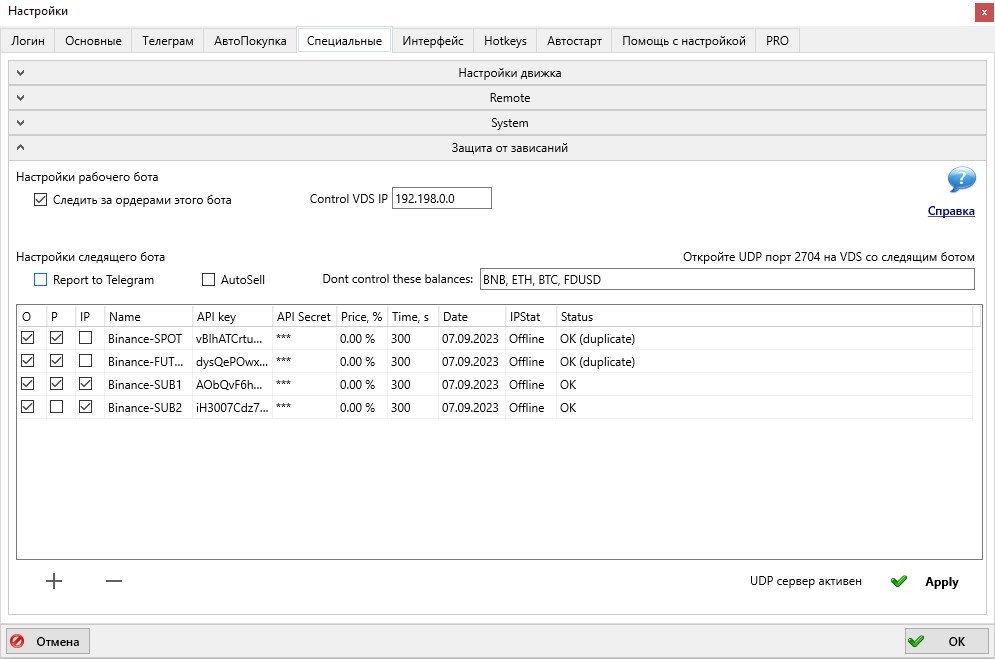 2) Настройка следящих ботов:
Нужно открыть UDP порт, указанный в боте в строке Open UDP port 2704 in the VDS with control bot. Внимание! Спот и разные пары фьючерсов используют разные порты. Эти порты используются для контроля по пингу.
Затем нужно заполнить таблицу API ключей от рабочих ботов. API ключи должны быть от разных аккаунтов биржи! Если вписать в две строки API ключи от одного и того же аккаунта, то бот не сможет правильно определить, каким аккаунтом нужно управлять и пометит обе строчки с API ключами в колонке Status надписью duplicate.
Если ключи введены неверно, или на них не заданы права или белый список IP, колонка Status покажет ошибку.
Галочка "O" в таблице отвечает за контроль ордеров по времени существования (колонка Time, s) и по дистанции до текущей цены (колонка Price, %). Ордер будет отменен по достижению заданного времени или приближения к заданной дистанции цены.
Галочка "P" отвечает за контроль позиций. Если она включена, то бот будет определять висящие без тейков позиции и сообщать о них в Телеграм, а с установленной галочкой AutoSell ещё и автоматически продавать. В поле "Dont control these balances" можно задать Черный Список монет, исключенных из алгоритма контроля позиций. По умолчанию это следующие монеты: BTC, ETH, BNB, USDP, TUSD, USDC, USDT, BUSD, GBP, USD, RUB, EUR, HT, HUSD, TRY.
Автопродажа производится по специальной ручной стратегии с названием “SafeGuard” - эта стратегия создается автоматически при первой такой продаже, после чего вы можете редактировать ее настройки.
Галочка "IP" отвечает за контроль по пингу. Если в рабочем боте корректно задан IP следящего бота, и если в течении 10 секунд пинг не проходит, то ордера на открытие позиций будут отменены (тейков это не касается, алгоритм контроля зависших позиций тейки не отменяет).
3) Количество следящих ботов:
Спот: 1 бот следит за всеми аккаунтами (и будет отменять ордера по всем парам; искать и продавать зависшие позиции за ту базовую валюту, на которой работает).
Фьючерсы: по 1 боту на каждый маркет (будет отменять ордера и искать зависшие позы только по маркету, на котором работает).
Итого потребуется следующее количество следящих ботов:
1 следящий бот на спотовый маркет биржи Binance
1 следящий бот на фьючерсный маркет USDT биржи Binance
1 следящий бот на квартальный маркет биржи Binance
1 следящий бот на спотовый маркет биржи HTX
1 следящий бот на спотовый маркет биржи Bybit
1 следящий бот на фьючерсный маркет биржи Bybit
1 следящий бот на спотовый маркет биржи Gate
1 следящий бот на фьючерсный маркет биржи Gate
1 следящий бот на спотовый маркет биржи Bitget
1 следящий бот на фьючерсный маркет биржи Bitget
В каждого следящего бота можно вставить 20-30 API ключей. Большее количество может привести к бану по API в момент, когда бот начнет отменять сразу все ордера на всех аккаунтах; поэтому если аккаунтов больше 30, то требуется дополнительно разделить следящих ботов по разным серверам, так как нагрузка API считается по IP сервера. Так, чтобы в каждом боте было не более 30 API ключей.
2) Настройка следящих ботов:
Нужно открыть UDP порт, указанный в боте в строке Open UDP port 2704 in the VDS with control bot. Внимание! Спот и разные пары фьючерсов используют разные порты. Эти порты используются для контроля по пингу.
Затем нужно заполнить таблицу API ключей от рабочих ботов. API ключи должны быть от разных аккаунтов биржи! Если вписать в две строки API ключи от одного и того же аккаунта, то бот не сможет правильно определить, каким аккаунтом нужно управлять и пометит обе строчки с API ключами в колонке Status надписью duplicate.
Если ключи введены неверно, или на них не заданы права или белый список IP, колонка Status покажет ошибку.
Галочка "O" в таблице отвечает за контроль ордеров по времени существования (колонка Time, s) и по дистанции до текущей цены (колонка Price, %). Ордер будет отменен по достижению заданного времени или приближения к заданной дистанции цены.
Галочка "P" отвечает за контроль позиций. Если она включена, то бот будет определять висящие без тейков позиции и сообщать о них в Телеграм, а с установленной галочкой AutoSell ещё и автоматически продавать. В поле "Dont control these balances" можно задать Черный Список монет, исключенных из алгоритма контроля позиций. По умолчанию это следующие монеты: BTC, ETH, BNB, USDP, TUSD, USDC, USDT, BUSD, GBP, USD, RUB, EUR, HT, HUSD, TRY.
Автопродажа производится по специальной ручной стратегии с названием “SafeGuard” - эта стратегия создается автоматически при первой такой продаже, после чего вы можете редактировать ее настройки.
Галочка "IP" отвечает за контроль по пингу. Если в рабочем боте корректно задан IP следящего бота, и если в течении 10 секунд пинг не проходит, то ордера на открытие позиций будут отменены (тейков это не касается, алгоритм контроля зависших позиций тейки не отменяет).
3) Количество следящих ботов:
Спот: 1 бот следит за всеми аккаунтами (и будет отменять ордера по всем парам; искать и продавать зависшие позиции за ту базовую валюту, на которой работает).
Фьючерсы: по 1 боту на каждый маркет (будет отменять ордера и искать зависшие позы только по маркету, на котором работает).
Итого потребуется следующее количество следящих ботов:
1 следящий бот на спотовый маркет биржи Binance
1 следящий бот на фьючерсный маркет USDT биржи Binance
1 следящий бот на квартальный маркет биржи Binance
1 следящий бот на спотовый маркет биржи HTX
1 следящий бот на спотовый маркет биржи Bybit
1 следящий бот на фьючерсный маркет биржи Bybit
1 следящий бот на спотовый маркет биржи Gate
1 следящий бот на фьючерсный маркет биржи Gate
1 следящий бот на спотовый маркет биржи Bitget
1 следящий бот на фьючерсный маркет биржи Bitget
В каждого следящего бота можно вставить 20-30 API ключей. Большее количество может привести к бану по API в момент, когда бот начнет отменять сразу все ордера на всех аккаунтах; поэтому если аккаунтов больше 30, то требуется дополнительно разделить следящих ботов по разным серверам, так как нагрузка API считается по IP сервера. Так, чтобы в каждом боте было не более 30 API ключей.
2) Настройка следящих ботов:
Нужно открыть UDP порт, указанный в боте в строке Open UDP port 2704 in the VDS with control bot. Внимание! Спот и разные пары фьючерсов используют разные порты. Эти порты используются для контроля по пингу.
Затем нужно заполнить таблицу API ключей от рабочих ботов. API ключи должны быть от разных аккаунтов биржи! Если вписать в две строки API ключи от одного и того же аккаунта, то бот не сможет правильно определить, каким аккаунтом нужно управлять и пометит обе строчки с API ключами в колонке Status надписью duplicate.
Если ключи введены неверно, или на них не заданы права или белый список IP, колонка Status покажет ошибку.
Галочка "O" в таблице отвечает за контроль ордеров по времени существования (колонка Time, s) и по дистанции до текущей цены (колонка Price, %). Ордер будет отменен по достижению заданного времени или приближения к заданной дистанции цены.
Галочка "P" отвечает за контроль позиций. Если она включена, то бот будет определять висящие без тейков позиции и сообщать о них в Телеграм, а с установленной галочкой AutoSell ещё и автоматически продавать. В поле "Dont control these balances" можно задать Черный Список монет, исключенных из алгоритма контроля позиций. По умолчанию это следующие монеты: BTC, ETH, BNB, USDP, TUSD, USDC, USDT, BUSD, GBP, USD, RUB, EUR, HT, HUSD, TRY.
Автопродажа производится по специальной ручной стратегии с названием “SafeGuard” - эта стратегия создается автоматически при первой такой продаже, после чего вы можете редактировать ее настройки.
Галочка "IP" отвечает за контроль по пингу. Если в рабочем боте корректно задан IP следящего бота, и если в течении 10 секунд пинг не проходит, то ордера на открытие позиций будут отменены (тейков это не касается, алгоритм контроля зависших позиций тейки не отменяет).
3) Количество следящих ботов:
Спот: 1 бот следит за всеми аккаунтами (и будет отменять ордера по всем парам; искать и продавать зависшие позиции за ту базовую валюту, на которой работает).
Фьючерсы: по 1 боту на каждый маркет (будет отменять ордера и искать зависшие позы только по маркету, на котором работает).
Итого потребуется следующее количество следящих ботов:
1 следящий бот на спотовый маркет биржи Binance
1 следящий бот на фьючерсный маркет USDT биржи Binance
1 следящий бот на квартальный маркет биржи Binance
1 следящий бот на спотовый маркет биржи HTX
1 следящий бот на спотовый маркет биржи Bybit
1 следящий бот на фьючерсный маркет биржи Bybit
1 следящий бот на спотовый маркет биржи Gate
1 следящий бот на фьючерсный маркет биржи Gate
1 следящий бот на спотовый маркет биржи Bitget
1 следящий бот на фьючерсный маркет биржи Bitget
В каждого следящего бота можно вставить 20-30 API ключей. Большее количество может привести к бану по API в момент, когда бот начнет отменять сразу все ордера на всех аккаунтах; поэтому если аккаунтов больше 30, то требуется дополнительно разделить следящих ботов по разным серверам, так как нагрузка API считается по IP сервера. Так, чтобы в каждом боте было не более 30 API ключей.
Причины неадекватно низкой цены продажи/покупки - это не баг, а особенность отображения средней цены продажи.
Основная причина, почему продажа визуально происходит, например, по неадекватно низкой цене: количество купленных монет больше, чем проданных.
Пример: куплено 100 монет за 100$, продано 90 монет за 90$
средняя цена покупки = 100 / 100 = 1$. Средняя цена продажи = 90 / 100 = 0.9$
Почему делим на 100 монет, хотя продали только 90? Потому что остаток в 10 монет продать невозможно (ограничение бирж на минимальный ордер). У Вас было 100 монет, в результате их продажи у Вас появилось 90$, поэтому бот считает среднюю цену как результат продажи 100 монет за 90$.
Почему появляются остатки монет на балансе? Причин может быть несколько:
1) Вы торгуете без баланса BNB монет. В этом случае биржа списывает комиссию в торгуемых монетах и при этом нарушается кратность лота. Например, было 2 монеты, списали 0.1, осталось 1.9 монет. А продать можно только кратно 1-й монете, значит 0.9 останется висеть на бирже в виде остатка.
2) У Вас есть BNB, но другие трейдеры торгуют без BNB. Например, Вы продаете ордер в 2 монеты в стенку где стоит 1.9. После чего пытаетесь переставить ордер он отменяется, но уже выставиться не может так как меньше минимального лота и 0.1 монеты остается на балансе.
а) Если Вы отмените частично исполненный ордер, непроданные монеты останутся на балансе. При установленной галочке "Отменять малые Sell ордера" MoonBot будет удалять такие ордера, где остаток меньше лота. При этом ордер удалится только из списка активных с графика, но останется в отчете и на бирже. Смысл данной галочки - убрать с экрана ордера, которыми Вы все равно не можете управлять, по причине того что они меньше лота, следовательно их невозможно перемещать.
б) Другая разновидность случая п.2: Вы переставляете ордер на продажу, в этот момент он частично заполняется, а остаток уже меньше лота, и его не переставить. В логе будет запись "Looks like order was done while replacing or rest quantity too low".
3) Во время листинга комиссия первые часы списывается в монетах, а не в BNB, что всегда приводит к остаткам.
Как проверить, что у Вас появились остатки?
1. Можно открыть обзор спотового кошелька и там увидите остатки монет.
2. Можно открыть на бирже историю ордеров, найти в ней нужный ордер, развернуть в нем историю трейдов и проверить, было ли списание комиссии в BNB или в монетах, а также сверить сколько было куплено и сколько продано.
Все вышесказанное может в полной мере относиться и к некорректной цене покупки.
Коротко подводя итоги:
1) Всегда поддерживайте баланс монет BNB для списания торговой комиссии.
2) Регулярно проверяйте мелкие остатки монет на балансе Вашего аккаунта на бирже и вовремя конвертируйте их в BNB.
Основная причина, почему продажа визуально происходит, например, по неадекватно низкой цене: количество купленных монет больше, чем проданных.
Пример: куплено 100 монет за 100$, продано 90 монет за 90$
средняя цена покупки = 100 / 100 = 1$. Средняя цена продажи = 90 / 100 = 0.9$
Почему делим на 100 монет, хотя продали только 90? Потому что остаток в 10 монет продать невозможно (ограничение бирж на минимальный ордер). У Вас было 100 монет, в результате их продажи у Вас появилось 90$, поэтому бот считает среднюю цену как результат продажи 100 монет за 90$.
Почему появляются остатки монет на балансе? Причин может быть несколько:
1) Вы торгуете без баланса BNB монет. В этом случае биржа списывает комиссию в торгуемых монетах и при этом нарушается кратность лота. Например, было 2 монеты, списали 0.1, осталось 1.9 монет. А продать можно только кратно 1-й монете, значит 0.9 останется висеть на бирже в виде остатка.
2) У Вас есть BNB, но другие трейдеры торгуют без BNB. Например, Вы продаете ордер в 2 монеты в стенку где стоит 1.9. После чего пытаетесь переставить ордер он отменяется, но уже выставиться не может так как меньше минимального лота и 0.1 монеты остается на балансе.
а) Если Вы отмените частично исполненный ордер, непроданные монеты останутся на балансе. При установленной галочке "Отменять малые Sell ордера" MoonBot будет удалять такие ордера, где остаток меньше лота. При этом ордер удалится только из списка активных с графика, но останется в отчете и на бирже. Смысл данной галочки - убрать с экрана ордера, которыми Вы все равно не можете управлять, по причине того что они меньше лота, следовательно их невозможно перемещать.
б) Другая разновидность случая п.2: Вы переставляете ордер на продажу, в этот момент он частично заполняется, а остаток уже меньше лота, и его не переставить. В логе будет запись "Looks like order was done while replacing or rest quantity too low".
3) Во время листинга комиссия первые часы списывается в монетах, а не в BNB, что всегда приводит к остаткам.
Как проверить, что у Вас появились остатки?
1. Можно открыть обзор спотового кошелька и там увидите остатки монет.
2. Можно открыть на бирже историю ордеров, найти в ней нужный ордер, развернуть в нем историю трейдов и проверить, было ли списание комиссии в BNB или в монетах, а также сверить сколько было куплено и сколько продано.
Все вышесказанное может в полной мере относиться и к некорректной цене покупки.
Коротко подводя итоги:
1) Всегда поддерживайте баланс монет BNB для списания торговой комиссии.
2) Регулярно проверяйте мелкие остатки монет на балансе Вашего аккаунта на бирже и вовремя конвертируйте их в BNB.
Биржа Binance по новым правилам безопасности, о которых сообщала заранее, начала удалять API ключи, у которых не указаны в белом списке разрешенные IP адреса.
В связи с этим терминалы MoonBot, использующие эти ключи останавливаются по ошибкам и не могут подключиться при перезагрузке.
Для решения этой проблемы и восстановления PRO версии (при ее наличии) необходимо сделать следующее:
Строго выполнить пункт за пунктом!
1) Закройте MoonBot и сделайте его резервную копию (для восстановления и повторных действий).
2) Зайдите в свой аккаунт на бирже Binance и создайте НОВЫЕ API ключи (это очень важно чтобы ключи были новые и ранее не зарегистрированные в боте), при этом нужно выбрать тип ключей Сгенерированный системой.
3) Новые ключи имеют только разрешение на чтение, поэтому далее потребуется отредактировать ограничения и нужно будет указать в белом списке разрешенные IP адреса, с которых будут работать данные ключи, если этого не сделать, то система безопасности не позволит установить нужные галочки.
Для тех, у кого IP адрес динамический и его периодически меняет провайдер, придётся либо получить статический адрес, либо использовать VPN или VDS (выделенный сервер). В противном случае биржа Binance снова удалит API ключи.
4) После указания в белом списке IP адреса установите галочки разрешения на спотовую и фьючерсную торговлю, при этом не забывая сохранить публичную и секретную часть ключа в текстовом виде в отдельном файле (этот файл храните на отдельной флешке).
5) Запустить терминал MoonBot, который ранее у Вас работал на удаленных API ключах. Особенно важно, если Вы восстанавливаете PRO версию, то Вы должны запускать именно того же бота.
6) Откройте вкладку Настройки-Логин, полностью удалите старые API ключи и вставьте НОВЫЕ.
7) После того как Вы вставили новые ключи нажмите кнопку Зарегистрировать API ключи.
Терминал проверит принадлежность новых API ключей к тому же аккаунту, которые были зарегистрированы в нём ранее. Если Вы всё сделали правильно, то терминал MoonBot подключится к Вашему аккаунту биржи Binance и восстановит соединение.
В связи с этим терминалы MoonBot, использующие эти ключи останавливаются по ошибкам и не могут подключиться при перезагрузке.
Для решения этой проблемы и восстановления PRO версии (при ее наличии) необходимо сделать следующее:
Строго выполнить пункт за пунктом!
1) Закройте MoonBot и сделайте его резервную копию (для восстановления и повторных действий).
2) Зайдите в свой аккаунт на бирже Binance и создайте НОВЫЕ API ключи (это очень важно чтобы ключи были новые и ранее не зарегистрированные в боте), при этом нужно выбрать тип ключей Сгенерированный системой.
3) Новые ключи имеют только разрешение на чтение, поэтому далее потребуется отредактировать ограничения и нужно будет указать в белом списке разрешенные IP адреса, с которых будут работать данные ключи, если этого не сделать, то система безопасности не позволит установить нужные галочки.
Для тех, у кого IP адрес динамический и его периодически меняет провайдер, придётся либо получить статический адрес, либо использовать VPN или VDS (выделенный сервер). В противном случае биржа Binance снова удалит API ключи.
4) После указания в белом списке IP адреса установите галочки разрешения на спотовую и фьючерсную торговлю, при этом не забывая сохранить публичную и секретную часть ключа в текстовом виде в отдельном файле (этот файл храните на отдельной флешке).
5) Запустить терминал MoonBot, который ранее у Вас работал на удаленных API ключах. Особенно важно, если Вы восстанавливаете PRO версию, то Вы должны запускать именно того же бота.
6) Откройте вкладку Настройки-Логин, полностью удалите старые API ключи и вставьте НОВЫЕ.
7) После того как Вы вставили новые ключи нажмите кнопку Зарегистрировать API ключи.
Терминал проверит принадлежность новых API ключей к тому же аккаунту, которые были зарегистрированы в нём ранее. Если Вы всё сделали правильно, то терминал MoonBot подключится к Вашему аккаунту биржи Binance и восстановит соединение.
Кружок или "светофор", его цвет сигнализирует о качестве подключения к бирже, если горит зеленым, то все в порядке, если горит оранжевым, то существуют проблемы с подключением или существенное замедление работы. В этом случае можно попробовать поменять методы подключения к бирже, перезагрузить роутер или дождаться прекращения лагов у биржи.
В самом левом углу расположен статус соединения бота с биржей, возможны варианты: зеленая надпись "Готов" это означает, что бот успешно подключился к бирже и получает от нее по API все необходимые данные для работы бота или красная надпись "Соединение ОШИБКА", которая будет означать, что у бота есть проблемы с подключением к бирже, которые могут быть связаны с неправильным вводом API ключей или отсутствием разрешений на торговлю, проблемой с интернетом, блокировкой антивирусом или прочими неполадками компьютера. Если Вы не можете самостоятельно разобраться в причинах такой ошибки, то обращайтесь в телеграм группу нашей службы технической поддержки https://t.me/MoonBotSettings
Скорей всего у Вас открыто одно из окон с Настройками, Отчетами, Таблицей монет, Смотреть маркеты, Стратегии и это окно находится за главным окном терминала MoonBot или вне рабочей области монитора. Чтобы вернуть окно стратегий в зону главного окна терминала MoonBot и в зону видимости монитора следует нажать на комбинацию горячих кнопок, которую можно настроить на вкладке Настройки-Hotkeys в поле "Reset form positions", по умолчанию это комбинация: Ctrl+Shift+F10. Кроме этого, возможнен вариант зависания терминала MoonBot по различным причинам, связанных с операционной системой, в этом случае необходимо перезагрузить компьютер и снова загрузить терминал MoonBot в режиме администратора.
Если у Вас не открываются окна Настройки, Отчеты, Смотреть маркеты, Стратегии, то скорей всего, вызываемое Вами окно находится за главным окном терминала MoonBot или вне рабочей области монитора. Чтобы вернуть окно стратегий в зону главного окна терминала MoonBot и в зону видимости монитора следует нажать на комбинацию горячих кнопок, которую можно настроить на вкладке Настройки-Hotkeys в поле "Reset form positions", по умолчанию это комбинация: Ctrl+Shift+F10.
Чтобы очистить поле Hotkeys нужно кликнуть на это поле мышкой из затем нажать клавишу ESC на клавиатуре.
В терминале MoonBot активировался режим скрытия баланса через Hotkeys, который по умолчанию установлен на кнопку F7. Если после нажатия на F7 баланс все ещё остается размытым, то следует зайти на вкладку Настройки-Hotkeys и проверить значение комбинации в поле "Hide Balance" и нажать на указанную в этом поле комбинацию кнопок.
В терминале MoonBot ордера эмулятора, будь то выставленные при включенном режиме Эмуляции через меню или установленные при включенной галочкой в параметре EmulatorMode=YES в стратегии - НЕ ОБЪЕДИНЯЮТСЯ и НЕ РАЗДЕЛЯЮТСЯ!
Эти значки на графике появляются автоматически и специальным образом не отключаются. Подождите немного и они появятся через некоторое время на в спотовом графике терминала MoonBot.
Вы торгуете в терминале MoonBot на паре USDT, а стрелу видите от параллельной пары BTC, которая на графике отображается более бледной. Чтобы не путаться, сделайте в Настройки-Интерфейс-Color Setup эти стрелы от параллельной пары (BTC) ещё бледнее или измените немного их цвет, чтобы отличать график на паралельной паре.
Если же это Вам мешает, то можно совсем отключить показ трейдов на BTC паре, для этого нужно кликнуть правой кнопкой мышки на кнопку "Показывать графики\стаканы спотовых торгов", которая располагается левее кнопки "Воронка" и в меню снять галочку на пункте Show BTC Trаdes. Но лучше этого не делать, так как прострелы на параллельной торговой паре могут быть подсказкой к тому, что еще идет борьба покупателей и продавцов и цена на Вашей паре может еще вырасти, как минимум до уровня прострела.
Если же это Вам мешает, то можно совсем отключить показ трейдов на BTC паре, для этого нужно кликнуть правой кнопкой мышки на кнопку "Показывать графики\стаканы спотовых торгов", которая располагается левее кнопки "Воронка" и в меню снять галочку на пункте Show BTC Trаdes. Но лучше этого не делать, так как прострелы на параллельной торговой паре могут быть подсказкой к тому, что еще идет борьба покупателей и продавцов и цена на Вашей паре может еще вырасти, как минимум до уровня прострела.
Если Вы в терминале MoonBot выставляете отложенные ордера (Pending order) в красный или зеленый стакан вручную или с помощью стратегий (тип отложенных ордеров BuyStop или BuyLimit), то отложка имеет две линии:
- сплошную (триггерную) линию, через которую должна пройти линия цены (не крестики с трейдами) и если она срабатывает, то исчезает с графика.
- пунктирную линию (место выставления Buy ордера), после того как сплошная линия сработала и исчезла с графика, тут же выставляется на место пунктирной линии реальный Buy ордер.
Можно настраивать положение пунктирной линии и устанавливать её выше или ниже сплошной, для того, чтобы, или после выставления Buy ордера покупать монету сразу по рынку, или выставлять Buy ордер в спреде или ниже спреда в торговом стакане на некотором расстоянии. Отображение пунктирной линии включается на вкладке Настройки-Интерфейс - галочка "Рисовать цену покупки отложек".
При ручном выставлении отложенных ордеров расстояние от пунктирной линии до сплошной задаётся на вкладке Настройки-Интерфейс в полях "Спред в отлож. ордерах" - в этих полях устанавливаете значения со знаком плюс или минус, которые будут влиять на расстояние и положение (выше или ниже сплошной линии) пунктирной линии относительно сплошной.
При автоматическом выставлении отложенных ордеров (BuyStop и BuyLimit) расстояние от пунктирной линии до сплошной задаётся в настройках стратегии на вкладке Buy conditions значением в параметре PendingOrderSpread, которое следует записывать со знаком плюс или минус, согласно Вашему алгоритму.
Итак, в Вашем случае, не произошло срабатывание отложенного ордера, так как линия цены не пересекла его (сплошную линию отложки), а пересечение было только крестиками трейдами, которые не приводят к срабатыванию отложки. Для того, чтобы убедиться в этом, отключите крестики на графике кнопкой Show market history (на главном окне терминала MoonBot вторая кнопка равее от кнопки Авто масштаба) и оставьте только линию цены. Вот именно она и должна пересечь сплошную линию отложенного ордера, чтобы отложка (сплошная линия) сработала, исчезла с графика и выставила Buy ордер на место пунктирной линии.
- сплошную (триггерную) линию, через которую должна пройти линия цены (не крестики с трейдами) и если она срабатывает, то исчезает с графика.
- пунктирную линию (место выставления Buy ордера), после того как сплошная линия сработала и исчезла с графика, тут же выставляется на место пунктирной линии реальный Buy ордер.
Можно настраивать положение пунктирной линии и устанавливать её выше или ниже сплошной, для того, чтобы, или после выставления Buy ордера покупать монету сразу по рынку, или выставлять Buy ордер в спреде или ниже спреда в торговом стакане на некотором расстоянии. Отображение пунктирной линии включается на вкладке Настройки-Интерфейс - галочка "Рисовать цену покупки отложек".
При ручном выставлении отложенных ордеров расстояние от пунктирной линии до сплошной задаётся на вкладке Настройки-Интерфейс в полях "Спред в отлож. ордерах" - в этих полях устанавливаете значения со знаком плюс или минус, которые будут влиять на расстояние и положение (выше или ниже сплошной линии) пунктирной линии относительно сплошной.
При автоматическом выставлении отложенных ордеров (BuyStop и BuyLimit) расстояние от пунктирной линии до сплошной задаётся в настройках стратегии на вкладке Buy conditions значением в параметре PendingOrderSpread, которое следует записывать со знаком плюс или минус, согласно Вашему алгоритму.
Итак, в Вашем случае, не произошло срабатывание отложенного ордера, так как линия цены не пересекла его (сплошную линию отложки), а пересечение было только крестиками трейдами, которые не приводят к срабатыванию отложки. Для того, чтобы убедиться в этом, отключите крестики на графике кнопкой Show market history (на главном окне терминала MoonBot вторая кнопка равее от кнопки Авто масштаба) и оставьте только линию цены. Вот именно она и должна пересечь сплошную линию отложенного ордера, чтобы отложка (сплошная линия) сработала, исчезла с графика и выставила Buy ордер на место пунктирной линии.
Если на графике пропала информация о торговой сессии на монете, то это означает, что выключен режим Мультиордеров. Для включения режима Мультиордеров нужно нажать кнопку М на основном окне MoonBot и информация о торговой сессии на монете снова появится.
Если в режиме эмулятора Ваша стратегия в терминале MoonBot выставляла Buy ордера, а при переключении на реальный режим она это не делает, то проверьте размер выставляемого Buy ордера. За размер и порядок выставления Buy ордера в стратегии отвечает параметр OrderSize, который находится на вкладке Buy conditions настройки стратегии. Если OrderSize=0, то размер Buy ордера будет взят из полозка или фиксированной кнопки на главном окне терминала MoonBot, которые отвечают за размер выставляемого Buy ордера. Если в параметре OrderSize установлен определенный размер ордера в BTC, то терминал MoonBot будет выставлять Buy ордер на монету именно с указанным размером. Обратите внимание, что на Free версии есть ограничение на максимальный ордер в 40$ (в эквиваленте BTC), кроме этого, нельзя выставить Buy ордер ниже минимального лота на монете (обычно это 5$ в эквиваленте BTC). Соответственно OrderSize в настройках стратегии должен находится в пределах от 5 до 40$ (в эквиваленте BTC), но мы рекомендуем выставлять ордера от 10$ до 35$ (в эквиваленте BTC), чтобы точно уложиться в этот коридор при изменении курса BTC.
Рекомендуем Вам обновить терминал MoonBot до актуальной версии, так как в новых версиях ошибка выставления тейк профита при одновременно стоящих ордерах на покупку, которые в сумме превышают лимит позиции исправлена.
Если У Вас при обновлении терминала MoonBot появилось окно с ошибкой обновления "Update Fail. Please download latest Moonbot from our site", то сначала Вам нужно убедиться, что терминал MoonBot закрыт. Затем скачайте архив с последней версией терминала с нашего сайта https://moon-bot.com/ru/download/, откройте его и переместите 4 файла из него в корневую папку с терминалом MoonBot с заменой файлов. После этого запустите файл MoonBot.exe из корневой папки в режиме администратора и после запуска терминала убедитесь, что обновление на новую версию прошло удачно (номер версии указывается в верхнем левом углу главного окна терминала MoonBot).
API биржи Bybit пока не поддерживает конвертацию мелких остатков монет, поэтому в терминале MoonBot для биржи Bybit после вызова окна Assets через Меню - Assets в нижнем окне Transfer есть кнопка Convert to MNT, но при её нажатии конвертирование не производится и в логе появляется запись "Currently Bybit does not support auto-conversion", этот функционал будет работать после того как биржа добавит возможность конвертирования в API. Сейчас остатки монет нужно конвертировать вручную в Вашем аккаунте биржи Bybit.
Конвертировать небольшие суммы в токены MNT на бирже Bybit можно только один раз в 6 часов. Стоимость обмена активами по одной транзакции не может превышать 0.001 в эквиваленте ВТС. Снятые с продажи монеты (delisting) обменивать нельзя. Запросы на конвертацию нескольких активов, отправленные с Единого торгового аккаунта могут быть исполнены лишь частично. За каждую конвертацию биржа Bybit взымает плату 2% от суммы конвертированных токенов MNT.
Если в терминале MoonBot на вкладке Filters / Base настройки стратегии в написании формулы CustomEMA допущена ошибка, например, не верная кодировка, то тогда запись в фильтрах на графике будет будет отображаться так:
EMA Filters: CustomEMA: Not a EMA ()
Для исправления ошибки аккуратно перепишите всю формулу в параметре CustomEMA строго в английской раскладке и следите за кодировкой текста.
Если в терминале MoonBot на вкладке Filters / Base настройки стратегии в написании формулы CustomEMA допущена ошибка, например, неверное обозначение часов, минут, секунд, а Вашем случае 5 минут вместо 5m указано как 5м, то тогда запись в фильтрах на графике будет отображаться так:
EMA Filters: CustomEMA: Wrong EMA parameter (5м)
Для исправления ошибки аккуратно перепишите формулу строго в английской раскладке и используйте допустимые сокращения для значений времени: час (h), минута (m), секунда (s). Для написания секунд можно опускать букву s, тогда число без буквы будет всегда считаться как s.
Если в терминале MoonBot на вкладке Filters / Base настройки стратегии в написании формулы CustomEMA допущена ошибка, например, вместо круглых скобок использовались квадратные скобки, как в Вашем случае, то тогда запись в фильтрах на графике будет отображаться так:
EMA Filters: CustomEMA: Wrong EMA formula (EMA[5m,1]>-1)
Для исправления ошибки замените в формуле квадратные скобки на круглые.
Если в терминале MoonBot на вкладке Filters / Base настройки стратегии в написании формулы CustomEMA допущена ошибка, например, как в Вашем случае, вместо запятой указана точка, то тогда запись в фильтрах на графике будет отображаться так:
EMA Filters: CustomEMA: Wrong EMA formula (no comma) (EMA(5m.1)>-1)
Для исправления ошибки замените в формуле точку на запятую.
Если в терминале MoonBot на вкладке Filters / Base настройки стратегии в написании формулы CustomEMA допущена ошибка, например, как в Вашем случае EMA(1m,1)>-1, то есть указано значение времени "1m", которое не поддерживается для сравнения в данной формуле, то тогда запись в фильтрах на графике будет отображаться так:
EMA Filters: CustomEMA: Wrong EMA range (1 minutes, must be [2 .. 90])
Для исправления ошибки замените в формуле первое значение для сравнения "1m", которое должно находится в диапазоне от 2m до 90m.
Если в терминале MoonBot на вкладке Filters / Base настройки стратегии в написании формулы CustomEMA допущена ошибка, например, как в Вашем случае EMA(5m,1)=>-1, то есть указан не допустимый знак для сравнения, который не поддерживается в данной формуле, то тогда запись в фильтрах на графике будет отображаться так:
EMA Filters: CustomEMA: Wrong EMA comparison part EMA(5m,1)=>-1 "=>-1")
Для исправления ошибки удалите в формуле знак равно, так как он лишний и не поддерживается при сравнении в формулах. Допустимых знаков только два - это знак больше или знак меньше.
Если в терминале MoonBot на вкладке Filters / Base настройки стратегии в написании формулы CustomEMA допущена ошибка, например, как в Вашем случае EMA(5m,1)>-1O, то есть при написании числа 10, случайно указан не ноль, а буква "O", то тогда запись в фильтрах на графике будет отображаться так:
EMA Filters: CustomEMA: Wrong EMA comparison value EMA(5m,1)=>-1O "-1O")
Для исправления ошибки замените в значении "1O" букву O на ноль.
Если в терминале MoonBot на вкладке Filters / Base настройки стратегии в написании формулы CustomEMA допущена ошибка написания допустимого сочетания формул между собой, например, как в Вашем случае EMA(5m,1)>-1 АHD EMA(5m,1)>-2, то есть при написании AND не верно написано AHD, то тогда запись в фильтрах на графике будет отображаться так:
EMA Filters: CustomEMA: Wrong EMA comparison value EMA(5m,1)>-1 АHD EMA(10m,1)>-1 "-1 АHD MIN(10m,1)>-1")
Доступные сочетания сравнения формул между собой только AND или OR. В вашем случае для исправления ошибки перепишите AHD на AND в английской раскладке.
Если новая монета после листинга на бирже не появилась в терминале MoonBot, то следует перезапустить его в режиме администратора.
При торговле в терминале MoonBot для биржи Binance Spot на паре USDT-USUAL ордера могут не выставляться из-за того, что данная пара запущена на Binance Pre-Market. Торговля на Binance Pre-Market доступна только с основного аккаунта пользователя и запрещена для субаккаунтов, а так же разрешена только для пользователей из избранных стран, которые включены с список разрешенных. Кроме этого, необходимо зайти в свой аккаунт на бирже Binance открыть Binance Pre-Market и в окне-уведомлении "Trading Guidelines" установить галочку "I accept the Term of Use", чтобы принять условия биржи при торговле на Binance Pre-Market.
Сначала перезагрузите терминал MoonBot, если проблема осталась, то перезагрузите роутер и компьютер, проверьте настройки VPN и Proxy соединений, попробуйте сменить провайдера, например подключиться к мобильному интернету. Если лаги все равно иногда повторяются, то в момент лага в поле поиска монет на главном окне терминала MoonBot введите диагностическую команду ChartsTimings, в логе после этого будет запись вида: "Ok. Will show charts timings" и в левом верхнем углу графика появятся отладочные данные с различными таймингами вида: tm2=2 tm3=2 tm4=10 tm5=12 tm6=20 tm7=132 Slter: 14. Цифры будут указывать время в миллисекундах на отрисовку графика, чем они выше, тем больше наблюдается визуальный лаг. Далее сделайте скриншот графика с этими данными и отправьте его с пояснениями разработчику терминала MoonBot для проверки.
В более ранних версиях терминала MoonBot в режиме Эмулятор ордера могли отскакивать от прострелов цены, что могло приводить к некорректному тестированию некоторых стратегий, в последних версиях терминала это исправлено, рекомендуем обновиться на актуальную релизную версию.
Ранее, иногда при долгой работе терминала MoonBot стратегия MoonStrike переставала выдавать детекты, в последних версиях терминала эта ситуация исправлена и мы рекомендуем обновиться на актуальную версию терминала. Кроме этого рекомендуем перезапустить терминал MoonBot и после этого создать новую стратегию MoonStrike в терминале.
Ранее при использовании Телеграм команд SetWL\SetBL не сохранялись в стратегиях монеты в белых и черных списках после перезапуска терминала MoonBot в последних версиях эта ситуация исправлена и мы рекомендуем обновиться на актуальную версию терминала.
После того как биржа Gate ввела дополнительные ограничения по лимитам API и пользователи стали получать сообщения об ошибке по лимитам API в терминале MoonBot добавлено внутреннее пенальти 10 минут после получения такой ошибки, то есть после того, как биржа Gate ограничила пользователю лимит 1 ордером в 10 секунд. Ордера при наступлении пенальти не снимаются, но новые не выставляются до истечения времени пенальти.
Если в Вашем терминале MoonBot наблюдаются лаги из-за проблем в TLS на серверах биржи Binance, то данная проблема была исправлена в последних версиях терминала, рекомендуем обновить терминал на актуальную версию.
Если Вы увидели такое предупреждение и терминал MoonBot не запускается, при этом Вы используете Windows 7 или Windows server 2012, то Вам необходимо установить все обновления для этих операционных систем Windows!
Последние версии терминала MoonBot не запустятся на старых операционных системах без последних установленных на них обновлений!
На компьютерах с операционными системами Windows 10, Windows 2016 и старше такие ошибки не возникают, так как они имеют необходимые файлы с обновлениями.
В последних версиях терминала MoonBot внутренние настройки защиты по ЦПУ ослаблены за счет возможности его работы при значениях ЦПУ близким к 95%, так что сейчас терминал будет реже останавливаться из-за этого, рекомендуем обновить версию терминала до актуальной.
При торговле в терминале MoonBot для биржи Bitget Futures плечи на фьючерсах грузятся не сразу (как и на бирже Gate), поэтому нужно выждать некоторое время, чтобы в таблице маркетов обновились все плечи и максимальные лимиты.
В настоящее время баланс в терминале MoonBot для биржи Bitget Futures обновляется с задержкой это особенность данной биржи.
В последних версиях терминала MoonBot состояния свернутости подразделов фильтров в настройках стратегий сохраняются в том же положении, как они были свернуты или развернуты. Эти положения сохраняются для всех стратегий в терминале как при текущей его работе, так и после перезапуска терминала, рекомендуем обновить терминал на актуальную версию.
В последних версиях терминала MoonBot Gate Futures исправлена ситуация, когда при включении терминала на некоторых монетах устанавливалось нулевое плечо, рекомендуем обновить терминал на актуальную версию.
В последних версиях терминала MoonBot исправлена ситуация, когда глобальный черный список на вкладке Настройки - Основные не сохранялся при нештатном перезапуске системы, рекомендуем обновить терминал на актуальную версию.
В последних версиях терминала MoonBot Binance Futures были убраны "лишние" крестики на графике, которые появлялись в соответствии с ADL-ликвидациями в потоке трейдов от биржи, рекомендуем обновить терминал на актуальную версию.
В последних версиях терминала MoonBot на главном окне кнопки размера Buy ордера и процентов Sell ордера теперь реагируют на нажатие кнопки мышкой сразу, до её отжатия и, тем самым исключая ложные срабатывания при перемещении курсора мыши к соседним кнопкам, рекомендуем обновить версию терминала до актуальной.
Если Вы в терминале MoonBot изменили название папки, то затем в окне Strategies следует нажать на кнопку "Сохранить" и только после этого терминал будет реагировать на команды из Телеграм, отправленные к стратегиям, которые находятся в этой переименованной папке.
Ошибка Out of memory (нехватка памяти) возникает, когда программа или операционная система не может выделить достаточно оперативной памяти (RAM) для выполнения запрошенной операции.
Некоторые причины возникновения ошибки Out of memory:
- Недостаточный объём RAM. Особенно актуально, если на домашнем компьютере помимо запущенных нескольких терминалов MoonBot Вы ещё выполняете другие ресурсоёмкие задачи, такие как игры, редактирование видео, работа с большими базами данных.
- Утечка памяти (Memory Leak). Ошибки в программном коде, когда программа выделяет память, но не освобождает её после использования.
- Слишком много запущенных программ. Запуск большого количества программ одновременно может привести к тому, что вся доступная оперативная память будет занята.
- Слишком большие файлы подкачки (Page File). Файл подкачки - это файл на жёстком диске, который используется Windows как расширение оперативной памяти. Если размер файла подкачки слишком велик, это может указывать на неэффективное использование памяти. Про правльную настройку файла подкачки рекомендуем прочесть и Интернете.
- Повреждённые драйверы. Повреждённые или устаревшие драйверы, особенно видеокарты, могут вызывать утечки памяти.
- Вирусы и вредоносное ПО. Вирусы и вредоносное ПО могут занимать системные ресурсы, включая оперативную память.
- Проблемы с оборудованием. В редких случаях причиной ошибки Out of memory может быть неисправность оперативной памяти (RAM) или других компонентов компьютера.
Для исправления ошибки Out of memory можно попробовать следующие действия:
- Закрыть ненужные программы. Это освободит оперативную память.
- Перезагрузить компьютер. Перезагрузка очистит оперативную память и закроет все запущенные процессы, что может помочь устранить временные проблемы.
- Увеличить объём оперативной памяти (RAM). Это особенно эффективно, если часто приходится работать с ресурсоёмкими приложениями.
- Проверить оперативную память. Можно использовать инструмент для проверки оперативной памяти (например, Windows Memory Diagnostic).
- Оптимизировать виртуальную память. Например, настроить размер файла подкачки на автоматический, чтобы система сама определяла нужный объём.
В терминале MoonBot на главном окне в поле для поиска монет можно вводить их названия в русской раскладке, например при вводе ИЕС, терминал понимает, что пользователь вводил название монеты BTC. Но, если Вы установили или переустановили операционную систему Windows, то необходимо убедиться, что в ней присутствует поддержка русского языка, загружен и активирован русский языковой пакет, тогда поиск монет по русской раскладке будет поддерживаться в терминале MoonBot.
Ошибки в логе
Терминал MoonBot фиксирует повышенный уровень ошибок API, которые могут появляться из-за лагов с биржей, проблемы с интернетом, общими проблемами при связи с биржей и срабатывает защита по API. Включение этой защиты расположено на вкладке Настройки - Автостарт, если установлена галочка у параметра "Авто стоп, если уровень ошибок больше >=3". Количество ошибок, при котором будет срабатывать защита можно регулировать полозком, который расположен правее этого параметра. Вы можете снять галочку с этой защиты и тогда терминал MoonBot будет игнорировать данную ошибку, но лучше этого не делать, так как это может повлиять на некорректную работу передачи данных от терминала MoonBot на биржу. Постарайтесь исправить проблему, которая приводит к такой ошибке: проверить интернет связь, перезагрузить роутер, изменить способ подключения к бирже или сделать паузу в торговле и дождаться пока лаги с биржей прекратятся.
Проблема в запрете системой Windows записывать файлы с логами, так как нарушены рекомендации размещению терминала MoonBot на компьютере.
а) не запускайте терминал MoonBot из архива;
б) не распаковывайте MoonBot на рабочий стол, во временные и системные папки операционной системы, такие как windows, temp, users и так далее;
в) не используйте в названиях папок в пути к терминалу MoonBot русские буквы;
г) если на компьютере есть другие диски кроме системного С, например, такие как D, E и так далее, то размещайте папку с терминалом MoonBot на них. Если на компьютере есть только системный диск С, то размещайте папку с ботом на этом диске в отдельную папку корневого каталога, например, в такую C:\MoonBot.
Вам следует проверить все эти пункты, исправить расположение папки с терминалом MoonBot, перезагрузить компьютер и затем запустить файл MoonBot.exe в режиме администратора.
а) не запускайте терминал MoonBot из архива;
б) не распаковывайте MoonBot на рабочий стол, во временные и системные папки операционной системы, такие как windows, temp, users и так далее;
в) не используйте в названиях папок в пути к терминалу MoonBot русские буквы;
г) если на компьютере есть другие диски кроме системного С, например, такие как D, E и так далее, то размещайте папку с терминалом MoonBot на них. Если на компьютере есть только системный диск С, то размещайте папку с ботом на этом диске в отдельную папку корневого каталога, например, в такую C:\MoonBot.
Вам следует проверить все эти пункты, исправить расположение папки с терминалом MoonBot, перезагрузить компьютер и затем запустить файл MoonBot.exe в режиме администратора.
Это не ошибка, а информационное сообщение терминала MoonBot, в котором он сообщает, что осуществил пропуск открытия графиков больше лимита, который в нем установлен.
Ошибка такого вида в логе терминала MoonBot означает, что параметр HFT на вкладке Buy conditions в параметрах стратегии задан меньше, чем фактический лаг биржи. Чтобы его не учитывать можно выставить HFT=0 или увеличить значение и установить его больше, чем установлен в данный момент, чтобы значение превышало фактический лаг биржи.
Ошибка такого вида в логе терминала MoonBot означает, что Вам не хватило маржи, то есть средств на балансе на все ваши ордера. Настройте стратегии с учетом своих реальных возможностей!
Это не считается ошибкой, а просто информационное сообщение и запись такого вида в логе терминала MoonBot означает, что ордер уже исполнился в момент, когда MoonBot начал его переставлять.
Такая запись в логе терминала MoonBot вида: == Reconnect Liquidations ==, не считается ошибкой, а это просто техническое сообщение.
Ошибка такого вида в логе терминала MoonBot означает, что это проявился старый баг биржи Binance, тем не менее до сих пор актуальный. Он заключается в том, что функция API GET /api/v3/order для проверки статуса ордера возвращает ошибку "Order does not exist" (ордер не существует), хотя на самом ордер существует. Из-за этой ошибки невозможно проверить состояние ордера - исполнен ли он полностью или частично или еще не исполнен.
Биржа Binance заявляет, что время, в течении которого состояние ордера не определяется, не превышает 1 секунды на спокойном рынке, и 10 секунд во время высокой волатильности, но на самом деле значения могут быть значительно выше. При возникновении данных ошибок следует обращаться с логами напрямую в техническую поддержку биржи Binance.
Биржа Binance заявляет, что время, в течении которого состояние ордера не определяется, не превышает 1 секунды на спокойном рынке, и 10 секунд во время высокой волатильности, но на самом деле значения могут быть значительно выше. При возникновении данных ошибок следует обращаться с логами напрямую в техническую поддержку биржи Binance.
Ошибка [499] Err: Read timed out и другие ошибки с кодом [499] обычно означают проблемы связи на вашей стороне (провайдер, интернет, роутер). Реже - глобальный сетевой сбой на стороне биржи.
Ошибки такого вида в логе терминала MoonBot означают, что это появляются баги биржи Binance. Чтобы устранить такого рода ошибки, рекомендуем перенести терминалы MoonBot в локацию Корея (Сеул), поскольку опытным путем выявлено, что такие ошибка бывает только в локации Япония (Токио).
Ошибки вида "UDP Init failed: Could not bind socket. Address and port are already in use. network functions won't work, sry" в логе терминала MoonBot возникает, когда у Вас запущено несколько копий терминала MoonBot с одинаковыми номерами портов.
Чтобы такая запись исчезла, в каждом терминале MoonBot следует на вкладке Настройка-Специальные-System прописать свой уникальный порт в поле "Listen UPD port:"
для MoonBot1: 1999
для MoonBot2: 1998
для MoonBot3: 1997
...
и так далее.
Такое сообщение чаще всего появляется в логе терминала MoonBot, который установлен на выделенном сервере и оно сообщает, что есть перегрузка по API или CPU (процессора). Чтобы исправить ошибку такого вида нужно:
1) Зайти в Меню-System Setting и установить галочку на пункте "Режим VDS (оптимизация)"
2) Перезагрузить компьютер
3) Проверить диспетчер устройств и убедится, что сторонние процессы на сервере не загружают его ресурсы и при необходимости выключить процессы, которые приводят к загрузке CPU.
4) Проверить методы подключения к бирже и загрузку API, значок загрузки API должен гореть зеленым цветом.
5) Если в терминале MoonBot запущено много стратегий, то для проверки оставить только одну, которая будет выставлять ордера не более, чем на 5 монетах, чтобы снизить нагрузку на API
6) Убедиться, что не превышены лимиты API и биржа не наложила бан на торговлю.
Если выше описанные методы не привели к положительному результату, то для более детальной консультации обратитесь за помощью в телеграм группу MoonBot Настройка https://t.me/MoonBotSettings
1) Зайти в Меню-System Setting и установить галочку на пункте "Режим VDS (оптимизация)"
2) Перезагрузить компьютер
3) Проверить диспетчер устройств и убедится, что сторонние процессы на сервере не загружают его ресурсы и при необходимости выключить процессы, которые приводят к загрузке CPU.
4) Проверить методы подключения к бирже и загрузку API, значок загрузки API должен гореть зеленым цветом.
5) Если в терминале MoonBot запущено много стратегий, то для проверки оставить только одну, которая будет выставлять ордера не более, чем на 5 монетах, чтобы снизить нагрузку на API
6) Убедиться, что не превышены лимиты API и биржа не наложила бан на торговлю.
Если выше описанные методы не привели к положительному результату, то для более детальной консультации обратитесь за помощью в телеграм группу MoonBot Настройка https://t.me/MoonBotSettings
Если Вы обнаружили в логе информацию об ошибках вида:
- API key format invalid
- Status: 401 Invalid API-key, IP, or permissions for action
- Haven't found buy orders, waiting
и перестали выставляться ордера, то это означает, что биржа Binance отключила в Вашем API галки для торговли (спот, фьючерсы...) и поставила API только в режим чтения данных, то есть данные с биржи Мунботом принимаются (график Вы видите), а вот ордер поставить не сможете и биржа его не примет от Вас.
Для восстановления возможности выставлять ордера Вам следует сделать следующие действия:
1) Проверить, что на бирже Binance пройдена ПРОМЕЖУТОЧНАЯ верификация (с документами)
2) Зайти на старые API и заново выставить нужные галочки, разрешающие торговлю на нужном Вам рынке (спот, фьючерсы...)
3) В API переключить выбор на "Разрешить доступ только к доверенным IP-адресам (рекомендуется)" и вбить в это поле IP домашнего компьютера или сервера, на котором установлен Мунбот и ведётся торговля. Если требуется ввести несколько IP, то они вводятся в это поле последовательно через пробел.
Примечание:
а) Найти IP домашнего компьютера можно через любой сервис проверки IP, например этот: https://2ip.io/
Но имейте ввиду, что лучше купить у Вашего провайдера постоянный IP адрес, в противном случае, если у Вас динамический IP, то после перезапуска домашнего оборудования (компьютера, роутера) Вам может быть присвоен другой динамический IP адрес, который будет отличаться от того, который Вы ввели в API ключи на бирже.
б) Найти IP удаленного сервера можно в личном кабинете провайдера услуг (Вультр, Амазон и др.)
в) Можно не прописывать в этом поле белый список IP, но при этом API отключит Вам возможность торговать через 90 дней (забудете продлить и он отключится в самый неподходящий момент).
4) Если со старыми ключами были проблемы или они были удалены биржей, то можете создать новые API ключи с повторением п.2) и п.3)
5) Далее следует закрыть Мунбот и перезапустить его в режиме администратора.
6) Если у Вас оставались старые ключи, то следует проверить их работу и убедиться, что теперь ордера выставляются и Мунбот работает корректно.
7) Если были созданы новые ключи, то следует их зарегистрировать в Мунботе и убедиться, что теперь ордера выставляются и Мунбот работает корректно.
Зарегистрировать новые API ключи поверх старых можно так, Настройки-Логин:
а) Нажать: Зарегистрировать другие ключи
б) Ввести новые ключи (API Key и API Secret)
в) Нажать: Зарегистрировать API ключи.
После этих процедур, Вы сможете работать в прежнем режиме.
- API key format invalid
- Status: 401 Invalid API-key, IP, or permissions for action
- Haven't found buy orders, waiting
и перестали выставляться ордера, то это означает, что биржа Binance отключила в Вашем API галки для торговли (спот, фьючерсы...) и поставила API только в режим чтения данных, то есть данные с биржи Мунботом принимаются (график Вы видите), а вот ордер поставить не сможете и биржа его не примет от Вас.
Для восстановления возможности выставлять ордера Вам следует сделать следующие действия:
1) Проверить, что на бирже Binance пройдена ПРОМЕЖУТОЧНАЯ верификация (с документами)
2) Зайти на старые API и заново выставить нужные галочки, разрешающие торговлю на нужном Вам рынке (спот, фьючерсы...)
3) В API переключить выбор на "Разрешить доступ только к доверенным IP-адресам (рекомендуется)" и вбить в это поле IP домашнего компьютера или сервера, на котором установлен Мунбот и ведётся торговля. Если требуется ввести несколько IP, то они вводятся в это поле последовательно через пробел.
Примечание:
а) Найти IP домашнего компьютера можно через любой сервис проверки IP, например этот: https://2ip.io/
Но имейте ввиду, что лучше купить у Вашего провайдера постоянный IP адрес, в противном случае, если у Вас динамический IP, то после перезапуска домашнего оборудования (компьютера, роутера) Вам может быть присвоен другой динамический IP адрес, который будет отличаться от того, который Вы ввели в API ключи на бирже.
б) Найти IP удаленного сервера можно в личном кабинете провайдера услуг (Вультр, Амазон и др.)
в) Можно не прописывать в этом поле белый список IP, но при этом API отключит Вам возможность торговать через 90 дней (забудете продлить и он отключится в самый неподходящий момент).
4) Если со старыми ключами были проблемы или они были удалены биржей, то можете создать новые API ключи с повторением п.2) и п.3)
5) Далее следует закрыть Мунбот и перезапустить его в режиме администратора.
6) Если у Вас оставались старые ключи, то следует проверить их работу и убедиться, что теперь ордера выставляются и Мунбот работает корректно.
7) Если были созданы новые ключи, то следует их зарегистрировать в Мунботе и убедиться, что теперь ордера выставляются и Мунбот работает корректно.
Зарегистрировать новые API ключи поверх старых можно так, Настройки-Логин:
а) Нажать: Зарегистрировать другие ключи
б) Ввести новые ключи (API Key и API Secret)
в) Нажать: Зарегистрировать API ключи.
После этих процедур, Вы сможете работать в прежнем режиме.
Терминал MoonBot фиксирует повышенный уровень ошибок API, которые могут появляться из-за лагов с биржей, проблемы с интернетом, общими проблемами при связи с биржей и срабатывает защита по API. Включение этой защиты расположено на вкладке Настройки - Автостарт, если установлена галочка у параметра "Авто стоп, если уровень ошибок больше >=3". Количество ошибок при котором будет срабатывать защита можно регулировать полозком, который расположен правее этого параметра. Вы можете снять галочку с этой защиты и тогда терминал MoonBot будет игнорировать данную ошибку, но лучше этого не делать, так как это может повлиять на некорректную работу передачи данных от терминала MoonBot на биржу. Постарайтесь исправить проблему, которая приводит к такой ошибке: проверить интернет связь, перезагрузить роутер, изменить способ подключения к бирже или сделать паузу в торговле и дождаться пока лаги с биржей прекратятся.
Нужно закрыть лишние подключенные устройства к этому телеграм аккаунту, затем закрыть терминал MoonBot и удалить целиком папку tdlib. После этотого загрузить терминал MoonBot в режиме администратора и ещё раз провести процедуру подключения к телеграм на вкладке Настройки-Телеграм.
В терминале MoonBot cледует зайти на вкладку Настройки-Основные и снять галочки в разделах "Условия хорошего пампа" и "Ограничение рисков". Это старые настройки, которые уже не применяются.
Если у Вас в логах появляется такая ошибка и ордера не выставляются, то это означает, что биржа не даёт возможность установить ордер выше, чем хочет Ваша стратегия.
Например, у Вас в логе есть записи следующего вида:
1) Task 342 started; USDT-XVS (strategy ) UseAsk: 7.9260 CurAsk: 7.92360 BUY 10.405
Старт задачи #342: на паре USDT-XVS (стратегия с именем "ST-NEW") при текущей цене ASK 7.9260 должна выставить лимитный ордер на покупку высоко в красный стакан на линию цены 10.405 (то есть на +30% от цены ASK)
2) USDT-XVS Set Buy order: FAIL; Status: 400 Limit price can't be higher than 9.134430
На паре USDT-XVS установть Buy ордер НЕ ВОЗМОЖНО (задача провалена) из-за ошибки "Статус: 400 Лимитная цена не может быть выше, чем 9.134430" (или не более +15% от цены ASK)
3) === FAILED TO SET BUY ORDER ! vol.4.80000000 price: 10.405 total 100$
И как итог следующая запись: НЕ УДАЛОСЬ УСТАНОВИТЬ ОРДЕР НА ПОКУПКУ на линию цены 10.405 размер ордера 100$
В данном примере в настройках стратегии был выставлен параметр buyPrice=30 (установить лимитный ордер на +30%), а биржа, в какое-то время включила ограничение и не дала установить ордер выше, чем +15% (согласно записи в логе). В этом случае нужно в параметре buyPrice снизить значение с 30% до 15% или ниже. Какие именно ограничения вводит биржа, в каждом конкретном случае, можно посмотреть в логе: проверить текущую цену ASK и максимально допустимое значение цены, выше которой биржа не даёт выставлять лимитный ордер и затем скорректировать настройки стратегии.
Например, у Вас в логе есть записи следующего вида:
1) Task 342 started; USDT-XVS (strategy ) UseAsk: 7.9260 CurAsk: 7.92360 BUY 10.405
Старт задачи #342: на паре USDT-XVS (стратегия с именем "ST-NEW") при текущей цене ASK 7.9260 должна выставить лимитный ордер на покупку высоко в красный стакан на линию цены 10.405 (то есть на +30% от цены ASK)
2) USDT-XVS Set Buy order: FAIL; Status: 400 Limit price can't be higher than 9.134430
На паре USDT-XVS установть Buy ордер НЕ ВОЗМОЖНО (задача провалена) из-за ошибки "Статус: 400 Лимитная цена не может быть выше, чем 9.134430" (или не более +15% от цены ASK)
3) === FAILED TO SET BUY ORDER ! vol.4.80000000 price: 10.405 total 100$
И как итог следующая запись: НЕ УДАЛОСЬ УСТАНОВИТЬ ОРДЕР НА ПОКУПКУ на линию цены 10.405 размер ордера 100$
В данном примере в настройках стратегии был выставлен параметр buyPrice=30 (установить лимитный ордер на +30%), а биржа, в какое-то время включила ограничение и не дала установить ордер выше, чем +15% (согласно записи в логе). В этом случае нужно в параметре buyPrice снизить значение с 30% до 15% или ниже. Какие именно ограничения вводит биржа, в каждом конкретном случае, можно посмотреть в логе: проверить текущую цену ASK и максимально допустимое значение цены, выше которой биржа не даёт выставлять лимитный ордер и затем скорректировать настройки стратегии.
Данный вид записи сообщает, что бот фиксирует проблемы с интернет соединением для исправления нужно проделать следующие действия:
1) Перезагрузить роутер.
2) Перезагрузить компьютер.
3) Не пользоваться Wi-Fi, а лучше проводным интернет соединением.
4) Проверить настройку VPN и PROXY.
5) Проверить блокировки брандмауэра и антивируса.
6) Попробовать изменить метод подключения в МунБоте: Настройки-Специальные-Настройки движка - "Binance connection method".
1) Перезагрузить роутер.
2) Перезагрузить компьютер.
3) Не пользоваться Wi-Fi, а лучше проводным интернет соединением.
4) Проверить настройку VPN и PROXY.
5) Проверить блокировки брандмауэра и антивируса.
6) Попробовать изменить метод подключения в МунБоте: Настройки-Специальные-Настройки движка - "Binance connection method".
Данный вид записи сообщает, что терминал MoonBot запущен с рабочего стола и из папки которая набрана русскими буквами.
Следует закрыть бота, создать папку C:\MoonBot и переместить в нее все содержимое из папки на рабочем столе.
Затем следует запустить бота из C:\MoonBot\MoonBot.exe в режиме администратора.
Следует закрыть бота, создать папку C:\MoonBot и переместить в нее все содержимое из папки на рабочем столе.
Затем следует запустить бота из C:\MoonBot\MoonBot.exe в режиме администратора.
Ошибка 451 Unavailable For Legal Reasons означает, что соединение "Недоступно по юридическим причинам" - это стандартный код ответа HTTP, означающий, что доступ к ресурсу, к которому Вы пытаетесь подключаться, закрыт из-за ограничений или санкций. Далее в логе будет запись вида: Service unavailable from a restricted location according to 'b. Eligibility' in https://www.binance.com/en/terms. Please contact customer service if you believe you received this message in error, со ссылкой на правила биржи, в которой объясняются причины ограничений.
Чтобы исправить ситуацию, используйте Proxy соединение или установите MoonBot на сервере c IP той страны, которая не имеет ограничений для торговли. Кроме этого, Вы можете обратиться в службу технической поддержки биржи для более детального объяснения.
У некоторых пользователей терминала MoonBot возникают такие ошибки, а иногда некоторые торговые крестики на графике пропадают.
Чаще всего ошибки возникают, когда на монете начинается большая волатильность и серверы биржи не успевают обрабатывать запросы и отвечать в отведенное время.
В такие моменты как ордера на покупку, так и ордера на продажу могут быть отменены, образуя зависшие позиции.
Что можно попробовать в этой ситуации:
1) Добавить дополнительный DNS на сервер (1.1.1.1 и 8.8.8.8). Вы можете самостоятельно прописать DNS на 1.1.1.1 и 8.8.8.8.
2) Перезагрузить сервер.
3) Попробуйте другой способ подключения к бирже.
4) Внимательно прочитайте этот материал https://moon-bot.com/ru/control-hanged-position/, после прочтения поставьте галочку Ignore Replacing Bug и примите тот факт, что могут формироваться зависшие позы, которые будет продавать следящий бот.
5) Ничего не делайте, просто подождите в следующий раз, пока бот проверит заказ и повторно отправит его.
6) Если не хотите с этим мириться, то пишите тикет в Binance, прикрепляя текст ошибки из лога. Найдите все такие фразы в логе (Статус: 503 Внутренняя ошибка, не удалось обработать Ваш запрос) и прикрепите к заявке.
Чаще всего ошибки возникают, когда на монете начинается большая волатильность и серверы биржи не успевают обрабатывать запросы и отвечать в отведенное время.
В такие моменты как ордера на покупку, так и ордера на продажу могут быть отменены, образуя зависшие позиции.
Что можно попробовать в этой ситуации:
1) Добавить дополнительный DNS на сервер (1.1.1.1 и 8.8.8.8). Вы можете самостоятельно прописать DNS на 1.1.1.1 и 8.8.8.8.
2) Перезагрузить сервер.
3) Попробуйте другой способ подключения к бирже.
4) Внимательно прочитайте этот материал https://moon-bot.com/ru/control-hanged-position/, после прочтения поставьте галочку Ignore Replacing Bug и примите тот факт, что могут формироваться зависшие позы, которые будет продавать следящий бот.
5) Ничего не делайте, просто подождите в следующий раз, пока бот проверит заказ и повторно отправит его.
6) Если не хотите с этим мириться, то пишите тикет в Binance, прикрепляя текст ошибки из лога. Найдите все такие фразы в логе (Статус: 503 Внутренняя ошибка, не удалось обработать Ваш запрос) и прикрепите к заявке.
Терминал MoonBot может автоматически формировать и принимать команды, соответствующие основным действиям: выставление, перестановка ордеров, продажа, отмена ордера и прочее. Команды подаются в Ваш личный канал в особом виде, в котором их могут прочитать другие боты. Таким образом, Ваш бот является ведущим, боты других пользователей которых вы пригласили в свой канал - ведомыми, они будут повторять Ваши действия.
Ошибка в логе cant parse, will skip возникает, когда MoonBot не может распознать команду по нескольким причинам:
- Вы ошиблись в синтаксисе команды.
- Не верно указали название монеты (в Вашем случае название монеты 1000SHIBA не верное, правильное написание монеты без А -> 1000SHIB).
- В плотную с названием монеты стоит символ (например, в команде указано BTC], это не верно, так как вплотную к названию монеты стоит закрывающая квадратная скобка, верное написание BTC ], то есть название монеты должно быть отбито слева и справа пробелами).
Обозначения:
Coin - монета;
Price - цена, может быть задана в абсолютном значении или в процентах;
X - % размера ордера от всего депозита;
< > - обязательный параметр;
[ ] - необязательный параметр.
Буква (M) после описания команды означает, что данная команда автоматически не отправляется (вы можете написать ее вручную).
Обратите внимание: важно соблюдать регистр букв в написании команды и не пишите в команде скобки - в примере они приведены для указания переменных параметров и синтаксиса!
Пример синтаксиса команды на покупку монеты:
cmd_Buy <Coin> [Price] [sell [Price]] [OrderSize X%] [Key ChannelKey] - Купить монету по заданной цене на указанный % от установленного ордера.
Если указания цены [Price] нет, то по настройкам стратегии ведомого бота.
Если указана цена продажи с ключевым словом sell, например: buy NEO 0.048 sell +15% OrderSize 100%, то указанная цена продажи будет подставлена в стратегию ведомого бота. То есть это эквивалентно двум командам: buy NEO 0.048 и cmd_UpdateSell 15%.
Параметр Key ChannelKey (необязательный) служит для указания стратегии с нужным ChannelKey. То есть это позволяет разделить команды по стратегиям. Если он не задан, или стратегии с таким ChannelKey нет, то будет выбрана первая по списку стратегия.
Если вы используете ключ в стратегиях для разделения команд, команду надо писать в полном формате, например cmd_Buy BTC 1% sell 1% OrderSize 100% Key Kup, где Kup - это ChannelKey.
Полный синтаксис команд описан на странице нашего сайта "Доверительное управление": https://moon-bot.com/ru/75-trust-management/
Это временная ошибка и она иногда возникает, когда в терминал MoonBot не подгрузились с биржи данные по свечам за этот период. MoonBot делает повторный запрос не сразу, поэтому какое-то время будет указываться, что нет данных (no data). Попробуйте перезагрузить терминал MoonBot в режиме администратора, после перезагрузки он еще раз сделает запрос на биржу и получит от неё нужные данные.
Если в терминале MoonBot на вкладке Filters / Base настройки стратегии в написании формулы CustomEMA допущена ошибка, например, первая буква не английская, а русская, то тогда запись в фильтрах на графике будет будет отображаться так:
EMA Filters: CustomEMA: Not a EMA (EMA(5m,1)>-1)
Вероятно это Ваш случай. Для исправления такой ошибки аккуратно перепишите всю формулу в параметре CustomEMA строго в английской раскладке.
Если биржа Binance внезапно поменяла плечи на монете, то в терминале MoonBot сразу появится запись вида: Exceeded the maximum allowable position at current leverage и после этой ошибки будет внеплановая перепроверка лимитов и подстройка плечей под них, согласно Вашим настройкам. Без такой ошибки терминал MoonBot делает проверку 1 раз в час.
Данная запись в логе сообщает, что Ваш сервер не достаточно мощный, чтобы обрабатывать все запущенные на нем стратегии в терминале MoonBot. Кроме этого, Вам следует проверить нагрузку на сервер, которые создают другие приложения с параллельными процессами, возможно они также занимают много ресурсов у выделенного сервера (VPS). Также мы можем рекомендовать Вам использовать для торговли более мощный VPS сервер.
Данный вид записи в логе сигнализирует, что есть трудности с определением IP серверов биржи Binance на методах подключения 2 и 3. При работе на выделенном сервере, например, Vultr такого быть не должно, если у Вас эта запись возникает на домашнем компьютере и если всё в целом работает нормально, то можно игнорировать эту ошибку в логе.
Существует несколько причин, по которым подпись может является недействительной:
- Не установлен секретный ключ
- Секретный ключ не совпадает с ключом API
- Параметр, передаваемый на сервер, не имеет значения.
Ошибка /api/v3/order?orderId=×tamp=xxxxx&signature=xxxx может быть следующей
- В качестве последних параметров не указаны метка времени и подпись (в данном ордере)
/sapi/v1/sub-account/status?email=xxx&recvWindow=10000×tamp=xxx&signature=xxx
- Подпись подписывается другим алгоритмом Hash, она должна быть SHA256
- У одного пользователей такая ошибка наблюдалась из-за сбоя Hash API ключей в памяти в режиме разгона BIOS. В этом случае помогло включение в утилите ASUS Armoury Crate пункта "AI OverClocking" с перезапуском компьютера.
Для её устранения также рекомендуем создать новый API ключ от своего аккаунта и заново зарегистрировать его в терминале MoonBot.
Для дополнительной консультации обратитесь за помощью в Телеграм группу MoonBot Настройка https://t.me/MoonBotSettings
Такая запись в логе говорит о том, что из API ещё не удалена информация о токене, который уже удалён с биржи, а терминал MoonBot пытается выставить ордер на несуществующем токене, даёт серию ошибок и встаёт в защиту по лимиту API. В последней версии терминала MoonBot при возникновении в логе ошибки по CONTRACT_IN_DELISTING теперь автоматически накладывается 30-секундное пенальти на этот маркет, чтобы избежать превышения лимита API. Рекомендуем Вам обновить версию терминала MoonBot на актуальную.
Для некоторых стратегий в терминале MoonBot на вкладке Filters / Price/Position настройки стратегии используется параметр SamePosition (выставлять последующие ордера в сторону открытой позиции), если SamePosition=YES и, например, был открыт лонг, то последующие ордера тоже будут выставляться в лонг, а при попытке выставить ордера в шорт MoonBot отклонит это действие и укажет в логе причину: Market XXX is opened in Long position. Вам нужно правильно использовать эту настройку или сделать копии стратегий отдельно для лонг и отдельно для шорт ордеров.
Чтобы этот параметр проверялся стратегией нужно на общей вкладке Filters установить IgnoreFilters = NO, а на вкладке Filters / Price/Position нужно установить IgnorePrice = NO, при этом слева от вкладки Filters / Price/Position должна гореть зеленая вертикальная полоска, по которой видно, что эта вкладка и параметры в ней не игнорируются.
Сразу после регистрации на бирже Bybit необходимо сменить тип аккаунта на UTA (ETA в русской версии). Вам будет это предложено сделать при первом входе в личный кабинет. Затем создать API ключи и зарегистрировать их в терминале MoonBot.
Подробнее о подключении к бирже Bybit можно посмотреть на этой странице: https://moon-bot.com/ru/connect-bybit/
В терминале MoonBot откройте вкладку Настройки-Телеграм. Установите галочку "Мониторить несколько каналов" и снимите галочку "Покупать только если монета сразу в 2х каналах".
Запись в логе терминала MoonBot вида: "Status: 400 This symbol is not permitted for this account" означает, что учетная запись и символ не имеют одинаковых прав доступа для торговли. Эта ошибка не связана с настройками терминала MoonBot, обратитесь в службу поддержки биржи.
При получении записи вида: USDT-SUI Set Buy order: FAIL; {"retCode":170241,"retMsg":"To proceed with trading, users must read through and confirm that they fully understand the project's risk disclosure document. For App users, please update your Bybit App to version 4.16.0 to process." Вам следует в аккаунте биржи или в приложении биржи зайти на спотовую торговлю, открыть трейд по этой монете, прочесть соглашение о рисках и подтвердить его. После этого данная ошибка в логе терминала MoonBot исчезнет и Вы сможете торговать на этой монете в обычном режиме. Кроме этого рекомендуется обновить Ваше торговое приложение для биржи Bybit в смартфоне на последнюю версию.
При торговле в терминале MoonBot для биржи Bybit, если не выставился Buy ордер, а в логе при этом есть запись вида: Buy order: FAIL; {"retCode":10001,"retMsg":"estimated will trigger liq", то это означает, что на бирже Bybit сработала автоматическая защита, которая предотвратила попытку выставления Buy ордера, исполнение которого привело бы к немедленной ликвидации позиции при текущей рыночной ситуации и значением MarkPrice.
Если в терминале MoonBot для биржи Gate не ставятся ордера, а в логе есть запись вида: [400] {"label":"CONTRACT_BONUS_DISABLED","message":"can not put order at contract with bonus disabled while having bonus"}, что переводится как "не удается оформить заказ по контракту с отключенным бонусом при наличии бонуса", то скорей всего Вы активировали ваучер для фьючерсной торговли, но при этом у Вас в аккаунте биржи Gate отключена возможность его использовать для торговли или комиссии.
Ранее ошибка PRICE_TOO_DEVIATED в терминале MoonBot при торговле на бирже Gate приводила к остановке по ошибкам API, но в последних версиях эта ситуация была исправлена, рекомендуем обновить терминал на актуальную версию.
Ранее ошибка "This symbol is not permitted for this account" в терминале MoonBot при торговле на бирже Binance приводила к остановке по ошибкам API, но в последних версиях эта ситуация была исправлена, рекомендуем обновить терминал на актуальную версию.
При получении ошибки QTY_GREATER_THAN_MAX_QTY на бирже Binance Futures терминал MoonBot даёт пенальти на 5 секунд.
В последних версиях терминала MoonBot для биржи Bitget исправлена ошибка "The order amount exceeds the balance", из-за которой пропадал тейк, рекомендуем обновить терминал на актуальную версию.
Недавно биржа Bybit увеличила минимальный размер продаваемой позиции, поэтому в терминале MoonBot, установленном для слежения за ордерами Bybit Spot могут перестать продаваться мелкие остатки монет меньше этого размера и в логе будет запись вида: Set Sell order: FAIL; Error Order value exceeded lower limit. [170140] . рекомендуем обновить терминал на актуальную версию. А мелкие остатки монет можно продать в своем аккаунте биржи Bybit через веб интерфейс.
В последних версиях терминала MoonBot для биржи Gate исправлена ситуация, которая приводила в логе к ошибке вида: RISK_LIMIT_EXCEEDED, рекомендуем обновить версию терминала до актуальной.
Если в логе терминала MoonBot есть запись вида: Need Backtest module!, то это указывает на то, что платный модуль BackTest для тестирования стратегий на исторических данных трейдов у Вас не активирован. Для его активации, зайдите на вкладку Настройки - PRO и нажмите на надпись Moon Credits или кликните на надпись PRO version в правом нижнем углу главного окна терминала MoonBot. Далее, в открывшемся окне Moon Credits под надписью "Activate BackTest" при наличии на Вашем балансе 500 Moon Credits нажмите на кнопку "Activate for 500 Credits" и модуль BackTest будет активирован. Если на Вашем балансе меньшее количество Moon Credits, то для их приобретения обратитесь к нашим администраторам.
Если при попытке подключить фьючерсный терминал MoonBot к бирже Binance на вкладке Настройки - Логин горит красным надпись "Введите правильные API ключи", слева внизу главного окна горит красным "Соединение: ОШИБКА", а в логе при этом находите строчку вида: Last Error: error in FastParsePositionInfo, то в личном кабинете биржи Binance сделайте перевод небольшой суммы со спота на фьючерсы соответствующего аккаунта или субаккаунта, а затем перезагрузите терминал MoonBot в режиме администратора.
Если Вы увидели в логе терминала MoonBot для биржи Binance запись вида: "Error sending data: (12029) Не удается установить соединение с сервером", то это указывает на проблемы с подключением к серверу биржи Binance. Возможные причины и решения:
1) Проблемы с Интернет-соединением: убедитесь в стабильности Вашего Интернет-соединения. Попробуйте использовать альтернативные сети или браузеры для устранения возможных проблем. Попробуйте использовать временно мобильный интернет.
2) Настройки подключения MoonBot: в разделе Настройки - Специальные - Настройки движка попробуйте менять метод подключения к бирже Binance, чтобы устранить возможные ошибки соединения.
3) Удаление API-ключей Binance: биржа Binance может удалять API-ключи без указанных в белом списке IP-адресов. Создайте новые API-ключи, добавьте свой IP-адрес в белый список и предоставьте необходимые разрешения для торговли на бирже Binance. Зарегистрируйте новые API ключи в терминале MoonBot и проверьте соединение с биржей Binance.
Ошибка "Account has insufficient balance for requested action" в логе терминала MoonBot для биржи Binance возникает, если используются все средства на депозите и при этом происходит попытка выставить новый ордер. Биржа возвращает данную ошибку, когда сумма ордера превышает доступный остаток на торговом балансе.
Если ваши средства уже задействованы в других ордерах или позициях, терминал MoonBot не сможет выставить новый ордер и отобразит эту ошибку.
Средства, находящиеся не на торговом (спотовом или фьючерсном) кошельке, а, например, на "Кошельке пополнения", также недоступны для торговли - попытка выставить ордер приведёт к аналогичной ошибке.
Для размещения ордера необходимо учитывать не только сумму сделки, но и комиссию. Если комиссия оплачивается не в BNB, а в торгуемой валюте, часть средств удерживается под комиссию, что может привести к недостаточному балансу для нового ордера.
Ошибка будет возникать до тех пор, пока не освободится необходимый баланс на торговом кошельке.
Ошибка в логе терминала MoonBot вида: [400] ab not enough for new order означает, что недостаточно доступного баланса (ab = available balance) или доступной маржи для открытия нового ордера по выбранной монете. Проверьте доступный баланс на аккаунте биржи и при необходимости пополните его. Убедитесь, что средства не заняты в других ордерах или позициях. Уменьшите размер ордера, если средств недостаточно. Проверьте, не заблокированы ли средства под другие обязательства.
Записи в логе
Терминал MoonBot сообщает, что произошел детект по одной из Ваших стратегий без возможности автопокупки, то есть Buy ордера после детекта не выставились на график, так как MoonBot находится в "Ручном режиме". Чтобы перевести его в режим автопокупки переключите кнопку в верхнем правом окне терминала с "Режим: Ручной" (горит красным) на "Режим: Сигналы" (горит зеленым)
Терминал MoonBot сообщает, что Вы пытаетесь установить на график ордер меньше допустимой суммы (минимального лота на монете). Для устранения этой ошибки увеличьте сумму ордера.
Терминал MoonBot автоматически и регулярно проводит проверку на появление новых листингов (размещение новых монет на бирже) и при каждой проверке пишет это в логе.
Данная запись в логе сообщает, что окно с графиком монеты BTC автоматически закрыто согласно настройке автозакрытия графиков на вкладке Настройки-Специальные-System (полозок "Закрывать графики после NN минут неактивности"), в данном случае полозок стоял на "3 мин" = 180 секунд и был закрыт по истечению этого времени.
Данная запись сообщает нам, что текущая рыночная цена является часовым минимумом. В стратегии Drops есть отдельная настройка, которая контролирует это значение, если галочка стоит, то стратегия Drops проверит, что цена является часовым минимумом и только тогда выставит Buy ордер. Если галочка не установлена, то не смотря на запись в логе эта проверка будет игнорироваться стратегией.
c
В логе увидел записи вида: AutoStart: FALSE AutoBuy is off by strategy settings, что это означает?
Произошел детект по стратегии, но Buy ордер выставлен не будет, так как в настройках стратегии в параметре AutoBuy установлена опция "NO" (не покупать).
Запись вида: Already working - означает, что на монете уже есть один ордер и без режима мультиордеров второй и последующие ордера MoonBot не поставит.
Для того, чтобы убрать такую ошибку и позволить боту выставлять несколько ордеров на одной монете нужно включить режим мультиордеров (нажать кнопку М на главном окне терминала MoonBot).
Режим мультиордеров и использование кнопки М доступны только для владельцев PRO версии с активированным модулем MoonScalper.
Для того, чтобы убрать такую ошибку и позволить боту выставлять несколько ордеров на одной монете нужно включить режим мультиордеров (нажать кнопку М на главном окне терминала MoonBot).
Режим мультиордеров и использование кнопки М доступны только для владельцев PRO версии с активированным модулем MoonScalper.
Это служебная информация, которая означает, что при подключении к бирже в данный момент используется метод подключения "Original". Метод подключения к бирже можно изменить на вкладке Настройки-Специальные-Настройки движка в меню "Binance connection method". Индексы в логе для разных видов подключения следующие:
"Original" = 0
"Method 2" = 1
"Method 3" = 2
"Method 4" = 3
"Original" = 0
"Method 2" = 1
"Method 3" = 2
"Method 4" = 3
При запуске терминала MoonBot он записывает в лог служебную информацию, в данном случае сообщает, про API лимиты, что на данном аккаунте можно передавать не более 1200 запросов в минуту и выставлять 50 ордеров за 10 секунд. Если данные лимиты будут превышены, то биржа дает кратковременный бан, если после его истечения снова происходит превышение лимитов, то бан будет повторным на более продолжительное время. Таким образом биржа страхует себя от повышенной нагрузки на свои сервера.
Это служебная информация, которая означает, что при использовании протокола UDP используется порт 1999, который можно изменить на вкладке Настройки-Специальные-System "Listen UDP port".
При запуске терминала MoonBot он записывает в лог служебную информацию, в данном случае сообщает, что режим "Мульти Ордера" выключен.
При запуске терминала MoonBot он записывает в лог служебную информацию, в данном случае сообщает, что на данном маркете обнаружено 341 монета, которая доступна для торговли.
При запуске терминала MoonBot он записывает в лог служебную информацию, в данном случае сообщает, что у Вас используется FREE версия, которая имеет ограничения на максимальную сумму Buy ордера в 40$.
Это служебная информация, которая означает, что активирован стоп-лосс и Sell ордер будет продан по Panic Sell.
Это служебная информация, которая означает, что после изменения каких-либо параметров в настройках стратегии она была сохранена.
Это служебные записи, которые записываются в лог при перемещении Sell ордера в стакане. Например, когда Вы хотите переместить Sell ордер в стакане вручную или он автоматически корректируется по настройкам стратегии, то сначала идет запрос на перемещение, затем Sell ордер отменяется со старой позиции и устанавливается на новую.
Эта запись сообщает о том, что MoonBot определил, что монету уже пампили и не будет покупать её снова в текущей сессии. Чтобы отключить такую проверку нужно снять галочку на вкладке Настройки-Основные с параметра "Не покупать то, что уже пампили" и перегрузить MoonBot в режиме администратора.
Эта запись сообщает о том, что MoonBot выставил не реальный ордер, а эмуляторный, который не отправляется на биржу, а виден только в боте.
Эта запись сообщает о том, что MoonBot отменил Buy ордер и на момент отмены он был выкуплен на 0%.
Эта запись сообщает о том, что Buy ордер исполнился и был выкуплен на 100%.
Эта запись сообщает о том, что MoonBot установил на график Buy ордер.
У установленного на график Buy ордера присвоены параметры: стоп-лосс выключен (SL:OFF) и трейлинг-стоп выключен (TS:OFF)
Терминал MoonBot установил на график Sell ордер.
У установленного на график Sell ордера присвоены параметры: стоп-лосс выключен (SL:OFF) и трейлинг-стоп выключен (TS:OFF)
Будет активирована автоотмена Buy ордера через 60 секунд, согласно настройке параметра AutoCancelBuy=60 в стратегии на вкладке Buy conditions.
Эта запись сообщает о том, что в MoonBot произошло перемещение Sell согласно алгоритму в настройке стратегии. На вкладке Sell order был определен максимум цены за последние 300 секунд (SellLevelTime=300), который составил maxPrice: 9.1998. Затем была коррекция и установка Sell ордера на уровень "от максимальной цены за 300 секунд ниже на 0,5%" (SellLevelAdjust=-0.5), а именно 9.1998-0,5%= new sell price: 9.1538.
Эта запись сообщает о том, что MoonBot запущен и ожидает детекты по монетам, которые зависят от настроек Ваших стратегий.
Это информационное сообщение терминала MoonBot, в котором он записывает в лог каждые 15 минут данные об использовании памяти в процессе своей работы. Отключить запись в лог этих сообщений нельзя.
Запись вида: Tlg Cmd: cmd_UpdateKeyWords BUY означает, что в терминал MoonBot из управляющего Телеграм канала была отправлена команда на изменение ключевого слова на Long позицию (на слово BUY), а запись вида: Global settings keyword updated означает, что терминал её исполнил и обновил ключевое слово в Long.
Запись вида: Tlg Cmd: Cmd: cmd_UpdateBlackWords called,gave,told,dont,don't,reached означает, что в терминал MoonBot из управляющего Телеграм канала была отправлена команда на обновление стоп-слов в поле "Слова в сообщ., при которых НЕ покупать" на вкладке Настройки-Автопокупка, а запись вида: Command: Global settings blackwords updated означает, что терминал её исполнил и обновил эти стоп-слова.
Запись вида: Tlg cmd_UpdateLowerPriceWords wait dip,for dip,when dump,when dumped означает, что в терминал MoonBot из управляющего Телеграм канала была отправлена команда на обновление списка слов в поле "Слова, при которых покупать при меньшей цене" на вкладке Настройки-Автопокупка, а запись вида: Global settings LowerPriceWords updated означает, что терминал её исполнил и обновил этот список слов.
Запись вида: Tlg Cmd: Tlg cmd_UpdateTokenTags #,USDT означает, что в терминал MoonBot из управляющего Телеграм канала была отправлена команда на изменение тэгов в поле под параметром "Покупать монеты с тэгами" на вкладке Настройки-Автопокупка, а запись вида: Command: Global settings tags updated означает, что терминал её исполнил и обновил тэги.
При использовании стратегии MoonHook, если в стратегии стоит задержка выставления ордера в параметре BuyDelay и за время этой задержки цена ордера вышла за коридор, перед выставлением ордера, то производится пересчет цены и делается в логе информационная запись вида: Initial BuyPrice changed during BuyDelay.
Запись вида "No need to modify the order" появлялась на старых версиях фьючерсного терминала MoonBot и в новых версиях эта ситуация исправлена, Вам следует обновиться до последней версии терминала.
В терминале MoonBot, если на вкладке Настройки - Специальные - Настройки движка установлена галочка Автопокупка BNB, то при уменьшении лимита BNB автоматически производится автопокупка заданного количества BNB и в логе появляется запись следующего вида:
Looks like we need some more BNB !
Ok! 0.50 BNB has been bought.
Если в терминале MoonBot на вкладке Stops активирован параметр DontSellBelowLiq = YES, то активируется логика "не продавать позицию на изолированной марже по стопу ниже цены ликвидации", а при работе данного параметра в логе будет запись вида "Stop level (...) is below than liq level".
В последних версиях терминала MoonBot сделано исправление для ошибки вида: The reasonable mark price deviates too much from the market, рекомендуем обновить терминал на актуальную версию.
Информация после делистинга монеты в API биржи Bitget выглядит иначе, чем на других биржах, а именно: маркет пропадает из списка пар, но цены в API по этой монете остаются ненулевыми и в лог записывается информация вида: The symbol has been removed. В последних версиях терминала MoonBot для биржи Bitget устранена отправка большого количества сообщений в лог с этими сообщениями по монетам, которые были удалены с биржи, рекомендуем обновить терминал на актуальную версию.
После срабатывания стратегии MoonHook в логе терминала MoonBot пишется значение VolK - это соотношение объемов за время детекта HookTimeFrame к объему за последние 2 минуты. VolK не используется в стратегии и не настраивается в её параметрах.
Статистика
На нашей странице https://stat.moon-bot.com/ на вкладке Trades можно посмотреть ID терминала MoonBot и ник пользователя в телеграм, время трейда, монету, цену покупки и продажи, размер ордера, профит в $ и % к ордеру, тип торговли (ручной или авто) тип версии терминала (pro или free)
На нашей странице https://stat.moon-bot.com/ на вкладке 24h Top можно посмотреть рейтинг пользователей терминала MoonBot с указанием ID и ника в телеграм, среднего размера ордера, количества ордеров, профита в $ и % за 24 часа.
На нашей странице https://stat.moon-bot.com/ на вкладке Weekly Top можно посмотреть рейтинг пользователей терминала MoonBot с указанием ID и ника в телеграм, среднего размера ордера, количества ордеров, профита в $ и % за неделю.
На нашей странице https://stat.moon-bot.com/ на вкладке Rating TM можно посмотреть рейтинг управляющих Master ботов, которые управляют Slave ботами с указанием ID и ника в телеграм, количеством Slave ботов в управлении, среднего размера ордера, количества ордеров, профита в $ и % за неделю.
На нашей странице https://stat.moon-bot.com/ на вкладке Сompetition можно посмотреть рейтинг недельного конкурса среди Free пользователей терминала MoonBot с указанием ID и ника в телеграм, среднего размера ордера, количества ордеров, профита в $ и %. Конкурс начинается каждый 1-й и 3-й понедельники месяца, в 00:01 по GMT+0 и длится ровно одну неделю.
Участвуют только пользователи бесплатной FREE версии и допустимы любые способы торгов - ручной, авто по стратегиям, по сигналам и т.п.
Обязательна актуальная версия бота и указание действующего ника в Телеграм, по которому с Вами можно связаться.
Участвуют только пользователи бесплатной FREE версии и допустимы любые способы торгов - ручной, авто по стратегиям, по сигналам и т.п.
Обязательна актуальная версия бота и указание действующего ника в Телеграм, по которому с Вами можно связаться.
На нашей странице https://stat.moon-bot.com/ на вкладке Top coin 24h можно посмотреть рейтинг монет от пользователей терминала MoonBot по профиту или убытку в $ за 24 часа.
На нашей странице https://stat.moon-bot.com/ на вкладке Daily можно посмотреть ежедневную сводную статистику от пользователей терминала MoonBot по количеству профита или убытка в $.
На нашей странице https://stat.moon-bot.com/ на вкладке Volumes можно посмотреть ежедневную сводную статистику от пользователей терминала MoonBot по количеству проторгованного объема в $ на бирже и количеству ордеров.
На нашей странице https://stat.moon-bot.com/ на вкладке Strategy Ratings можно наблюдать за суточной и недельной статистикой по типу используемых стратегий от некоторой части пользователей терминала MoonBot, так как сбор этой статистики добровольный и она отправляется на сервер, только от тех пользователей, кто не поставил галочку на вкладке Настройки-Логин "Не слать тип стратегии".
Если пользователь разрешил отправку данных в сервис статистики, то данные о ликвидациях также туда передаются и отображаются на странице https://stat.moon-bot.com/ на вкладке на вкладке "Top coin 24h" в отдельной таблице с полями: монета, объем ликвидаций и их количество.
На сайте статистики терминала MoonBot https://stat.moon-bot.com/ можно видеть строчки со сделками от UserId 404 и Telega @moon_bot_kurilka, это не какой-то конкретный пользователь, а под этим ID и Телеграм именем публикуется анонимная статистика от всех пользователей, которые на вкладке Настройки - Логин установили галочки "Я согласен отправлять результаты сделок на сервер" и "Анонимно".
Если в терминале MoonBot на вкладке Настройки - Логин установлена галочка "Я согласен отправлять результаты сделок на сервер", то активируется функция отправки информации о совершенных сделках с указанием некоторых персональных данных (MoonBot ID и Telegram) из этого терминала в MoonBot статистику https://stat.moon-bot.com (вкладка Trades):
UserId - ID терминала MoonBot с вкладки Настройки - Логин
Telega - @Логин в Telegram с вкладки Настройки - Логин
Time - время входа в сделку
Coin - название монеты
BuyPrice - цена покупки монеты
SellPrice - цена продажи монеты
OrderSize, $ - размер ордера
Profit, $ - профит в $
Profit, % - профит в %
Trade - ручная или авто торговля: manual / auto
Type - тип версии: pro / free
Если ниже установить галочку "Анонимно", то персональные данные по UserId и Telega на сервер передаваться не будут, а на сайте статистики по таким сделкам информация будет заменяться с привязкой на обезличенного пользователя UserId 404 и Telega @moon_bot_kurilka.
Если в терминале MoonBot включен общий режим ЭМУЛЯТОР через Меню - Режим Эмуляции, то фандинг не пишется и не отправляется на сайт статистики.
Развитие и тестирование
Мы приветствуем новые идеи, которые могут помочь в развитии терминала MoonBot.
У нас есть специальная форма для предложений, в которой Вам нужно указать свой MoonBot ID и ник в Телеграм, а также подробно описать свою идею и почему она будет полезна для всех:
https://docs.google.com/forms/d/e/1FAIpQLSfWDJPDVQh2ZxU2moyqDdFFvLd1jey53zg3gBUj10qjIINRHg/viewform
Все предложения и ответы от разработчиков можно посмотреть тут:
https://docs.google.com/spreadsheets/d/1A_rNypu7piNmqqAgM-gCNBiM1l9tkGWkS5k3IRL45FU/edit
У нас есть специальная форма для предложений, в которой Вам нужно указать свой MoonBot ID и ник в Телеграм, а также подробно описать свою идею и почему она будет полезна для всех:
https://docs.google.com/forms/d/e/1FAIpQLSfWDJPDVQh2ZxU2moyqDdFFvLd1jey53zg3gBUj10qjIINRHg/viewform
Все предложения и ответы от разработчиков можно посмотреть тут:
https://docs.google.com/spreadsheets/d/1A_rNypu7piNmqqAgM-gCNBiM1l9tkGWkS5k3IRL45FU/edit
c
Где посмотреть ответы от разработчиков на мои предложения по новому функционалу терминала MoonBot?
После того, как Вы внесли свое предложение через форму для предложений:
https://docs.google.com/forms/d/e/1FAIpQLSfWDJPDVQh2ZxU2moyqDdFFvLd1jey53zg3gBUj10qjIINRHg/viewform
оно попадает в специальную накопительную гугл-таблицу, в которой все идеи от пользователей идут в порядке их поступления.
В ячейку таблицы правее от Вашего предложения через некоторое время будет занесен ответ разработчиков.
https://docs.google.com/spreadsheets/d/1A_rNypu7piNmqqAgM-gCNBiM1l9tkGWkS5k3IRL45FU/edit
https://docs.google.com/forms/d/e/1FAIpQLSfWDJPDVQh2ZxU2moyqDdFFvLd1jey53zg3gBUj10qjIINRHg/viewform
оно попадает в специальную накопительную гугл-таблицу, в которой все идеи от пользователей идут в порядке их поступления.
В ячейку таблицы правее от Вашего предложения через некоторое время будет занесен ответ разработчиков.
https://docs.google.com/spreadsheets/d/1A_rNypu7piNmqqAgM-gCNBiM1l9tkGWkS5k3IRL45FU/edit
Cтатус тестера новых версий терминала MoonBot Вы можете получить индивидуально по приглашению. Тестер должен обладать PRO версией терминала MoonBot, быть активным участником в наших группах, готовым тратить свое время на процесс обсуждения, помощи в разработке и тестирования.
Для рассмотрения Вашей кандидатуры на звание тестера обратитесь через личные сообщения к Майку https://t.me/MikeMercer
Для рассмотрения Вашей кандидатуры на звание тестера обратитесь через личные сообщения к Майку https://t.me/MikeMercer
Если Вы являетесь тестером, то Вы можете найти свежую тестовую версию терминала MoonBot в закрепе закрытой Телеграм группы MoonBot Binance Futures (вход только по приглашениям и строго для владельцев PRO версии). В этой же группе происходят обсуждения между тестерами последних нововведений и возможных багов, которые учитываются и исправляются разработчиками.
Некоторые тестовые версии, также публикуются в открытых Телеграм группах, в которых все пользователи этих групп могут обсуждать тестовые версии и новые идеи для них. В этих группах также присутствуют официальные тестеры, которые могут донести в сжатом виде основные идеи для их реализации напрямую разработчикам уже в закрытой Телеграм группе MoonBot Binance Futures.
Скачайте архив со свежей тестовой версией терминала MoonBot себе на компьютер.
Закройте Ваш терминал MoonBot PRO и сделайте копию папки, в котором он установлен.
Откройте папку с копией терминала MoonBot PRO и переместите 4 файла из скачанного ранее архива с тестовой копией (с их заменой в папке).
Важно!
1) Используйте тестовые версии терминала MoonBot осторожно, протестируйте новые функции как в режиме эмулятора, так и в реальном режиме, но используя маленький ордер. Имейте в виду, что в тестовых версиях могут быть баги, о которых следует сообщить тестерам или, если Вы тестер, то сразу напрямую разработчикам, приложив подробное описание, короткие видео, скрины и логи.
2) Ваша помощь в тестировании новых тестовых версий терминала MoonBot поможет сделать его лучше и выпустить в релиз больше нового функционала полезного для всех.
Для того, чтобы иметь возможность обновляться в терминале MoonBot на тестовые версии с помощью Телеграм команды Вам необходимо сделать следующие действия:
а) Убедиться, что Ваш тестовый терминал MoonBot подключен к Телеграм и принимает от него управляющие команды.
б) В тестовом терминале MoonBot на вкладке Настройки - Специальные - System нужно установить галочку Accept beta versions, чтобы данный терминал принимал телеграм-команду для обновления и установки тестовой версии.
в) Нужно отправить команду из Телеграм в тестовый терминал MoonBot, например, для тестовой версии "MoonBot-N1" телеграм команда будет следующей: "InstallTestVersion MoonBot-N1" и терминал, который принял эту команду и, у которого стоит разрешающая галочка Accept beta versions начнет автоматическое обновление с перезагрузкой терминала.
Если у Вас, например, запущено 2 тестовых терминала MB-TEST1 и MB-TEST2, и у обоих включена галочка Accept beta versions, то при отправке команды с обращением к конкретному боту вида: "botname:MB-TEST1 InstallTestVersion MoonBot-N1", будет обновление на эту тестовую версию только в терминале MB-TEST1, а в терминале MB-TEST2 обновления не будет, не смотря, что и у MB-TEST2 тоже установлена галочка Accept beta versions.
Если отправить общую команду: "InstallTestVersion MoonBot-N1", то обновятся все терминалы, к которых будет установлена галочка Accept beta versions.
Терминалы, у которых не установлена галочка Accept beta versions не будут обновляться ни по персональной, ни по общей команде.
Помощь
:
Помощь
Сначала перезапустите компьютер и роутер, сделайте синхронизацию времени на компьютере, так как некоторые ошибки возникают при обрыве связи, ошибках компьютера или сбоях с интернетом.
Убедитесь, что файл MoonBot.exe был запущен в режиме администратора.
Далее убедитесь, что у Вас последняя версия терминала MoonBot, так как в последней версии возможно уже исправлена ошибка, которая у Вас возникает!
Номер версии указан в верхнем левом углу главного окна терминала MoonBot, а информацию с историей версий и номер актуальной версии можно посмотреть на нашем сайте в разделе "Истории версий": https://moon-bot.com/ru/manual/versions-history/
Нажмите на кнопку Стоп в терминале MoonBot, чтобы лог записался в файл, затем откройте папку logs и откройте файл с логами вида "LOG_2025-ХХ-XX.log" (без приставки ADD). В нём записываются все действия терминала MoonBot (системная информация, предупреждающие записи, записи о детектах и названиях стратегий, информация о покупках, продажах, активации стопов и трейлинга, ошибки и так далее).
Нажмите на кнопку Справка на главном окне терминала MoonBot, при этом откроется отдельное окно MoonBot FAQ, в котором собрано большое количество вопросов и ответов.
Чтобы найти информацию по Вашему вопросу в строке поиска окна MoonBot FAQ наберите одно или несколько ключевых слов и затем нажмите на кнопку Найти или Enter.
Кроме этого в окне MoonBot FAQ можно пролистать все вопросы из подходящей Вам категории и постараться там найти интересующую Вас информацию.
Если Вы не нашли ответ на Ваш вопрос в Справке, то зайдите в нашу Телеграм группу технической поддержки: MoonBot Настройка https://t.me/MoonBotSettings и сделайте в ней поиск с такими же ключевыми словами.
Если Вы самостоятельно так и не смогли найти ответ, то задайте свой вопрос в Телеграм группе MoonBot Настройка и при его формулировке постарайтесь описать ситуацию максимально точно и подробно (номер версии, FREE или PRO MoonBot, спотовая или фьючерсная торговля, при каких обстоятельствах происходит не понятная Вам ситуация, что при этом происходило и так далее)!
Приложите логи вида "LOG_2025-ХХ-XX.log" (без приставки ADD) и скриншот всего экрана терминала MoonBot, чтобы были видны кнопки, полозки, график экрана, окно с ордерами и логами, а также нижнее информационное поле с системными сообщениями и индикацией. Если вопрос касается настроек параметров стратегий или основных настроек (где купило, где продало, куда выставился стоп, где сработал трейлинг и прочее), то пришлите ещё и скрины соответствующих разделов вкладок стратегий или вкладок разделов основных настроек.
Для создания скриншота главного окна терминала MoonBot Вы можете нажать горячую комбинацию CTRL+F12 и изображение будет скопировано в буфер обмена, затем Вы можете встать на поле с Телеграм сообщением, нажать CTRL+V ставить скриншот из буфера и отправить его в Телеграм.
Для создания скриншотов прочих настроек Вы можете воспользоваться штатными функциями Windows или любой сторонней программой.
После отправки Вашего сообщения дождитесь ответа от свободного специалиста группы поддержки.