“Settings → Hotkeys” Tab
Tabs Section
At the top of the tab is a block of tabs: Fixed Order Sizes, Fixed Sell Prices and Manual strategies.
Fixed Order Sizes Tab
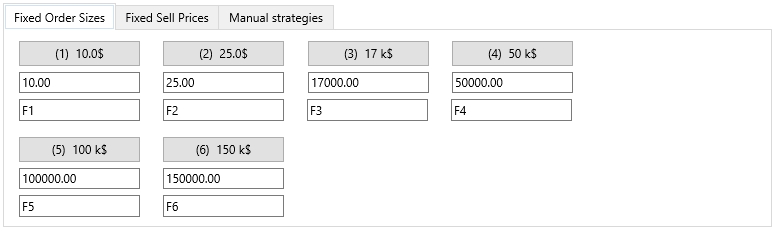
On the Fixed Order Sizes tab, you can configure settings for each of the fixed Buy buttons: the order size (in quote currency) and the hotkey combination to select the desired fixed Buy button.
Fixed Sell Prices Tab
On the Fixed Sell Prices tab, you can configure settings for each of the fixed Sell buttons: the Sell Price (Take Profit level) and the hotkey combination to select the desired fixed Sell button.
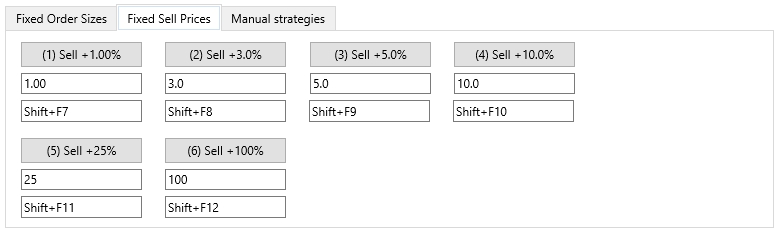
You can also change the size of Buy orders or the Sell Price level by double-clicking the corresponding fixed button in the interface.
By default, hotkeys for selecting fixed buttons are already assigned. You can use the suggested values or set your own.
Manual strategies Tab
On the Manual strategies tab, you can enable buttons for quickly selecting manual strategies and assign hotkeys for each of these buttons. When you check the box next to Button, additional buttons for Manual strategies will appear in the top right of the main terminal window.
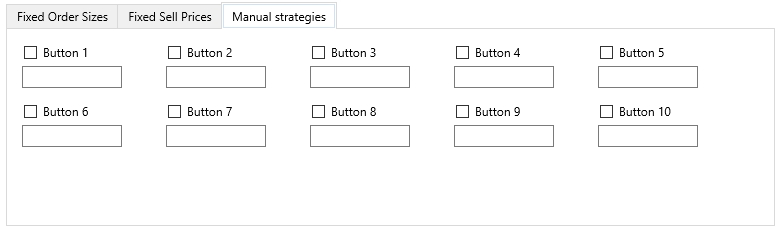
Initially, these buttons are empty, not assigned to any Manual strategy. If you right-click one of the buttons, a list of available Manual strategies will appear. Select the desired one — it will be linked to that button. This way, you can prepare several buttons with different Manual strategies and quickly switch between them during trading, selecting the most appropriate one for the current market situation.