Main Terminal Window with Advanced Settings
"Funnel" Button (Filters on charts)
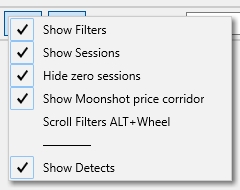
The “Funnel" buttonenables or disables the display of filters on charts. Right-clicking this button opens an additional settings menu:
Show Filters
If this checkbox is enabled, the chart will display information about which filters a strategy fails to pass for the selected coin. The strategy name and the specific parameter that failed the filter will be shown in the top-left corner of the coin’s chart.
If the coin chart is not in full-screen mode, EMA filter conditions will be shown as a general message: failed EMA filter, without detailed information. This is done to optimize CPU load during filter calculation. EMA condition lines are only visible when the Funnel button is active and the coin chart is opened in full-screen mode.
Show Sessions
If this checkbox is enabled, a line displaying information about sessions configured in the strategies under the Session tab will be shown. Only sessions with IgnoreSession = NO in their settings will be shown.
Hide zero sessions
When this checkbox is enabled, rows with zero data for sessions (set in the Session tab of each strategy) will be hidden.
Show MoonShot price corridor
When this checkbox is enabled, green price corridor areas will be displayed on the chart for Buy orders placed by the MoonShot strategy. As the price changes, the corridor shifts accordingly. If a Buy order moves outside the corridor boundaries, the strategy will try to return it to the center of the corridor. This is how the MoonShot strategy’s order-tracking algorithm works.
To disable corridor display on the chart, simply uncheck Show MoonShot price corridor. However, this option is typically left enabled to help visually understand how the MoonShot strategy operates.
Scroll Filters ALT+Wheel
When enabled, this option activates scrollable strategy filter lines on the chart. To use it, hover your cursor over the top-left corner of the chart, hold Alt, and scroll the mouse wheel. This allows you to scroll through the filter lines of various strategies.
This feature is useful when many strategies are running in the terminal but are filtered out and their rows don’t fit within the visible area of the screen.
💡Note: аll of the above settings only work when the “Funnel” button is active.