“Settings → AutoBuy” Tab
“Detect coins in Clipboard” Settings Zone
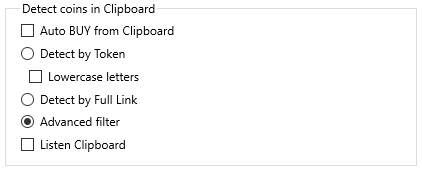
Auto BUY from Clipboard
If the Auto BUY from Clipboard checkbox is enabled, MoonBot will automatically place an order and execute a purchase when a coin name is detected in the clipboard. If the checkbox is unchecked but Listen Clipboard remains active, MoonBot will open the coin’s chart and begin monitoring prices and orders, but will not execute a buy.
To configure auto-buy parameters, you must enable the Advanced filter option.
Detect by Token
If the Detect by Token option is selected, the search will be performed based on the coin token (coin name).
Lowercase letters
If the Lowercase letters checkbox is enabled, token search will be performed using lowercase letters.
Detect by Full Link
If the Detect by Full Link option is selected, the search will be based on a full exchange link containing the coin token. For example, for BTC on Gate, the link would look like: 🔗 https://www.gate.io/ru/trade/BTC_USDT.
If token search is enabled, MoonBot will respond to various formats of coin mentions, such as: BTC-USDT, BTC_USDT, $BTC, and so on.
Token-based search should be used with caution: some coins, such as START (Startcoin) and TIME (Chronobank), have been excluded from auto-detect, but other cases are possible where English words could be mistakenly interpreted as coin names.
Advanced filter
If the Advanced filter option is enabled, you must set parameters in the Signal detection rules section to configure signal filtering rules.
Listen Clipboard
If the Listen Clipboard checkbox is enabled, MoonBot will block other applications from using the clipboard. If the checkbox is disabled, the terminal will not capture the clipboard, allowing other programs to access and use text without restriction.