“Settings → AutoBuy” Tab
“Signals detection rules” Settings Zone
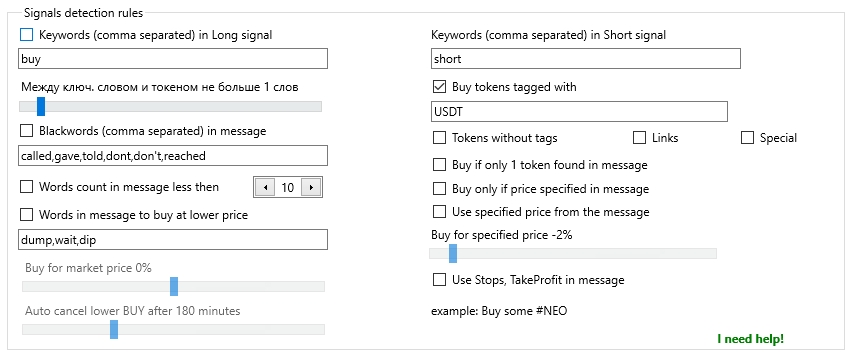
In different Telegram channels, coin names in signals may appear in various formats. Some may use symbols like #, $, or ! before the coin name, others may include the word “Buy” as a keyword for a buy signal. Each signal channel is unique, so you’ll need to configure your filters manually.
Keywords (comma-separated) in Long signal
The Keywords (comma-separated) in Long signal checkbox and field are used to enter a list of keywords (comma-separated) that MoonBot will look for in a signal to place a Buy order in long. A long buy will be triggered if at least one of the words in the list is found.
Keywords (comma-separated) in Short signal (futures only)
The Keywords (comma-separated) in Short signal (futures only) field is used to enter a list of keywords (comma-separated) that MoonBot will search for in a signal to place a Buy order in short. A short buy will be triggered if at least one of the words in the list is found.
Buy if distance between token and keyword < N words
The Buy if distance between token and keyword < N words slider allows you to set the maximum number of words allowed between the detected token and the keyword. You can set this from 0 to 15 words. If the slider is moved to the far right to token to keyword Distance doesn’t matter, the terminal will respond to all signals regardless of the number of words between the keyword and token.
For example, in a Telegram signal like Buy some token #NEO, the words “some” and “token” appear between the keyword Buy and the token #NEO. If the slider is set to Buy if distance between token and keyword < 2 words, the terminal will process this signal. In other messages, such as weekly reports or general discussions, keywords and tokens are farther apart — this setting helps filter out such non-signal messages.
Buy tokens tagged with
If the Buy tokens tagged with checkbox is enabled and the field below contains a list of tags (for example: #, $, /USDT, USDT), the terminal will only consider tokens in the signal that are accompanied by one of these tags. Signals without a tag next to the token will be ignored.
For instance, if the tags field contains “#, $”, then messages like Buy #BTC or Buy $ BTC will be treated as valid signals, while a message like BTC buy coins will be ignored, since the token isn’t tagged.
Tokens without tags
If the Tokens without tags checkbox is enabled, the terminal will be allowed to buy tokens mentioned in a signal even if they are not accompanied by a tag.
Links
If the Links checkbox is enabled, the terminal will be allowed to buy tokens if the signal includes links to them.
Special
If the Special checkbox is enabled, the terminal will accept tokens formatted in unusual ways, such as C O I N or (C)(O)(I)(N).
Blackwords (comma separated) in message
If the Blackwords (comma separated) in message checkbox is enabled, and the field below contains a blacklist of words (comma-separated), the terminal will skip signals that contain any of these words. These are typically words used in follow-up messages or reports, such as “we called #ETH”, “we gave #TRX signal last week”, “BTC reached 99k”, and so on.
Words count in message less then
If the Words count in message less then checkbox is enabled and a value is set (2 to 50 words), including links, numbers, dates, and prices, this setting can help filter out long messages or discussions and only process short, concise trading signals.
Words in message to buy at lower price
Sometimes Telegram channels don’t provide a specific buy price, but suggest buying below the current price. In such cases, you can enable the Words in message to buy at lower price checkbox and enter a comma-separated list of indicative phrases, such as: wait dip, for dip, when dump, when dumped.
The Buy for market price ±X% slider (range: -20% to +20%) lets you specify how far below the current price the buy order should be placed.
The Auto cancel lower BUY after N minutes slider (range: 1 to 599 minutes, or NEVER at the far right) allows you to define how long the order remains active before being cancelled.
Buy only if 1 token found in message
If the Buy only if 1 token found in message checkbox is enabled, the terminal will buy only when exactly one token is found in the signal. This applies to most signals, although there may be exceptions.
If the checkbox is disabled, the terminal will select the most frequently mentioned token in the message. For example, in the message BUY #NEO, #NEO will go to the moon like #ETH, the token NEO will be selected for purchase.
Buy only if price specified in message
If the Buy only if price specified in message checkbox is enabled, the terminal will search for a buy price in the signal. If no price is found, no buy will occur. If multiple prices are found, the terminal will choose the highest price in the message that is still lower than the current market ASK price of the token, but by no more than 15%.
Example signal:
MID TERM #NAV
Buy Zone: 10500
Target 1: 10900
Target 2: 11500
Target 3: 12400
Target 4: 12960
Stop-loss: 9500.
If the current NAV token price at the time of the signal is 10505, the terminal will accept 10500 as the buy price. If the price were 10499, it would instead use 9500, as 10500 would be considered too high (above current market price).
Use specified price from the message
If the Use specified price from the message checkbox is enabled, the terminal will use the price from the signal message. If the checkbox is disabled or the price is missing, it will default to general buy price settings (from the main window), such as [Current ASK + X%] in Mode: Manual, or [ASK from 30 seconds ago + X%] in Mode: Signals.
Buy for specified price ±N%
The Buy for specified price ±N% slider (range: -10% to +100%) allows you to increase or decrease the buy price stated in the message by the specified percentage.
Use Stops, TakeProfit in message
If the Use Stops, TakeProfit in message checkbox is enabled, the terminal will use the lowest value from the message as the stop-loss.
⚠ Important! All other parameters (like sell price, trailing, stop-loss — if not specified in the signal) will be taken from the main MoonBot settings.
You can also create special Telegram strategies to work with signals for more precise auto-trading control. Descriptions of Telegram strategies are available in the section “Strategies — General parameters for all strategies” of this manual.
To ensure the terminal trades using Telegram strategies and not the main settings, uncheck the Auto BUY from Telegram option and enable the Advanced filter to select buy keywords.
It is also recommended to manage risk by adjusting parameters in the main settings or on the Filters tab of each strategy, since Telegram channels may sometimes issue buy signals after a pump has already started, when the coin is at a peak and may begin to fall.