Main Terminal Window with Advanced Settings
“Show Spot trades\OrderBook” Button
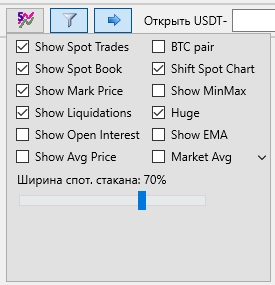
The Show Spot trades\OrderBooks button opens a window with the following additional options:
-
Show Spot Trades – displays spot trades (they appear in a lighter color compared to the current pair). If sharp movements or price growth are observed on the spot market, this may indicate a potential arbitrage situation, where terminals will attempt to align prices with the futures market. This information can assist in making trade direction decisions
-
Show Spot Book – displays the spot order book. This is a useful option that shows large spot market orders which can potentially stop price growth or decline
-
Show Mark Price – displays the line representing the average price of the coin across all exchanges
-
Show Liquidations – displays crosses indicating trader liquidations (by default: yellow for short liquidations, blue for long liquidations). You can change these colors in Settings → User Interface, under the Colors Setup section, using the LiqOrdersLong and LiqOrdersShort parameters
-
Show Open Interest – displays the open interest line (available only for the USDT-BTC pair)
-
Show Avg Price – displays the average price line from which stop loss is calculated
-
BTC pair – enables display of spot trades for BTC pairs. If unchecked, the data shown corresponds to the USDT pair. After enabling this option, you need to close and reopen the chart for it to take effect
-
Shift Spot Chart – aligns spot and futures charts and order books
-
Show MinMax – displays minimum and maximum prices on hourly, minute, and second intervals
-
Huge – enlarges the size of trade crosses. Additionally, you can adjust their thickness in Settings →User Interface using the Pixel Size slider
-
Show EMA – displays EMA on hourly, minute, and second intervals
-
Market Avg – shows moving averages (Mavg) on hourly, minute, and second intervals
-
Spot Book Width XX% – a slider to control the width of the displayed spot order book.
Some of these parameters do not appear in the spot terminal, as they apply only to futures settings.
You can enable or disable the checkboxes for the parameters you need and configure the chart and order book display according to your preferences.