Orders Window and Log Window
Log Window
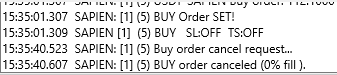
The Log window displays all system activity from the MoonBot terminal.
Every terminal action is timestamped and logged: strategy detections with parameters, order placement, movement, merging, coin purchases, balance usage, stop-loss and trailing triggers, errors, and service messages.
You can adjust the log detail level in Settings → Advanced → System using the Log Level (0 – less, 5 – more): slider.
Log retention time can be configured under Settings → Advanced → System using the Delete old logs since N days slider. If set to 0, chart data will not be written to the report. If you move the slider to the far-right position Delete old logs: NEVER, logs will not be deleted at all.
The log is very detailed — each line starts with a timestamp, making it easy to reconstruct events and understand what happened and why.
Users often contact support with questions like: "Why did the terminal sell the coin?" "Why didn't the stop-loss trigger?" "Why aren't orders being placed?"
In such cases, support may request the log to quickly identify the issue. However, if you learn to read the log yourself, you’ll be able to resolve many issues independently and faster.
For quick access to recent actions, you can open a small log window on the main chart, but for detailed analysis of past activity, open the relevant log file.
Log files are saved daily and stored in the logs folder with the format: LOG_YYYY-MM-DD.log, for example: LOG_2025-04-18.log
Open the log for the desired date in Notepad, find the relevant time range, and analyze the entries line by line.
For example, you’ll be able to know:
-
Which strategy triggered
-
When the order was placed
-
Whether the order was real or emulator
-
When and at what price the order was filled or canceled
-
Order volume
-
Whether Stop Loss and Trailing Stop were enabled
-
When the terminal was started or stopped
-
Whether API permissions were checked
-
And much more.
You can also learn more about reading MoonBot logs in a video seminar from MoonAcademy: 🔗https://youtu.be/rF6x61f1Ks4?t=1055.