“Settings → Main” Tab
"Good Pump” conditions" Section
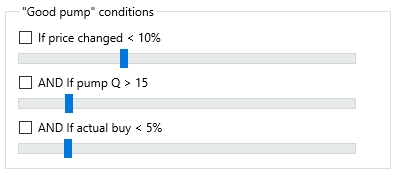
This group of settings allows the use of a second, higher Sell price, which is set on the terminal's main screen. For the second price to be applied, all conditions with checkboxes in this section must be met.
If price changed < X%
The If price changed < X% checkbox and its slider (adjustable from 1% to 30%) check the coin's price deviation over the last hour. A large deviation may indicate pre-purchase by pump group admins before the pump announcement or a repost of a pump from another Telegram channel where the pump started earlier.
AND If pump Q > N
The AND If pump Q > N checkbox and slider (adjustable from 1 to 100) set the threshold for the pump quality value, which Moonbot calculates automatically. If a coin's pump quality is above the defined threshold, the terminal will use the higher Sell price.
AND If actual buy < X%
The AND If buy price < X% checkbox and slider (adjustable from 1% to 30%) verify that the actual Buy price does not differ from the pre-pump price by more than X%. This situation may occur if there were sufficient lower-priced orders in the Order Book ASK when the purchase was made. Typically, this happens with coins well-suited for pumps, where pump group admins did not accumulate too much beforehand.
In practice, it is recommended to uncheck all boxes in this section, as these conditions were more relevant in earlier versions of the program. Now, strategy filters offer more flexible configuration options. Leaving these checkboxes enabled may cause the terminal to refuse to place orders if the conditions are not met.