Main Terminal Window with Advanced Settings
Main Terminal Window with Advanced Settings
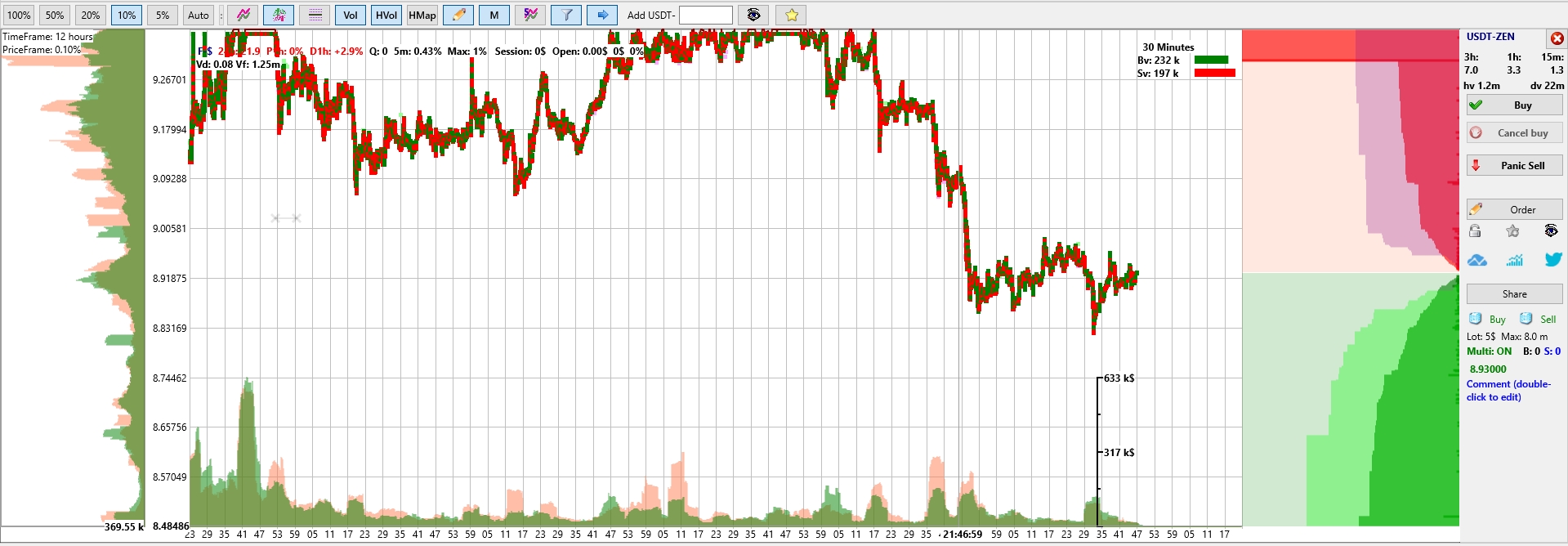
The central area displays the coin chart along with service information, including deltas and volumes for the selected coin. On the left side, you can enable horizontal volume display, and at the bottom — vertical volumes. Volume data helps better understand trader activity, predict potential price movements, and highlight consolidation zones — important levels the price may gravitate toward. The ability to enable horizontal and vertical volumes is available only in the PRO version of the terminal.
On the left, there is a price scale, and at the bottom — a time scale, which is synchronized with all event entries in the log. On the right side, you’ll see the Order Book, showing red (sellers) and green (buyers) orders. The Order Book can be configured to display individual limit orders from other traders as thin horizontal lines — the longer the line, the larger the order. The visibility and clustering of such orders help navigate the market more effectively: for example, buying slightly above large green volumes and selling just below large red volumes to increase the number of trades.
Further to the right is the right panel with service information, the trading pair name, and control buttons. This right control panel can be automatically hidden to maximize space for the chart.